摘要:本文介绍如何在 Windows 下使用 TensorRT 10.16 以 C++ 部署 YOLO26 目标检测模型。内容涵盖环境准备(VS2022、CMake、CUDA 12.9、OpenCV 4.8.1、TensorRT)、工程编译与验证、模型导出(FP32/FP16/INT8)与 engine 序列化,以及命令行推理和部署自训练模型的完整流程。实测 C++ 实现推理单帧约 1.4 ms,相比 ultralytics Python 推理提升约 14 倍。
Windows 下 YOLO26 的 TensorRT C++ 部署
#
前言
这是一个系列教程,本片主要讲:YOLO26的目标检测,其他分类、分割、特征点、深度图都有。
仓库:TensorRT-Alpha
未来还会部署的模型包含SAM系列视觉LLM
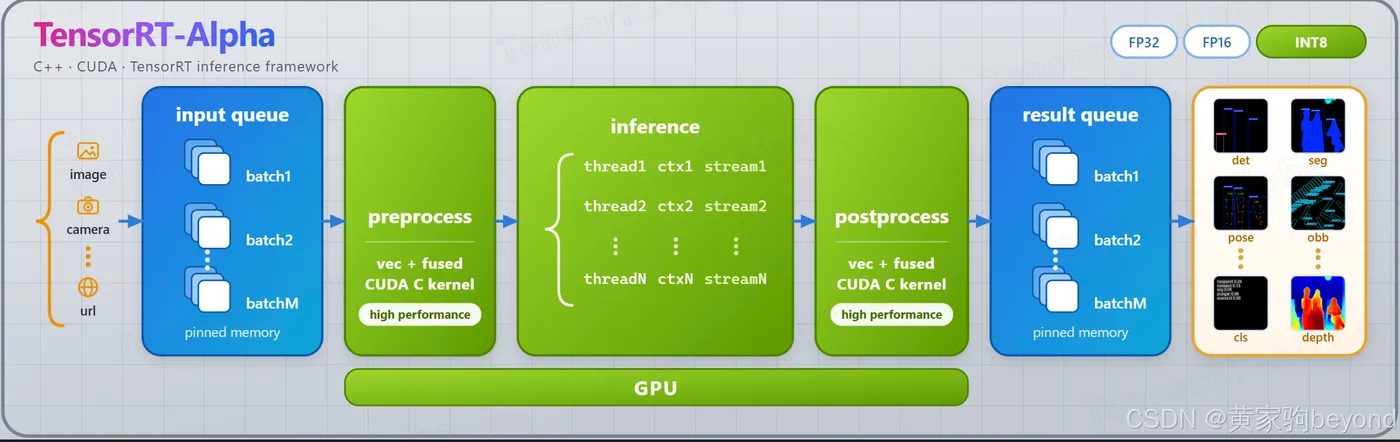
仓库支持的模型矩阵
✅ 已跑通并实测 ·
🚧 规划中 ·
— 未提供
| model | fp32 | fp16 | int8 | 序列化onnx |
|---|:---:|:---:|:---:|:---:|
| YOLO26 | | | | |
| yolo26-det | ✅ | ✅ | ✅ | ✅ |
| yolo26-seg | ✅ | ✅ | ✅ | ✅ |
| yolo26-obb | ✅ | ✅ | ✅ | ✅ |
| yolo26-cls | ✅ | ✅ | ✅ | ✅ |
| yolo26-depth | ✅ | ✅ | ✅ | ✅ |
| yolo26-sem | ✅ | ✅ | ✅ | ✅ |
| yolo26-pose | ✅ | ✅ | ✅ | ✅ |
| yolo26-tracking | 🚧 | 🚧 | 🚧 | 🚧 |
| YOLOV11 | | | | |
| yolov11_det | ✅ | ✅ | ✅ | ✅ |
| yolov11_seg | ✅ | ✅ | ✅ | ✅ |
| yolov11_obb | ✅ | ✅ | ✅ | ✅ |
| yolov11_cls | ✅ | ✅ | ✅ | ✅ |
| yolov11_pose | ✅ | ✅ | ✅ | ✅ |
| YOLOV9 | | | | |
| yolov9_det | ✅ | — | — | ✅ |
| yolov9_seg | ✅ | — | — | ✅ |
| YOLOV10 | | | | |
| yolov10_det | ✅ | — | — | ✅ |
其他(沿用 legacy 资产)
| model | fp32 | fp16 | int8 | 序列化onnx |
|---|:---:|:---:|:---:|:---:|
| yolov3 | ✅ | — | — | ✅ |
| yolov4 | ✅ | — | — | ✅ |
| yolov5 | ✅ | — | — | ✅ |
| yolov6 | ✅ | — | — | ✅ |
| yolov7 | ✅ | — | — | ✅ |
| yolov8_det | ✅ | ✅ | ✅ | ✅ |
| yolov8_seg | ✅ | ✅ | ✅ | ✅ |
| yolov8_cls | ✅ | ✅ | ✅ | ✅ |
| yolov8_pose | ✅ | ✅ | ✅ | ✅ |
| yolov8_obb | ✅ | ✅ | ✅ | ✅ |
| yolox | ✅ | — | — | ✅ |
| yolor | ✅ | — | — | ✅ |
| yolo_nas | ✅ | — | — | ✅ |
| efficientdet | ✅ | — | — | ✅ |
| yunet | ✅ | — | — | ✅ |
| u2net | ✅ | — | — | ✅ |
一、先看结果
1.1 速度
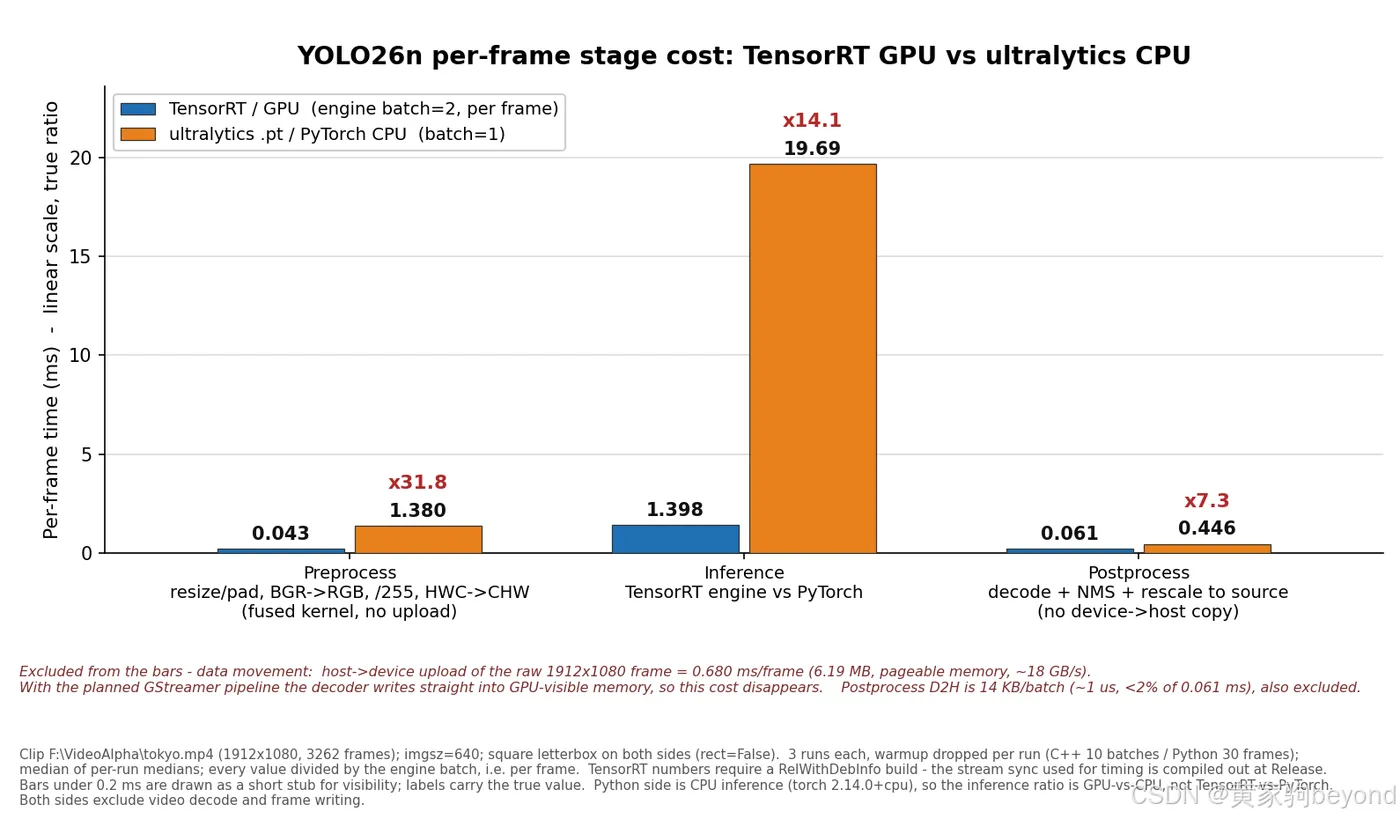
三组柱子,每组左边蓝色是这套 C++ 实现,右边橙色是 ultralytics 官方 Python 推理。测试片段是 1912×1080 的视频,imgsz 640,C++ 这边 batch=2 折算到每帧,Python 那边 batch=1:
| 阶段 | Python | 本仓库 | 倍数 |
|---|---|---|---|
| 预处理(5 步合一 kernel) | 1.380 ms | 0.043 ms | 31.8× |
| 推理 | 19.685 ms | 1.398 ms | 14.1× |
| 后处理 | 0.446 ms | 0.061 ms | 7.3× |
| 合计(不含搬运) | 21.512 ms | 1.502 ms | 14.3× |
| 合计(含 H2D) | 21.512 ms | 2.248 ms | 9.6× |
Python 那边是 CPU 版 torch,不是显卡没跑起来,是我故意用 CPU 版对拍的。拿 GPU 版 torch 比,后处理那栏它反而会好看一些(NMS 在 GPU 上做),预处理和推理还是差一个量级。
图上的柱子是纯计算,不含数据搬运。C++ 这边上传的是一整张 1912×1080 的原图,一帧 6.19 MB,走的还是 pageable 内存,光这一步就 0.68 ms,比预处理 kernel 本身贵十几倍。等后面接了 GStreamer 让解码直接落显存,这 0.68 ms 就没了,这也是下一阶段性能提升最大的一块。
还有一点得说明白:2.248 ms 折下来 445 fps,是算上那 0.68 ms 搬运的上限。真跑视频的时候达不到,瓶颈在解码线程,实测整条流水线大概 240 fps 上下(GPU 利用率只有三成左右,活都在 CPU 解码上)。别看到 445 就以为写进播放器能跑 445。
1.2 复现效果:本仓库 TensorRT vs ultralytics
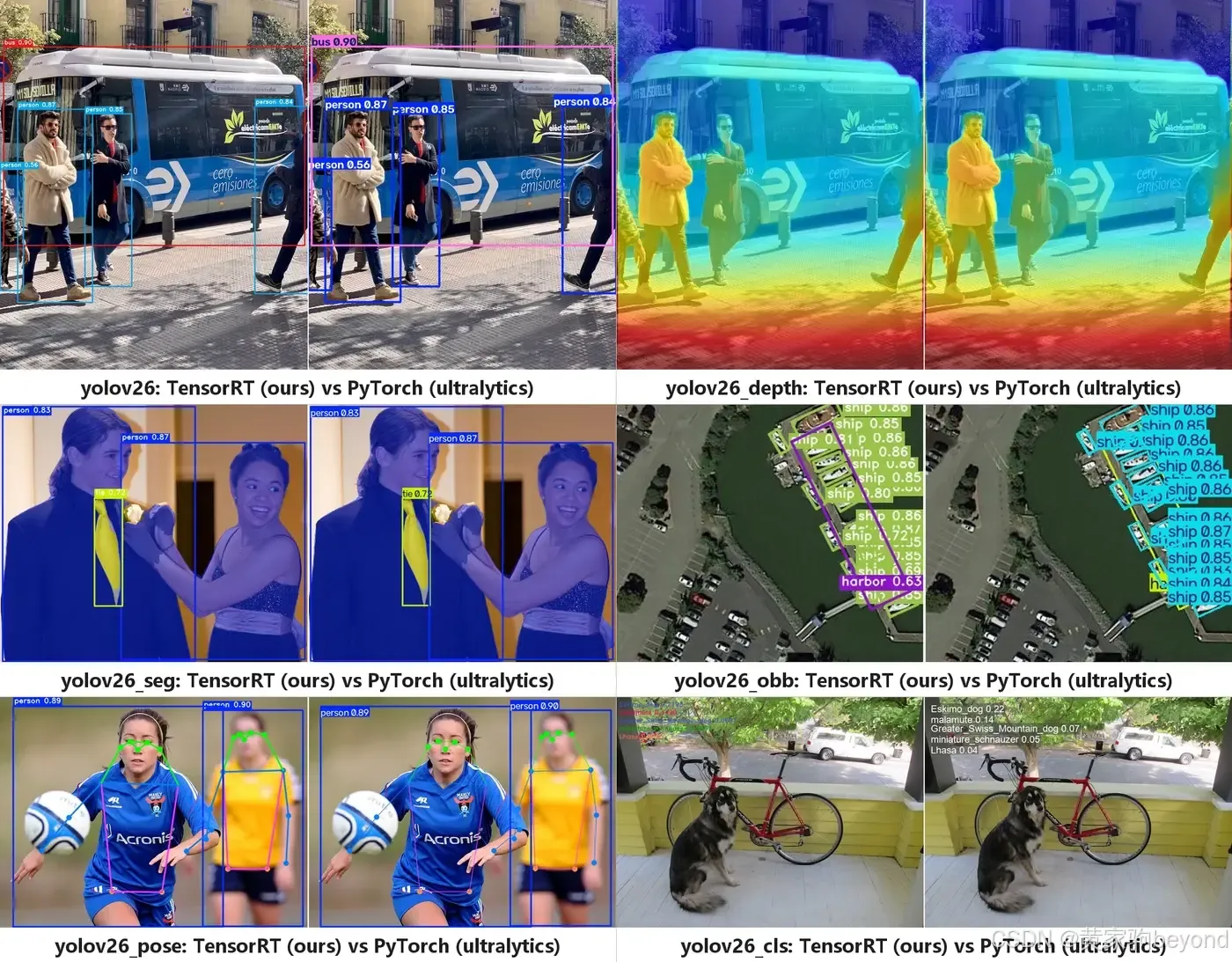
左边是这套 C++ 实现跑出来的,右边是 ultralytics 官方 PyTorch 输出,框、置信度、掩码都是对齐的。
二、Windows环境准备
2.1 版本清单
| 组件 | 版本 | 说明 |
|---|---|---|
| Visual Studio | 2022(17.x) | 工作负载勾“使用 C++ 的桌面开发” |
| CMake | ≥ 3.25 | 工程里写死了这个下限 |
| 显卡驱动 | 跟 CUDA 12.9 配套 | 太旧的话 CUDA 装不上 |
| CUDA Toolkit | 12.9 | 只装 Toolkit,不用装驱动 |
| OpenCV | 4.8.1 | 官方 exe 自解压包 |
| TensorRT | 10.16.1.11 | Windows amd64 zip 包 |
2.2 装 VS2022 和 CMake
从官网下 Community 版就行,安装器默认停在“工作负载”那一页,只需要勾一个:
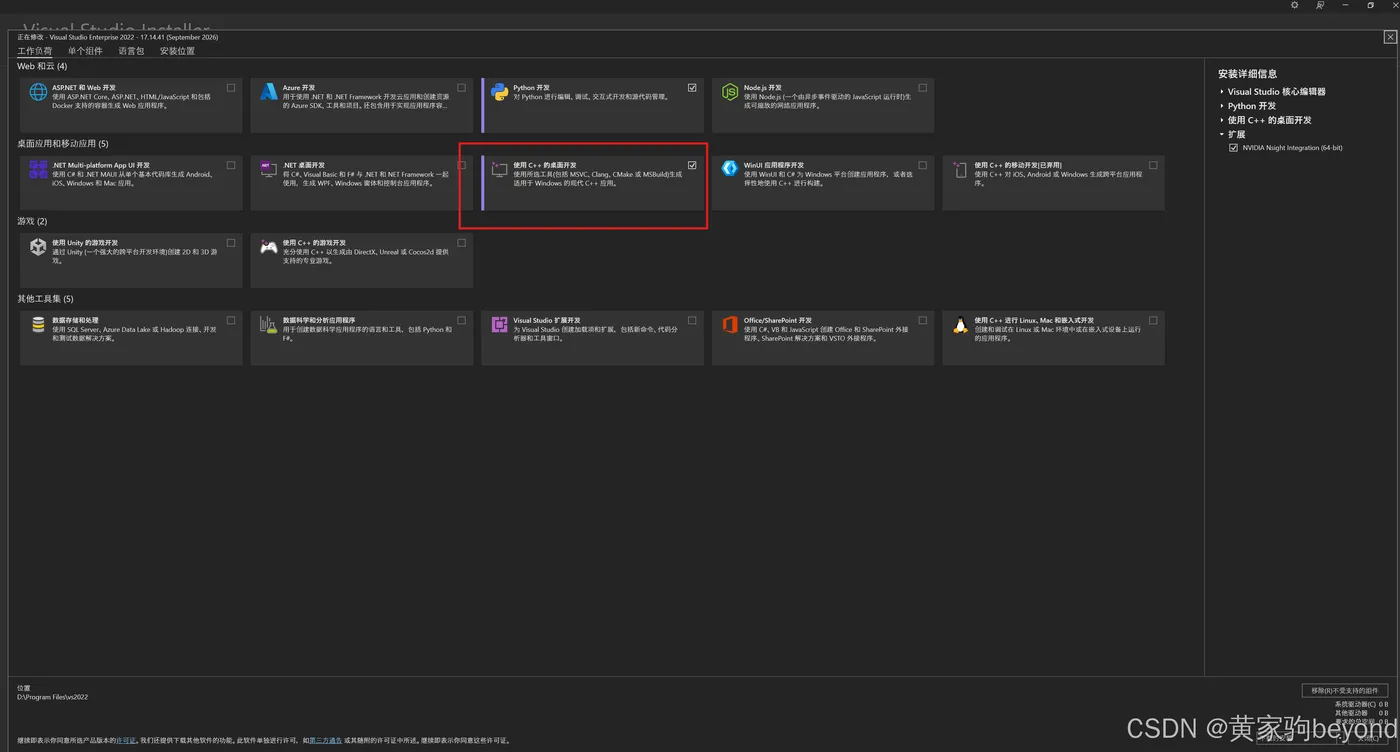
就是图上红框那个“使用 C++ 的桌面开发”。右侧默认组件里已经带了 MSVC v143 和 Windows 10/11 SDK,不用额外加。装完重启一次。CMake 直接去官网下,版本要求 3.25 以上。
2.3 装 CUDA 12.9
NVIDIA 官网的 CUDA Toolkit Archive 页面找 12.9,下载 exe (local),三个多 G,装的时候选“自定义”,只留 CUDA 那一组组件,Visual Studio Integration 一定要勾上。
装完开个新的 PowerShell:
nvidia-smi
nvcc -V
nvidia-smi 右上角会显示驱动支持的最高 CUDA 版本,nvcc -V 打出 12.9 就对了。新开的窗口才能读到 CUDA_PATH,装完不重开窗口可能会说找不到,别急着怀疑装坏了。
2.4 解压 OpenCV 4.8.1
下载 opencv-4.8.1-windows.exe,双击,解压路径填:
D:\ThirdParty
不要勾 “Add to the system PATH”。这一步只是解压,不写注册表、不改环境变量。
解压完的目录长这样:
D:\ThirdParty\opencv\build\x64\vc16\
    ├── bin\      opencv_world481.dll 等
    └── lib\      opencv_world481.lib + OpenCVConfig.cmake
后面配置时 -DOpenCV_DIR 要指到 D:\ThirdParty\opencv\build\x64\vc16\lib 这一层,也就是 OpenCVConfig.cmake 所在的那层。指到 opencv 根目录会报 Could not find OpenCV,这是最常见的错。
vc16 是 VS2019/2022 的 ABI,MSVC 从 19.2 到 19.4 都是这个目录,VS2022 直接用没问题。
2.5 解压 TensorRT 10.16.1.11
下载 TensorRT-10.16.1.11.Windows.amd64.cuda-12.9.zip,解压到 D:\ThirdParty,得到:
D:\ThirdParty\TensorRT-10.16.1.11\
    ├── bin\      nvinfer_10.dll、trtexec.exe
    ├── include\  NvInfer.h
    └── lib\      nvinfer_10.lib、nvonnxparser_10.lib
同样不跑安装程序、不加 PATH,这个版本的 TensorRT 就是绿色包。OpenCV 和 TensorRT 都别手动往系统环境变量里塞,后面 DeployRuntime.cmake 会把 dll 拷到 exe 旁边。
三、编译
3.1 拉代码
cd D:\VS2022_Project
git clone -b v2-dev https://github.com/FeiYull/TensorRT-Alpha.git
cd TensorRT-Alpha
路径按你自己习惯改,后面所有命令里的 D:\VS2022_Project\TensorRT-Alpha 都跟着换。
3.2 配置:cmake一把,建立vs工程
下面指令,换成你的实际路径就行!
cmake -S D:\VS2022_Project\TensorRT-Alpha `
      -B D:\VS2022_Project\TensorRT-Alpha\build `
      -G "Visual Studio 17 2022" -A x64 `
      -DOpenCV_DIR=D:/ThirdParty/opencv/build/x64/vc16/lib `
      -DTensorRT_ROOT=D:/ThirdParty/TensorRT-10.16.1.11
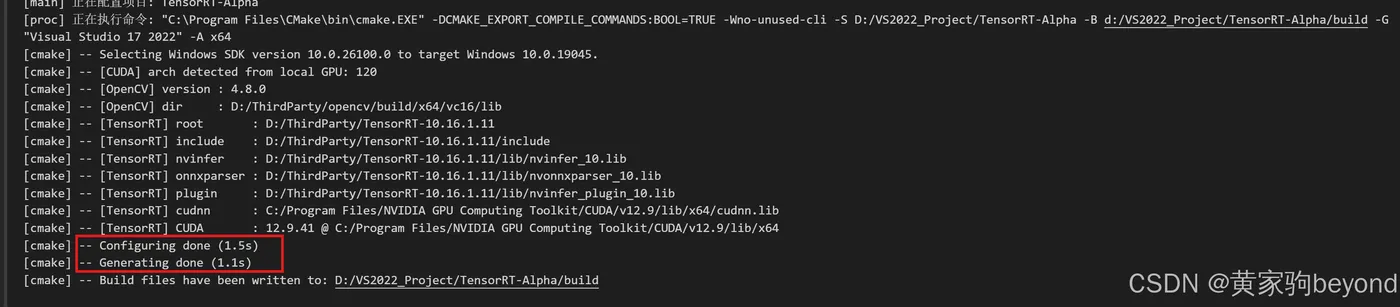
配置跑完,最后几行应该有这些:
-- [CUDA] arch detected from local GPU: 120
-- [OpenCV] version : 4.8.1
-- [OpenCV] dir     : D:/ThirdParty/opencv/build/x64/vc16/lib
-- [TensorRT] root       : D:/ThirdParty/TensorRT-10.16.1.11
-- [TensorRT] nvinfer    : .../nvinfer_10.lib
-- [TensorRT] onnxparser : .../nvonnxparser_10.lib
-- [TensorRT] CUDA       : 12.9 @ ...
如下图:
3.3 编译
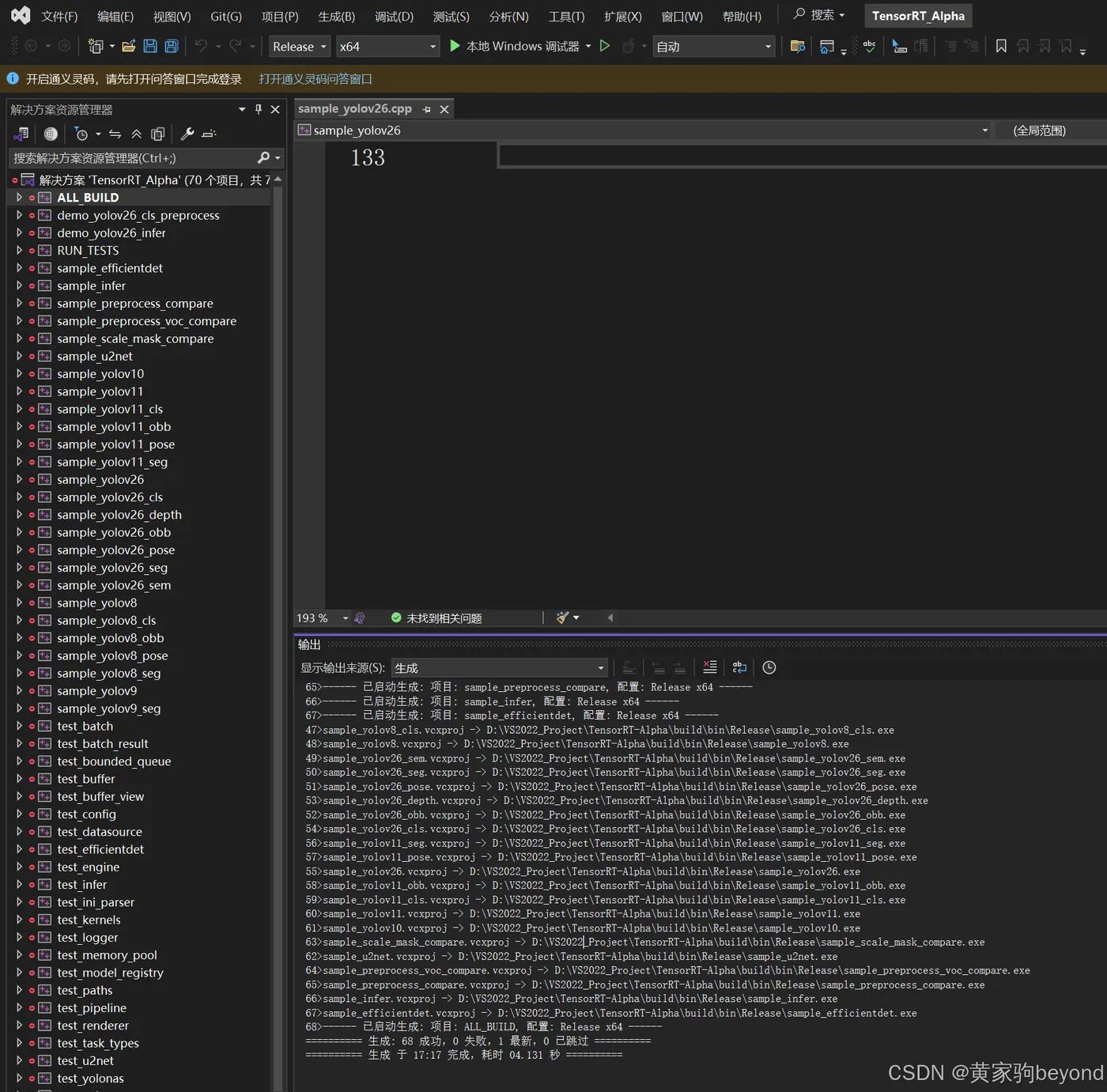
可以用vs2022直接打开编译:
也可以使用指令直接编译
cmake --build build --config Release -j 24
编完的产物:
build\bin\Release\trt_alpha.exe
旁边会多出一堆 dll。这是 cmake/DeployRuntime.cmake 干的活:编译完自动把 OpenCV、TensorRT、CUDA 运行时的 dll 拷到 exe 旁边。因为 Windows 加载器找 dll 的第一优先级就是 exe 所在目录,所以不用给 PATH 加任何东西。
目录里长这样:
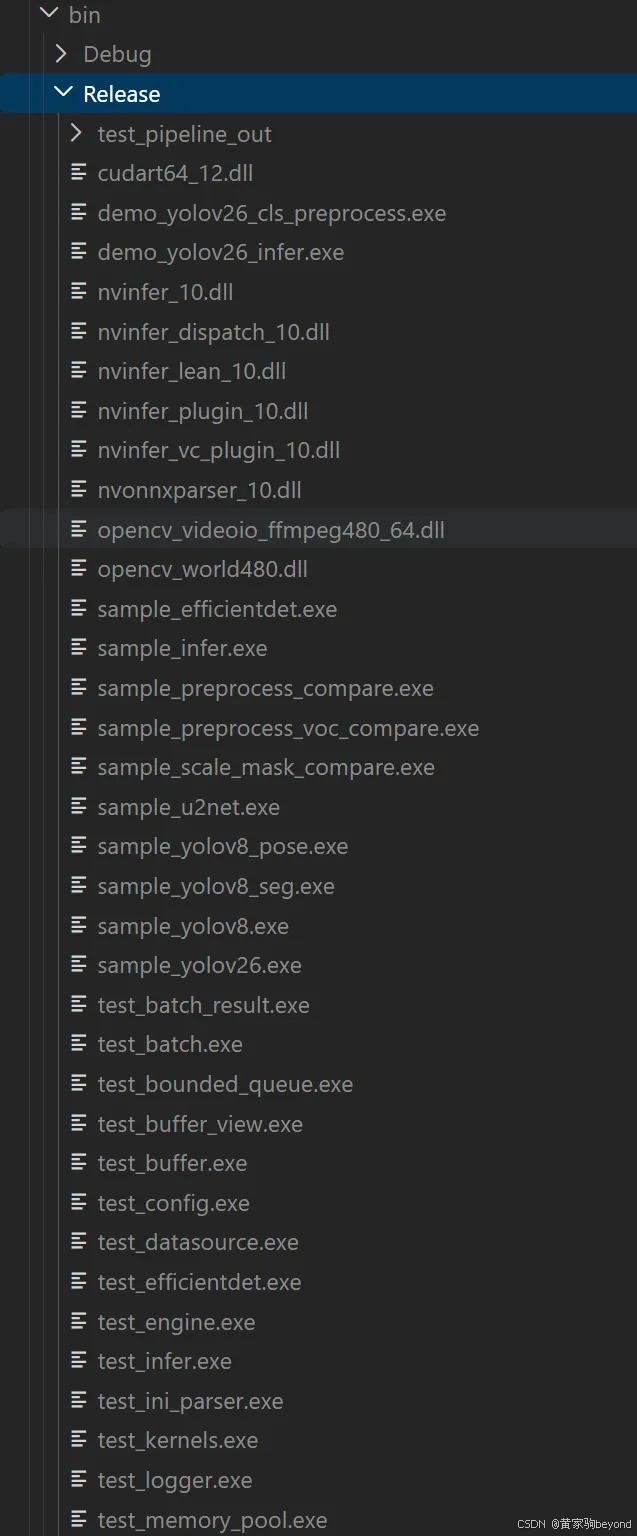
trt_alpha.exe 旁边是 opencv_world、nvinfer_10、nvinfer_plugin_10、nvonnxparser_10 这些 dll,再往下是 samples 和 test 编出来的一堆 exe,跑单测用的。
3.4 验证
.\build\bin\Release\trt_alpha.exe list
打出 21 个模型名,说明注册表、静态库、链接全通了:
Registered models (21):
  efficientdet
  u2net
  yolo_nas
  yolor
  yolov3
  yolov4
  yolov5
  yolov6
  yolov7
  yolov8
  yolov8_pose
  yolov8_seg
  yolov26
  yolov26_cls
  yolov26_depth
  yolov26_obb
  yolov26_pose
  yolov26_seg
  yolov26_sem
  yolox
  yunet
list 打出来的名字就是 --net 能接受的值,同时也决定默认读 configs/<名字>.ini。比如 --net yolov26_seg 读的就是 configs/yolov26_seg.ini。
3.5 编译期常见错误
| 报错 | 原因 | 处理 |
|---|---|---|
Could not find OpenCV |
OpenCV_DIR 指错层 |
指到 ...\build\x64\vc16\lib |
Could not find TensorRT |
TensorRT_ROOT 里没有 include/NvInfer.h |
检查是否多套了一层目录 |
C1083: 无法打开 cuda_runtime_api.h |
没装 CUDA,或装完没重开窗口 | echo $env:CUDA_PATH 是否有值 |
MSB6001: 字典中已添加相同键 |
环境里同时有 HTTPS_PROXY 和 https_proxy 两个键 |
跑 CMake 之前先把小写那份清掉,Git Bash 里 unset https_proxy,PowerShell 里 Remove-Item Env:https_proxy;这机器上确实会撞 |
未找到 nvinfer_10.lib |
TensorRT 还是 8.x 的包 | TRT 10 的库名带 _10 后缀,装错版本了 |
四、准备模型
4.0 直接下载模型
onnx文件可以自己导出,也可以直接下载我提供的,在页面链接最下:
https://github.com/FeiYull/TensorRT-Alpha/releases/download/v1.0.0/yolo26n.onnx
或者你也可以按照如下步骤自己导出模型。
4.1 手动导出onnx
Python 的 yolo 环境,一句指令的事情:
pip install ultralytics

# FP32,精度对齐用这个
yolo export model=yolo26n.pt format=onnx imgsz=640 batch=2 opset=17 simplify=True
导出文件默认落在权重旁边,叫 yolo26n.onnx。
4.2 量化导出(FP16 / INT8)
注意:tensorrt10.x版本后续会删除量化工具,官方建议是:用户自己在pytorch端自行量化,然后导出量化版本的onnx,最后直接用tensorrt进行序列化就行(这条指令后续会说)。但是,这里我还是会说,最简单的,也是最不靠谱的PTQ量化方式如下,utralyrics更加最简QAT量化方法,自己可以搜下(QAT现在是业界主流):
yolo export model=yolo26n.pt format=onnx imgsz=640 batch=2 opset=17 simplify=True quantize=16
文件名还是 yolo26n.onnx,跟前一份重名,自己改成 yolo26n_fp16.onnx。
INT8 要校准集,导出的是 Q/DQ 图,文件名自动带 _int8 后缀:
yolo export model=yolo26n.pt format=onnx imgsz=640 batch=2 opset=17 simplify=True quantize=8 data=coco8.yaml
data 给一份 yolo 格式的 yaml,校准用的就是里面的图。coco8 只有 8 张,够跑通流程,真要上生产还是拿自己的数据集校准。
4.3 转成 engine
trtexec.exe 在 TensorRT 的 bin 目录里。先切过去,再执行:
cd D:\ThirdParty\TensorRT-10.16.1.11\bin

# FP32,精度对齐用这个
.\trtexec.exe --onnx=D:\models\yolo26n.onnx --saveEngine=D:\VS2022_Project\TensorRT-Alpha\engines\yolov26n.trt --noTF32
--noTF32 是给 FP32 引擎用的,把 TF32 关掉,这样 fp32 结果不会漂。只有精度基准才需要它。
FP16 更快,引擎也小一圈。量化本身在 Python 端就做完了,这边只是换个 flag:
.\trtexec.exe --onnx=D:\models\yolo26n.onnx --saveEngine=D:\VS2022_Project\TensorRT-Alpha\engines\yolov26n_fp16.trt --fp16
4.4 引擎文件放哪
configs/yolov26*.ini 里已经写好了各自的引擎路径,文件名对得上就不用改:
configs/yolov26.ini -> engines/yolov26n.trt
引擎想放别处也行,两种办法:改 ini 里的 engine =,或者运行时 --engine 指过去。--engine 优先级最高,会盖掉 ini 和 --config。
五、跑起来
5.1 目录准备
TensorRT-Alpha\
├── build\bin\Release\trt_alpha.exe
├── configs\        不用动
├── data\           测试图,bus.jpg / zidane.jpg / road0.png 这些仓库里自带
└── engines\        把 .trt 放进来
5.2 检测
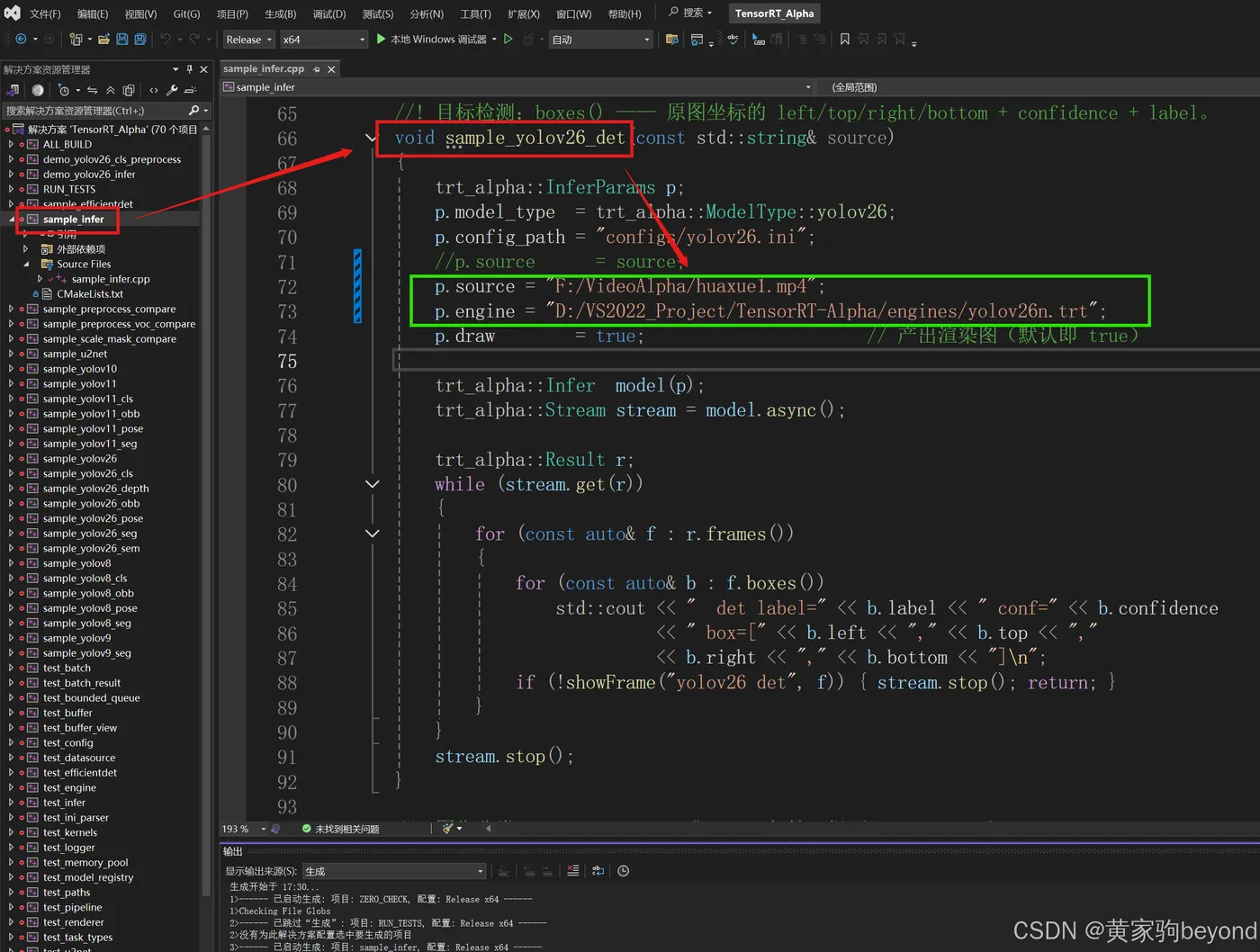
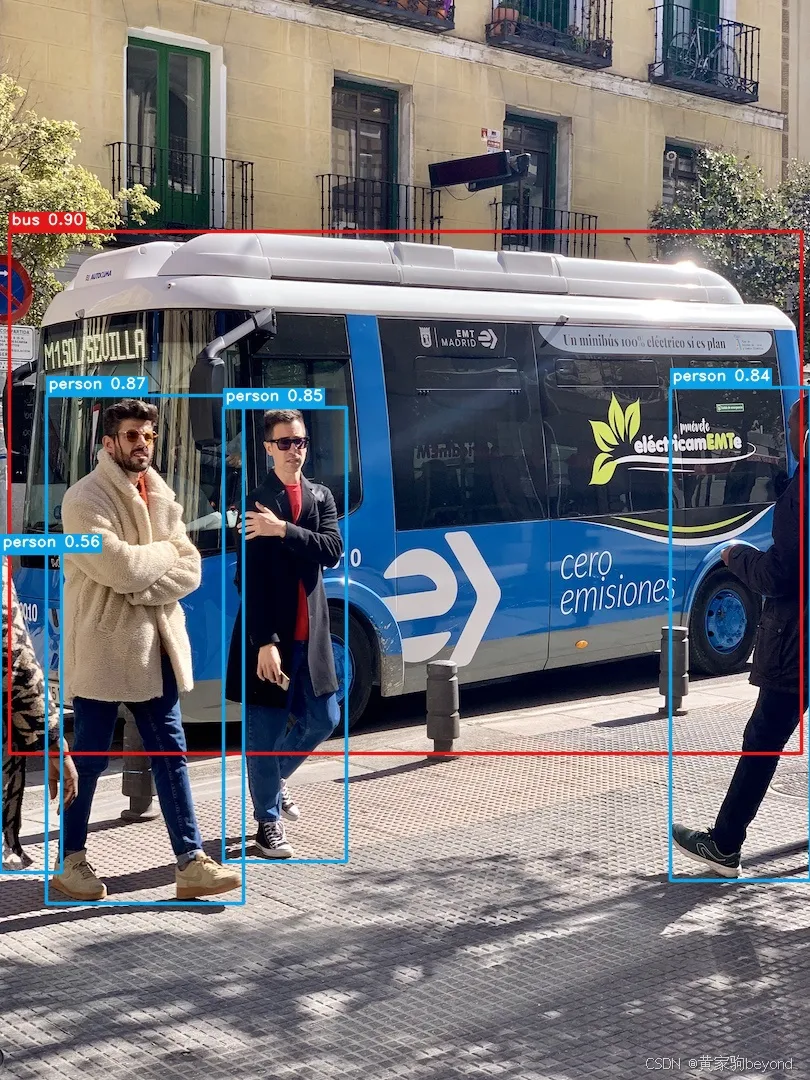
可以直接使用命令行,也可以使用vs2022打开工程,设置如图的sample_infer工程为启动。如图绿色框,然后设置trt文件路径,在设置一个视频,或者图片,或者路径(路径里面是多张图片),还可以是url、camera id等等
也可以直接在命令行执行推理
.\build\bin\Release\trt_alpha.exe run --net yolov26 --source data/bus.jpg --engine d:/xxxx.trt --save
--show 弹窗显示,窗口标题是 trt_alpha:<模型名>,同时开几个模型也不会互相覆盖。--save 落盘,不带参数时存到 save\<模型名>\,带路径就原样用那个路径。
5.3 参数source
只有一个 --source 参数,类型是程序自己判的:
| 写法 | 当成 |
|---|---|
data/bus.jpg |
单张图 |
data/ |
图片目录,逐张推理 |
data/people.mp4 |
本地视频 |
rtsp://192.168.1.10:554/stream1 |
网络流,rtsp / rtmp / http(s) / udp 都认 |
0 |
0 号摄像头 |
其他参数,这里不多说,自己探索。
六、部署自己训练的模型
训练部署一个模型:假设我们使用utralyrics训练一个目标检测模型(使用别的框架训练也是同理),有四个类别,
6.1、训练
训练代码如下:
from ultralytics import YOLO

def main():
    model = YOLO("yolo26n.pt")
    results = model.train(data="african-wildlife.yaml", epochs=100, imgsz=640)

if __name__ == '__main__':
    main()
训练好之后,得到权重文件:my_det_task_cls_num_4.pt
6.2、导出onnx
from ultralytics import YOLO

model = YOLO(r"runs\detect\train-3\weights\my_det_task_cls_num_4.pt")
model.export(
    format="onnx",
    batch = 2, # 仓库代码支持多batch推理,这里设置batch为2
    imgsz=640,
    dynamic=False,
    simplify=True,
    opset=17,
    nms=None,      # 用默认 one-to-many 头,one-to-to精度略有下降,并且本仓库的decode+nms使用cuda c实现,足够快
)
然后导出对应的onnx,得到:my_det_task_cls_num_4.onnx
6.3、使用trtexec序列化
.\trtexec.exe --onnx=my_det_task_cls_num_4.onnx --saveEngine=my_det_task_cls_num_4.trt --noTF32
得到:my_det_task_cls_num_4.trt文件
6.4、新建ini格式配置文件
在仓库TensorRT-Alpha目录下
将上述my_det_task_cls_num_4.trt拷贝到engines文件夹下
在data/classes/目录下新建:african-wildlife.txt,用于设置我们训练时候的任务类别,我们这里是4个类别,具体类型信息如下:
注:buffalo 255 0 255分别表示:name of label, B, G, R;其中BGR适用于渲染时的颜色。
buffalo 255 0 255
elephant 255 0 0
rhino 0 255 255
zebra 0 255 0
configs文件夹下新建:my_det_task_cls_num_4.ini
具体如下:注意根据情况修改:engine、class_names_file、num_class、batch_size等变量
[model]
engine = engines/my_det_task_cls_num_4.trt
class_names_file = data/classes/african-wildlife.txt
num_class = 4

[input]
layout = nchw
batch_size = 2

[postprocess]
conf_thresh = 0.25
iou_thresh = 0.7
top_k = 300
6.5、执行
记住:任何时候,加载自己的模型,执行的时候,别忘记设定参数:--config configs/my_det_task_cls_num_4.ini,其他参数,类似engine的路径设置,都可以在ini文件中设置。
.\build\bin\Release\trt_alpha.exe run --source E:/Code/datasets/african-wildlife/images/test --net yolov26 --config configs/my_det_task_cls_num_4.ini --engine engines/my_det_task_cls_num_4.trt --save
以下是成功执行log:
(base) PS D:\VS2022_Project\TensorRT-Alpha>  .\build\bin\Release\trt_alpha.exe run --source E:/Code/datasets/african-wildlife/images/test   --net yolov26 --config configs/my_det_task_cls_num_4.ini --engine engines/my_det_task_cls_num_4.trt  --save
[2026-10-19 19:21:36.219] [INFO ] [tid=7600] [paths.cpp:208 root] Paths: root = D:\VS2022_Project\TensorRT-Alpha  (source: executable location)
[2026-10-19 19:21:36.219] [INFO ] [tid=7600] [config.cpp:174 loadModelConfig] Config: loaded configs/my_det_task_cls_num_4.ini (with configs/base.ini) (engine=engines/my_det_task_cls_num_4.trt, batch=2, layout=NCHW, extras=34 entries)
[2026-10-19 19:21:36.220] [INFO ] [tid=7600] [config.cpp:264 loadClassNamesFile] Config: class names file data/classes/african-wildlife.txt (4 classes)
[2026-10-19 19:21:36.220] [INFO ] [tid=7600] [inference_pool.cpp:50 InferencePool] [InferencePool] constructing with 1 worker(s), engine=engines/my_det_task_cls_num_4.trt, batchSize=2, maxQueueSize=4
[2026-10-19 19:21:36.220] [INFO ] [tid=7600] [inference_pool.cpp:55 InferencePool] [InferencePool] loading shared engine: engines/my_det_task_cls_num_4.trt
[2026-10-19 19:21:36.220] [INFO ] [tid=7600] [engine.cpp:381 Engine] Engine: loading D:\VS2022_Project\TensorRT-Alpha\engines\my_det_task_cls_num_4.trt
[TRT INFO ] Loaded engine size: 12 MiB
[2026-10-19 19:21:36.331] [INFO ] [tid=7600] [engine.cpp:452 discoverIo] Engine: io[0] input  'images' fp32 [2, 3, 640, 640]
[2026-10-19 19:21:36.331] [INFO ] [tid=7600] [engine.cpp:462 discoverIo] Engine: io[0] input batch static, min/opt/max = 2/2/2
[2026-10-19 19:21:36.331] [INFO ] [tid=7600] [engine.cpp:452 discoverIo] Engine: io[1] output 'output0' fp32 [2, 8, 8400]
[2026-10-19 19:21:36.332] [INFO ] [tid=7600] [engine.cpp:410 Engine] Engine: loaded (2 io tensors)
[2026-10-19 19:21:36.332] [INFO ] [tid=7600] [yolov26.cpp:72 loadConfig] yolov26: config num_class=4 extra=0 conf=0.25 iou=0.7 top_k=300
[TRT INFO ] [MS] Running engine with multi stream info
[TRT INFO ] [MS] Number of aux streams is 3
[TRT INFO ] [MS] Number of total worker streams is 4
[TRT INFO ] [MS] The main stream provided by execute/enqueue calls is the first worker stream
[TRT INFO ] [MemUsageChange] TensorRT-managed allocation in IExecutionContext creation: CPU +0, GPU +52, now: CPU 0, GPU 62 (MiB)
[2026-10-19 19:21:36.394] [INFO ] [tid=7600] [engine.cpp:372 applyInputShape] InputShape: 'images' layout=NCHW -> [2, 3, 640, 640]
[2026-10-19 19:21:36.395] [INFO ] [tid=7600] [yolov26.cpp:230 init] yolov26: initialized (batch=2, outC=8, anchors=8400, dst=640x640)
[2026-10-19 19:21:36.395] [INFO ] [tid=7600] [inference_pool.cpp:137 InferencePool] [InferencePool] worker[0] ready
[2026-10-19 19:21:36.395] [INFO ] [tid=7600] [inference_pool.cpp:147 InferencePool] [InferencePool] ready with 1 worker(s)
+===================================================================================================+
| [CONFIG] yolov26                                                configs/my_det_task_cls_num_4.ini |
| [model]                                                                                           |
|   engine            = engines/my_det_task_cls_num_4.trt                 CLI                       |
|   class_names_file  = data/classes/african-wildlife.txt                 my_det_task_cls_num_4.ini |
|   num_class         = 4                                                 my_det_task_cls_num_4.ini |
|                                                                                                   |
| [input]                                                                                           |
|   batch_size        = 2                                                 my_det_task_cls_num_4.ini |
|   layout            = nchw                                              my_det_task_cls_num_4.ini |
|                                                                                                   |
| [normalize]                                                                                       |
|   scale             = 255.0                                             base.ini                  |
|   mean              = 0.0,0.0,0.0                                       base.ini                  |
|   std               = 1.0,1.0,1.0                                       base.ini                  |
|   pad_value         = 114.0                                             base.ini                  |
|                                                                                                   |
| [postprocess]                                                                                     |
|   conf_thresh       = 0.25                                              my_det_task_cls_num_4.ini |
|   iou_thresh        = 0.7                                               my_det_task_cls_num_4.ini |
|   top_k             = 300                                               my_det_task_cls_num_4.ini |
|                                                                                                   |
| [pool]                                                                                            |
|   workers           = 1                                                 base.ini                  |
|   max_queue_size    = 4                                                 base.ini                  |
|   result_queue_size = 8                                                 base.ini                  |
|   render_threads    = 6                                                 base.ini                  |
|                                                                                                   |
| [output]                                                                                          |
|   jpeg_quality      = 95                                                base.ini                  |
|   save_dir          = save/yolov26                                      default                   |
|                                                                                                   |
| [resolved]   engine truth (shape = engine declaration; -1 = dynamic axis)                         |
|   batch             = 2                                                 (engine-confirmed)        |
|   in                = images   2 x 3 x 640 x 640   fp32 (4B)   linear                             |
|   out               = output0   2 x 8 x 8400   fp32 (4B)   linear                                 |
+===================================================================================================+
[2026-10-19 19:21:36.414] [INFO ] [tid=7600] [opencv_source.cpp:129 openImage] OpenCVSource: 'E:/Code/datasets/african-wildlife/images/test' is a directory -> images mode (single level)
[2026-10-19 19:21:36.415] [INFO ] [tid=7600] [opencv_source.cpp:165 openImages] OpenCVSource: found 227 image(s) in E:/Code/datasets/african-wildlife/images/test
[2026-10-19 19:21:36.415] [INFO ] [tid=7600] [opencv_source.cpp:96 OpenCVSource] OpenCVSource[images]: opened 'E:/Code/datasets/african-wildlife/images/test' batch=2 sourceId=0
[2026-10-19 19:21:36.422] [INFO ] [tid=7600] [pipeline.cpp:176 validateConfig] Pipeline: render_threads=6 (frame order on disk is not guaranteed)
[2026-10-19 19:21:36.422] [INFO ] [tid=7600] [pipeline.cpp:188 start] Pipeline: starting with 1 source(s) and 1 pool(s)
[2026-10-19 19:21:36.422] [INFO ] [tid=7600] [pipeline.cpp:200 start] Pipeline: launching 6 render thread(s)
[2026-10-19 19:21:36.423] [INFO ] [tid=7600] [pipeline.cpp:206 start] Pipeline: render thread(s) launched
[2026-10-19 19:21:36.423] [INFO ] [tid=7600] [pipeline.cpp:217 start] Pipeline: launching source thread 0
[2026-10-19 19:21:36.423] [INFO ] [tid=7600] [pipeline.cpp:220 start] Pipeline: all source threads launched
[2026-10-19 19:21:36.423] [INFO ] [tid=46752] [pipeline.cpp:338 renderLoop] Pipeline: render loop started, entering while
[2026-10-19 19:21:36.423] [INFO ] [tid=7600] [pipeline.cpp:225 start] Pipeline: started (1 source + 6 render = 7 threads)
[2026-10-19 19:21:36.423] [INFO ] [tid=48696] [pipeline.cpp:338 renderLoop] Pipeline: render loop started, entering while
[2026-10-19 19:21:36.423] [INFO ] [tid=31172] [pipeline.cpp:338 renderLoop] Pipeline: render loop started, entering while
[2026-10-19 19:21:36.423] [INFO ] [tid=49896] [pipeline.cpp:338 renderLoop] Pipeline: render loop started, entering while
[2026-10-19 19:21:36.423] [INFO ] [tid=49208] [pipeline.cpp:338 renderLoop] Pipeline: render loop started, entering while
[2026-10-19 19:21:36.423] [INFO ] [tid=34192] [pipeline.cpp:338 renderLoop] Pipeline: render loop started, entering while
[2026-10-19 19:21:36.423] [INFO ] [tid=24136] [pipeline.cpp:237 sourceLoop] Pipeline: source[0] thread entered
[2026-10-19 19:21:36.423] [INFO ] [tid=24136] [pipeline.cpp:243 sourceLoop] Pipeline: source[0] 'images' using pool[0]
[2026-10-19 19:21:36.434] [INFO ] [tid=46752] [opencv_renderer.cpp:979 save] OpenCVRenderer: saving into D:\VS2022_Project\TensorRT-Alpha\save\yolov26
[2026-10-19 19:21:36.434] [WARN ] [tid=46752] [opencv_renderer.cpp:1037 save] OpenCVRenderer::save: overwriting existing file(s), e.g. save/yolov26\1 (103).jpg (reported once per output dir)
[2026-10-19 19:21:37.188] [INFO ] [tid=24136] [pipeline.cpp:259 sourceLoop] Pipeline: source[0] next() returned false, breaking
[2026-10-19 19:21:37.188] [INFO ] [tid=24136] [pipeline.cpp:320 sourceLoop] Pipeline: source[0] exiting
[2026-10-19 19:21:37.194] [INFO ] [tid=49896] [pipeline.cpp:350 renderLoop] Pipeline: render loop pop() returned false, exiting
[2026-10-19 19:21:37.194] [INFO ] [tid=49896] [pipeline.cpp:494 renderLoop] Pipeline: render loop exiting
[2026-10-19 19:21:37.196] [INFO ] [tid=46752] [pipeline.cpp:350 renderLoop] Pipeline: render loop pop() returned false, exiting
[2026-10-19 19:21:37.196] [INFO ] [tid=46752] [pipeline.cpp:494 renderLoop] Pipeline: render loop exiting
[2026-10-19 19:21:37.198] [INFO ] [tid=48696] [pipeline.cpp:350 renderLoop] Pipeline: render loop pop() returned false, exiting
[2026-10-19 19:21:37.198] [INFO ] [tid=48696] [pipeline.cpp:494 renderLoop] Pipeline: render loop exiting
[2026-10-19 19:21:37.201] [INFO ] [tid=49208] [pipeline.cpp:350 renderLoop] Pipeline: render loop pop() returned false, exiting
[2026-10-19 19:21:37.201] [INFO ] [tid=49208] [pipeline.cpp:494 renderLoop] Pipeline: render loop exiting
[2026-10-19 19:21:37.204] [INFO ] [tid=31172] [pipeline.cpp:350 renderLoop] Pipeline: render loop pop() returned false, exiting
[2026-10-19 19:21:37.204] [INFO ] [tid=31172] [pipeline.cpp:494 renderLoop] Pipeline: render loop exiting
[2026-10-19 19:21:37.205] [INFO ] [tid=34192] [pipeline.cpp:350 renderLoop] Pipeline: render loop pop() returned false, exiting
[2026-10-19 19:21:37.205] [INFO ] [tid=34192] [pipeline.cpp:494 renderLoop] Pipeline: render loop exiting
[2026-10-19 19:21:37.205] [INFO ] [tid=7600] [pipeline.cpp:567 waitForCompletion] Pipeline: all threads joined
[2026-10-19 19:21:37.205] [INFO ] [tid=7600] [inference_pool.cpp:370 shutdown] [InferencePool] shutdown requested, queue=0, active=0
[2026-10-19 19:21:37.205] [INFO ] [tid=24208] [inference_pool.cpp:238 workerLoop] [InferencePool] worker[0] exiting
[2026-10-19 19:21:37.210] [INFO ] [tid=7600] [inference_pool.cpp:391 shutdown] [InferencePool] shutdown complete
(base) PS D:\VS2022_Project\TensorRT-Alpha>
以下是推理结果,效果图,分别是本仓库tensorrt推理效果和pytorch推理效果:
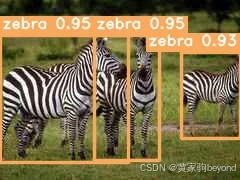
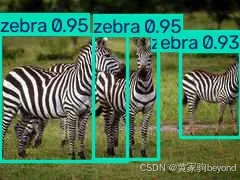
注:推理的时候设置rect=False,表示关闭矩形推理,矩形推理在tensorrt推理没啥吊用!
from ultralytics import YOLO
# 加载经过 COCO 预训练的 YOLO26n 模型
#model = YOLO("yolo26n-cls.pt")
#model = YOLO("yolo26n-cls.pt")
#model = YOLO("yolo26n-obb.pt")
#model = YOLO("yolo26n-pose.pt")
# model = YOLO("yolo26n-seg.pt")
#model = YOLO("yolo26n-depth.pt")
model = YOLO(r"runs\detect\train-3\weights\best.pt")
# 使用 YOLO26n 模型对 'bus.jpg' 图像进行推理
results = model(
    r"E:/Code/datasets/african-wildlife/images/test",
    rect=False,
    save=True,
    exist_ok=True           # 覆盖已有文件夹
)
都看到这里,去点个star吧。😄