
01 引言
声明:本文为《Kubernetes权威指南:从Docker到Kubernetes实践全接触(第5版)》的读书笔记
Kubernetes从1.9版本开始引入容器存储接口 Container Storage Interface (CSI)机制,用于在Kubernetes和外部存储系统之间建立一套标准的存储管理接口,通过该接口为容器提供存储服务。
02 CSI的核心组件和部署架构
Kubernetes CSI存储插件的关键组件和推荐的容器化部署架构如下(其中主要包括两类组件:CSI Controller和CSI Node):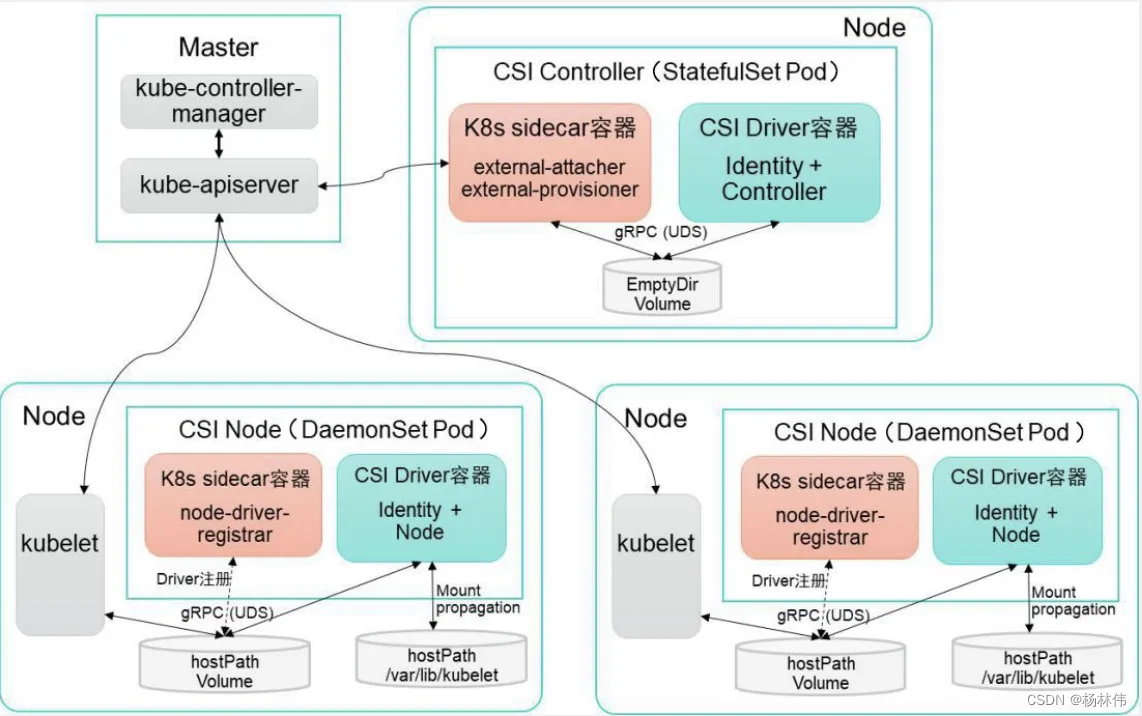
2.1 CSI Controller
CSI Controller的主要功能是 提供存储服务视角对存储资源和存储卷进行管理和操作。在Kubernetes中建议将其部署为单实例Pod,可以使用StatefulSet或 Deployment控制器进行部署,设置副本数量为1,保证一种存储插件只运行一个控制器实例。
在这个Pod内部署两个容器,分别提供以下功能.
与Master ( kube-controller-manager) 通信的辅助sidecar容器:在 sidecar容器内又可以包含external-attacher和external-provisioner两个容器,它们的功能分别如下:
- external-attacher:监控VolumeAttachment资源对象的变更,触发针对 CSI端点的ControllerPublish和ControllerUnpublish操作;
- externail-provisioner:监控PersistentVolumeClaim资源对象的变更,触发针对CSI端点的CreateVolume和DeleteVolume操作。
另外,社区正在引入具备其他管理功能的sidecar工具,例如:externalsnapshotter,用于管理存储快照,目前为Alpha阶段;external-resizer用于管理存储容量扩容,目前为Beta阶段。
CsI Driver存储驱动容器,由第三方存储提供商提供,需要实现上述接口:这两个容器通过本地Socket (Unix Domain Socket, UDS),并使用gPRC协议进行通信。sidecar容器通过Socket调用CSI Driver容器的CSI接口,CSI Driver 容器负责具体的存储卷操作。
2.2 CSI Node
CSI Node的主要功能是对主机(Node )上的Volume进行管理和操作,在 Kubernetes中建议将其部署为DaemonSet,在需要提供存储资源的各个Node上都运行一个Pod。
在这个Pod中部署以下两个容器:
- 与kubelet通信的辅助sidecar容器node-driver-registrar:主要功能是将存储驱动注册到kubelet中;
- CSI Driver存储驱动容器:由第三方存储提供商提供,主要功能是接收 kubelet 的调用,需要实现一系列与 Node 相关的 CSI 接口,例如: NodePublishVolume 接口(用于将 Volume 挂载到容器内的目标路径)、NodeUnpublishVolume接口(用于从容器中卸载Volu加粗样式me),等等。
流程:
- node-driver-registrar容器与kubelet通过 Node主机一个
hostPath目录下的unix socket进行通信。 - CSI Driver容器与kubelet通过Node主机另一个
hostPath目录下的unix socket进行通信,同时需要将 kubelet 的工作目录(默认为/var/lib/kubelet)挂载给CSI Driver容器,用于为Pod进行Volume的管理操作 (包括mount、 umount等)。
03 CSI存储插件应用实战
下面以csi-hostpath插件为例,对如何部署CSI插件、用户如何使用CSI插件提供的存储资源进行详细说明。
3.1 设置Kubernetes服务启动参数
为kube-apiserver、 kube-controller-manager和kubelet服务的启动参数添加如下内容:
--feature-gates=VolumeSnapshotDataSource=true, CSINodeInfo=true, CSIDriverRegistry=true这3个特性开关是Kubernetes 从1.12版本开始引入的Alpha 版本功能, CSINodelnfo和CSIDriverRegistry需要手工创建其相应的CRD资源对象。
3.2 创建CRD资源对象
需要创建CSINodelnfo和CSIDriverRegistry CRD资源对象。
csidriver.yaml的内容如下:
apiVersion: apiextensions.k8s.io/v1beta1
kind: CustomResourceDefinition
metadata:
    name: csidrivers.csi.storage.k8s.io
    labels:
        addonmanager.kubernetes.io/mode: Reconcile
spec:
    group: csi.storage.k8s.io
    names:
        kind: CSIDriver
        plural: csidrivers
    scope: Cluster
    validation:
        openAPIV3Schema:
            properties:
                spec:
                    description: Specification of the CST Driver.
                    properties:
                        attachRequired:
                            description: Indicates this cSI volume driver requires an attach    operation, and that Kubernetes should call attach and wait for any attach operationto complete before proceeding to mount.
                            type: boolean
                        podInfoOnMountVersion:
                            description: Indicates this cSI volume driver requires additional    pod    information (1ike podName, poduID, etc.) during mount operations.
                            type: string
version: v1alpha1csinodeinfo.yaml的内容如下:
apiVersion: apiextensions.k8s.io/v1betal
kind: CustomResourceDefinition
metadata:
    name: csinodeinfos.csi.storage.k8s.io
    labels:
        addonmanager.kubernetes.io/mode: Reconcile
spec:
    group: csi.storage.k8s.io
    names:
        kind: CSINodeInfo
        plural: csinodeinfos
    scope: Cluster
    validation:
        openAPIV3Schema:
            properties:
                spec:
                    description: Specification of CSINodeInfo
                    properties:
                        drivers:
                            description: List of CSI drivers running on the node and their specs.
                            type: array
                            items:
                                properties:
                                    name:
                                        description: The CSI driver that this obiect refers to.
                                        type: string
                                    nodeID:
                                        description: The node from the driver point of view.
                                        type: string
                                    topologyKeys:
                                        description: Tiist of keys supported by the driver.
                                        items:
                                            type: string
                                        type: array
                status:
                    description: Status of CSINodeInfo
                    properties:
                        drivers:
                            description: List of cSI drivers running on the node and their statuses.
                            type: array
                            items:
                                properties:
                                    name:
                                        description: The CSI driver that this obiect refers to.
                                    type: string
                                    available:
                                        description: Whether the CSI driver is installed.
                                        type: boolean
                                    volumePluginMechanism:
                                        description: Indicates to external components the required mechanism    to use for any in-tree plugins replaced by this driver.
                                        pattern: in-treelesi
                                        type: string

version: v1alpha1接着使用kubectl create命令完成创建。
3.3 创建csi-hostpath存储插件相关组件
创建csi-hostpath存储插件相关组件,包括csi-hostpath-attacher、 csihostpath-provisioner和csi-hostpathplugin(其中包含csi-node-driver-registrar和 hostpathplugin)。其中为每个组件都配置了相应的RBAC权限控制规则,对于安全访问Kubernetes资源对象非常重要。
csi-hostpath-attacher.yaml的内容如下:
#RBAC 相关配置
---
apiVersion: v1
kind: ServiceAccount
metadata:
    name: csi-attacher
    namespace: default

---
kind: ClusterRole
apiVersion: rbac.authorization.k8s.io/v1
metadata:
    name: external-attacher-runner
rules:
  - apiGroups: [""]
    resources: ["persistentvolumes"]
    verbs: ["get","list","watch","update"]
  - apiGroups: [""]
    resources: ["nodes"]
    verbs: ["get","list", "watch"]
  - apiGroups: ["csi.storage.k8s.io"]
    resources: ["csinodeinfos"]
    verbs: ["get","list", "watch"]
  - apiGroups: ["storage.k8s.io"]
    resources: ["volumeattachments"]
    verbs: ["get", "1ist","watch","update"]

---
kind: ClusterRoleBinding
apiVersion: rbac.authorization.k8s.io/v1
metadata:
    name: csi-attacher-role
subjects:
    - kind: ServiceAccount
      name: csi-attacher
      namespace: default
roleRef:
    kind: ClusterRole
    name: external-attacher-runner
    apiGroup: rbac.authorization.k8s.io

---
# Attacher must be able to work with config map in current namespace
# if (and only if) leadership election is enalled
kind: Role
apiVersion: rbac.authorization.k8s.io/v1
metadata:
    # replace with non-default name space name
    namespace: default
    name: external-attacher-cfg
rules:
- apiGroups: [""]
  resources: ["configmaps"]
  verbs: ["get","watch","1ist", "delete", "update", "create"]

---
kind: RoleBinding
apiVersion: rbac.authorization.k8s.io/v1
metadata:
    name: csi-attacher-role-cfg
    namespace: default
    subiects:
      - kind: ServiceAccount
        name: csi-attacher
        namespace: default
    roleRef:
        kind: Role
        name: external-attacher-cfg
        apiGroup: rbac.authorization.k8s.io

---
# Service 和 StatefulSet 的定义
kind: Service
apiversion: v1
metadata:
    name: csi-hostpath-attacher
    labels:
        app: csi-hostpath-attacher
spec:
    selector:
        app: csi-hostpath-attacher
    ports:
      - name: dummy
        port: 12345

---
kind: StatefulSet
apiVersion: apps /v1
metadata:
    name: csi-hostpath-attacher
spec:
    serviceName: "csi-hostpath-attacher"
    replicas: 1
    selector:
        matchLabels:
            app: csi-hostpath-attacher
    template:
        metadata:
            labels:
                app: csi-hostpath-attacher
        spec:
            serviceAccountName: csi-attacher
            containers:
            - name: csi-attacher
              image: quay.io/k8scsi/csi-attacher:v1.0.1
              imagePullPolicy: IfNotPresent
              args:
                  - --v=5
                - --csi-address=$(ADDRESS)
              env:
              - name: ADDRESS
                value: /csi/csi.sock
              volumeMounts:
              - mountPath: /csi
                name: socket-dir
            volumes:
              - hostPath:
                    path: /var/lib/kubelet/plugins/csi-hostpath
                    type: DirectoryorCreate
                name: socket-dir
csi-hostpath-provisioner.yaml的内容如下:
# RBAC 相关配置
---
apiversion: v1
kind: ServiceAccount
metadata:
    name: csi-provisioner
    # replace with non-default name space name
    namespace: default

---
kind: ClusterRole
apiversion: rbac.authorization.k8s.io/v1
metadata:
    name: external-provisioner-runner
    rules:
      - apiGroups: [""]
        resources: ["secrets"]
        verbs: ["get", "list"]
      - apiGroups: [""]
        resources: ["persistentvolumes"]
        verbs: ["get","list","watch","create", "'delete"]
      - apiGroups: [""]
        resources: ["persistentvolumeclaims"]
        verbs: ["get","list","watch", "update"]
      - apiGroups: ["storage.k8s.io"]
        resources: ["storageclasses"]
        verbs: ["get", "list", "watch"]
      - apiGroups: [""]
        resources: ["events"]
        verbs: ["1ist","watch", "create", "update","patch"]
      - apiGroups: ["snapshot.storage. k8s.io"]
        resources: ["volumesnapshots"]
         verbs: ["get", "list"]
      - apiGroups: ["snapshot.storage.k8s.io"]
        resources: ["volumesnapshotcontents"]
        verbs: ["get", "list"]
      - apiGroups: ["csi.storage.k8s.io"]
        resources: ["csinodein fos"]
        verbs: ["get", "list","watch"]
      - apiGroups: [""]
        resources: ["nodes"]
        verbs: ["get","list", "watch"]

---
kind: ClusterRoleBinding
apiVersion: rbac.authorization.k8s.io/v1
metadata:
    name: csi-provisioner-role
subjeets:
- kind: ServiceAccount
  name: csi-provisioner
  # replace with non-default namespace name
  namespace: default
roleRef:
    kind: ClusterRole
    name: external-provisioner-runner
    apiGroup: rbac.authorization.k8s.io

---
kind: Role
apiVersion: rbac.authorization.k8s.io/v1
metadata:
    namespace: default
    name: external-provisioner-cfg
rules:
    - apiGroups: [""]
      resources: ["endpoints"]
      verbs: ["get","watch","list","delete","update","create"]

---
kind: RoleBinding
apiVersion: rbac.authorization.k8s.io/v1
metadata:
    name: csi-provisioner-role-cfg
    namespace: default
subjects:
  - kind: ServiceAccount
    name: csi-provisioner
    namespace: default
roleRef:
  - kind: Role
    name: external-provisioner-cfg
    apiGroup: rbac.authorization.k8s.io

---
kind: Service
apiVersion: v1
metadata:
    name: csi-hostpath-provisioner
    labels:
        app: csi-hostpath-provisioner
spec:
    seleetor:
        app: csi-hostpath-provisioner
        ports:
            - name: dummy
              port: 12345

---
kind: StatefulSet
apiVersion: apps/v1
metadata:
    name: csi-hostpath-provisioner
spec:
    serviceName: "csi-hostpath-provisioner"
    replicas: 1
    selector:
        matchLabels:
            app: csi-hostpath-provisioner
    template:
        metadata:
            labels:
                app: esi-hostpath-provisioner
        spec:
            serviceAccountName: csi-provisioner
            containers:
                 - name: csi-provisioner
                  image: quay.io/k8scsi/csi-provisioner:v1.0.1
                  imagePullPolicy: IfNotPresent
                  args:
                      - "--provisioner=csi-hostpath"
                    - "--csi-address=$(ADDRESS)"
                    - "--connection-timeout=15s"
                  env:
                    - name: ADDRESS
                      value: /csi/csi.sock
                  volumeMounts:
                  - mountPath: /csi
                    name: socket-dir
            volumes:
              - hostPath:
                    path: /var/lib/kubelet/plugins/csi-hostpath
                    type: DirectoryorCreate
                name: socket-dir
csi-hostpathplugin.yaml的内容如下:
# RBAC 相关配置
apiVersion: v1
kind: ServiceAccount
metadata:
    name: csi-node-sa
    # replace with non-default namespace name
    namespace: default

---
kind: clusterRole
apiVersion: rbac.authorization.k8s.io/v1
metadata:
    name: driver-registrar-runner
    rules:
        - apiGroups: [""]
          resources: ["events"]
          verbs: ["get","list", "watch", "create", "update", "patch"]
        # Kubernetes versions.
        # - apiGroups: [""]
        # resources: ["nodes"]
        # verbs: ["get","update", "patch"〕

---
kind: ClusterRoleBinding
apiVersion: rbac.authorization.k8s.io/v1
metadata:
    name: csi-driver-registrar-role
subjeets:
    - kind: ServiceAccount
      name: csi-node-sa
      # replace with non-default namespace name
      namespace: default
roleRef:
    kind: ClusterRole
    name: driver-registrar-runner
    apiGroup: rbac.authorization.k8s.io

# Daemon Set 的定义
---
kind: DaemonSet
apiVersion: apps/v1
metadata:
    name: csi-hostpathplugin
spec:
    selector:
        matchLabels:
            app: csi-hostpathplugin
    template:
        metadata:
            labels:
                app: csi-hostpathplugin
        spec:
            serviceAccountName: csi-node-sa
            hostNetwork: true
            containers:
              - name: driver-registrar
                image: quay.io/k8scsi/csi-node-driver-registrar:v1.0.1
                imagePullPolicy: IfNotPresent
                args:
                  - --v=5
                  - --csi-address=/csi/csi.sock
                  - --kubelet-registration-path=/var/lib/kubelet/plugins /csi-hostpath/csi.sock
                env:
                  - name: KUBE_NODE_NAME
                  - valueFrom:
                        fieldRef:
                            apiversion: v1
                            fieldPath: spec.nodeName
                volumeMounts:
                  - mountPath: /csi
                    name: socket-dir
                  - mountPath: /registration
                       name: registration-dir
            - name: hostpath
              image: quay.io/k8scsi/hostpathplugin:v1.0.1
              imagePullPolicy: IfNotPresent
              args:
                - "--v=5"
                - "--endpoint=$(CSI_ENDPOINT)"
                - "--nodeid=$(KUBE NODE NAME)"
              env:
                  - name: CSI_ENDPOINI
                  value: unix:///csi/csi.sock
                - name: KUBE_NODE_NAME
                  valueFrom:
                      fieldRef:
                        apiVersion: V1
                        fieldPath: spec.nodeName
              securityContext:
                privileged: true
              volumeMounts:
                - mountPath: /csi
                  name: socket-dir
                - mountPath: /var/lib/kubelet/pods
                  mountPropagation: Bidirectional
                  name: mountpoint-dir
        volumes:
          - hostPath:
              path: /var/lib/kubelet/plugins/csi-hostpath
              type: DirectoryorCreate
            name: socket-dir
          - hostPath:
              path: /var/1ib/kubelet/pods
              type: DirectoryorCreate
            name: mountpoint-dir
          - hostPath:
                path: /var/lib/kubelet/plugins_registry
                type: Directory
name: registration-dir然后使用kubectl create命令去创建csi-hostpath-attacher.yaml、csi-hostpath-provisioner.yaml、csi-hostpathplugin.yaml。
至此就完成了CSI存储插件的部署。
3.4 应用容器使用CSI存储
应用程序如果希望使用CSI存储插件提供的存储服务,则仍然使用Kubernetes动态存储管理机制。首先通过创建 StorageClass和PVC为应用容器准备存储资源,然后容器就可以挂载PVC到容器内的目录下进行使用了。
创建一个StorageClass,provisioner为CSI存储插件的类型,在本例中为csihostpath:
# csi-storageclass.yaml
apiVersion: storage.k8s.io/v1
kind: Storageclass
metadata:
    name: csi-hostpath-sc
provisioner: csi-hostpath
reclaimPolicy: Delete
volumeBindingMode: Immediate

# 创建
# kubectl create -f csi-storageclass . yaml
storageclass.storage.k8s.io/csi-hostpath-sc created
创建一个PVC,引用刚刚创建的StorageClass,申请存储空间为1GiB:
# csi-pvc.yaml
apiVersion: V1
kind: PersistentVolumeClaim
metadata:
    name: csi-pvc
spec:
    accessModes:
        ReadwriteOnce
resources:
    requests:
        storage: 1Gi
storageClassName: csi-hostpath-sc

# kubectl create -f csi-pve.yaml
persistentvolumeclaim/csi-pve created
查看PVC和系统自动创建的PV,状态为Bound,说明创建成功:
$ kubectl get pvc

NAME     STATUS     VOLUME                                        CAPACITY         ACCESS     MODES            STORAGECLASS AGE
csi-pve Bound     pve-f8923093-3e25-11e9-a5fa-000c29069202     1Gi             RNO     csi-hostpath-sc                 40s

$ kubectl get pv
NAME                                        CAPACITY  ACCESS MODES RECLAIM POLICY    STATUS CLAIM   STORAGECLASS  REASON          AGE
pve-£8923093-3e25-11e9-a5fa-000c29069202    1Gi        RWO          Delete       Bound  default /csi-pvc      csi-hostpath-sc 42S
最后,在应用容器的配置中使用该PVC:
# csi-app. yaml
kind: Pod
apiVersion: v1
metadata:
    mame: my-csi-app
spec:
    contaiiners:
        name: my-csi-app
        image: busybox
        imagePullPolicy: IfNotPresent
        command: ["sleep", "1000000"]
        volumeMounts:
        - mountPath:"/data"
          name: my-csi-volume
    volumes:
      - name: my-csi-volume
        persistentVolumeClaim:
            claimName: csi-pvc

# kubectl create -f csi-app.yaml
# pod/my-csi-app created

# kubect1 get pods

NAME            READY         STATUS         RESTARTS AGE

my-csi-app        1/1         Running       0      40s
在Pod创建成功之后,应用容器中的/data目录使用的就是CSI存储插件提供的存储。

