1.安装mongodb-server
[alerta@SUSE ~]$ curl -O https://fastdl.mongodb.org/linux/mongodb-linux-x86_64-rhel62-3.4.6.tgz
[alerta@SUSE ~]$ tar zxvf mongodb-linux-x86_64-rhel62-3.4.6.tgz
[alerta@SUSE mongodb-linux-x86_64-rhel62-3.4.6]$ cd mongodb-linux-x86_64-rhel62-3.4.6 && mkdir data
[alerta@SUSE ~]$ nohup ./mongodb-linux-x86_64-rhel62-3.4.6/bin/mongod --dbpath /usr/local/alerta/mongodb-linux-x86_64-rhel62-3.4.6/data/ &
安装python3.6版本
[alerta@SUSE ~]$ wget https://www.python.org/ftp/python/3.6.1/Python-3.6.1.tar.xz
[alerta@SUSE ~]$ tar xvf Python-3.6.1.tar.xz
[alerta@SUSE Python-3.6.1]$ ./configure --prefix=/usr/local/alerta/python3.6.1 && make && make install
安装alerta-server
[alerta@SUSE bin]$ ./pip3 install alerta-server
Collecting alerta-server
Downloading alerta-server-4.9.6.tar.gz (44kB)
100% |████████████████████████████████| 51kB 187kB/s
Collecting Flask (from alerta-server)
Downloading Flask-0.12.2-py2.py3-none-any.whl (83kB)
100% |████████████████████████████████| 92kB 130kB/s
Collecting Flask-Cors>=3.0.2 (from alerta-server)
Downloading Flask_Cors-3.0.3-py2.py3-none-any.whl
Collecting pymongo>=3.0 (from alerta-server)
Downloading pymongo-3.4.0.tar.gz (583kB)
100% |████████████████████████████████| 583kB 55kB/s
Collecting argparse (from alerta-server)
Downloading argparse-1.4.0-py2.py3-none-any.whl
Collecting requests (from alerta-server)
Downloading requests-2.18.1-py2.py3-none-any.whl (88kB)
100% |████████████████████████████████| 92kB 35kB/s
Collecting python-dateutil (from alerta-server)
Downloading python_dateutil-2.6.0-py2.py3-none-any.whl (194kB)
100% |████████████████████████████████| 194kB 19kB/s
Collecting pytz (from alerta-server)
Downloading pytz-2017.2-py2.py3-none-any.whl (484kB)
100% |████████████████████████████████| 491kB 12kB/s
Collecting PyJWT (from alerta-server)
Downloading PyJWT-1.5.2-py2.py3-none-any.whl
Collecting bcrypt (from alerta-server)
Downloading bcrypt-3.1.3-cp36-cp36m-manylinux1_x86_64.whl (54kB)
100% |████████████████████████████████| 61kB 9.9kB/s
Collecting Werkzeug>=0.7 (from Flask->alerta-server)
Downloading Werkzeug-0.12.2-py2.py3-none-any.whl (312kB)
100% |████████████████████████████████| 317kB 14kB/s
Collecting click>=2.0 (from Flask->alerta-server)
Downloading click-6.7-py2.py3-none-any.whl (71kB)
100% |████████████████████████████████| 71kB 15kB/s
Collecting itsdangerous>=0.21 (from Flask->alerta-server)
Downloading itsdangerous-0.24.tar.gz (46kB)
100% |████████████████████████████████| 51kB 25kB/s
Collecting Jinja2>=2.4 (from Flask->alerta-server)
Downloading Jinja2-2.9.6-py2.py3-none-any.whl (340kB)
100% |████████████████████████████████| 348kB 27kB/s
Collecting Six (from Flask-Cors>=3.0.2->alerta-server)
Downloading six-1.10.0-py2.py3-none-any.whl
Collecting idna=2.5 (from requests->alerta-server)
Downloading idna-2.5-py2.py3-none-any.whl (55kB)
100% |████████████████████████████████| 61kB 25kB/s
Collecting urllib3=1.21.1 (from requests->alerta-server)
Downloading urllib3-1.21.1-py2.py3-none-any.whl (131kB)
100% |████████████████████████████████| 133kB 13kB/s
Collecting certifi>=2017.4.17 (from requests->alerta-server)
Downloading certifi-2017.4.17-py2.py3-none-any.whl (375kB)
100% |████████████████████████████████| 378kB 16kB/s
Collecting chardet=3.0.2 (from requests->alerta-server)
Downloading chardet-3.0.4-py2.py3-none-any.whl (133kB)
100% |████████████████████████████████| 143kB 8.9kB/s
Collecting cffi>=1.1 (from bcrypt->alerta-server)
Downloading cffi-1.10.0-cp36-cp36m-manylinux1_x86_64.whl (406kB)
100% |████████████████████████████████| 409kB 12kB/s
Collecting MarkupSafe>=0.23 (from Jinja2>=2.4->Flask->alerta-server)
Downloading MarkupSafe-1.0.tar.gz
Collecting pycparser (from cffi>=1.1->bcrypt->alerta-server)
Downloading pycparser-2.18.tar.gz (245kB)
100% |████████████████████████████████| 256kB 26kB/s
Installing collected packages: Werkzeug, click, itsdangerous, MarkupSafe, Jinja2, Flask, Six, Flask-Cors, pymongo, argparse, idna, urllib3, certifi, chardet, requests, python-dateutil, pytz, PyJWT, pycparser, cffi, bcrypt, alerta-server
Running setup.py install for itsdangerous ... done
Running setup.py install for MarkupSafe ... done
Running setup.py install for pymongo ... done
Running setup.py install for pycparser ... done
Running setup.py install for alerta-server ... done
Successfully installed Flask-0.12.2 Flask-Cors-3.0.3 Jinja2-2.9.6 MarkupSafe-1.0 PyJWT-1.5.2 Six-1.10.0 Werkzeug-0.12.2 alerta-server-4.9.6 argparse-1.4.0 bcrypt-3.1.3 certifi-2017.4.17 cffi-1.10.0 chardet-3.0.4 click-6.7 idna-2.5 itsdangerous-0.24 pycparser-2.18 pymongo-3.4.0 python-dateutil-2.6.0 pytz-2017.2 requests-2.18.1 urllib3-1.21.1
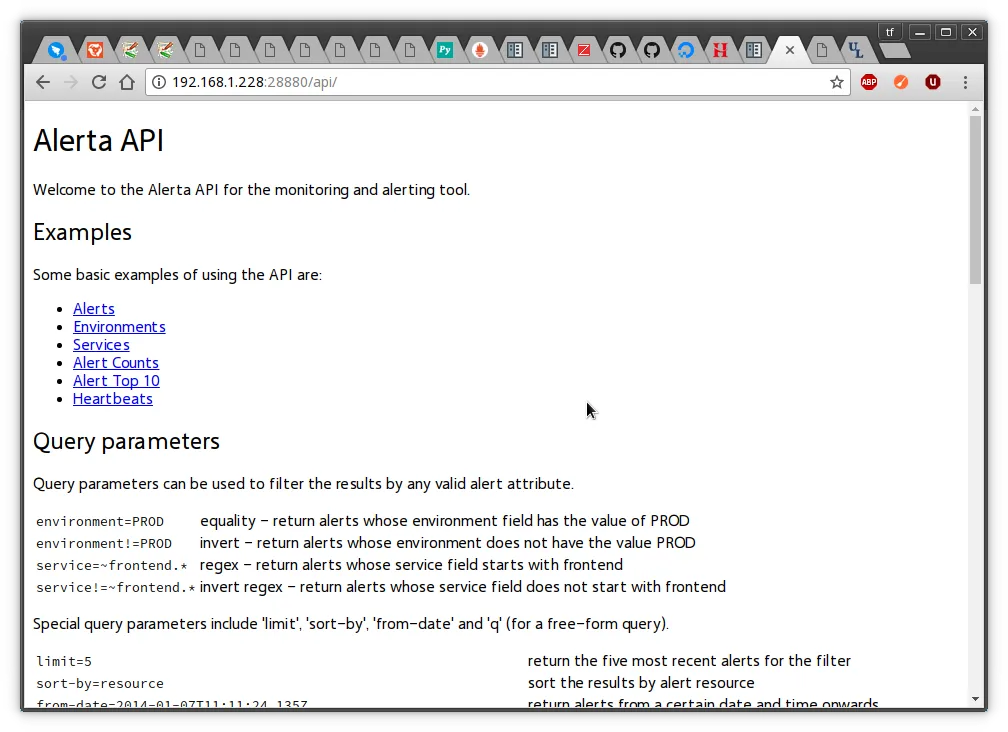
使用uwsgi部署alerta-server,内置的alertad在测试时使用,上线不建议使用。
[alerta@SUSE ~]$ cat wsgi.py
from alerta.app import app
[alerta@SUSE ~]$ cat uwsgi.ini
[uwsgi]
chdir = /usr/local/alerta
mount = /api=wsgi.py
callable = app
manage-script-name = true
master = true
processes = 5
logger = syslog:alertad
socket = /usr/local/alerta/uwsgi.sock
chmod-socket = 664
uid = alerta
gid = alerta
vacuum = true
die-on-term = true
启动
[alerta@SUSE ~]$ nohup uwsgi --ini uwsgi.ini &
[1] 18626
[uWSGI] getting INI configuration from uwsgi.ini
安装nginx web服务器
wget http://nginx.org/download/nginx-1.12.0.tar.gz
tar zxvf nginx-1.12.0.tar.gz
./configure --prefix=/usr/local/nginx-1.5.1 --with-http_ssl_module --with-http_spdy_module --with-http_stub_status_module --with-pcre
make && make install
注释掉原来的server,添加
include vhosts/*.conf;
[alerta@SUSE ~]$ cat ~/nginx1.12/conf/vhosts/alerta.conf
server {
listen 28880;
server_name 192.168.1.228 ;
location /api { try_files $uri @api; }
location @api {
include uwsgi_params;
uwsgi_pass unix:/usr/local/alerta/uwsgi.sock;
proxy_set_header Host $host:$server_port;
proxy_set_header X-Real-IP $remote_addr;
proxy_set_header X-Forwarded-For $proxy_add_x_forwarded_for;
}
location / {
root /usr/local/alerta/angular-alerta-webui/app/;
}
error_page 500 502 503 504 /50x.html;
location = /50x.html {
root /usr/local/nginx1.12/nginx/html;
}
}
./nginx -t
./nginx
启动服务
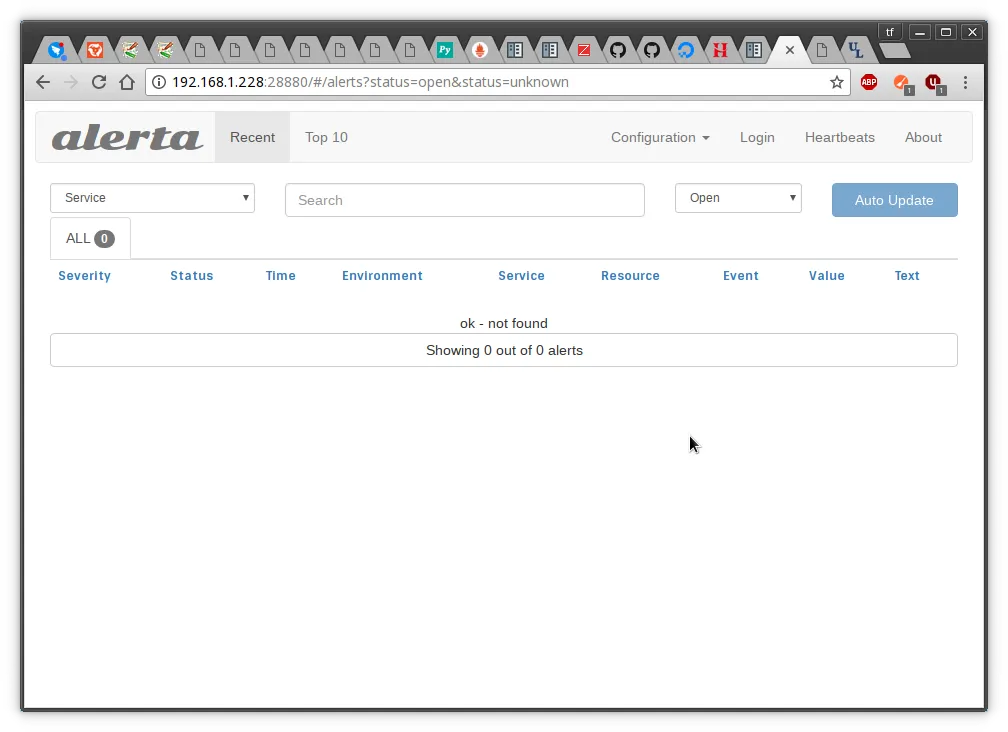
安装alerta-webui前端
[alerta@SUSE ~]$ git clone https://github.com/alerta/angular-alerta-webui.git
[alerta@SUSE ~]$ vim /usr/local/alerta/angular-alerta-webui/app/config.js
'use strict';
angular.module('config', [])
.constant('config', {
'endpoint' : "/api",
'provider' : "basic", // google, github, gitlab, keycloak or basic
'client_id' : "INSERT-CLIENT-ID-HERE",
'github_url' : null, // replace with your enterprise github server
'gitlab_url' : "https://gitlab.com", // replace with your gitlab server
'keycloak_url': "https://keycloak.example.org", // replace with your keycloak server
'keycloak_realm': "master", // replace with your keycloak realm
'colors' : {}, // use default colors
'severity' : {}, // use default severity codes
'audio' : {}, // no audio
'tracking_id' : "" // Google Analytics tracking ID eg. UA-NNNNNN-N
});
安装alerta客户端测试
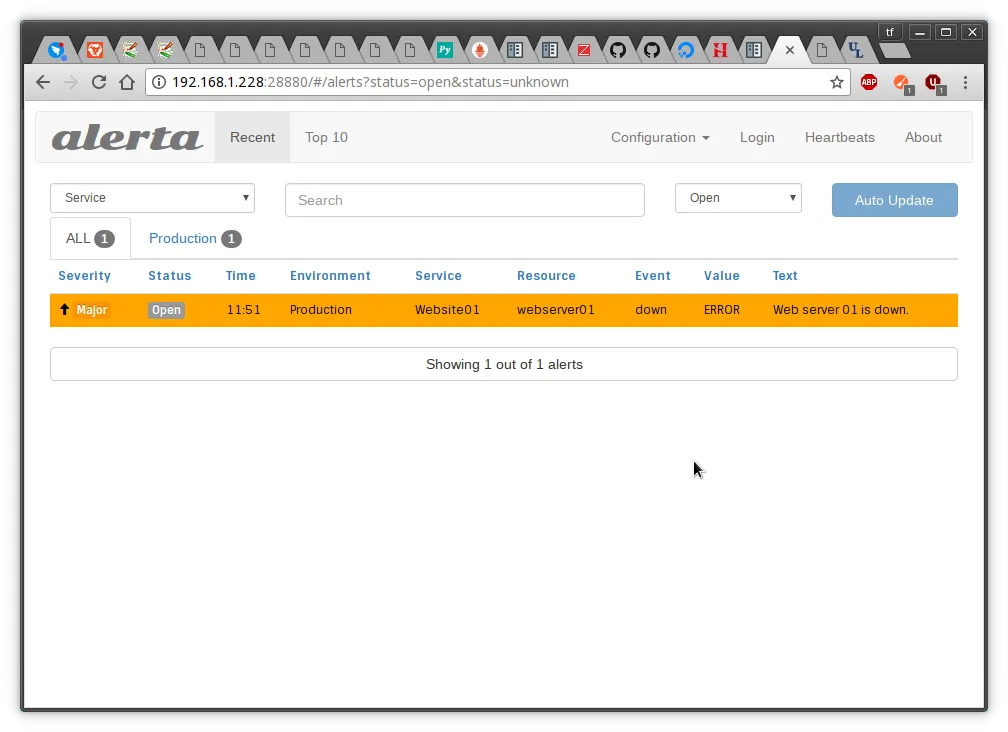
发送2条测试,显示1条重复。
[alerta@SUSE ~]$ pip install alerta
[alerta@SUSE ~]$ alerta --endpoint-url http://192.168.1.228:28880/api send --resource webserver01 --event down --environment Production --service Website01 --severity major --text "Web server 01 is down." --value ERROR
6e28d3a5-f764-452b-9916-f6d54c533402 (indeterminate -> major)
[alerta@SUSE ~]$ alerta --endpoint-url http://192.168.1.228:28880/api send --resource webserver01 --event down --environment Production --service Website01 --severity major --text "Web server 01 is down." --value ERROR
6e28d3a5-f764-452b-9916-f6d54c533402 (1 duplicates)
[alerta@SUSE ~]$ curl -O https://fastdl.mongodb.org/linux/mongodb-linux-x86_64-rhel62-3.4.6.tgz
[alerta@SUSE ~]$ tar zxvf mongodb-linux-x86_64-rhel62-3.4.6.tgz
[alerta@SUSE mongodb-linux-x86_64-rhel62-3.4.6]$ cd mongodb-linux-x86_64-rhel62-3.4.6 && mkdir data
[alerta@SUSE ~]$ nohup ./mongodb-linux-x86_64-rhel62-3.4.6/bin/mongod --dbpath /usr/local/alerta/mongodb-linux-x86_64-rhel62-3.4.6/data/ &
安装python3.6版本
[alerta@SUSE ~]$ wget https://www.python.org/ftp/python/3.6.1/Python-3.6.1.tar.xz
[alerta@SUSE ~]$ tar xvf Python-3.6.1.tar.xz
[alerta@SUSE Python-3.6.1]$ ./configure --prefix=/usr/local/alerta/python3.6.1 && make && make install
安装alerta-server
[alerta@SUSE bin]$ ./pip3 install alerta-server
Collecting alerta-server
Downloading alerta-server-4.9.6.tar.gz (44kB)
100% |████████████████████████████████| 51kB 187kB/s
Collecting Flask (from alerta-server)
Downloading Flask-0.12.2-py2.py3-none-any.whl (83kB)
100% |████████████████████████████████| 92kB 130kB/s
Collecting Flask-Cors>=3.0.2 (from alerta-server)
Downloading Flask_Cors-3.0.3-py2.py3-none-any.whl
Collecting pymongo>=3.0 (from alerta-server)
Downloading pymongo-3.4.0.tar.gz (583kB)
100% |████████████████████████████████| 583kB 55kB/s
Collecting argparse (from alerta-server)
Downloading argparse-1.4.0-py2.py3-none-any.whl
Collecting requests (from alerta-server)
Downloading requests-2.18.1-py2.py3-none-any.whl (88kB)
100% |████████████████████████████████| 92kB 35kB/s
Collecting python-dateutil (from alerta-server)
Downloading python_dateutil-2.6.0-py2.py3-none-any.whl (194kB)
100% |████████████████████████████████| 194kB 19kB/s
Collecting pytz (from alerta-server)
Downloading pytz-2017.2-py2.py3-none-any.whl (484kB)
100% |████████████████████████████████| 491kB 12kB/s
Collecting PyJWT (from alerta-server)
Downloading PyJWT-1.5.2-py2.py3-none-any.whl
Collecting bcrypt (from alerta-server)
Downloading bcrypt-3.1.3-cp36-cp36m-manylinux1_x86_64.whl (54kB)
100% |████████████████████████████████| 61kB 9.9kB/s
Collecting Werkzeug>=0.7 (from Flask->alerta-server)
Downloading Werkzeug-0.12.2-py2.py3-none-any.whl (312kB)
100% |████████████████████████████████| 317kB 14kB/s
Collecting click>=2.0 (from Flask->alerta-server)
Downloading click-6.7-py2.py3-none-any.whl (71kB)
100% |████████████████████████████████| 71kB 15kB/s
Collecting itsdangerous>=0.21 (from Flask->alerta-server)
Downloading itsdangerous-0.24.tar.gz (46kB)
100% |████████████████████████████████| 51kB 25kB/s
Collecting Jinja2>=2.4 (from Flask->alerta-server)
Downloading Jinja2-2.9.6-py2.py3-none-any.whl (340kB)
100% |████████████████████████████████| 348kB 27kB/s
Collecting Six (from Flask-Cors>=3.0.2->alerta-server)
Downloading six-1.10.0-py2.py3-none-any.whl
Collecting idna=2.5 (from requests->alerta-server)
Downloading idna-2.5-py2.py3-none-any.whl (55kB)
100% |████████████████████████████████| 61kB 25kB/s
Collecting urllib3=1.21.1 (from requests->alerta-server)
Downloading urllib3-1.21.1-py2.py3-none-any.whl (131kB)
100% |████████████████████████████████| 133kB 13kB/s
Collecting certifi>=2017.4.17 (from requests->alerta-server)
Downloading certifi-2017.4.17-py2.py3-none-any.whl (375kB)
100% |████████████████████████████████| 378kB 16kB/s
Collecting chardet=3.0.2 (from requests->alerta-server)
Downloading chardet-3.0.4-py2.py3-none-any.whl (133kB)
100% |████████████████████████████████| 143kB 8.9kB/s
Collecting cffi>=1.1 (from bcrypt->alerta-server)
Downloading cffi-1.10.0-cp36-cp36m-manylinux1_x86_64.whl (406kB)
100% |████████████████████████████████| 409kB 12kB/s
Collecting MarkupSafe>=0.23 (from Jinja2>=2.4->Flask->alerta-server)
Downloading MarkupSafe-1.0.tar.gz
Collecting pycparser (from cffi>=1.1->bcrypt->alerta-server)
Downloading pycparser-2.18.tar.gz (245kB)
100% |████████████████████████████████| 256kB 26kB/s
Installing collected packages: Werkzeug, click, itsdangerous, MarkupSafe, Jinja2, Flask, Six, Flask-Cors, pymongo, argparse, idna, urllib3, certifi, chardet, requests, python-dateutil, pytz, PyJWT, pycparser, cffi, bcrypt, alerta-server
Running setup.py install for itsdangerous ... done
Running setup.py install for MarkupSafe ... done
Running setup.py install for pymongo ... done
Running setup.py install for pycparser ... done
Running setup.py install for alerta-server ... done
Successfully installed Flask-0.12.2 Flask-Cors-3.0.3 Jinja2-2.9.6 MarkupSafe-1.0 PyJWT-1.5.2 Six-1.10.0 Werkzeug-0.12.2 alerta-server-4.9.6 argparse-1.4.0 bcrypt-3.1.3 certifi-2017.4.17 cffi-1.10.0 chardet-3.0.4 click-6.7 idna-2.5 itsdangerous-0.24 pycparser-2.18 pymongo-3.4.0 python-dateutil-2.6.0 pytz-2017.2 requests-2.18.1 urllib3-1.21.1
使用uwsgi部署alerta-server,内置的alertad在测试时使用,上线不建议使用。
[alerta@SUSE ~]$ cat wsgi.py
from alerta.app import app
[alerta@SUSE ~]$ cat uwsgi.ini
[uwsgi]
chdir = /usr/local/alerta
mount = /api=wsgi.py
callable = app
manage-script-name = true
master = true
processes = 5
logger = syslog:alertad
socket = /usr/local/alerta/uwsgi.sock
chmod-socket = 664
uid = alerta
gid = alerta
vacuum = true
die-on-term = true
启动
[alerta@SUSE ~]$ nohup uwsgi --ini uwsgi.ini &
[1] 18626
[uWSGI] getting INI configuration from uwsgi.ini
安装nginx web服务器
wget http://nginx.org/download/nginx-1.12.0.tar.gz
tar zxvf nginx-1.12.0.tar.gz
./configure --prefix=/usr/local/nginx-1.5.1 --with-http_ssl_module --with-http_spdy_module --with-http_stub_status_module --with-pcre
make && make install
注释掉原来的server,添加
include vhosts/*.conf;
[alerta@SUSE ~]$ cat ~/nginx1.12/conf/vhosts/alerta.conf
server {
listen 28880;
server_name 192.168.1.228 ;
location /api { try_files $uri @api; }
location @api {
include uwsgi_params;
uwsgi_pass unix:/usr/local/alerta/uwsgi.sock;
proxy_set_header Host $host:$server_port;
proxy_set_header X-Real-IP $remote_addr;
proxy_set_header X-Forwarded-For $proxy_add_x_forwarded_for;
}
location / {
root /usr/local/alerta/angular-alerta-webui/app/;
}
error_page 500 502 503 504 /50x.html;
location = /50x.html {
root /usr/local/nginx1.12/nginx/html;
}
}
./nginx -t
./nginx
启动服务
安装alerta-webui前端
[alerta@SUSE ~]$ git clone https://github.com/alerta/angular-alerta-webui.git
[alerta@SUSE ~]$ vim /usr/local/alerta/angular-alerta-webui/app/config.js
'use strict';
angular.module('config', [])
.constant('config', {
'endpoint' : "/api",
'provider' : "basic", // google, github, gitlab, keycloak or basic
'client_id' : "INSERT-CLIENT-ID-HERE",
'github_url' : null, // replace with your enterprise github server
'gitlab_url' : "https://gitlab.com", // replace with your gitlab server
'keycloak_url': "https://keycloak.example.org", // replace with your keycloak server
'keycloak_realm': "master", // replace with your keycloak realm
'colors' : {}, // use default colors
'severity' : {}, // use default severity codes
'audio' : {}, // no audio
'tracking_id' : "" // Google Analytics tracking ID eg. UA-NNNNNN-N
});
安装alerta客户端测试
发送2条测试,显示1条重复。
[alerta@SUSE ~]$ pip install alerta
[alerta@SUSE ~]$ alerta --endpoint-url http://192.168.1.228:28880/api send --resource webserver01 --event down --environment Production --service Website01 --severity major --text "Web server 01 is down." --value ERROR
6e28d3a5-f764-452b-9916-f6d54c533402 (indeterminate -> major)
[alerta@SUSE ~]$ alerta --endpoint-url http://192.168.1.228:28880/api send --resource webserver01 --event down --environment Production --service Website01 --severity major --text "Web server 01 is down." --value ERROR
6e28d3a5-f764-452b-9916-f6d54c533402 (1 duplicates)