原文 LINQ to PostgreSQL Tutorial
This tutorial guides you through the process of creating a simple application powered by LinqConnect technology. In less than 5 minutes you will have a ready-to-use data access layer for your business objects.
In this walkthrough:
- Introducing the LinqConnect (LINQ to PostgreSQL) Technology
- Requirements
- Preparing the Project
- Generating Model from Database
- Querying Data
- Inserting New Data
- Updating Data
- Deleting Data
- Additional Information
Introducing the LinqConnect (LINQ to PostgreSQL) Technology
LinqConnect (formerly known as LINQ to PostgreSQL) is the fast and lightweight ORM solution, which is closely compatible to Microsoft LINQ to SQL and contains its own advanced features, such as complex type support, advanced data fetching options, configurable compiled query caching, and others.
LINQ stands for Language-Integrated Query, which means that data retrieval is no longer a separate language. The LINQ engine allows .NET applications to connect to databases without bothering much about columns and rows. The data you receive is automatically formed as objects ready to use by your business logic.
LINQ to Relational Data may be thought of as an object-relational mapping (ORM) tool. The type-safe LINQ queries get compiled into MSIL on the fly, and the query clauses are translated into SQL and sent to PostgreSQL server for execution. This makes your data access layer safer, faster, and greatly more convenient to design.
Requirements
In order to connect to PostgreSQL server you need the server itself running, dotConnect for PostgreSQL installed and IDE running. LinqConnect requires .NET Framework 3.5, Visual Studio 2008, and PostgreSQL server 8.0 or higher. Note that LinqConnect feature is only available in Professional Edition of dotConnect for PostgreSQL.
In this tutorial it is assumed that you already have the database objects created. You have to execute a script from the following file installed by default to
\Program Files\Devart\dotConnect\PostgreSQL\Samples\crm_demo.sql
Preparing the Project
Create a new console application in Visual Studio. It could be any other project type as well, but for simplicity's sake we'll use console project throughout the tutorial. The rest of the tutorial assumes that the name of the project isConsoleApplication1. If you project is named otherwise, you will have to substitute this name with the actual one in Solution Explorer.
Generating Model from Database
- Add Devart LinqConnect Model to the project. To do this, right-click on the project node in Solution Explorer, point to Add, click New Item.... In the Add New Item dialog select Data category, choose Devart LinqConnect Model template, and click Add. This automatically launches Create New Model wizard, which creates a new empty model or generates it from database.
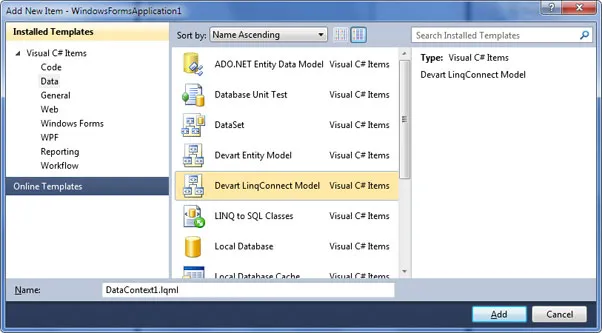
- Click Next on the welcome screen.
- Fill in connection settings and click Next.
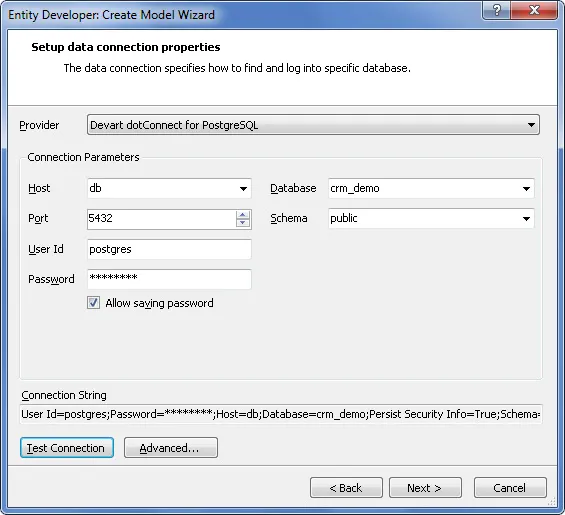
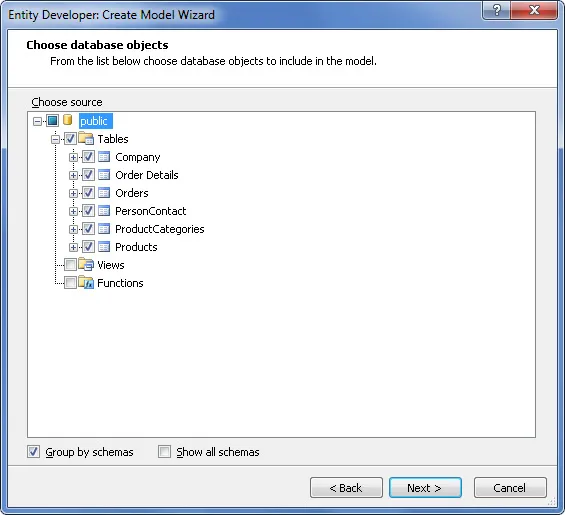
- Choose database objects that will be used in the model. These are all objects from the crm_demo script, including auxiliary tables. Click Next.
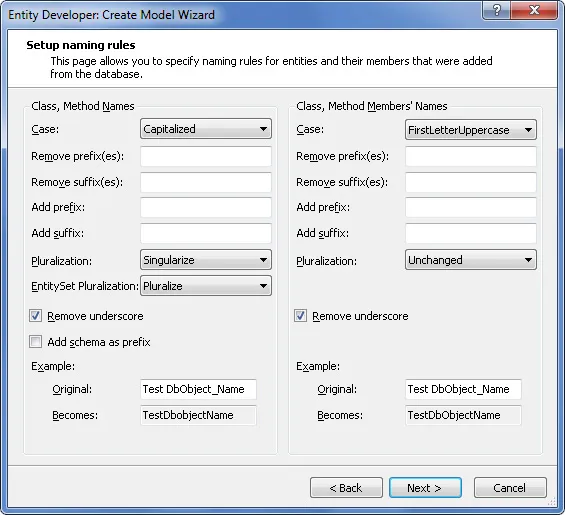
- On the next screen you can adjust naming rules for entities and their members. For the CRM Demo database no rules are required, so just click Next.
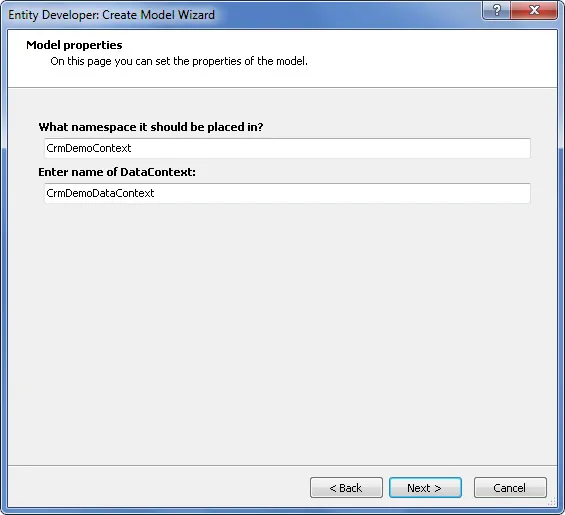
- Input CrmDemoContext as namespace, and CrmDemoDataContext as the name of DataContext descendant. This will be the name of the main data access class. Click Next.
- Press Finish. The model will be generated and opened in Entity Developer.
- In the main menu, click File | Save. This updates the generated CrmDemoDataContext model code in Visual Studio.
The model you've just generated is ready to use.
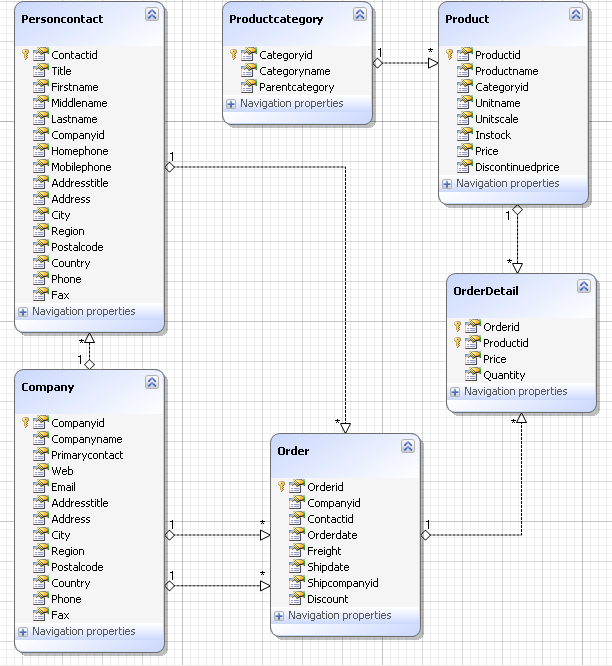
Entity Developer creates classes for all selected tables that represent entities. It also creates a descendant ofDevart.Data.Linq.DataContext class, which controls the connection to the database, and the whole data flow. This class includes properties and methods named after your database objects. You will use these members to retrieve and modify data in the context. The generated code is contained in the file DataContext1.Designer.cs (DataContext1.Designer.vb). You may write your own partial classes and methods for it in the file DataContext1.cs (DataContext1.vb).
Querying Data
All LINQ to PostgreSQL operations are executed through the DataContext descendant, which is namedCrmDemoDataContext in this tutorial. To retrieve data you have to first create an instance of the context, then prepare a query with LinqConnect, and then access the object returned by the query, which may be a collection of objects or a single object.
Let's read all the data from the table Company, sort it by CompanyID, and output some columns. Add the following block of code to the method Main:
C#
CrmDemoDataContext context =
new
CrmDemoDataContext();
var query = from it
in
context.Companies
orderby it.CompanyID
select it;
foreach
(Company comp
in
query)
Console.WriteLine(
"{0} | {1} | {2}"
, comp.CompanyID, comp.CompanyName, comp.Country);
Console.ReadLine();
|
Visual Basic
Dim
context
As
CrmDemoDataContext =
New
CrmDemoDataContext
Dim
query = From it
In
context.companies _
Order By it.CompanyID _
Select
it
Dim
comp
As
company
For
Each
comp
In
query
Console.WriteLine(
"{0} | {1} | {2}"
, comp.CompanyID, comp.CompanyName, comp.Country)
Next
Console.ReadLine()
|
As simple as that. You prepare a query and then iterate through it as you would do with a usual collection of objects. The database interaction is performed by LinqConnect in the background. Now let's see who is who in this code sample.
- CrmDemoDataContext is the name of the class that knows all about your model and does everything to retrieve and modify related data in the database. All LinqConnect operations are performed within this class's properties and methods. This class is designed to be lightweight and not expensive to create, thus it is recommended to create a new DataContext instance for any 'unit of work' and dispose it after this unit is completed.
- query, it are arbitrary variable names in the LINQ to SQL statement. The former is used as the collection of data objects, the latter is used to reference single entities in a collection and exists inside the statement only.
- context.Companies refers to a public property of CrmDemoDataContext class. This property represents the collection of all companies in the context.
- Company (in the foreach statement) is the name of an autogenerated class. This class maps to the Companytable in the database and is named after it.
Here is the project's output in the console:
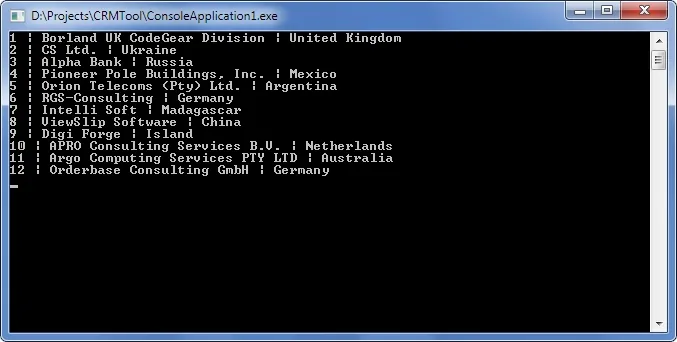
Note that the LINQ query code just describes the query. It does not execute it. This approach is known as deferred execution.
Now let's query data from two tables united with a foreign key. Replace the old code with this:
C#
CrmDemoDataContext context =
new
CrmDemoDataContext();
var query = from it
in
context.Companies
orderby it.CompanyID
select it;
foreach
(Company comp
in
query) {
if
(comp.PersonContacts.Count > 0) {
Console.WriteLine(
"{0} | {1} | {2}"
,
comp.CompanyName, comp.PersonContacts[0].FirstName,
comp.PersonContacts[0].LastName);
}
}
Console.ReadLine();
|
Visual Basic
Dim
context
As
CrmDemoDataContext =
New
CrmDemoDataContext
Dim
query = From it
In
context.companies _
Order By it.CompanyID _
Select
it
Dim
comp
As
company
For
Each
comp
In
query
If
comp.personcontacts.Count > 0
Then
Console.WriteLine(
"{0} | {1} | {2}"
, _
comp.CompanyName, comp.personcontacts(0).FirstName, _
comp.personcontacts(0).LastName)
End
If
Next
Console.ReadLine()
|
As you can see, the LINQ query statement was not changed at all. The data about the contact persons was retrieved from the database automatically when you accessed the corresponding property of the company object. This is one of the great things about LINQ: you do not have to worry about dependencies when writing queries.
Inserting New Data
What earlier was adding rows to tables, now is just adding new objects to context collections. When you are ready to send the changes to the database, call SubmitChanges() method of the context. Before doing this, you must first set all properties that do not support null (Nothing) values. The SubmitChanges() method generates and executes commands that perform the equivalent INSERT, UPDATE, or DELETE statements against the data source.
Let's add a new product and a new category to the database. Replace the old code with this:
C#
CrmDemoDataContext context =
new
CrmDemoDataContext();
// Create a new category
ProductCategory newCategory =
new
ProductCategory();
newCategory.CategoryID = 1000;
newCategory.CategoryName =
"New category"
;
// Create a new product
Product newProduct =
new
Product();
newProduct.ProductID = 2000;
newProduct.ProductName =
"New product"
;
newProduct.Price = 20;
// Associate the new product with the new category
newProduct.ProductCategory = newCategory;
context.Products.InsertOnSubmit(newProduct);
// Send the changes to the database.
// Until you do it, the changes are cached on the client side.
context.SubmitChanges();
// Request the new product from the database
var query = from it
in
context.Products
where it.ProductID == 2000
select it;
// Since we query for a single object instead of a collection, we can use the method First()
Product product = query.First();
Console.WriteLine(
"{0} | {1} | {2}"
,
product.ProductCategory.CategoryName, product.ProductName, product.Price);
Console.ReadLine();
|
Visual Basic
Dim
context
As
CrmDemoDataContext =
New
CrmDemoDataContext
' Create a new category
Dim
newCategory
As
productcategory =
New
productcategory()
newCategory.CategoryID = 1000
newCategory.CategoryName =
"New category"
' Create a new product
Dim
newProduct
As
product =
New
product()
newProduct.ProductID = 2000
newProduct.ProductName =
"New product"
newProduct.Price = 20
' Associate the new product with the new category
newProduct.productcategory = newCategory
context.products.InsertOnSubmit(newProduct)
' Send the changes to the database.
' Until you do it, the changes are cached on the client side.
context.SubmitChanges()
' Request the new product from the database
Dim
query = From it
In
context.products _
Where it.ProductID = 2000 _
Select
it
' Since we query for a single object instead of a collection, we can use the method First()
Dim
product
As
product = query.First()
Console.WriteLine(
"{0} | {1} | {2}"
, _
product.productcategory.CategoryName, product.ProductName, product.Price)
Console.ReadLine()
|
The InsertOnSubmit() method is created for every collection in the context. This method stores in the database information about all linked objects. As shown in the example, it is only necessary to call InsertOnSubmit() once to submit both product and category objects.
Note that after you have added the new product and category by submitting the changes, you cannot execute this solution again as is. To execute the solution again, change the IDs of the objects to be added.
Updating Data
Entity instances are modified as usual. The only thing to remember is that you have to invoke the SubmitChanges() method to send the data to the database.
Append the following block to the existing code and launch the project:
C#
product.ProductName =
"Edited product"
;
product.Price = 15;
context.SubmitChanges();
|
Visual Basic
product.ProductName =
"Edited product"
product.Price = 15
context.SubmitChanges()
|
Deleting Data
To extract an instance from a context use the DeleteOnSubmit method of the corresponding collection. The object is removed from the collection of its type, but not destroyed. To delete the object's data from the database invoke the SubmitChanges() method.
You can do this with a block of code like the following:
C#
context.products.DeleteOnSubmit(newProduct);
context.productcategories.DeleteOnSubmit(newCategory);
context.SubmitChanges();
|
Visual Basic
context.products.DeleteOnSubmit(newProduct)
context.productcategories.DeleteOnSubmit(newCategory)
context.SubmitChanges()
|
Deletion of objects is affected by attributes in the model. When DeleteRule parameter is Cascade, dependent objects are deleted automatically. When this parameter is SetNull, dependent objects are not deleted, but the relation is nullified. When no rule is specified, the order of deletion sequence is important.
Additional Information
Now that you can perform the basic data manipulation with LinqConnect, you can move on to some advanced topics. dotConnect for PostgreSQL includes a help section dedicated to the LinqConnect technology. You can access it online at https://www.devart.com/linqconnect/docs/.
LinqConnect is developed closely to the Microsoft's implementation of LINQ to SQL, so you might find some useful information in MSDN:
For hands-on experience use samples shipped with dotConnect for PostgreSQL. You can access the samples from the Start menu.
To understand deeper the works of LinqConnect engine you can watch the generated SQL statements in dbMonitoror using the DataContext.Log property.