使用TextTest来做认定测试——本质是通过diff对比程序的运行log输出,来看测试结果和预期结果是否相同

简介:
Welcome to TextTest.org!
TextTest is an open source tool for text-based functional testing. This means running a program in lots of different ways from the command line, and using the text output produced as a means of controlling the behaviour of that application.
Also on this site are StoryText and CaptureMock, which aid in GUI testing and mocking respectively. They do not depend on TextTest in any way but are well suited to being used together with it.
Site index
Introducing TextTest and Acceptance Testing
TextTest Tutorials and Reference
Formerly "PyUseCase". Domain-language GUI testing for PyGTK, Tkinter, wxPython, Swing and SWT/Eclipse RCP
Capture-replay mocking for Python, command-line programs, and synchronous messaging
Conference publications, presentations and workshop summaries
Download a TextTest release or the latest source
Live test results and coverage for the self-tests


About Texttest
Background
We feel that the world still produces way too much software that is frankly substandard. The reasons for this are pretty simple: software producers do not pay enough attention to testing, or rely too heavily on manual testing. Manual testing should be focussed on examining the user experience and finding complex bugs, and too often it is used for simple regression testing : to check that the latest release does not crash on startup.
We are warm adherents of  Agile Development practices, and practitioners of  Extreme Programming. We believe that the Agile movement has improved the software quality situation a great deal, by moving testing to the centre of the development process and making developers directly responsible for verifying the quality of their code. Since 2000 we have been exploring different ways of creating high-level tests that communicate intent and can be understood and created by non-technical customers (Acceptance Tests). The front end and common factor is a tool called TextTest.
Verifying Application Behaviour with TextTest
As the name suggests, TextTest works via comparing plain text logged by programs with a previous 'gold standard' version of that text. This is in contrast to most acceptance testing frameworks on offer today, which generally use some form of hand-written 'assertions' by the test writer that call into an application API.
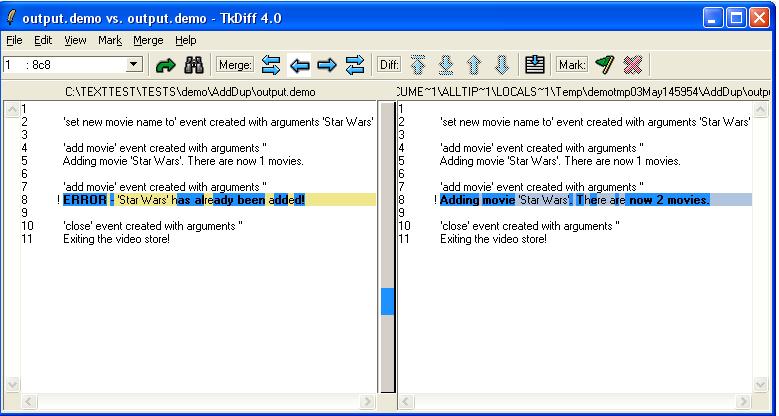
So, when your test fails and you click on it to see what went wrong, you might see this (Click to Enlarge):
On the left you see what we wanted the program to produce. On the right we see what actually happened. This is testing a small 'video store' application, and this test checks that the same movie cannot be added twice. Given what happened, it obviously can right now...
The focus is around testing a particular executable program with a variety of inputs. To start with, a plain text configuration file is created that tells TextTest about your program, how to run it, and how to test it. Tests (and test suites) are then defined entirely using plain text files in a directory structure.
A test is defined partly by the expected files and their contents that should be produced, and partly by the 'input' to provide, which can consist any or all of:
  • Options to be provided on the command line
  • A file to be redirected to standard input
  • Environment variables that should be set
  • A sequence of 'use-case' actions to be performed on a GUI (see  StoryText)
The application needs to write a log file describing what is happening, similar to the one shown above. Any output at all can be compared, so long as it is plain text, or can be converted to it.
For people wanting to test a GUI (custom or Web) you will need some scripting approach to that GUI so that tests can be run without needing somebody to click the buttons. For Python and Java GUIs we have the tool  StoryText, which is especially designed to work with TextTest.


本文转自张昺华-sky博客园博客,原文链接:http://www.cnblogs.com/bonelee/p/6508375.html ,如需转载请自行联系原作者


相关实践学习
【涂鸦即艺术】基于云应用开发平台CAP部署AI实时生图绘板
相关文章
|
安全 JavaScript 前端开发
AppSpider 7.5.020 发布 - Web 应用程序安全测试
AppSpider 7.5.020 for Windows - Web 应用程序安全测试
322 0
|
12月前
|
Java 测试技术 数据安全/隐私保护
通过yaml文件配置自动化测试程序
通过yaml文件可以将自动化测试环境,测试数据和测试行为分开,请看一下案例
454 4
|
12月前
|
JSON 缓存 测试技术
程序出错瞎找?教你写“会说话”的错误日志,秒定位原因
错误日志是排查问题的“导航地图”。本文详解错误三大来源:参数非法、交互故障、逻辑疏漏,并分享写好日志的6大原则——完整、具体、直接、集成经验、格式统一、突出关键字,助你快速定位问题,提升系统可维护性。
732 0
|
监控 安全 测试技术
【01】卓伊凡收到冒充税务机关的诈骗程序-决定在沙盒Sandbox环境中运行测试下-广大企业同胞们注意防诈骗
454 14
【01】卓伊凡收到冒充税务机关的诈骗程序-决定在沙盒Sandbox环境中运行测试下-广大企业同胞们注意防诈骗
|
安全 测试技术 Linux
Acunetix v25.4 发布 - Web 应用程序安全测试
Acunetix v25.4 (Linux, Windows) - Web 应用程序安全测试
546 3
Acunetix v25.4 发布 - Web 应用程序安全测试
|
安全 Devops 测试技术
AppSpider 7.5.018 for Windows - Web 应用程序安全测试
298 0
AppSpider 7.5.018 for Windows - Web 应用程序安全测试
|
安全 JavaScript Java
AppSpider Pro 7.5.015 for Windows - Web 应用程序安全测试
312 12
AppSpider Pro 7.5.015 for Windows - Web 应用程序安全测试
|
缓存 Java 测试技术
【01】噩梦终结flutter配安卓android鸿蒙harmonyOS 以及next调试环境配鸿蒙和ios真机调试环境-flutter项目安卓环境配置-gradle-agp-ndkVersion模拟器运行真机测试环境-本地环境搭建-如何快速搭建android本地运行环境-优雅草卓伊凡-很多人在这步就被难倒了
2297 3
【01】噩梦终结flutter配安卓android鸿蒙harmonyOS 以及next调试环境配鸿蒙和ios真机调试环境-flutter项目安卓环境配置-gradle-agp-ndkVersion模拟器运行真机测试环境-本地环境搭建-如何快速搭建android本地运行环境-优雅草卓伊凡-很多人在这步就被难倒了
|
自然语言处理 安全 测试技术
HCL AppScan Standard 10.8.0 (Windows) - Web 应用程序安全测试
1105 0
HCL AppScan Standard 10.8.0 (Windows) - Web 应用程序安全测试
|
数据可视化 前端开发 测试技术
接口测试新选择:Postman替代方案全解析
在软件开发中,接口测试工具至关重要。Postman长期占据主导地位,但随着国产工具的崛起,越来越多开发者转向更适合中国市场的替代方案——Apifox。它不仅支持中英文切换、完全免费不限人数,还具备强大的可视化操作、自动生成文档和API调试功能,极大简化了开发流程。