👉博__主👈:米码收割机
👉技__能👈:C++/Python语言
👉公众号👈:测试开发自动化【获取源码+商业合作】
👉荣__誉👈:阿里云博客专家博主、51CTO技术博主
👉专__注👈:专注主流机器人、人工智能等相关领域的开发、测试技术。
一、原文要求
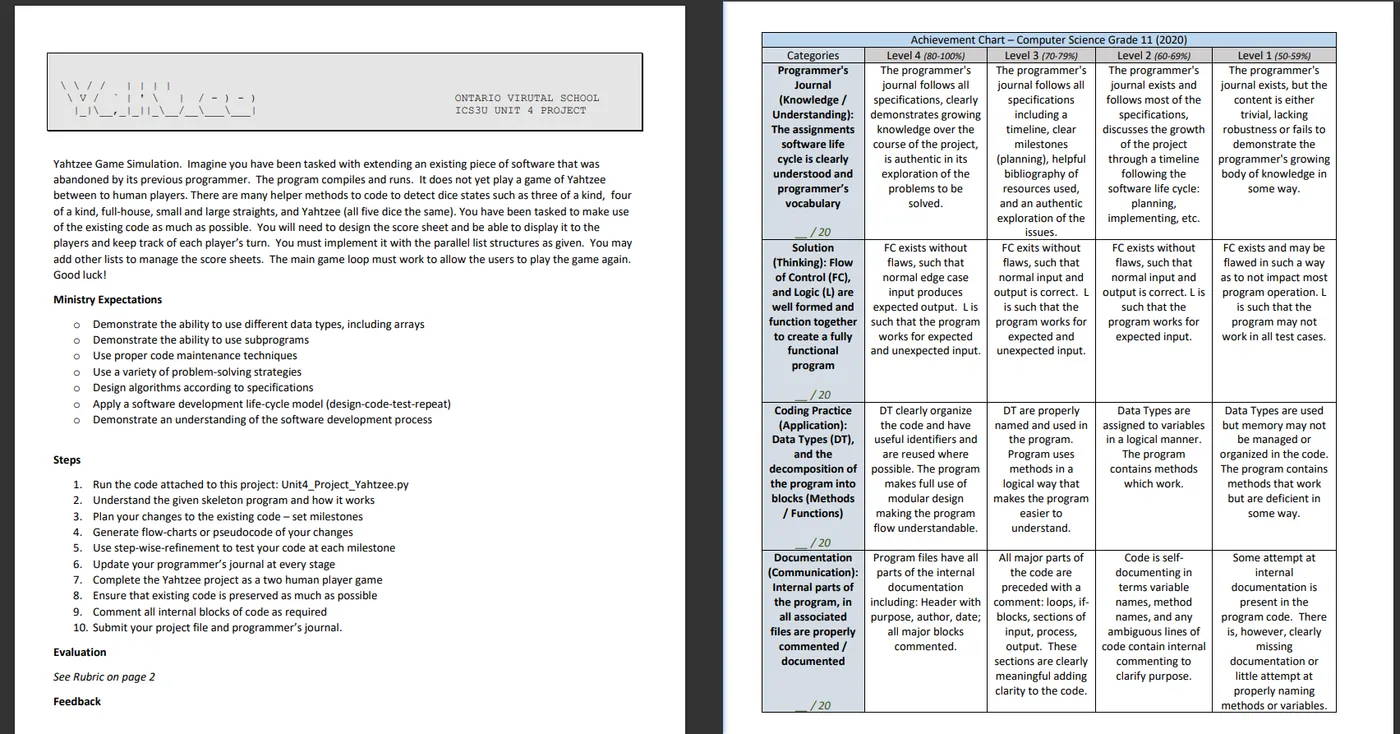
Yahtzee Game Simulation. Imagine you have been tasked with extending an existing piece of software that was abandoned by its previous programmer. The program compiles and runs. It does not yet play a game of Yahtzee
between to human players. There are many helper methods to code to detect dice states such as three of a kind, four of a kind, full-house, small and large straights, and Yahtzee (all five dice the same). You have been tasked to make use of the existing code as much as possible. You will need to design the score sheet and be able to display it to the players and keep track of each player’s turn. You must implement it with the parallel list structures as given. You may add other lists to manage the score sheets. The main game loop must work to allow the users to play the game again.
Good luck!
Ministry Expectations
o Demonstrate the ability to use different data types, including arrays
o Demonstrate the ability to use subprograms
o Use proper code maintenance techniques
o Use a variety of problem-solving strategies
o Design algorithms according to specifications
o Apply a software development life-cycle model (design-code-test-repeat)
o Demonstrate an understanding of the software development process
Steps
- Run the code attached to this project: Unit4_Project_Yahtzee.py
- Understand the given skeleton program and how it works
- Plan your changes to the existing code – set milestones
- Generate flow-charts or pseudocode of your changes
- Use step-wise-refinement to test your code at each milestone
- Update your programmer’s journal at every stage
- Complete the Yahtzee project as a two human player game
- Ensure that existing code is preserved as much as possible
- Comment all internal blocks of code as required
- Submit your project file and programmer’s journal.
二、中文描述
描述了一个Yahtzee(掷骰子游戏)模拟程序的开发任务。你的任务是继续开发一个由前一名程序员遗弃的软件项目。虽然该程序能够编译和运行,但尚未实现两个人类玩家之间进行Yahtzee游戏的功能。项目中有许多用于检测骰子状态的辅助方法,例如三样、四样、满屋、小顺和大顺,以及Yahtzee(五个骰子都相同)。你需要尽量使用现有的代码,并设计记分表以显示给玩家并跟踪每个玩家的回合。你必须使用给定的并行列表结构来实现它。你可以添加其他列表来管理记分表。主游戏循环必须允许用户重新玩游戏。祝你好运!
期望
o 展示使用不同数据类型的能力,包括数组
o 展示使用子程序的能力
o 使用适当的代码维护技术
o 使用多种解决问题的策略
o 根据规格设计算法
o 应用软件开发生命周期模型(设计-编码-测试-重复)
o 展示对软件开发过程的理解
步骤
- 运行附加到这个项目的代码:Unit4_Project_Yahtzee.py
- 理解给定的骨架程序及其工作方式
- 计划对现有代码的更改 - 设置里程碑
- 生成你更改的流程图或伪代码
- 在每个里程碑处使用分步细化来测试你的代码
- 在每个阶段更新你的程序员日志
- 完成Yahtzee项目作为一个两个人类玩家的游戏
- 确保尽可能保留现有代码
- 根据需要注释所有内部代码块
- 提交你的项目文件和程序员日志。
三、代码详解
这个代码实现的游戏是一个简化版本的骰子游戏,其中包括两名玩家(标记为"A"和"B")。每位玩家都有一个得分表,该得分表有13个槽位。游戏的目标是通过掷骰子来填满这些得分槽位。
游戏流程:
- 开始游戏:首先,轮到玩家"A"。
- 掷骰子:每名玩家轮流掷5个骰子(存储在列表
cup中)。系统会自动为当前玩家掷骰子并显示结果。 - 操作命令:在每个回合中,玩家有两次机会输入命令,这些命令包括:
sheet:查看当前玩家的得分表。score 1-13:将当前骰子的总和储存在得分表的指定槽位(从1到13)。rollDice:重新掷骰子(仅对没有被保留的骰子进行)。displayDice:显示当前骰子的状态。holdDie 1-5:保留一个指定位置(从1到5)的骰子。releaseDie 1-5:释放一个指定位置(从1到5)的骰子。help:显示可用命令列表。
- 轮换玩家:完成两次操作后,游戏切换到另一名玩家。
- 得分:玩家通过输入
score 1-13来将当前骰子的总和记录到得分表的某个槽位。每个槽位只能被填充一次。 - 游戏结束条件:当两名玩家的得分表都被完全填满时,游戏结束。
注意
- 每个骰子都有一个保留状态(
held列表中的布尔值),表示玩家是否选择保留该骰子。被保留的骰子在下次掷骰子时不会改变。 - 得分表(
score_sheet_a和score_sheet_b)最初都是空的(即全为None)。当玩家选择一个槽位并记录得分时,该槽位会被填充。 - 由于这是一个非常简化的版本,它没有实现像Yahtzee这样复杂的骰子游戏规则。所有得分都是基于当前骰子的总和。
这个游戏主要用于展示基本的掷骰子和得分机制,并没有高级的游戏逻辑或复杂的得分规则。它也没有错误处理或数据验证的全面实现。希望这能清晰地解释游戏的整体规则!
玩家可以输入以下命令:
sheet:查看得分表。score 1-13:将当前骰子的总和作为得分储存到指定的得分槽(1-13)中。rollDice:重新掷骰子。displayDice:显示当前骰子的状态。holdDie 1-5:保留指定位置(1-5)的骰子。releaseDie 1-5:释放指定位置(1-5)的骰子。help:查看可用的命令列表。
1. A掷骰子
使用score 1 将总和计入得分槽中,并使用sheet 查看。
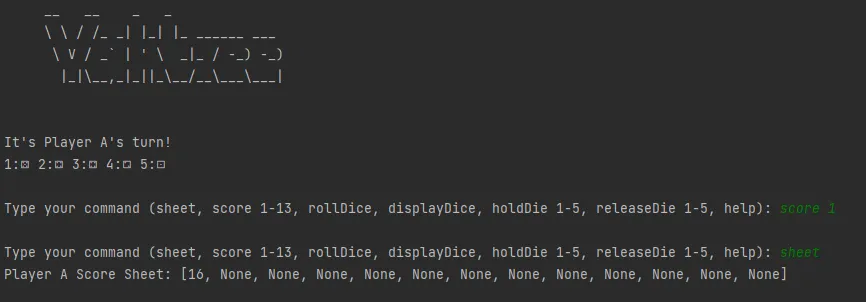
使用 rollDice,重新掷骰子 并使用 displayDice 显示当前骰子的状态。


2. B掷骰子
使用holdDie 1保留指定位置1的骰子。score 1 将总和计入得分槽中,并使用sheet 查看。


四、代码展示
代码框架展示:
# End of Unit 4: Yahtzee Project
#
# Purpose: to create a two player text based game.
# 1. Complete the code -alone- using the template below.
# 2. Do not 're-write' the project, make use of it.
# 3. Rules of the Game: https://en.wikipedia.org/wiki/Yahtzee
#    A sample graphical game example to play: https://cardgames.io/yahtzee/
# 4. Two Human players play a game of Yahtzee together
# 5. The game ends when both players fill their score sheet
# 6. A turn consists of one, two or three dice rolls.
#    A turn ends when (a) a player makes the third roll and scores
#    or (b) when a player stops rolling to record the dice on the score sheet.
#    The score-sheet consists of 13 slots.  Follow the rules for
#    filling in the score sheet.
# 7. Note: you must create a Command Line Interface for your game
# 8. commands must include:
#    sheet - displaying a player's full score sheet
#    score (1-13) - selecting a spot to score the current dice
#    rollDice() - rolling all free dice
#    displayDice() - showing the player their current dice.
#    holdDie (1-5) - a method of holding / keeping dice not to be rolled
#    releaseDie(1-5) - a method of releasing dice so they can be rolled.
#    help() - prints out a list of all valid commands for your CLI
# 9. Follow the Major Programming Rubric - Keep a Journal!
# 0. REMOVE TEMPLATE INSTRUCTIONS - REPLACE WITH YOUR COMMENTS
#
# Author: YOUR NAME HERE
#
# Date: DATE SUBMITTED HERE
#
# Setup the initial environment
import random
# a dictionary of dice - a data structure to make the game pretty
# - in Thonny increase font size under view to see them properly
dice = { 1 : "⚀",
         2 : "⚁",
         3 : "⚂",
         4 : "⚃",
         5 : "⚄",
         6 : "⚅"
         }
# the dice cup which hold the dice (a list of dice) - starting with impossible values
# the parallel array boolean flags required to hold specific dice
cup = [0,0,0,0,0]
held = [False,False,False,False,False]
# 。。。。。。。。。。。
# 。。。。。。。。。。。
# 。。。。。。。。。。。
# Your Main Program Here -- helpful hints follow and the methods given are simply tested below
# you'll need a game loop
# you'll need two score sheets, one for each player
# you'll need to keep track of which player (a or b) is playing.
# you'll need to keep track of which slots on the score sheet are still available for each player
# you'll need to protect the score sheet from incorrect selections
print("""\
 __   __    _   _
 \ \ / /_ _| |_| |_ ______ ___
  \ V / _` | ' \  _|_ / -_) -_)
   |_|\__,_|_||_\__/__\___\___|
                               """)
rollDice()
displayDice()
holdDie(1)  # simulating a player holding onto dice
holdDie(2)
rollDice()
displayDice()
releaseDie(1) # simulating a player making new holding pattern choices
holdDie(5)
rollDice()
displayDice()
print('chance score is: {0}'.format(chanceScore()))
完整代码截图: