需要源码和数据集请点赞关注收藏后评论区留言私信~~~
一、数据集简介
下面用到的数据集基于IAM数据集的英文手写字体自动识别应用,IAM数据库主要包含手写的英文文本,可用于训练和测试手写文本识别以及执行作者的识别和验证,该数据库在ICDAR1999首次发布,并据此开发了基于隐马尔可夫模型的手写句子识别系统,并于ICPR2000发布,IAM包含不受约束的手写文本,以300dpi的分辨率扫描并保存为具有256级灰度的PNG图像,IAM手写数据库目前最新的版本为3.0,其主要结构如下
约700位作家贡献笔迹样本
超过1500页扫描文本
约6000个独立标记的句子
超过一万行独立标记的文本
超过十万个独立标记的空间
展示如下 有许多张手写照片


二、实现步骤
1:数据清洗
删除文件中备注说明以及错误结果,统计正确笔迹图形的数量,最后将整理后的数据进行随机无序化处理
2:样本分类
接下来对数据进行分类 按照8:1:1的比例将样本数据集分为三类数据集,分别是训练数据集 验证数据集和测试数据集,针对训练数据集进行训练可以获得模型,而测试数据集主要用于测试模型的有效性
3:实现字符和数字映射
利用Tensorflow库的Keras包的StringLookup函数实现从字符到数字的映射 主要参数说明如下
max_tokens:单词大小的最大值
num_oov_indices:out of vocabulary的大小
mask_token:表示屏蔽输入的大小
oov_token:仅当invert为True时使用 OOV索引的返回值 默认为UNK
4:进行卷积变化
通过Conv2D函数实现二维卷积变换 主要参数说明如下
filters:整数值 代表输出空间的维度
kernel_size:一个整数或元组列表 指定卷积窗口的高度和宽度
strides:一个整数或元组列表 指定卷积沿高度和宽度的步幅
padding:输出图像的填充方式
activation:激活函数
三、效果展示
读取部分手写样本的真实文本信息如下
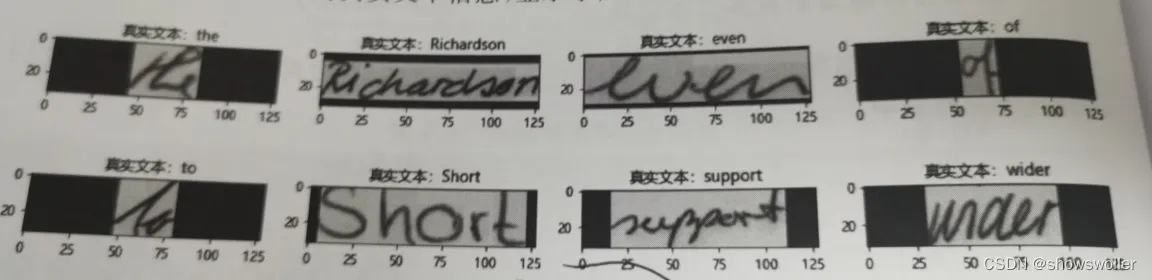
训练结束后 得到训练模型 导入测试手写文本数据 进行手写笔迹预测 部分结果如下

四、结果总结
观察预测结果可知,基于均值池化以及训练过程预警极值,大部分的英文字符能够得到准确的预测判定,训练的精度持续得到改善,损失值控制在比较合理的区间内,没有发生预测准确度连续多次无法改进的场景,模型稳定性较好
五、代码
部分代码如下 需要全部代码请点赞关注收藏后评论区留言私信~~~
from tensorflow.keras.layers.experimental.preprocessing import StringLookup
from tensorflow import keras
import matplotlib.pyplot as plt
import tensorflow as tf
import numpy as np
import os
plt.rcParams['font.family'] = ['Microsoft YaHei']
np.random.seed(0)
tf.random.set_seed(0)
# ## 切分数据
# In[ ]:
corpus_read = open("data/words.txt", "r").readlines()
corpus = []
length_corpus=0
for word in corpus_read:
    if lit(" ")[1] == "ok"):
        corpus.append(word)
np.random.shuffle(corpus)
length_corpus=len(corpus)
print(length_corpus)
corpus[400:405]
# 划分数据,按照 80:10:10 比例分配给训练:有效:测试   数据
# In[ ]:
train_flag = int(0.8 * len(corpus))
test_flag = int(0.9 * len(corpus))
train_data = corpus[:train_flag]
validation_data = corpus[train_flag:test_flag]
test_data = corpus[test_flag:]
train_data_len=len(train_data)
validation_data_len=len(validation_data)
test_data_len=len(test_data)
print("训练样本大小:", train_data_len)
print("验证样本大小:", validation_data_len)
print("测试样本大小:",test_data_len )
# In[ ]:
image_direct = "data\images"
def retrieve_image_info(data):
    image_location = []
    sample = []
    for (i, corpus_row) in enumerate(data):
        corpus_strip = corpus_row.strip()
        corpus_strip = corpus_strip.split(" ")
        image_name = corpus_strip[0]
        leve1 = image_name.split("-")[0]
        leve2 = image_name.split("-")[1]
        image_location_detail = os.path.join(
            image_direct, leve1, leve1 + "-" + leve2, image_name + ".png"
        )
        if os.path.getsize(image_location_detail) >0 :
            image_location.append(image_location_detail)
            sample.append(corpus_row.split("\n")[0])
    print("手写图像路径:",image_location[0],"手写文本信息:",sample[0])
    return image_location, sample
train_image, train_tag = retrieve_image_info(train_data)
validation_image, validation_tag = retrieve_image_info(validation_data)
test_image, test_tag = retrieve_image_info(test_data)
# In[ ]:
# 查找训练数据词汇最大长度
train_tag_extract = []
vocab = set()
max_len = 0
for tag in train_tag:
    tag = tag.split(" ")[-1].strip()
    for i in tag:
        vocab.add(i)
    max_len = max(max_len, len(tag))
    train_tag_extract.append(tag)
print("最大长度: ", max_len)
print("单词大小: ", len(vocab))
print("单词内容: ", vocab)
train_tag_extract[40:45]
# In[ ]:
print(train_tag[50:54])
print(validation_tag[10:14])
print(test_tag[80:84])
def extract_tag_info(tags):
    extract_tag = []
    for tag in tags:
        tag = tag.split(" ")[-1].strip()
        extract_tag.append(tag)
    return extract_tag
train_tag_tune = extract_tag_info(train_tag)
validation_tag_tune = extract_tag_info(validation_tag)
test_tag_tune = extract_tag_info(test_tag)
print(train_tag_tune[50:54])
print(validation_tag_tune[10:14])
print(test_tag_tune[80:84])
# In[ ]:
AUTOTUNE = tf.data.AUTOTUNE
# 映射单词到数字
string_to_no = StringLookup(vocabulary=list(vocab),  invert=False)
# 映射数字到单词
no_map_string = StringLookup(
    vocabulary=string_to_no.get_vocabulary(),  invert=True)
# In[ ]:
def distortion_free_resize(image, img_size):
    w, h = img_size
    image = tf.image.resize(image, size=(h, w), preserve_aspect_ratio=True, antialias=False, name=None)
    # 计算填充区域大小
    pad_height = h - tf.shape(image)[0]
    pad_width = w - tf.shape(image)[1]
    if pad_height % 2 != 0:
        height = pad_height // 2
        pad_height_top = height + 1
        pad_height_bottom = height
    else:
        pad_height_top = pad_height_bottom = pad_height // 2
    if pad_width % 2 != 0:
        width = pad_width // 2
        pad_width_left = width + 1
        pad_width_right = width
    else:
        pad_width_left = pad_width_right = pad_width // 2
    image = tf.pad(
        image,
        paddings=[
            [pad_height_top, pad_height_bottom],
            [pad_width_left, pad_width_right],
            [0, 0],
        ],
    )
    image = tf.transpose(image, perm=[1, 0, 2])
    image = tf.image.flip_left_right(image)
    return image
# In[ ]:
batch_size = 64
padding_token = 99
image_width = 128
image_height = 32
def preprocess_image(image_path, img_size=(image_width, image_height)):
    image = tf.io.read_file(image_path)
    image = tf.image.decode_png(image, 1)
    image = distortion_free_resize(image, img_size)
    image = tf.cast(image, tf.float32) / 255.0
    return image
def vectorize_tag(tag):
    tag = string_to_no(tf.strings.unicode_split(tag, input_encoding="UTF-8"))
    length = tf.shape(tag)[0]
    pad_amount = max_len - length
    tag = tf.pad(tag, paddings=[[0, pad_amount]], constant_values=padding_token)
    return tag
def process_images_tags(image_path, tag):
    image = preprocess_image(image_path)
    tag = vectorize_tag(tag)
    return {"image": image, "tag": tag}
def prepare_dataset(image_paths, tags):
    dataset = tf.data.Dataset.from_tensor_slices((image_paths, tags)).map(
        process_images_tags, num_parallel_calls=AUTOTUNE
    )
    return dataset.batch(batch_size).cache().prefetch(AUTOTUNE)
# In[ ]:
train_final = prepare_dataset(train_image, train_tag_extract )
validation_final = prepare_dataset(validation_image, validation_tag_tune )
test_final = prepare_dataset(test_image, test_tag_tune )
print(train_final.take(1))
print(train_final)
# In[ ]:
plt.rcParams['font.family'] = ['Microsoft YaHei']
for data in train_final.take(1):
    images, tags = data["image"], data["tag"]
    _, ax = plt.subplots(4, 4, figsize=(15, 8))
    for i in range(16):
        img = images[i]
        img = tf.image.flip_left_right(img)
        img = tf.transpose(img, perm=[1, 0, 2])
        img = (img * 255.0).numpy().clip(0, 255).astype(np.uint8)
        img = img[:, :, 0]
        tag = tags[i]
        indices = tf.gather(tag, tf.where(tf.math.not_equal(tag, padding_token)))
        tag = tf.strings.reduce_join(no_map_string(indices))
        tag = tag.numpy().decode("utf-8")
        ax[i // 4, i % 4].imshow(img)
        ax[i // 4, i % 4].set_title(u"真实文本:%s"%tag)
        ax[i // 4, i % 4].axis("on")
plt.show()
# In[ ]:
class CTCLoss(keras.layers.Layer):
    def call(self, y_true, y_pred):
        batch_len = tf.cast(tf.shape(y_true)[0], dtype="int64")
        input_length = tf.cast(tf.shape(y_pred)[1], dtype="int64")
        tag_length = tf.cast(tf.shape(y_true)[1], dtype="int64")
        input_length = input_length * tf.ones(shape=(batch_len, 1), dtype="int64")
        tag_length = tag_length * tf.ones(shape=(batch_len, 1), dtype="int64")
        loss = keras.backend.ctc_batch_cost(y_true, y_pred, input_length, tag_length)
        self.add_loss(loss)
        return loss
def generate_model():
    # Inputs to the model
    input_img = keras.Input(shape=(image_width, image_height, 1), name="image")
    tags = keras.layers.Input(name="tag", shape=(None,))
    # First conv block.
    t = keras.layers.Conv2D(
        filters=32,
        kernel_size=(3, 3),
        activation="relu",
        kernel_initializer="he_normal",
        padding="same",
        name="ConvolutionLayer1")(input_img)
    t = keras.layers.AveragePooling2D((2, 2), name="AveragePooling_one")(t)
    # Second conv block.
    t = keras.layers.Conv2D(
        filters=64,
        kernel_size=(3, 3),
        activation="relu",
        kernel_initializer="he_normal",
        padding="same",
        name="ConvolutionLayer2")(t)
    t = keras.layers.AveragePooling2D((2, 2), name="AveragePooling_two")(t)
    #re_shape = (t,[(image_width // 4), -1])
    #tf.dtypes.cast(t, tf.int32)
    re_shape = ((image_width // 4), (image_height // 4) * 64)
    t = keras.layers.Reshape(target_shape=re_shape, name="reshape")(t)
    t = keras.layers.Dense(64, activation="relu", name="denseone",use_bias=False,
    kernel_initializer='glorot_uniform',
    bias_initializer='zeros')(t)
    t = keras.layers.Dropout(0.4)(t)
    # RNNs.
    t = keras.layers.Bidirectional(
        keras.layers.LSTM(128, return_sequences=True, dropout=0.4)
    )(t)
    t = keras.layers.Bidirectional(
        keras.layers.LSTM(64, return_sequences=True, dropout=0.4)
    )(t)
    t = keras.layers.Dense(
        len(string_to_no.get_vocabulary())+2, activation="softmax", name="densetwo"
    )(t)
    # Add CTC layer for calculating CTC loss at each step.
    output = CTCLoss(name="ctc_loss")(tags, t)
    # Define the model.
    model = keras.models.Model(
        inputs=[input_img, tags], outputs=output, name="handwriting"
    )
    # Optimizer.
    # Compile the model and return.
    model.compile(optimizer=keras.optimizers.Adam())
    return model
# Get the model.
model = generate_model()
model.summary()
# In[ ]:
validation_images = []
validation_tags = []
for batch in validation_final:
    validation_images.append(batch["image"])
    validation_tags.append(batch["tag"])
# In[ ]:
#epochs = 20
model = generate_model()
prediction_model = keras.models.Model(
    model.get_layer(name="image").input, model.get_layer(name="densetwo").output)
#edit_distance_callback = EarlyStoppingAtLoss()
epochs = 60
early_stopping_patience = 10
# Add early stopping
early_stopping = keras.callbacks.EarlyStopping(
    monitor="val_loss", patience=early_stopping_patience, restore_best_weights=True
)
# Train the model.
history = model.fit(
    train_final,
    validation_data=validation_final,
    epochs=60,callbacks=[early_stopping]
)
# ## Inference
# In[ ]:
plt.rcParams['font.family'] = ['Microsoft YaHei']
# A utility function to decode the output of the network.
def handwriting_prediction(pred):
    input_len = np.ones(pred.shape[0]) * pred.shape[1]
  = []
    for j in results:
        j = tf.gather(j, tf.where(tf.math.not_equal(j, -1)))
        j = tf.strings.reduce_join(no_map_string(j)).numpy().decode("utf-8")
        output_text.append(j)
    return output_text
#  Let's check results on some test samples.
for test in test_final.take(1):
    test_images = test["image"]
    _, ax = plt.subplots(4, 4, figsize=(15, 8))
    predit = prediction_model.predict(test_images)
    predit_text = handwriting_prediction(predit)
    for k in range(16):
        img = test_images[k]
        img = tf.image.flip_left_right(img)
        img = tf.transpose(img, perm=[1, 0, 2])
        img = (img * 255.0).numpy().clip(0, 255).astype(np.uint8)
        img = img[:, :, 0]
        title = f"预测结果: {predit_text[k]}"
# In[ ]:
创作不易 觉得有帮助请点赞关注收藏~~~