成功解决ImportError: Could not find 'msvcp140.dll'. TensorFlow requires that this DLL be installed in a

简介: 成功解决ImportError: Could not find 'msvcp140.dll'. TensorFlow requires that this DLL be installed in a

解决问题


ImportError: Could not find 'msvcp140.dll'. TensorFlow requires that this DLL be installed in a directory that is named in your %PATH% environment variable. You may install this DLL by downloading Visual C++ 2015 Redistributable Update 3 from this URL: https://www.microsoft.com/en-us/download/details.aspx?id=53587

>>> import tensorflow

Traceback (most recent call last):

 File "F:\Program Files\Python\Python36\lib\site-packages\tensorflow\python\platform\self_check.py", line 47, in preload_check

   ctypes.WinDLL(build_info.msvcp_dll_name)

 File "F:\Program Files\Python\Python36\lib\ctypes\__init__.py", line 348, in __init__

   self._handle = _dlopen(self._name, mode)

OSError: [WinError 126] 找不到指定的模块。

During handling of the above exception, another exception occurred:

Traceback (most recent call last):

 File "<stdin>", line 1, in <module>

 File "F:\Program Files\Python\Python36\lib\site-packages\tensorflow\__init__.py", line 22, in <module>

   from tensorflow.python import pywrap_tensorflow  # pylint: disable=unused-import

 File "F:\Program Files\Python\Python36\lib\site-packages\tensorflow\python\__init__.py", line 49, in <module>

   from tensorflow.python import pywrap_tensorflow

 File "F:\Program Files\Python\Python36\lib\site-packages\tensorflow\python\pywrap_tensorflow.py", line 30, in <module>

   self_check.preload_check()

 File "F:\Program Files\Python\Python36\lib\site-packages\tensorflow\python\platform\self_check.py", line 55, in preload_check

   % build_info.msvcp_dll_name)

ImportError: Could not find 'msvcp140.dll'. TensorFlow requires that this DLL be installed in a directory that is named in your %PATH% environment variable. You may install this DLL by downloading Visual C++ 2015 Redistributable Update 3 from this URL: https://www.microsoft.com/en-us/download/details.aspx?id=53587


解决思路


      ImportError:找不到'msvcp140.dll'。TensorFlow要求将此DLL安装在%PATH%环境变量中指定的目录中。您可以通过从此URL下载Visual C ++ 2015 Redistributable Update 3来安装此DLL:https: //www.microsoft.com/en-us/download/details.aspx?id = 53587


解决方法
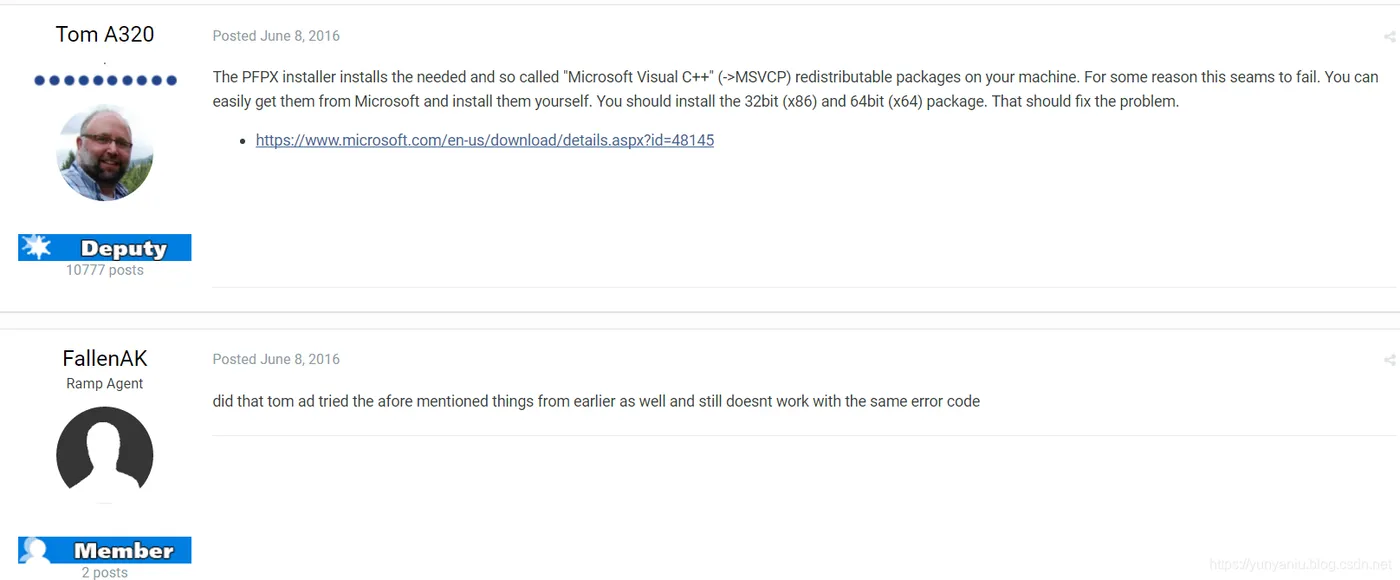

image.png

The PFPX installer installs the needed and so called "Microsoft Visual C++" (->MSVCP) redistributable packages on your machine. For some reason this seams to fail. You can easily get them from Microsoft and install them yourself. You should install the 32bit (x86) and 64bit (x64) package. That should fix the problem.


https://www.microsoft.com/en-us/download/details.aspx?id=48145


第一次尝试

先下载:

然后复制:将msvcp140.dll复制到路径F:……\ Python \ Python35或者C:\WINNT\System32下
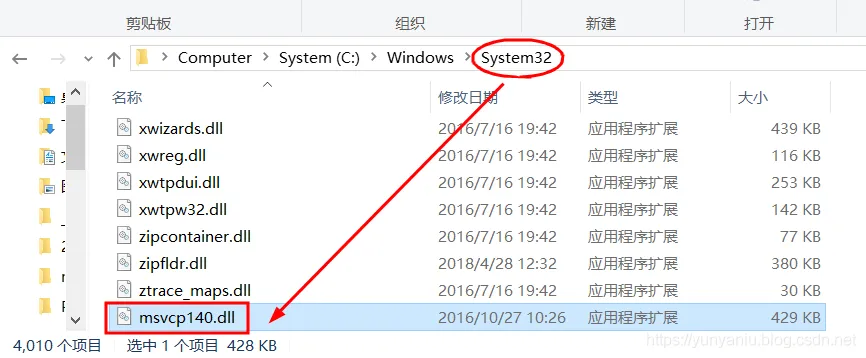
image.png


相关文章
|
并行计算 Linux Docker
Docker【部署 07】镜像内安装tensorflow-gpu及调用GPU多个问题处理Could not find cuda drivers+unable to find libcuda.so...
1362 0
|
机器学习/深度学习 Linux TensorFlow
【Tensorflow 2】解决tensorflow.python.framework.errors_impl.UnknownError: [_Derived_] Fail to find the...
本文解决了在使用TensorFlow 2.0和Keras API时,尝试使用双向LSTM (tf.keras.layers.Bidirectional) 出现的未知错误问题,并提供了三种解决该问题的方法。
502 3
|
TensorFlow 算法框架/工具 iOS开发
【Python-Tensorflow】ERROR: Could not find a version that satisfies the requirement tensorflow
本文讨论了在安装TensorFlow时遇到的版本兼容性问题,并提供了根据Python版本选择正确pip版本进行安装的解决方法。
2000 1
|
机器学习/深度学习 API TensorFlow
【Tensorflow+keras】解决 Fail to find the dnn implementation.
在TensorFlow 2.0环境中使用双向长短期记忆层(Bidirectional LSTM)遇到“Fail to find the dnn implementation”错误时的三种解决方案。
235 0
|
TensorFlow 算法框架/工具 Python
tensorflow安装错误:Could not find a version that satisfies the requirement tensorflow 解决
|
机器学习/深度学习 并行计算 TensorFlow
成功解决ImportError: Could not find 'cudart64_90.dll'. TensorFlow requires that this DLL be installed in
tensorflow遇到ImportError: Could not find 'cudart64_100.dll'错误解决
tensorflow遇到ImportError: Could not find 'cudart64_100.dll'错误解决在安装tensorflow的时候,使用import tensorflow出现了找不到dll文件的错误,参考了很多博客和stackflow的解决方案,发现其中只说了版本号不匹配,但是没有具体说明什么样的版本才是适配正确的,因此手写此避坑指南。
16367 0
|
机器学习/深度学习 人工智能 算法
猫狗宠物识别系统Python+TensorFlow+人工智能+深度学习+卷积网络算法
宠物识别系统使用Python和TensorFlow搭建卷积神经网络,基于37种常见猫狗数据集训练高精度模型,并保存为h5格式。通过Django框架搭建Web平台,用户上传宠物图片即可识别其名称,提供便捷的宠物识别服务。
1129 55
|
机器学习/深度学习 数据采集 数据可视化
TensorFlow,一款由谷歌开发的开源深度学习框架,详细讲解了使用 TensorFlow 构建深度学习模型的步骤
本文介绍了 TensorFlow,一款由谷歌开发的开源深度学习框架,详细讲解了使用 TensorFlow 构建深度学习模型的步骤,包括数据准备、模型定义、损失函数与优化器选择、模型训练与评估、模型保存与部署,并展示了构建全连接神经网络的具体示例。此外,还探讨了 TensorFlow 的高级特性,如自动微分、模型可视化和分布式训练,以及其在未来的发展前景。
1062 5
|
机器学习/深度学习 人工智能 算法
鸟类识别系统Python+卷积神经网络算法+深度学习+人工智能+TensorFlow+ResNet50算法模型+图像识别
鸟类识别系统。本系统采用Python作为主要开发语言,通过使用加利福利亚大学开源的200种鸟类图像作为数据集。使用TensorFlow搭建ResNet50卷积神经网络算法模型,然后进行模型的迭代训练,得到一个识别精度较高的模型,然后在保存为本地的H5格式文件。在使用Django开发Web网页端操作界面,实现用户上传一张鸟类图像,识别其名称。
623 12
鸟类识别系统Python+卷积神经网络算法+深度学习+人工智能+TensorFlow+ResNet50算法模型+图像识别

热门文章

最新文章