tensorflow遇到ImportError: Could not find 'cudart64_100.dll'错误解决

简介: tensorflow遇到ImportError: Could not find 'cudart64_100.dll'错误解决在安装tensorflow的时候,使用import tensorflow出现了找不到dll文件的错误,参考了很多博客和stackflow的解决方案,发现其中只说了版本号不匹配,但是没有具体说明什么样的版本才是适配正确的,因此手写此避坑指南。

tensorflow遇到ImportError: Could not find 'cudart64_100.dll'错误解决
在安装tensorflow的时候,使用import tensorflow出现了找不到dll文件的错误,参考了很多博客和stackflow的解决方案,发现其中只说了版本号不匹配,但是没有具体说明什么样的版本才是适配正确的,因此手写此避坑指南。再次感谢Function兄的指导帮助。
笔者环境:

python 版本3.6
tensorflow版本1.14
1
2
ImportError: Could not find 'cudart64_100.dll'
1
简答:
仔细分析错误的类型、原因

搞清自己的tensorflow以及CUDA版本

换用对应版本进行解决,完成cuda与tf的适配,cudnn与cuda的适配,protobuf与tf的适配

一. 错误类型原因
问题是找不到cuda系的dll文件的模块,提示需要下载CUDA10.0,那么首先查看cuda的路径下是否存在该文件:
通过C:Program FilesNVIDIA GPU Computing ToolkitCUDA路径访问cuda,在其bin目录下查找是否有cudart64_100.dll模块
如果有,则查看环境变量是否添加;如果没有,可能就是cuda版本和tensorflow版本的匹配问题

二. 搞清自己的tensorflow及CUDA版本
进入命令行环境下,首先通过python --version确定自己的python版本是3.6
再通过pip list查看已经安装好的tensorflow版本,笔者本人的版本是1.14
通过nvcc --version查看cuda版本,笔者之前的cuda版本是V9.0.176;

通过Tesnsorflow官网查找对应版本信息如下:

可以看到当Tensorflow的版本>=1.13时,CUDA的版本需要是10.0,同时cudnn版本号需要大于7.4.1;
这里笔者选用了将cuda的版本卸载,以适用tensorflow版本
直接进入C:Program FilesNVIDIA GPU Computing ToolkitCUDA路径下将文件夹删除,并且将环境变量删除。
找到了一个高中生搭的服务器下载链接,这里的下载速度会快一些:
tensorflow相关下载链接

三. 匹配对应的cudnn对应cuda版本
将cuda版本安装后,再次打开jupyter运行import tensorflow,发现并没有成功,出现了找不到'cudnn64_7.dll'的错误:

ImportError: Could not find 'cudnn64_7.dll'
1
此提示表示缺少cudnn模块的dll文件,根据tensorflow文档,对应tensorflow1.13版本以上,cudnn需要是>7.4.1的版本,下载cudnn版本,cudnn的目录结构如下:

将cudnn目录下的文件对应放在cuda目录下即可

四. 匹配对应的protobuf对应tf版本
此时应该是没问题了吧,笔者继续运行import tensorflow, MMP, 并没有顺利运行,出现了提示'descriptor'的错误:

ImportError: cannot import name 'descriptor'
1
stackflow上的tf安装问题汇总

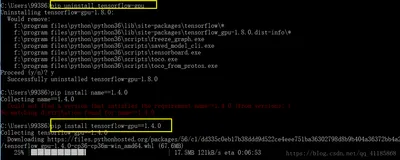
通过stackflow上查找,发现该错误出现的原因是因为protobuf和tf的版本不对应,因为tf和pro之间存在依赖关系,于是笔者首先uninstall pro, 接着uninstall tf,最后重新install tf ,tf会自动对依赖项pro进行安装。
中间出现了一点小插曲,笔者是用virtualenv的py虚拟环境,于是安装好了版本后,依然会出现'descriptor'的错误,于是自己在原生py环境中测试了下,发现可以导入tf。那么原因就是可能因为系统找不到py虚拟环境中的sitepackage,将虚拟环境的py-bin下的目录设置为环境变量,即可正常调用。
最后结果导入成功:


作者:精神抖擞王大鹏
来源:CSDN
原文:https://blog.csdn.net/qq_29027865/article/details/93236034
版权声明:本文为博主原创文章,转载请附上博文链接!

相关文章
|
并行计算 Linux Docker
Docker【部署 07】镜像内安装tensorflow-gpu及调用GPU多个问题处理Could not find cuda drivers+unable to find libcuda.so...
1656 0
|
机器学习/深度学习 Linux TensorFlow
【Tensorflow 2】解决tensorflow.python.framework.errors_impl.UnknownError: [_Derived_] Fail to find the...
本文解决了在使用TensorFlow 2.0和Keras API时,尝试使用双向LSTM (tf.keras.layers.Bidirectional) 出现的未知错误问题,并提供了三种解决该问题的方法。
712 3
|
TensorFlow 算法框架/工具 iOS开发
【Python-Tensorflow】ERROR: Could not find a version that satisfies the requirement tensorflow
本文讨论了在安装TensorFlow时遇到的版本兼容性问题,并提供了根据Python版本选择正确pip版本进行安装的解决方法。
2791 1
|
机器学习/深度学习 API TensorFlow
【Tensorflow+keras】解决 Fail to find the dnn implementation.
在TensorFlow 2.0环境中使用双向长短期记忆层(Bidirectional LSTM)遇到“Fail to find the dnn implementation”错误时的三种解决方案。
401 0
|
TensorFlow 算法框架/工具 Python
tensorflow安装错误:Could not find a version that satisfies the requirement tensorflow 解决
|
TensorFlow 算法框架/工具 C++
成功解决ImportError: Could not find 'msvcp140.dll'. TensorFlow requires that this DLL be installed in a
|
机器学习/深度学习 并行计算 TensorFlow
成功解决ImportError: Could not find 'cudart64_90.dll'. TensorFlow requires that this DLL be installed in
|
机器学习/深度学习 人工智能 算法
猫狗宠物识别系统Python+TensorFlow+人工智能+深度学习+卷积网络算法
宠物识别系统使用Python和TensorFlow搭建卷积神经网络,基于37种常见猫狗数据集训练高精度模型,并保存为h5格式。通过Django框架搭建Web平台,用户上传宠物图片即可识别其名称,提供便捷的宠物识别服务。
1701 55
|
机器学习/深度学习 人工智能 算法
鸟类识别系统Python+卷积神经网络算法+深度学习+人工智能+TensorFlow+ResNet50算法模型+图像识别
鸟类识别系统。本系统采用Python作为主要开发语言,通过使用加利福利亚大学开源的200种鸟类图像作为数据集。使用TensorFlow搭建ResNet50卷积神经网络算法模型,然后进行模型的迭代训练,得到一个识别精度较高的模型,然后在保存为本地的H5格式文件。在使用Django开发Web网页端操作界面,实现用户上传一张鸟类图像,识别其名称。
1090 12
鸟类识别系统Python+卷积神经网络算法+深度学习+人工智能+TensorFlow+ResNet50算法模型+图像识别
|
机器学习/深度学习 数据采集 数据可视化
TensorFlow,一款由谷歌开发的开源深度学习框架,详细讲解了使用 TensorFlow 构建深度学习模型的步骤
本文介绍了 TensorFlow,一款由谷歌开发的开源深度学习框架,详细讲解了使用 TensorFlow 构建深度学习模型的步骤,包括数据准备、模型定义、损失函数与优化器选择、模型训练与评估、模型保存与部署,并展示了构建全连接神经网络的具体示例。此外,还探讨了 TensorFlow 的高级特性,如自动微分、模型可视化和分布式训练,以及其在未来的发展前景。
1273 5

热门文章

最新文章