vCenter Server Appliance (vCSA) is a Security hardened base Suse (SLES 11 SP3) operating system packaged with vCenter server and vFabric Postgres database. vCSA appliance supports Oracle as external database. vCenter Server Appliance contains all of the necessary services for running vCenter Server 6.0 along with its components. As an alternative to installing vCenter Server on a Windows host machine, you can deploy the vCenter Server Appliance. It helps you quickly deploy vCenter Server without spending time to prepare windows operating system for vCenter server Installation. vCSA now supports most of the features which is supported with windows version of vCenter server.
What’s New with vCenter Server Appliance (vCSA) Installation:
As compared with the deployment of previous version of vCSA, vCSA 6.0 is different. Prior to vSphere 6.0, vCSA can be deployed using OVF template but It should be deployed using ISO image in vCSA 6.0. You need to download .iso installer for the vCenter Server Appliance and Client Integration Plug-in.
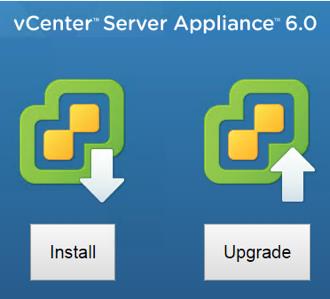
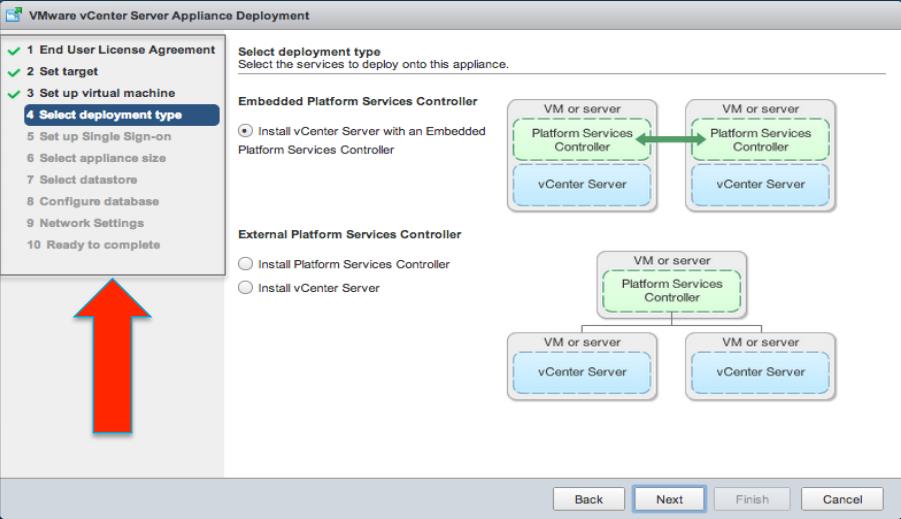
Install the Client Integration plugin and double-click “html” file in the software installer directory,which will allow access to the VMware Client Integration Plug-In and click Install or Upgrade to start the vCenter Server Appliance deployment wizard. You will be provided with various options during the deployment including the Deployment type of vCenter Server.
vCenter 6.0 Deployment Methods:
Embedded Platform Services Controller:
All services bundled with the Platform Services Controller are deployed on the same virtual machine as vCenter Server. vCenter Server with an embedded Platform Services Controller is suitable for smaller environments with eight or less product instances.
External Platform Services Controller:
The services bundled with the Platform Services Controller and vCenter Server are deployed on different virtual machines.You must deploy the VMware Platform Services Controller first on one virtual appliance and then deploy vCenter Server on another appliance. The Platform Services Controller can be shared across many products. This configuration is suitable for larger environments with nine or more product instances.
vCSA 6.0 Appliance Access:
As Compared with the Previous Versions of vCSA, vCSA 6.0 appliance access has been modified a bit. vCSA no more having admin URL with port 5480 to control and configure the vCenter Server appliance. Now there are 3 Methods to access the vCSA appliance
vSphere Web Client UI
Appliance Shell
Direct Control User Interface (DCUI)
With DCUI added with vCSA. Look and Feel of vCSA is very similar to ESXi host. Black box model.
vCSA 6.0 Appliance Sizing:
During vCSA 6.0 deployment, you will be asked to select the deployment size of vCSA appliance. There are 4 default out-of-box sizes available with vCSA deployment.

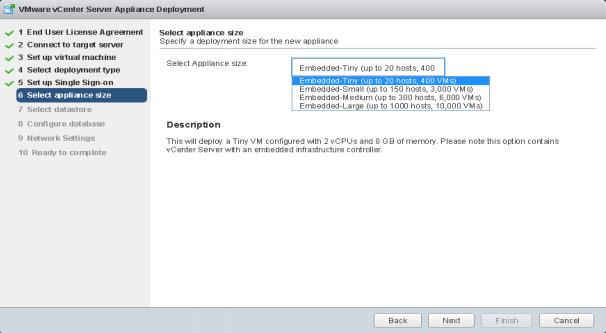
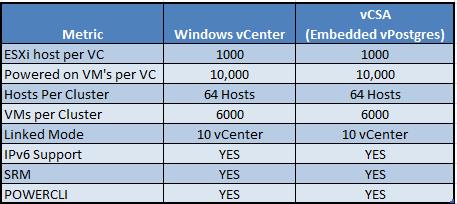
Comparison between vCenter 6.0 Windows and vCSA 6.0
vCSA now supports most of the features which is supported with the windows version of vCenter server. I would like to provide quick comparison table between vCenter windows version and vCenter server appliance with embedded database.
I hope this post helps you to understand the new features and changes about vCenter Server appliance 6.0. Thanks for reading!!!. Be social and share it in social media, if you feel worth sharing it.
vSphere 6.0 Related Articles:
vSphere 6.0 -Difference between vSphere 5.0, 5.1, 5.5 and vSphere 6.0
vSphere 6.0 What’s New – Improved and Faster vSphere Web Client
vSphere 6.0 – What’s New in vCenter Server Appliance(vCSA) 6.0
vSphere 6.0 New Features – What is VMware Virtual Volumes (VVols)?
vSphere 6.0 vMotion Enhancements – vMotion Across vSwitches and vCenter Servers
vSphere 6.0 – NFS 4.1 supported with Kerberos Authentication and Multipathing