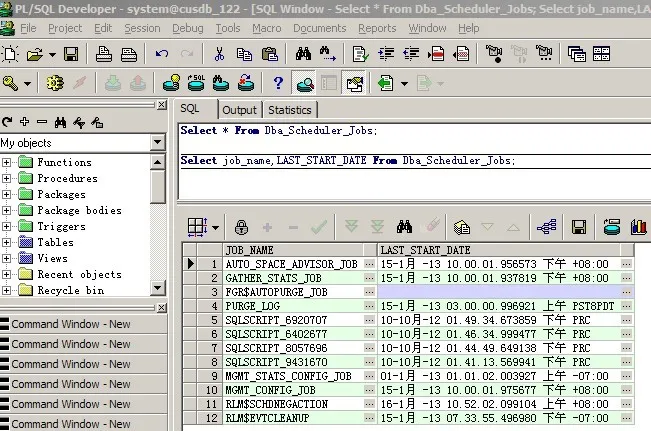
和许多网友一样,今天遇到了ora-01882问题,查了matelink解决了!
环境:
Oracle server端版本:
SQL> select * from v$version;
BANNER
----------------------------------------------------------------
Oracle Database 10g Enterprise Edition Release 10.2.0.5.0 - 64bi
PL/SQL Release 10.2.0.5.0 - Production
CORE 10.2.0.5.0 Production
TNS for Linux: Version 10.2.0.5.0 - Production
NLSRTL Version 10.2.0.5.0 - Production
Oracle client端版本:
OS:windows XP 32bit
DB client:Oracle 10.2.0.1
现象:
--客户端查询报错:
SQL> select * from dba_scheduler_jobs;
ERROR:
ORA-01882: 未找到时区区域 %s
未选定行
SQL> select * from v$timezone_file;
FILENAME VERSION
------------ ----------
timezlrg.dat 4
--登录server端查询正常
SQL> Select job_name,LAST_START_DATE From Dba_Scheduler_Jobs Where job_name='GATHER_STATS_JOB';
JOB_NAME LAST_START_DATE
-------------------- ----------------------------------------
GATHER_STATS_JOB 15-1月 -13 10.00.01.937819 下午 +08:00
分析:
通过查找资料,参考这个网友的分析的文章
http://blog.chinaunix.net/uid-20274021-id-1969654.html
--根据我的具体问题,重点参考文章中蓝色部分,如下:
Please make sure you have the error using the sqlplus found in the oracle_home on the server (!!! this is important !!!). IF and ONLY IF that is the case run the fix script found below directly on the server.
If you do NOT have a ORA-01882 when using the sqlplus found in the oracle_home on the server but you DO have it when connecting from a remote client then it means the remote client has not been updated to V3 or higher. In that case running the script will NOT solve the issue, you then need to update the client's DST version.
For windows clients see Note 417893.1 How To Apply The V4 DST Patches To Windows Clients or Servers
--问题原因应该是oracle客户端版本太旧,存在bug所致。
--通过matelink找到Note 417893.1,使用红色部分的解决方案
How To Apply The V4 DST Patches To Windows Clients or Servers [ID 417893.1]
If you need to patch windows clients or servers then can download the patch for
Windows for each version you have and simply copy the 3 needed files.
Note that there are different patches for 32bit / 64 bit x86 and 64 bit Itanium
To see on what platform you are you can use
select platform_id, platform_name from v$database;
-> Windows 32 bit is platform 7 (Microsoft Windows IA (32-bit))
-> Windows x86 64 bit is platform 233 (Microsoft Windows Server 2003 (64-bit AMD64 and Intel EM64T))
-> Windows Itanium is platform 206 (Microsoft Windows XP (64-bit Itanium)) or
208 (Microsoft Windows Server 2003 (64-bit Itanium))
or you can start "winver"
a x86 64 bit AMD64/EMT64 will mention "x64 edition"
to see if it's a Itanium system:
Click Start, right-click My Computer, and then click Properties.
In the System Properties window, click the General tab.
Note the first line under Computer:
Itanium or Itanium 2 appears on this line if it's a Itanium system.
Above information is provided as-is. Please contact Microsoft if you have
any questions regarding this
A) Windows 32 bit ( NT4/2000/XP/Vista)
--------------------------------------
1) Download the Windows 32 bit server patch for your version.
For a 9.2.0.X client or server (9.2.0.1 to 9.2.0.8) download the 9.2.0.8 patch
containing the DST V4 files: https://updates.oracle.com/download/5845928.html
For a 10.1.0.X client or server (10.1.0.1 to 10.1.0.5) download the 10.1.0.5 patch
containing the DST V4 files: https://updates.oracle.com/download/5728221.html
For a 10.2.0.X client or server ( 10.2.0.1 to 10.2.0.3) download the 10.2.0.3 patch
containing the DST V4 files: https://updates.oracle.com/download/5731535.html
2) Unzip the patch, and locate the 3 files readme.txt, timezone.dat and timezlrg.dat
in the patch, for 9.2 and 10.2 they are in the "files\oracore\zoneinfo"
directory of the uncompressed patch.
3) For a server install we recommend to backup the %ORACLE_HOME%\oracore\zoneinfo directory .
3) Copy the 2 .dat files and the readme.txt file that were found in step 2
into the %ORACLE_HOME%\oracore\zoneinfo directory on your clients or server.
Please make sure you copy the correct version.
The files from the 9.2 patch for a 9.2.0.X client or server.
The files from the 10.1 patch for a 10.1.0.X client or server.
The files from the 10.2 patch for a 10.2.0.x client or server.
4) Restart the client applications (in case of client install)
or database (in case of a server install).
B) Windows 64 bit x86 (AMD64 and EMT64)
---------------------------------------
1) Download the Windows 64 bit x86 (AMD64 and EMT64) (XP/2003) server patch for your version.
For a 10.2.0.X client or server ( 10.2.0.1 to 10.2.0.3) download the 10.2.0.3 patch
containing the DST V4 files: https://updates.oracle.com/download/5731537.html
2) Unzip the patch, and locate the 3 files readme.txt, timezone.dat and timezlrg.dat
in the patch, for 10.2 they are in the "files\oracore\zoneinfo" directory of
the uncompressed patch.
3) For a server install we recommend to backup the %ORACLE_HOME%\oracore\zoneinfo directory .
3) Copy the 2 .dat files and the readme.txt file that were found in step 2
into the %ORACLE_HOME%\oracore\zoneinfo directory on your clients or server.
Please make sure you copy the correct version.
The files from the 10.2 patch for a 10.2.0.x client or server.
4) restart the client applications (in case of client install)
or database (in case of a server install).
C) Windows 64 bit Itanium
-------------------------
1) Download the Windows 64 bit Itanium server patch for your version.
For a 9.2.0.X client or server (9.2.0.1 to 9.2.0.8) download the 9.2.0.8 patch
containing the DST V4 files: https://updates.oracle.com/download/5845932.html
For a 10.1.0.X client or server (10.1.0.1 to 10.1.0.5) download the 10.1.0.5 patch
containing the DST V4 files: https://updates.oracle.com/download/5731205.html
-> this is not out yet.
For a 10.2.0.X client or server ( 10.2.0.1 to 10.2.0.3) download the 10.2.0.3 patch
containing the DST V4 files: https://updates.oracle.com/download/5731536.html
2) Unzip the patch, and locate the 3 files readme.txt, timezone.dat and timezlrg.dat
in the patch, for 9.2, 10.1 and 10.2 they are in the "files\oracore\zoneinfo"
directory of the uncompressed patch.
3) For a server install we recommend to backup the %ORACLE_HOME%\oracore\zoneinfo directory .
3) Copy the 2 .dat files and the readme.txt file that were found in step 2
into the %ORACLE_HOME%\oracore\zoneinfo directory on your clients or server.
Please make sure you copy the correct version.
The files from the 9.2 patch for a 9.2.0.X client or server.
The files from the 10.1 patch for a 10.1.0.X client or server.
The files from the 10.2 patch for a 10.2.0.x client or server.
4) restart the client applications (in case of client install)
or database (in case of a server install).
Remarks:
--------
* there is no easy way to identify a client's version.
the Oracle_Home can be read from the registry under
HKEY_LOCAL_MACHINE\SOFTWARE\Oracle
if you have there HOMEx (HOME0, HOME1,HOME2 ) you know this is 8,8i or 9i
the actual directory is in the ORACLE_HOME key.
if you have KEY_ then this is 10.1 or 10.2,
again the the actual directory is in the ORACLE_HOME key.
once you have the directory you can check for
%oracle_home%\inventory\Components21\oracle.rsf\9.2.0.1.0 -> 9i
%oracle_home%\inventory\Components21\oracle.rsf\10.1.0.2.0 -> 10.1
%oracle_home%\inventory\Components21\oracle.rsf\10.2.0.1.0 -> 10.2
* For Instant Clients on Windows you need to download a NEW version from OTN.
You CANNOT patch a Instant Client with above method.
Setting ORA_TZFILE will not help - ORA_TZFILE is ignored by the Instant Client.
On Unix it is possible to generate yourself a new instant client from a patched env,
but not on windows.
解决方法:
Windows 32 bit ( NT4/2000/XP/Vista) 平台
1.下载相应版本的DST V4补丁文件,如下:
For a 10.2.0.X client or server ( 10.2.0.1 to 10.2.0.3) download the 10.2.0.3 patch
containing the DST V4 files: https://updates.oracle.com/download/5731535.html
2.解压缩补丁包 p5731535_10203_WINNT.zip
在files\oracore\zoneinfo目录下找到这三个文件:readme.txt, timezone.dat and timezlrg.dat
3.copy上面三个文件到你的客户端oracle的%ORACLE_HOME%\oracore\zoneinfo目录,把原来文件替换掉。
4.重新启动你oracle客户端连程序或database,是直接重启了我的电脑。
因为我是pl/sql developer连接的,重启连接程序后再连报错,所以直接重启了下我的电脑,再次连接后查询正常