0.90 里给 mapping 加一个
_ttl,文档到期就会被自动删掉——不用定时任务、不用 delete-by-query。这个功能 2.0 被标记废弃,5.0 正式移除。这篇看它当年的实现细节,以及官方给的替代方案。
说明
实测环境:本地另起一个 Elasticsearch 7.17.29 单节点实例(官方 tar 包,端口 9200,独立 path.data);本机没有 0.x / 1.x / 2.x 二进制,所以这里验的是这些限制在较新版本上的当前行为与默认值,不是当年的执行过程。文末「在 7.17.29 上跑一遍」里的命令与响应均取自该实例。
先看 0.90 的原文
0.90 的文档(docs/reference/mapping/fields/ttl-field.asciidoc @ v0.90.13,锚点 mapping-ttl-field)开篇是这么写的:
A lot of documents naturally come with an expiration date. Documents can therefore have a
_ttl(time to live), which will cause the expired documents to be deleted automatically.
"自动删除"这四个字在 2013 年很有吸引力——那时候没有 ILM,管理"日志只留 7 天"这类需求,要么自己写定时任务删,要么按天建索引再整体删索引。ES 内置一个 TTL,等于把这件事收进引擎里。
当时的用法
默认关闭,要在 mapping 里开:
{

    "tweet" : {

        "_ttl" : {
    "enabled" : true }
    }
}
想给整个 type 一个默认值:
{

    "tweet" : {

        "_ttl" : {
    "enabled" : true, "default" : "1d" }
    }
}
几个当时需要知道的细节,文档里都写了:
- 时间单位:可以写
d(天)、m(分钟)、h(小时)、ms(毫秒)、w(周);不写单位默认是毫秒——这个坑不小,"default": "7"是 7 毫秒。 - 不给
default也不在文档里带_ttl:文档的 TTL 是无限,永不过期。 - 存储方式:默认
store: yes、index: not_analyzed,而且文档特意强调index必须是not_analyzed,否则清理流程不工作。 - 改默认值:可以用 put mapping 动态更新
default,但只影响之后写入的文档,已索引的文档 TTL 不变。
过期是怎么执行的
文档里有一节 "Note on documents expiration",把实现说得很直白:
Expired documents will be automatically deleted regularly. You can dynamically set the
indices.ttl.intervalto fit your needs. The default value is60s.
也就是说:后台有一个周期性任务,默认每 60 秒跑一次,扫出过期的文档删掉。相关参数:
| 设置 | 默认 | 作用 |
|---|---|---|
indices.ttl.interval |
60s |
清理任务的运行间隔 |
indices.ttl.bulk_size |
10000 |
每批删除的文档数 |
还有一条设计得挺细的说明:
Note that the expiration procedure handle versioning properly so if a document is updated between the collection of documents to expire and the delete order, the document won't be deleted.
即"扫描出待删列表"到"真正发删除"之间,如果文档被更新过,就不会被删。避免刚写入的新数据被误删。
它为什么被拿掉
2.0 先标记废弃(migrate_2_0/mapping.asciidoc @ v2.4.6):
260: ==== `_timestamp` and `_ttl` deprecated
262: The `_timestamp` and `_ttl` fields are deprecated, but will remain functional
268: The current `_ttl` functionality will be replaced in a future version with a
关键词是 "remain functional"——2.0 只是宣布,功能照旧能用。
5.0 正式移除(migrate_5_0/mapping.asciidoc @ v5.6.16):
The
_timestampand_ttlfields were deprecated and are now removed. As a replacement for_timestamp, you should populate a regular date field with the current timestamp on application side. For_ttl, you should either use time-based indices, or delete documents with a delete-by-query on a timestamp field.
官方给的替代方案两条,也正是现在还在用的做法:
_timestamp:别指望引擎给你记时间,应用层自己写一个普通 date 字段;_ttl:要么按时间建索引(到期整个索引删掉),要么按时间字段跑 delete-by-query。
至于为什么:文档没直说。能核实到的机制问题是——_ttl 的清理靠周期性扫描 + 批量删除,文档过期这件事被放进了引擎的后台任务里,规模一大就是持续的额外负担;而"按时间建索引"把删除变成整个索引的丢弃,代价低得多。这段属判断,不是官方说法。
它不是孤例:0.90 的元字段家族
_ttl 不是单独存在的。0.90 的 docs/reference/mapping/fields/ 目录下并排放着这些元字段页面:
_all、_analyzer、_boost、_id、_index、_parent、_routing、_size、_source、_timestamp、_ttl、_type、_uid。
可以看到当时的思路:ES 倾向于把"文档生命周期里常见的需求"直接做成元字段——时间有 _timestamp、过期有 _ttl、父子关系有 _parent、路由有 _routing、权重有 _boost。
这些元字段后来的处理方式高度一致:_boost 在 1.0 被移除(改用 function_score),_timestamp 和 _ttl 在 2.0 废弃、5.0 移除,_all 在 6.0 默认关闭、7.0 彻底移除,_parent 最终被 join 字段接替。活到今天的只有 _source、_id、_routing 等少数几个。
这条脉络比单个字段的存废更值得记:ES 从"什么都内置"走向"引擎只做引擎"的过程,就是靠一次次迁移文档里的 deprecated / removed 完成的。
如果你还在维护带 _ttl 的老集群
升级路径上有一条硬阻断,5.0 的迁移文档写得很直接(migrate_5_0/mapping.asciidoc#L183):
_ttland_timestampcannot be created
意思是 5.0 之后带这两个元字段的 mapping 直接创建失败,不是告警、是报错,不是忽略。所以:
- 升到 5.x 之前,必须先把 mapping 里的
_ttl、_timestamp清掉; - 清掉之后,原本靠
_ttl自动删除的数据要用别的手段接住——按官方给的替代方案,就是把"按时间建索引 + 到期删索引"这条链路先搭好再切; - 切换期间注意数据量的台阶:从逐文档删除变成整索引删除,磁盘占用的曲线形状会不一样,别按老经验设告警。
现在的做法对照
| 需求 | 0.90 的做法 | 现在的做法 |
|---|---|---|
| 文档自动过期 | mapping 里 _ttl.enabled + default |
按时间建索引(rollup/数据流 + ILM),到期删整个索引 |
| 保留时间戳 | _timestamp 元字段 |
应用层写普通 date 字段 |
| 按条件清理 | 引擎后台扫描 | delete-by-query / ILM 的删除阶段 |
在 7.17.29 上跑一遍
_ttl 在 5.0 移除,用较新版本声明一次就能确认。
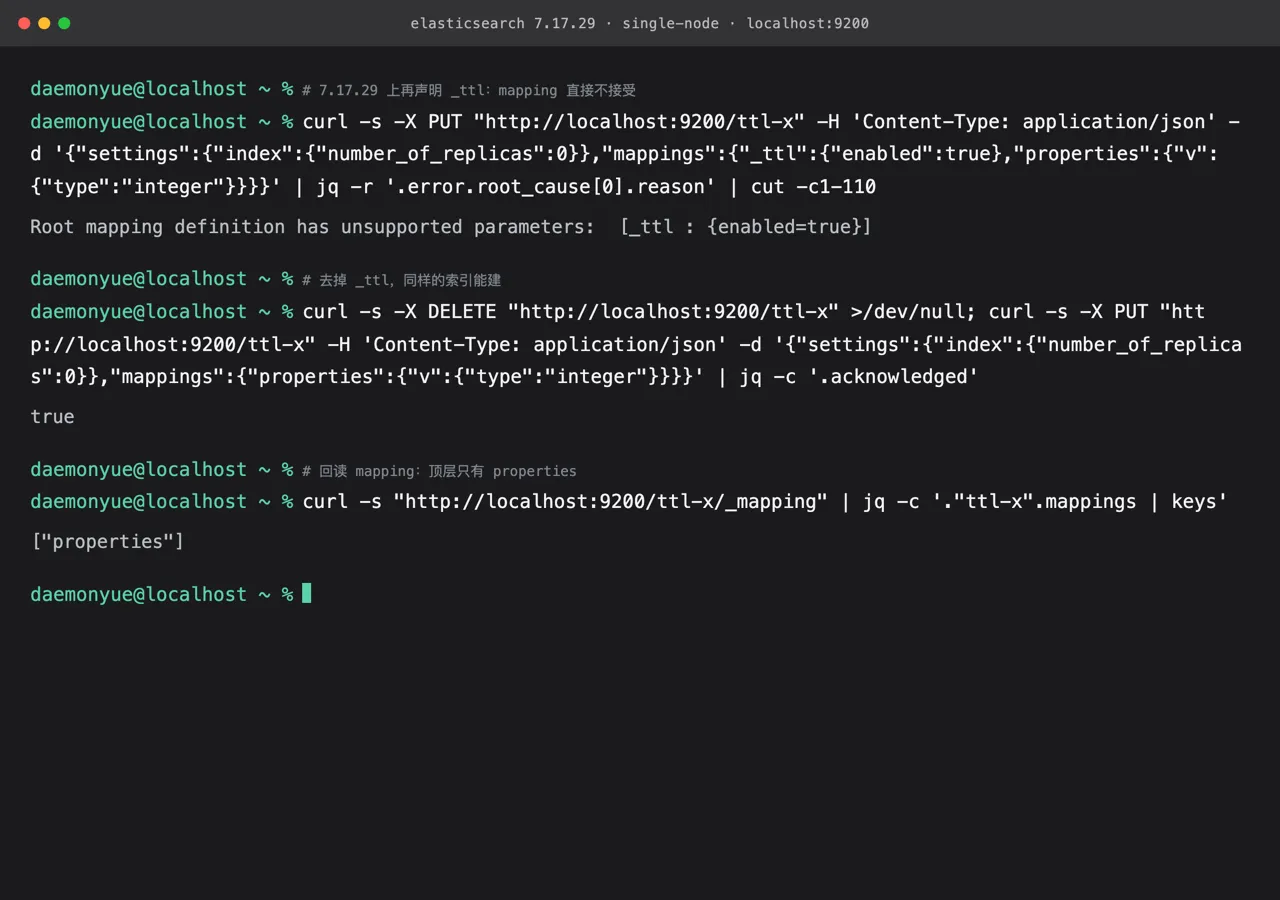
图 1:7.17.29 单节点实例的实测输出。mapping 顶层带 _ttl 报 Root mapping definition has unsupported parameters: [_ttl : {enabled=true}];去掉后索引能建,回读 mapping 顶层只有 properties。
curl -s -X PUT 'http://localhost:9200/ttl-x' -H 'Content-Type: application/json' \
  -d '{"settings":{"index":{"number_of_replicas":0}},"mappings":{"_ttl":{"enabled":true},"properties":{"v":{"type":"integer"}}}}' \
  | jq -r '.error.root_cause[0].reason'
# Root mapping definition has unsupported parameters:  [_ttl : {enabled=true}]
curl -s -X DELETE 'http://localhost:9200/ttl-x' >/dev/null
curl -s -X PUT 'http://localhost:9200/ttl-x' -H 'Content-Type: application/json' \
  -d '{"settings":{"index":{"number_of_replicas":0}},"mappings":{"properties":{"v":{"type":"integer"}}}}' \
  | jq -c '.acknowledged'
# true
curl -s 'http://localhost:9200/ttl-x/_mapping' | jq -c '."ttl-x".mappings | keys'
# ["properties"]
图 1 把「5.0 正式移除」验成了当前版本的具体报错。本机没有 0.90 二进制,_ttl 当年自动过期与 purge 线程的行为没有实例可对照。
边界:
- 图 1 出自 7.17.29 单节点实例,没有 0.90 / 2.x 二进制;
- 替代方案(按时间字段配合 delete-by-query、ILM)未实测;
- 只验了 mapping 声明阶段,写入带
_ttl的文档未测。
写在最后
_ttl的兴衰很能说明 ES 设计取向的变化:0.90 什么都想内置(TTL、timestamp、boost 字段、facets 都是),2.0 开始往"引擎只做引擎"的方向收,5.0 把这些内置功能一次性清理掉。- 现在不要再找替代品去实现"单文档 TTL"——官方明确指向按时间分索引这条路,顺着做,成本最低。
- 老集群升级时注意:5.0 起带
_ttl的 mapping 直接创建失败(migrate_5_0/mapping.asciidoc#L183那条_ttland_timestampcannot be created),是报错,不是警告。
参考
- mapping/fields/ttl-field.asciidoc @ v0.90.13
- migrate_2_0/mapping.asciidoc#L260-L268 @ v2.4.6
- migrate_5_0/mapping.asciidoc#L88-L94、L183 @ v5.6.16
本文引用的原文均取自本地
elasticsearch/仓库的v0.90.13/v2.4.6/v5.6.16标签。0.90 那份文档没有可用的行号锚点,按章节标题引用;2.0/5.0 的引用带行号。「为什么被拿掉」一节中官方未说明原因的部分已标明属判断。「在 7.17.29 上跑一遍」里已实际声明_ttlmapping:报Root mapping definition has unsupported parameters: [_ttl : {enabled=true}],去掉后索引可建、回读 mapping 只有properties。本机无 0.90 二进制,自动过期与 purge 线程行为未实测;替代方案未实测。