前言
本文将详细描述如何利用python来处理JSON文件,将由浅入深从JSON文件格式介绍一步一步到python自带json库函数解析,整合上述操作再实现python脚本处理JSON文件。
一、JSON介绍
JSON(JavaScript Object Notation, JS 对象简谱) 是一种轻量级的数据交换格式。它基于 ECMAScript (欧洲计算机协会制定的js规范)的一个子集,采用完全独立于编程语言的文本格式来存储和表示数据。简洁和清晰的层次结构使得 JSON 成为理想的数据交换语言。 易于人阅读和编写,同时也易于机器解析和生成,并有效地提升网络传输效率。
1.JSON语法规则
JSON是一个标记符的序列。这套标记符包含六个构造字符、字符串、数字和三个字面名。
JSON是一个序列化的对象或数组。
数据为 键 / 值 (name/value)对;
数据由逗号(,)分隔;
大括号保存对象(object);
方括号保存数组(Array);
值可以是对象、数组、数字、字符串或者三个字面值(false、null、true)中的一个。值中的字面值中的英文必须使用小写。
如:
"code":"100"
对象由花括号括起来的逗号分割的成员构成,成员是字符串键和上文所述的值由逗号分割的键值对组成:
{“code”:20,"type":"mysql"}
数组是由方括号括起来的一组值构成:
"datesource":[
            {"code":"20", "type":"mysql"},
            {"code":"20", "type":"mysql"},
            {"code":"20", "type":"mysql"}
        ]
二、python json库
python3的标准库中带有json库,就是处理json文件的。
json数据处理类型:
序列化:将python的数据转换为json格式的字符串
反序列化:将json格式的字符串转换为python类型
1.序列化
将python的数据转换为json格式的字符串
首先与json对应的python数据结构相似的就是dict字典了,故要把python数据转为json需要先转为字典形式,
1.1json.dump()
首先我们创立一个新文件test.json,该文件为空文件方便我们后续存储。
我们可以通过json.dump()函数实现存储到json中:
import json
dict1 ={"code":20,"type":"sql"}
with open ('test.json','w+') as f:
    json.dump(dict1,f)
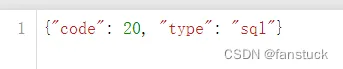
再次查看test.json会发现已经写入数据。
1.2to_json()
我们可以通过dataframe转为json,了解过pandas库的同学肯定对dataframe很熟悉,dataframe的数据类型也和字典十分相似也可以互相转换,所以转换为json也不是什么难事。想要详细了解的可以再看:一文速学-数据分析之Pandas数据结构和基本操作代码,中间需要用到pandas库
to_json默认参数和格式为:
DataFrame.to_json(path_or_buf=None, orient=None,
date_format=None, double_precision=10,
force_ascii=True, date_unit='ms',
 default_handler=None, lines=False,
compression=None, index=True)
path_or_buf : string or file handle, optional
File path or object. If not specified, the result is returned as a string.
orient : string
Indication of expected JSON string format.
Series
default is ‘index’
allowed values are: {‘split’,’records’,’index’}
DataFrame
default is ‘columns’
allowed values are: {‘split’,’records’,’index’,’columns’,’values’}
The format of the JSON string
‘split’ : dict like {‘index’ -> [index], ‘columns’ -> [columns], ‘data’ -> [values]}
‘records’ : list like [{column -> value}, … , {column -> value}]
‘index’ : dict like {index -> {column -> value}}
‘columns’ : dict like {column -> {index -> value}}
‘values’ : just the values array
‘table’ : dict like {‘schema’: {schema}, ‘data’: {data}} describing the data, and the data component is like orient='records'.
Changed in version 0.20.0.
date_format : {None, ‘epoch’, ‘iso’}
Type of date conversion. ‘epoch’ = epoch milliseconds, ‘iso’ = ISO8601. The default depends on the orient. For orient='table', the default is ‘iso’. For all other orients, the default is ‘epoch’.
double_precision : int, default 10
The number of decimal places to use when encoding floating point values.
force_ascii : boolean, default True
Force encoded string to be ASCII.
date_unit : string, default ‘ms’ (milliseconds)
The time unit to encode to, governs timestamp and ISO8601 precision. One of ‘s’, ‘ms’, ‘us’, ‘ns’ for second, millisecond, microsecond, and nanosecond respectively.
default_handler : callable, default None
Handler to call if object cannot otherwise be converted to a suitable format for JSON. Should receive a single argument which is the object to convert and return a serialisable object.
lines : boolean, default False
If ‘orient’ is ‘records’ write out line delimited json format. Will throw ValueError if incorrect ‘orient’ since others are not list like.
New in version 0.19.0.
compression : {None, ‘gzip’, ‘bz2’, ‘zip’, ‘xz’}
A string representing the compression to use in the output file, only used when the first argument is a filename.
New in version 0.21.0.
index : boolean, default True
Whether to include the index values in the JSON string. Not including the index (index=False) is only supported when orient is ‘split’ or ‘table’.
New in version 0.23.0.
后面一篇博客将会详细解析to_json和read_json。
import pandas as pd
data = {'code':[20,19],
        'type':['sql','hive']
}
df=pd.DataFrame(data)
with open('test.json','w+') as f:
    df.to_json(f,orient='index')

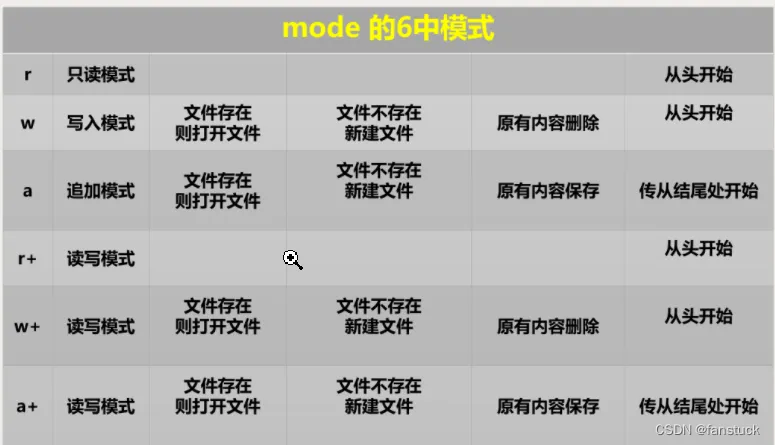
这里with open为w+,中把文件重覆盖掉,因此每执行一次json文件里面的内容就会刷新。想要追加记录修改mode就行:
1.3json.dumps()
json.dumps将一个Python数据转换为JSON 文件。与上述json.dump()的区别是:json.dump()聚焦于数据本身类型的转换,对数据的操作。
import json
dict1 ={"code":20,"type":"sql"}
dict1_json = json.dumps(dict1)
print(type(dict1_json))
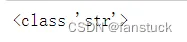
输出为json的数据形式。
2.反序列化
将json格式的字符串转换为python类型,我们要用到一下函数: json.load(),read_json(), json.loads()。
2.1json.load()
json_load()将json文件转换为python数据类型,当json文件是数组形式时读为llis类型,当json文件仅由对象组成则为字典:
1.with open('one.json','r')as json_f:
    df1=json.load(json_f)
print(df1)
print(type(df1))

with open('two.json','r')as json_f:
    df2=json.load(json_f)
print(df2)
print(type(df2))

2.2read_json()
read_json()在pandas库中,常用于pandas数据分析和统计。read_json()函数的参数如下:
pandas.read_json(path_or_buf=None, orient=None, typ='frame', dtype=True,
convert_axes=True, convert_dates=True, keep_default_dates=True,
numpy=False, precise_float=False, date_unit=None, encoding=None,
lines=False, chunksize=None, compression='infer')
path_or_buf : a valid JSON string or file-like, default: None
The string could be a URL. Valid URL schemes include http, ftp, s3, and file. For file URLs, a host is expected. For instance, a local file could be file://localhost/path/to/table.json
orient : string,
Indication of expected JSON string format. Compatible JSON strings can be produced by to_json() with a corresponding orient value. The set of possible orients is:
'split' : dict like {index -> [index], columns -> [columns], data -> [values]}
'records' : list like [{column -> value}, ... , {column -> value}]
'index' : dict like {index -> {column -> value}}
'columns' : dict like {column -> {index -> value}}
'values' : just the values array
The allowed and default values depend on the value of the typ parameter.
when typ == 'series',
allowed orients are {'split','records','index'}
default is 'index'
The Series index must be unique for orient 'index'.
when typ == 'frame',
allowed orients are {'split','records','index', 'columns','values', 'table'}
default is 'columns'
The DataFrame index must be unique for orients 'index' and 'columns'.
The DataFrame columns must be unique for orients 'index', 'columns', and 'records'.
New in version 0.23.0: ‘table’ as an allowed value for the orient argument
typ : type of object to recover (series or frame), default ‘frame’
dtype : boolean or dict, default True
If True, infer dtypes, if a dict of column to dtype, then use those, if False, then don’t infer dtypes at all, applies only to the data.
convert_axes : boolean, default True
Try to convert the axes to the proper dtypes.
convert_dates : boolean, default True
List of columns to parse for dates; If True, then try to parse datelike columns default is True; a column label is datelike if
it ends with '_at',
it ends with '_time',
it begins with 'timestamp',
it is 'modified', or
it is 'date'
keep_default_dates : boolean, default True
If parsing dates, then parse the default datelike columns
numpy : boolean, default False
Direct decoding to numpy arrays. Supports numeric data only, but non-numeric column and index labels are supported. Note also that the JSON ordering MUST be the same for each term if numpy=True.
precise_float : boolean, default False
Set to enable usage of higher precision (strtod) function when decoding string to double values. Default (False) is to use fast but less precise builtin functionality
date_unit : string, default None
The timestamp unit to detect if converting dates. The default behaviour is to try and detect the correct precision, but if this is not desired then pass one of ‘s’, ‘ms’, ‘us’ or ‘ns’ to force parsing only seconds, milliseconds, microseconds or nanoseconds respectively.
lines : boolean, default False
Read the file as a json object per line.
New in version 0.19.0.
encoding : str, default is ‘utf-8’
The encoding to use to decode py3 bytes.
New in version 0.19.0.
chunksize: integer, default None
Return JsonReader object for iteration. See the line-delimted json docs for more information on chunksize. This can only be passed if lines=True. If this is None, the file will be read into memory all at once.
New in version 0.21.0.
compression : {‘infer’, ‘gzip’, ‘bz2’, ‘zip’, ‘xz’, None}, default ‘infer’
For on-the-fly decompression of on-disk data. If ‘infer’, then use gzip, bz2, zip or xz if path_or_buf is a string ending in ‘.gz’, ‘.bz2’, ‘.zip’, or ‘xz’, respectively, and no decompression otherwise. If using ‘zip’, the ZIP file must contain only one data file to be read in. Set to None for no decompression.
New in version 0.21.0.
后面一篇博客将会详细解析to_json和read_json。
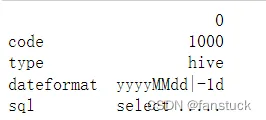
with open('two.json','r')as json_f:
    df3=pd.read_json(json_f,orient='index')
print(df3)
with open('one.json','r')as json_f:
    df3=pd.read_json(json_f,orient='values')
print(df3)

2.3json.loads()
一般是与json.dumps连用,主要处理pythpn内将json格式数据转换为字典。
dict1 ={"code":20,"type":"sql"}
dict1_json = json.dumps(dict1)
json_load=json.loads(dict1_json)
print(json_load)
print(type(json_load))