效果图:
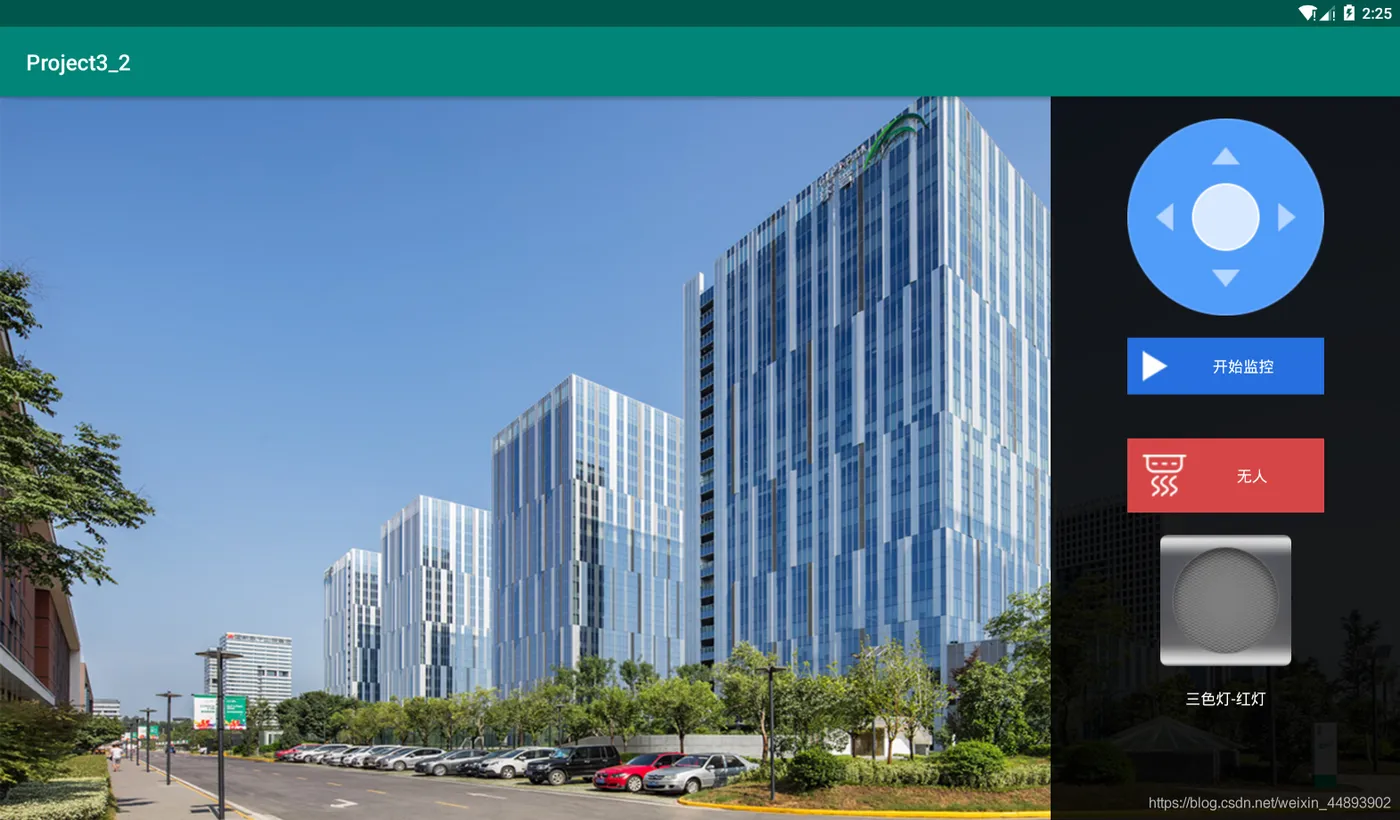
布局代码:
<?xml version="1.0" encoding="utf-8"?>
<LinearLayout xmlns:android="http://schemas.android.com/apk/res/android"
    android:layout_width="match_parent"
    android:layout_height="match_parent"
    android:background="@drawable/bg_out"
    android:orientation="horizontal">
    <LinearLayout
        android:layout_width="0dp"
        android:layout_height="match_parent"
        android:layout_weight="3"></LinearLayout>
    <LinearLayout
        android:layout_width="0dp"
        android:layout_height="match_parent"
        android:layout_weight="1"
        android:background="#e0000000"
        android:gravity="center_horizontal"
        android:orientation="vertical">
        <RelativeLayout
            android:layout_width="180dp"
            android:layout_height="180dp"
            android:layout_marginTop="20dp"
            android:background="@drawable/bg_direction">
            <ImageView
                android:id="@+id/ivLeft"
                android:layout_width="wrap_content"
                android:layout_height="wrap_content"
                android:layout_alignParentLeft="true"
                android:layout_centerVertical="true"
                android:layout_marginLeft="10dp"
                android:src="@drawable/arrow_left_white" />
            <ImageView
                android:id="@+id/ivRight"
                android:layout_width="wrap_content"
                android:layout_height="wrap_content"
                android:layout_alignParentRight="true"
                android:layout_centerVertical="true"
                android:layout_marginRight="10dp"
                android:src="@drawable/arrow_right_white" />
            <ImageView
                android:id="@+id/ivTop"
                android:layout_width="wrap_content"
                android:layout_height="wrap_content"
                android:layout_alignParentTop="true"
                android:layout_centerHorizontal="true"
                android:layout_marginTop="10dp"
                android:src="@drawable/arrow_up_white" />
            <ImageView
                android:id="@+id/ivBottom"
                android:layout_width="wrap_content"
                android:layout_height="wrap_content"
                android:layout_alignParentBottom="true"
                android:layout_centerHorizontal="true"
                android:layout_marginBottom="10dp"
                android:src="@drawable/arrow_down_white" />
        </RelativeLayout>
        <Button
            android:id="@+id/btnOpenOrClose"
            android:layout_width="180dp"
            android:layout_height="wrap_content"
            android:layout_marginTop="20dp"
            android:background="#266fde"
            android:button="@null"
            android:drawableLeft="@drawable/ico_start"
            android:padding="10dp"
            android:text="开始监控"
            android:textColor="#fff" />
        <Button
            android:id="@+id/btnPeople"
            android:layout_width="180dp"
            android:layout_height="wrap_content"
            android:layout_marginTop="40dp"
            android:background="#d64646"
            android:button="@null"
            android:drawableLeft="@drawable/pic_icon_smoke"
            android:padding="10dp"
            android:text="无人"
            android:textColor="#fff" />
        <CheckBox
            android:id="@+id/cb_red"
            android:layout_width="120dp"
            android:layout_height="120dp"
            android:layout_marginTop="20dp"
            android:background="@drawable/lamp_off"
            android:button="@null"
            android:clickable="false" />
        <TextView
            android:layout_width="wrap_content"
            android:layout_height="wrap_content"
            android:layout_marginTop="20dp"
            android:text="三色灯-红灯"
            android:textColor="#fff" />
    </LinearLayout>
</LinearLayout>