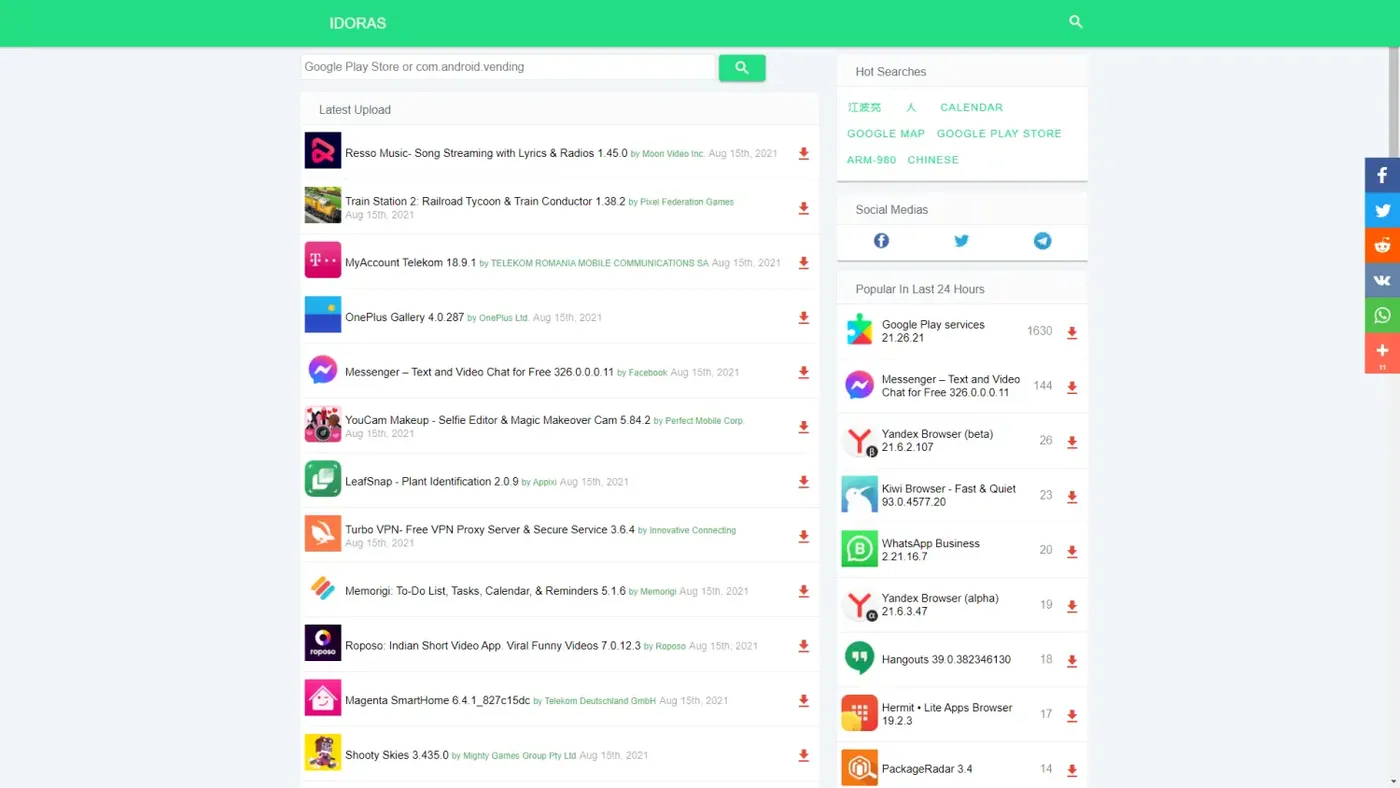
There are many free apk download websites such as apkmirror, today i will tell you how to build a website like apkmirror, the programming language i used is node.js, the database i used is mongodb, search engine used is elasticsearch, the web framework i use is eggjs.
Part I analysis apk file and save data
The tool we need is appt, you can install it with sudo apt-get install aapt on ubuntu, the command to analysis apk file is aapt dump badging test.apk, as we need execute the command in node.js script so i use execSync to call the command, the code block is below.
const { execSync } = require('child_process');
const fs = require("fs");
const md5 = require('md5');
const { sleep, getDir } = require('../util');

const analysis = (output) => {
  const res = {};
  let out = output.toString().replace(/'/g, '');

  out = out.split('\n');

  let tmp = out[0].split(' ');
  res.package = tmp[1].split('=')[1];
  res.versionCode = tmp[2].split('=')[1];
  res.versionName = tmp[3].split('=')[1];

  tmp = out[2].split(':')
  if (tmp[0] == 'sdkVersion') {
    res.sdkVersion = tmp[1];
  }

  tmp = out[3].split(':');
  if (tmp[0] == 'targetSdkVersion') {
    res.targetSdkVersion = tmp[1];
  }

  tmp = out[out.length - 2].split(':');
  if (tmp[0] == 'native-code') {
    res.variant = tmp[1].trim().replace(/ /g, '|');

    tmp = out[out.length - 6].split(':');
    res.screen = tmp[1].trim();

    tmp = out[out.length - 4].split(':');
    res.locales = tmp[1].trim();
  } else {
    res.variant = 'noarch';

    tmp = out[out.length - 5].split(':');
    res.screen = tmp[1].trim();

    tmp = out[out.length - 3].split(':');
    res.locales = tmp[1].trim();
  }
  return res;
}

const filters = ['.', '..'];

const run = async () => {
  while (true) {
    const dirs = fs.readdirSync(getDir('tmp'));
    for (const dir of dirs) {
      if (!filters.includes(dir)) {
        const name = getDir('tmp', dir);
        try {
          const output = execSync(`/usr/bin/aapt dump badging ${name}`);
          const res = analysis(output);
          const stats = fs.statSync(name);
          res.fileSize = stats.size;
          const newName = getDir('apk', `${res.package}_${res.versionCode}_idoras.com.apk`);
          const tasks = [];
          const url = `https://play.google.com/store/apps/details?id=${res.package}`;
          tasks.push({ _id: md5(url), url, host: 'play.google.com', type: 'detail', package: res.package, done: 0 });
          await global.db.collection('tasks').insertMany(tasks, { ordered: false }).catch(() => {});
          const one = await global.db.collection('apk').findOne({ _id: res.package }).catch(() => {});
          if (one) {
            const a = +one.versionCode;
            const b = +res.versionCode;
            if (b > a) {
              await global.db.collection('apk').updateOne({ _id: res.package }, { $set:{ udate: Date.now(), versionCode: res.versionCode, versionName: res.versionName, done: 1 }}).catch(() => {});
            }
          } else {
            await global.db.collection('apk').insertOne({ _id: res.package, versionCode: res.versionCode, versionName: res.versionName, cdate: Date.now(), udate: Date.now(), done: 0, down: 0 }).catch(() => {});
          }
          res._id = `${res.package}_${res.versionCode}`;
          await global.db.collection('variant').insertOne({ ...res, cdate: Date.now() }).catch(() => {});
          fs.renameSync(name, newName);
        } catch (err) {
          console.error(err);
          fs.unlinkSync(name);
        }
      }
    }
    if (dirs.length == 0) {
      console.log('no apk files to analysis');
      await sleep(60000);
    }
  }
};

module.exports = run;
The getDir and sleep is util function, you can find the source code below.
const req = require('request');
const path = require('path');
const os = require('os');
const agent = new require('socks-proxy-agent')('socks5://localhost:1080');

let root = '/data';
const options = {
  headers: {
    'User-Agent': 'Mozilla/5.0 (Windows NT 10.0; Win64; x64) AppleWebKit/537.36 (KHTML, like Gecko) Chrome/92.0.4515.107 Safari/537.36'
  },
  timeout: 30000,
  encoding: null,
};
if (os.platform() == 'win32') {
  options.agent = agent;
  root = 'd:/data';
}
const request = req.defaults(options);

const getDir = (...paths) => {
  paths.unshift(root);
  return path.join(...paths);
};

const sleep = (time) => new Promise((resolve) => {
    setTimeout(() => {
      resolve();
    }, time);
  });

const fetch = (url) => new Promise((resolve) => {
    console.log(`down ${url} started`);
    request(url, (err, res, body) => {
      if (res && res.statusCode === 200) {
        console.log(`down ${url} 200`);
        resolve(body);
      } else {
        console.error(`down ${url} ${res && res.statusCode} ${err}`);
        if (res && res.statusCode) {
          resolve(res.statusCode);
        } else {
          // ESOCKETTIMEOUT 超时错误返回600
          resolve(600);
        }
      }
    });
  });

module.exports = { getDir, sleep, fetch };
The main logic is we get basic information from appt, parse the output, get apk id such as com.moonvideo.android.resso, and insert a task to get apk logo and images and brief from play.google.com, i wrote a little crawler framework, each website with one parser bind with the host, every url have a type, each type bind with a function, the play.google.com’s parser code is below.
const { URL } = require('url');
const md5 = require('md5');
const cheerio = require('cheerio');
const slugify = require('slugify');

const resolve = (from, to) => {
  const resolvedUrl = new URL(to, new URL(from, 'resolve://'));
  if (resolvedUrl.protocol === 'resolve:') {
    // `from` is a relative URL.
    const { pathname, search, hash } = resolvedUrl;
    return pathname + search + hash;
  }
  return resolvedUrl.toString();
}

const fns = {

  detail: async (page) => {
    const host = page.host;
    try {
      const $ = cheerio.load(page.con.toString(), { decodeEntities: false });
      const brief = $('div.DWPxHb > span > div:nth-child(1)').html();
      const name = $('h1.AHFaub > span').text();
      const dev = $('div.qQKdcc > span:nth-child(1) > a').text();
      const tag = $('div.qQKdcc > span:nth-child(2) > a').attr('href').split('/')[4];
      const images = [];
      const tasks = [];
      $('button.Q4vdJd > img').each((i, ele) => {
        let url = $(ele).attr('src');
        if (!url || !url.startsWith('https')) {
          url = $(ele).attr('data-src')
        }
        tasks.push({ _id: md5(url), url, type: 'download', host: (new URL(url)).hostname, done: 0 });
        images.push({ _id: md5(url), url });
      });
      const logourl = $('div.xSyT2c > img').attr('src');
      tasks.push({ _id: md5(logourl), url: logourl, type: 'download', host: (new URL(logourl)).hostname, package: page.package, done: 0 });
      const res = await global.db.collection('tasks').insertMany(tasks, { ordered: false }).catch(() => {});
      res && console.log(`${host}-detail insert ${res.insertedCount} from ${tasks.length} tasks`);
      await global.db.collection('apk').updateOne({ _id: page.package }, { $set:{ brief, name, dev, devSlug: slugify(dev), tag, tagSlug: slugify(tag), images, done: 1 } });
      return 1;
    } catch (err) {
      console.error(`${host}-detail parse ${page.url} ${err}`);
      return 4;
    }
  },

  run: (page) => {
    const fn = fns[page.type];
    if (fn) {
      return fn(page);
    }
    console.error(`${page.url} parser not found`);
    return 0;
  }

};

module.exports = fns;
every apk we analysis with aapt will send one request to play.google.com to get it’s name, brief, developer info, tag, images, i will use these data to show on the website.
now we have the data of apk file, so where to find the apk files? You can download them from idoras or apkmirror or apkpure, also you can write node.js script to download them from website such as idoras.
Next we need index these data with elasticsearch so we can use them later, the code is below.
const { sleep } = require('../util');
const { Client } = require('@elastic/elasticsearch');

const getApks = (apks) => {
  const res = [];
  apks.forEach((apk) => {
    if(apk.name) {
      const tmp = {};
      res.push({ index: { _index: 'apk', _type: '_doc', _id: apk._id } });
      tmp.id = apk._id;
      tmp.versionCode = apk.versionCode;
      tmp.versionName = apk.versionName;
      tmp.cdate = apk.cdate;
      tmp.udate = apk.udate;
      tmp.down = apk.down;
      tmp.brief = apk.brief;
      tmp.dev = apk.dev;
      tmp.devSlug = apk.devSlug;
      tmp.name = apk.name;
      tmp.tag = apk.tag;
      res.push(tmp);
    }
  });
  return res;
};

const run = async () => {

  while (true) {
    const esclient = new Client({
      node: 'http://username:password@ip:9200',
      maxRetries: 3,
      requestTimeout: 60000
    });
    const apks = await global.db.collection('apk').find({ done: 1 }).limit(100).toArray().catch((err) => console.error(err));
    const tmp = getApks(apks);
    if (tmp && tmp.length) {
      let res = await esclient.bulk({ refresh: true, body: tmp }).catch((err) => console.error(err));
      if (res) {
        const ulist = apks.map((apk) => ({ updateOne: { filter: { _id: apk._id }, update: { $set: { done: 6 } }, upsert: false } }));
        res = await global.db.collection('apk').bulkWrite(ulist, { ordered: false, w: 1 }).catch(() => {});
        res && console.log(`apk:indexer update ${res.modifiedCount} from ${res.matchedCount}`);
      }
    } else {
      console.log('apk:indexer no apk to index');
      await sleep(60000);
    }
    await esclient.close();
  }
};

module.exports = run;
Part II build website with eggjs
The template engine i use is nunjucks, also i used some eggjs plugins such egg-elasticsearch2
The logic is easy, at home page we query data from elasticsearch, and render data into nunjucks template, basiclly it’s a list page, also i will cache the hot download apks into ctx.app.hots, refresh it every 30 minutes, and show the hot download apks on the right aside, also the html template support responsive design, it will show perfect on mobile system.
'use strict';

const Controller = require('egg').Controller;

class HomeController extends Controller {

  async home() {
    const { ctx } = this;
    const params = ctx.params;
    const page = parseInt(params.page, 10) || 1;
    if (page < 1) {
      ctx.redirect('/list/1/', 301);
    }
    const start = (page - 1) * ctx.helper.size;
    const query = {
      body: [
        { index: 'apk', type: '_doc' },
        { query: { bool: { must: [{ match_all: {} }, { exists: { field: 'id' } }] } }, highlight: { fields: { name: {} } }, from: start, size: ctx.helper.size, sort: [{ udate: { order: 'desc' } }, '_score' ] },
      ],
    };
    const info = {};
    const res = await ctx.app.elasticsearch.msearch(query);
    ctx.helper.getList(res.responses[0], info);

    let tpage = Math.floor(info.all / ctx.helper.size) + (info.all % ctx.helper.size ? 1 : 0);
    tpage < 1 && (tpage = 1);
    if (page > tpage) {
      if (tpage > 500) {
        ctx.redirect('/list/500/', 301);
      } else {
        ctx.redirect(`/list/${tpage}/`, 301);
      }
    } else if (page > 500) {
      ctx.redirect('/list/500/', 301);
    }
    tpage = tpage > 500 ? 500 : tpage;
    info.pages = ctx.helper.getPages(page, tpage);

    info.url = ctx.request.url;
    if (info.url === '/') {
      info.title = 'Free Apk download online - idoras.com';
      info.keywords = 'app download,apk download, free apk download, idoras, apk downloader, android apk download';
      info.description = 'Free apk download for Android with idoras APK downloader. NoAds, Faster apk downloads and apk file update speed. Best of all, it\'s free';
      info.home = true;
    } else {
      info.title = `Free Apk download - page${page} - idoras.com`;
      info.keywords = `app download,apk download, free apk download, idoras, apk downloader, android apk download,apk list page${page}`;
      info.description = info.list.map(item => item.name).join(',').substring(0, 150);
    }

    if (!ctx.app.hots) {
      ctx.app.hots = info.hots = await ctx.service.search.hot();
    } else {
      info.hots = ctx.app.hots;
    }
    info.slist = ctx.helper.getKeys();
    await ctx.render('home.html', { info });
  }

  async version() {
    const { ctx } = this;
    const params = ctx.params;
    const id = params.id;
    const apk = await ctx.model.Apk.findById(id);
    const list = await ctx.model.Variant.find({ package: id });
    list.sort((a, b) => b.versionCode - a.versionCode);
    const info = { apk, list };
    info.variant = list[0] || {};
    info.title = `${apk.name} Free Apk download - idoras.com`;
    info.keywords = `${apk.name} download, app download,apk download, free apk download, idoras, apk downloader, android apk download`;
    info.description = `download ${apk.name} free apks online, it's faster and free online, many version to download`;
    if (!ctx.app.hots) {
      ctx.app.hots = info.hots = await ctx.service.search.hot();
    } else {
      info.hots = ctx.app.hots;
    }
    info.slist = ctx.helper.getKeys();
    await ctx.render('version.html', { info });
  }

  async download() {
    const { ctx } = this;
    const params = ctx.params;
    const id = params.id;
    const version = params.version;
    const apk = await ctx.model.Apk.findById(id);
    const variant = await ctx.model.Variant.findById(`${id}_${version}`);
    const list = await ctx.model.Variant.find({ package: id });
    list.sort((a, b) => b.cdate - a.cdate);
    apk.down = apk.down + 1;
    apk.save();
    ctx.app.elasticsearch.update({ index: 'apk', type: '_doc', id, body: { script: 'ctx._source.down += 1', upsert: { down: 1 } } }, () => { });
    const info = { apk, variant, list };
    info.title = `${apk.name} ${apk.versionName} Free Apk download online - idoras.com`;
    info.keywords = `${apk.name} ${apk.versionName} download online, app download,apk download, free apk download, idoras, apk downloader, android apk download`;
    info.description = `download ${apk.name} ${apk.versionName} free apks online, it's faster and free online, many version to download`;
    if (!ctx.app.hots) {
      ctx.app.hots = info.hots = await ctx.service.search.hot();
    } else {
      info.hots = ctx.app.hots;
    }
    info.slist = ctx.helper.getKeys();
    await ctx.render('download.html', { info });
  }

  async dev() {
    const { ctx } = this;
    const params = ctx.params;
    const devSlug = params.devSlug;
    const page = parseInt(params.page, 10) || 1;
    if (page < 1) {
      ctx.redirect(`/dev/${devSlug}/1/`, 301);
    }
    const start = (page - 1) * ctx.helper.size;
    const info = { devSlug };
    const query = {
      body: [
        { index: 'apk', type: '_doc' },
        { query: { term: { devSlug } }, from: start, size: ctx.helper.size, sort: [{ udate: { order: 'desc' } }, '_score' ] },
      ],
    };
    const res = await ctx.app.elasticsearch.msearch(query);
    ctx.helper.getList(res.responses[0], info);

    let tpage = Math.floor(info.all / ctx.helper.size) + (info.all % ctx.helper.size ? 1 : 0);
    tpage < 1 && (tpage = 1);
    if (page > tpage) {
      if (tpage > 500) {
        ctx.redirect(`/dev/${devSlug}/500/`, 301);
      } else {
        ctx.redirect(`/dev/${devSlug}/${tpage}/`, 301);
      }
    } else if (page > 500) {
      ctx.redirect(`/dev/${devSlug}/500/`, 301);
    }
    tpage = tpage > 500 ? 500 : tpage;
    info.pages = ctx.helper.getPages(page, tpage);

    info.title = `apk developered by ${devSlug} download - idoras.com`;
    info.keywords = `${devSlug} apks download online, app download,apk download, free apk download, idoras, apk downloader, android apk download`;
    info.description = `download ${devSlug} free apks online, it's faster and free online, many version to download`;
    if (!ctx.app.hots) {
      ctx.app.hots = info.hots = await ctx.service.search.hot();
    } else {
      info.hots = ctx.app.hots;
    }
    info.slist = ctx.helper.getKeys();
    await ctx.render('dev.html', { info });
  }

  async tag() {
    const { ctx } = this;
    const params = ctx.params;
    const tag = params.tag;
    const page = parseInt(params.page, 10) || 1;
    if (page < 1) {
      ctx.redirect(`/tag/${tag}/1/`, 301);
    }
    const start = (page - 1) * ctx.helper.size;
    const info = { tag };
    const query = {
      body: [
        { index: 'apk', type: '_doc' },
        { query: { term: { tag } }, from: start, size: ctx.helper.size, sort: [{ udate: { order: 'desc' } }, '_score' ] },
      ],
    };
    const res = await ctx.app.elasticsearch.msearch(query);
    ctx.helper.getList(res.responses[0], info);

    let tpage = Math.floor(info.all / ctx.helper.size) + (info.all % ctx.helper.size ? 1 : 0);
    tpage < 1 && (tpage = 1);
    if (page > tpage) {
      if (tpage > 500) {
        ctx.redirect(`/tag/${tag}/500/`, 301);
      } else {
        ctx.redirect(`/tag/${tag}/${tpage}/`, 301);
      }
    } else if (page > 500) {
      ctx.redirect(`/tag/${tag}/500/`, 301);
    }
    tpage = tpage > 500 ? 500 : tpage;
    info.pages = ctx.helper.getPages(page, tpage);

    info.title = `apk tagged with ${tag} download - idoras.com`;
    info.keywords = `${tag} apks download online, app download,apk download, free apk download, idoras, apk downloader, android apk download`;
    info.description = `download ${tag} free apks online, it's faster and free online, many version to download`;
    if (!ctx.app.hots) {
      ctx.app.hots = info.hots = await ctx.service.search.hot();
    } else {
      info.hots = ctx.app.hots;
    }
    info.slist = ctx.helper.getKeys();
    await ctx.render('tag.html', { info });
  }

  async search() {
    const { ctx } = this;
    const params = ctx.params;
    const key = params.key;
    const page = parseInt(params.page, 10) || 1;
    if (page < 1) {
      ctx.redirect(`/search/${key}/1/`, 301);
    }
    const start = (page - 1) * ctx.helper.size;
    const info = { key };
    const query = {
      body: [
        { index: 'apk', type: '_doc' },
      ],
    };
    if (key) {
      query.body.push({ query: { multi_match: { query: key, fields: [ 'name', 'id', 'brief' ] } }, from: start, size: ctx.helper.size, sort: [ '_score' ] });
    } else {
      query.body.push({ query: { bool: { must: [{ match_all: {} }, { exists: { field: 'id' } }] } }, from: start, size: ctx.helper.size, sort: [ '_score' ] });
    }
    const res = await ctx.app.elasticsearch.msearch(query);
    key && res.responses[0].hits.hits.length && ctx.helper.putKey(key);
    ctx.helper.getList(res.responses[0], info);

    let tpage = Math.floor(info.all / ctx.helper.size) + (info.all % ctx.helper.size ? 1 : 0);
    tpage < 1 && (tpage = 1);
    if (page > tpage) {
      if (tpage > 500) {
        ctx.redirect(`/search/${key}/500/`, 301);
      } else {
        ctx.redirect(`/search/${key}/${tpage}/`, 301);
      }
    } else if (page > 500) {
      ctx.redirect(`/search/${key}/500/`, 301);
    }
    tpage = tpage > 500 ? 500 : tpage;
    info.pages = ctx.helper.getPages(page, tpage);

    info.title = `search ${key} apks to download online - idoras.com`;
    info.keywords = `${key} apks download online, app download,apk download, free apk download, idoras, apk downloader, android apk download`;
    info.description = `download ${key} free apks online, it's faster and free online, many version to download`;
    if (!ctx.app.hots) {
      ctx.app.hots = info.hots = await ctx.service.search.hot();
    } else {
      info.hots = ctx.app.hots;
    }
    info.slist = ctx.helper.getKeys();
    await ctx.render('search.html', { info });
  }

  async re() {
    const { ctx } = this;
    const params = ctx.request.body;
    const key = params.key;
    if (key) {
      ctx.redirect(`/search/${encodeURI(key)}/`, 301);
    } else {
      ctx.redirect('/search/', 301);
    }
  }
}

module.exports = HomeController;
'use strict';
// eslint-disable-next-line no-unused-vars
module.exports = (options, app) => {
return async function mobileMiddleware(ctx, next) {
const u = ctx.get('user-agent') || '';
const tmp = {
trident: u.indexOf('Trident') > -1, // IE内核
presto: u.indexOf('Presto') > -1, // opera内核
webKit: u.indexOf('AppleWebKit') > -1, // 苹果、谷歌内核
gecko: u.indexOf('Gecko') > -1 && u.indexOf('KHTML') === -1, // 火狐内核
mobile: !!u.match(/AppleWebKit.*Mobile.*/), // 是否为移动终端
ios: !!u.match(/\(i[^;]+;( U;)? CPU.+Mac OS X/), // ios终端
android: u.indexOf('Android') > -1 || u.indexOf('Linux') > -1, // android终端或者uc浏览器
iPhone: u.indexOf('iPhone') > -1, // 是否为iPhone或者QQHD浏览器
iPad: u.indexOf('iPad') > -1, // 是否iPad
webApp: u.indexOf('Safari') === -1, // 是否web应该程序,没有头部与底部
weixin: u.indexOf('MicroMessenger') > -1, // 是否微信 (2015-01-22新增)
qq: u.match(/\sQQ/i) === ' qq', // 是否QQ
};
if (tmp.mobile || tmp.android || tmp.ios || tmp.weixin) {
ctx.request.mobile = true;
}
await next();
};
};
<!DOCTYPE html>
<html lang="en">
<head>
<meta charset="UTF-8">
<meta http-equiv="X-UA-Compatible" content="IE=edge">
<meta name="viewport" content="width=device-width, initial-scale=1.0">
<title>{{info.title}}</title>
<meta name="keywords" content="{{info.keywords}}">
<meta name="description" content="{{info.description}}">
<meta property="og:site_name" content="idoras.com">
<meta property="og:title" content="{{info.title}}">
<meta property="og:type" content="website">
<link rel="shortcut icon" href="/favicon.ico">
<link rel="stylesheet" href="https://cdnjs.cloudflare.com/ajax/libs/normalize/8.0.0/normalize.min.css">
<link rel="stylesheet" href="https://fonts.googleapis.com/icon?family=Material+Icons">
<link rel="stylesheet" href="/css/material-components-web.min.css">
<link rel="stylesheet" href="/css/app.css?v=2021080817">
</head>
<body>
<aside class="mdc-drawer mdc-drawer--dismissible">
<div class="mdc-drawer__header">
<h3 class="mdc-drawer__title">IDORAS</h3>
<h6 class="mdc-drawer__subtitle">download free android apks</h6>
</div>
<div class="mdc-drawer__content">
<nav class="mdc-list">
<a class="mdc-list-item mdc-list-item--activated" href="/" aria-selected="true">
<i class="material-icons mdc-list-item__graphic" aria-hidden="true">home</i>
<span class="mdc-list-item__text">Home</span>
</a>
</nav>
</div>
</aside>
<div class="mdc-drawer-app-content">
<header class="mdc-top-app-bar app-bar" id="app-bar">
<div class="mdc-top-app-bar__row container">
<section class="mdc-top-app-bar__section mdc-top-app-bar__section--align-start">
<i href="" class="demo-menu material-icons mdc-top-app-bar__navigation-icon mdc-nav-icon menuLogo"
style="text-decoration: none;cursor: pointer;">menu</i>
<a class="mdc-top-app-bar__title" href="/" style="color: #fff;">IDORAS</a>
</section>
<section class="mdc-top-app-bar__section mdc-top-app-bar__section--align-end" role="toolbar">
<a href="/search/">
<i class="material-icons icon-white">search</i>
</a>
</section>
</div>
</header>
<main class="main-content" id="main-content">
<div class="mdc-top-app-bar--fixed-adjust container">
<div class="mdc-layout-grid" style="padding:0">
<div class="mdc-layout-grid__inner">
<div
class="mdc-layout-grid__cell mdc-layout-grid__cell--span-8 mdc-layout-grid__cell--span-12-tablet mdc-layout-grid__cell--span-12-phone">
{% if ctx.request.mobile %}
<div class="details-title">
<!-- Go to www.addthis.com/dashboard to customize your tools -->
<div class="addthis_inline_share_toolbox_bm88"></div>
</div>
{% endif %}
<div class="listWidght">
<form action="/re" style="overflow:visible" method="POST" onsubmit="return key.value!=''" role="search">
<input class="search-key" type="text" id="key" name="key" placeholder="Google Play Store or com.android.vending" size="1" style="padding: 5px;" />
<button type="submit" class="search mdc-button mdc-button--raised button">
<i class="material-icons icon-white">search</i>
</button>
</form>
</div>
<div class="listWidget">
<div class="box">
<div class="title bread-crumbs">
<h5 class="widgetHeader">Latest Upload</h5>
</div>
</div>
{% for item in info.list %}
<div>
<div class="appRow">
<div class="table-row">
<div style="width: 56px;" class="table-cell">
<img style="width:50px; height:50px;"
src="https://img.idoras.com/img/{{item.id}}.png">
</div>
<div class="table-cell">
<div style="padding-top: 4px;">
<h5 title="{{item.name}} {{item.versionName}} ({{item.versionCode}}) by {{item.dev}}"
class="appRowTitle wrapText marginZero block-on-mobile">
<a class="fontBlack" href="/apk/{{item.id}}/">{{item.name}} {{item.versionName}}</a>
</h5>
<a href="/dev/{{item.devSlug}}/" class="byDeveloper block-on-mobile wrapText">by {{item.dev}}</a>
<span style="padding:4px 12px 0 0;" class="colorLightBlack"><span class="udate">{{ctx.helper.fdate(item.udate)}}</span></span>
</div>
</div>
<div style="width: 30px;" class="table-cell">
<div class="iconsBox ">
<div class="downloadIconPositioning">
<a class="downloadLink" href="/apk/{{item.id}}/{{item.versionCode}}/">
<i class="material-icons icon-blue" aria-hidden="true">download</i>
</a>
</div>
</div>
</div>
</div>
</div>
</div>
{% endfor %}
<div class="appRow center">
<div class="pagination mobile">
<div class="wp-pagenavi" role="navigation">
{% for page in info.pages %}
<a href="/list/{{page.page}}/"
class="{%if loop.first%}first{%endif%} {%if loop.last%}last{%endif%} {%if page.current%}current{%endif%}">
<span class="mdc-fab__icon">
{{page.text}}
</span>
</a>
{% endfor %}
</div>
</div>
</div>
</div>
<div class="pages">
</div>
</div>
<div
class="mdc-layout-grid__cell mdc-layout-grid__cell--span-4 mdc-layout-grid__cell--span-12-tablet mdc-layout-grid__cell--span-12-phone">
{% if info.slist.length > 0 %}
<div class="listWidget">
<div class="box">
<div class="title bread-crumbs">
<h5 class="widgetHeader">Hot Searches</h5>
</div>
</div>
<div>
<div class="appRow">
{% for item in info.slist %}
<a href="/search/{{item.ekey}}/" class="mdc-button">
<span class="mdc-button__label">{{item.key}}</span>
</a>
{% endfor %}
</div>
</div>
</div>
{% endif %}
<div class="listWidget">
<div class="box">
<div class="title bread-crumbs">
<h5 class="widgetHeader">Social Medias</h5>
</div>
</div>
<div>
<div class="appRow">
<div class="table-row">
<div class="table-cell center">
<a href="https://www.facebook.com/profile.php?id=100071468057179" target="_blank">
<img style="vertical-align: baseline; height: 24px; width: 24px;" src="/img/facebook.png" class="clickable">
</a>
</div>
<div class="table-cell center">
<a href="https://twitter.com/Shaoyang2000" target="_blank">
<img style="vertical-align: baseline; height: 24px; width: 24px;" src="/img/twitter.png" class="clickable">
</a>
</div>
<div class="table-cell center">
<a href="https://t.me/idoras_official" target="_blank">
<img style="vertical-align: baseline; height: 24px; width: 24px;" src="/img/telegram.png" class="clickable">
</a>
</div>
</div>
</div>
</div>
</div>
<div class="listWidget">
<div class="box">
<div class="title bread-crumbs">
<h5 class="widgetHeader">Popular In Last 24 Hours</h5>
</div>
</div>
{% for item in info.hots[0].list %}
<div>
<div class="appRow">
<div class="table-row">
<div style="width: 56px;" class="table-cell">
<img style="width:50px; height:50px;"
src="https://img.idoras.com/img/{{item.id}}.png">
</div>
<div class="table-cell">
<h5 title="{{item.name}} {{item.versionName}}" class="appRowTitle wrapText marginZero block-on-mobile">
<a class="fontBlack" href="/apk/{{item.id}}/">{{item.name}} {{item.versionName}}</a>
</h5>
</div>
<div style="width: 50px; text-align: right;" class="table-cell">
<span style="padding-right:12px;" class="colorLightBlack">{{item.down}}</span>
</div>
<div style="width: 22px;" class="table-cell">
<div class="iconsBox one-icon">
<div class="downloadIconPositioning">
<a class="downloadLink"
href="/apk/{{item.id}}/">
<i class="material-icons icon-blue" aria-hidden="true">download</i>
</a>
</div>
</div>
</div>
</div>
</div>
</div>
{% endfor %}
</div>
<div class="listWidget">
<div class="box">
<div class="title bread-crumbs">
<h5 class="widgetHeader">Popular In Last 7 Days</h5>
</div>
</div>
{% for item in info.hots[1].list %}
<div>
<div class="appRow">
<div class="table-row">
<div style="width: 56px;" class="table-cell">
<img style="width:50px; height:50px;"
src="https://img.idoras.com/img/{{item.id}}.png">
</div>
<div class="table-cell">
<h5 title="{{item.name}} {{item.versionName}}" class="appRowTitle wrapText marginZero block-on-mobile">
<a class="fontBlack" href="/apk/{{item.id}}/">{{item.name}} {{item.versionName}}</a>
</h5>
</div>
<div style="width: 50px; text-align: right;" class="table-cell">
<span style="padding-right:12px;" class="colorLightBlack">{{item.down}}</span>
</div>
<div style="width: 22px;" class="table-cell">
<div class="iconsBox one-icon">
<div class="downloadIconPositioning">
<a class="downloadLink"
href="/apk/{{item.id}}/">
<i class="material-icons icon-blue" aria-hidden="true">download</i>
</a>
</div>
</div>
</div>
</div>
</div>
</div>
{% endfor %}
</div>
<div class="listWidget">
<div class="box">
<div class="title bread-crumbs">
<h5 class="widgetHeader">Popular In Last 30 Days</h5>
</div>
</div>
{% for item in info.hots[2].list %}
<div>
<div class="appRow">
<div class="table-row">
<div style="width: 56px;" class="table-cell">
<img style="width:50px; height:50px;"
src="https://img.idoras.com/img/{{item.id}}.png">
</div>
<div class="table-cell">
<h5 title="{{item.name}} {{item.versionName}}" class="appRowTitle wrapText marginZero block-on-mobile">
<a class="fontBlack" href="/apk/{{item.id}}/">{{item.name}} {{item.versionName}}</a>
</h5>
</div>
<div style="width: 50px; text-align: right;" class="table-cell">
<span style="padding-right:12px;" class="colorLightBlack">{{item.down}}</span>
</div>
<div style="width: 22px;" class="table-cell">
<div class="iconsBox one-icon">
<div class="downloadIconPositioning">
<a class="downloadLink"
href="/apk/{{item.id}}/">
<i class="material-icons icon-blue" aria-hidden="true">download</i>
</a>
</div>
</div>
</div>
</div>
</div>
</div>
{% endfor %}
</div>
</div>
</div>
</div>
</div>
<div class="footer">
<div class="b">
<p><a href="/about/">About Us</a> | <a href="/contact-us/">Contact Us</a></p>
<p><a href="/privacy-policy/" rel="nofollow">Privacy Policy</a></p>
<p><a href="/report-content/">Report abuse</a></p>
<p><a href="/dmca/" rel="nofollow">DMCA Disclaimer</a></p>
<p>idoras.com © 2016-2021</p>
</div>
</div>
</main>
</div>
<script src="/js/material-components-web.min.js"></script>
<script src="/js/app.js?v=20210805"></script>
</script>
</body>
</html>That’s the main code i wrote for the website, leave a comment if you want to know more about my code, at last remember the website address https://idoras.com i built a week ago, and share it with your firends if you find it useful, thanks.