一、flume概述
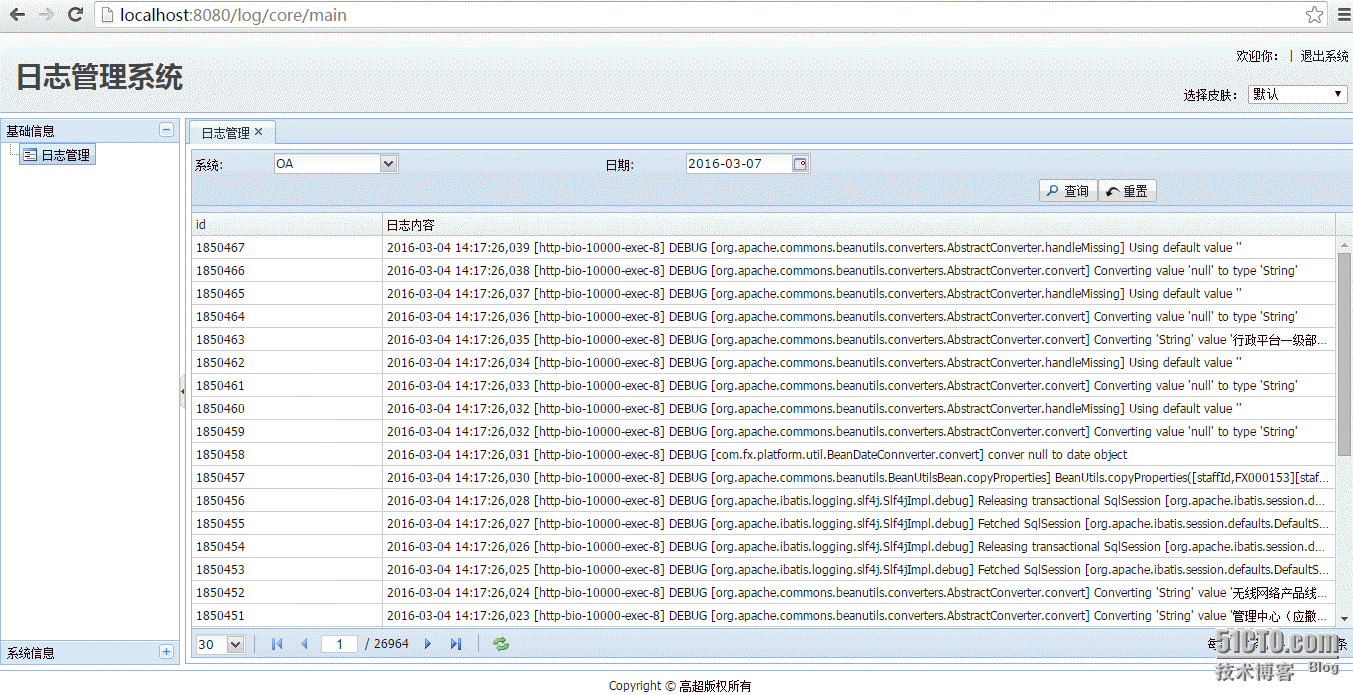
Flume是Cloudera提供的一个高可用的,高可靠的,分布式的海量日志采集、聚合和传输的系统,Flume支持在日志系统中定制各类数据发送方,用于收集数据;同时,Flume提供对数据进行简单处理,并写到各种数据接受方(可定制)的能力。我们选用flume对内部多个系统的日志进行信号的采集、管理和查询,目前仅实现了信息管理功能,进一步会对报警、统计等功能进行开发。
flume的主要组件包括:
Source,SourceRunner,Interceptor,Channel,ChannelSelector,ChannelProcessor,Sink,SinkRunner,SinkProcessor,SinkSelector等
工作流程包含两个部分:
source->channel,数据由source写入channel,主动模式,主要步骤如下:
一个SourceRunner包含一个Source对象,一个Source对象包含一个ChannelProcessor对象,一个ChannelProcessor对象包含多个Interceptor对象和一个ChannelSelector对象
1)SourceRunner启动Source,Source接收Event
2) Source调用ChannelProcessor
3)ChannelProcessor调用Interceptor进行过滤Event操作
4)ChannelProcessor调用ChannelSelector对象根据配置的策略选择Event对应的Channel(replication和multiplexing两种)
5)Source将Event发送到对应的Channel中
channel->sink,数据由sink主动从channel中拉取(将压力分摊到sink,这一点类似于kafka的consumer)
一个SinkRunner对象包含一个SinkProcessor对象,一个SinkProcessor包含多个Sink或者一个SinkSelector
1)SinkRunner启动SinkProcessor(DefaultSinkProcessor,FailoverSinkProcessor,LoadBalancingSinkProcessor 3种)
2)如果是DefaultSinkProcessor的话,直接启动单个Sink
3)FailoverSinkProcessor,LoadBalancingSinkProcessor对应的是SinkGroup
4)FailoverSinkProcessor从SinkGroup中选择出Sink并启动
5)LoadBalancingSinkProcessor包含SinkSelector,会根据SinkSelector在SinkGroup中选择Sink并启动
6)Sink 从Channel中消费Event信息
二、Flume的安装
安装包下载地址:http://flume.apache.org/download.html
安装过程略
三、Flume和MySQL的整合
Flume可以和许多的系统进行整合,包括了Hadoop、Spark、Kafka、Hbase等等;当然,强悍的Flume也是可以和Mysql进行整合,将分析好的日志存储到Mysql(当然,也可以存放到pg、oracle等等关系型数据库)。Flume和Mysql进行整合开发的过程也是相当的简单的。代码如下:
|
1
2
3
4
5
6
7
8
9
10
11
12
13
14
15
16
17
18
19
20
21
22
23
24
25
26
27
28
29
30
31
32
33
34
35
36
37
38
39
40
41
42
43
44
45
46
47
48
49
50
51
52
53
54
55
56
57
58
59
60
61
62
63
64
65
66
67
68
69
70
71
72
73
74
75
76
77
78
79
80
81
82
83
84
85
86
87
88
89
90
91
92
93
94
95
96
97
98
99
100
101
102
103
104
105
106
107
108
109
110
111
112
113
114
115
116
117
118
119
120
121
122
123
124
125
126
127
128
129
130
131
132
133
134
135
136
137
138
139
140
141
142
143
144
145
146
147
148
149
150
151
152
153
154
155
156
157
158
159
160
161
162
163
164
165
166
167
168
169
|
/**
* Licensed to the Apache Software Foundation (ASF) under one
* or more contributor license agreements. See the NOTICE file
* distributed with this work for additional information
* regarding copyright ownership. The ASF licenses this file
* to you under the Apache License, Version 2.0 (the
* "License"); you may not use this file except in compliance
* with the License. You may obtain a copy of the License at
*
* http://www.apache.org/licenses/LICENSE-2.0
*
* Unless required by applicable law or agreed to in writing, software
* distributed under the License is distributed on an "AS IS" BASIS,
* WITHOUT WARRANTIES OR CONDITIONS OF ANY KIND, either express or implied.
* See the License for the specific language governing permissions and
* limitations under the License.
*/
package
org.flume.mysql.sink;
/**
* @authorchao.gao
* @date 2016年1月14日 上午8:38:50
* @version <b>1.0.0</b>
*/
import
com.google.common.base.Preconditions;
import
com.google.common.base.Throwables;
import
com.google.common.collect.Lists;
import
org.apache.flume.*;
import
org.apache.flume.conf.Configurable;
import
org.apache.flume.sink.AbstractSink;
import
org.slf4j.Logger;
import
org.slf4j.LoggerFactory;
import
java.sql.Connection;
import
java.sql.DriverManager;
import
java.sql.PreparedStatement;
import
java.sql.SQLException;
import
java.util.List;
public
class
MysqlSink
extends
AbstractSink
implements
Configurable {
private
Logger LOG = LoggerFactory.getLogger(MysqlSink.
class
);
private
String hostname;
private
String port;
private
String databaseName;
private
String tableName;
private
String user;
private
String password;
private
PreparedStatement preparedStatement;
private
Connection conn;
private
int
batchSize;
public
MysqlSink() {
LOG.info(
"MysqlSink start..."
);
}
public
void
configure(Context context) {
hostname = context.getString(
"hostname"
);
Preconditions.checkNotNull(hostname,
"hostname must be set!!"
);
port = context.getString(
"port"
);
Preconditions.checkNotNull(port,
"port must be set!!"
);
databaseName = context.getString(
"databaseName"
);
Preconditions.checkNotNull(databaseName,
"databaseName must be set!!"
);
tableName = context.getString(
"tableName"
);
Preconditions.checkNotNull(tableName,
"tableName must be set!!"
);
user = context.getString(
"user"
);
Preconditions.checkNotNull(user,
"user must be set!!"
);
password = context.getString(
"password"
);
Preconditions.checkNotNull(password,
"password must be set!!"
);
batchSize = context.getInteger(
"batchSize"
,
100
);
Preconditions.checkNotNull(batchSize >
0
,
"batchSize must be a positive number!!"
);
}
@Override
public
void
start() {
super
.start();
try
{
//调用Class.forName()方法加载驱动程序
Class.forName(
"com.mysql.jdbc.Driver"
);
}
catch
(ClassNotFoundException e) {
e.printStackTrace();
}
String url =
"jdbc:mysql://"
+ hostname +
":"
+ port +
"/"
+ databaseName;
//调用DriverManager对象的getConnection()方法,获得一个Connection对象
try
{
conn = DriverManager.getConnection(url, user, password);
conn.setAutoCommit(
false
);
//创建一个Statement对象
preparedStatement = conn.prepareStatement(
"insert into "
+ tableName +
" (content) values (?)"
);
}
catch
(SQLException e) {
e.printStackTrace();
System.exit(
1
);
}
}
@Override
public
void
stop() {
super
.stop();
if
(preparedStatement !=
null
) {
try
{
preparedStatement.close();
}
catch
(SQLException e) {
e.printStackTrace();
}
}
if
(conn !=
null
) {
try
{
conn.close();
}
catch
(SQLException e) {
e.printStackTrace();
}
}
}
public
Status process()
throws
EventDeliveryException {
Status result = Status.READY;
Channel channel = getChannel();
Transaction transaction = channel.getTransaction();
Event event;
String content;
List<String> actions = Lists.newArrayList();
transaction.begin();
try
{
for
(
int
i =
0
; i < batchSize; i++) {
event = channel.take();
if
(event !=
null
) {
content =
new
String(event.getBody());
actions.add(content);
}
else
{
result = Status.BACKOFF;
break
;
}
}
if
(actions.size() >
0
) {
preparedStatement.clearBatch();
for
(String temp : actions) {
preparedStatement.setString(
1
, temp);
preparedStatement.addBatch();
}
preparedStatement.executeBatch();
conn.commit();
}
transaction.commit();
}
catch
(Throwable e) {
try
{
transaction.rollback();
}
catch
(Exception e2) {
LOG.error(
"Exception in rollback. Rollback might not have been"
+
"successful."
, e2);
}
LOG.error(
"Failed to commit transaction."
+
"Transaction rolled back."
, e);
Throwables.propagate(e);
}
finally
{
transaction.close();
}
return
result;
}
}
|
pom.xml依赖如下:
|
1
2
3
4
5
6
7
8
9
10
11
12
13
14
15
16
17
18
19
20
21
22
23
24
25
26
27
28
29
30
31
32
33
34
35
36
37
38
39
40
41
42
43
44
45
46
47
48
49
50
51
52
53
54
55
56
57
58
59
60
61
62
|
<?
xml
version
=
"1.0"
?>
<!--
Licensed to the Apache Software Foundation (ASF) under one or more
contributor license agreements. See the NOTICE file distributed with
this work for additional information regarding copyright ownership.
The ASF licenses this file to You under the Apache License, Version 2.0
(the "License"); you may not use this file except in compliance with
the License. You may obtain a copy of the License at
http://www.apache.org/licenses/LICENSE-2.0
Unless required by applicable law or agreed to in writing, software
distributed under the License is distributed on an "AS IS" BASIS,
WITHOUT WARRANTIES OR CONDITIONS OF ANY KIND, either express or implied.
See the License for the specific language governing permissions and
limitations under the License.
-->
<
project
xsi:schemaLocation
=
"http://maven.apache.org/POM/4.0.0 http://maven.apache.org/xsd/maven-4.0.0.xsd"
xmlns
=
"http://maven.apache.org/POM/4.0.0"
xmlns:xsi
=
"http://www.w3.org/2001/XMLSchema-instance"
>
<
modelVersion
>4.0.0</
modelVersion
>
<
parent
>
<
groupId
>org.apache.flume</
groupId
>
<
artifactId
>flume-parent</
artifactId
>
<
version
>1.4.0</
version
>
</
parent
>
<
groupId
>org.apache.flume</
groupId
>
<
artifactId
>flume-mysql-sink</
artifactId
>
<
version
>1.4.0</
version
>
<
name
>flume-mysql-sink</
name
>
<
url
>http://maven.apache.org</
url
>
<
properties
>
<
project.build.sourceEncoding
>UTF-8</
project.build.sourceEncoding
>
</
properties
>
<
dependencies
>
<
dependency
>
<
groupId
>org.apache.flume</
groupId
>
<
artifactId
>flume-ng-core</
artifactId
>
</
dependency
>
<
dependency
>
<
groupId
>org.apache.flume</
groupId
>
<
artifactId
>flume-ng-configuration</
artifactId
>
</
dependency
>
<
dependency
>
<
groupId
>mysql</
groupId
>
<
artifactId
>mysql-connector-java</
artifactId
>
<
version
>5.1.25</
version
>
</
dependency
>
<
dependency
>
<
groupId
>org.slf4j</
groupId
>
<
artifactId
>slf4j-api</
artifactId
>
</
dependency
>
<
dependency
>
<
groupId
>org.slf4j</
groupId
>
<
artifactId
>slf4j-log4j12</
artifactId
>
<
scope
>test</
scope
>
</
dependency
>
</
dependencies
>
</
project
>
|
打包成jar包后放置在/opt/flume_home/apache-flume-1.4.0-bin/lib下
四、修改conf文件
|
1
2
3
4
5
6
7
8
9
10
11
12
13
14
15
16
17
18
19
20
21
22
23
24
25
26
27
28
29
30
31
32
33
|
agent1.sources = source1
agent1.sinks = mysqlSink
agent1.channels = channel1
# Describe/configure source1
agent1.sources.source1.
type
=
exec
agent1.sources.source1.
command
= ftail.sh
/data/pm-oa/tomcat-9999/logs/pm-oa
.log
agent1.sources.source1.channels = channel1
# Describe mysqlSink
agent1.sinks.mysqlSink.
type
= org.flume.mysql.sink.MysqlSink
agent1.sinks.mysqlSink.
hostname
=172.17.191.12
agent1.sinks.mysqlSink.port=3306
agent1.sinks.mysqlSink.databaseName=logdatabase
agent1.sinks.mysqlSink.tableName=tb_oarelease_log
agent1.sinks.mysqlSink.user=logwriter
agent1.sinks.mysqlSink.password=feixun*123S
agent1.sinks.mysqlSink.channel = channel1
# Use a channel which buffers events in memory
agent1.channels.channel1.
type
=
file
agent1.channels.channel1.checkpointDir=
/opt/flume_home/checkpoint
agent1.channels.channel1.dataDirs=
/opt/flume_home/tmp
agent1.channels.channel1.capacity = 1000
agent1.channels.channel1.transactionCapactiy = 100
# Bind the source and sink to the channel
agent1.sources.source1.channels = channel1
agent1.sinks.mysqlSink.channel = channel1
|
五、ftail.sh 文件
|
1
2
3
4
5
6
7
8
9
10
11
12
13
14
15
16
17
18
19
20
21
22
23
24
25
26
27
28
29
30
31
32
33
34
35
36
37
38
39
40
41
42
43
44
45
46
47
48
49
50
51
52
53
54
55
56
57
58
59
60
61
62
63
64
65
66
|
#!/bin/sh
# ftail.sh = tail -f 的增强版本,可检查文件是否重建过或删除过
# usage: ftail.sh <file>
# author: codingstandards@gmail.com
# release time: v0.1 2010.11.04/05
# 显示title
echo
"+---------------------------------------------------------------------------------------------+"
echo
"| ftail.sh v0.1 - a bash script that enhanced 'tail -f', written by codingstandards@gmail.com |"
>&2
echo
"+---------------------------------------------------------------------------------------------+"
echo
# 判断参数个数
if
[
"$#"
!=
"1"
];
then
echo
"usage: $0 <file>"
>&2
exit
1
fi
# 取文件参数
FILE=
"$1"
# 取文件的inode
INODE=$(stat -c
"%i"
"$FILE"
)
# 启动tail -f进程,并打印信息
# usage: fork_tail
fork_tail()
{
if
[ -r
"$FILE"
];
then
tail
-f
"$FILE"
&
PID=$!
#echo "##### $0: FILE $FILE INODE=$INODE PID $PID #####" >&2
else
PID=
INODE=
#echo "##### $0: FILE $FILE NOT FOUND #####" >&2
fi
}
# 杀掉tail进程
# usage: kill_tail
kill_tail()
{
if
[
"$PID"
];
then
kill
$PID
fi
}
# 检查inode是否变化了
# usage: inode_changed
inode_changed()
{
NEW_INODE=$(
cat
/proc/
*
/status
|
grep
PPid |
grep
"$$"
|
wc
-l>
/dev/null
)
if
[
"2"
==
"$NEW_INODE"
];
then
return
1
else
INODE=$NEW_INODE
fi
}
# 设置陷阱,按Ctrl+C终止或者退出时杀掉tail进程
trap
"kill_tail;"
SIGINT SIGTERM SIGQUIT
# 首次启动tail -f进程
fork_tail
# 每隔一定时间检查文件的inode是否变化,如果变化就先杀掉原来的tail进程,重新启动tail进程
while
:
do
sleep
15
if
inode_changed;
then
kill_tail
fork_tail
fi
done
# END.
|
六、启动 Flume
1.运行 cd /opt/flume_home/apache-flume-1.4.0-bin//bin/命令 进入bin目录下
2.运行 sh ./oareleasestart.sh 命令
七、其他
查看flume进程
使用 ps -ef | grep flume命令
杀死flume进程
使用 kill -9 进程号
注:
1.使用 命令 ls -l ftail.sh 可以查看 文件 “ftail.sh”的权限
----rwxrwx 1 root root
可读(r/4) 可写(w/2) 可执行(x/1) 无权限(-/0)
第一个字符代表文件类型 d代表目录,-代表非目录。
以后每三个为一组,分别代表:所有者权限、同组用户权限、其它用户权限
2.使用 chmod 057 ftail.sh 设置文件权限
此时文件“ftail.sh”权限是 ----r-xrwx(无权限|可读可执行|可读可写可执行)
八、信息管理功能:
略
效果如下:
九、参考文献