作者:王先荣
原文;http://www.cnblogs.com/xrwang/archive/2010/01/26/TheComparisonOfImageProcessingLibraries.html
前言
近期需要做一些图像处理方面的学习和研究,首要任务就是选择一套合适的图像处理类库。目前较知名且功能完善的图像处理类库有OpenCv、EmguCv、AForge.net等等。本文将从许可协议、下载、安装、文档资料、易用性、性能等方面对这些类库进行比较,然后给出选择建议,当然也包括我自己的选择。
许可协议
| 类库 | 许可协议 | 许可协议网址 | 大致介绍 |
| OpenCv | BSD | www.opensource.org/licenses/bsd-license.html | 在保留原来BSD协议声明的前提下,随便怎么用都行 |
| EmguCv | GPL v3 | http://www.gnu.org/licenses/gpl-3.0.txt | 你的产品必须也使用GPL协议,开源且免费 |
| 商业授权 | http://www.emgu.com/wiki/files/CommercialLicense.txt | 给钱之后可以用于闭源的商业产品 | |
| AForge.net | LGPL v3 | http://www.gnu.org/licenses/lgpl.html | 如果不修改类库源代码,引用该类库的产品可以闭源和(或)收费 |
以上三种类库都可以用于开发商业产品,但是EmguCv需要付费;因为我只是用来学习和研究,所以这些许可协议对我无所谓。不过鉴于我们身在中国,如果脸皮厚点,去他丫的许可协议。
下载
可以很方便的下载到这些类库,下载地址分别为:
类库 |
下载地址 |
OpenCv |
http://sourceforge.net/projects/opencvlibrary/files/ |
EmguCv |
http://www.emgu.com/wiki/index.php/Download_And_Installation |
AForge.net |
http://www.aforgenet.com/framework/downloads.html |
安装
这些类库的安装都比较简单,直接运行安装程序,并点“下一步”即可完成。但是OpenCv在安装完之后还需要一些额外的处理才能在VS2008里面使用,在http://www.opencv.org.cn有一篇名为《VC2008 Express下安装OpenCv 2.0》的文章专门介绍了如何安装OpenCv。
类库 |
安装难易度 |
备注 |
OpenCv |
比较容易 |
VC下使用需要重新编译 |
EmguCv |
容易 |
|
AForge.net |
容易 |
|
相信看这篇文章的人都不会被安装困扰。
文档资料
类库 |
总体评价 |
书籍 |
网站 |
文档 |
示例 |
社区 |
备注 |
OpenCv |
中等 |
中英文 |
中英文 |
中英文 |
较多 |
中文论坛 |
有中文资料但不完整 |
EmguCv |
少 |
无 |
英文 |
英文 |
少 |
英文论坛 |
论坛人气很差 |
AForge.net |
少 |
无 |
英文 |
英文 |
少 |
英文论坛 |
论坛人气很差 |
OpenCv有一些中文资料,另外两种的资料全是英文的;不过EmguCv建立在OpenCv的基础上,大部分OpenCv的资料可以用于EmguCv;而AForge.net是原生的.net类库,对GDI+有很多扩展,一些MSDN的资料可以借鉴。如果在查词典的基础上还看不懂英文文档,基本上可以放弃使用这些类库了。
易用性
易用性这玩意,主观意志和个人能力对它影响很大,下面是我的看法:
类库 |
易用性 |
备注 |
OpenCv |
比较差 |
OpenCv大多数功能都以C风格函数形式提供,少部分功能以C++类提供。注意:2.0版将更多的功能封装成类了。 |
EmguCv |
比较好 |
将OpenCv的绝大部分功能都包装成了.net类、结构或者枚举。不过文档不全,还是得对照OpenCv的文档去看才行。 |
AForge.net |
好 |
纯.net类库,用起来很方便。 |
最近几年一直用的是C# ,把C和C++忘记得差不多了,况且本来C/C++我就不太熟,所以对OpenCv的看法恐怕有偏见。
性能
这些类库能做的事情很多,我选了最基础的部分来进行性能测试,那就是将一幅彩色图像转换成灰度图,然后再将灰度图转换成二值图像。因为图像处理大部分时间都用于内存读写及运算(特别是矩阵运算),所以这两种操作有一定的代表性。
我分别用以下方式实现了图像的灰度化及二值化:(1)C语言调用OpenCv库;(2)C#调用AForge.net库;(3)C#调用EmguCv库;(4)C#中用P/INVOKE的形式调用OpenCv函数;(5)C#调用自己写的灰度和二值化方法。

 C语言调用OpenCv
#include " cv.h "
#include " cxcore.h "
#include " highgui.h "
#include " winbase.h "
int _tmain( int argc, _TCHAR * argv[])
{
// 初始化图像
IplImage * pIplSource = cvLoadImage( " E:\\xrwang\\ImageProcessLearn\\Debug\\wky_tms_2272x1704.jpg " );
IplImage * pIplGrayscale = cvCreateImage(cvSize(pIplSource -> width,pIplSource -> height),IPL_DEPTH_8U, 1 );
IplImage * pIplThreshold = cvCreateImage(cvSize(pIplSource -> width,pIplSource -> height),IPL_DEPTH_8U, 1 );
// 执行灰度化和二值化,并输出所用时间
LARGE_INTEGER frequency,count1,count2,count3;
double time1,time2;
QueryPerformanceFrequency( & frequency);
for ( int i = 0 ;i < 10 ;i ++ )
{
QueryPerformanceCounter( & count1);
cvCvtColor(pIplSource,pIplGrayscale,CV_BGR2GRAY);
QueryPerformanceCounter( & count2);
cvThreshold(pIplGrayscale,pIplThreshold, 128 , 255 ,CV_THRESH_BINARY);
QueryPerformanceCounter( & count3);
time1 = ( double ) 1000.0 * (count2.QuadPart - count1.QuadPart) / frequency.QuadPart;
time2 = ( double ) 1000.0 * (count3.QuadPart - count2.QuadPart) / frequency.QuadPart;
printf( " 灰度:%g毫秒,二值化:%g毫秒\r\n " ,time1,time2);
}
// 显示图像
cvNamedWindow( " grayscale " , 0 );
cvNamedWindow( " threshold " , 0 );
cvResizeWindow( " grayscale " , 600 , 480 );
cvResizeWindow( " threshold " , 600 , 480 );
cvShowImage( " grayscale " ,pIplGrayscale);
cvShowImage( " threshold " ,pIplThreshold);
cvWaitKey( 0 );
// 销毁对象
cvDestroyAllWindows();
cvReleaseImage( & pIplThreshold);
cvReleaseImage( & pIplGrayscale);
cvReleaseImage( & pIplSource);
return 0 ;
}
C#调用各种类库处理图像
using System.Collections.Generic;
using System.ComponentModel;
using System.Data;
using System.Drawing;
using System.Drawing.Imaging;
using System.Linq;
using System.Text;
using System.Windows.Forms;
using System.Diagnostics;
using System.Runtime.InteropServices;
using AForge.Imaging.Filters;
using Emgu.CV;
using Emgu.CV.Structure;
using Emgu.CV.CvEnum;
namespace ImageProcessLearn
{
public partial class FormMain : Form
{
public FormMain()
{
InitializeComponent();
}
// 窗体加载时
private void FormMain_Load( object sender, EventArgs e)
{
// 显示原始图像
pbSource.Image = Image.FromFile( " wky_tms_2272x1704.jpg " );
}
// 使用选定的类库处理图像
private void btnProcess_Click( object sender, EventArgs e)
{
if (rbAForge.Checked)
{
ProcessImageWithAforge();
}
else if (rbEmgucv.Checked)
{
ProcessImageWithEmgucv();
}
else if (rbOpencv.Checked)
{
ProcessImageWithOpencv();
}
else if (rbOwnMethod.Checked)
ProcessImageWithOwnMethod();
}
/// <summary>
/// 使用AForge.net处理图像
/// </summary>
private void ProcessImageWithAforge()
{
Stopwatch sw = new Stopwatch(); // 计时器
// 灰度
sw.Start();
Grayscale grayscaleFilter = new Grayscale( 0.299 , 0.587 , 0.114 );
Bitmap bitmapGrayscale = grayscaleFilter.Apply((Bitmap)pbSource.Image);
sw.Stop();
double timeGrayscale = sw.Elapsed.TotalMilliseconds;
if (pbGrayscale.Image != null )
{
pbGrayscale.Image.Dispose();
pbGrayscale.Image = null ;
}
pbGrayscale.Image = bitmapGrayscale;
// 二值化
sw.Reset();
sw.Start();
Threshold thresholdFilter = new Threshold( 128 );
Bitmap bitmapThreshold = thresholdFilter.Apply(bitmapGrayscale);
sw.Stop();
double timeThreshold = sw.Elapsed.TotalMilliseconds;
if (pbThreshold.Image != null )
{
pbThreshold.Image.Dispose();
pbThreshold.Image = null ;
}
pbThreshold.Image = bitmapThreshold;
// 输出所用时间
txtResult.Text += string .Format( " 类库:AForge.net,灰度:{0:F05}毫秒,二值化:{1:F05}毫秒\r\n " , timeGrayscale, timeThreshold);
}
/// <summary>
/// 使用EmguCv处理图像
/// </summary>
private void ProcessImageWithEmgucv()
{
Stopwatch sw = new Stopwatch(); // 计时器
// 灰度
Image < Bgr, Byte > imageSource = new Image < Bgr, byte > ((Bitmap)pbSource.Image);
sw.Start();
Image < Gray, Byte > imageGrayscale = imageSource.Convert < Gray, Byte > ();
sw.Stop();
double timeGrayscale = sw.Elapsed.TotalMilliseconds;
if (pbGrayscale.Image != null )
{
pbGrayscale.Image.Dispose();
pbGrayscale.Image = null ;
}
pbGrayscale.Image = imageGrayscale.ToBitmap();
// 二值化
sw.Reset();
sw.Start();
Image < Gray, Byte > imageThreshold = imageGrayscale.ThresholdBinary( new Gray( 128 ), new Gray( 255 ));
sw.Stop();
double timeThreshold = sw.Elapsed.TotalMilliseconds;
if (pbThreshold.Image != null )
{
pbThreshold.Image.Dispose();
pbThreshold.Image = null ;
}
pbThreshold.Image = imageThreshold.ToBitmap();
// 输出所用时间
txtResult.Text += string .Format( " 类库:EmguCv,灰度:{0:F05}毫秒,二值化:{1:F05}毫秒\r\n " , timeGrayscale, timeThreshold);
}
/// <summary>
/// 使用Open Cv P/Invoke处理图像
/// </summary>
unsafe private void ProcessImageWithOpencv()
{
Stopwatch sw = new Stopwatch(); // 计时器
// 灰度
Image < Bgr, Byte > imageSource = new Image < Bgr, byte > ((Bitmap)pbSource.Image);
IntPtr ptrSource = Marshal.AllocHGlobal(Marshal.SizeOf( typeof (MIplImage)));
Marshal.StructureToPtr(imageSource.MIplImage, ptrSource, true );
sw.Start();
IntPtr ptrGrayscale = CvInvoke.cvCreateImage(imageSource.Size, IPL_DEPTH.IPL_DEPTH_8U, 1 );
CvInvoke.cvCvtColor(ptrSource, ptrGrayscale, COLOR_CONVERSION.CV_BGR2GRAY);
sw.Stop();
double timeGrayscale = sw.Elapsed.TotalMilliseconds;
if (pbGrayscale.Image != null )
{
pbGrayscale.Image.Dispose();
pbGrayscale.Image = null ;
}
pbGrayscale.Image = ImageConverter.IplImagePointerToBitmap(ptrGrayscale);
// 二值化
sw.Reset();
sw.Start();
IntPtr ptrThreshold = CvInvoke.cvCreateImage(imageSource.Size, IPL_DEPTH.IPL_DEPTH_8U, 1 );
CvInvoke.cvThreshold(ptrGrayscale, ptrThreshold, 128d, 255d, THRESH.CV_THRESH_BINARY);
sw.Stop();
double timeThreshold = sw.Elapsed.TotalMilliseconds;
if (pbThreshold.Image != null )
{
pbThreshold.Image.Dispose();
pbThreshold.Image = null ;
}
pbThreshold.Image = ImageConverter.IplImagePointerToBitmap(ptrThreshold);
// 释放资源
// CvInvoke.cvReleaseImage(ref ptrThreshold);
// CvInvoke.cvReleaseImage(ref ptrGrayscale);
Marshal.FreeHGlobal(ptrSource);
// 输出所用时间
txtResult.Text += string .Format( " 类库:OpenCv P/Invoke,灰度:{0:F05}毫秒,二值化:{1:F05}毫秒\r\n " , timeGrayscale, timeThreshold);
}
/// <summary>
/// 使用自定义的方法处理图像
/// </summary>
private void ProcessImageWithOwnMethod()
{
Stopwatch sw = new Stopwatch(); // 计时器
// 灰度
sw.Start();
Bitmap bitmapGrayscale = Grayscale((Bitmap)pbSource.Image);
sw.Stop();
double timeGrayscale = sw.Elapsed.TotalMilliseconds;
if (pbGrayscale.Image != null )
{
pbGrayscale.Image.Dispose();
pbGrayscale.Image = null ;
}
pbGrayscale.Image = bitmapGrayscale;
// 二值化
sw.Reset();
sw.Start();
Bitmap bitmapThreshold = Threshold(bitmapGrayscale, 128 );
sw.Stop();
double timeThreshold = sw.Elapsed.TotalMilliseconds;
if (pbThreshold.Image != null )
{
pbThreshold.Image.Dispose();
pbThreshold.Image = null ;
}
pbThreshold.Image = bitmapThreshold;
// 输出所用时间
txtResult.Text += string .Format( " 类库:自定义方法,灰度:{0:F05}毫秒,二值化:{1:F05}毫秒\r\n " , timeGrayscale, timeThreshold);
}
/// <summary>
/// 将指定图像转换成灰度图
/// </summary>
/// <param name="bitmapSource"> 源图像支持3通道或者4通道图像,支持Format24bppRgb、Format32bppRgb和Format32bppArgb这3种像素格式 </param>
/// <returns> 返回灰度图,如果转化失败,返回null。 </returns>
private Bitmap Grayscale(Bitmap bitmapSource)
{
Bitmap bitmapGrayscale = null ;
if (bitmapSource != null && (bitmapSource.PixelFormat == PixelFormat.Format24bppRgb || bitmapSource.PixelFormat == PixelFormat.Format32bppArgb || bitmapSource.PixelFormat == PixelFormat.Format32bppRgb))
{
int width = bitmapSource.Width;
int height = bitmapSource.Height;
Rectangle rect = new Rectangle( 0 , 0 , width, height);
bitmapGrayscale = new Bitmap(width, height, PixelFormat.Format8bppIndexed);
// 设置调色板
ColorPalette palette = bitmapGrayscale.Palette;
for ( int i = 0 ; i < palette.Entries.Length; i ++ )
palette.Entries[i] = Color.FromArgb( 255 , i, i, i);
bitmapGrayscale.Palette = palette;
BitmapData dataSource = bitmapSource.LockBits(rect, ImageLockMode.ReadOnly, bitmapSource.PixelFormat);
BitmapData dataGrayscale = bitmapGrayscale.LockBits(rect, ImageLockMode.WriteOnly, PixelFormat.Format8bppIndexed);
byte b, g, r;
int strideSource = dataSource.Stride;
int strideGrayscale = dataGrayscale.Stride;
unsafe
{
byte * ptrSource = ( byte * )dataSource.Scan0.ToPointer();
byte * ptr1;
byte * ptrGrayscale = ( byte * )dataGrayscale.Scan0.ToPointer();
byte * ptr2;
if (bitmapSource.PixelFormat == PixelFormat.Format24bppRgb)
{
for ( int row = 0 ; row < height; row ++ )
{
ptr1 = ptrSource + strideSource * row;
ptr2 = ptrGrayscale + strideGrayscale * row;
for ( int col = 0 ; col < width; col ++ )
{
b = * ptr1;
ptr1 ++ ;
g = * ptr1;
ptr1 ++ ;
r = * ptr1;
ptr1 ++ ;
* ptr2 = ( byte )( 0.114 * b + 0.587 * g + 0.299 * r);
ptr2 ++ ;
}
}
}
else // bitmapSource.PixelFormat == PixelFormat.Format32bppArgb || bitmapSource.PixelFormat == PixelFormat.Format32bppRgb
{
for ( int row = 0 ; row < height; row ++ )
{
ptr1 = ptrSource + strideGrayscale * row;
ptr2 = ptrGrayscale + strideGrayscale * row;
for ( int col = 0 ; col < width; col ++ )
{
b = * ptr1;
ptr1 ++ ;
g = * ptr1;
ptr1 ++ ;
r = * ptr1;
ptr1 += 2 ;
* ptr2 = ( byte )( 0.114 * b + 0.587 * g + 0.299 * r);
ptr2 ++ ;
}
}
}
}
bitmapGrayscale.UnlockBits(dataGrayscale);
bitmapSource.UnlockBits(dataSource);
}
return bitmapGrayscale;
}
/// <summary>
/// 将指定的灰度图像转换成二值图像。如果某个像素的值大于等于阀值,该像素置为白色;否则置为黑色。
/// 目前支持8bpp和16bpp两种灰度图像的转换,对于8bpp,阀值介于0~255之间;对于16bpp,阀值介于0~65535之间。
/// </summary>
/// <param name="bitmapGrayscale"> 灰度图像 </param>
/// <param name="thresholdValue"> 阀值 </param>
/// <returns> 返回转换之后的二值图像;如果转换失败,返回null。 </returns>
private Bitmap Threshold(Bitmap bitmapGrayscale, int thresholdValue)
{
Bitmap bitmapThreshold = null ;
if (bitmapGrayscale != null )
{
int width = bitmapGrayscale.Width;
int height = bitmapGrayscale.Height;
Rectangle rect = new Rectangle( 0 , 0 , width, height);
PixelFormat pixelFormat = bitmapGrayscale.PixelFormat;
if (pixelFormat == PixelFormat.Format8bppIndexed)
{
if (thresholdValue >= 0 && thresholdValue <= 255 )
{
bitmapThreshold = (Bitmap)bitmapGrayscale.Clone();
byte white = 255 ;
byte black = 0 ;
BitmapData data = bitmapThreshold.LockBits(rect, ImageLockMode.ReadWrite, pixelFormat);
unsafe
{
byte * ptrStart = ( byte * )data.Scan0.ToPointer();
byte * ptr1;
for ( int row = 0 ; row < height; row ++ )
{
ptr1 = ptrStart + data.Stride * row;
for ( int col = 0 ; col < width; col ++ )
{
* ptr1 = ( * ptr1 < thresholdValue) ? black : white;
ptr1 ++ ;
}
}
}
bitmapThreshold.UnlockBits(data);
}
}
else if (pixelFormat == PixelFormat.Format16bppGrayScale)
{
bitmapThreshold = (Bitmap)bitmapGrayscale.Clone();
UInt16 white = 65535 ;
UInt16 black = 0 ;
BitmapData data = bitmapThreshold.LockBits(rect, ImageLockMode.ReadWrite, pixelFormat);
unsafe
{
byte * ptrStart = ( byte * )data.Scan0.ToPointer();
UInt16 * ptr1;
for ( int row = 0 ; row < height; row ++ )
{
ptr1 = (UInt16 * )(ptrStart + data.Stride * row);
for ( int col = 0 ; col < width; col ++ )
{
* ptr1 = ( * ptr1 < thresholdValue) ? black : white;
ptr1 ++ ;
}
}
}
bitmapThreshold.UnlockBits(data);
}
}
return bitmapThreshold;
}
}
}
分别用上述5种形式处理10次,记录下运行时间,去掉每种的最大和最小数据,然后计算平均值。结果如下所示(单位是毫秒):
语言 |
类库 |
灰度化 |
二值化 |
性能排名 |
C |
OpenCv |
16.89721 |
7.807766 |
1 |
C# |
Aforge.net |
48.9403 |
25.32473 |
5 |
C# |
EmguCv |
18.86898 |
13.74628 |
3 |
C# |
OpenCv(P/Invoke) |
18.68938 |
10.0149 |
2 |
C# |
自定义处理方法 |
48.33593 |
21.46168 |
4 |
测试环境如下:CPU-奔腾4 2.4G,内存-512M,操作系统-Windows XP SP2,显卡-nVidia GForce4 64M,进程数-49,线程数-611,句柄数-13004,可用内存101M。
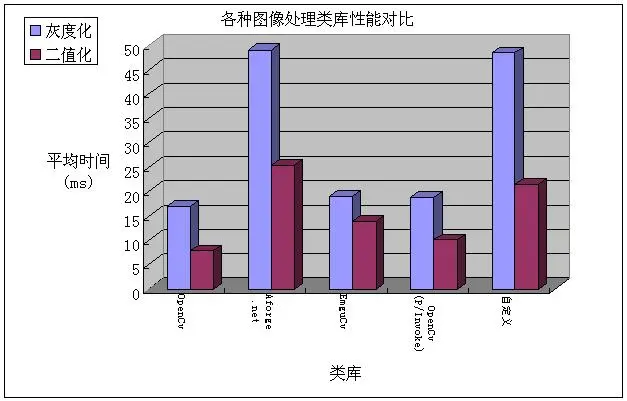
毫无疑问,用C语言调用OpenCv的性能最好,两种纯.net的方式性能最差。
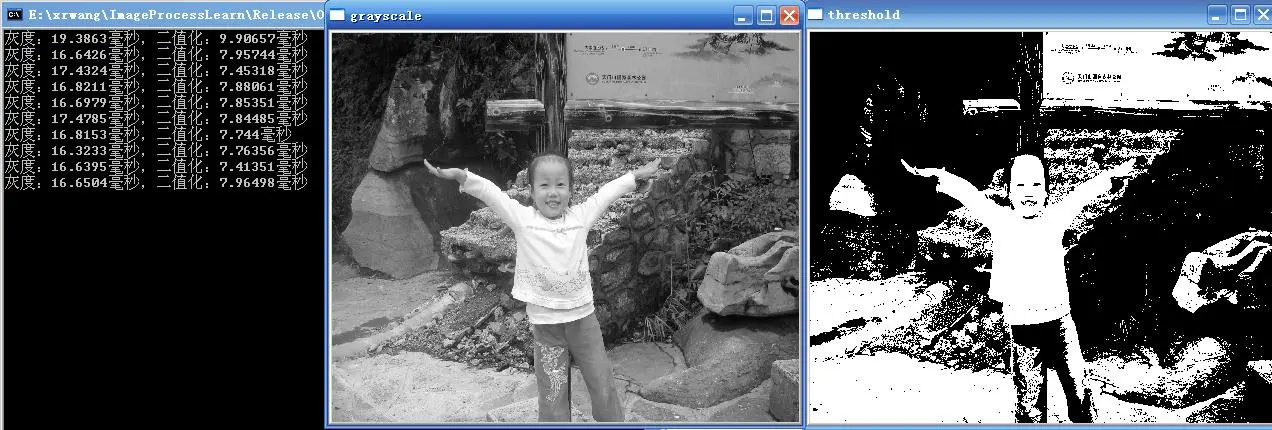
C语言调用OpenCv的处理效果如下所示:
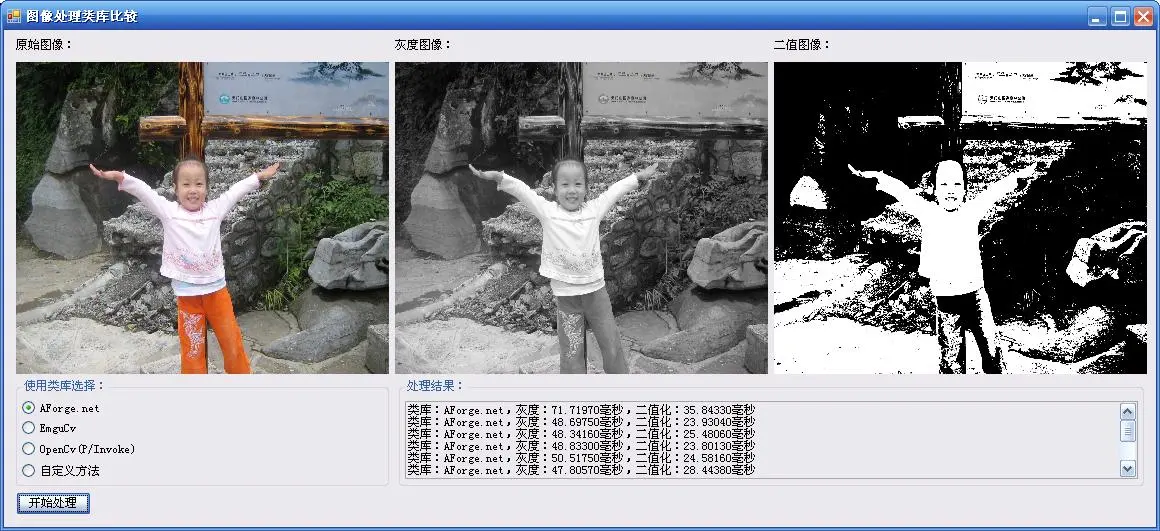
C#的处理效果如下:
结论
将上面的内容汇总结果如下表所示:
类库 |
OpenCv |
EmguCv |
AForge.net |
许可协议 |
BSD |
GPL v3或商业授权 |
LGPL v3 |
下载 |
方便 |
方便 |
方便 |
安装 |
比较容易 |
容易 |
容易 |
文档资料 |
中等 |
少 |
少 |
易用性 |
比较差 |
比较好 |
好 |
性能 |
很好 |
比较好 |
不好 |
综上所述,我的选择是使用EmguCv作为我的图像处理类库,在必要的时候用P/Invoke的形式调用没有被封装的OpenCv函数。
本文转自feisky博客园博客,原文链接:http://www.cnblogs.com/feisky/archive/2010/03/08/1681103.html,如需转载请自行联系原作者