相信在.net平台下,我们都玩过linq,是的,linq让我们的程序简洁优美,简直玩的是爱不释手,但是传统的linq只是串行代码,在并行的
年代如果linq不支持并行计算那该是多么遗憾的事情啊。
当然linq有很多种方式,比如linq to sql ,xml,object 等等,如果要将linq做成并行还是很简单的,这里我就举一个比较实际一点的例子,
我们知道为了更快的响应用户操作,码农们想尽了各种办法,绞尽了脑汁,其中有一个办法就是将数据库数据预加载到内存中,然后通过各种
数据结构的手段来加速CURD,是的,比如一个排序地球人只能做到N(lgN),那么如果我还想再快一点的话该怎么办呢?那么现在的并行就能发
挥巨大的优势,尤其是现在的服务器配置都是在8个硬件线程的情况下,你简直会狂笑好几天啊,好,不乱扯了。
1:AsParallel(并行化)
下面我们模拟给ConcurrentDictionary灌入1500w条记录,看看串行和并行效率上的差异,注意我的老爷机是2个硬件线程。
using System;
using System.Threading;
using System.Threading.Tasks;
using System.Diagnostics;
using System.Collections.Concurrent;
using System.Collections.Generic;

using System.Linq;

class Program
{
    static void Main(string[] args)
    {
        var dic = LoadData();

        Stopwatch watch = new Stopwatch();

        watch.Start();

        //串行执行
        var query1 = (from n in dic.Values
                      where n.Age > 20 && n.Age < 25
                      select n).ToList();

        watch.Stop();

        Console.WriteLine("串行计算耗费时间:{0}", watch.ElapsedMilliseconds);

        watch.Restart();

        var query2 = (from n in dic.Values.AsParallel()
                      where n.Age > 20 && n.Age < 25
                      select n).ToList();

        watch.Stop();

        Console.WriteLine("并行计算耗费时间:{0}", watch.ElapsedMilliseconds);

        Console.Read();
    }

    public static ConcurrentDictionary<int, Student> LoadData()
    {
        ConcurrentDictionary<int, Student> dic = new ConcurrentDictionary<int, Student>();

        //预加载1500w条记录
        Parallel.For(0, 15000000, (i) =>
        {
            var single = new Student()
            {
                ID = i,
                Name = "hxc" + i,
                Age = i % 151,
                CreateTime = DateTime.Now.AddSeconds(i)
            };
            dic.TryAdd(i, single);
        });

        return dic;
    }

    public class Student
    {
        public int ID { get; set; }

        public string Name { get; set; }

        public int Age { get; set; }

        public DateTime CreateTime { get; set; }
    }
}
执行的结果还是比较震撼的,将近7倍,这是因为plinq的查询引擎会尽量利用cpu的所有硬件线程。
2:常用方法的使用
<1> orderby
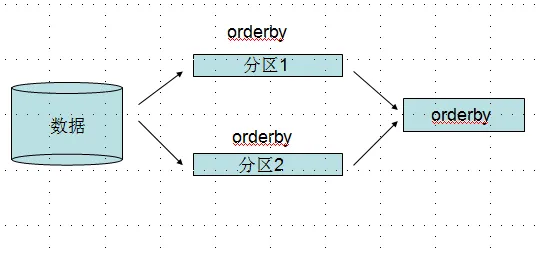
有时候我们并不是简单的select一下就ok了,可能需要将结果进行orderby操作,并行化引擎会把要遍历的数据分区,然后在每个区上进行
orderby操作,最后来一个总的orderby,这里很像算法中的“归并排序”。
using System;
using System.Threading;
using System.Threading.Tasks;
using System.Diagnostics;
using System.Collections.Concurrent;
using System.Collections.Generic;

using System.Linq;

class Program
{
    static void Main(string[] args)
    {
        var dic = LoadData();

        var query1 = (from n in dic.Values.AsParallel()
                      where n.Age > 20 && n.Age < 25
                      select n).ToList();


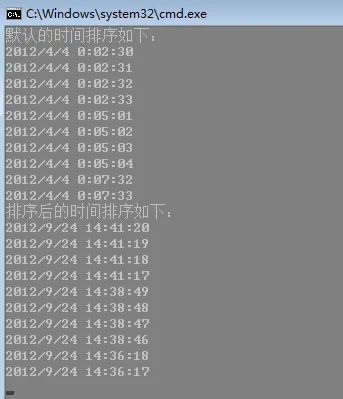
        Console.WriteLine("默认的时间排序如下:");
        query1.Take(10).ToList().ForEach((i) =>
        {
            Console.WriteLine(i.CreateTime);
        });

        var query2 = (from n in dic.Values.AsParallel()
                      where n.Age > 20 && n.Age < 25
                      orderby n.CreateTime descending
                      select n).ToList();

        Console.WriteLine("排序后的时间排序如下:");
        query2.Take(10).ToList().ForEach((i) =>
        {
            Console.WriteLine(i.CreateTime);
        });

        Console.Read();
    }

    public static ConcurrentDictionary<int, Student> LoadData()
    {
        ConcurrentDictionary<int, Student> dic = new ConcurrentDictionary<int, Student>();

        //预加载1500w条记录
        Parallel.For(0, 15000000, (i) =>
        {
            var single = new Student()
            {
                ID = i,
                Name = "hxc" + i,
                Age = i % 151,
                CreateTime = DateTime.Now.AddSeconds(i)
            };
            dic.TryAdd(i, single);
        });

        return dic;
    }

    public class Student
    {
        public int ID { get; set; }

        public string Name { get; set; }

        public int Age { get; set; }

        public DateTime CreateTime { get; set; }
    }
}
<2> sum(),average()等等这些聚合函数的效果跟orderby类型一样,都是实现了类型归并排序的效果,这里就不举例子了。
3:指定并行度,这个我在前面文章也说过,为了不让并行计算占用全部的硬件线程,或许可能要留一个线程做其他事情。
1         var query2 = (from n in dic.Values.AsParallel()
2                       .WithDegreeOfParallelism(Environment.ProcessorCount - 1)
3                       where n.Age > 20 && n.Age < 25
4                       orderby n.CreateTime descending
5                       select n).ToList();
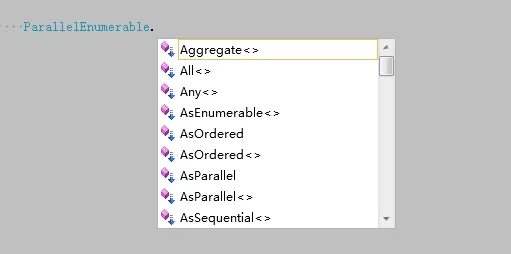
4: 了解ParallelEnumerable类
首先这个类是Enumerable的并行版本,提供了很多用于查询实现的一组方法,截个图,大家看看是不是很熟悉,要记住,他们都是并行的。
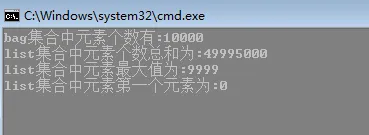
下面列举几个简单的例子。
class Program
{
    static void Main(string[] args)
    {
        ConcurrentBag<int> bag = new ConcurrentBag<int>();

        var list = ParallelEnumerable.Range(0, 10000);

        list.ForAll((i) =>
        {
            bag.Add(i);
        });

        Console.WriteLine("bag集合中元素个数有:{0}", bag.Count);

        Console.WriteLine("list集合中元素个数总和为:{0}", list.Sum());

        Console.WriteLine("list集合中元素最大值为:{0}", list.Max());

        Console.WriteLine("list集合中元素第一个元素为:{0}", list.FirstOrDefault());

        Console.Read();
    }
}
5: plinq实现MapReduce算法
mapReduce是一个非常流行的编程模型,用于大规模数据集的并行计算,非常的牛X啊,记得mongodb中就用到了这个玩意。
map: 也就是“映射”操作,可以为每一个数据项建立一个键值对,映射完后会形成一个键值对的集合。
reduce:“化简”操作,我们对这些巨大的“键值对集合“进行分组,统计等等。
具体大家可以看看百科:http://baike.baidu.com/view/2902.htm
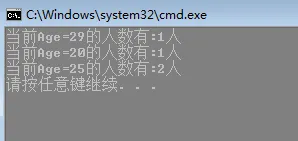
下面我举个例子,用Mapreduce来实现一个对age的分组统计。
using System;
using System.Threading;
using System.Threading.Tasks;
using System.Diagnostics;
using System.Collections.Concurrent;

using System.Collections.Generic;

using System.Linq;

class Program
{
    static void Main(string[] args)
    {
        List<Student> list = new List<Student>()
        {
            new Student(){ ID=1, Name="jack", Age=20},
            new Student(){ ID=1, Name="mary", Age=25},
            new Student(){ ID=1, Name="joe", Age=29},
            new Student(){ ID=1, Name="Aaron", Age=25},
        };

        //这里我们会对age建立一组键值对
        var map = list.AsParallel().ToLookup(i => i.Age, count => 1);

        //化简统计
        var reduce = from IGrouping<int, int> singleMap
                     in map.AsParallel()
                     select new
                     {
                         Age = singleMap.Key,
                         Count = singleMap.Count()
                     };

        ///最后遍历
        reduce.ForAll(i =>
        {
            Console.WriteLine("当前Age={0}的人数有:{1}人", i.Age, i.Count);
        });
    }

    public class Student
    {
        public int ID { get; set; }

        public string Name { get; set; }

        public int Age { get; set; }

        public DateTime CreateTime { get; set; }
    }
}