
前言
大家好,我是明哥!
本片博文是“大数据问题排查系列”之一,我们首先会聊聊一个问题的现象原因和解决方法,然后给出 HDFS FileSystem API 常见的两种使用方式,最后来看下 HDFS 源码中是如何根据用户的配置文件创建对应的 FileSystem 对象实例的。
以下是正文。
从一个报错聊起
- 问题现象:某 JAVA 作业需要读取 HDFS 文件系统中的文件,作业提交后报错如下:
java.io.IOException: No FileSystem for scheme: hdfs
    at org.apache.hadoop.fs.FileSystem.getFileSystemClass(FileSystem.java:2584)
    at org.apache.hadoop.fs.FileSystem.createFileSystem(FileSystem.java:2591)
- 问题原因:类加载路径上缺少 hdfs 相关 Jar包 hadoop-hdfs-*.jar,导致org.apache.hadoop.fs.FileSystem 创建 FileSystem实列 时没有创建 org.apache.hadoop.hdfs.DistributedFileSystem,所以当配置文件中配置 fs.defaultFS 为 hdfs://nameservice1 时,会寻找 hdfs scheme 即org.apache.hadoop.hdfs.DistributedFileSystem,此时自然找不到,就会报上述错误。
- 问题解决:只需要确保类的 Classpath 下有对应的 hdfs相关 jar报即可解决上述报错(注意在分布式环境中可能会涉及到不同 classloader下不同的加载机制),具体来讲:
- 可以在 pom中添加相关依赖:
<dependency>
        <groupId>org.apache.hadoop</groupId>
            <artifactId>hadoop-hdfs</artifactId>
            <version>2.7.4</version>
        </dependency>
- 在linux上提交时,可以通过类似以下命令确保类加载路径上包含相关 hdfs jar包:
java -cp ./test-1.0-SNAPSHOT-jar-with-dependencies.jar:`hadoop classpath` com.hundsun.HdfsTest core-site-test.xml hdfs-site-test.xml
HDFS FileSystem api 常见的两种方式
粗略来看,通过 HDFS FileSystem api 创建 FileSystem 实例时,主要有两种方式,两者在如何配置访问不同集群的 HDFS 上略有差异。以下是示例代码。
- 方式一:代码使用原生JAVA,目标 hdfs 集群的配置信息,通过导出目标集群中的配置文件core-site 和 hdfs-site.xml并放到特定路径下加载进来
package com.mingge.hdfs.demo;
import org.apache.hadoop.conf.Configuration;
import org.apache.hadoop.fs.FileStatus;
import org.apache.hadoop.fs.FileSystem;
import org.apache.hadoop.fs.Path;
import java.io.IOException;
public class HdfsTest {
    /**
     *
     1. If there are configuration files in the classpath with default names like core-site.xml, hdfs-site.xml,
     The Configuration class will automatically load them;
     2. If your configuration files are not following the default names like core-site.xml, hdfs-site.xml,
     you must load them explicitly;
     3. If the configuration files are already in the classpath, you can load them this way:
     conf.addResource(Thread.currentThread().getContextClassLoader().getResourceAsStream(coreConfPath));
     4. If the configuration files are not in the classpath, you can load them this way:
     conf.addResource(new Path(coreConfPath));
     */
    public static void main(String[] args) {
        Configuration conf = new Configuration();
        // paths to configuration files
        String coreConfPath = null;
        String hdfsConfPath = null;
        coreConfPath = args[0];
        hdfsConfPath = args[1];
        // you can use absolute paths, like below on windows:
//        coreConfPath = "E:\\git\\test\\src\\main\\resources\\core-site-test.xml";
//        hdfsConfPath = "E:\\git\\test\\src\\main\\resources\\hdfs-site-test.xml";
        // If you use relative paths, the files must be in the cwd, which can be get by System.getProperty("user.dir");
//        coreConfPath = "core-site-test.xml";
//        hdfsConfPath = "hdfs-site-test.xml";
//        conf.addResource(new Path(coreConfPath));
//        conf.addResource(new Path(hdfsConfPath));
        // if the configuraton files are already in the classpath, you can also use below codes to load them:
        conf.addResource(Thread.currentThread().getContextClassLoader().getResourceAsStream(coreConfPath));
        conf.addResource(Thread.currentThread().getContextClassLoader().getResourceAsStream(hdfsConfPath));
//        System.getenv().forEach((key,value) -> System.out.println(key.toString() + value.toString()));
//        System.getProperties().forEach((key,value) -> System.out.println(key.toString() + value.toString()));
//        conf.iterator().forEachRemaining((confItem)-> System.out.println(confItem.toString()));
        System.out.println("user dir is: " + System.getProperty("user.dir"));
        try { FileSystem fileSystem = FileSystem.get(conf);
        for (FileStatus status: fileSystem.listStatus(new Path("/"))){
            System.out.println(status.getPath());}
        }
        catch (IOException e) {
            e.printStackTrace();
        }
    }
}
- 方式二:代码使用 spring 框架,目标HDFS 集群相关配置信息,配置在 properties 配置文件中:
package com.mingge.hdfs.demo;
import org.apache.commons.lang3.StringUtils;
import org.apache.hadoop.hdfs.HdfsConfiguration;
import org.apache.hadoop.security.UserGroupInformation;
import org.apache.log4j.Logger;
import org.springframework.beans.factory.annotation.Value;
import org.springframework.context.annotation.Bean;
import org.springframework.context.annotation.Configuration;
import java.io.IOException;
/**
 * Created by xxx on xxx.
 */
@Configuration
public class HdfsConfig {
    private final Logger log = Logger.getLogger(this.getClass());
    @Value("${fs.default.name}")
    String fs_default_name;
    @Value("${fs.namenode.isha:false}")
    boolean fs_namenode_isha;
    @Value("${fs.namenode.address:}")
    private String fs_namenode_address;
    @Value("${hadoop.security.authentication:}")
    String hadoop_auth;
    @Value("${key.user:}")
    String key_user;
    @Value("${key.path:}")
    String key_path;
    @Value("${java.security.krb5.conf:}")
    String kbr5_conf;
    @Value("${dfs.namenode.kerberos.principal:}")
    String dfs_namenode_kerberos_principal;
    @Bean(name = "configuration1")
    public org.apache.hadoop.hdfs.HdfsConfiguration configuration(){
        org.apache.hadoop.hdfs.HdfsConfiguration conf = new HdfsConfiguration();
        if(fs_namenode_isha){
            String clusterName = "clusterName";
            conf.set("fs.defaultFS", fs_default_name);
            conf.set("dfs.nameservices", clusterName);
            if(StringUtils.isBlank(fs_namenode_address)){
                throw new RuntimeException("fs.namenode.address 不能为空");
            }
            int i = 0;
            StringBuilder nodes = new StringBuilder();
            for(String address : fs_namenode_address.split(",")){
                i++;
                nodes.append(",nn").append(i);
                conf.set("dfs.namenode.rpc-address."+clusterName+".nn" + i, address);
            }
            conf.set("dfs.ha.namenodes."+clusterName, nodes.substring(1));
            //conf.setBoolean(name, value);
            conf.set("dfs.client.failover.proxy.provider."+clusterName,
                    "org.apache.hadoop.hdfs.server.namenode.ha.ConfiguredFailoverProxyProvider");
        }else{
            conf.set("fs.default.name",fs_default_name);
        }
        conf.set("fs.hdfs.impl", "org.apache.hadoop.hdfs.DistributedFileSystem");
        if (StringUtils.isNotBlank(kbr5_conf)) {
//            System.setProperty("HADOOP_USER_NAME", user); //设置当前window/linux下用户为HBase可访问用户
            System.setProperty("java.security.krb5.conf", kbr5_conf );
            /** 使用Hadoop安全登录 **/
            conf.set("hadoop.security.authentication", hadoop_auth);
            conf.set("dfs.namenode.kerberos.principal", dfs_namenode_kerberos_principal);
            try {
                UserGroupInformation.setConfiguration(conf);
                UserGroupInformation.loginUserFromKeytab(key_user, key_path);
                log.info("=========================kerberos登录成功==============================");
            } catch (IOException e1) {
                log.error("=====================登录错误==================:",e1);
                e1.printStackTrace();
            }
        }
        return conf;
    }
}
HDFS 源码中是如何根据用户的配置文件创建对应的 FileSystem 对象实例的?
通过以上方法一的代码,我们不难发现,只要在类的加载路径上有配置文件core-site.xml和hdfs-site.xml,两行简单的如下语句就可以创建好指向目标 hdfs 集群的 FileSystem对象实例:
Configuration conf = new Configuration();
FileSystem fileSystem = FileSystem.get(conf);
这背后的原理,其实涉及到源码中类 org.apache.hadoop.conf.Configuration 和 org.apache.hadoop.hdfs.HdfsConfiguration,尤其是其如下静态代码块,截图如下:
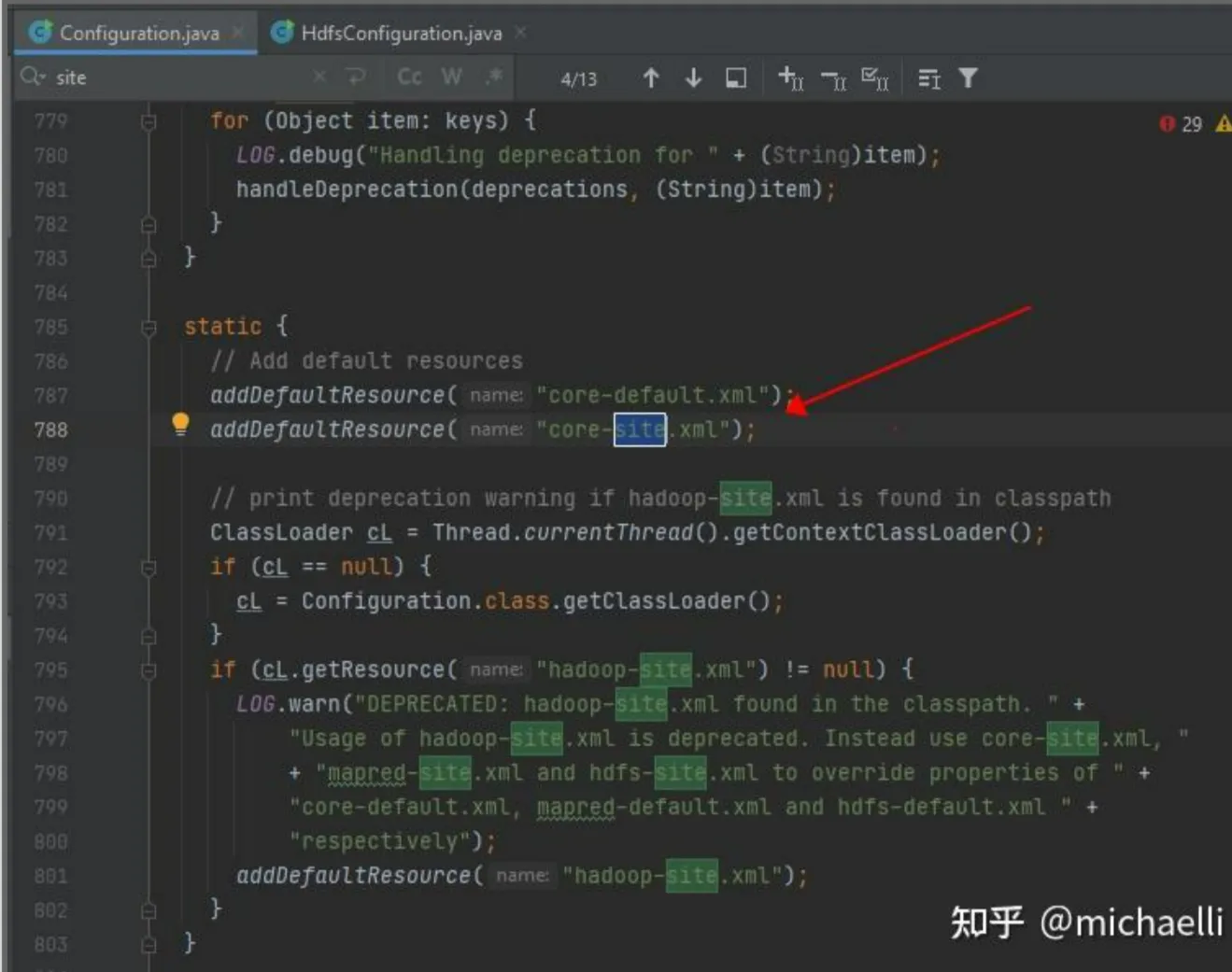
Configuration.java
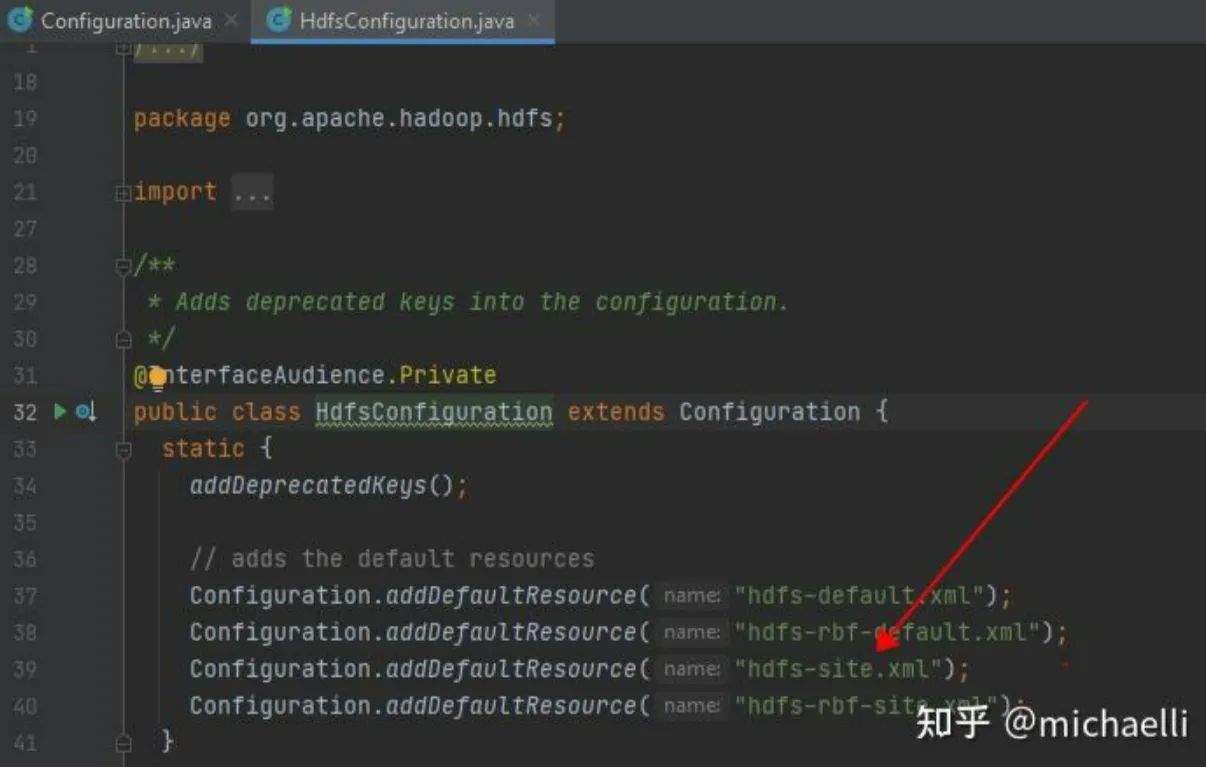
HdfsConfiguration.java
相关知识点,总结如下:
- If there are configuration files in the classpath with default names like core-site.xml, hdfs-site.xml, the Configuration class will automatically load them;
- If your configuration files are not following the default names like core-site.xml, hdfs-site.xml, you must load them explicitly;
- If the configuration files are already in the classpath, you can load them this way: conf.addResource(Thread.currentThread().getContextClassLoader().getResourceAsStream(coreConfPath));
- If the configuration files are not in the classpath, you can load them this way: conf.addResource(new Path(coreConfPath));
大家可以在 IDE 工具中导入以上方法一的代码,DEBUG 调试下以了解其中的细节。以下是笔者排查上述问题时,debug过程中的相关截图:
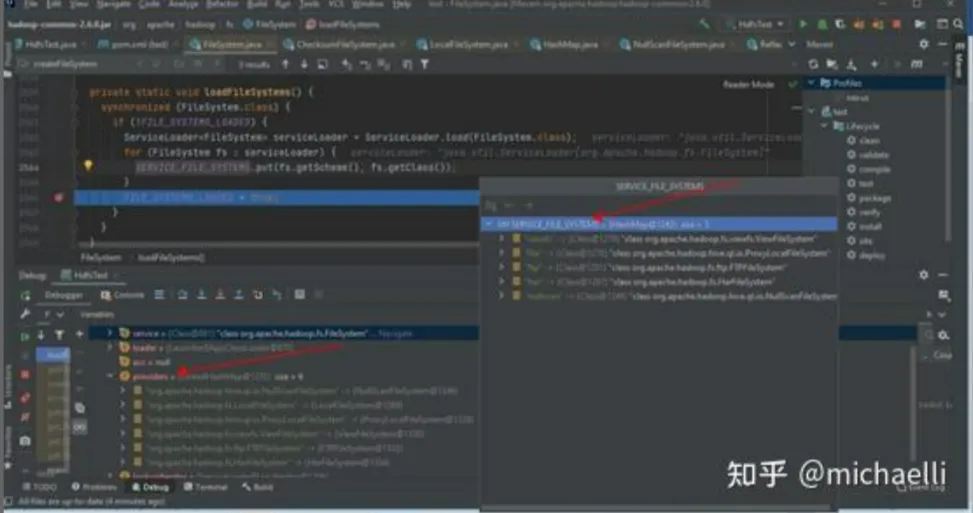
debug FileSystem.java when no org.apache.hadoop:hadoop-hdfs is in the classpath
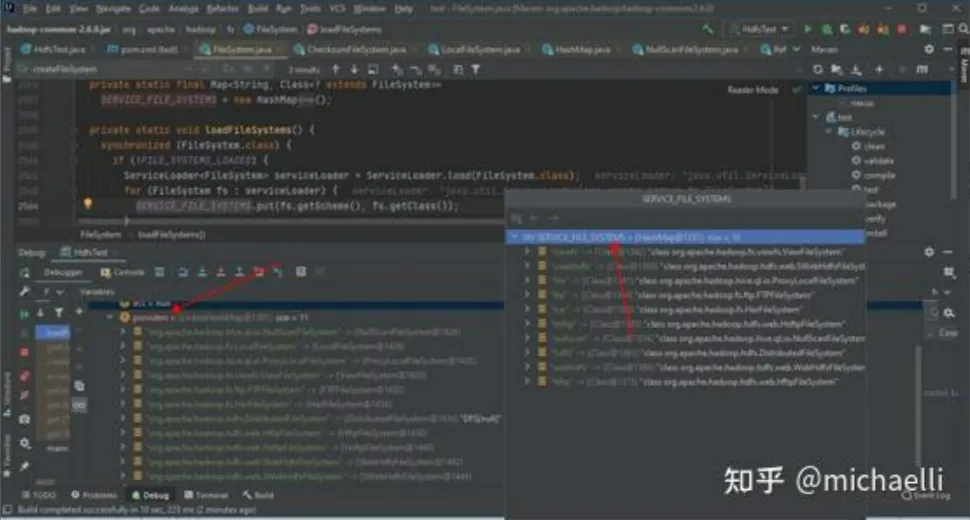
debug FileSystem.java when org.apache.hadoop:hadoop-hdfs is in the classpath
