Springboot2
1.使用maven构建项目
IDEA新建一个maven项目,创建好在pom.xml中添加依赖:
<?xml version="1.0" encoding="UTF-8"?>
<project xmlns="http://maven.apache.org/POM/4.0.0"
xmlns:xsi="http://www.w3.org/2001/XMLSchema-instance"
xsi:schemaLocation="http://maven.apache.org/POM/4.0.0 http://maven.apache.org/xsd/maven-4.0.0.xsd">
<modelVersion>4.0.0</modelVersion>
<groupId>com.elite</groupId>
<artifactId>springboot-demo1</artifactId>
<version>1.0-SNAPSHOT</version>
<parent>
<groupId>org.springframework.boot</groupId>
<artifactId>spring-boot-starter-parent</artifactId>
<version>2.3.1.RELEASE</version>
</parent>
<dependencies>
<dependency>
<groupId>org.springframework.boot</groupId>
<artifactId>spring-boot-starter-web</artifactId>
</dependency>
</dependencies>
</project>
App启动类:
package com.elite.demo1;
import org.springframework.boot.SpringApplication;
import org.springframework.boot.autoconfigure.EnableAutoConfiguration;
import org.springframework.boot.autoconfigure.SpringBootApplication;
import org.springframework.web.bind.annotation.GetMapping;
import org.springframework.web.bind.annotation.RestController;
@SpringBootApplication
@RestController
public class App {
public static void main(String[] args) {
SpringApplication.run(App.class,args);
}
//
@GetMapping("/hello")
public String hello(){
return "hello,springboot!";
}
}
访问结果如:
[外链图片转存失败,源站可能有防盗链机制,建议将图片保存下来直接上传(img-eOKbSWgq-1595723065858)(C:\Users\dell\AppData\Roaming\Typora\typora-user-images\image-20200725082214695.png)]
快速入门的demo就完成了!
2.自动配置父类依赖
- spring-boot-starter-parent 依赖
<?xml version="1.0" encoding="UTF-8"?>
<project xmlns="http://maven.apache.org/POM/4.0.0" xsi:schemaLocation="http://maven.apache.org/POM/4.0.0 http://maven.apache.org/xsd/maven-4.0.0.xsd" xmlns:xsi="http://www.w3.org/2001/XMLSchema-instance">
<modelVersion>4.0.0</modelVersion>
<parent>
<groupId>org.springframework.boot</groupId>
<artifactId>spring-boot-dependencies</artifactId>
<version>2.3.1.RELEASE</version>
</parent>
<artifactId>spring-boot-starter-parent</artifactId>
<packaging>pom</packaging>
<name>spring-boot-starter-parent</name>
<description>Parent pom providing dependency and plugin management for applications built with Maven</description>
<build>
<resources>
<resource>
<directory>${basedir}/src/main/resources</directory>
<filtering>true</filtering>
<includes>
<include>**/application*.yml</include>
<include>**/application*.yaml</include>
<include>**/application*.properties</include>
</includes>
</resource>
<resource>
<directory>${basedir}/src/main/resources</directory>
<excludes>
<exclude>**/application*.yml</exclude>
<exclude>**/application*.yaml</exclude>
<exclude>**/application*.properties</exclude>
</excludes>
</resource>
</resources>
<pluginManagement>
<plugins>
<plugin>
<groupId>org.jetbrains.kotlin</groupId>
<artifactId>kotlin-maven-plugin</artifactId>
<version>${kotlin.version}</version>
<configuration>
<jvmTarget>${java.version}</jvmTarget>
<javaParameters>true</javaParameters>
</configuration>
</plugin>
<plugin>
<groupId>org.apache.maven.plugins</groupId>
<artifactId>maven-compiler-plugin</artifactId>
<configuration>
<parameters>true</parameters>
</configuration>
</plugin>
<plugin>
</project>
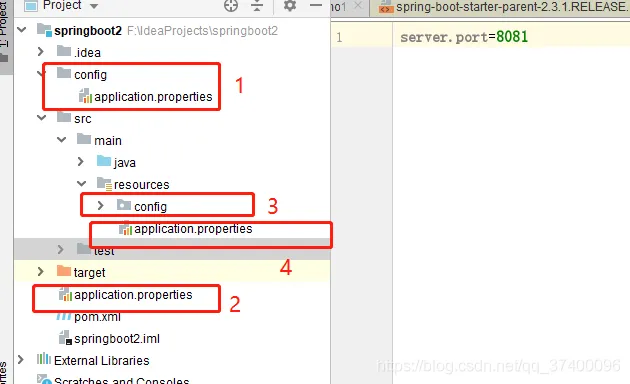
注意:以上位置的优先级一次降低
- 配置文件方式
- .xml文件方式
- .yml方式
3.属性注入
1.spring注入的方式
application.properties
server.port=8081
book.name=java
book.author=javaer
book.id=1
bookcontroller
package com.elite.demo1.controller;
import com.elite.demo1.Book;
import org.springframework.beans.factory.annotation.Autowired;
import org.springframework.web.bind.annotation.GetMapping;
import org.springframework.web.bind.annotation.RestController;
@RestController
public class BookController {
@Autowired
Book book;
@GetMapping("/book")
public Book book(){
return book;
}
}
2.springboot的安全注入
book.name=springboot
book.author=javaer
book.id=2
book对象
package com.elite.demo1.domain;
import org.springframework.boot.context.properties.ConfigurationProperties;
import org.springframework.context.annotation.Configuration;
import org.springframework.context.annotation.PropertySource;
import org.springframework.stereotype.Component;
@Component
@PropertySource("classpath:book.properties")
@ConfigurationProperties(prefix ="book")
public class Book {
private Long id;
private String name;
private String author;
//省略set get 方法
}
[外链图片转存失败,源站可能有防盗链机制,建议将图片保存下来直接上传(img-bJwrsuDu-1595723065867)(C:\Users\dell\AppData\Roaming\Typora\typora-user-images\image-20200725094817000.png)]
3.yml注入
application.yml配置文件
my:
servers:
- dev.example.com
- another.example.com
MyTestConfig对象
package com.elite.demo1.domain;
import org.springframework.boot.context.properties.ConfigurationProperties;
import org.springframework.stereotype.Component;
import java.util.ArrayList;
import java.util.List;
@ConfigurationProperties(prefix = "my")
@Component
public class MyTestConfig {
private List<String> servers = new ArrayList<>();
public List<String> getServers() {
return servers;
}
public void setServers(List<String> servers) {
this.servers = servers;
}
}
访问:
[外链图片转存失败,源站可能有防盗链机制,建议将图片保存下来直接上传(img-8az3GKsq-1595723065868)(C:\Users\dell\AppData\Roaming\Typora\typora-user-images\image-20200725095732417.png)]
4.自定义starter
1.建立自己properties类
package com.elite.starter;
import org.springframework.boot.context.properties.ConfigurationProperties;
import org.springframework.stereotype.Component;
@Component
@ConfigurationProperties(prefix="elite")
public class HelloProperties {
//默认配置属性
private static final String DEFAULT_NAME ="springboot";
private static final String DEFAULT_MSG="javaer";
private String name = DEFAULT_NAME;
private String msg = DEFAULT_MSG;
public String getName() {
return name;
}
public void setName(String name) {
this.name = name;
}
public String getMsg() {
return msg;
}
public void setMsg(String msg) {
this.msg = msg;
}
}
2.建立服务类
package com.elite.starter;
public class HelloService {
private String name;
private String msg;
public String sayHello(){
return name + " say " + msg + "!";
}
public String getName() {
return name;
}
public void setName(String name) {
this.name = name;
}
public String getMsg() {
return msg;
}
public void setMsg(String msg) {
this.msg = msg;
}
}
3.自动配置类
package com.elite.starter;
import org.springframework.beans.factory.annotation.Autowired;
import org.springframework.boot.autoconfigure.EnableAutoConfiguration;
import org.springframework.boot.autoconfigure.condition.ConditionalOnClass;
import org.springframework.boot.context.properties.EnableConfigurationProperties;
import org.springframework.context.annotation.Bean;
import org.springframework.context.annotation.Conditional;
import org.springframework.context.annotation.Configuration;
import org.springframework.context.annotation.EnableMBeanExport;
@Configuration
@EnableConfigurationProperties(HelloProperties.class)
@ConditionalOnClass(HelloService.class)
public class HelloServiceAutoConfiguration {
@Autowired
HelloProperties helloProperties;
@Bean
HelloService helloService(){
HelloService helloService = new HelloService();
helloService.setName(helloProperties.getName());
helloService.setMsg(helloProperties.getMsg());
return helloService;
}
}
4.建立一个spring.factories
org.springframework.boot.autoconfigure.EnableAutoConfiguration=com.elite.starter.HelloSer
5.安装
使用maven install打包
[外链图片转存失败,源站可能有防盗链机制,建议将图片保存下来直接上传(img-nC601pAI-1595723065871)(C:\Users\dell\AppData\Roaming\Typora\typora-user-images\image-20200725105144668.png)]
6.测试
1.添加自己的依赖
<dependency>
<groupId>com.elite</groupId>
<artifactId>mystarter</artifactId>
<version>1.0-SNAPSHOT</version>
</dependency>
2.建立一个hellocontroller
package com.elite.demo1.controller;
import com.elite.starter.HelloService;
import org.springframework.beans.factory.annotation.Autowired;
import org.springframework.web.bind.annotation.RequestMapping;
import org.springframework.web.bind.annotation.RestController;
@RestController
public class HelloController {
@Autowired
HelloService helloService;
@RequestMapping("/sayhello")
public String sayHello(){
return helloService.sayHello();
}
}
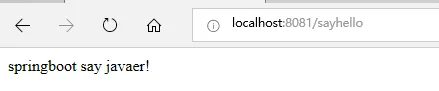
3.访问测试
[外链图片转存失败,源站可能有防盗链机制,建议将图片保存下来直接上传(img-2nuONRqP-1595723065873)(C:\Users\dell\AppData\Roaming\Typora\typora-user-images\image-20200725105826413.png)]
4.数据访问
1.jdbctemplate
新建一张user表**
create table user(
id int not null primary key auto_increment,
username varchar(20),
age int,
address varchar(255)
)engine=innodb;
insert into user(username,age,address)values('a',12,'beijing');
insert into user (username,age,address)values('b',13,'shanghai');
insert into user (username,age,address)values('c',14,'shenzhen');
引入数据源druid以及mysql驱动
<!--引入数据源druid依赖-->
<dependency>
<groupId>com.alibaba</groupId>
<artifactId>druid-spring-boot-starter</artifactId>
<version>1.1.23</version>
</dependency>
<!--引入mysql驱动-->
<dependency>
<groupId>mysql</groupId>
<artifactId>mysql-connector-java</artifactId>
<version>5.1.49</version>
<scope>runtime</scope>
</dependency>
<!-- jdbc依赖 -->
<dependency>
<groupId>org.springframework.boot</groupId>
<artifactId>spring-boot-starter-jdbc</artifactId>
</dependency>
</dependencies>
配置数据库连接
server.port=8081
spring.datasource.type=com.alibaba.druid.pool.DruidDataSource
spring.datasource.driver-class-name=com.mysql.jdbc.Driver
spring.datasource.username=root
spring.datasource.password=123456
spring.datasource.url=jdbc:mysql://127.0.0.1:3306/test?useUnicode=true&characterEncoding=UTF-8
查询结果1:
[外链图片转存失败,源站可能有防盗链机制,建议将图片保存下来直接上传(img-70eIpbBw-1595723065875)(C:\Users\dell\AppData\Roaming\Typora\typora-user-images\image-20200725152831456.png)]
新建一个用户实体类user
package com.elite.demo1.domain;
public class User {
private Integer id;
private String username;
private Integer age;
private String address;
//省略set get方法
}
userservice类
package com.elite.demo1.service;
import com.elite.demo1.domain.User;
import org.springframework.beans.factory.annotation.Autowired;
import org.springframework.jdbc.core.BeanPropertyRowMapper;
import org.springframework.jdbc.core.JdbcTemplate;
import org.springframework.jdbc.core.PreparedStatementCreator;
import org.springframework.jdbc.core.RowMapper;
import org.springframework.jdbc.support.GeneratedKeyHolder;
import org.springframework.jdbc.support.KeyHolder;
import org.springframework.stereotype.Service;
import java.sql.*;
import java.util.List;
@Service
public class UserService {
@Autowired
JdbcTemplate jdbcTemplate;
/**
* 添加用户
*/
public int addUser(User user){
KeyHolder keyHolder = new GeneratedKeyHolder();
int update = jdbcTemplate.update(new PreparedStatementCreator() {
@Override
public PreparedStatement createPreparedStatement(Connection connection) throws SQLException {
PreparedStatement ps = connection.prepareStatement("insert into user " +
"(username,age,address)values(?,?,?);", Statement.RETURN_GENERATED_KEYS);
ps.setString(1,user.getUsername());
ps.setInt(2,user.getAge());
ps.setString(3,user.getAddress());
return ps;
}
},keyHolder);
user.setId((int) keyHolder.getKey().longValue());
System.out.println(user);
return update;
}
/**
* 删除用户
*/
public int delUserById(Integer id){
return jdbcTemplate.update("delete from user where id = ?",id);
}
/**
* 更改
*/
public int updateUser(User user){
return jdbcTemplate.update("update user set username=?,age = ? ,address=? where " +
"id = ?",user.getUsername(),user.getAge(),user.getAddress(),user.getId());
}
/**
* 查询用户
*
*/
public List<User> getAllUser(){
return jdbcTemplate.query("select *from user", new RowMapper<User>() {
@Override
public User mapRow(ResultSet resultSet, int i) throws SQLException {
String username = resultSet.getString("username");
Integer age = resultSet.getInt("age");
String address = resultSet.getString("address");
Integer id = resultSet.getInt("id");
User user = new User();
user.setId(id);
user.setUsername(username);
user.setAge(age);
user.setAddress(address);
return user;
}
});
}
/**
* 查询2
*/
public List<User> getUserList(){
return jdbcTemplate.query("select * from user",new BeanPropertyRowMapper<>(User.class));
}
}
usercontroller类
package com.elite.demo1.controller;
import com.elite.demo1.domain.User;
import com.elite.demo1.service.UserService;
import org.springframework.beans.factory.annotation.Autowired;
import org.springframework.web.bind.annotation.GetMapping;
import org.springframework.web.bind.annotation.RequestMapping;
import org.springframework.web.bind.annotation.RequestParam;
import org.springframework.web.bind.annotation.RestController;
import javax.swing.*;
import java.util.List;
@RestController
public class UserController {
@Autowired
UserService userService;
/**
* 查询用户1
* @return
*/
@GetMapping("getUserList1")
public List<User> getUserList1(){
return userService.getAllUser();
}
/**
* 查询用户2
* @return
*/
@GetMapping("getUserList2")
public List<User> getUserList2(){
return userService.getUserList();
}
/**
* 删除用户
* @param id
* @return
*/
@RequestMapping("delUserById")
public List<User> delUserById(@RequestParam("id") Integer id){
int i = userService.delUserById(id);
return userService.getUserList();
}
/**
* 增加用户
* @param username
* @param age
* @param address
* @return
*/
@RequestMapping("addUser")
public List<User> delUserById(@RequestParam("username") String username,
@RequestParam("age") Integer age,
@RequestParam("address") String address){
User user = new User();
user.setUsername(username);
user.setAge(age);
user.setAddress(address);
userService.addUser(user);
return userService.getUserList();
}
@RequestMapping("updateUser")
public List<User> updateUser(@RequestParam("id") Integer id,
@RequestParam("username") String username,
@RequestParam("age") Integer age,
@RequestParam("address") String address){
User user = new User();
user.setId(id);
user.setUsername(username);
user.setAge(age);
user.setAddress(address);
userService.updateUser(user);
return userService.getUserList();
}
}
启动项目进行访问
查询结果2 http://localhost:8081/getUserList2[外链图片转存失败,源站可能有防盗链机制,建议将图片保存下来直接上传(img-gRNK6zYn-1595723065877)(C:\Users\dell\AppData\Roaming\Typora\typora-user-images\image-20200725152859927.png)]
删除用户:http://localhost:8081/delUserById?id=3
[外链图片转存失败,源站可能有防盗链机制,建议将图片保存下来直接上传(img-XPX11T9S-1595723065880)(C:\Users\dell\AppData\Roaming\Typora\typora-user-images\image-20200725153101126.png)]
添加用户:http://localhost:8081/addUser?username=d&age=15&address=hangzhou[外链图片转存失败,源站可能有防盗链机制,建议将图片保存下来直接上传(img-hiEdhpbU-1595723065881)(C:\Users\dell\AppData\Roaming\Typora\typora-user-images\image-20200725153222586.png)]
修改用户:http://localhost:8081/updateUser?id=1&username=aa&age=15&address=hangzhou
[外链图片转存失败,源站可能有防盗链机制,建议将图片保存下来直接上传(img-eHEAcGES-1595723065884)(C:\Users\dell\AppData\Roaming\Typora\typora-user-images\image-20200725153649497.png)]
2.mybatis
- 引入mybatis依赖
<dependency>
<groupId>org.mybatis.spring.boot</groupId>
<artifactId>mybatis-spring-boot-starter</artifactId>
<version>2.1.3</version>
</dependency>
基于mapper注解实现
package com.elite.demo1.mappers;
import com.elite.demo1.domain.User;
import org.apache.ibatis.annotations.*;
import java.util.List;
public interface UserMapper {
@Select("select * from user")
List<User> getAllUsers();
@Results({@Result(property = "id" ,column = "id"),
@Result(property = "username",column = "u"),
@Result(property = "age",column = "age"),
@Result(property = "address",column = "a")})
@Select("select id as id,username as u ,age as age,address as a from user where id=#{id}")
User getUserByID(Integer id);
/**
* 按用户名模糊查询
*/
@Select("select * from user where username like concat('%',#{name},'%')"
)
List<User> getUserByName(String name);
/**
* 插入用户
*/
@Insert({"insert into user(username,age,address)values(#{username},#{age},#{address})"})
@SelectKey(statement = "select last_insert_id()",keyProperty = "id",before = false,resultType = Integer.class)
Integer addUser(User user);
/**
* 更新用户
*/
@Update("update user set username=#{username},age=#{age},address=#{address} where id=#{id}")
Integer updateUserById(User user);
/**
* 删除用户
*/
@Delete("delete from user where id=#{id}")
Integer delUserById(Integer id);
}
UserMapperController
package com.elite.demo1.controller;
import com.elite.demo1.domain.User;
import com.elite.demo1.mappers.UserMapper;
import org.springframework.beans.factory.annotation.Autowired;
import org.springframework.web.bind.annotation.GetMapping;
import org.springframework.web.bind.annotation.RequestMapping;
import org.springframework.web.bind.annotation.RequestParam;
import org.springframework.web.bind.annotation.RestController;
import javax.annotation.Resource;
import java.util.List;
@RestController
public class UserMapperController {
@Resource
UserMapper userMapper;
/**
* 查询用户通过id
* @return
*/
@GetMapping("getUserList")
public List<User> getUserList1(){
return userMapper.getAllUsers();
}
/**
* 通过id查询用户
* @return
*/
@GetMapping("getUserById")
public User getUserList2(@RequestParam("id") Integer id){
return userMapper.getUserByID(id);
}
/**
* 通过用户名模糊查询
* @param name
* @return
*/
@RequestMapping("getUserByName")
public List<User> delUserById(@RequestParam("name") String name){
return userMapper.getUserByName(name);
}
/**
* 增加用户
* @param username
* @param age
* @param address
* @return
*/
@RequestMapping("addUserByMapper")
public List<User> delUserById(@RequestParam("username") String username,
@RequestParam("age") Integer age,
@RequestParam("address") String address){
User user = new User();
user.setUsername(username);
user.setAge(age);
user.setAddress(address);
userMapper.addUser(user);
return userMapper.getUserByName(username);
}
@RequestMapping("updateUserByMapper")
public User updateUser(@RequestParam("id") Integer id,
@RequestParam("username") String username,
@RequestParam("age") Integer age,
@RequestParam("address") String address){
User user = new User();
user.setId(id);
user.setUsername(username);
user.setAge(age);
user.setAddress(address);
userMapper.updateUserById(user);
return userMapper.getUserByID(id);
}
/**
* 删除用户
*/
/**
* 通过id查询用户
* @return
*/
@GetMapping("delUserByIdByMapper")
public Integer delUserById(@RequestParam("id") Integer id){
return userMapper.delUserById(id);
}
}
测试:修改用戶
[外链图片转存失败,源站可能有防盗链机制,建议将图片保存下来直接上传(img-UcrAr48N-1595723065886)(C:\Users\dell\AppData\Roaming\Typora\typora-user-images\image-20200726072056311.png)]
添加用戶
[外链图片转存失败,源站可能有防盗链机制,建议将图片保存下来直接上传(img-pzzheHyM-1595723065888)(C:\Users\dell\AppData\Roaming\Typora\typora-user-images\image-20200726072224804.png)]
查询用户
[外链图片转存失败,源站可能有防盗链机制,建议将图片保存下来直接上传(img-u4GjkKVI-1595723065890)(C:\Users\dell\AppData\Roaming\Typora\typora-user-images\image-20200726072422855.png)]
刪除用戶
[外链图片转存失败,源站可能有防盗链机制,建议将图片保存下来直接上传(img-87BOpB5A-1595723065891)(C:\Users\dell\AppData\Roaming\Typora\typora-user-images\image-20200726072519621.png)]
基于xml配置
xml的位置放置问题:
<build>
<resources>
<resource>
<directory>src/main/java</directory>
<includes>**/*.xml</includes>
</resource>
<resource>
<directory>src/main/resources</directory>
</resource>
</resources>
</build>
#mybatis的位置
mybatis.mapper-locations=classpath:mappers/UserMapper.xml
我这里是放在resource下:UserXmlMapper.xml
<?xml version="1.0" encoding="UTF-8" ?>
<!DOCTYPE mapper
PUBLIC "-//mybatis.org//DTD Mapper 3.0//EN"
"http://mybatis.org/dtd/mybatis-3-mapper.dtd">
<mapper namespace="com.elite.demo1.mappers.UserXmlMapper">
<select id="getUserById" parameterType="java.lang.Integer" resultType="com.elite.demo1.domain.User">
select * from user where id=#{id}
</select>
<select id="getUserList" resultType="com.elite.demo1.domain.User">
select * from user
</select>
<insert id="addUser" parameterType="com.elite.demo1.domain.User">
insert into user(username,age,address)values (#{username},#{age},#{address})
</insert>
<update id="updateUser" parameterType="com.elite.demo1.domain.User">
update user set username=#{username},
age = #{age},
address = #{address}
where id = #{id}
</update>
<delete id="delUserById" parameterType="java.lang.Integer">
delete from user where id=#{id}
</delete>
</mapper>
还得书写一个接口类:
package com.elite.demo1.mappers;
import com.elite.demo1.domain.User;
import java.util.List;
public interface UserXmlMapper {
public User getUserById(Integer id);
public List<User> getUserList();
public void addUser(User user);
public void updateUser(User user);
public void delUserById(Integer id);
}
- 需要注意:接口的名称和xml名称一致,接口方法名和xml的标签的id必须一致。
UserXmlMapperController类
package com.elite.demo1.controller;
import com.elite.demo1.domain.User;
import com.elite.demo1.mappers.UserXmlMapper;
import org.springframework.beans.factory.annotation.Autowired;
import org.springframework.web.bind.annotation.GetMapping;
import org.springframework.web.bind.annotation.RequestParam;
import org.springframework.web.bind.annotation.RestController;
import javax.annotation.Resource;
import java.util.List;
@RestController
public class UserXmlMapperController {
@Resource
UserXmlMapper userXmlMapper;
/**
* 查询用户
*/
@GetMapping("/getUserByXmlMapper")
public User getUserByXmlMapper(@RequestParam("id") Integer id){
return userXmlMapper.getUserById(id);
}
/**
* 查询用户
*/
@GetMapping("/getUserListByXmlMapper")
public List<User> getUserListByXmlMapper(){
return userXmlMapper.getUserList();
}
/**
* 增加用户
* @param username
* @param age
* @param address
* @return
*/
@GetMapping("addUserByXmlMapper")
public List<User> addUserByXmlMapper(@RequestParam("username") String username,
@RequestParam("age") Integer age,
@RequestParam("address") String address){
User user = new User();
user.setUsername(username);
user.setAge(age);
user.setAddress(address);
userXmlMapper.addUser(user);
return userXmlMapper.getUserList() ;
}
@GetMapping("updateUserByXmlMapper")
public User updateUser(@RequestParam("id") Integer id,
@RequestParam("username") String username,
@RequestParam("age") Integer age,
@RequestParam("address") String address){
User user = new User();
user.setId(id);
user.setUsername(username);
user.setAge(age);
user.setAddress(address);
userXmlMapper.updateUser(user);
return userXmlMapper.getUserById(id);
}
/**
* 删除用户
*/
/**
* 通过id查询用户
* @return
*/
@GetMapping("delUserByIdByXmlMapper")
public void delUserById(@RequestParam("id") Integer id){
userXmlMapper.delUserById(id);
}
}
测试:
查询用户:
[外链图片转存失败,源站可能有防盗链机制,建议将图片保存下来直接上传(img-bAJb0Cz3-1595723065894)(C:\Users\dell\AppData\Roaming\Typora\typora-user-images\image-20200726075711924.png)]
添加用户:
[外链图片转存失败,源站可能有防盗链机制,建议将图片保存下来直接上传(img-qExAN6mQ-1595723065897)(C:\Users\dell\AppData\Roaming\Typora\typora-user-images\image-20200726075617867.png)]
修改用户
[外链图片转存失败,源站可能有防盗链机制,建议将图片保存下来直接上传(img-C8Sey3uY-1595723065899)(C:\Users\dell\AppData\Roaming\Typora\typora-user-images\image-20200726080228891.png)]
删除用户:
(img-bAJb0Cz3-1595723065894)]
添加用户:
[外链图片转存中…(img-qExAN6mQ-1595723065897)]
修改用户
[外链图片转存中…(img-C8Sey3uY-1595723065899)]
删除用户:
[外链图片转存失败,源站可能有防盗链机制,建议将图片保存下来直接上传(img-QGxEIUkJ-1595723065901)(C:\Users\dell\AppData\Roaming\Typora\typora-user-images\image-20200726080521386.png)]