1.创建Docker file
在/etc/docker/dockerfile/目录下新建一个Docerfile
vi /etc/docker/dockerfile/Dockerfile
Dockerfile的内容如下:
FROM centos
MAINTAINER Xiaobo<xxxxx@qq.com>
RUN yum install nginx
COPY testfile.html /usr/share/nginx/html/
ENV TZ=Asia/Shanghai
EXPOSE 80CMD ["nginx","-g","daemon off;"]
Dockerfile的内容解析
- FROM centos #指定镜像继承自centos的docker镜像
- MAINTAINER Xiaobo<947089528@qq.com> #镜像的维护者和邮箱
- RUN yum install nginx #执行RUN后面的命令,执行时间是在docker build的时候,有两种格式
shell 格式:
RUN <命令行命令># <命令行命令> 等同于,在终端操作的 shell 命令。
exec 格式:
RUN ["可执行文件","参数1","参数2"]# 例如:# RUN ["./test.php", "dev", "offline"] 等价于 RUN ./test.php dev offline
- COPY testfile.html /usr/share/nginx/html/ #把testfile拷贝到容器中的/usr/share/nginx/html/目录下,不存在会自动创建。
- ENV TZ=Asia/Shanghai #设置环境变量,设置timezone为Asia/Shanghai
- EXPOSE 80 #声明端口
- CMD ["nginx","-g","daemon off;"] #运行程序,CMD是在docker run时运行。
Docker 容器启动时,默认会把容器内部第一个进程,也就是pid=1的程序,作为docker容器是否正在运行的依据,如果 docker 容器pid=1的进程挂了,那么docker容器便会直接退出。
nginx默认是以后台模式启动的,Docker未执行自定义的CMD之前,nginx的pid是1,执行到CMD之后,nginx就在后台运行,bash或sh脚本的pid变成了1。所以一旦执行完自定义CMD,nginx容器也就退出了。为了保持nginx的容器不退出,应该关闭nginx后台运行,所以用-g daemon off关闭后台运行。
原文:If you add a custom CMD in the Dockerfile, be sure to include -g daemon off; in the CMD in order for nginx to stay in the foreground, so that Docker can track the process properly (otherwise your container will stop immediately after starting)!
2.构建镜像
(1)使用docker build -t nginx:v1 .命令构建docker镜像
[root@iZm5e1wm3ud5qa2atm67ooZ dockerfile]# docker build -t nginx:v1 .Sending build context to Docker daemon 3.072kB Step 1/7 : FROM centos ---> 300e315adb2f Step 2/7 : MAINTAINER Xiaobo<xxxxxx@qq.com> ---> Using cache ---> 97b62ee6ef6f Step 3/7 : RUN yum install nginx -y---> Running in 8af7ee643936 CentOS Linux 8- AppStream 7.8 MB/s | 6.3 MB 00:00 CentOS Linux 8- BaseOS 3.4 MB/s | 2.3 MB 00:00 CentOS Linux 8- Extras 19 kB/s | 9.6 kB 00:00 Dependencies resolved. ============================================================================================== Package Arch Version Repo Size ==============================================================================================Installing: nginx x86_64 1:1.14.1-9.module_el8.0.0+184+e34fea82 appstream 570 k Upgrading: openssl-libs x86_64 1:1.1.1g-15.el8_3 baseos 1.5 M Installing dependencies: dejavu-fonts-common noarch 2.35-6.el8 baseos 74 k dejavu-sans-fonts noarch 2.35-6.el8 baseos 1.5 M fontconfig x86_64 2.13.1-3.el8 baseos 275 k fontpackages-filesystem noarch 1.44-22.el8 baseos 16 k freetype x86_64 2.9.1-4.el8_3.1 baseos 394 k gd x86_64 2.2.5-7.el8 appstream 144 k jbigkit-libs x86_64 2.1-14.el8 appstream 55 k libX11 x86_64 1.6.8-3.el8 appstream 611 k libX11-common noarch 1.6.8-3.el8 appstream 158 k libXau x86_64 1.0.9-3.el8 appstream 37 k libXpm x86_64 3.5.12-8.el8 appstream 58 k libjpeg-turbo x86_64 1.5.3-10.el8 appstream 156 k libpng x86_64 2:1.6.34-5.el8 baseos 126 k libtiff x86_64 4.0.9-18.el8 appstream 188 k libwebp x86_64 1.0.0-1.el8 appstream 273 k libxcb x86_64 1.13.1-1.el8 appstream 229 k libxslt x86_64 1.1.32-5.el8 baseos 250 k nginx-all-modules noarch 1:1.14.1-9.module_el8.0.0+184+e34fea82 appstream 23 k nginx-filesystem noarch 1:1.14.1-9.module_el8.0.0+184+e34fea82 appstream 24 k nginx-mod-http-image-filter x86_64 1:1.14.1-9.module_el8.0.0+184+e34fea82 appstream 35 k nginx-mod-http-perl x86_64 1:1.14.1-9.module_el8.0.0+184+e34fea82 appstream 45 k nginx-mod-http-xslt-filter x86_64 1:1.14.1-9.module_el8.0.0+184+e34fea82 appstream 33 k nginx-mod-mail x86_64 1:1.14.1-9.module_el8.0.0+184+e34fea82 appstream 64 k nginx-mod-stream x86_64 1:1.14.1-9.module_el8.0.0+184+e34fea82 appstream 85 k openssl x86_64 1:1.1.1g-15.el8_3 baseos 707 k perl-Carp noarch 1.42-396.el8 baseos 30 k perl-Errno x86_64 1.28-416.el8 baseos 76 k perl-Exporter noarch 5.72-396.el8 baseos 34 k perl-File-Path noarch 2.15-2.el8 baseos 38 k perl-IO x86_64 1.38-416.el8 baseos 141 k perl-PathTools x86_64 3.74-1.el8 baseos 90 k perl-Scalar-List-Utils x86_64 3:1.49-2.el8 baseos 68 k perl-Socket x86_64 4:2.027-3.el8 baseos 59 k perl-Text-Tabs+Wrap noarch 2013.0523-395.el8 baseos 24 k perl-Unicode-Normalize x86_64 1.25-396.el8 baseos 82 k perl-constant noarch 1.33-396.el8 baseos 25 k perl-interpreter x86_64 4:5.26.3-416.el8 baseos 6.3 M perl-libs x86_64 4:5.26.3-416.el8 baseos 1.6 M perl-macros x86_64 4:5.26.3-416.el8 baseos 72 k perl-parent noarch 1:0.237-1.el8 baseos 20 k perl-threads x86_64 1:2.21-2.el8 baseos 61 k perl-threads-shared x86_64 1.58-2.el8 baseos 48 k Installing weak dependencies: openssl-pkcs11 x86_64 0.4.10-2.el8 baseos 66 k Enabling module streams: nginx 1.14 Transaction Summary ==============================================================================================Install 44 Packages Upgrade 1 Package Total download size: 16 M Downloading Packages: (1/45): gd-2.2.5-7.el8.x86_64.rpm 1.6 MB/s | 144 kB 00:00 (2/45): jbigkit-libs-2.1-14.el8.x86_64.rpm 566 kB/s | 55 kB 00:00 (3/45): libX11-common-1.6.8-3.el8.noarch.rpm 4.7 MB/s | 158 kB 00:00 (4/45): libX11-1.6.8-3.el8.x86_64.rpm 4.8 MB/s | 611 kB 00:00 (5/45): libXau-1.0.9-3.el8.x86_64.rpm 867 kB/s | 37 kB 00:00 (6/45): libXpm-3.5.12-8.el8.x86_64.rpm 1.4 MB/s | 58 kB 00:00 (7/45): libjpeg-turbo-1.5.3-10.el8.x86_64.rpm 2.5 MB/s | 156 kB 00:00 (8/45): libtiff-4.0.9-18.el8.x86_64.rpm 1.8 MB/s | 188 kB 00:00 (9/45): libwebp-1.0.0-1.el8.x86_64.rpm 3.1 MB/s | 273 kB 00:00 (10/45): libxcb-1.13.1-1.el8.x86_64.rpm 2.9 MB/s | 229 kB 00:00 (11/45): nginx-all-modules-1.14.1-9.module_el8. 408 kB/s | 23 kB 00:00 (12/45): nginx-1.14.1-9.module_el8.0.0+184+e34f 7.7 MB/s | 570 kB 00:00 (13/45): nginx-filesystem-1.14.1-9.module_el8.0 310 kB/s | 24 kB 00:00 (14/45): nginx-mod-http-image-filter-1.14.1-9.m 663 kB/s | 35 kB 00:00 (15/45): nginx-mod-http-perl-1.14.1-9.module_el 645 kB/s | 45 kB 00:00 (16/45): nginx-mod-http-xslt-filter-1.14.1-9.mo 531 kB/s | 33 kB 00:00 (17/45): nginx-mod-mail-1.14.1-9.module_el8.0.0 895 kB/s | 64 kB 00:00 (18/45): nginx-mod-stream-1.14.1-9.module_el8.0 1.1 MB/s | 85 kB 00:00 (19/45): dejavu-fonts-common-2.35-6.el8.noarch. 951 kB/s | 74 kB 00:00 (20/45): fontconfig-2.13.1-3.el8.x86_64.rpm 3.1 MB/s | 275 kB 00:00 (21/45): dejavu-sans-fonts-2.35-6.el8.noarch.rp 12 MB/s | 1.5 MB 00:00 (22/45): fontpackages-filesystem-1.44-22.el8.no 205 kB/s | 16 kB 00:00 (23/45): freetype-2.9.1-4.el8_3.1.x86_64.rpm 8.0 MB/s | 394 kB 00:00 (24/45): libpng-1.6.34-5.el8.x86_64.rpm 2.5 MB/s | 126 kB 00:00 (25/45): libxslt-1.1.32-5.el8.x86_64.rpm 3.2 MB/s | 250 kB 00:00 (26/45): openssl-1.1.1g-15.el8_3.x86_64.rpm 8.4 MB/s | 707 kB 00:00 (27/45): openssl-pkcs11-0.4.10-2.el8.x86_64.rpm 879 kB/s | 66 kB 00:00 (28/45): perl-Carp-1.42-396.el8.noarch.rpm 391 kB/s | 30 kB 00:00 (29/45): perl-Errno-1.28-416.el8.x86_64.rpm 1.2 MB/s | 76 kB 00:00 (30/45): perl-Exporter-5.72-396.el8.noarch.rpm 474 kB/s | 34 kB 00:00 (31/45): perl-File-Path-2.15-2.el8.noarch.rpm 564 kB/s | 38 kB 00:00 (32/45): perl-IO-1.38-416.el8.x86_64.rpm 1.8 MB/s | 141 kB 00:00 (33/45): perl-PathTools-3.74-1.el8.x86_64.rpm 1.1 MB/s | 90 kB 00:00 (34/45): perl-Scalar-List-Utils-1.49-2.el8.x86_ 899 kB/s | 68 kB 00:00 (35/45): perl-Socket-2.027-3.el8.x86_64.rpm 816 kB/s | 59 kB 00:00 (36/45): perl-Text-Tabs+Wrap-2013.0523-395.el8. 250 kB/s | 24 kB 00:00 (37/45): perl-Unicode-Normalize-1.25-396.el8.x8 1.1 MB/s | 82 kB 00:00 (38/45): perl-constant-1.33-396.el8.noarch.rpm 350 kB/s | 25 kB 00:00 (39/45): perl-macros-5.26.3-416.el8.x86_64.rpm 878 kB/s | 72 kB 00:00 (40/45): perl-parent-0.237-1.el8.noarch.rpm 965 kB/s | 20 kB 00:00 (41/45): perl-threads-2.21-2.el8.x86_64.rpm 2.2 MB/s | 61 kB 00:00 (42/45): perl-libs-5.26.3-416.el8.x86_64.rpm 9.4 MB/s | 1.6 MB 00:00 (43/45): perl-threads-shared-1.58-2.el8.x86_64. 2.2 MB/s | 48 kB 00:00 (44/45): perl-interpreter-5.26.3-416.el8.x86_64 24 MB/s | 6.3 MB 00:00 (45/45): openssl-libs-1.1.1g-15.el8_3.x86_64.rp 9.0 MB/s | 1.5 MB 00:00 --------------------------------------------------------------------------------Total 7.5 MB/s | 16 MB 00:02 warning: /var/cache/dnf/appstream-02e86d1c976ab532/packages/gd-2.2.5-7.el8.x86_64.rpm: Header V3 RSA/SHA256 Signature, key ID 8483c65d: NOKEY CentOS Linux 8- AppStream 1.6 MB/s | 1.6 kB 00:00 Importing GPG key 0x8483C65D: Userid : "CentOS (CentOS Official Signing Key) <security@centos.org>" Fingerprint: 99DB 70FA E1D7 CE22 7FB6 4882 05B5 55B3 8483 C65D From : /etc/pki/rpm-gpg/RPM-GPG-KEY-centosofficial Key imported successfully Running transaction check Transaction check succeeded. Running transaction test Transaction test succeeded. Running transaction Preparing : 1/1 Installing : perl-Exporter-5.72-396.el8.noarch 1/46 Installing : perl-libs-4:5.26.3-416.el8.x86_64 2/46 Installing : perl-Carp-1.42-396.el8.noarch 3/46 Installing : perl-Scalar-List-Utils-3:1.49-2.el8.x86_64 4/46 Upgrading : openssl-libs-1:1.1.1g-15.el8_3.x86_64 5/46 Running scriptlet: openssl-libs-1:1.1.1g-15.el8_3.x86_64 5/46 Installing : openssl-1:1.1.1g-15.el8_3.x86_64 6/46 Installing : openssl-pkcs11-0.4.10-2.el8.x86_64 7/46 Installing : libpng-2:1.6.34-5.el8.x86_64 8/46 Installing : freetype-2.9.1-4.el8_3.1.x86_64 9/46 Installing : fontpackages-filesystem-1.44-22.el8.noarch 10/46 Installing : libjpeg-turbo-1.5.3-10.el8.x86_64 11/46 Installing : dejavu-fonts-common-2.35-6.el8.noarch 12/46 Installing : dejavu-sans-fonts-2.35-6.el8.noarch 13/46 Installing : fontconfig-2.13.1-3.el8.x86_64 14/46 Running scriptlet: fontconfig-2.13.1-3.el8.x86_64 14/46 Installing : perl-macros-4:5.26.3-416.el8.x86_64 15/46 Installing : perl-parent-1:0.237-1.el8.noarch 16/46 Installing : perl-Errno-1.28-416.el8.x86_64 17/46 Installing : perl-Socket-4:2.027-3.el8.x86_64 18/46 Installing : perl-Text-Tabs+Wrap-2013.0523-395.el8.noarch 19/46 Installing : perl-Unicode-Normalize-1.25-396.el8.x86_64 20/46 Installing : perl-File-Path-2.15-2.el8.noarch 21/46 Installing : perl-IO-1.38-416.el8.x86_64 22/46 Installing : perl-PathTools-3.74-1.el8.x86_64 23/46 Installing : perl-constant-1.33-396.el8.noarch 24/46 Installing : perl-threads-1:2.21-2.el8.x86_64 25/46 Installing : perl-threads-shared-1.58-2.el8.x86_64 26/46 Installing : perl-interpreter-4:5.26.3-416.el8.x86_64 27/46 Installing : libxslt-1.1.32-5.el8.x86_64 28/46 Running scriptlet: nginx-filesystem-1:1.14.1-9.module_el8.0.0+184+e34 29/46 Installing : nginx-filesystem-1:1.14.1-9.module_el8.0.0+184+e34 29/46 Installing : libwebp-1.0.0-1.el8.x86_64 30/46 Installing : libXau-1.0.9-3.el8.x86_64 31/46 Installing : libxcb-1.13.1-1.el8.x86_64 32/46 Installing : libX11-common-1.6.8-3.el8.noarch 33/46 Installing : libX11-1.6.8-3.el8.x86_64 34/46 Installing : libXpm-3.5.12-8.el8.x86_64 35/46 Installing : jbigkit-libs-2.1-14.el8.x86_64 36/46 Running scriptlet: jbigkit-libs-2.1-14.el8.x86_64 36/46 Installing : libtiff-4.0.9-18.el8.x86_64 37/46 Installing : gd-2.2.5-7.el8.x86_64 38/46 Running scriptlet: gd-2.2.5-7.el8.x86_64 38/46 Installing : nginx-mod-http-perl-1:1.14.1-9.module_el8.0.0+184+39/46 Running scriptlet: nginx-mod-http-perl-1:1.14.1-9.module_el8.0.0+184+39/46 Installing : nginx-mod-http-xslt-filter-1:1.14.1-9.module_el8.0 40/46 Running scriptlet: nginx-mod-http-xslt-filter-1:1.14.1-9.module_el8.0 40/46 Installing : nginx-mod-mail-1:1.14.1-9.module_el8.0.0+184+e34fe 41/46 Running scriptlet: nginx-mod-mail-1:1.14.1-9.module_el8.0.0+184+e34fe 41/46 Installing : nginx-mod-stream-1:1.14.1-9.module_el8.0.0+184+e34 42/46 Running scriptlet: nginx-mod-stream-1:1.14.1-9.module_el8.0.0+184+e34 42/46 Installing : nginx-1:1.14.1-9.module_el8.0.0+184+e34fea82.x86_6 43/46 Running scriptlet: nginx-1:1.14.1-9.module_el8.0.0+184+e34fea82.x86_6 43/46 Installing : nginx-mod-http-image-filter-1:1.14.1-9.module_el8. 44/46 Running scriptlet: nginx-mod-http-image-filter-1:1.14.1-9.module_el8. 44/46 Installing : nginx-all-modules-1:1.14.1-9.module_el8.0.0+184+e3 45/46 Cleanup : openssl-libs-1:1.1.1g-11.el8.x86_64 46/46 Running scriptlet: openssl-libs-1:1.1.1g-11.el8.x86_64 46/46 Running scriptlet: fontconfig-2.13.1-3.el8.x86_64 46/46 Verifying : gd-2.2.5-7.el8.x86_64 1/46 Verifying : jbigkit-libs-2.1-14.el8.x86_64 2/46 Verifying : libX11-1.6.8-3.el8.x86_64 3/46 Verifying : libX11-common-1.6.8-3.el8.noarch 4/46 Verifying : libXau-1.0.9-3.el8.x86_64 5/46 Verifying : libXpm-3.5.12-8.el8.x86_64 6/46 Verifying : libjpeg-turbo-1.5.3-10.el8.x86_64 7/46 Verifying : libtiff-4.0.9-18.el8.x86_64 8/46 Verifying : libwebp-1.0.0-1.el8.x86_64 9/46 Verifying : libxcb-1.13.1-1.el8.x86_64 10/46 Verifying : nginx-1:1.14.1-9.module_el8.0.0+184+e34fea82.x86_6 11/46 Verifying : nginx-all-modules-1:1.14.1-9.module_el8.0.0+184+e3 12/46 Verifying : nginx-filesystem-1:1.14.1-9.module_el8.0.0+184+e34 13/46 Verifying : nginx-mod-http-image-filter-1:1.14.1-9.module_el8. 14/46 Verifying : nginx-mod-http-perl-1:1.14.1-9.module_el8.0.0+184+15/46 Verifying : nginx-mod-http-xslt-filter-1:1.14.1-9.module_el8.0 16/46 Verifying : nginx-mod-mail-1:1.14.1-9.module_el8.0.0+184+e34fe 17/46 Verifying : nginx-mod-stream-1:1.14.1-9.module_el8.0.0+184+e34 18/46 Verifying : dejavu-fonts-common-2.35-6.el8.noarch 19/46 Verifying : dejavu-sans-fonts-2.35-6.el8.noarch 20/46 Verifying : fontconfig-2.13.1-3.el8.x86_64 21/46 Verifying : fontpackages-filesystem-1.44-22.el8.noarch 22/46 Verifying : freetype-2.9.1-4.el8_3.1.x86_64 23/46 Verifying : libpng-2:1.6.34-5.el8.x86_64 24/46 Verifying : libxslt-1.1.32-5.el8.x86_64 25/46 Verifying : openssl-1:1.1.1g-15.el8_3.x86_64 26/46 Verifying : openssl-pkcs11-0.4.10-2.el8.x86_64 27/46 Verifying : perl-Carp-1.42-396.el8.noarch 28/46 Verifying : perl-Errno-1.28-416.el8.x86_64 29/46 Verifying : perl-Exporter-5.72-396.el8.noarch 30/46 Verifying : perl-File-Path-2.15-2.el8.noarch 31/46 Verifying : perl-IO-1.38-416.el8.x86_64 32/46 Verifying : perl-PathTools-3.74-1.el8.x86_64 33/46 Verifying : perl-Scalar-List-Utils-3:1.49-2.el8.x86_64 34/46 Verifying : perl-Socket-4:2.027-3.el8.x86_64 35/46 Verifying : perl-Text-Tabs+Wrap-2013.0523-395.el8.noarch 36/46 Verifying : perl-Unicode-Normalize-1.25-396.el8.x86_64 37/46 Verifying : perl-constant-1.33-396.el8.noarch 38/46 Verifying : perl-interpreter-4:5.26.3-416.el8.x86_64 39/46 Verifying : perl-libs-4:5.26.3-416.el8.x86_64 40/46 Verifying : perl-macros-4:5.26.3-416.el8.x86_64 41/46 Verifying : perl-parent-1:0.237-1.el8.noarch 42/46 Verifying : perl-threads-1:2.21-2.el8.x86_64 43/46 Verifying : perl-threads-shared-1.58-2.el8.x86_64 44/46 Verifying : openssl-libs-1:1.1.1g-15.el8_3.x86_64 45/46 Verifying : openssl-libs-1:1.1.1g-11.el8.x86_64 46/46 Upgraded: openssl-libs-1:1.1.1g-15.el8_3.x86_64 Installed: dejavu-fonts-common-2.35-6.el8.noarch dejavu-sans-fonts-2.35-6.el8.noarch fontconfig-2.13.1-3.el8.x86_64 fontpackages-filesystem-1.44-22.el8.noarch freetype-2.9.1-4.el8_3.1.x86_64 gd-2.2.5-7.el8.x86_64 jbigkit-libs-2.1-14.el8.x86_64 libX11-1.6.8-3.el8.x86_64 libX11-common-1.6.8-3.el8.noarch libXau-1.0.9-3.el8.x86_64 libXpm-3.5.12-8.el8.x86_64 libjpeg-turbo-1.5.3-10.el8.x86_64 libpng-2:1.6.34-5.el8.x86_64 libtiff-4.0.9-18.el8.x86_64 libwebp-1.0.0-1.el8.x86_64 libxcb-1.13.1-1.el8.x86_64 libxslt-1.1.32-5.el8.x86_64 nginx-1:1.14.1-9.module_el8.0.0+184+e34fea82.x86_64 nginx-all-modules-1:1.14.1-9.module_el8.0.0+184+e34fea82.noarch nginx-filesystem-1:1.14.1-9.module_el8.0.0+184+e34fea82.noarch nginx-mod-http-image-filter-1:1.14.1-9.module_el8.0.0+184+e34fea82.x86_64 nginx-mod-http-perl-1:1.14.1-9.module_el8.0.0+184+e34fea82.x86_64 nginx-mod-http-xslt-filter-1:1.14.1-9.module_el8.0.0+184+e34fea82.x86_64 nginx-mod-mail-1:1.14.1-9.module_el8.0.0+184+e34fea82.x86_64 nginx-mod-stream-1:1.14.1-9.module_el8.0.0+184+e34fea82.x86_64 openssl-1:1.1.1g-15.el8_3.x86_64 openssl-pkcs11-0.4.10-2.el8.x86_64 perl-Carp-1.42-396.el8.noarch perl-Errno-1.28-416.el8.x86_64 perl-Exporter-5.72-396.el8.noarch perl-File-Path-2.15-2.el8.noarch perl-IO-1.38-416.el8.x86_64 perl-PathTools-3.74-1.el8.x86_64 perl-Scalar-List-Utils-3:1.49-2.el8.x86_64 perl-Socket-4:2.027-3.el8.x86_64 perl-Text-Tabs+Wrap-2013.0523-395.el8.noarch perl-Unicode-Normalize-1.25-396.el8.x86_64 perl-constant-1.33-396.el8.noarch perl-interpreter-4:5.26.3-416.el8.x86_64 perl-libs-4:5.26.3-416.el8.x86_64 perl-macros-4:5.26.3-416.el8.x86_64 perl-parent-1:0.237-1.el8.noarch perl-threads-1:2.21-2.el8.x86_64 perl-threads-shared-1.58-2.el8.x86_64 Complete! Removing intermediate container 8af7ee643936 ---> b65c9c7f6c65 Step 4/7 : COPY testfile.html /usr/share/nginx/html/ ---> 669f455c55d9 Step 5/7 : ENV TZ=Asia/Shanghai ---> Running in 8ccc4db83d35 Removing intermediate container 8ccc4db83d35 ---> f7ef58c74a94 Step 6/7 : EXPOSE 80---> Running in d66bbfb1a8d8 Removing intermediate container d66bbfb1a8d8 ---> 4527e71ef4c0 Step 7/7 : CMD ["nginx","-g","daemon off;"] ---> Running in 2c634ef1b0f6 Removing intermediate container 2c634ef1b0f6 ---> 63e9675f385f Successfully built 63e9675f385f Successfully tagged nginx:v1 [root@iZm5e1wm3ud5qa2atm67ooZ dockerfile]#
可以用docker images查看本地主机上的镜像

3.使用创建的docker镜像启动容器并测试访问容器
(1)使用如下命令指定创建的镜像启动容器
docker run -itd--name=nginx -p80:80 nginx:v1

(2)检查内核转发是否已经开启,如果没有开启echo "net.ipv4.ip_forward = 1" >> /etc/sysctl.conf,然后sysctl -p
(3)检查iptables的FORWARD链是否默认DROP,如果是默认DROP,则iptables -P FORWARD ACCEPT设为默认ACCEPT
(4)测试访问docker应用

4.推送自建镜像到阿里云容器镜像服务
(1)首先创建好阿里云容器镜像服务ACR的仓库。
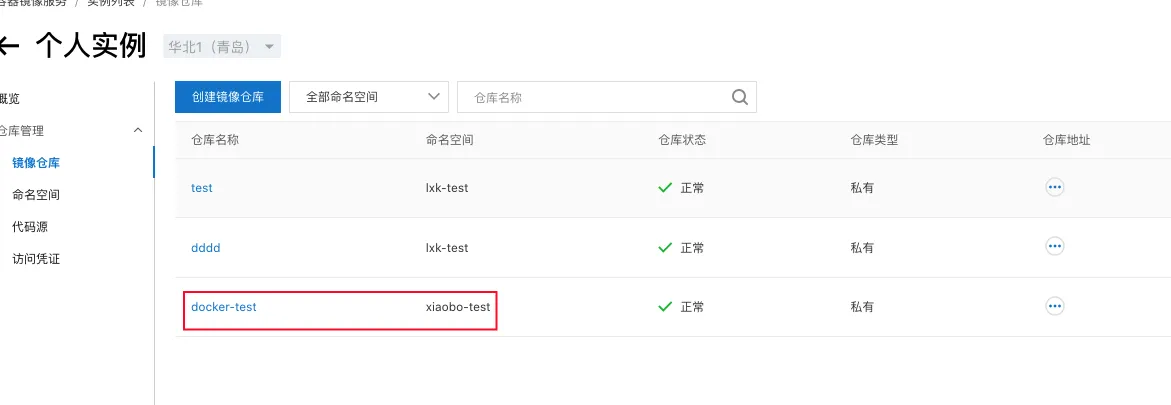
(2)本地登录容器镜像仓库
docker login --username=user@domain registry.cn-qingdao.aliyuncs.com

(3)推送本地创建镜像到镜像仓库
docker tag [ImageId] registry.cn-qingdao.aliyuncs.com/xiaobo-test/docker-test:[镜像版本号]
docker push registry.cn-qingdao.aliyuncs.com/xiaobo-test/docker-test:[镜像版本号]
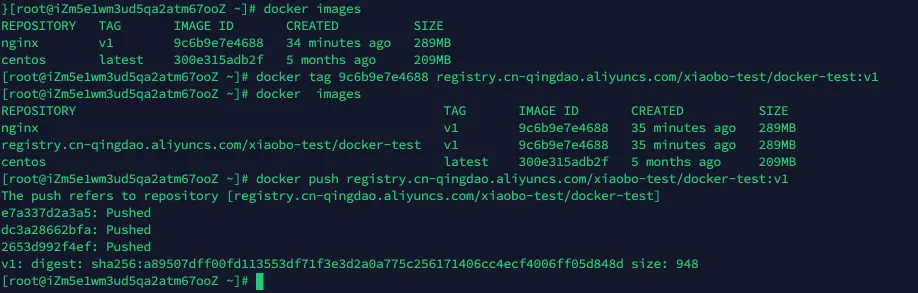
(4)阿里云控制台可以看到推送的镜像了。