系列文章:
一 摘要
上一篇的初体验之后,本篇我们继续探索,将transformers模型导出到onnx。这里主要参考huggingface的官方文档:https://huggingface.co/docs/transformers/v4.20.1/en/serialization#exporting-a-model-to-onnx。
为什么要转onnx?如果需要部署生产环境中的Transformers模型,官方建议将它们导出为可在专用运行时和硬件上加载和执行的序列化格式。Transformers模型有两种广泛使用的格式:ONNX和TorchScript。一旦导出,模型就可以通过量化和修剪等技术进行推理优化,这也就是需要导出的原因。
二 关于onnx
ONNX(开放神经网络eXchange)项目是一个开放标准,它定义了一组通用的运算符和一种通用的文件格式,以表示各种框架中的深度学习模型,包括PyTorch和TensorFlow。当模型导出为ONNX格式时,这些运算符用于构建计算图(通常称为中间表示),该图表示通过神经网络的数据流。
ONNX通过公开具有标准化运算符和数据类型的图,可以轻松地在框架之间切换。例如,用PyTorch训练的模型可以导出为ONNX格式,然后以TensorFlow导入(反之亦然)。
三 transformers中的onnx包
3.1 onnx包简介
transformers 提供了transformers.onnx包,通过使用这个包,我们可以通过利用配置对象将模型检查点转换为ONNX图。这些配置对象是为许多模型体系结构准备的,并且被设计为易于扩展到其他体系结构。transformers.onnx包的源码地址:https://github.com/huggingface/transformers/tree/main/src/transformers/onnx,代码结构如下:
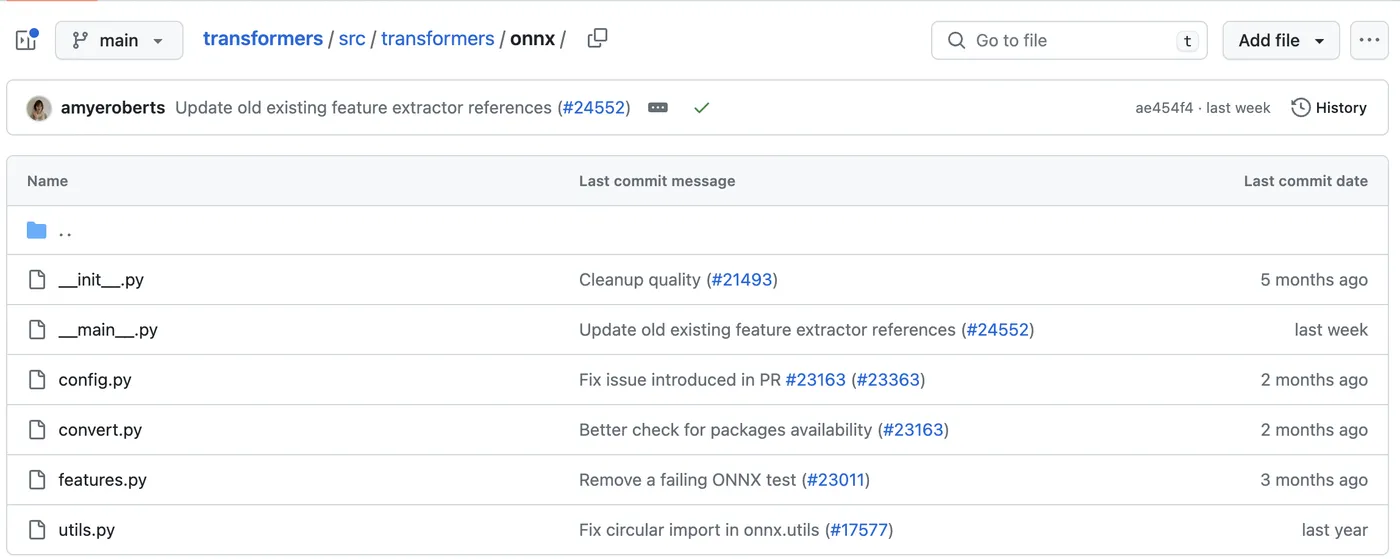
其中,config.py是onnx提供的配置相关代码。
3.2 onnx的相关配置
transformers提供了三个抽象类供使用者集成,我们可以根据希望导出的模型体系结构的类型来选择集成哪一个。
- Encoder-based models 继承 OnnxConfig
- Decoder-based models 继承 OnnxConfigWithPast
- Encoder-decoder models 继承 OnnxSeq2SeqConfigWithPast
四 transformers导出onnx示例
4.1 安装环境依赖
导出Transformers模型到ONNX,首先需要安装一些额外的依赖项:
pip install transformers[onnx]
在安装完成后,transformers.onnx包就可以作为一个Python的module来使用了:
(tutorial-env) (base) [root@xxx onnx]# python -m transformers.onnx --help
2023-07-09 16:50:52.082389: I tensorflow/core/platform/cpu_feature_guard.cc:182] This TensorFlow binary is optimized to use available CPU instructions in performance-critical operations.
To enable the following instructions: AVX2 AVX512F FMA, in other operations, rebuild TensorFlow with the appropriate compiler flags.
2023-07-09 16:50:52.965206: W tensorflow/compiler/tf2tensorrt/utils/py_utils.cc:38] TF-TRT Warning: Could not find TensorRT
usage: Hugging Face Transformers ONNX exporter [-h] -m MODEL [--feature FEATURE] [--opset OPSET] [--atol ATOL]
                                               [--framework {pt,tf}] [--cache_dir CACHE_DIR]
                                               [--preprocessor {auto,tokenizer,feature_extractor,processor}]
                                               [--export_with_transformers]
                                               output
positional arguments:
  output                Path indicating where to store generated ONNX model.
options:
  -h, --help            show this help message and exit
  -m MODEL, --model MODEL
                        Model ID on huggingface.co or path on disk to load model from.
  --feature FEATURE     The type of features to export the model with.
  --opset OPSET         ONNX opset version to export the model with.
  --atol ATOL           Absolute difference tolerance when validating the model.
  --framework {pt,tf}   The framework to use for the ONNX export. If not provided, will attempt to use the local
                        checkpoint's original framework or what is available in the environment.
  --cache_dir CACHE_DIR
                        Path indicating where to store cache.
  --preprocessor {auto,tokenizer,feature_extractor,processor}
                        Which type of preprocessor to use. 'auto' tries to automatically detect it.
  --export_with_transformers
                        Whether to use transformers.onnx instead of optimum.exporters.onnx to perform the ONNX export.
                        It can be useful when exporting a model supported in transformers but not in optimum,
                        otherwise it is not recommended.
4.2 导出命令
使用现成的配置导出checkpoint可以按如下方式完成:
python -m transformers.onnx --model=distilbert-base-uncased onnx/
在本地的执行记录如下:
2023-07-09 16:48:37.895868: I tensorflow/core/platform/cpu_feature_guard.cc:182] This TensorFlow binary is optimized to use available CPU instructions in performance-critical operations.
To enable the following instructions: AVX2 AVX512F FMA, in other operations, rebuild TensorFlow with the appropriate compiler flags.
2023-07-09 16:48:38.785971: W tensorflow/compiler/tf2tensorrt/utils/py_utils.cc:38] TF-TRT Warning: Could not find TensorRT
Framework not requested. Using torch to export to ONNX.
Loading TensorFlow model in PyTorch before exporting to ONNX.
Downloading tf_model.h5: 100%|███████████████████████████████████████████████████████| 363M/363M [00:36<00:00, 9.96MB/s]
2023-07-09 16:49:20.811614: I tensorflow/compiler/xla/stream_executor/cuda/cuda_gpu_executor.cc:996] successful NUMA node read from SysFS had negative value (-1), but there must be at least one NUMA node, so returning NUMA node zero. See more at https://github.com/torvalds/linux/blob/v6.0/Documentation/ABI/testing/sysfs-bus-pci#L344-L355
2023-07-09 16:49:20.813190: W tensorflow/core/common_runtime/gpu/gpu_device.cc:1956] Cannot dlopen some GPU libraries. Please make sure the missing libraries mentioned above are installed properly if you would like to use GPU. Follow the guide at https://www.tensorflow.org/install/gpu for how to download and setup the required libraries for your platform.
Skipping registering GPU devices...
All TF 2.0 model weights were used when initializing DistilBertModel.
All the weights of DistilBertModel were initialized from the TF 2.0 model.
If your task is similar to the task the model of the checkpoint was trained on, you can already use DistilBertModel for predictions without further training.
Downloading (…)okenizer_config.json: 100%|████████████████████████████████████████████| 28.0/28.0 [00:00<00:00, 200kB/s]
Downloading (…)solve/main/vocab.txt: 100%|████████████████████████████████████████████| 232k/232k [00:00<00:00, 600kB/s]
Downloading (…)/main/tokenizer.json: 100%|███████████████████████████████████████████| 466k/466k [00:00<00:00, 1.96MB/s]
Using framework PyTorch: 2.0.1+cu117
/root/onnx/tutorial-env/lib/python3.10/site-packages/transformers/models/distilbert/modeling_distilbert.py:223: TracerWarning: torch.tensor results are registered as constants in the trace. You can safely ignore this warning if you use this function to create tensors out of constant variables that would be the same every time you call this function. In any other case, this might cause the trace to be incorrect.
  mask, torch.tensor(torch.finfo(scores.dtype).min)
============= Diagnostic Run torch.onnx.export version 2.0.1+cu117 =============
verbose: False, log level: Level.ERROR
======================= 0 NONE 0 NOTE 0 WARNING 0 ERROR ========================
Validating ONNX model...
  -[✓] ONNX model output names match reference model ({'last_hidden_state'})
  - Validating ONNX Model output "last_hidden_state":
    -[✓] (3, 9, 768) matches (3, 9, 768)
    -[✓] all values close (atol: 1e-05)
All good, model saved at: onnx/model.onnx
/root/onnx/tutorial-env/lib/python3.10/site-packages/transformers/onnx/__main__.py:178: FutureWarning: The export was done by transformers.onnx which is deprecated and will be removed in v5. We recommend using optimum.exporters.onnx in future. You can find more information here: https://huggingface.co/docs/optimum/exporters/onnx/usage_guides/export_a_model.
  warnings.warn(
除了一些提示和模型的config.json等配置文件之外,与官方示例基本一致。 上述命令导出由--model参数定义的检查点的ONNX图。在这个例子中,它是distilbert-base-uncased,但它可以是Hugging Face Hub上的任何checkpoint,也可以是本地存储的checkpoint。
4.3 模型加载

导出执行完毕后,可以在当前目录的onnx/目录下看到model.onnx。model.onnx文件可以在众多支持onnx标准的加速器之一上运行。例如,我们可以使用ONNX Runtime加载并运行模型,如下所示(注意执行命令的目录):
from transformers import AutoTokenizer
from onnxruntime import InferenceSession
tokenizer = AutoTokenizer.from_pretrained("distilbert-base-uncased")
session = InferenceSession("onnx/model.onnx")
# ONNX Runtime expects NumPy arrays as input
inputs = tokenizer("Using DistilBERT with ONNX Runtime!", return_tensors="np")
outputs = session.run(output_names=["last_hidden_state"], input_feed=dict(inputs))
print(outputs)
outputs输出内容如下:
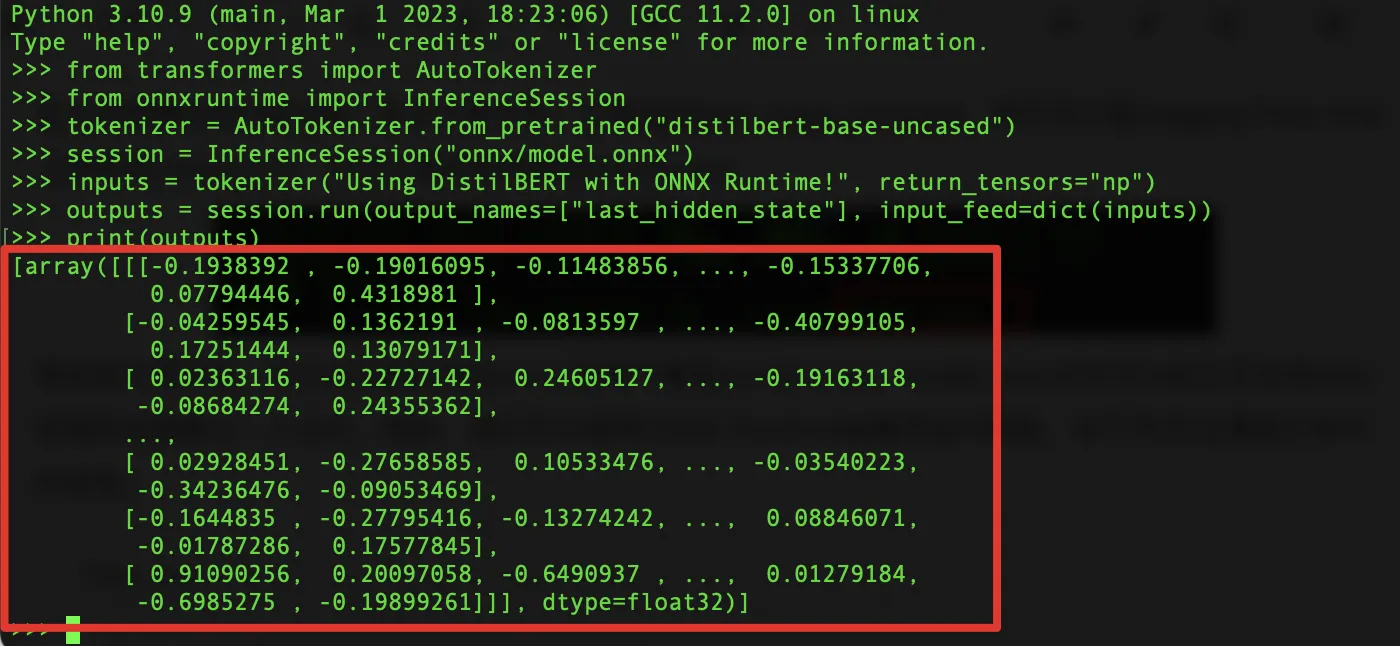
所需的输出名称(即[“last_hidden_state”])可以通过查看每个模型的ONNX配置来获得。例如,对于DistilBERT,我们有:
from transformers.models.distilbert import DistilBertConfig, DistilBertOnnxConfig
config = DistilBertConfig()
onnx_config = DistilBertOnnxConfig(config)
print(list(onnx_config.outputs.keys()))
# 输出:
["last_hidden_state"]
这个过程与在hub上的Transformer checkpoints相同。例如,我们可以从 Keras organization导出一个纯TensorFlow checkpoint,如下所示:
python -m transformers.onnx --model=keras-io/transformers-qa onnx/
要导出本地存储的模型,我们需要将模型的权重和标记器文件存储在一个目录中。例如,我们可以按如下方式加载和保存checkpoint:
Pytorch:
from transformers import AutoTokenizer, AutoModelForSequenceClassification
# 从hub加载tokenizer和PyTorch权重
tokenizer = AutoTokenizer.from_pretrained("distilbert-base-uncased")
pt_model = AutoModelForSequenceClassification.from_pretrained("distilbert-base-uncased")
# 保存到本地磁盘
tokenizer.save_pretrained("local-pt-checkpoint")
pt_model.save_pretrained("local-pt-checkpoint")
在执行tokenizer.save_pretrained("local-pt-checkpoint")时,输出如下:
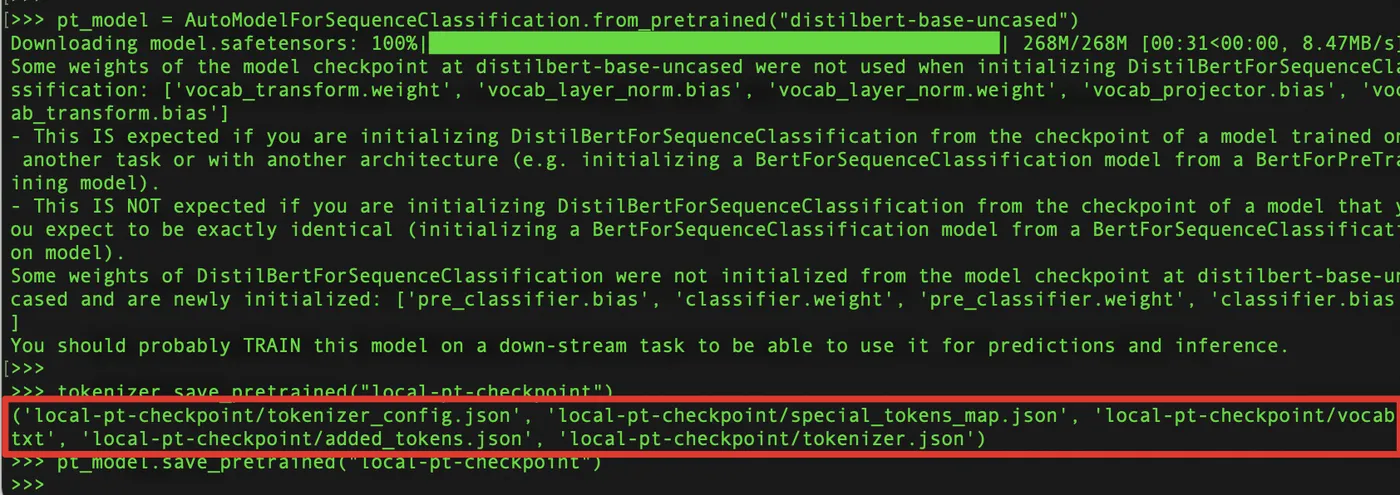
接下来我们可以在本地磁盘上看到保存下来的模型文件及相关配置:
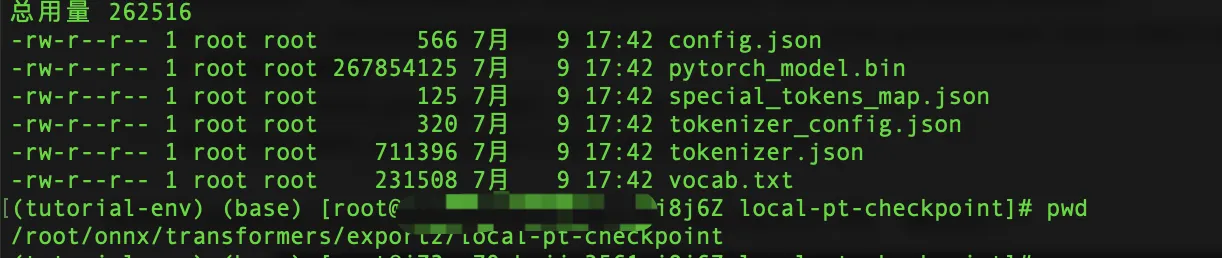
一旦checkpoint被保存,我们可以通过将transformers.ONNX包的--model参数指向所需的目录将其导出到ONNX:
python -m transformers.onnx --model=local-pt-checkpoint onnx/
TensorFlow:
from transformers import AutoTokenizer, TFAutoModelForSequenceClassification
# 从hub加载tokenizer和TensorFlow weights
tokenizer = AutoTokenizer.from_pretrained("distilbert-base-uncased")
tf_model = TFAutoModelForSequenceClassification.from_pretrained("distilbert-base-uncased")
# 保存到
tokenizer.save_pretrained("local-tf-checkpoint")
tf_model.save_pretrained("local-tf-checkpoint")
在这一步的执行中,遇到了报错:

这个问题暂时没有找到解决方案,暂时遗留。
五 小结
本篇继续学习huggingface,尝试将模型导出为onnx并加载运行。后续将继续深入探索不同模型导出为onnx的方法。