
Emacs本质上是函数的组合
从帮助上看emacs有何不同
Vim和Sublime Text等编辑器,本质上是一个编辑器。
比如我们看看vim的帮助,是这个风格的,比如我要看i命令的帮助:
<insert>        or                              *i* *insert* *<Insert>*
i                       Insert text before the cursor [count] times.
                        When using CTRL-O in Insert mode |i_CTRL-O| the count
                        is not supported.
再看看emacs的帮助,是这样的风格,比如我们看Ctrl-n键的帮助:
C-n runs the command next-line (found in global-map), which is an interactive
compiled Lisp function in ‘simple.el’.

It is bound to C-n.

(next-line &optional ARG TRY-VSCROLL)

This function is for interactive use only;
in Lisp code use ‘forward-line’ instead.

Move cursor vertically down ARG lines.
Interactively, vscroll tall lines if ‘auto-window-vscroll’ is enabled.
Non-interactively, use TRY-VSCROLL to control whether to vscroll tall
lines: if either ‘auto-window-vscroll’ or TRY-VSCROLL is nil, this
function will not vscroll.

ARG defaults to 1.

If there is no character in the target line exactly under the current column,
the cursor is positioned after the character in that line which spans this
column, or at the end of the line if it is not long enough.
If there is no line in the buffer after this one, behavior depends on the
value of ‘next-line-add-newlines’.  If non-nil, it inserts a newline character
to create a line, and moves the cursor to that line.  Otherwise it moves the
cursor to the end of the buffer.

If the variable ‘line-move-visual’ is non-nil, this command moves
by display lines.  Otherwise, it moves by buffer lines, without
taking variable-width characters or continued lines into account.
See M-x next-logical-line for a command that always moves by buffer lines.

The command C-x C-n can be used to create
a semipermanent goal column for this command.
Then instead of trying to move exactly vertically (or as close as possible),
this command moves to the specified goal column (or as close as possible).
The goal column is stored in the variable ‘goal-column’, which is nil
when there is no goal column.  Note that setting ‘goal-column’
overrides ‘line-move-visual’ and causes this command to move by buffer
lines rather than by display lines.
更进一步,我们可以点击simple.el进去看看,可以看到它的源码:
(defun next-line (&optional arg try-vscroll)
  "Move cursor vertically down ARG lines.
...就是上面贴过的帮助,此处略过
"
  (declare (interactive-only forward-line))
  (interactive "^p\np")
  (or arg (setq arg 1))
  (if (and next-line-add-newlines (= arg 1))
      (if (save-excursion (end-of-line) (eobp))
      ;; When adding a newline, don't expand an abbrev.
      (let ((abbrev-mode nil))
        (end-of-line)
        (insert (if use-hard-newlines hard-newline "\n")))
    (line-move arg nil nil try-vscroll))
    (if (called-interactively-p 'interactive)
    (condition-case err
        (line-move arg nil nil try-vscroll)
      ((beginning-of-buffer end-of-buffer)
       (signal (car err) (cdr err))))
      (line-move arg nil nil try-vscroll)))
  nil)
从上面可以看到,比起vim是个相对黑盒,需要文档描述的编辑器,emacs是个比较简单直接的家伙。简单到,基本上就是一堆函数的组合而己,我们做编辑时,就是直接调用这些函数。为了方便,我们把这些函数绑定到快捷键上。
只要知道要调用哪个函数,不想记任何快捷键的话,只需要记住一个就可以了,就是Alt+X,然后就可以输入要执行的函数名,去执行这个命令。
Emacs的功能,都是由lisp或C语言实现的函数来实现的,所有的源码都是开放的,在新的版本中,直接都可以通过帮助功能来查看,非常方便。
在emacs里,Alt键的命令也都可以通过先按Esc再按另一个键的方式来实现。
从扩展方向上看emacs的不同
vim的扩展
Emacs是第一个著名的以可扩展能力而闻名的编辑器,同时期的主流编辑器在这方面都要向emacs学习。到了现在,Sublime Text和Vim等编辑器的扩展功能也是非常值得称道而且受欢迎的。
但是,不管是Vim还是Sublime Text,甚至更强大一些的Visual Studio Code和Atom,它们的做法都是把扩展的接口开放出来,大家按照开放出来的接口来写扩展。
比如我们先看vim,以我在mac OS下的vim 8.0.600为例,它支持下列feature:
Huge version without GUI.  Features included (+) or not (-):
+acl             +clipboard       +dialog_con      +file_in_path    +job             -lua             +mouse_sgr       +path_extra      +rightleft       +tag_old_static  +user_commands   +writebackup
+arabic          +cmdline_compl   +diff            +find_in_path    +jumplist        +menu            -mouse_sysmouse  +perl            +ruby            -tag_any_white   +vertsplit       -X11
+autocmd         +cmdline_hist    +digraphs        +float           +keymap          +mksession       +mouse_urxvt     +persistent_undo +scrollbind      -tcl             +virtualedit     -xfontset
-balloon_eval    +cmdline_info    -dnd             +folding         +lambda          +modify_fname    +mouse_xterm     +postscript      +signs           +termguicolors   +visual          -xim
-browse          +comments        -ebcdic          -footer          +langmap         +mouse           +multi_byte      +printer         +smartindent     +terminfo        +visualextra     -xpm
++builtin_terms  +conceal         +emacs_tags      +fork()          +libcall         -mouseshape      +multi_lang      +profile         +startuptime     +termresponse    +viminfo         -xsmp
+byte_offset     +cryptv          +eval            -gettext         +linebreak       +mouse_dec       -mzscheme        +python          +statusline      +textobjects     +vreplace        -xterm_clipboard
+channel         +cscope          +ex_extra        -hangul_input    +lispindent      -mouse_gpm       +netbeans_intg   -python3         -sun_workshop    +timers          +wildignore      -xterm_save
+cindent         +cursorbind      +extra_search    +iconv           +listcmds        -mouse_jsbterm   +num64           +quickfix        +syntax          +title           +wildmenu
-clientserver    +cursorshape     +farsi           +insert_expand   +localmap        +mouse_netterm   +packages        +reltime         +tag_binary      -toolbar         +windows
带加号的是我装的vim支持的功能,减号为不支持。从中可以看到,我用的这个版本的vim支持:python,ruby,perl三种语言,而不支持python3,tcl和lua语言来写扩展。
比如我们看一个vim扩展的官方例子:
 1 " Vim global plugin for correcting typing mistakes
 2 " Last Change: 2000 Oct 15
 3 " Maintainer: Bram Moolenaar <Bram@vim.org>
 4 " License: This file is placed in the public domain.
 5
 6 if exists("g:loaded_typecorr")
 7 finish
 8 endif
 9 let g:loaded_typecorr = 1
 10
 11 let s:save_cpo = &cpo
 12 set cpo&vim
 13
 14 iabbrev teh the
 15 iabbrev otehr other
 16 iabbrev wnat want
 17 iabbrev synchronisation
 18 \ synchronization
 19 let s:count = 4
 20
 21 if !hasmapto('<Plug>TypecorrAdd')
 22 map <unique> <Leader>a <Plug>TypecorrAdd
 23 endif
 24 noremap <unique> <script> <Plug>TypecorrAdd <SID>Add
 25
 26 noremenu <script> Plugin.Add\ Correction <SID>Add
 27
 28 noremap <SID>Add :call <SID>Add(expand("<cword>"), 1)<CR>
 29
 30 function s:Add(from, correct)
 31 let to = input("type the correction for " . a:from . ": ")
 32 exe ":iabbrev " . a:from . " " . to
 33 if a:correct | exe "normal viws\<C−R>\" \b\e" | endif
 34 let s:count = s:count + 1
 35 echo s:count . " corrections now"
 36 endfunction
 37
 38 if !exists(":Correct")
 39 command −nargs=1 Correct :call s:Add(<q−args>, 0)
 40 endif
 41
 42 let &cpo = s:save_cpo
 43 unlet s:save_cpo
在vimscript中,通过exe命令可以执行vim本身的命令。
反正是调用API接口么,那么可以支持很多语言了。
比如可以通过:pe perl脚本的方式,直接执行perl语句。可以通过:help :perl查看:
:pe[rl] {cmd}           Execute Perl command {cmd}.  The current package
                        is "main".
Perl语言写vim插件例:
        function! WhitePearl()
        perl << EOF
                VIM::Msg("pearls are nice for necklaces");
                VIM::Msg("rubys for rings");
                VIM::Msg("pythons for bags");
                VIM::Msg("tcls????");
        EOF
        endfunction
常用的perl可调用接口有:
  :perl VIM::Msg("Text")                # displays a message
  :perl VIM::Msg("Error", "ErrorMsg")   # displays an error message
  :perl VIM::Msg("remark", "Comment")   # displays a highlighted message
  :perl VIM::SetOption("ai")            # sets a vim option
  :perl $nbuf = VIM::Buffers()          # returns the number of buffers
  :perl @buflist = VIM::Buffers()       # returns array of all buffers
  :perl $mybuf = (VIM::Buffers('qq.c'))[0] # returns buffer object for 'qq.c'
  :perl @winlist = VIM::Windows()       # returns array of all windows
  :perl $nwin = VIM::Windows()          # returns the number of windows
  :perl ($success, $v) = VIM::Eval('&path') # $v: option 'path', $success: 1
  :perl ($success, $v) = VIM::Eval('&xyz')  # $v: '' and $success: 0
  :perl $v = VIM::Eval('expand("<cfile>")') # expands <cfile>
  :perl $curwin->SetHeight(10)          # sets the window height
  :perl @pos = $curwin->Cursor()        # returns (row, col) array
  :perl @pos = (10, 10)
  :perl $curwin->Cursor(@pos)           # sets cursor to @pos
  :perl $curwin->Cursor(10,10)          # sets cursor to row 10 col 10
  :perl $mybuf = $curwin->Buffer()      # returns the buffer object for window
  :perl $curbuf->Name()                 # returns buffer name
  :perl $curbuf->Number()               # returns buffer number
  :perl $curbuf->Count()                # returns the number of lines
  :perl $l = $curbuf->Get(10)           # returns line 10
  :perl @l = $curbuf->Get(1 .. 5)       # returns lines 1 through 5
  :perl $curbuf->Delete(10)             # deletes line 10
  :perl $curbuf->Delete(10, 20)         # delete lines 10 through 20
  :perl $curbuf->Append(10, "Line")     # appends a line
  :perl $curbuf->Append(10, "Line1", "Line2", "Line3") # appends 3 lines
  :perl @l = ("L1", "L2", "L3")
  :perl $curbuf->Append(10, @l)         # appends L1, L2 and L3
  :perl $curbuf->Set(10, "Line")        # replaces line 10
  :perl $curbuf->Set(10, "Line1", "Line2")      # replaces lines 10 and 11
  :perl $curbuf->Set(10, @l)            # replaces 3 lines
类似的,:py可以调用python语言,:rub可以使用ruby语言.
使用python的例子:
        :python from vim import *
        :python from string import upper
        :python current.line = upper(current.line)
        :python print "Hello"
        :python str = current.buffer[42]
Python调用vim命令的例子:
        :py print "Hello"               # displays a message
        :py vim.command(cmd)            # execute an Ex command
        :py w = vim.windows[n]          # gets window "n"
        :py cw = vim.current.window     # gets the current window
        :py b = vim.buffers[n]          # gets buffer "n"
        :py cb = vim.current.buffer     # gets the current buffer
        :py w.height = lines            # sets the window height
        :py w.cursor = (row, col)       # sets the window cursor position
        :py pos = w.cursor              # gets a tuple (row, col)
        :py name = b.name               # gets the buffer file name
        :py line = b[n]                 # gets a line from the buffer
        :py lines = b[n:m]              # gets a list of lines
        :py num = len(b)                # gets the number of lines
        :py b[n] = str                  # sets a line in the buffer
        :py b[n:m] = [str1, str2, str3] # sets a number of lines at once
        :py del b[n]                    # deletes a line
        :py del b[n:m]                  # deletes a number of lines
调用python文件,可以通过:pyfile或:pyf命令调用。
Ruby语言写vim插件的例子:
        function! RedGem()
        ruby << EOF
        class Garnet
                def initialize(s)
                        @buffer = VIM::Buffer.current
                        vimputs(s)
                end
                def vimputs(s)
                        @buffer.append(@buffer.count,s)
                end
        end
        gem = Garnet.new("pretty")
        EOF
        endfunction
Ruby调用vim接口的示例:
        print "Hello"                         # displays a message
        VIM.command(cmd)                      # execute an Ex command
        num = VIM::Window.count               # gets the number of windows
        w = VIM::Window[n]                    # gets window "n"
        cw = VIM::Window.current              # gets the current window
        num = VIM::Buffer.count               # gets the number of buffers
        b = VIM::Buffer[n]                    # gets buffer "n"
        cb = VIM::Buffer.current              # gets the current buffer
        w.height = lines                      # sets the window height
        w.cursor = [row, col]                 # sets the window cursor position
        pos = w.cursor                        # gets an array [row, col]
        name = b.name                         # gets the buffer file name
        line = b[n]                           # gets a line from the buffer
        num = b.count                         # gets the number of lines
        b[n] = str                            # sets a line in the buffer
        b.delete(n)                           # deletes a line
        b.append(n, str)                      # appends a line after n
        line = VIM::Buffer.current.line       # gets the current line
        num = VIM::Buffer.current.line_number # gets the current line number
        VIM::Buffer.current.line = "test"     # sets the current line number
再来一个lua语言的:
        function! CurrentLineInfo()
        lua << EOF
        local linenr = vim.window().line
        local curline = vim.buffer()[linenr]
        print(string.format("Current line [%d] has %d chars",
                linenr, #curline))
        EOF
        endfunction
tcl语言的:
        function! DefineDate()
            tcl << EOF
            proc date {} {
                return [clock format [clock seconds]]
            }
        EOF
        endfunction
Atom的扩展
Atom的扩展的主力语言是CoffeeScript。
YourNameWordCountView = require './your-name-word-count-view'
{CompositeDisposable} = require 'atom'

module.exports = YourNameWordCount =
  yourNameWordCountView: null
  modalPanel: null
  subscriptions: null

  activate: (state) ->
    @yourNameWordCountView = new YourNameWordCountView(state.yourNameWordCountViewState)
    @modalPanel = atom.workspace.addModalPanel(item: @yourNameWordCountView.getElement(), visible: false)

    # Events subscribed to in atom's system can be easily cleaned up with a CompositeDisposable
    @subscriptions = new CompositeDisposable

    # Register command that toggles this view
    @subscriptions.add atom.commands.add 'atom-workspace',
      'your-name-word-count:toggle': => @toggle()

  deactivate: ->
    @modalPanel.destroy()
    @subscriptions.dispose()
    @wordcountView.destroy()

  serialize: ->
    yourNameWordCountViewState: @yourNameWordCountView.serialize()

  toggle: ->
    console.log 'YourNameWordCount was toggled!'

    if @modalPanel.isVisible()
      @modalPanel.hide()
    else
      @modalPanel.show()
Visual Studio Code的扩展
Visual Studio Code的插件可以用JavaScript或者TypeScript来开发。
下面是个空的TypeScript的例子:
// The module 'vscode' contains the VS Code extensibility API
// Import the module and reference it with the alias vscode in your code below
import * as vscode from 'vscode';

// this method is called when your extension is activated
// your extension is activated the very first time the command is executed
export function activate(context: vscode.ExtensionContext) {

    // Use the console to output diagnostic information (console.log) and errors (console.error)
    // This line of code will only be executed once when your extension is activated
    console.log('Congratulations, your extension "my-first-extension" is now active!');

    // The command has been defined in the package.json file
    // Now provide the implementation of the command with  registerCommand
    // The commandId parameter must match the command field in package.json
    var disposable = vscode.commands.registerCommand('extension.sayHello', () => {
        // The code you place here will be executed every time your command is executed

        // Display a message box to the user
        vscode.window.showInformationMessage('Hello World!');
    });

    context.subscriptions.push(disposable);
}
Sublime Text的扩展
Sublime Text的扩展是用Python写的,举个处理回车换行的例子:
def normalize_line_endings(self, string):
    string = string.replace('\r\n', '\n').replace('\r', '\n')
    line_endings = self.view.settings().get('default_line_ending')
    if line_endings == 'windows':
        string = string.replace('\n', '\r\n')
    elif line_endings == 'mac':
        string = string.replace('\n', '\r')
    return string
emacs的扩展
Emacs与以上的编辑器的最大不同的就是,无所谓扩展了,哪块看不顺眼就直接改了就是了。反正大部分都是绑定到快捷键上的函数而己。
比如,学习emacs的教程中,最开始讲的函数就是find-file,它的作用是打开文件,绑定在C-x C-f键上。水木社区官方QQ群进群问题就是问C-x C-f的作用是什么。
Emacs的好处是没有秘密,我们直接看源码,看看它是做啥的:
(defun find-file (filename &optional wildcards)
... ;文档略
  (interactive
   (find-file-read-args "Find file: "
                        (confirm-nonexistent-file-or-buffer)))
  (let ((value (find-file-noselect filename nil nil wildcards)))
    (if (listp value)
    (mapcar 'switch-to-buffer (nreverse value))
      (switch-to-buffer value))))
这么基础的命令,在其它编辑器中,一般没人改吧。但是在spacemacs中,C-x C-f就默认绑定ido-find-file函数上了。
(defun ido-find-file ()
  (interactive)
  (ido-file-internal ido-default-file-method))
ido是Emacs的一个插件,意思是『Interactive Do』,在交互式操作方式上对基础的Emacs功能上有所增强。
即使在相对古老的emacs 23.x版本上,ido插件也是官方发布版本中的一部分。只不过官方版本上的键绑定还是绑到基础命令上。我们可以选择绑一个键给它,也可以通过Alt-x来运行它。
后面学习emacs的功能的时候,我们都会讲,标准emacs是如何做的,spacemancs是如何做的。大家可以看到,有很多标准emacs绑定的快捷键,在spacemacs上根本就不灵了,被绑定到别的功能上了。
所以,与其记快捷键,不如记函数名吧。也不用太精确,输的时候能找到就行。查帮助时会提升它绑到哪个键上,或者记不住就自己绑一个喜欢的也可以。
在Emacs中查找帮助
个人觉得,Emacs的文档确实不如Vim的文档写得好。但是,Emacs的文档也仍然是非常丰富的,实在查不到,咱还可以直接看代码。
官网上的文档
官网上的文档还是相当丰富的:https://www.gnu.org/software/emacs/manual/
除了基本功能外,常用的大插件的文档也不少,比如我用emacs写代码比较多,经常用cc-mode,cc-mode的文档也很详细:https://www.gnu.org/software/emacs/manual/html_node/ccmode/index.html
在emacs中查找帮助
既然我们已经了解到emacs就是一堆函数的组合,那么提供帮助功能,肯定也是调用相应的函数了。没错,正是这样!
如果想完整地阅读手册,可以调用info函数,默认绑定在C-h i组合上。
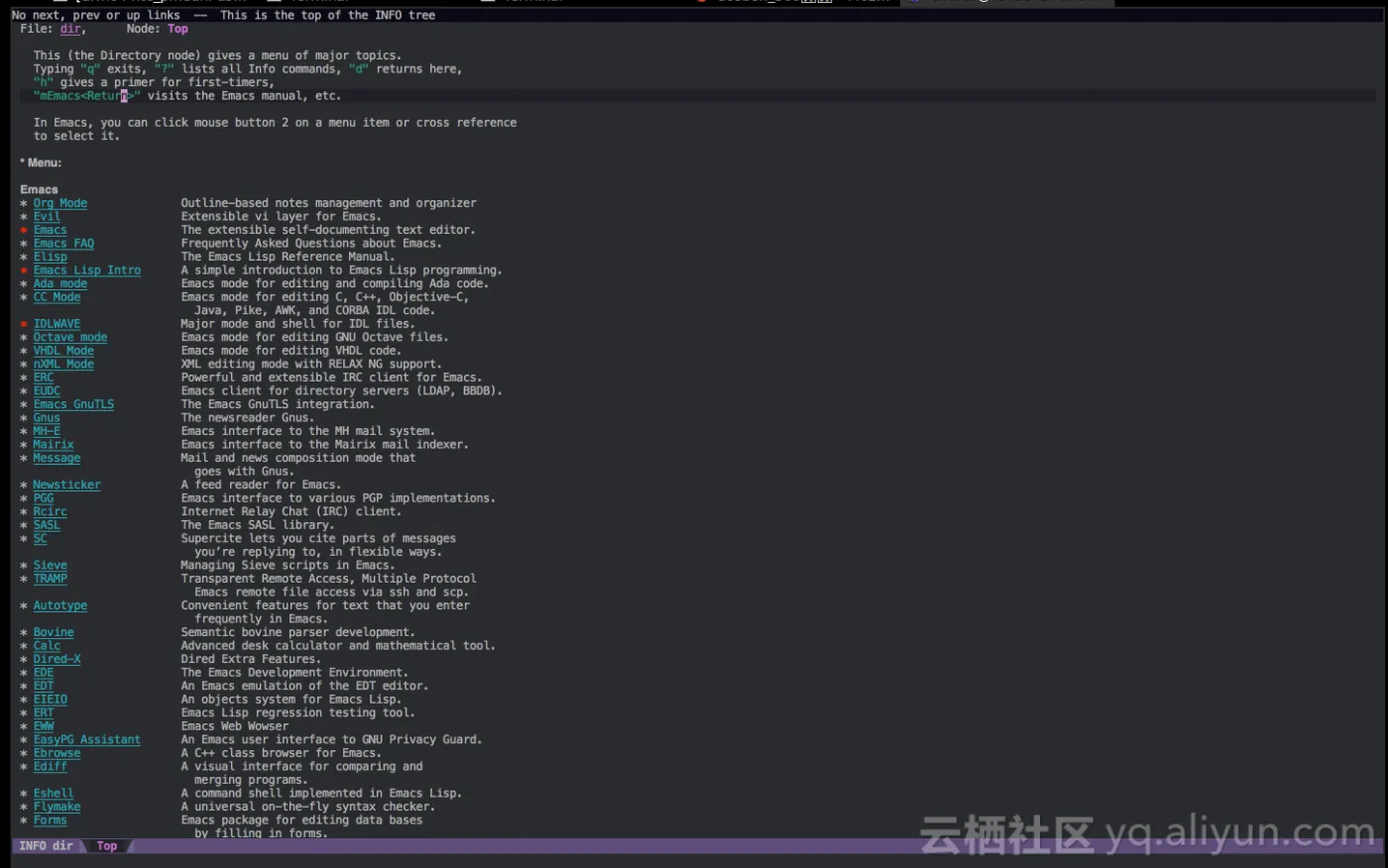
如果看到手册或者书上有讲一个快捷键是做什么的,我们可以查找它所对应的函数。查找一个按键的定义:C-h k (describe-key):比如我们就可以查查C-h k对应的功能:
C-h k runs the command describe-key, which is an interactive compiled
Lisp function.

It is bound to C-h k, <f1> k, <help> k, <menu-bar> <help-menu>
<describe> <describe-key-1>.

(describe-key &optional KEY UNTRANSLATED UP-EVENT)

Display documentation of the function invoked by KEY.
KEY can be any kind of a key sequence; it can include keyboard events,
mouse events, and/or menu events.  When calling from a program,
pass KEY as a string or a vector.

If non-nil, UNTRANSLATED is a vector of the corresponding untranslated events.
It can also be a number, in which case the untranslated events from
the last key sequence entered are used.
UP-EVENT is the up-event that was discarded by reading KEY, or nil.

If KEY is a menu item or a tool-bar button that is disabled, this command
temporarily enables it to allow getting help on disabled items and buttons.
从帮助中我们可以看到,快捷键绑到C-h k,而实际调用的函数是describe-key.
同样,我们还可以通过C-h f (describe-function)来查询一个函数的功能。
describe-function is an interactive compiled Lisp function.

It is bound to C-h f, <f1> f, <help> f, <menu-bar> <help-menu>
<describe> <describe-function>.

(describe-function FUNCTION)

Display the full documentation of FUNCTION (a symbol).
另外,还有查询变量的describe-variable函数,绑定到C-h v键上。
小结
- emacs的基本用法,就是调用一些函数而己。这些函数可以通过Alt-x加上函数名去调用。
- 常用函数可以绑定到一些快捷键上。很多emacs入门教程讲的就是这些功能的用法
- info用于在emacs中查看手册, describe-funciton查找函数用法,对于lisp函数经常可以直达源码。describe-key查找键值绑定。它们默认的绑定是C-h i, C-h f和C-h k。在以后的emacs岁月里,您会经常用到它们的

