在Lucene5学习之排序-Sort中,我们已经学习了Sort的用法,已经了解了,Lucene搜索返回的命中结果默认是按照索引文档跟搜索关键字的相关度已经排序的,而相关度又是基于内部的打分机制和索引文档id,内部的打分机制则是根据Term的IDF-TF以及创建索引时Field的boost等决定的,默认是按照得分降序排序,得分相同再按docId升序排序。如果你觉得默认的排序方式满足不了你的需求,你可以设置SortField按照特定的域来排序,特定的域排序其实根据域的type类型去调用相应的compareTo方法来比较的,String,Long等都有对象的compareTo实现,其实SortField构造函数还有一个重载:
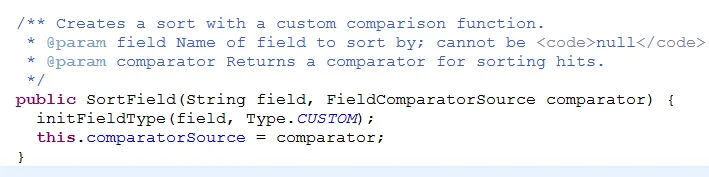
对,没错我们只需要提供一个比较器即可,实现该接口重写相应方法即可。

- /** Creates a sort, possibly in reverse, with a custom comparison function.
- * @param field Name of field to sort by; cannot be <code>null</code>.
- * @param comparator Returns a comparator for sorting hits.
- * @param reverse True if natural order should be reversed.
- */
- public SortField(String field, FieldComparatorSource comparator, boolean reverse) {
- initFieldType(field, Type.CUSTOM);
- this.reverse = reverse;
- this.comparatorSource = comparator;
- }
这个构造重载多了一个reverse参数,设置为true即表示反转排序结果。默认不设置即为false.
假如有这样一个案例:给定一个地点(x,y),搜索附近最近的某家饭店。
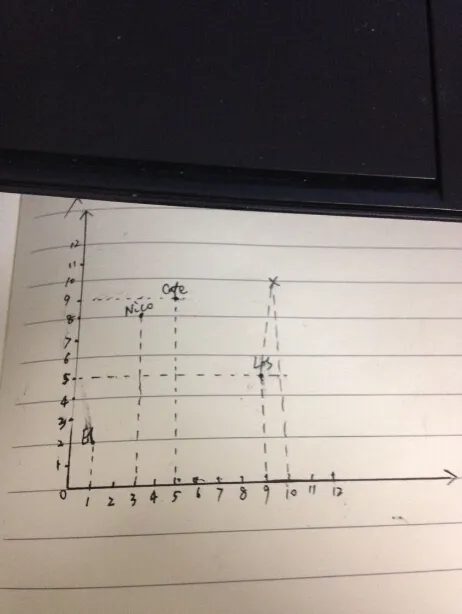
类似这样的场景,我们可以使用自定义排序实现,即返回的饭店需要按照距离当前地点远近排序,离的越近越靠前显示。即需要按照两个地点的距离排序,而给点的地点的坐标,排序需要的两点之间的距离与实际域的值需要一个转换过程,不能直接按照域的值进行排序,这时就不能按照默认排序也不能按照指定域排序了,我们需要一个数据转换过程,即计算两点之间的距离。
下面是有关上面案例场景的示例代码:
- package com.yida.framework.lucene5.sort.custom;
- import java.io.IOException;
- import org.apache.lucene.index.BinaryDocValues;
- import org.apache.lucene.index.LeafReaderContext;
- import org.apache.lucene.search.SimpleFieldComparator;
- import org.apache.lucene.util.BytesRef;
- /**
- * 自定义排序器[按照两点距离远近进行比较]
- * @author Lanxiaowei
- *
- */
- public class DistanceSourceLookupComparator extends
- SimpleFieldComparator<String> {
- private float[] values;
- private float top;
- private float bottom;
- private String fieldName;
- private int x;
- private int y;
- private BinaryDocValues binaryDocValues;
- public DistanceSourceLookupComparator(String fieldName, int numHits, int x,
- int y) {
- values = new float[numHits];
- this.fieldName = fieldName;
- this.x = x;
- this.y = y;
- }
- @Override
- public int compare(int slot1, int slot2) {
- if (values[slot1] > values[slot2]) {
- return 1;
- }
- if (values[slot1] < values[slot2]) {
- return -1;
- }
- return 0;
- }
- /**
- * 求两点连线之间的距离[两点之间直线距离最短]
- *
- * @param doc
- * @return
- */
- private float getDistance(int doc) {
- BytesRef bytesRef = binaryDocValues.get(doc);
- String xy = bytesRef.utf8ToString();
- String[] array = xy.split(",");
- // 求横纵坐标差
- int deltax = Integer.parseInt(array[0]) - x;
- int deltay = Integer.parseInt(array[1]) - y;
- // 开平方根
- float distance = (float) Math.sqrt(deltax * deltax + deltay * deltay);
- //System.out.println(distance);
- return distance;
- }
- @Override
- protected void doSetNextReader(LeafReaderContext context)
- throws IOException {
- binaryDocValues = context.reader().getBinaryDocValues(fieldName);
- }
- public void setBottom(int slot) {
- bottom = values[slot];
- }
- public int compareBottom(int doc) throws IOException {
- float distance = getDistance(doc);
- if (bottom < distance) {
- return -1;
- }
- if (bottom > distance) {
- return 1;
- }
- return 0;
- }
- public int compareTop(int doc) throws IOException {
- float distance = getDistance(doc);
- if (top < distance) {
- return -1;
- }
- if (top > distance) {
- return 1;
- }
- return 0;
- }
- public void copy(int slot, int doc) throws IOException {
- //为values赋值
- values[slot] = getDistance(doc);
- }
- @Override
- public void setTopValue(String value) {
- top = Float.valueOf(value);
- }
- @Override
- public String value(int slot) {
- return values[slot] + "";
- }
- }
- package com.yida.framework.lucene5.sort.custom;
- import java.io.IOException;
- import org.apache.lucene.search.FieldComparator;
- import org.apache.lucene.search.FieldComparatorSource;
- /**
- * 域比较器自定义ValueSource
- * @author Lanxiaowei
- *
- */
- public class DistanceComparatorSource extends FieldComparatorSource {
- private int x;
- private int y;
- public DistanceComparatorSource(int x,int y){
- this.x = x;
- this.y = y;
- }
- @Override
- public FieldComparator<?> newComparator(String fieldname, int numHits,
- int sortPos, boolean reversed) throws IOException {
- return new DistanceSourceLookupComparator(fieldname, numHits,x,y);
- }
- }
- package com.yida.framework.lucene5.sort.custom;
- import org.apache.lucene.analysis.Analyzer;
- import org.apache.lucene.analysis.standard.StandardAnalyzer;
- import org.apache.lucene.document.BinaryDocValuesField;
- import org.apache.lucene.document.Document;
- import org.apache.lucene.document.Field;
- import org.apache.lucene.index.DirectoryReader;
- import org.apache.lucene.index.IndexReader;
- import org.apache.lucene.index.IndexWriter;
- import org.apache.lucene.index.IndexWriterConfig;
- import org.apache.lucene.index.IndexWriterConfig.OpenMode;
- import org.apache.lucene.index.Term;
- import org.apache.lucene.search.IndexSearcher;
- import org.apache.lucene.search.Query;
- import org.apache.lucene.search.ScoreDoc;
- import org.apache.lucene.search.Sort;
- import org.apache.lucene.search.SortField;
- import org.apache.lucene.search.TermQuery;
- import org.apache.lucene.search.TopFieldDocs;
- import org.apache.lucene.store.RAMDirectory;
- import org.apache.lucene.util.BytesRef;
- /**
- * 自定义排序测试
- * @author Lanxiaowei
- *
- */
- public class CustomSortTest {
- public static void main(String[] args) throws Exception {
- RAMDirectory directory = new RAMDirectory();
- Analyzer analyzer = new StandardAnalyzer();
- IndexWriterConfig indexWriterConfig = new IndexWriterConfig(analyzer);
- indexWriterConfig.setOpenMode(OpenMode.CREATE_OR_APPEND);
- IndexWriter indexWriter = new IndexWriter(directory, indexWriterConfig);
- addPoint(indexWriter, "El charro", "restaurant", 1, 2);
- addPoint(indexWriter, "Cafe Poca Cosa", "restaurant", 5, 9);
- addPoint(indexWriter, "Los Betos", "restaurant", 9, 6);
- addPoint(indexWriter, "Nico's Toco Shop", "restaurant", 3, 8);
- indexWriter.close();
- IndexReader reader = DirectoryReader.open(directory);
- IndexSearcher searcher = new IndexSearcher(reader);
- Query query = new TermQuery(new Term("type","restaurant"));
- Sort sort = new Sort(new SortField("location",new DistanceComparatorSource(10, 10)));
- TopFieldDocs topDocs = searcher.search(query, null, Integer.MAX_VALUE,sort,true,false);
- ScoreDoc[] docs = topDocs.scoreDocs;
- for(ScoreDoc doc : docs){
- Document document = searcher.doc(doc.doc);
- System.out.println(document.get("name") + ":" + doc.score);
- }
- }
- private static void addPoint(IndexWriter writer,String name,String type,int x,int y) throws Exception{
- Document document = new Document();
- String xy = x + "," + y;
- document.add(new Field("name",name,Field.Store.YES,Field.Index.NOT_ANALYZED));
- document.add(new Field("type",type,Field.Store.YES,Field.Index.NOT_ANALYZED));
- document.add(new Field("location",xy,Field.Store.YES,Field.Index.NOT_ANALYZED));
- document.add(new BinaryDocValuesField("location", new BytesRef(xy.getBytes())));
- writer.addDocument(document);
- }
- }
这是测试运行结果截图:
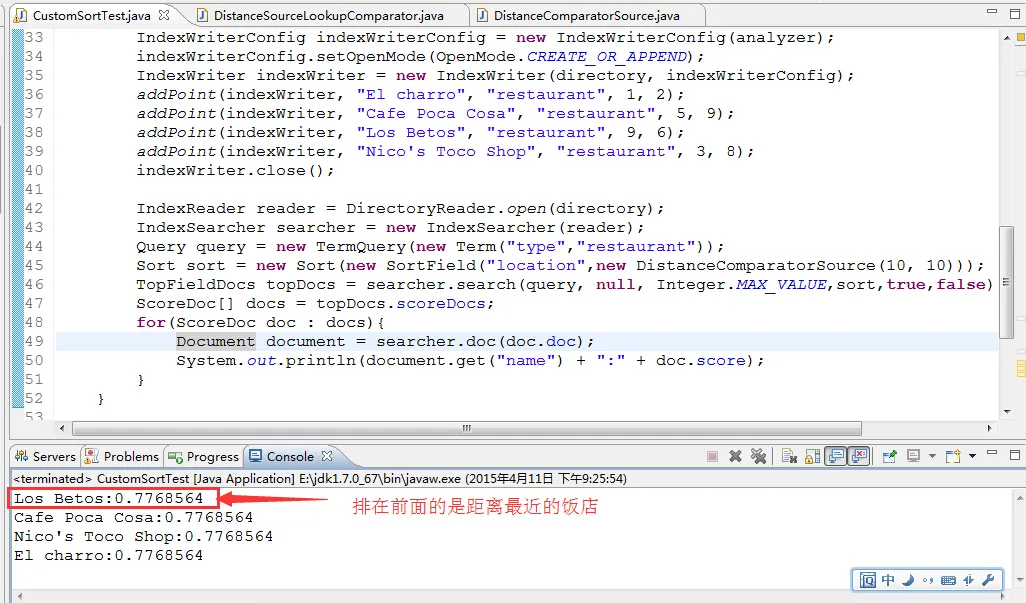
OK,自定义排序就说完了,精华都在代码里,看代码运行测试例子去理解,如果代码有哪里看不懂,请联系我,demo源码一如既往的会上传到底下的附件里。
哥的QQ: 7-3-6-0-3-1-3-0-5,欢迎加入哥的Java技术群一起交流学习。
群号:

转载:http://iamyida.iteye.com/blog/2201372