升级整个rac 环境则需要先升级Clusterware 层,然后升级Database/RDBMS,整个过程可以选择滚动升级也可以选择将数据库停掉,这个要根据生产库的停机维护窗口来定了。此文描述了非滚动升级的方式!实际过程中要更为严谨。
1 准备工作
下载补丁介质
通过登录My Oracle Support后进入Patch栏目搜索Patchid获得补丁。11.2.0.2补丁集的全称是11.2.0.2.0 PATCH SET FOR ORACLE DATABASE SERVER (Patchset)(patchid:10098816),
可以通过10098816这个id到Patch栏目搜索,并找出对应平台的介质zip包。
以上p10098816_112020_Linux-x86-64_1of7.zip和p10098816_112020_Linux-x86-64_2of7.zip ,
这2个zip包对应为Database/RDBMS软件的介质,
p10098816_112020_Linux-x86-64_3of7.zip对应于Clusterware软件。
2 安装软件之前,建立新的软件的安装目录,同时也是grid和oracle用的新的$ORACLE_HOME 路径!
--建立grid目录
mkdir -p /opt/11202/grid
mkdir -p /opt/11202/11.2.0/grid
chown -R grid:oinstall /opt/11202
chown -R grid:oinstall /opt/11202/grid
chown -R grid:oinstall /opt/11202/11.2.0/
--建立oracle目录
mkdir -p /opt/11202/oracle
chown -R oracle:oinstall /opt/11202/oracle
chmod -R 775 /opt/11202
--修改.bash_profile里的ORACLE_BASE和ORACLE_HOME
当然也可以使用unset $ORACLE_HOME 命令来重置ORACLE_HOME变量。
选择非滚动方式,升级Clusterware层的时候要关闭数据库。
oracle@rac1:/opt/rac/oracle>srvctl stop database -d rac -o immediate
grid@rac1:/home/grid/software/11202>crs_stat -t
Name Type Target State Host
------------------------------------------------------------
ora.DATA1.dg ora....up.type ONLINE ONLINE rac1
ora.DATA2.dg ora....up.type ONLINE ONLINE rac1
。。。。。
ora.oc4j ora.oc4j.type OFFLINE OFFLINE
ora.ons ora.ons.type ONLINE ONLINE rac1
ora.rac.db ora....se.type OFFLINE OFFLINE --db停止
ora....SM1.asm application ONLINE ONLINE rac1
。。。。。
ora.rac2.vip ora....t1.type ONLINE ONLINE rac2
ora.scan1.vip ora....ip.type ONLINE ONLINE rac1
3 安装软件。
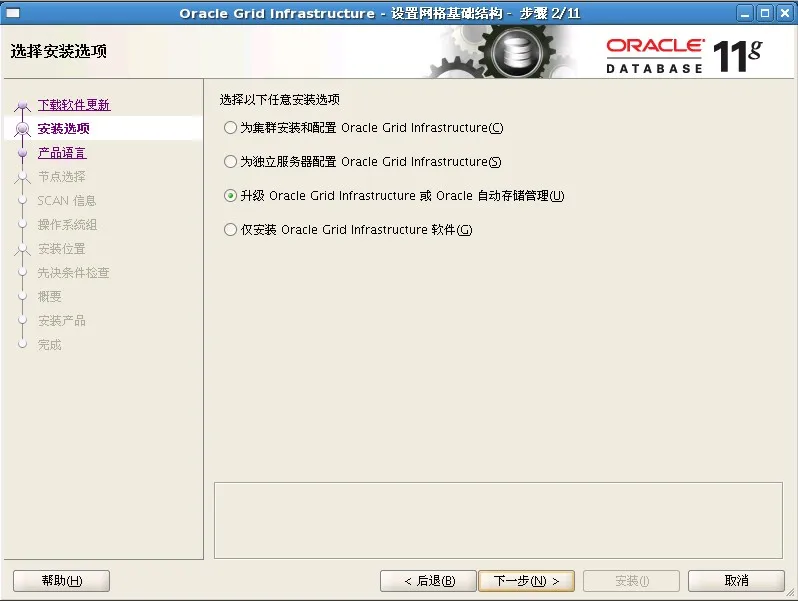
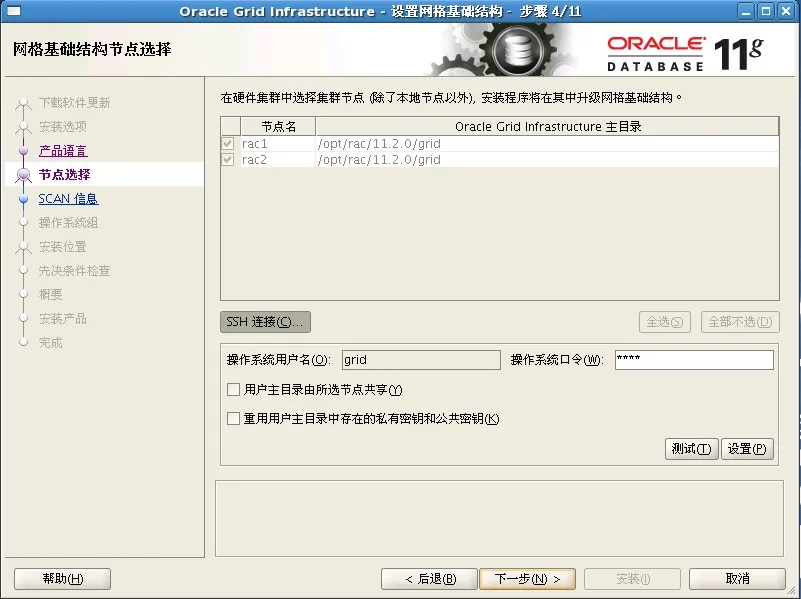
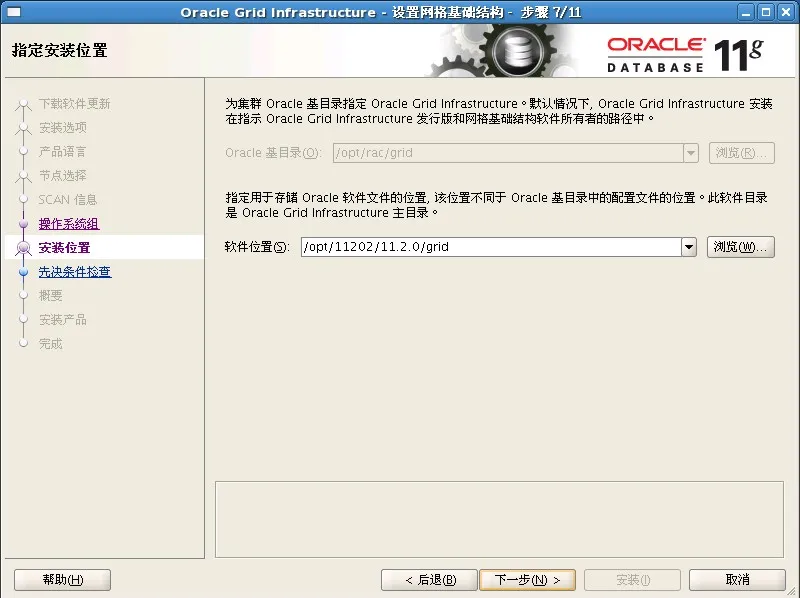
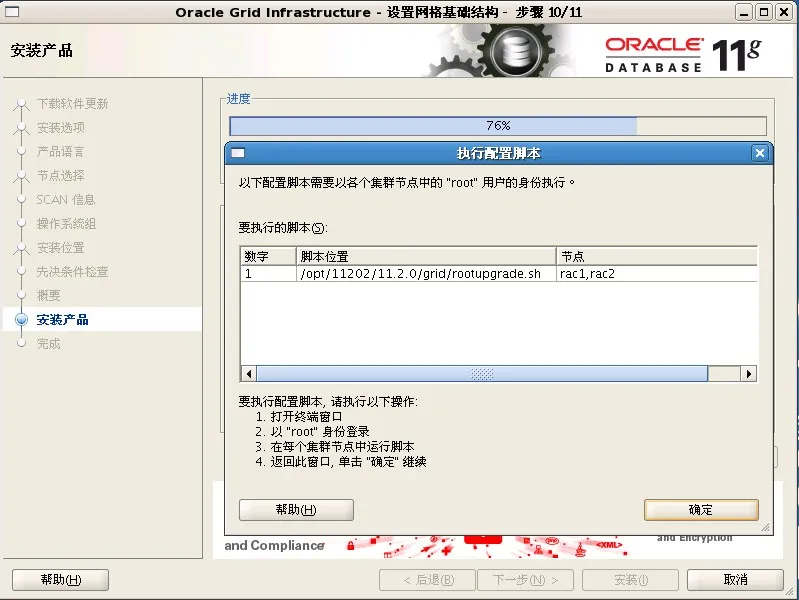
安装完成之后,会要求在所有节点上执行一个rootupgrade.sh脚本:其中一个节点如下所示
[root@rac1 grid]# ./rootupgrade.sh
Running Oracle 11g root script...
The following environment variables are set as:
ORACLE_OWNER= grid
ORACLE_HOME= /opt/11202/11.2.0/grid
Enter the full pathname of the local bin directory: [/usr/local/bin]:
The contents of "dbhome" have not changed. No need to overwrite.
The file "oraenv" already exists in /usr/local/bin. Overwrite it? (y/n)
[n]: n
The file "coraenv" already exists in /usr/local/bin. Overwrite it? (y/n)
[n]: n
nEntries will be added to the /etc/oratab file as needed by
Database Configuration Assistant when a database is created
Finished running generic part of root script.
Now product-specific root actions will be performed.
Using configuration parameter file: /opt/11202/11.2.0/grid/crs/install/crsconfig_params
Creating trace directory
ASM upgrade has initialized on first node.
Successfully deleted 1 keys from OCR.
Creating OCR keys for user 'root', privgrp 'root'..
Operation successful.
OLR initialization - successful
Adding daemon to inittab
ACFS-9459: ADVM/ACFS is not supported on this OS version: 'error: file /etc/SuSE-release: 没有那个文件或目录'
ACFS-9201: Not Supported
ACFS-9459: ADVM/ACFS is not supported on this OS version: 'error: file /etc/SuSE-release: 没有那个文件或目录'
clscfg: EXISTING configuration version 5 detected.
clscfg: version 5 is 11g Release 2.
Successfully accumulated necessary OCR keys.
Creating OCR keys for user 'root', privgrp 'root'..
Operation successful.
ASM 升级已在第一个节点上开始。
Preparing packages for installation...
cvuqdisk-1.0.9-1
Configure Oracle Grid Infrastructure for a Cluster ... succeeded
[root@rac1 grid]#
升级完成后在两个节点做确认
grid@rac1:/home/grid> crsctl query crs releaseversion
Oracle High Availability Services release version on the local node is [11.2.0.2.0]
grid@rac2:/home/grid> crsctl query crs releaseversion
Oracle High Availability Services release version on the local node is [11.2.0.2.0]
grid@rac1:/home/grid>sqlplus "/as sysasm"
SQL*Plus: Release 11.2.0.2.0 Production on Sun Sep 25 19:01:16 2011
Copyright (c) 1982, 2010, Oracle. All rights reserved.
Connected to:
Oracle Database 11g Enterprise Edition Release 11.2.0.2.0 - 64bit Production
With the Real Application Clusters and Automatic Storage Management options
SQL>
SQL>
至此CRS/GI 升级成功!
 升级1.JPG