# DotAI
一个仓库,管理所有 AI 工具配置。原生格式,零转换。
通过 Git 仓库集中管理 Cursor、Claude Code、GitHub Copilot、Windsurf、Cline、Roo Code、Codex CLI、Qoder 等工具配置,自动分发到各工具原生路径,保持原始格式不做任何转换。
仓库地址
背景与痛点
越来越多的团队同时使用多种 AI 编程助手,随之而来的是配置文件的碎片化:.cursor/rules/、CLAUDE.md、.github/copilot-instructions.md、.windsurf/rules/…… 每个工具都有自己的配置路径和格式,散落在不同目录中。团队缺乏统一的方式来版本化、共享和同步这些配置。
DotAI 将 AI 工具配置视为一等公民的 DevOps 产物:在 Git 中统一存储,自动分发到每个工具的原生目录。
工作原理
┌──────────────┐     git pull      ┌───────────────┐      分发         ┌──────────────────┐
│  Git 配置    │  ──────────────>  │   DotAI 核心  │  ────────────────> │  工具配置        │
│  仓库        │                   │     引擎       │                    │                  │
│              │                   │                │                    │  ~/.cursor/rules │
│  cursor/     │                   │  - 解析配置    │                    │  ./CLAUDE.md     │
│  claude/     │                   │  - 过滤工具    │                    │  ~/.github/      │
│  copilot/    │                   │  - 分发文件    │                    │  .windsurf/rules │
│  windsurf/   │                   │  - 验证完整性  │                    │  .clinerules/    │
│  ...         │                   │                │                    │  .codex/         │
└──────────────┘                   └───────────────┘                    └──────────────────┘
三步完成统一配置管理:
dotai init --repo git@github.com:team/ai-config.git   # 1. 指向配置仓库
dotai sync                                              # 2. 分发到所有工具
dotai status                                            # 3. 确认同步状态
核心特性
| 特性 | 说明 |
|---|---|
| 原生格式、零转换 | 配置文件原样分发 —— 不定义中间 DSL,不做格式转换。仓库里的文件就是工具直接读取的文件。 |
| Git 驱动的唯一真实源 | 所有配置集中在一个 Git 仓库。版本历史、代码审查、分支策略自然适用。 |
| CLI + VSCode 插件双通道 | 两种界面共享同一个核心引擎和同一份 settings.yaml。CLI 面向自动化,插件提供图形化编辑体验。 |
| 用户级与项目级双作用域 | 全局规则分发到 ~/ 目录,项目规则分发到工作目录。两个作用域独立管理。 |
| 按工具选择性同步 | 支持一次同步所有工具,也支持 --tool cursor,claude 精确指定。--dry-run 模式可预览变更再决定。 |
| 离线可用 | 网络不可用时,自动回退到本地 Git 缓存继续工作。 |
| 冲突策略可控 | 提供 overwrite(覆盖)、skip(跳过)、ask(确认)三种模式,控制本地配置冲突的处理方式。 |
| 可扩展的适配器架构 | 实现一个 ToolAdapter 接口即可支持新工具,无需修改核心代码。 |
支持的工具
| 工具 | 作用域 | 原生配置路径 |
|---|---|---|
| Cursor | 用户级 + 项目级 | ~/.cursor/{rules,commands,skills,agents/} · ./.cursor/{rules,commands,skills,agents/} |
| Claude Code | 用户级 + 项目级 | ~/.claude/CLAUDE.md + ~/.claude/commands/* · ./CLAUDE.md + ./.claude/commands/* |
| GitHub Copilot | 项目级 | ./.github/copilot-instructions.md + ./.github/instructions/*.instructions.md |
| Windsurf | 项目级 | ./.windsurf/rules/*.md |
| Cline | 用户级 + 项目级 | ~/Documents/Cline/Rules/*.md · ./.clinerules + ./.clinerules/*.md |
| Roo Code | 用户级 + 项目级 | ~/.roo/rules*/**/*.md · ./.roo/rules*/**/*.md + ./.roorules* + ./AGENTS.md |
| Codex CLI | 用户级 + 项目级 | ~/.codex/{AGENTS.md,AGENTS.override.md} · ./{AGENTS.md,AGENTS.override.md} |
| Qoder | 用户级 + 项目级 | ~/.qoder/{rules,commands,skills,agents/} · ./.qoder/{rules,commands,skills,agents/} |
| Gemini | 用户级 + 项目级 | ~/.gemini/GEMINI.md + ~/.gemini/{rules,commands,skills,agents/} · ./.gemini/{rules,commands,skills,agents/} |
| iFlow | 用户级 + 项目级 | ~/.iflow/IFLOW.md + ~/.iflow/{rules,commands,skills,agents/} · ./.iflow/{rules,commands,skills,agents/} |
环境要求
| 依赖 | 版本要求 |
|---|---|
| Node.js | >= 18.0.0 |
| pnpm | >= 8.0.0 |
| Git | 任意近期版本 |
安装
一键安装脚本
脚本会自动从源码完成克隆、构建并全局链接 CLI,然后按提示安装扩展:
# Linux / macOS
curl -fsSL https://raw.githubusercontent.com/bajinzhi/dotai/main/scripts/install.sh | bash
# Windows PowerShell
iwr -useb https://raw.githubusercontent.com/bajinzhi/dotai/main/scripts/install.ps1 | iex
从源码构建
git clone <your-dotai-repo-url>
cd dotai
pnpm install
pnpm run build
pnpm run build 当前仅执行工作区构建。
如需本地安装 + 扩展打包,请执行:
pnpm run build:local
全局安装 CLI
cd packages/cli
pnpm link --global
此后在任意终端都可使用 dotai 命令。
安装 VSCode 插件
cd packages/extension
pnpm run package                         # 生成 dotai-vscode-x.x.x.vsix
code --install-extension ./dotai-vscode-x.x.x.vsix
操作截图
1. 在扩展市场安装 DotAI
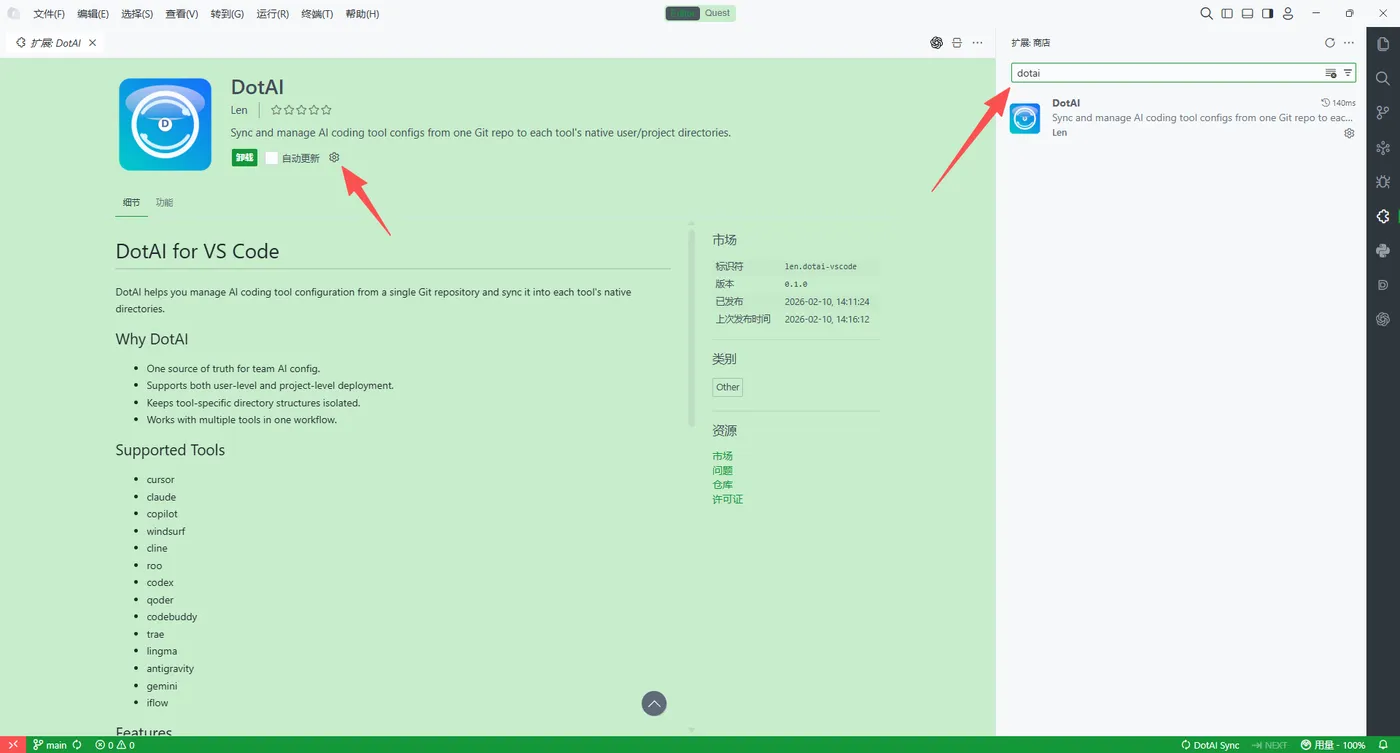
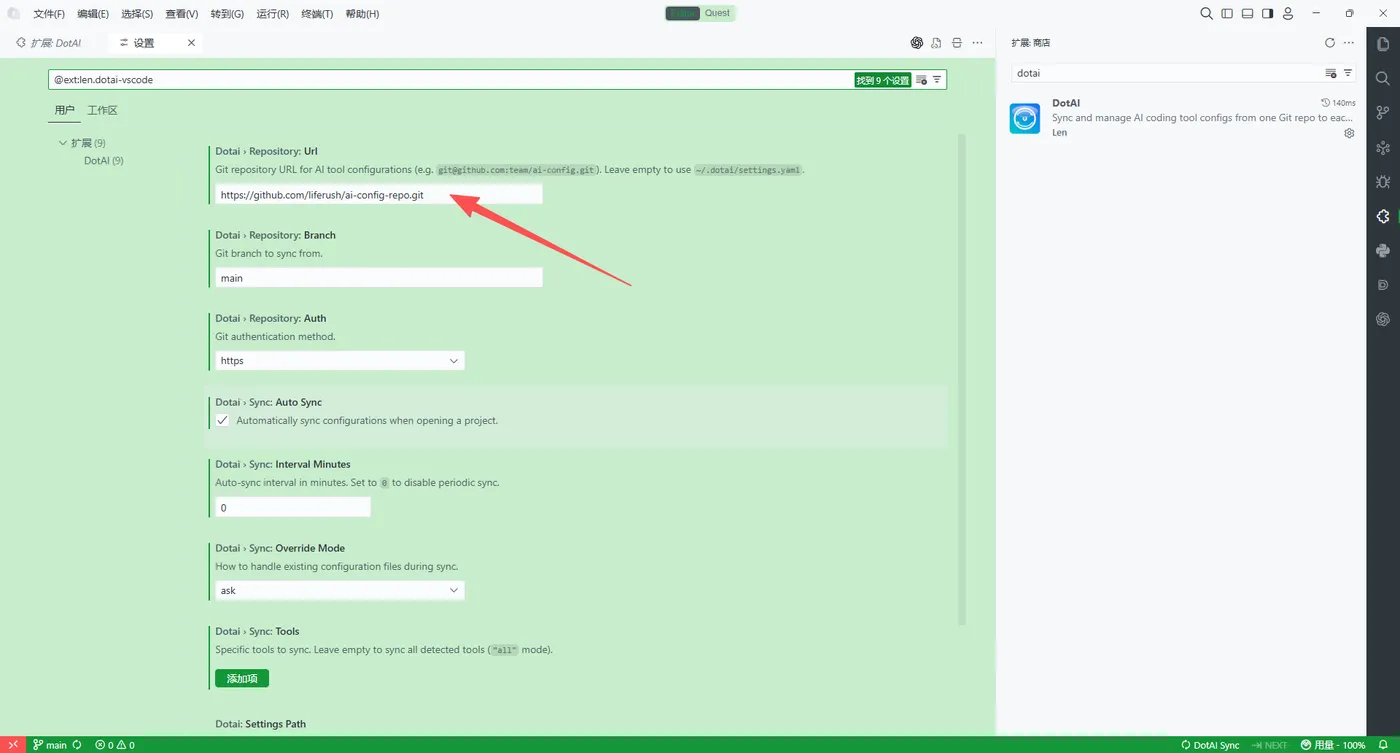
2. 打开 DotAI 面板并配置仓库地址
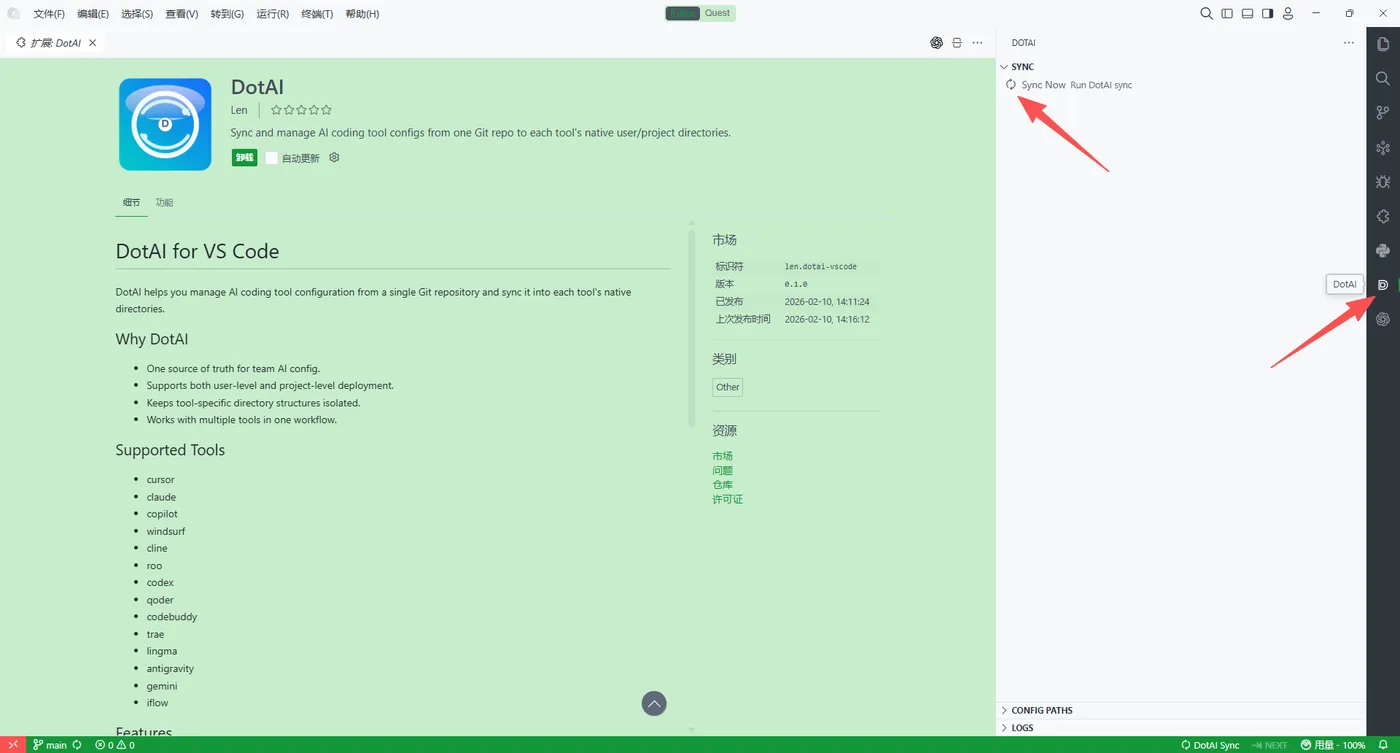
3. 执行同步并查看日志 / 配置路径
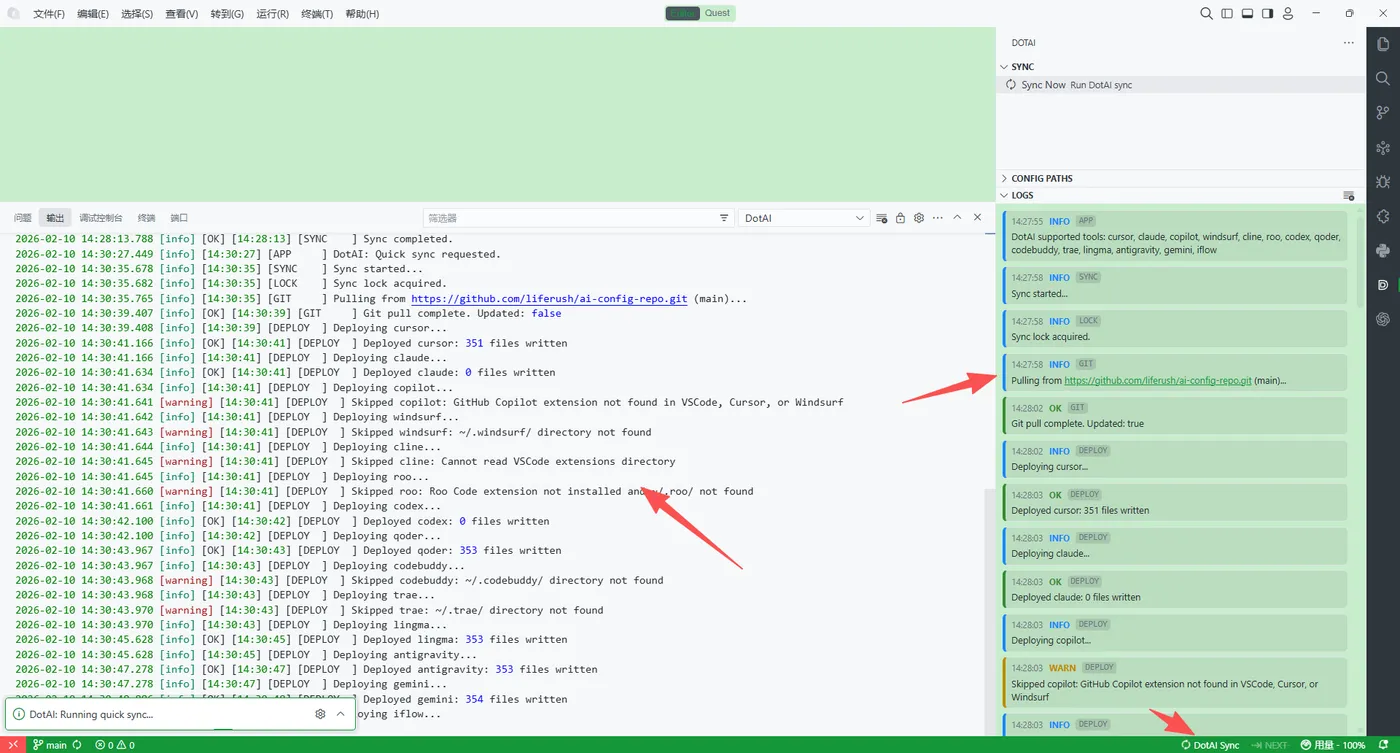
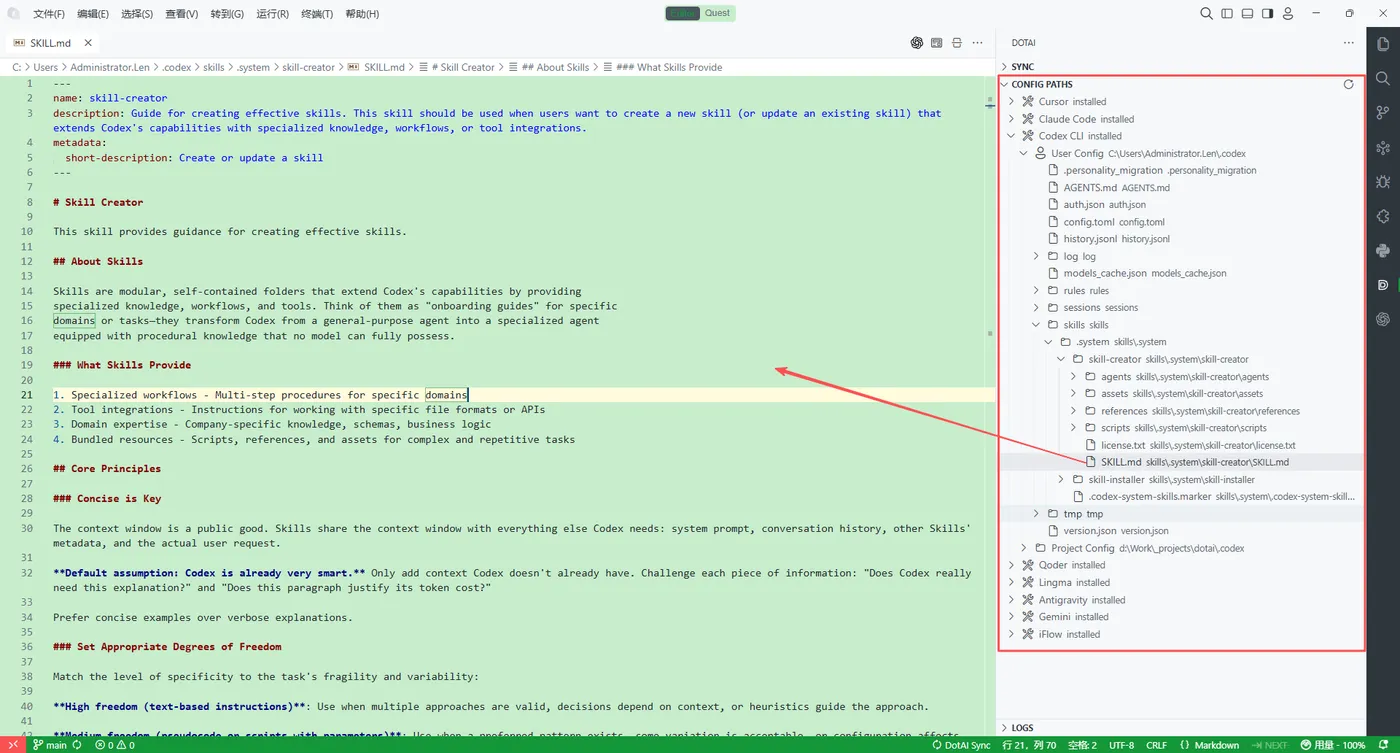
4. 使用 CLI 验证(dotai / dotai status / dotai sync)
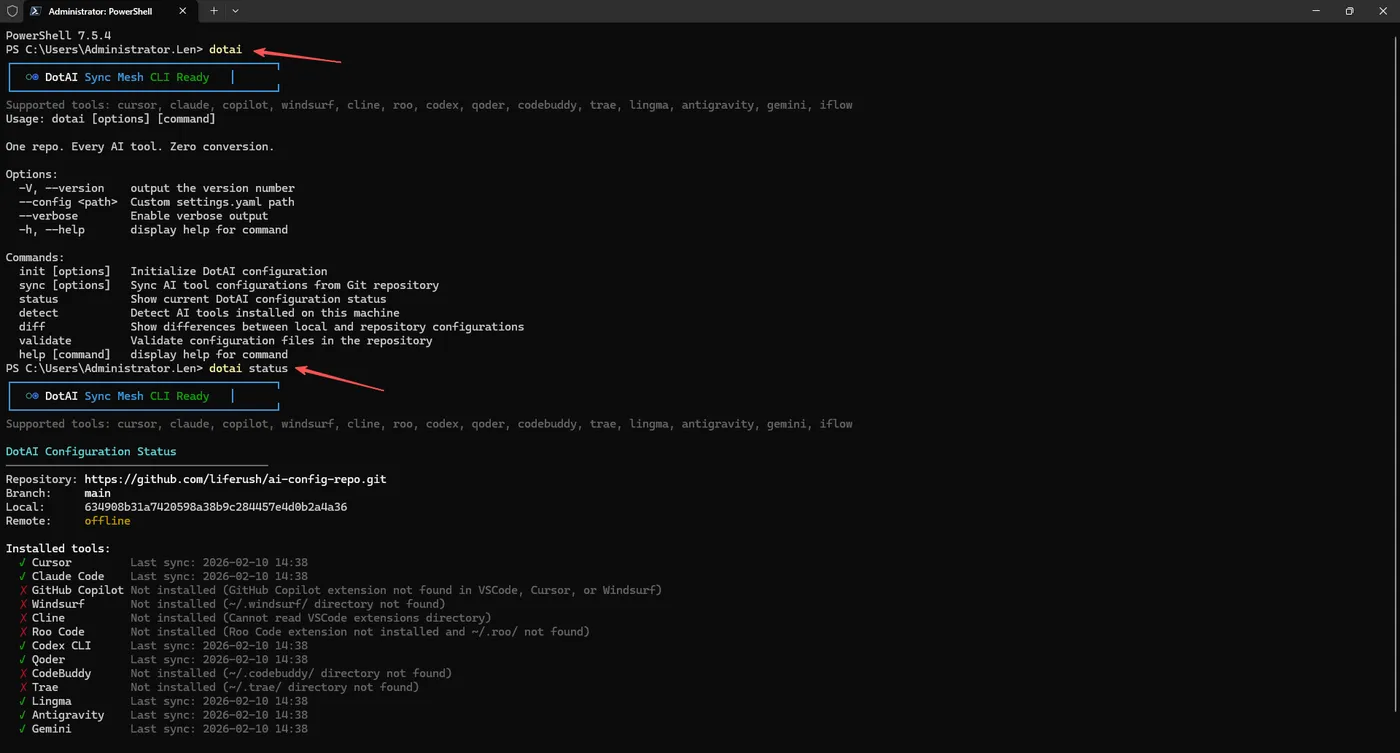
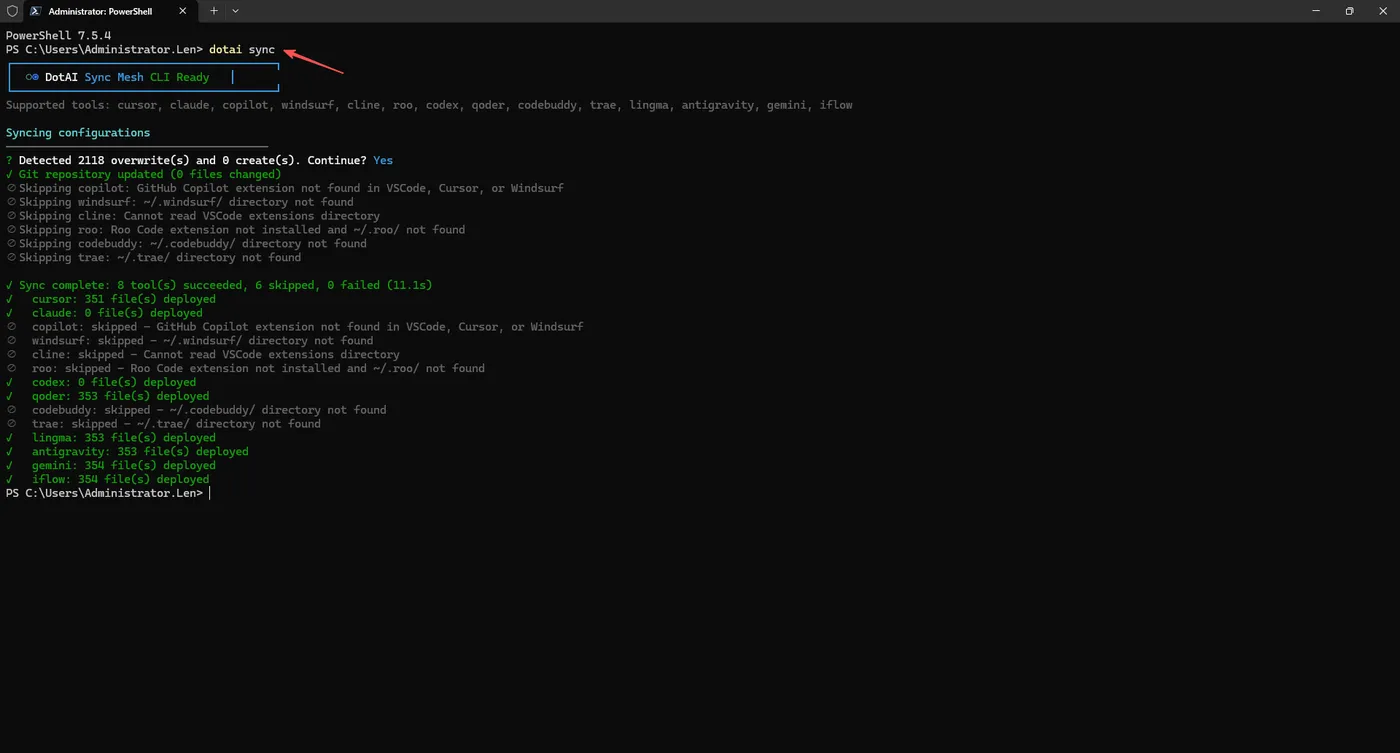
5. 可选:Linux/WSL 构建测试流程
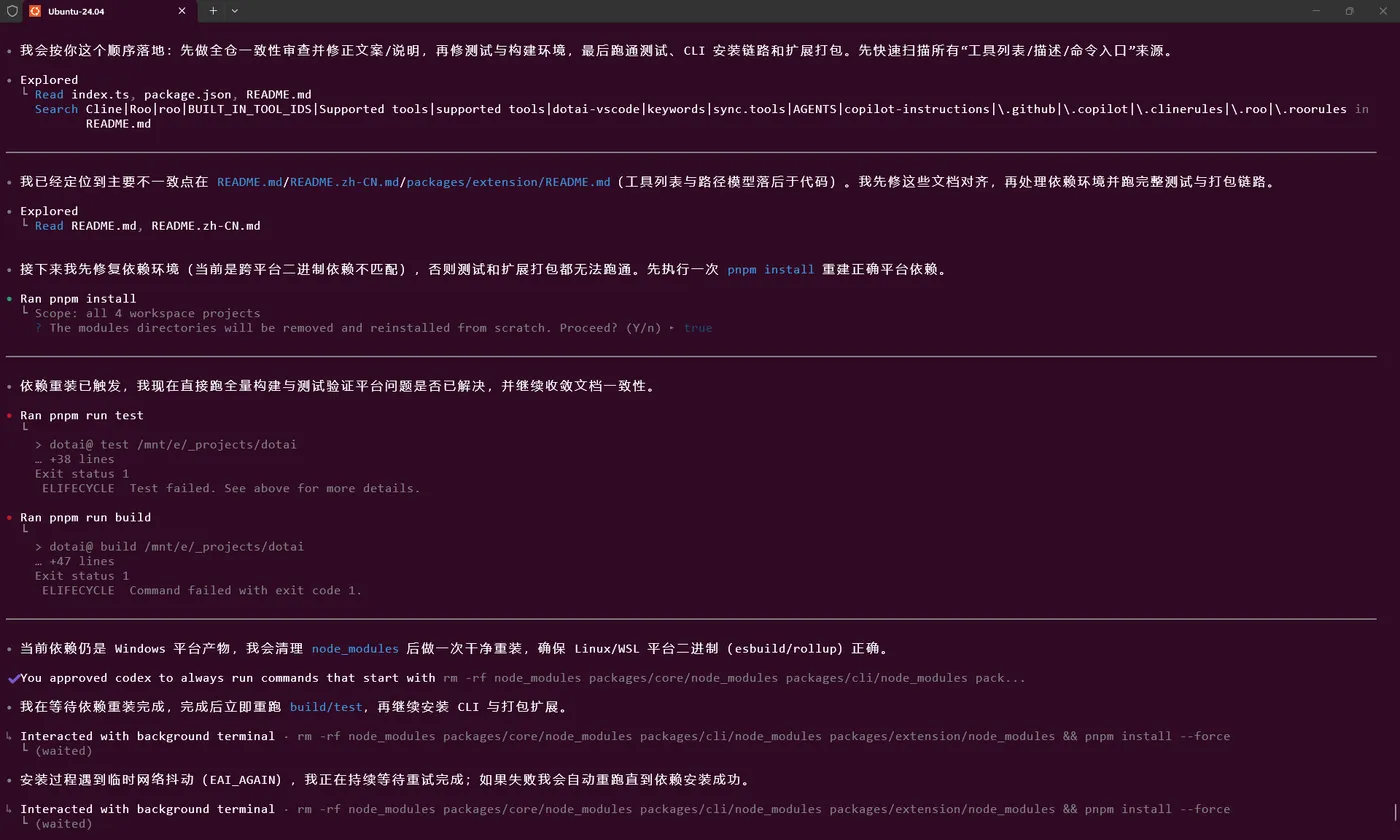
快速上手
1. 初始化
# 交互式 — 引导输入仓库地址、认证方式、分支、工具选择
dotai init

# 非交互式 — 适用于 CI/CD 或 dotfiles 自动化
dotai init \
  --repo git@github.com:team/ai-config.git \
  --branch main \
  --auth ssh \
  --tools cursor,claude,copilot
执行后会创建 ~/.dotai/settings.yaml 并克隆配置仓库。
2. 同步
dotai sync                      # 同步所有工具
dotai sync --tool cursor,claude # 仅同步指定工具
dotai sync --dry-run            # 预览变更,不实际写入
dotai sync --force              # 强制覆盖,跳过冲突检测
dotai sync --verbose            # 输出完整事件流
3. 检查
dotai status      # 仓库状态 + 各工具同步情况
dotai diff        # 仓库与本地配置的文件级差异
dotai validate    # 校验配置文件完整性
全局参数
| 参数 | 说明 |
|---|---|
--config <path> |
指定自定义 settings.yaml 路径,替代默认的 ~/.dotai/settings.yaml |
--verbose |
为任意命令启用详细输出 |
配置说明
全局配置(~/.dotai/settings.yaml)
repository:
  url: git@github.com:team/ai-config.git
  branch: main
  auth: ssh                  # ssh | https

sync:
  autoSync: true             # VSCode 打开工作区时是否自动同步
  intervalMinutes: 0         # 定时同步间隔,单位分钟(0 = 禁用)
  tools: all                 # "all" 或工具名称列表:[cursor, claude, copilot]
  overrideMode: ask          # overwrite | skip | ask

log:
  level: info                # debug | info | warn | error
项目级覆盖(.dotai/profile.yaml)
profile: backend-team
repository:
  branch: backend
tools:
  - cursor
  - claude
项目级配置会合并覆盖全局配置中的对应字段,仅对当前工作区生效。
配置共享 — SSOT 架构
~/.dotai/settings.yaml 是唯一真实源(Single Source of Truth)。CLI 和 VSCode 插件共同读写同一份文件:
                   ┌─────────────────────────┐
  dotai init/sync  │  ~/.dotai/settings.yaml  │  VSCode Settings UI
  ───────────────> │      (SSOT — YAML)       │ <───────────────────
                   └────────────┬─────────────┘
                                │
                    FileSystemWatcher(双向监听)
                                │
                   ┌────────────┴─────────────┐
                   │  DotAI Core Engine        │
                   │  (CLI 与插件共享)          │
                   └───────────────────────────┘
- CLI 通过
ConfigWriter直接读写settings.yaml。 - VSCode 插件 将 VSCode 设置界面作为 YAML 的图形化编辑器,变更通过
FileSystemWatcher+ 防重入守卫双向同步。 - 外部编辑(如直接用文本编辑器修改 YAML)会被自动检测并同步到两端。
配置仓库目录规范
Git 配置仓库需遵循以下目录约定:
ai-config-repo/
├── cursor/
│   ├── user/          → ~/.cursor/{rules,commands,skills,agents/}
│   └── project/       → ./.cursor/{rules,commands,skills,agents/}
├── claude/
│   ├── user/          → ~/.claude/CLAUDE.md + ~/.claude/commands/*
│   └── project/       → ./CLAUDE.md + ./.claude/commands/*
├── copilot/
│   └── project/       → ./.github/copilot-instructions.md + ./.github/instructions/*.instructions.md
├── windsurf/
│   └── project/       → ./.windsurf/rules/*.md
├── cline/
│   ├── user/          → ~/Documents/Cline/Rules/*.md
│   └── project/       → ./.clinerules + ./.clinerules/*.md
├── roo/
│   ├── user/          → ~/.roo/rules*/**/*.md
│   └── project/       → ./.roo/rules*/**/*.md + ./.roorules* + ./AGENTS.md
├── codex/
│   ├── user/          → ~/.codex/{AGENTS.md,AGENTS.override.md}
│   └── project/       → ./{AGENTS.md,AGENTS.override.md}
├── qoder/
│   ├── user/          → ~/.qoder/{rules,commands,skills,agents/}
│   └── project/       → ./.qoder/{rules,commands,skills,agents/}
├── gemini/
│   ├── user/          → ~/.gemini/GEMINI.md + ~/.gemini/{rules,commands,skills,agents/}
│   └── project/       → ./.gemini/{rules,commands,skills,agents/}
└── iflow/
    ├── user/          → ~/.iflow/IFLOW.md + ~/.iflow/{rules,commands,skills,agents/}
    └── project/       → ./.iflow/{rules,commands,skills,agents/}
user/ 目录下的文件分发到用户主目录(全局作用域),project/ 目录下的文件分发到当前工作目录(项目作用域)。
VSCode 插件
命令
| 命令 | 说明 |
|---|---|
DotAI: Sync All |
从仓库同步所有工具的配置 |
DotAI: Sync Tool... |
选择指定工具进行同步 |
DotAI: Status |
在输出面板显示当前配置状态 |
DotAI: Show Diff |
显示本地与仓库的文件级差异 |
DotAI: Select Profile |
切换当前项目的 Profile |
DotAI: Open Settings |
在编辑器中直接打开 settings.yaml |
设置项
所有设置均可通过 文件 > 首选项 > 设置 访问,在 dotai 命名空间下搜索:
| 设置项 | 类型 | 默认值 | 说明 |
|---|---|---|---|
dotai.repository.url |
string | "" |
Git 仓库地址 |
dotai.repository.branch |
string | "main" |
默认分支 |
dotai.repository.auth |
enum | "ssh" |
认证方式 |
dotai.sync.autoSync |
boolean | true |
激活时自动同步 |
dotai.sync.intervalMinutes |
number | 0 |
定时同步间隔 |
dotai.sync.overrideMode |
enum | "ask" |
冲突处理策略 |
dotai.sync.tools |
array | [] |
同步的工具列表(空 = 全部) |
dotai.logLevel |
enum | "info" |
日志级别 |
系统架构
┌───────────────────────────────────────────────────────┐
│                      展示层                             │
│   ┌─────────────────┐       ┌───────────────────────┐ │
│   │  VSCode Extension│       │     CLI (dotai)       │ │
│   │  (Settings UI,   │       │  (commander, chalk,   │ │
│   │   status bar,    │       │   ora, inquirer)      │ │
│   │   output panel)  │       │                       │ │
│   └────────┬─────────┘       └──────────┬────────────┘ │
├────────────┴────────────────────────────┴──────────────┤
│               Core Engine (@dotai/core)                 │
│                                                        │
│   ┌──────────────┐  ┌────────────┐  ┌───────────────┐ │
│   │     Sync     │  │    Git     │  │    Config     │ │
│   │ Orchestrator │  │  Provider  │  │   Resolver    │ │
│   └──────┬───────┘  └─────┬──────┘  └──────┬────────┘ │
│   ┌──────┴────────────────┴────────────────┴────────┐ │
│   │            Tool Adapter Registry                 │ │
│   │                                                  │ │
│   │  Cursor · Claude · Copilot · Windsurf            │ │
│   │  Cline  · Roo · Codex · Qoder · [Your Adapter]  │ │
│   └──────────────────────────────────────────────────┘ │
│                                                        │
│   Infrastructure: EventBus · AtomicWriter · LockMgr    │
└────────────────────────────────────────────────────────┘
核心设计决策:
- Monorepo —
@dotai/core、@dotai/cli、dotai-vscode三个包在 pnpm workspace 中管理。Core 包零 UI 依赖。 - 适配器模式 — 每个工具实现
ToolAdapter(检测 → 部署 → 验证)。对扩展开放,对修改关闭。 - 事件总线 — 解耦引擎与展示层。CLI 通过控制台格式化器订阅,插件通过 Output Channel 处理器订阅。
- 原子文件写入 — 临时文件 +
rename(),确保目标路径不会出现半写入的配置文件。 - 文件锁 — 跨进程安全的同步互斥,防止并发执行
dotai sync导致状态损坏。 - 指数退避重试 — Git 操作在遇到临时网络故障时自动重试,退避策略可配置。
开发指南
pnpm install          # 安装全部依赖
pnpm run build        # 构建全部包
pnpm run build:local  # 构建 + 重链本地 CLI + 打包扩展 VSIX
pnpm run test         # 运行全部测试
pnpm run build:core   # 仅构建核心包
pnpm run lint         # 全包 ESLint 检查
项目结构
dotai/
├── packages/
│   ├── core/                  # @dotai/core — 共享核心引擎
│   │   ├── src/
│   │   │   ├── adapters/      # 14 个内置工具适配器 + 注册表
│   │   │   ├── config/        # ConfigResolver + ConfigWriter(YAML ↔ 类型化设置)
│   │   │   ├── events/        # EventBus(类型化发布/订阅)
│   │   │   ├── git/           # Git 提供者(simple-git 封装、重试、离线回退)
│   │   │   ├── io/            # 原子文件写入器 + 文件锁管理器
│   │   │   ├── sync/          # SyncOrchestrator + SyncStateStore
│   │   │   ├── utils/         # 跨平台路径解析
│   │   │   ├── engine.ts      # createDotAIEngine() 工厂函数
│   │   │   ├── index.ts       # 公共 API
│   │   │   └── types.ts       # 共享类型定义
│   │   └── test/              # 36 个单元测试(vitest)
│   ├── cli/                   # @dotai/cli — 终端接口
│   │   └── src/
│   │       ├── commands/      # init · sync · status · diff · validate
│   │       ├── formatters/    # 基于 Chalk 的彩色输出
│   │       └── index.ts       # Commander 入口
│   └── extension/             # dotai-vscode — VSCode / Cursor 插件
│       └── src/
│           ├── commands/      # sync · status · diff · profile · settings
│           ├── ui/            # 状态栏 · 输出面板 · 通知
│           ├── extension.ts   # 激活入口 + YAML ↔ Settings 双向同步
│           └── event-handler.ts
├── package.json               # 根工作区脚本
├── pnpm-workspace.yaml        # 工作区包声明
└── tsconfig.base.json         # 共享 TypeScript 编译选项
参与贡献
- Fork 本仓库
- 创建功能分支(
git checkout -b feature/amazing-tool-adapter) - 编写代码并补充测试
- 确保所有检查通过(
pnpm run build && pnpm run test && pnpm run lint) - 提交 Pull Request
添加新工具适配器
在 packages/core/src/adapters/ 目录下实现 ToolAdapter 接口:
import {
    AbstractToolAdapter } from "./base.js";

export class MyToolAdapter extends AbstractToolAdapter {

  readonly id = "mytool";
  readonly displayName = "My Tool";

  protected getUserPaths()    {
    return ["~/.mytool/config/"]; }
  protected getProjectPaths() {
    return [".mytool/"]; }
  protected detect()          {
    /* 返回 true 如果工具已安装 */ }
}
在 engine.ts 中注册,或通过 engine.registerAdapter(new MyToolAdapter(repoPath)) 动态添加。