MistoLine算法介绍
MistoLine 是一个可以适配任意类型线稿,准确性高,稳定性优秀的SDXL-ControlnetNet模型。它可以基于用户输入的任意类型的线稿图(手绘、各类controlnet-line preprocessor、模型线框轮廓等)作为条件,生成高质量图像(短边大于1024px),无需再根据不同线预处理器选择不同的controlnet模型,MistoLine在各类线稿条件下都有较好的泛化能力。

MistoLine采用了全新的线预处理算法(Anyline),并基于stabilityai/stable-diffusion-xl-base-1.0的Unet以及大模型训练工程上的创新,重新进行训练的Controlnet模型。MistoLine对于不同类型的线稿输入都有较好的表现,在更加复杂的场景下对于细节还原,prompt对齐,稳定性方面对比现有的Controlnet模型都有更好的表现结果。
MistoLine与lllyasviel公布的Controlnet架构保持一致,原理图如下:
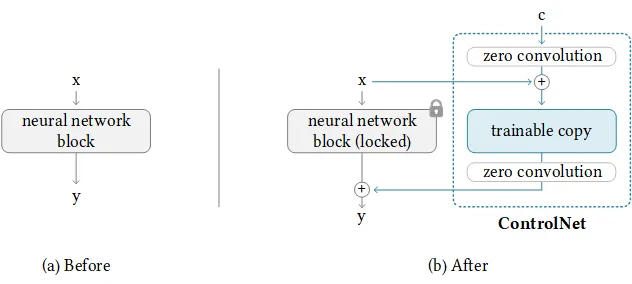
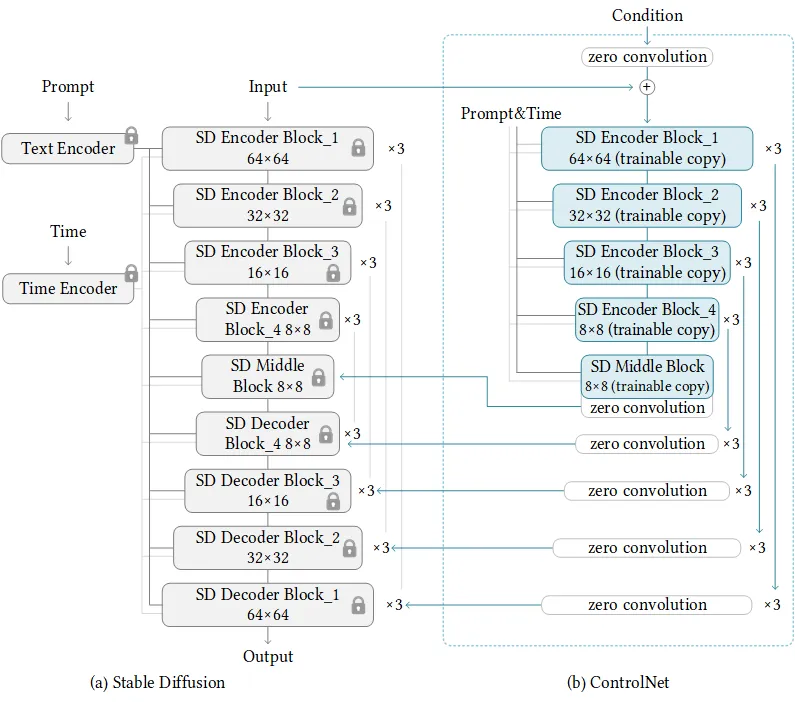
更多关于ControlNet相关的介绍请参考:
More information about ControlNet can be found in the following references:
https://github.com/lllyasviel/ControlNet
https://huggingface.co/docs/diffusers/main/en/api/pipelines/controlnet_sdxl
该模型适配目前除(PlaygroundV2.5以及CosXL)之外的大部分SDXL模型,可以配合LCM以及其他ControlNet模型一并使用。
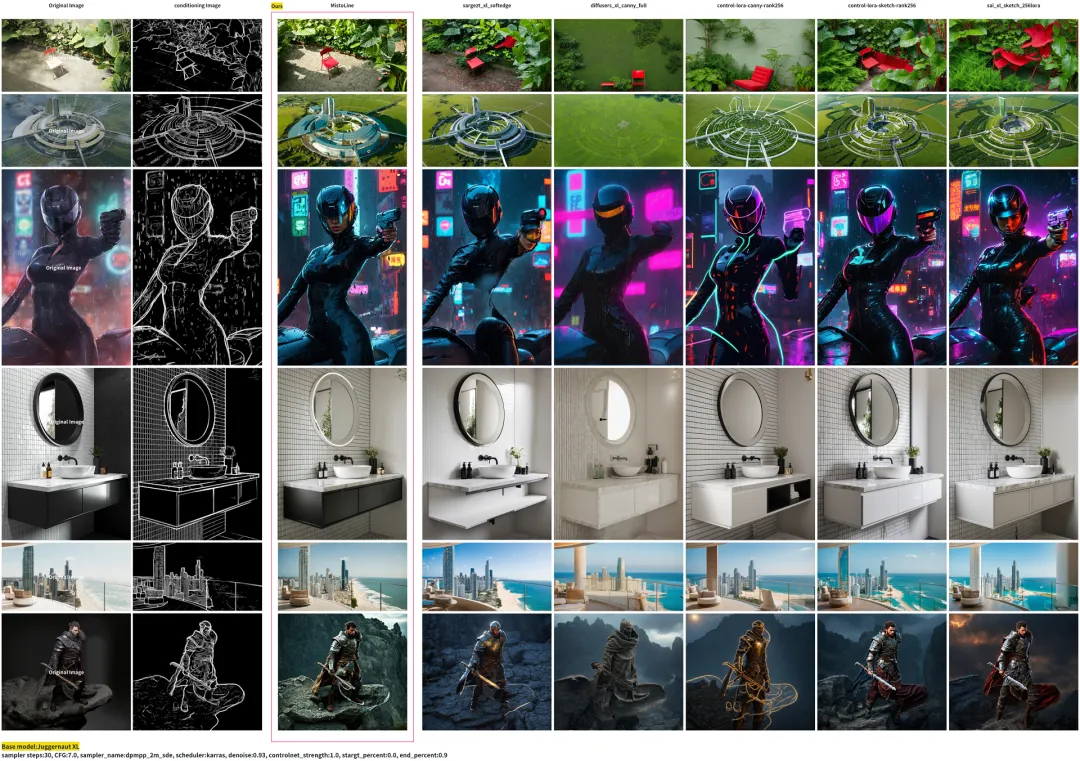
MistoLine在不同类型线稿下的表现对比
对于各种线预处理器,MistoLine均有良好的表现效果
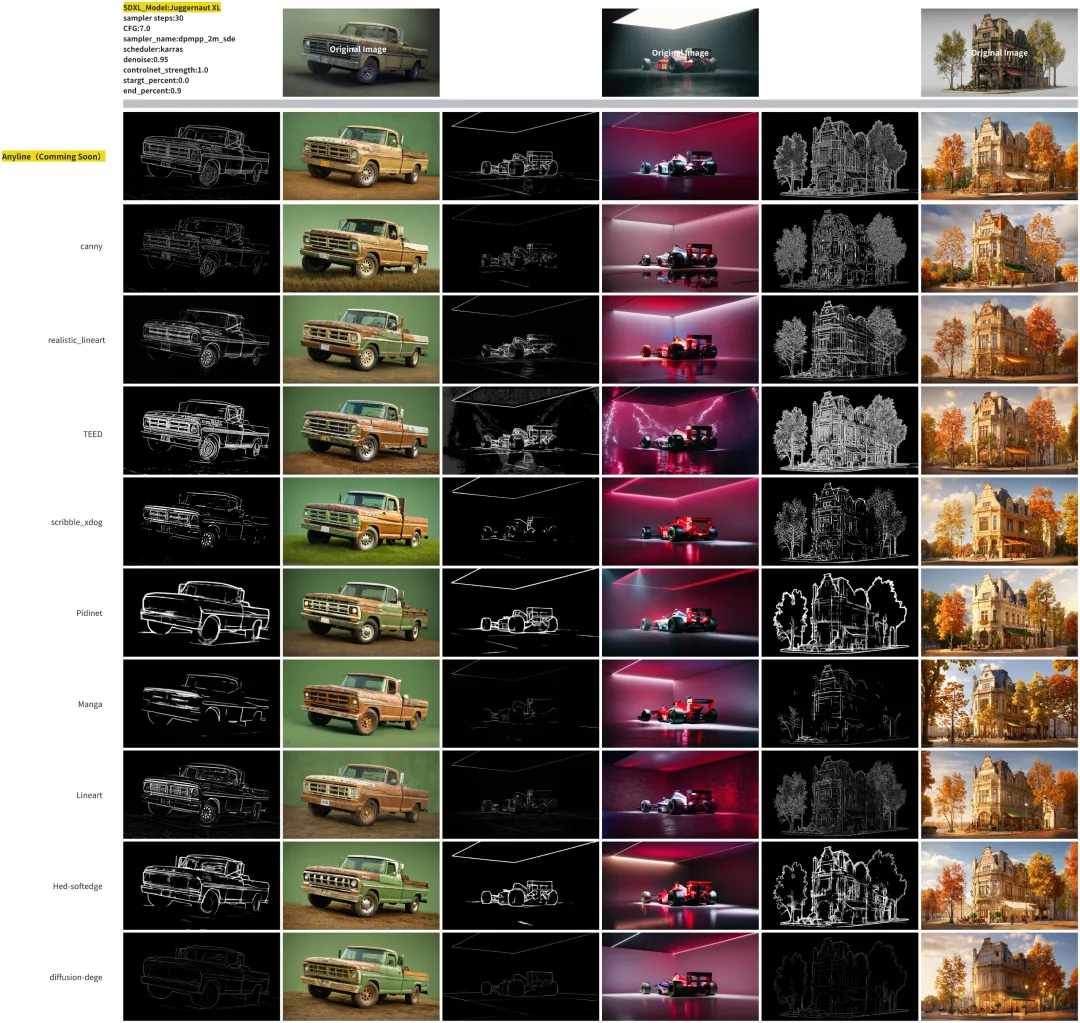
MistoLine与其他controlnet的对比
对于现有各种sdxl的线控制controlnet,MistoLine在准确性和泛化性上表现出明显的优势
应用场景 Application examples
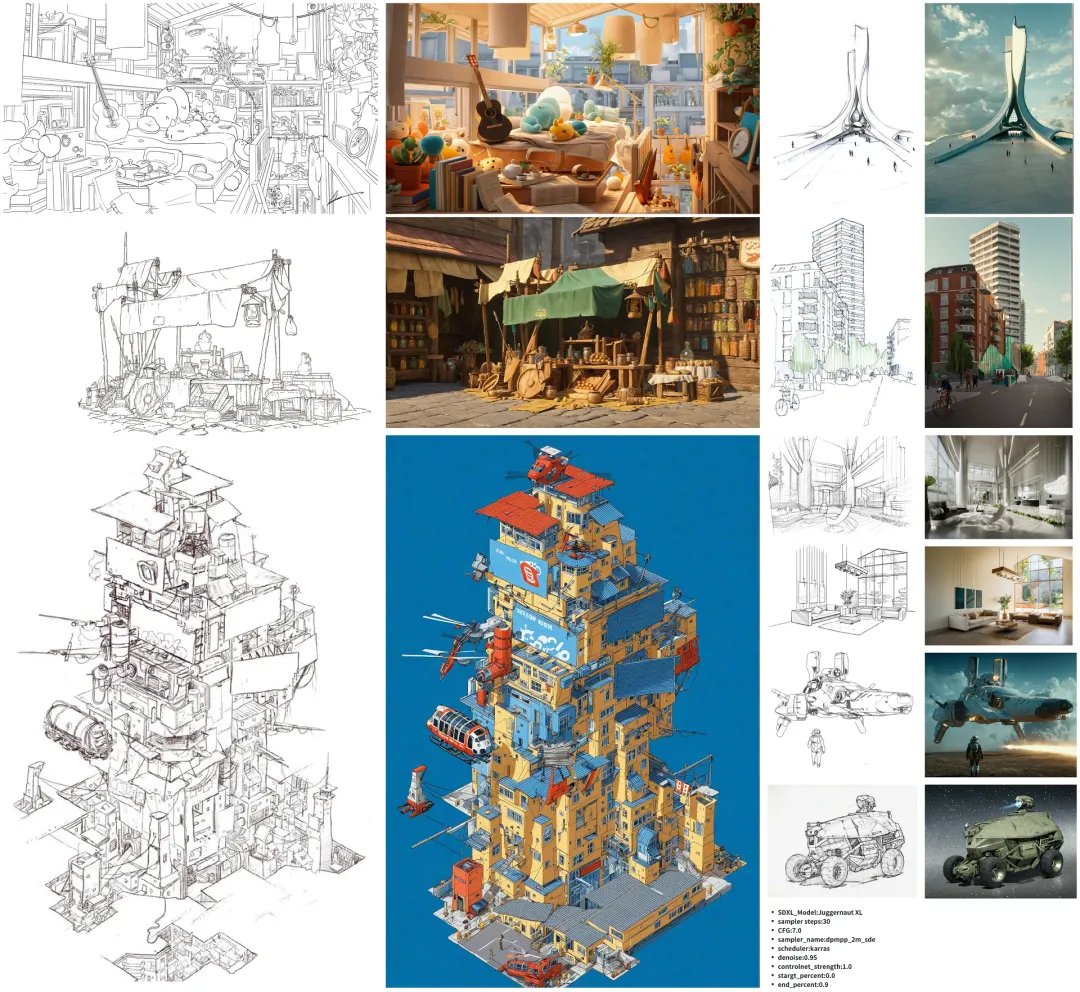
手绘渲染 Sketch rendering
以下案例只使用了MistoLine这个controlnet
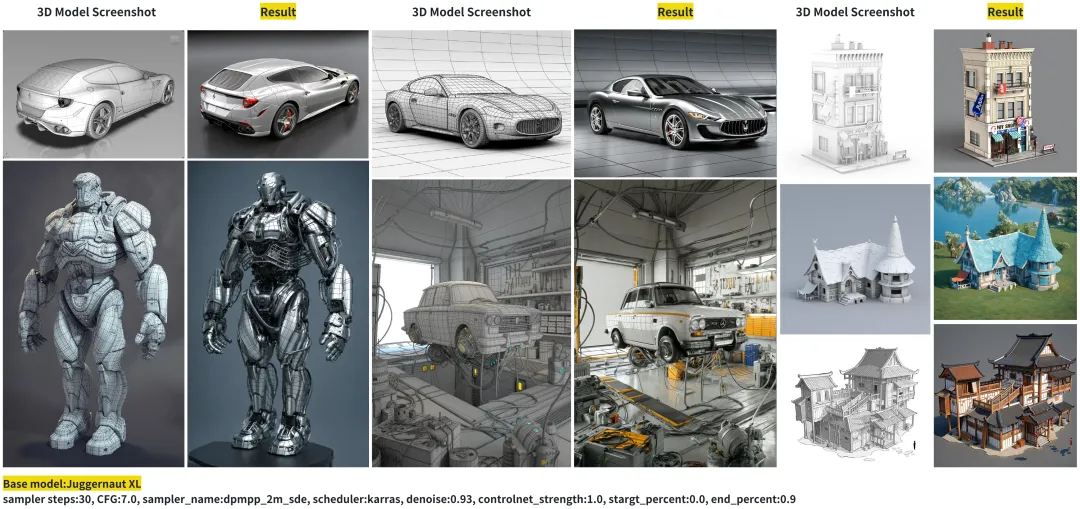
模型渲染 Model rendering
以下案例只使用了Anyline作为预处理器以及MistoLine这个controlnet
魔搭社区最佳实践
环境配置与安装
本文主要演示的模型推理代码可在魔搭社区免费实例PAI-DSW的配置下运行(显存24G) :
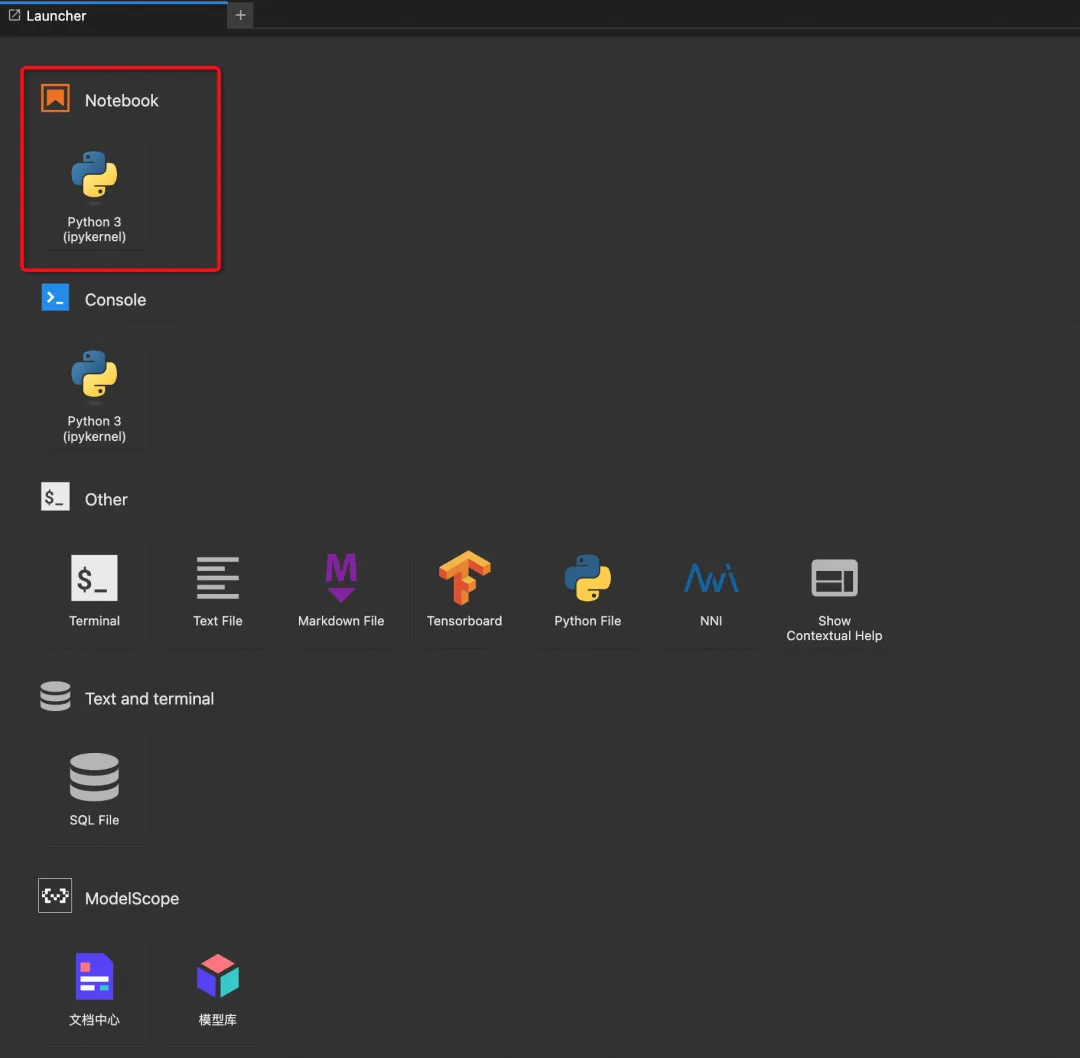
点击模型右侧Notebook快速开发按钮,选择GPU环境
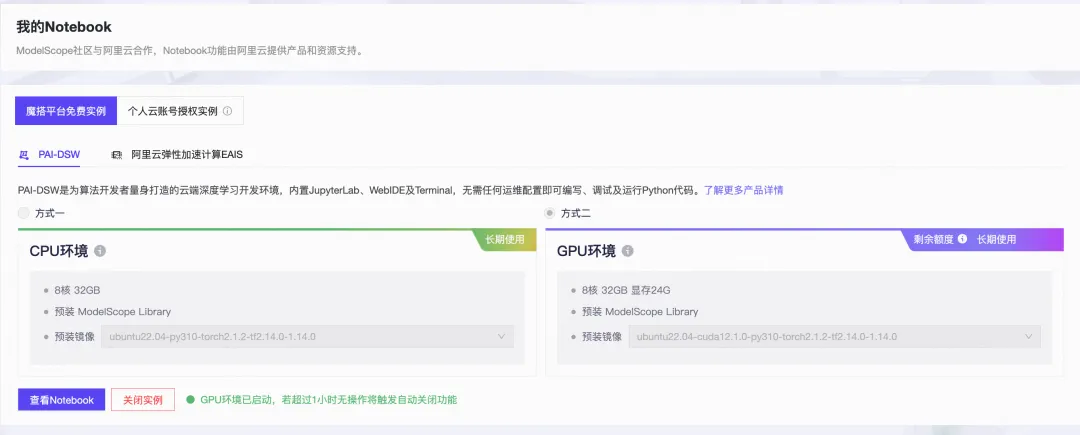
打开Notebook环境:
模型推理代码
from diffusers import ControlNetModel, StableDiffusionXLControlNetPipeline, AutoencoderKL
from diffusers.utils import load_image
from PIL import Image
from modelscope import snapshot_download
import torch
import numpy as np
import cv2
prompt = "sea turtle"
negative_prompt = 'low quality, bad quality, sketches'
image = load_image("https://modelscope.oss-cn-beijing.aliyuncs.com/resource/sea%20turtle.jpeg")
controlnet_conditioning_scale = 0.5
controlnet_dir = snapshot_download("TheMisto.ai/MistoLine")
VAE_dir = snapshot_download("AI-ModelScope/sdxl-vae-fp16-fix")
SDXL_dir = snapshot_download("AI-ModelScope/stable-diffusion-xl-base-1.0")
controlnet = ControlNetModel.from_pretrained(
    controlnet_dir,
    torch_dtype=torch.float16
)
vae = AutoencoderKL.from_pretrained(VAE_dir, torch_dtype=torch.float16)
pipe = StableDiffusionXLControlNetPipeline.from_pretrained(
    SDXL_dir,
    controlnet=controlnet,
    vae=vae,
    torch_dtype=torch.float16,
)
pipe.enable_model_cpu_offload()
image = np.array(image)
image = cv2.Canny(image, 100, 200)
image = image[:, :, None]
image = np.concatenate([image, image, image], axis=2)
image = Image.fromarray(image)
images = pipe(
    prompt, negative_prompt=negative_prompt, image=image, controlnet_conditioning_scale=controlnet_conditioning_scale,
    ).images
images[0].save(f"turtle.png")
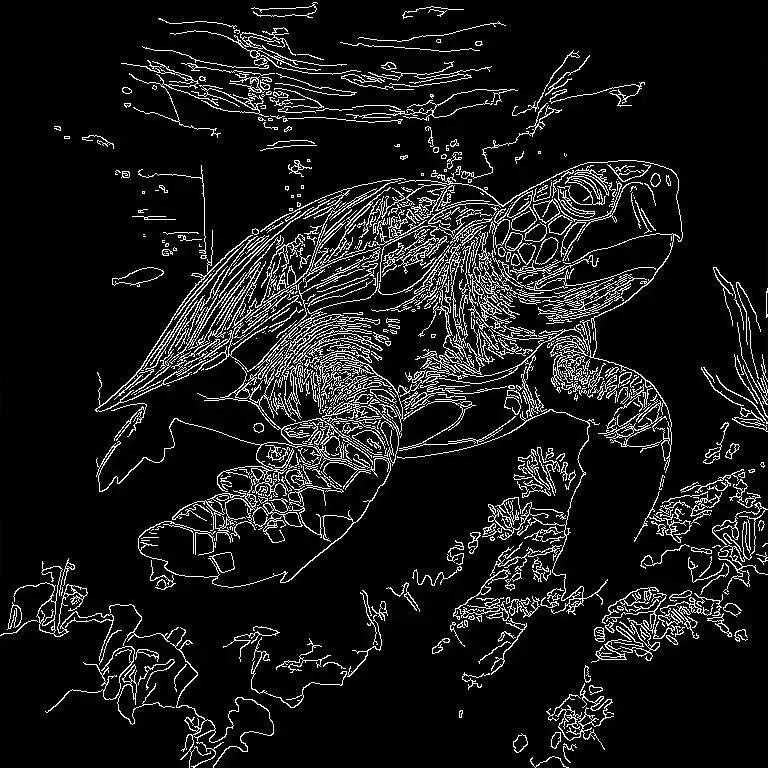
效果展示:
|
|

在ComfyUI使用MistoLine
clone ComfyUI代码并安装环境
# #@title Environment Setup
from pathlib import Path
OPTIONS = {}
UPDATE_COMFY_UI = True  #@param {type:"boolean"}
INSTALL_COMFYUI_MANAGER = True  #@param {type:"boolean"}
INSTALL_ANIMATEDIFF = True  #@param {type:"boolean"}
INSTALL_CUSTOM_NODES_DEPENDENCIES = True  #@param {type:"boolean"}
OPTIONS['UPDATE_COMFY_UI'] = UPDATE_COMFY_UI
OPTIONS['INSTALL_COMFYUI_MANAGER'] = INSTALL_COMFYUI_MANAGER
OPTIONS['INSTALL_ANIMATEDIFF'] = INSTALL_ANIMATEDIFF
OPTIONS['INSTALL_CUSTOM_NODES_DEPENDENCIES'] = INSTALL_CUSTOM_NODES_DEPENDENCIES
current_dir = !pwd
WORKSPACE = f"{current_dir[0]}/ComfyUI"
%cd /mnt/workspace/
![ ! -d $WORKSPACE ] && echo -= Initial setup ComfyUI =- && git clone https://github.com/comfyanonymous/ComfyUI
%cd $WORKSPACE
if OPTIONS['UPDATE_COMFY_UI']:
  !echo "-= Updating ComfyUI =-"
  !git pull
if OPTIONS['INSTALL_COMFYUI_MANAGER']:
  %cd custom_nodes
  ![ ! -d ComfyUI-Manager ] && echo -= Initial setup ComfyUI-Manager =- && git clone https://github.com/ltdrdata/ComfyUI-Manager
  %cd ComfyUI-Manager
  !git pull
%cd $WORKSPACE
if OPTIONS['INSTALL_CUSTOM_NODES_DEPENDENCIES']:
  !pwd
  !echo "-= Install custom nodes dependencies =-"
  ![ -f "custom_nodes/ComfyUI-Manager/scripts/colab-dependencies.py" ] && python "custom_nodes/ComfyUI-Manager/scripts/colab-dependencies.py"
下载相关模型:
#@markdown ###Download standard resources
### SDXL
### I recommend these workflow examples: https://comfyanonymous.github.io/ComfyUI_examples/sdxl/
OPTIONS = {}
#@markdown **Models**
SDXL_1_0_BASE_AND_REFINER = True  #@param {type:"boolean"}
OPTIONS['SDXL_1_0_BASE_AND_REFINER'] = SDXL_1_0_BASE_AND_REFINER
if OPTIONS['SDXL_1_0_BASE_AND_REFINER']:
  !wget -c "https://modelscope.cn/api/v1/models/AI-ModelScope/stable-diffusion-xl-base-1.0/repo?Revision=master&FilePath=sd_xl_base_1.0.safetensors" -P ./models/checkpoints/
  !wget -c "https://modelscope.cn/api/v1/models/AI-ModelScope/stable-diffusion-xl-refiner-1.0/repo?Revision=master&FilePath=sd_xl_refiner_1.0.safetensors" -P ./models/checkpoints/
#@markdown **VAEs**
SDXL_1_0_VAE = True  #@param {type:"boolean"}
OPTIONS['SDXL_1_0_VAE'] = SDXL_1_0_VAE
if OPTIONS['SDXL_1_0_VAE']:
  !wget -c "https://modelscope.cn/api/v1/models/AI-ModelScope/sdxl-vae-fp16-fix/repo?Revision=master&FilePath=diffusion_pytorch_model.safetensors" -O ./models/vae/sdxl-vae-fp16-fix.safetensors #sdxl-vae-fp16-fix.safetensors
#@markdown **Controlnets**
!wget -c "https://modelscope.cn/api/v1/models/TheMisto.ai/MistoLine/repo?Revision=master&FilePath=mistoLine_rank256.safetensors" -P /mnt/workspace/ComfyUI/models/controlnet/
使用Cloudflared生成链接
!wget "https://modelscope.oss-cn-beijing.aliyuncs.com/resource/cloudflared-linux-amd64.deb"
!dpkg -i cloudflared-linux-amd64.deb
%cd /mnt/workspace/ComfyUI
import subprocess
import threading
import time
import socket
import urllib.request
def iframe_thread(port):
  while True:
      time.sleep(0.5)
      sock = socket.socket(socket.AF_INET, socket.SOCK_STREAM)
      result = sock.connect_ex(('127.0.0.1', port))
      if result == 0:
        break
      sock.close()
  print("\nComfyUI finished loading, trying to launch cloudflared (if it gets stuck here cloudflared is having issues)\n")
  p = subprocess.Popen(["cloudflared", "tunnel", "--url", "http://127.0.0.1:{}".format(port)], stdout=subprocess.PIPE, stderr=subprocess.PIPE)
  for line in p.stderr:
    l = line.decode()
    if "trycloudflare.com " in l:
      print("This is the URL to access ComfyUI:", l[l.find("http"):], end='')
    #print(l, end='')
threading.Thread(target=iframe_thread, daemon=True, args=(8188,)).start()
!python main.py --dont-print-server
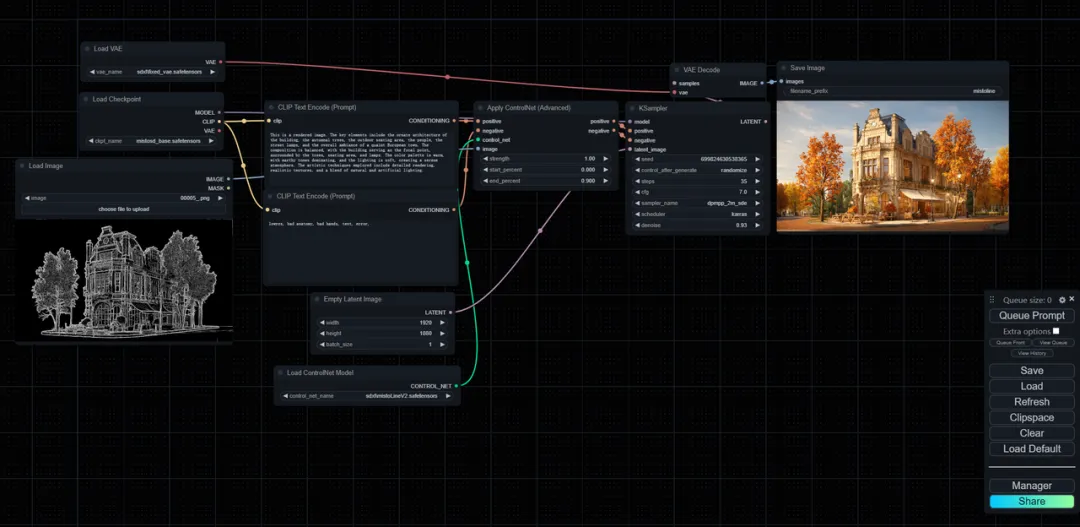
导入controlnet流程,推荐工作流下载链接:
https://modelscope.oss-cn-beijing.aliyuncs.com/resource/CN_mistoline.json
ComfyUI 推荐配置
sampler steps:30
CFG:7.0
sampler_name:dpmpp_2m_sde
scheduler:karras
denoise:0.93
controlnet_strength:1.0
stargt_percent:0.0
end_percent:0.9
ComfyUI使用示例:
点击链接直达开源