使用Python编程的示例程序,用于在电脑上显示树莓派上的摄像头内容:
首先,确保您的电脑和树莓派已连接到同一个WiFi网络。
接下来,在您的电脑上安装Python 3.6或更高版本,并安装pip(Python包管理器)。然后,通过pip安装以下库:
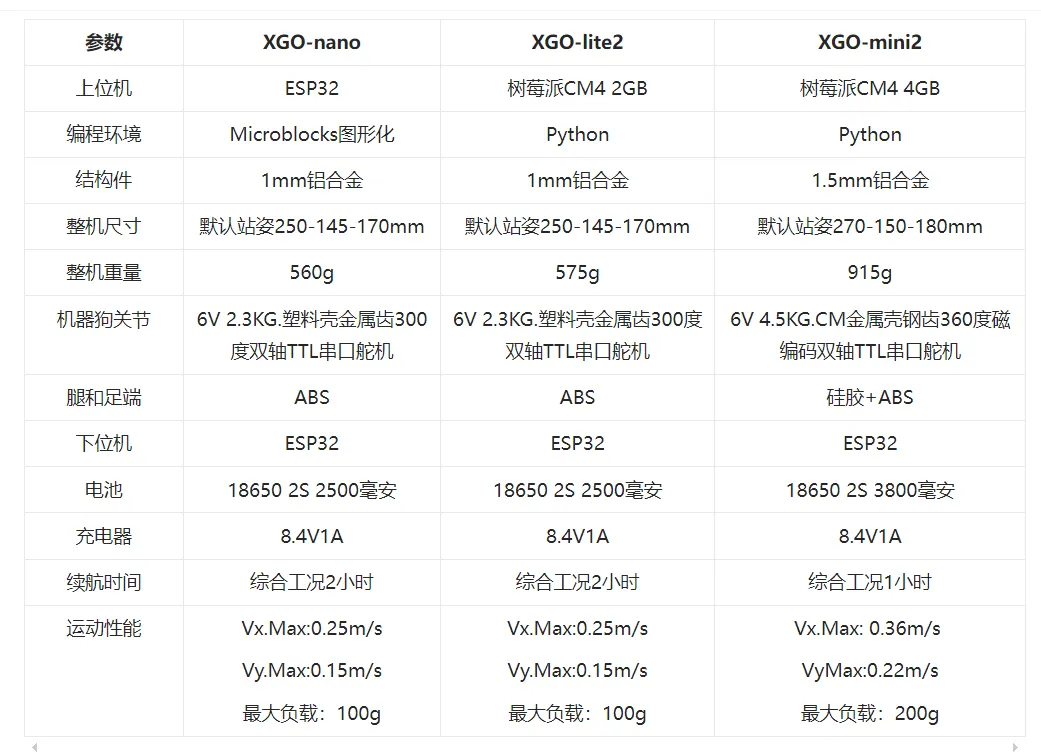
AI模组参数
● Broadcom BCM2711 4核Cortex A72 1.5GHz (ARM v8) 64-bit CPU
● 支持H.265 (HEVC) (最高支持4Kp60解码), H.264 (最高支持1080p60解码, 1080p30编码)
● OpenGL ES 3.0 graphics
● 4个可编程按键
● Micro Hdmi视频输出接口
● Type-C USB接口
● PH2.0 4PIN串口通信及电源接口
电源系统参数
● 充电器输入电压:100-240V AC 50/60Hz;
● 充电器输出电压:8.4V;
● 充电器输出电流:1A,具有过流保护特性,防止过充爆炸。
● 电池:18650标准2500毫安3C放电
XGO-lite2 包装清单
● XGO2 专用保护箱
● XGO-lite2机器狗整机
● 8.4V1A专用锂电池充电器
● XGO-lite 2中文用户手册
● Type-C USB Hub
● Micro Hdmi转Hdmi线
● 小球和方块若干
pip install numpy
pip install opencv-python
pip install opencv-python-headless
在电脑上创建一个名为“stream_camera.py”的Python文件,并将以下代码粘贴到文件中:
import cv2
import socket
import sys
import time
Set the IP address of your Raspberry Pi
rpi_ip = "192.168.1.100"
Set the port number for the stream
port = 8080
Create a socket to connect to the Raspberry Pi
sock = socket.socket(socket.AF_INET, socket.SOCK_STREAM)
sock.connect((rpi_ip, port))
Start a server to receive connections
server_socket = socket.socket(socket.AF_INET, socket.SOCK_STREAM)
server_socket.bind(('0.0.0.0', 8081))
server_socket.listen(1)
print("Server started, waiting for connections...")
while True:
# Accept a connection from a client
client_socket, client_address = server_socket.accept()
print("Connection from:", client_address)

while True:
    # Receive data from the client
    data = client_socket.recv(1024)
    if not data:
        break
    # Decode the data as an image (assuming jpg)
    image = cv2.imdecode(data, cv2.IMREAD_COLOR)

    # Display the image
    cv2.imshow('Image', image)
    # Wait for a key press
    if cv2.waitKey(1) == ord('q'):
        break

# Close the connection with the client
client_socket.close()
Close the server socket
server_socket.close()
Exit the program
cv2.destroyAllWindows()