刚刚学习完三层,紧接着又开始学习七层。那么七层是什么呢?七层就是在三层的基础上增加了外观层、数据接口层、抽象工厂加反射和SQL Helper。这几个层在这里的作用是解耦。我们先来说说他们具体含义。
外观层:是将不同的两个层分离,增加外观层可以提供一个简单的接口,减少他们之间的依赖。在这里主要是把UI层和BLL层分离。
数据接口层:它用来定义一个统一的接口,解除BLL层和DAL层的耦合。
抽象工厂加反射:主要是为了更换数据库的方便性,同时把DAL层中的类转换成为IDAL层中的接口,从而使BLL层实现通过调用IDAL从而调用DAL层。
SQLHelper:在程序中进行查询操作。
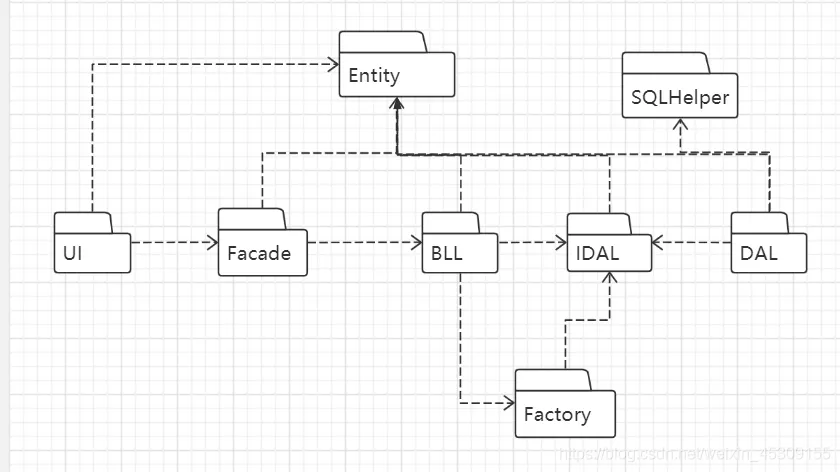
配置文件

引用关系
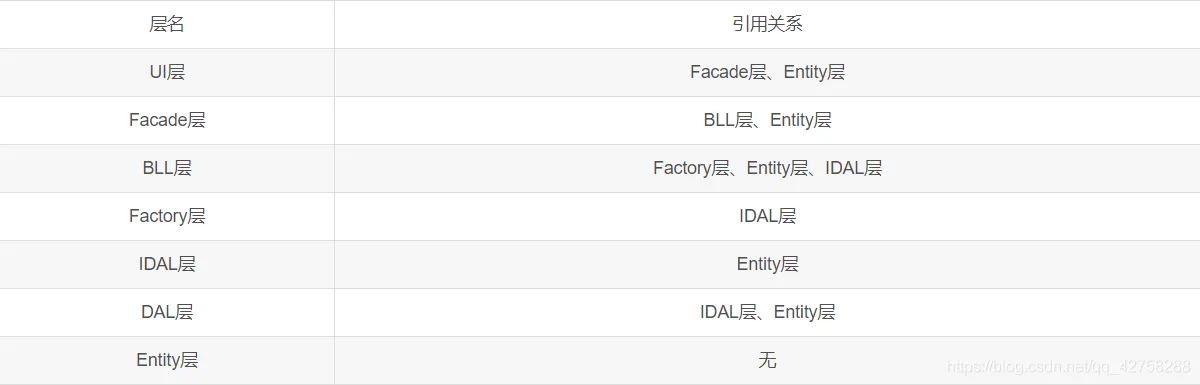
UI层
private void cmdOK_Click(object sender, EventArgs e)
        {
            if (txtUserName.Text .Trim() == "" || txtUserPassword.Text .Trim ()=="")
            {
                MessageBox.Show("用户名或密码不能为空", "温馨提示");
            }
            //实例化外观层
            Facade.UserInfoFacade flogin = new Facade.UserInfoFacade();
            //实例化实体层(用户核对用户数据的数据与数据库中的数据
             Entity.UserInfo user = new Entity.UserInfo();
            //定义一个值去接收输入的用户名
            user.UserName = txtUserName.Text.Trim();
            user.Password = txtUserPassword.Text.Trim();
            //定义变量dt去接收来自外观层的参数
            DataTable dt = flogin.selectUser(user);
            //进行判断
            //查看数据内存表中的数据是否不为0,不等于0代表有数据,且输入数据与数据库中的数据一致
            if (dt.Rows .Count !=0)
            {
                //数据层,隐藏本窗体
                this.Hide();
                //数据核对一致
                //this.DialogResult = System.Windows.Forms.DialogResult.OK;//DialogResult对话框结果
                MessageBox.Show("登录成功!");
                //此处为级别判断的代码,查看数据内存表中的数据的第0行数据是否为“用户”
                //if (dt.Rows[0][0].ToString().Trim() == "用户")
                //{
                //    //实例化用户定了主窗体
                //    Form1 main = new Form1();
                //    //显示主窗体
                //    main.Show();
                //}
                //else
                //{
                //    MessageBox.Show("用户名或密码错误,请重新输入!", "温馨提示");
                //        txtUserName.Text = "";
                //    txtUserPassword.Text = "";
                //}
            }
            else
            {
                MessageBox.Show("用户名或密码错误,请重新输入!", "温馨提示");
                txtUserName.Text = "";
                txtUserPassword.Text = "";
            }
        }
外观层
public partial  class UserInfoFacade
    {
        //实例化B层
        LoginBll.UserInfoBll userB = new LoginBll.UserInfoBll();
        //定义一个方法体
        public DataTable selectUser(Entity .UserInfo userInfo )
        {
            DataTable dt = userB.UserBLL(userInfo);
            return dt;
        }
    }
BLL层
namespace LoginBll
{
    public  partial class UserInfoBll
    {
        //定义一个方法体,参数与接口的参数保持一致
        public DataTable UserBLL(Entity .UserInfo userInfo )
        {
            //实例化工厂
            Factory.UserInfoFactory fact = new Factory.UserInfoFactory();
            //工厂方法去实现这个接口
            IDAL.LoginIDAL idal = fact.CreateUser();
            //定义变量dt去接收内存数据表中的数据
            DataTable dt = idal.selectUser(userInfo);
            return dt;
        }
    }
}
工厂层
namespace Factory
{
    public  partial class UserInfoFactory//partial部分
    {
        //ConfigurationManager--提供了对配置文件访问的一个类,这个类不能被继承
        //["DB"]是我们在配置文件中自定义的,所对应的是value,配置文件中value是“DAL”
        //Assembly是一个程序集
        string StrDB = System.Configuration.ConfigurationManager.AppSettings["DB"];
        public IDAL .LoginIDAL CreateUser()
        {
            //明确具体操作类
            string className = StrDB + "." + "LoginDAL";
            //反射加工厂的应用-将在DAL层中用到的具体类反射到接口,说明那个类实现了这个接口
            return (IDAL.LoginIDAL)Assembly.Load(StrDB).CreateInstance(className);
        }
    }
}
IDAL层
public interface LoginIDAL
    {
        DataTable selectUser(Entity.UserInfo user);//接口函数,判断要登录的用户名是否在数据表中存在 datatbale数据表
    }
DAL层
namespace LoginDAL
{
    class UserInfoDal:IDAL .LoginIDAL
    {
        #region 登录
        //实例化sqlhelper类(要用到此类中封装的方法,所以要先进行实例化)
        SQLHelper sqlhelper = new SQLHelper();
        //声明一个datatable方法体(此处的方法头与接口中声明的方法必须保持一致)
        public DataTable selectUser(Entity .UserInfo userinfo )
        {
            //构造sql语句
            string sql = @"select UserName from Users where UserName=@txtUserName and Password=@txtUserPassword ";
            //根据语句构造参数数据
            //“SqlParameter[] ps=”是调用SQLHelper类中的一个方法
            SqlParameter[] ps =
            {
                //@txtUserName是我们输入的用户名,userinfo .UserName是实体类中的字段。就是进行核对,是否一致
                new SqlParameter("@txtUserName",userinfo .UserName),
                new SqlParameter ("@txtUserPassword",userinfo .Password ),
            };
            //定义一个变量你dt去接收查询到的值
            DataTable dt = sqlhelper.ExecuteQuery(sql, ps, CommandType.Text);
            return dt;//返回结果集
        }
        #endregion
    }
}
sqlhelper
namespace LoginDAL
{
    public class SQLHelper
    {
        private SqlConnection conn = null;//连接对象
        private SqlCommand cmd = null;//命令对象
        private SqlDataReader sdr = null;//读取进行流  定义数据库只读
        #region 数据库连接部分
        public SQLHelper()//数据库连接
        {
            string connStr = ConfigurationManager.AppSettings["ConStr"];//?  AppSettings应用程序设置
            conn = new SqlConnection(connStr);
        }
        #endregion
        #region 数据连接
        private SqlConnection GetConn ()//连接
        {
            if (conn.State==System.Data.ConnectionState.Closed )//state状态
            {
                conn.Open();
            }
            return conn;
        }
        #endregion
        #region  执行查询
        //执行带参数的数据库操作或者存储过程
        public int ExecuteNonQuery(string cmdText,CommandType ct)//执行查询
        {
            int res;
            cmd = new SqlCommand(cmdText, GetConn());
            cmd.CommandType = ct;
            res = cmd.ExecuteNonQuery();//?
            if (conn.State ==System.Data .ConnectionState .Open )
            {
                conn.Close();
            }
            return res;
        }
        #endregion
        #region 执行带参的增删改查
        public int ExecuteNonQuery(string cmdText,SqlParameter[]ps,CommandType ct )
        {
            int res;
            using (cmd=new SqlCommand(cmdText ,GetConn ()))
            {
                cmd.CommandType = ct;
                cmd.Parameters.AddRange(ps);
                res = cmd.ExecuteNonQuery();
            }
            return res;
        }
        #endregion
        #region 执行
        //执行不带参数的SQL查询语句或这存储过程
        public DataTable ExecuteQuery(string cmdText,CommandType ct)
        {
            DataTable dt = new DataTable();//DataTable数据表
            cmd = new SqlCommand(cmdText, GetConn());
            cmd.CommandType = ct;
            using (sdr=cmd.ExecuteReader (System .Data .CommandBehavior.CloseConnection))
            {
                dt.Load(sdr);
            }
            return dt;
        }
        #endregion
         #region 执行带参的查询连接
        public DataTable ExecuteQuery(string cmdText,SqlParameter []ps,CommandType ct )
        {
            DataTable dt = new DataTable();
            cmd = new SqlCommand(cmdText, GetConn());
            cmd.CommandType = ct;
            cmd.Parameters.AddRange(ps);
            using (sdr=cmd.ExecuteReader())
            {
                dt.Load(sdr);
            }
            return dt;
        }
        #endregion
    }
}
Entity层
namespace Entity
{
    public class UserInfo
    {
        private string ID { get; set; }
        public string UserName { get; set; }//用户名字段
        public string Password { get; set; }//用户密码字段
    }
}