一、cJSON介绍
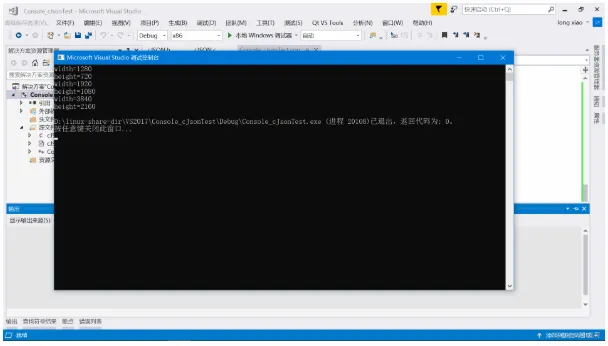
cJSON 是一个超轻巧,携带方便,单文件,可以作为 ANSI-C 标准的 JSON 解析器,是一个用C语言编写的简单好用的JSON解析器;它只包含一个C文件和一个头文件,可以非常容易集成到自己工程项目中。
并且cJSON是用ANSI C(C89)编写的,可以兼容所有支持C语言的平台和编译器。
cJSON下载地址:
cJSON download | SourceForge.net
https://sourceforge.net/projects/cjson/
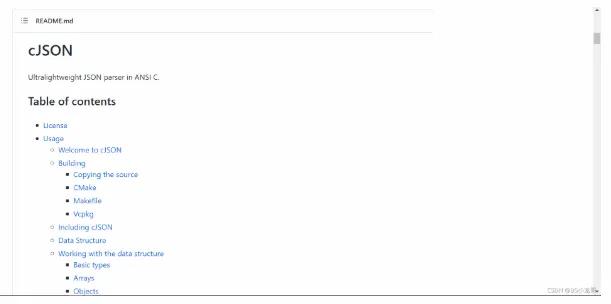
cJSON的GitHub仓库地址:
https://github.com/DaveGamble/cJSON
https://github.com/DaveGamble/cJSON
二、JSON简介、语法介绍
2.1 JSON是什么?
JSON是JavaScript Object Notation(JavaScript对象表示法),是一种轻量级的数据交换格式。
JSON主要是用来存储和交换文本信息,类似XML格式;但是JSON比XML更小、更快,更易解析。
JSON是基于ECMAScript (欧洲计算机协会制定的js规范)的一个子集,采用完全独立于编程语言的文本格式来存储和表示数据。
简洁和清晰的层次结构使得 JSON 成为理想的数据交换语言。 易于人阅读和编写,同时也易于机器解析和生成,并有效地提升网络传输效率。 比如: Web服务器接口基本都是采用JSON反馈数据,采用JSON格式字符串来描述符信息。 JSON文件的后缀一般是.json,这个只是为了方便辨识。
简单的说,JSON就是按照指定格式序列化的字符串,就算不使用任何现成的解析库,自己也可以按照正常解析字符串的思路去解析;有现成的标准JSON解析库,那就大大减轻了我们的工作量。
JSON格式的数据示例: 这是表示当前时间的JSON字符串
{
  "success": "1",
  "result": {
    "timestamp": "1631849514",
    "datetime_1": "2021-09-17 20:31:54",
    "datetime_2": "2021年09月17日 20时31分54秒",
    "week_1": "5",
    "week_2": "星期五",
    "week_3": "周五",
    "week_4": "Friday"
  }
}
JSON格式的数据示例: 这是表示未来几天天气预报的json字符串
{
  "success": "1",
  "result": [
    {
      "weaid": "1",
      "days": "2021-09-17",
      "week": "星期五",
      "cityno": "beijing",
      "citynm": "北京",
      "cityid": "101010100",
      "temperature": "26℃/17℃",
      "humidity": "0%/0%",
      "weather": "晴",
      "weather_icon": "http://api.k780.com/upload/weather/d/0.gif",
      "weather_icon1": "http://api.k780.com/upload/weather/n/0.gif",
      "wind": "北风转西南风",
      "winp": "小于3级",
      "temp_high": "26",
      "temp_low": "17",
      "humi_high": "0",
      "humi_low": "0",
      "weatid": "1",
      "weatid1": "1",
      "windid": "8",
      "winpid": "0",
      "weather_iconid": "0",
      "weather_iconid1": "0"
    },
    {
      "weaid": "1",
      "days": "2021-09-18",
      "week": "星期六",
      "cityno": "beijing",
      "citynm": "北京",
      "cityid": "101010100",
      "temperature": "25℃/17℃",
      "humidity": "0%/0%",
      "weather": "多云",
      "weather_icon": "http://api.k780.com/upload/weather/d/1.gif",
      "weather_icon1": "http://api.k780.com/upload/weather/n/1.gif",
      "wind": "西南风",
      "winp": "小于3级",
      "temp_high": "25",
      "temp_low": "17",
      "humi_high": "0",
      "humi_low": "0",
      "weatid": "2",
      "weatid1": "2",
      "windid": "5",
      "winpid": "0",
      "weather_iconid": "1",
      "weather_iconid1": "1"
    },
    {
      "weaid": "1",
      "days": "2021-09-19",
      "week": "星期日",
      "cityno": "beijing",
      "citynm": "北京",
      "cityid": "101010100",
      "temperature": "19℃/15℃",
      "humidity": "0%/0%",
      "weather": "小雨转中雨",
      "weather_icon": "http://api.k780.com/upload/weather/d/7.gif",
      "weather_icon1": "http://api.k780.com/upload/weather/n/8.gif",
      "wind": "西南风转北风",
      "winp": "小于3级转小于3级",
      "temp_high": "19",
      "temp_low": "15",
      "humi_high": "0",
      "humi_low": "0",
      "weatid": "8",
      "weatid1": "9",
      "windid": "5",
      "winpid": "0",
      "weather_iconid": "7",
      "weather_iconid1": "8"
    },
    {
      "weaid": "1",
      "days": "2021-09-20",
      "week": "星期一",
      "cityno": "beijing",
      "citynm": "北京",
      "cityid": "101010100",
      "temperature": "26℃/16℃",
      "humidity": "0%/0%",
      "weather": "多云转晴",
      "weather_icon": "http://api.k780.com/upload/weather/d/1.gif",
      "weather_icon1": "http://api.k780.com/upload/weather/n/0.gif",
      "wind": "北风",
      "winp": "3-4级转3-4级",
      "temp_high": "26",
      "temp_low": "16",
      "humi_high": "0",
      "humi_low": "0",
      "weatid": "2",
      "weatid1": "1",
      "windid": "8",
      "winpid": "1",
      "weather_iconid": "1",
      "weather_iconid1": "0"
    },
    {
      "weaid": "1",
      "days": "2021-09-21",
      "week": "星期二",
      "cityno": "beijing",
      "citynm": "北京",
      "cityid": "101010100",
      "temperature": "27℃/16℃",
      "humidity": "0%/0%",
      "weather": "晴",
      "weather_icon": "http://api.k780.com/upload/weather/d/0.gif",
      "weather_icon1": "http://api.k780.com/upload/weather/n/0.gif",
      "wind": "西北风转北风",
      "winp": "小于3级",
      "temp_high": "27",
      "temp_low": "16",
      "humi_high": "0",
      "humi_low": "0",
      "weatid": "1",
      "weatid1": "1",
      "windid": "7",
      "winpid": "0",
      "weather_iconid": "0",
      "weather_iconid1": "0"
    },
    {
      "weaid": "1",
      "days": "2021-09-22",
      "week": "星期三",
      "cityno": "beijing",
      "citynm": "北京",
      "cityid": "101010100",
      "temperature": "26℃/18℃",
      "humidity": "0%/0%",
      "weather": "多云",
      "weather_icon": "http://api.k780.com/upload/weather/d/1.gif",
      "weather_icon1": "http://api.k780.com/upload/weather/n/1.gif",
      "wind": "北风转东北风",
      "winp": "小于3级",
      "temp_high": "26",
      "temp_low": "18",
      "humi_high": "0",
      "humi_low": "0",
      "weatid": "2",
      "weatid1": "2",
      "windid": "8",
      "winpid": "0",
      "weather_iconid": "1",
      "weather_iconid1": "1"
    },
    {
      "weaid": "1",
      "days": "2021-09-23",
      "week": "星期四",
      "cityno": "beijing",
      "citynm": "北京",
      "cityid": "101010100",
      "temperature": "24℃/16℃",
      "humidity": "0%/0%",
      "weather": "多云",
      "weather_icon": "http://api.k780.com/upload/weather/d/1.gif",
      "weather_icon1": "http://api.k780.com/upload/weather/n/1.gif",
      "wind": "东北风",
      "winp": "小于3级",
      "temp_high": "24",
      "temp_low": "16",
      "humi_high": "0",
      "humi_low": "0",
      "weatid": "2",
      "weatid1": "2",
      "windid": "1",
      "winpid": "0",
      "weather_iconid": "1",
      "weather_iconid1": "1"
    }
  ]
}
2.2 JSON语法介绍
JSON里就分为两种结构: 对象和数组,通过这两种结构可以表示各种复杂的结构。
JSON语法规则
1. 大括号 { } 用来保存对象
2. 中括号 [ ] 用来保存数组,数组里也可以包含多个对象,对象里又可以包含数组,可以嵌套
3. JSON的值表示语法: key : value --> "width": 1280
4. 多个数据由逗号分隔: {"width": 1920,"height": 1080}
JSON值可以是以下几种类型:
1. 数字(整数或浮点数)
2. 字符串(在双引号中)
3. 逻辑值(true 或 false)
4. 数组(在中括号中)
5. 对象(在大括号中)
6. null (空值)
三、cJSON创建简单JSON数据并解析
3.1 新建工程
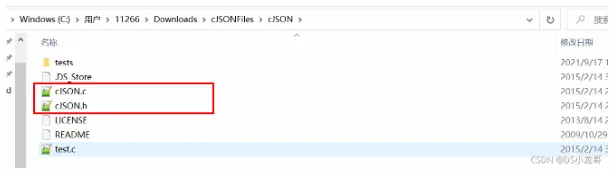
这是下载下来的cJSON源文件,将它加到自己工程中即可。
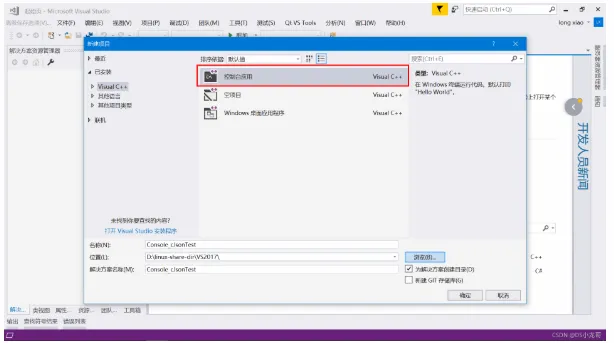
我这里使用VS2017建立工程,演示实例。
建好工程之后,将文件添加到工程里:
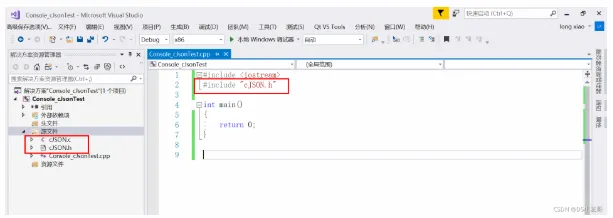
在VS2017里使用C语言的字符串处理函数会报错,提示不安全;
1>d:\linux-share-dir\vs2017\console_cjsontest\console_cjsontest\cjson.c(155): error C4996: 'strcpy': This function or variable may be unsafe. Consider using strcpy_s instead. To disable deprecation, use _CRT_SECURE_NO_WARNINGS. See online help for details.
解决办法是:找到【项目属性】,点击【C++】里的【预处理器】,对【预处理器】进行编辑,在里面加入一段代码:_CRT_SECURE_NO_WARNINGS。
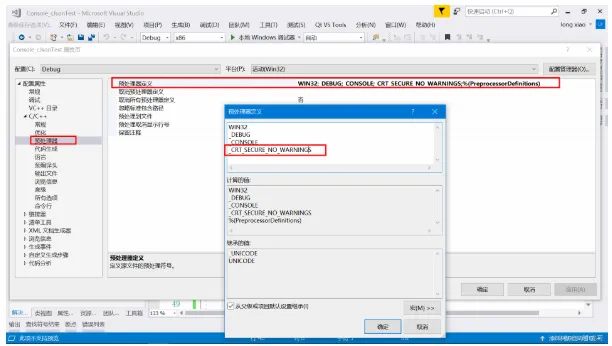
3.2 创建JSON数据
接下来目标是使用cJSON创建出下面这样一个JSON格式数据:
{
  "text": "我是一个字符串数据",
  "number": 666,
  "state1": false,
  "state2": true,
  "state3": null
}
示例代码如下:
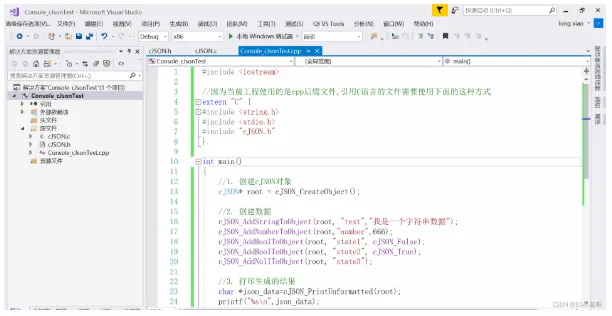
#include <iostream>
//因为当前工程使用的是cpp后缀文件,引用C语言的文件需要使用下面的这种方式
extern "C" {
#include <string.h>
#include <stdio.h>
#include "cJSON.h"
}
int main()
{
  //1. 创建cJSON对象
  cJSON* root = cJSON_CreateObject();
  //2. 创建数据
  cJSON_AddStringToObject(root, "text","我是一个字符串数据");
  cJSON_AddNumberToObject(root,"number",666);
  cJSON_AddBoolToObject(root, "state1", cJSON_False);
  cJSON_AddBoolToObject(root, "state2", cJSON_True);
  cJSON_AddNullToObject(root, "state3");
  //3. 打印生成的结果
  char *json_data=cJSON_PrintUnformatted(root);
  printf("%s\n",json_data);
  //4. 释放空间
  cJSON_Delete(root);
  return 0;
}
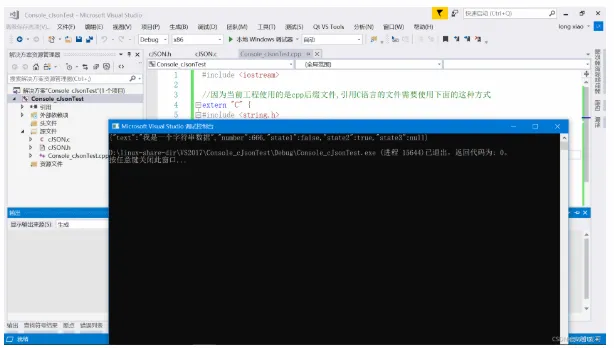
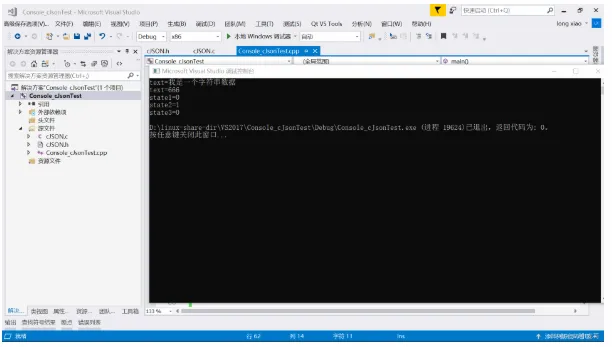
3.3 解析JSON数据
1.#include <iostream>
//因为当前工程使用的是cpp后缀文件,引用C语言的文件需要使用下面的这种方式
extern "C" {
#include <string.h>
#include <stdio.h>
#include "cJSON.h"
}
//将要解析的JSON数据.
char data[] =
"{"
  "\"text\": \"我是一个字符串数据\","
  "\"number\" : 666,"
  "\"state1\" : false,"
  "\"state2\" : true,"
  "\"state3\" : null"
"}";
int main()
{
  //1. 载入JSON数据
  cJSON* root = cJSON_Parse(data);
  if (root == NULL)return 0;
  //2. 解析字段
  cJSON* item;
  item=cJSON_GetObjectItem(root,"text");
  if (item)
  {
    printf("text=%s\n",item->valuestring);
  }
  item = cJSON_GetObjectItem(root, "number");
  if (item)
  {
    printf("text=%d\n", item->valueint);
  }
  item = cJSON_GetObjectItem(root, "state1");
  if (item)
  {
    printf("state1=%d\n", item->valueint);
  }
  item = cJSON_GetObjectItem(root, "state2");
  if (item)
  {
    printf("state2=%d\n", item->valueint);
  }
  item = cJSON_GetObjectItem(root, "state3");
  if (item)
  {
    printf("state3=%d\n", item->valueint);
  }
  //3. 释放空间
  cJSON_Delete(root);
  return 0;
}
四、cJSON创建嵌套的对象数据
目标: 使用cJSON创建出下面这样一个JSON格式数据
1.{
  "data1": {
    "text": "我是一个字符串数据1",
    "number": 666,
    "state1": false,
    "state2": true,
    "state3": null
  },
  "data2": {
    "text": "我是一个字符串数据2",
    "number": 666,
    "state1": false,
    "state2": true,
    "state3": null
  }
}
4.1 创建json数据
#include <iostream>
//因为当前工程使用的是cpp后缀文件,引用C语言的文件需要使用下面的这种方式
extern "C" {
#include <string.h>
#include <stdio.h>
#include "cJSON.h"
}
int main()
{
  //1. 创建cJSON对象
  cJSON* root = cJSON_CreateObject();
  //2. 创建对象数据1
  cJSON* item1 = cJSON_CreateObject();
  cJSON_AddStringToObject(item1, "text","我是一个字符串数据1");
  cJSON_AddNumberToObject(item1,"number",666);
  cJSON_AddBoolToObject(item1, "state1", cJSON_False);
  cJSON_AddBoolToObject(item1, "state2", cJSON_True);
  cJSON_AddNullToObject(item1, "state3");
  cJSON_AddItemToObject(root, "data1", item1);
  //3. 创建对象数据2
  cJSON* item2 = cJSON_CreateObject();
  cJSON_AddStringToObject(item2, "text", "我是一个字符串数据2");
  cJSON_AddNumberToObject(item2, "number", 666);
  cJSON_AddBoolToObject(item2, "state1", cJSON_False);
  cJSON_AddBoolToObject(item2, "state2", cJSON_True);
  cJSON_AddNullToObject(item2, "state3");
  cJSON_AddItemToObject(root, "data2", item2);
  //3. 打印生成的结果
  char *json_data=cJSON_PrintUnformatted(root);
  printf("%s\n",json_data);
  //4. 释放空间
  cJSON_Delete(root);
  return 0;
}
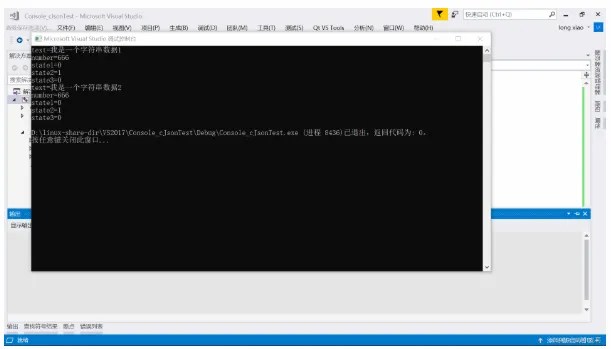
4.2 解析JSON数据
#include <iostream>
//因为当前工程使用的是cpp后缀文件,引用C语言的文件需要使用下面的这种方式
extern "C" {
#include <string.h>
#include <stdio.h>
#include "cJSON.h"
}
//将要解析的JSON数据.
char data[] =
"{"
  "\"data1\": {"
  "\"text\": \"我是一个字符串数据1\","
  "\"number\" : 666,"
  "\"state1\" : false,"
  "\"state2\" : true,"
  "\"state3\" : null"
   "},"
  "\"data2\": {"
  "\"text\":\"我是一个字符串数据2\","
  "\"number\" : 666,"
  "\"state1\" : false,"
  "\"state2\" : true,"
  "\"state3\" : null"
  "}"
"}";
int main()
{
  //1. 载入JSON数据
  cJSON* root = cJSON_Parse(data);
  if (root == NULL)return 0;
  //2. 解析字段
  cJSON* item;
  item=cJSON_GetObjectItem(root,"data1");
  if (item)
  {
    cJSON *obj;
    obj=cJSON_GetObjectItem(item, "text");
    if (obj)
    {
      printf("text=%s\n", obj->valuestring);
    }
    obj=cJSON_GetObjectItem(item, "number");
    if (obj)
    {
      printf("number=%d\n", obj->valueint);
    }
    obj = cJSON_GetObjectItem(item, "state1");
    if (obj)
    {
      printf("state1=%d\n", obj->valueint);
    }
    obj = cJSON_GetObjectItem(item, "state2");
    if (obj)
    {
      printf("state2=%d\n", obj->valueint);
    }
    obj = cJSON_GetObjectItem(item, "state3");
    if (obj)
    {
      printf("state3=%d\n", obj->valueint);
    }
  }
  item = cJSON_GetObjectItem(root, "data2");
  if (item)
  {
    cJSON *obj;
    obj = cJSON_GetObjectItem(item, "text");
    if (obj)
    {
      printf("text=%s\n", obj->valuestring);
    }
    obj = cJSON_GetObjectItem(item, "number");
    if (obj)
    {
      printf("number=%d\n", obj->valueint);
    }
    obj = cJSON_GetObjectItem(item, "state1");
    if (obj)
    {
      printf("state1=%d\n", obj->valueint);
    }
    obj = cJSON_GetObjectItem(item, "state2");
    if (obj)
    {
      printf("state2=%d\n", obj->valueint);
    }
    obj = cJSON_GetObjectItem(item, "state3");
    if (obj)
    {
      printf("state3=%d\n", obj->valueint);
    }
  }
  //3. 释放空间
  cJSON_Delete(root);
  return 0;
}
五、cJSON带数组的JSON数据
目标: 使用cJSON创建出下面这样一个JSON格式数据
1.{
  "text": [
    {
      "width": 1280,
      "height": 720
    },
    {
      "width": 1920,
      "height": 1080
    },
    {
      "width": 3840,
      "height": 2160
    }
  ]
}
5.1 创建json数据
#include <iostream>
//因为当前工程使用的是cpp后缀文件,引用C语言的文件需要使用下面的这种方式
extern "C" {
#include <string.h>
#include <stdio.h>
#include "cJSON.h"
}
int main()
{
  cJSON *width = NULL;
  cJSON *height = NULL;
  int i;
  const unsigned int resolution_numbers[3][2] = {
    {1280, 720},
    {1920, 1080},
    {3840, 2160}
  };
  //1. 创建cJSON对象
  cJSON* root = cJSON_CreateObject();
  //2. 创建数组对象
  cJSON *array = cJSON_CreateArray();
  cJSON_AddItemToObject(root, "text", array);
  for (i = 0; i < (sizeof(resolution_numbers) / (2 * sizeof(int))); ++i)
  {
    cJSON *obj = cJSON_CreateObject();
    cJSON_AddItemToArray(array, obj);
    width = cJSON_CreateNumber(resolution_numbers[i][0]);
    cJSON_AddItemToObject(obj, "width", width);
    height = cJSON_CreateNumber(resolution_numbers[i][1]);
    cJSON_AddItemToObject(obj, "height", height);
  }
  //3. 打印生成的结果
  char *json_data=cJSON_PrintUnformatted(root);
  printf("%s\n",json_data);
  //4. 释放空间
  cJSON_Delete(root);
  return 0;
}
5.2 解析JSON数据
#include <iostream>
//因为当前工程使用的是cpp后缀文件,引用C语言的文件需要使用下面的这种方式
extern "C" {
#include <string.h>
#include <stdio.h>
#include "cJSON.h"
}
//将要解析的JSON数据.
char data[] =
"{"
"\"text\": ["
"{"
"\"width\": 1280,"
"\"height\" : 720"
"},"
"{"
"\"width\": 1920,"
"\"height\" : 1080"
"},"
"{"
"\"width\": 3840,"
"\"height\" : 2160"
"}"
"]"
"}";
int main()
{
  //1. 载入JSON数据
  cJSON* root = cJSON_Parse(data);
  if (root == NULL)return 0;
  //2. 解析字段
  cJSON* item;
  int i;
  item = cJSON_GetObjectItem(root, "text");
  if (item)
  {
    //获取数组的大小
    int ArraySize = cJSON_GetArraySize(item);
    //解析数组的里的每个成员
    for (i = 0; i < ArraySize; i++)
    {
      //取出数组下标对象
      cJSON *array_item = cJSON_GetArrayItem(item, i);
      if (array_item == NULL)continue;
      //解析数据
      cJSON *obj = cJSON_GetObjectItem(array_item, "width");
      if (obj)
      {
        printf("width=%d\n",obj->valueint);
      }
      obj = cJSON_GetObjectItem(array_item, "height");
      if (obj)
      {
        printf("height=%d\n", obj->valueint);
      }
    }
  }
  //3. 释放空间
  cJSON_Delete(root);
  return 0;
}