简介:外国不过十一,所以利用十一假期,看看他们都在干什么。一、小白问题http://answers.opencv.org/question/199987/contour-single-blob-with-multiple-object/ Contour Single blob with multiple object Hi to everyone.
I'm developing an object shape identification application and struck up with separating close objects using contour, Since close objects are identified as single contour. Is there way to separate the objects?
Things I have tried:1. I have tried Image segmentation with distance transform and Watershed algorithm - It works for few images only2. I have tried to separate the objects manual using the distance between two points as mentioned in http://answers.opencv.org/question/71... - I struck up with choosing the points that will separate the object.
I have attached a sample contour for the reference.
Please suggest any comments to separate the objects.
I am trying to squeeze the last ms from a tracking loop. One of the time consuminig parts is doing adaptive contrast enhancement (clahe), which is a necessary part. The results are great, but I am wondering whether I could avoid some copying/splitting/merge or apply other optimizations.
On the test machine, the above snippet takes about 8ms (on 1Mpix images), The actual clahe part takes only 1-2 ms.
1 answer
You can save quite a bit. First, get rid of the vector. Then, outside the loop, create a Mat for the V channel only.
Then use extractChannel and insertChannel to access the channel you're using. It only accesses the one channel, instead of all three like split does.
The reason you put the Mat outside the loop is to avoid reallocating it every pass through the loop. Right now you're allocating and deallocating three Mats every pass.
for (int i = 0; i < 1000; i++) { extractChannel(hsv1, hsvChannels2, 2); clahe->apply(hsvChannels2, hsvChannels2); insertChannel(hsvChannels2, hsv1, 2); } tm.stop(); cout<< tm; absdiff(hsv1, hsv2, diff); imshow("diff", diff*255); waitKey(); }
我运行这段代码的结果为:
4.63716sec
3.80283sec
应该说其中关键的一句就是使用:
extractChannel(hsv1, hsvChannels2, 2);
代替
split(hsv2, hsvChannels);
能够单句提高1MS左右时间,而这种费时的方法是我目前经常采用的,应该说这题很有较益。
三、基本算法
Compare two images and highlight the difference
Hi - First I'm a total n00b so please be kind. I'd like to create a target shooting app that allows me to us the camera on my android device to see where I hit the target from shot to shot. The device will be stationary with very little to no movement. My thinking is that I'd access the camera and zoom as needed on the target. Once ready I'd hit a button that would start taking pictures every x seconds. Each picture would be compared to the previous one to see if there was a change - the change being I hit the target. If a change was detected the two imaged would be saved, the device would stop taking picture, the image with the change would be displayed on the device and the spot of change would be highlighted. When I was ready for the next shot, I would hit a button on the device and the process would start over. If I was done shooting, there would be a button to stop.
Any help in getting this project off the ground would be greatly appreciated.
This will be a very basic algorithm just to evaluate your use case. It can be improved a lot.
(i) In your case, the first step is to identify whether there is a change or not between 2 frames. It can be identified by using a simple StandardDeviation measurement. Set a threshold for acceptable difference in deviation.
Mat prevFrame, currentFrame;
for(;;) { //Getting a frame from the video capture device. cap >> currentFrame;
if( prevFrame.data ) { //Finding the standard deviations of current and previous frame. Scalar prevStdDev, currentStdDev; meanStdDev(prevFrame, Scalar(), prevStdDev); meanStdDev(currentFrame, Scalar(), currentStdDev);
//Decision Making. if(abs(currentStdDev - prevStdDev) < ACCEPTED_DEVIATION) { Save the images and break out of the loop. } }
//To exit from the loop, if there is a keypress event. if(waitKey(30)>=0) break;
//For swapping the previous and current frame. swap(prevFrame, currentFrame); }
(ii) The first step will only identify the change in frames. In order to locate the position where the change occured, find the difference between the two saved frames using AbsDiff. Using this difference image mask, find the contours and finally mark the region with a bounding rectangle.
I have the version of tesseract 3.05 and opencv3.2 installed and tested. But when I tried the end-to-end-recognition demo code, I discovered that tesseract was not found using OCRTesseract::create and checked the documentation to find that the interface is for v3.02. Is it possible to use it with Tesseract v3.05 ? How?
where to build binaries : E:/leptonica-1.74.4/build
click Configure buttonselect compiler
see "Configuring done"click Generate button and see "Generating done"
Open Visual Studio 2015 >> file >> open "E:\leptonica-1.74.4\build\ALL_BUILD.vcxproj"select release, build ALL BUILD
see "Build: 3 succeeded" and be sure E:\leptonica-master\build\src\Release\leptonica-1.74.4.lib and E:\leptonica-1.74.4\build\bin\Release\leptonica-1.74.4.dll have been created
create a directory E:\tesseract-3.05.01\Files\leptonica\include
copy *.h from E:\leptonica-master\src into E:\tesseract-3.05.01\Files\leptonica\includecopy *.h from E:\leptonica-master\build\src into E:\tesseract-3.05.01\Files\leptonica\include
run cmake
where is the source code : E:/tesseract-3.05.01
where to build binaries : E:/tesseract-3.05.01/build
click Configure buttonselect compiler
set Leptonica_DIR to E:/leptonica-1.74.4\buildclick Configure button againsee "Configuring done"click Generate button and see "Generating done"
Open Visual Studio 2015 >> file >> open "E:/tesseract-3.05.01\build\ALL_BUILD.vcxproj"build ALL_BUILD
be sure E:\tesseract-3.05.01\build\Release\tesseract305.lib and E:\tesseract-3.05.01\build\bin\Release\tesseract305.dll generated
Pyramid Blending with Single input and Non-Vertical Boundar
Hi All,
Here is the input image.
Say you do not have the other half of the images. Is it still possible to do with Laplacian pyramid blending?
I tried stuffing the image directly into the algorithm. I put weights as opposite triangles. The result comes out the same as the input.My another guess is splitting the triangles. Do gaussian and Laplacian pyramid on each separately, and then merge them.
But the challenge is how do we apply Laplacian matrix on triangular data. What do we fill on the missing half? I tried 0. It made the boundary very bright.
If pyramid blending is not the best approach for this. What other methods do you recommend me to look into for blending?
Thank you for your comment. I tried doing that (explained by my 2nd paragraph). The output is the same as the original image. Please note where I want to merge is NOT vertical. So I do not get what you meant by "line blend".
With my previous laptop (Windows7) I was connecting to my phone camera via DroidCam and using videoCapture in OpenCV with Visual Studio, and there was no problem. But now I have a laptop with Windows 10, and when I connect the same way it shows orange screen all the time. Actually DroidCam app in my laptop works fine, it shows the video. However while using OpenCV videoCapture from Visual Studio it shows orange screen.
Disable laptop webcam from device manager and then restart. Then it works
七、算法研究
OpenCV / C++ - Filling holes
Hello there,
For a personnel projet, I'm trying to detect object and there shadow. These are the result I have for now:Original:
Object:
Shadow:
The external contours of the object are quite good, but as you can see, my object is not full.Same for the shadow.I would like to get full contours, filled, for the object and its shadow, and I don't know how to get better than this (I juste use "dilate" for the moment).Does someone knows a way to obtain a better result please?Regards.




Hi to everyone.
I'm developing an object shape identification application and struck up with separating close objects using contour, Since close objects are identified as single contour. Is there way to separate the objects?
Things I have tried:1. I have tried Image segmentation with distance transform and Watershed algorithm - It works for few images only2. I have tried to separate the objects manual using the distance between two points as mentioned in http://answers.opencv.org/question/71... - I struck up with choosing the points that will separate the object.
I have attached a sample contour for the reference.
Please suggest any comments to separate the objects.
分析:这个问题其实在阈值处理之前就出现了,我们常见的想法是对图像进行预处理,比如HSV 分割,或者在阈值处理的时候想一些方法。
I am trying to squeeze the last ms from a tracking loop. One of the time consuminig parts is doing adaptive contrast enhancement (clahe), which is a necessary part. The results are great, but I am wondering whether I could avoid some copying/splitting/merge or apply other optimizations.
Basically I do the following in tight loop:
cv::cvtColor(rgb, hsv, cv::COLOR_BGR2HSV);

std::vector<cv::Mat> hsvChannels;

cv::split(hsv, hsvChannels);

m_clahe->apply(hsvChannels[2], hsvChannels[2]); /* m_clahe constructed outside loop */

cv::merge(hsvChannels, hsvOut);

cv::cvtColor(hsvOut, rgbOut, cv::COLOR_HSV2BGR);
On the test machine, the above snippet takes about 8ms (on 1Mpix images), The actual clahe part takes only 1-2 ms.
1 answer
You can save quite a bit. First, get rid of the vector. Then, outside the loop, create a Mat for the V channel only.
Then use extractChannel and insertChannel to access the channel you're using. It only accesses the one channel, instead of all three like split does.
The reason you put the Mat outside the loop is to avoid reallocating it every pass through the loop. Right now you're allocating and deallocating three Mats every pass.
test code:
#include "opencv2/imgproc.hpp"
#include "opencv2/highgui.hpp"
#include <iostream>

using namespace std;
using namespace cv;

int main(){

TickMeter tm;
Ptr<CLAHE> clahe = createCLAHE();
    clahe->setClipLimit(4);
    vector <Mat> hsvChannels;
    Mat img, hsv1, hsv2, hsvChannels2, diff;
    img = imread("lena.jpg");
    cvtColor (img, hsv1, COLOR_BGR2HSV);
    cvtColor (img, hsv2, COLOR_BGR2HSV);
    tm.start();
for (int i = 0; i < 1000; i++)
{
        split(hsv2, hsvChannels);
        clahe->apply(hsvChannels[2], hsvChannels[2]);
        merge(hsvChannels, hsv2);
}
    tm.stop();
    cout<< tm << endl;
    tm.reset();
    tm.start();

for (int i = 0; i < 1000; i++)
{
        extractChannel(hsv1, hsvChannels2, 2);
        clahe->apply(hsvChannels2, hsvChannels2);
        insertChannel(hsvChannels2, hsv1, 2);
}
    tm.stop();
    cout<< tm;
    absdiff(hsv1, hsv2, diff);
    imshow("diff", diff*255);
    waitKey();
}
Hi - First I'm a total n00b so please be kind. I'd like to create a target shooting app that allows me to us the camera on my android device to see where I hit the target from shot to shot. The device will be stationary with very little to no movement. My thinking is that I'd access the camera and zoom as needed on the target. Once ready I'd hit a button that would start taking pictures every x seconds. Each picture would be compared to the previous one to see if there was a change - the change being I hit the target. If a change was detected the two imaged would be saved, the device would stop taking picture, the image with the change would be displayed on the device and the spot of change would be highlighted. When I was ready for the next shot, I would hit a button on the device and the process would start over. If I was done shooting, there would be a button to stop.
Any help in getting this project off the ground would be greatly appreciated.
This will be a very basic algorithm just to evaluate your use case. It can be improved a lot.
(i) In your case, the first step is to identify whether there is a change or not between 2 frames. It can be identified by using a simple StandardDeviation measurement. Set a threshold for acceptable difference in deviation.
Mat prevFrame, currentFrame;

for(;;)
{
    //Getting a frame from the video capture device.
    cap >> currentFrame;

    if( prevFrame.data )
    {
         //Finding the standard deviations of current and previous frame.
         Scalar prevStdDev, currentStdDev;
         meanStdDev(prevFrame, Scalar(), prevStdDev);
         meanStdDev(currentFrame, Scalar(), currentStdDev);

          //Decision Making.
          if(abs(currentStdDev - prevStdDev) < ACCEPTED_DEVIATION)
          {
               Save the images and break out of the loop.
          }
    }

    //To exit from the loop, if there is a keypress event.
    if(waitKey(30)>=0)
        break;

    //For swapping the previous and current frame.
    swap(prevFrame, currentFrame);
}
(ii) The first step will only identify the change in frames. In order to locate the position where the change occured, find the difference between the two saved frames using AbsDiff. Using this difference image mask, find the contours and finally mark the region with a bounding rectangle.
Hope this answers your question.
这道题难道不是对absdiff的应用吗?直接absdiff,然后阈值,数数就可以了。
I have the version of tesseract 3.05 and opencv3.2 installed and tested. But when I tried the end-to-end-recognition demo code, I discovered that tesseract was not found using OCRTesseract::create and checked the documentation to find that the interface is for v3.02. Is it possible to use it with Tesseract v3.05 ? How?
How to create OpenCV binary files from source with tesseract ( Windows )
i tried to explain the steps
Step 1.download https://github.com/DanBloomberg/lepto...
extract it in a dir like "E:/leptonica-1.74.4"
run cmake
click Configure buttonselect compiler
see "Configuring done"click Generate button and see "Generating done"
Open Visual Studio 2015 >> file >> open "E:\leptonica-1.74.4\build\ALL_BUILD.vcxproj"select release, build ALL BUILD
see "Build: 3 succeeded" and be sure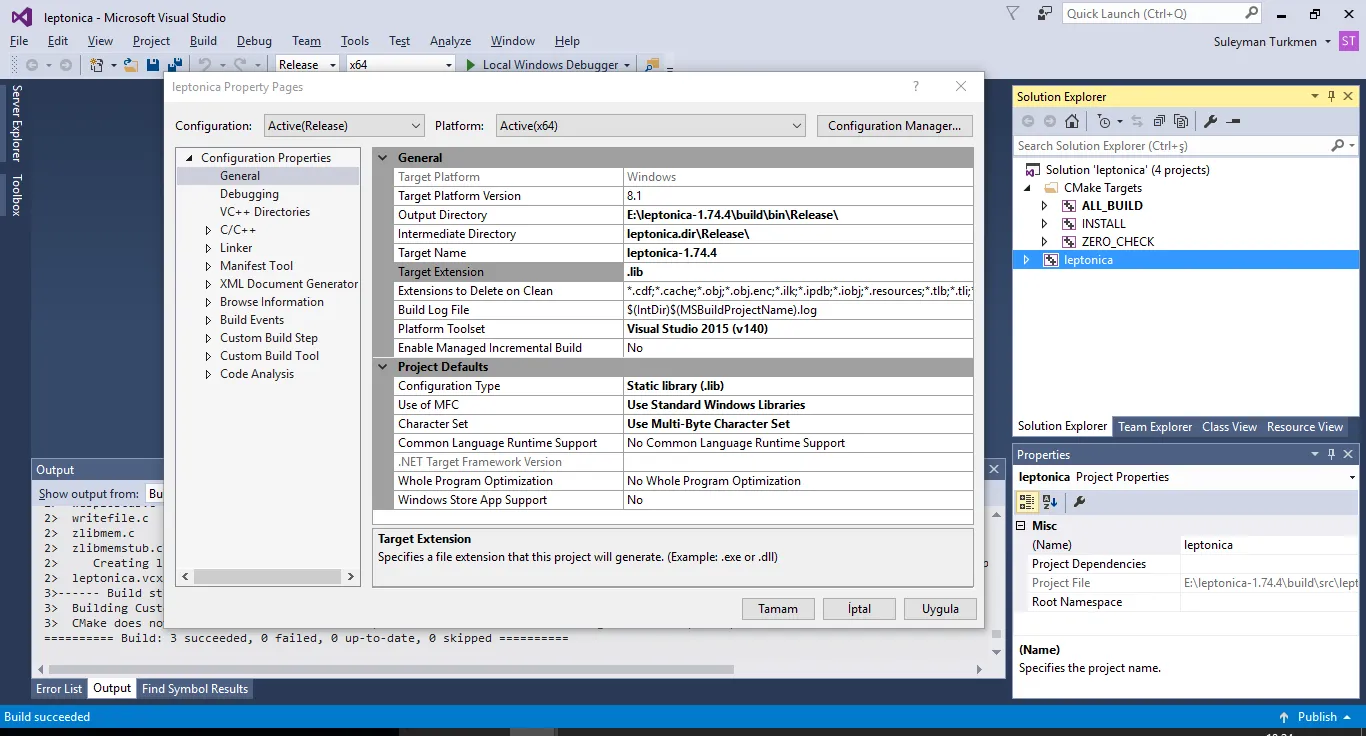
E:\leptonica-master\build\src\Release\leptonica-1.74.4.libandE:\leptonica-1.74.4\build\bin\Release\leptonica-1.74.4.dllhave been createdStep 2.download https://github.com/tesseract-ocr/tess...
extract it in a dir like "E:/tesseract-3.05.01"
create a directory
E:\tesseract-3.05.01\Files\leptonica\includecopy *.h from
E:\leptonica-master\srcintoE:\tesseract-3.05.01\Files\leptonica\includecopy *.h fromE:\leptonica-master\build\srcintoE:\tesseract-3.05.01\Files\leptonica\includerun cmake
click Configure buttonselect compiler
set Leptonica_DIR to E:/leptonica-1.74.4\buildclick Configure button againsee "Configuring done"click Generate button and see "Generating done"
Open Visual Studio 2015 >> file >> open "E:/tesseract-3.05.01\build\ALL_BUILD.vcxproj"build ALL_BUILD
be sure
E:\tesseract-3.05.01\build\Release\tesseract305.libandE:\tesseract-3.05.01\build\bin\Release\tesseract305.dllgeneratedStep 3.create directory
E:\tesseract-3.05.01\include\tesseractcopy all *.h files from
E:\tesseract-3.05.01\api
E:\tesseract-3.05.01\ccmain
E:\tesseract-3.05.01\ccutil
E:\tesseract-3.05.01\ccstruct
to
E:/tesseract-3.05.01/include\tesseractin OpenCV cmake set Tesseract_INCLUDE_DIR : E:/tesseract-3.05.01/include
set tesseract_LIBRARY
E:/tesseract-3.05.01/build/Release/tesseract305.libset Lept_LIBRARY
E:/leptonica-master/build/src/Release/leptonica-1.74.4.libwhen you click Configure button you will see "Tesseract: YES" it means everything is OK
make other settings and generate. Compile ....
Hi All,
Here is the input image.
Say you do not have the other half of the images. Is it still possible to do with Laplacian pyramid blending?
I tried stuffing the image directly into the algorithm. I put weights as opposite triangles. The result comes out the same as the input.My another guess is splitting the triangles. Do gaussian and Laplacian pyramid on each separately, and then merge them.
But the challenge is how do we apply Laplacian matrix on triangular data. What do we fill on the missing half? I tried 0. It made the boundary very bright.
If pyramid blending is not the best approach for this. What other methods do you recommend me to look into for blending?
Any help is much appreciated!
Comments
the answer is YES.what you need is pyrdown the images and lineblend them at each pyramid
Thank you for your comment. I tried doing that (explained by my 2nd paragraph). The output is the same as the original image. Please note where I want to merge is NOT vertical. So I do not get what you meant by "line blend".
这个问题需要实现的是mulitband blend,而且实现的是倾斜过来的融合,应该说很奇怪,不知道在什么环境下会有这样的需求,但是如果作为算法问题来说的话,还是很有价值的。首先需要解决的是倾斜的line bend,值得思考。With my previous laptop (Windows7) I was connecting to my phone camera via DroidCam and using videoCapture in OpenCV with Visual Studio, and there was no problem. But now I have a laptop with Windows 10, and when I connect the same way it shows orange screen all the time. Actually DroidCam app in my laptop works fine, it shows the video. However while using OpenCV videoCapture from Visual Studio it shows orange screen.
Thanks in advance
Hello there,
For a personnel projet, I'm trying to detect object and there shadow. These are the result I have for now:Original:
Object:
Shadow:
The external contours of the object are quite good, but as you can see, my object is not full.Same for the shadow.I would like to get full contours, filled, for the object and its shadow, and I don't know how to get better than this (I juste use "dilate" for the moment).Does someone knows a way to obtain a better result please?Regards.
有趣的问题,研究看看。