
一、准备阶段
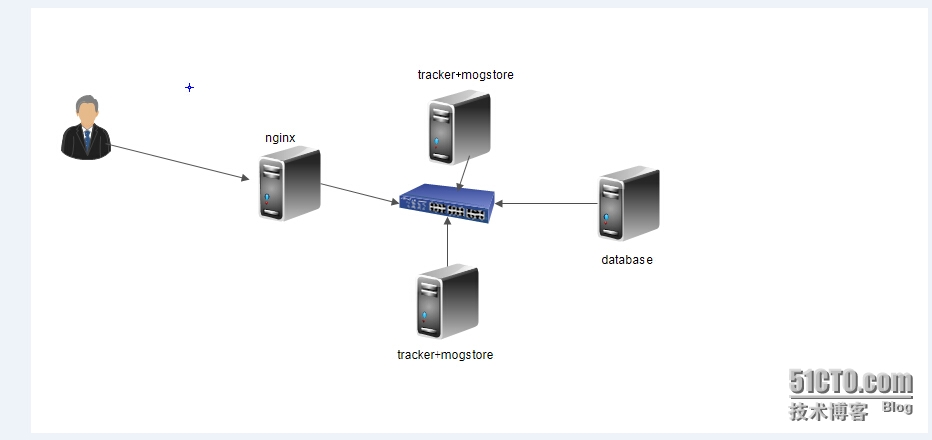
1、5台机器
10.1.2.180 作为mysql机器
10.1.2.200-202作为集群节点
10.1.2.203作为nginx反向代理
2、拓扑图
三、mogilefs集群部署步聚
1、180机器
1.1由于前面单节,180机器安装了mysql和Mogilefs,而现在180作为单独Mysql机器,所以先停掉Mogilefs服务
|
1
2
|
[root@logicserver tmp]# /etc/init.d/mogilefsd stop
Stopping mogilefsd [确定]
|
1.2创建mysql用户root的密码,方便集群节点连接上去
|
1
2
|
MariaDB [mogilefs]> GRANT ALL ON *.* TO
'root'
@
'10.1.%.%'
IDENTIFIED BY
'168'
;
|
|
1
2
|
MariaDB [mogilefs]> flush privileges;
Query OK,
0
rows affected (
0.04
sec)
|
2、200机器
2.1 重新初始化数据库
|
1
|
[root@xenserver1 mogdata]# mogdbsetup --dbhost=
10.1
.
2.180
--dbname=mogilefs --dbport=
3306
--dbrootuser=root --dbrootpass=
168
--dbuser=moguser --dbpass=mog168
|
2.2修改配置文件
|
1
2
3
4
5
|
root@xenserver1 mogdata]# vim /etc/mogilefs/mogilefsd.conf
db_dsn = DBI:mysql:mogilefs:host=
10.1
.
2.180
db_user = moguser
db_pass = mog168
listen =
0.0
.
0.0
:
7001
|
2.3重启服务
|
1
|
[root@xenserver1 mogdata]# service mogilefsd restart
|
|
1
2
|
[root@xenserver1 mogdata]# ss -tnl | sed -n
'/7001/p'
LISTEN
0
128
127.0
.
0.1
:
7001
*:*
|
2.4启动 mogstored服务
|
1
2
3
4
5
|
[root@xenserver1 ~]# vim /etc/mogilefs/mogstored.conf
maxconns =
10000
httplisten =
0.0
.
0.0
:
7500
mgmtlisten =
0.0
.
0.0
:
7501
docroot = /data0/nfs/mogdata/
|
|
1
|
[root@xenserver1 ~]# service mogstored restart
|
|
1
2
3
4
|
[root@xenserver1 ~]# ss -tnl | sed -n
'/7500\|7501\|7001/p'
LISTEN
0
128
127.0
.
0.1
:
7001
*:*
LISTEN
0
128
*:
7500
*:*
LISTEN
0
128
*:
7501
*:*
|
2.3由于原来已经有了,所以先删除再重新添加
|
1
2
3
4
5
|
[root@xenserver1 ~]# mogadm --trackers=
10.1
.
2.200
:
7001
host list
10.1
.
2.200
[
1
]: alive
IP:
10.1
.
2.200
:
7500
10.1
.
2.201
[
2
]: alive
IP:
10.1
.
2.201
:
7500
|
|
1
2
|
[root@xenserver1 ~]# mogadm --trackers=
10.1
.
2.200
:
7001
host
delete
10.1
.
2.200
Failure deleting host: host_not_empty Unable to
delete
host; it contains devices still
|
2.4有错误提示了,先去到180数据库下删除dev1,dev2
|
1
2
3
4
5
6
7
8
9
10
11
12
13
|
MariaDB [mogilefs]> select * from device
-> ;
+-------+--------+--------+--------+----------+---------+------------+
| devid | hostid | status | weight | mb_total | mb_used | mb_asof |
+-------+--------+--------+--------+----------+---------+------------+
|
1
|
1
| down |
100
|
336801
|
66
|
1443524971
|
|
2
|
2
| alive |
100
|
3737
|
735
|
1443525069
|
+-------+--------+--------+--------+----------+---------+------------+
2
rows
in
set
(
0.00
sec)
MariaDB [mogilefs]>
delete
from device where devid=
1
;
Query OK,
1
row affected (
0.02
sec)
MariaDB [mogilefs]>
delete
from device where devid=
2
;
Query OK,
1
row affected (
0.01
sec)
|
2.5再执行删除主机
|
1
2
3
|
[root@xenserver1 ~]# mogadm --trackers=
10.1
.
2.200
:
7001
host
delete
10.1
.
2.200
[root@xenserver1 ~]# mogadm --trackers=
10.1
.
2.200
:
7001
host
delete
10.1
.
2.201
[root@xenserver1 ~]# mogadm --trackers=
10.1
.
2.200
:
7001
host list
|
2.6把自己添加进来
|
1
2
3
4
|
[root@xenserver1 ~]# mogadm --trackers=
10.1
.
2.200
:
7001
host add
10.1
.
2.200
--ip=
10.1
.
2.200
--status=alive
[root@xenserver1 ~]# mogadm --trackers=
10.1
.
2.200
:
7001
host list
10.1
.
2.200
[
1
]: alive
IP:
10.1
.
2.200
:
7500
|
2.7、把mogilefs配置文件复制到201,202机器上,这两台机器安装的mogilefs请参考上章节来安装
|
1
2
3
4
|
[root@xenserver1 ~]# scp /etc/mogilefs/*
10.1
.
2.201
:/etc/mogilefs/
root@
10.1
.
2.201
's password:
mogilefsd.conf
100
%
1459
1
.4KB/s
00
:
00
mogstored.conf
100
%
99
0
.1KB/s
00
:
00
|
|
1
2
3
4
|
[root@xenserver1 ~]# scp /etc/mogilefs/*
10.1
.
2.202
:/etc/mogilefs/
root@
10.1
.
2.201
's password:
mogilefsd.conf
100
%
1459
1
.4KB/s
00
:
00
mogstored.conf
100
%
99
0
.1KB/s
00
:
00
|
3、201机器上
3.1启动mogilefs,mogstored服务
|
1
2
|
[root@hadoop3 nfs]# service mogilefsd start
Starting mogilefsd [确定]
|
|
1
2
|
[root@hadoop3 nfs]# service mogstored start
Starting mogstored [确定]
|
3.2通过本机验证一下
|
1
2
3
|
[root@hadoop3 nfs]# mogadm --tracker=
10.1
.
2.201
:
7001
host list
10.1
.
2.200
[
1
]: alive
IP:
10.1
.
2.200
:
7500
|
3.3把自己也添加进来
|
1
2
3
4
5
6
7
8
|
[root@hadoop3 nfs]# mogadm --tracker=
10.1
.
2.201
:
7001
host add
10.1
.
2.201
--ip=
10
.
1.2
.
201
--status=alive
You have
new
mail
in
/
var
/spool/mail/root
[root@hadoop3 nfs]# mogadm --tracker=
10.1
.
2.201
:
7001
host list
10.1
.
2.200
[
1
]: alive
IP:
10.1
.
2.200
:
7500
10.1
.
2.201
[
2
]: alive
IP:
10.1
.
2.201
:
7500
|
3.4去到200机子上查看
|
1
2
3
4
5
|
[root@xenserver1 ~]# mogadm --trackers=
10.1
.
2.200
:
7001
host list
10.1
.
2.200
[
1
]: alive
IP:
10.1
.
2.200
:
7500
10.1
.
2.201
[
2
]: alive
IP:
10.1
.
2.201
:
7500
|
4、202机器上
4.1创建目录
|
1
2
3
4
5
6
|
[root@hadoop4 MogileFS]# mkdir /data0/nfs/mogdata/dev3 -pv
mkdir: 已创建目录
"/data0"
mkdir: 已创建目录
"/data0/nfs"
mkdir: 已创建目录
"/data0/nfs/mogdata"
mkdir: 已创建目录
"/data0/nfs/mogdata/dev3"
[root@hadoop4 MogileFS]# chown -R mogilefs.mogilefs /data0/nfs/mogdata/
|
4.2启动服务后,添加主机
|
1
2
3
4
5
6
7
8
|
[root@hadoop4 MogileFS]# mogadm --trackers=
10.1
.
2.202
:
7001
host add
10.1
.
2.202
--ip=
10.1
.
2.202
--status=alive
[root@hadoop4 MogileFS]# mogadm --trackers=
10.1
.
2.202
:
7001
host list
10.1
.
2.200
[
1
]: alive
IP:
10.1
.
2.200
:
7500
10.1
.
2.201
[
2
]: alive
IP:
10.1
.
2.201
:
7500
10.1
.
2.202
[
3
]: alive
IP:
10.1
.
2.202
:
7500
|
5、在集群节点任何一台添加设备ID,
5.1现在就选200,此时设备列表为空的
|
1
2
3
4
5
6
7
|
[root@xenserver1 ~]# mogadm device list
10.1
.
2.200
[
1
]: alive
used(G) free(G) total(G) weight(%)
10.1
.
2.201
[
2
]: alive
used(G) free(G) total(G) weight(%)
10.1
.
2.202
[
3
]: alive
used(G) free(G) total(G) weight(%)
|
5.2添回设备
|
1
2
3
|
[root@xenserver1 ~]# mogadm --tracker=
10.1
.
2.200
:
7001
device add
10.1
.
2.200
1
[root@xenserver1 ~]# mogadm --tracker=
10.1
.
2.200
:
7001
device add
10.1
.
2.201
2
[root@xenserver1 ~]# mogadm --tracker=
10.1
.
2.200
:
7001
device add
10.1
.
2.202
3
|
|
1
2
3
4
5
6
7
8
9
10
|
[root@xenserver1 ~]# mogadm --tracker=
10.1
.
2.200
:
7001
device list
10.1
.
2.200
[
1
]: alive
used(G) free(G) total(G) weight(%)
dev1: alive
0.064
328.843
328.907
100
10.1
.
2.201
[
2
]: alive
used(G) free(G) total(G) weight(%)
dev2: alive
0.718
2.932
3.649
100
10.1
.
2.202
[
3
]: alive
used(G) free(G) total(G) weight(%)
dev3: alive
0.418
3.169
3.587
100
|
5.4选201节点验证一下
|
1
2
3
4
5
6
7
8
9
10
|
[root@hadoop4 MogileFS]# mogadm --trackers=
10.1
.
2.201
:
7001
device list
10.1
.
2.200
[
1
]: alive
used(G) free(G) total(G) weight(%)
dev1: alive
0.064
328.843
328.907
100
10.1
.
2.201
[
2
]: alive
used(G) free(G) total(G) weight(%)
dev2: alive
0.718
2.932
3.649
100
10.1
.
2.202
[
3
]: alive
used(G) free(G) total(G) weight(%)
dev3: alive
0.418
3.169
3.587
100
|
6、在域内添加class类
6.1
|
1
2
3
4
5
|
[root@xenserver1 ~]# mogadm --tracker=
10.1
.
2.200
:
7001
class
list
domain
class
mindevcount replpolicy hashtype
-------------------- -------------------- ------------- ------------ -------
files
default
2
MultipleHosts() NONE
images
default
2
MultipleHosts() NONE
|
6.2
|
1
2
3
4
5
6
7
8
9
|
[root@xenserver1 ~]# mogadm --tracker=
10.1
.
2.200
:
7001
class
add
ERROR: Missing argument
'domain'
Help
for
'class-add'
command:
mogadm
class
add <domain> <
class
> [opts] Add a file
class
to a domain.
<
class
> Name of
class
to add.
<domain> Domain to add
class
to.
--hashtype=s Hash algorithm string (
'MD5'
,
'NONE'
).
--mindevcount=i Minimum number of replicas.
--replpolicy=s Replication policy string.
|
6.3
|
1
2
3
|
[root@xenserver1 ~]# mogadm --trackers=
10.1
.
2.200
:
7001
class
add images class0 --mindevcount=
2
[root@xenserver1 ~]# mogadm --trackers=
10.1
.
2.200
:
7001
class
add images class1 --mindevcount=
2
[root@xenserver1 ~]# mogadm --trackers=
10.1
.
2.200
:
7001
class
add images class2 --mindevcount=
2
|
|
1
2
3
4
5
6
7
8
|
root@xenserver1 ~]# mogadm --tracker=
10.1
.
2.200
:
7001
class
list
domain
class
mindevcount replpolicy hashtype
-------------------- -------------------- ------------- ------------ -------
files
default
2
MultipleHosts() NONE
images class0
2
MultipleHosts() NONE
images class1
2
MultipleHosts() NONE
images class2
2
MultipleHosts() NONE
images
default
2
MultipleHosts() NONE
|
四、203机器上nginx部署
1、下载地址
http://nginx.org/en/download.html
http://www.grid.net.ru/nginx/mogilefs.en.html
2、
|
1
|
[root@hadoop5 ~]# yum -y groupinstall
"Development Tools"
"Server Platform Develoment"
|
3、
|
1
|
[root@hadoop5 nginx-
1.8
.
0
]# yum install pcre-devel -y
|
4、
|
1
2
3
|
[root@hadoop5 nginx]# ls
nginx-
1.8
.
0
nginx_mogilefs_module-
1.0
.
4
nginx-
1.8
.
0
.tar.gz nginx_mogilefs_module-
1.0
.
4
.tar.gz
|
5、进到相应nginx-1.8.0目录下编译安装
|
1
|
[root@hadoop5 nginx]# ./configure --prefix=/usr --sbin-path=/usr/sbin/nginx --conf-path=/etc/nginx/nginx.conf --error-log-path=/
var
/log/nginx/error.log --http-log-path=/
var
/log/nginx/access.log --pid-path=/
var
/run/nginx/nginx.pid --lock-path=/
var
/lock/nginx.lock --user=nginx --group=nginx --
with
-http_ssl_module --
with
-http_flv_module --
with
-http_stub_status_module --
with
-http_gzip_static_module --http-client-body-temp-path=/
var
/tmp/nginx/client/ --http-proxy-temp-path=/
var
/tmp/nginx/proxy/ --http-fastcgi-temp-path=/
var
/tmp/nginx/fcgi/ --http-uwsgi-temp-path=/
var
/tmp/nginx/uwsgi --http-scgi-temp-path=/
var
/tmp/nginx/scgi --
with
-pcre --
with
-debug --add-module=../nginx_mogilefs_module-
1.0
.
4
|
6、为nginx提供init脚本
|
1
2
3
4
5
6
7
8
9
10
11
12
13
14
15
16
17
18
19
20
21
22
23
24
25
26
27
28
29
30
31
32
33
34
35
36
37
38
39
40
41
42
43
44
45
46
47
48
49
50
51
52
53
54
55
56
57
58
59
60
61
62
63
64
65
66
67
68
69
70
71
72
73
74
75
76
77
78
79
80
81
82
83
84
85
86
87
88
89
90
91
92
93
94
95
96
97
98
99
100
101
102
103
104
105
106
107
108
109
110
|
[root@hadoop5 ~]# vim /etc/init.d/nginx
#!/bin/sh
#
# nginx -
this
script starts and stops the nginx daemon
#
# chkconfig: -
85
15
# description: Nginx
is
an HTTP(S) server, HTTP(S) reverse \
# proxy and IMAP/POP3 proxy server
# processname: nginx
# config: /etc/nginx/nginx.conf
# config: /etc/sysconfig/nginx
# pidfile: /
var
/run/nginx.pid
# Source
function
library.
. /etc/rc.d/init.d/functions
# Source networking configuration.
. /etc/sysconfig/network
# Check that networking
is
up.
[
"$NETWORKING"
=
"no"
] && exit
0
nginx=
"/usr/sbin/nginx"
prog=$(basename $nginx)
NGINX_CONF_FILE=
"/etc/nginx/nginx.conf"
[ -f /etc/sysconfig/nginx ] && . /etc/sysconfig/nginx
lockfile=/
var
/lock/subsys/nginx
make_dirs() {
# make required directories
user=`nginx -V
2
>&
1
| grep
"configure arguments:"
| sed
's/[^*]*--user=\([^ ]*\).*/\1/g'
-`
options=`$nginx -V
2
>&
1
| grep
'configure arguments:'
`
for
opt
in
$options;
do
if
[ `echo $opt | grep
'.*-temp-path'
` ]; then
value=`echo $opt | cut -d
"="
-f
2
`
if
[ ! -d
"$value"
]; then
# echo
"creating"
$value
mkdir -p $value && chown -R $user $value
fi
fi
done
}
start() {
[ -x $nginx ] || exit
5
[ -f $NGINX_CONF_FILE ] || exit
6
make_dirs
echo -n $
"Starting $prog: "
daemon $nginx -c $NGINX_CONF_FILE
retval=$?
echo
[ $retval -eq
0
] && touch $lockfile
return
$retval
}
stop() {
echo -n $
"Stopping $prog: "
killproc $prog -QUIT
retval=$?
echo
[ $retval -eq
0
] && rm -f $lockfile
return
$retval
}
restart() {
configtest ||
return
$?
stop
sleep
1
start
}
reload() {
configtest ||
return
$?
echo -n $
"Reloading $prog: "
killproc $nginx -HUP
RETVAL=$?
echo
}
force_reload() {
restart
}
configtest() {
$nginx -t -c $NGINX_CONF_FILE
}
rh_status() {
status $prog
}
rh_status_q() {
rh_status >/dev/
null
2
>&
1
}
case
"$1"
in
start)
rh_status_q && exit
0
$
1
;;
stop)
rh_status_q || exit
0
$
1
;;
restart|configtest)
$
1
;;
reload)
rh_status_q || exit
7
$
1
;;
force-reload)
force_reload
;;
status)
rh_status
;;
condrestart|
try
-restart)
rh_status_q || exit
0
;;
*)
echo $
"Usage: $0 {start|stop|status|restart|condrestart|try-restart|reload|force-reload|configtest}"
exit
2
esac
|
7、
|
1
2
|
[root@hadoop5 ~]# groupadd -r nginx
[root@hadoop5 ~]# useradd -r -g nginx nginx
|
|
1
2
|
[root@hadoop5 ~]# chmod +x /etc/init.d/nginx
[root@hadoop5 ~]# chkconfig --add nginx
|
|
1
2
3
|
[root@hadoop5 ~]# service nginx configtest
nginx: the configuration file /etc/nginx/nginx.conf syntax
is
ok
nginx: configuration file /etc/nginx/nginx.conf test
is
successful
|
五、上传图片
|
1
2
3
4
5
|
[root@xenserver1 picture]# mogupload --trackers=
10.1
.
2.200
:
7001
--domain=images --key=
'/images/1.png'
--file=
'/root/picture/1.png'
[root@xenserver1 picture]# mogupload --trackers=
10.1
.
2.200
:
7001
--domain=images --key=
'/images/2.png'
--file=
'/root/picture/2.png'
[root@xenserver1 picture]# moglistkeys --trackers=
10.1
.
2.200
--domain=images
/images/
1
.png
/images/
2
.png
|
|
1
2
3
4
5
6
7
8
9
10
11
12
13
14
15
16
17
18
19
20
|
[root@xenserver1 /]# mogfileinfo --tracker=
10.1
.
2.201
:
7001
--domain=images --key=
'/images/1.png'
- file: /images/
1
.png
class
:
default
devcount:
2
domain: images
fid:
10
key: /images/
1
.png
length:
178950
- http:
//10.1.2.201:7500/dev2/0/000/000/0000000010.fid
- http:
//10.1.2.202:7500/dev3/0/000/000/0000000010.fid
[root@xenserver1 /]# mogfileinfo --tracker=
10.1
.
2.201
:
7001
--domain=images --key=
'/images/2.png'
- file: /images/
2
.png
class
:
default
devcount:
2
domain: images
fid:
11
key: /images/
2
.png
length:
149341
- http:
//10.1.2.202:7500/dev3/0/000/000/0000000011.fid
- http:
//10.1.2.201:7500/dev2/0/000/000/0000000011.fid
|
六、配置nginx使用mogilefs模块
1、
|
1
|
[root@hadoop5 ~]# cp /etc/nginx/nginx.conf /etc/nginx/nginx.conf.bak
|
2、编辑配置文件
|
1
2
3
4
5
6
7
8
9
10
11
12
13
14
15
16
17
18
19
20
21
22
23
24
25
26
27
28
29
30
31
32
33
34
35
36
37
38
39
40
41
42
43
44
45
46
47
48
49
50
51
52
53
54
55
56
57
58
59
60
61
62
63
64
65
66
67
68
69
70
71
72
73
74
75
76
77
78
79
80
81
82
83
84
85
86
87
88
89
90
91
92
93
94
95
96
97
98
99
100
101
102
103
104
105
106
107
108
109
110
111
112
113
114
115
116
117
118
119
120
121
122
123
124
125
126
127
128
129
130
131
132
133
134
135
136
137
138
139
140
141
|
[root@hadoop5 ~]# vim /etc/nginx/nginx.conf
# }
server {
listen
80
;
server_name localhost;
#charset koi8-r;
#access_log logs/host.access.log main;
location / {
root html;
index index.html index.htm;
}
location /files/ {
mogilefs_tracker mogcluster;
mogilefs_domain files;
# mogilefs_methods GET;
# mogilefs_noverify on;
mogilefs_pass {
proxy_pass $mogilefs_path;
proxy_hide_header Content-Type;
proxy_buffering off;
}
}
location /images/ {
# mogilefs_tracker
10.1
.
2.200
:
7001
;
mogilefs_tracker mogcluster;
# }
server {
listen
80
;
server_name localhost;
#charset koi8-r;
#access_log logs/host.access.log main;
location / {
root html;
index index.html index.htm;
}
location /files/ {
mogilefs_tracker mogcluster;
mogilefs_domain files;
# mogilefs_methods GET;
# mogilefs_noverify on;
mogilefs_pass {
proxy_pass $mogilefs_path;
proxy_hide_header Content-Type;
proxy_buffering off;
}
}
location /images/ {
# mogilefs_tracker
10.1
.
2.200
:
7001
;
mogilefs_tracker mogcluster;
#mogilefs_domain files;
mogilefs_domain images;
mogilefs_methods GET;
mogilefs_noverify on;
mogilefs_pass {
proxy_pass $mogilefs_path;
proxy_hide_header Content-Type;
proxy_buffering off;
}
}
#error_page
404
/
404
.html;
# redirect server error pages to the
static
page /50x.html
#
error_page
500
502
503
504
/50x.html;
location = /50x.html {
root html;
}
# proxy the PHP scripts to Apache listening on
127.0
.
0.1
:
80
#
#location ~ \.php$ {
# proxy_pass http:
//127.0.0.1;
#}
# pass the PHP scripts to FastCGI server listening on
127.0
.
0.1
:
9000
#
#location ~ \.php$ {
# root html;
# fastcgi_pass
127.0
.
0.1
:
9000
;
# fastcgi_index index.php;
# fastcgi_param SCRIPT_FILENAME /scripts$fastcgi_script_name;
#
include
fastcgi_params;
#}
# deny access to .htaccess files,
if
Apache's document root
# concurs
with
nginx's one
#
#location ~ /\.ht {
# deny all;
#}
}
# another virtual host using mix of IP-, name-, and port-based configuration
#
#server {
# listen
8000
;
# listen somename:
8080
;
# server_name somename alias another.alias;
# location / {
# root html;
# index index.html index.htm;
# }
#}
# HTTPS server
#
#server {
# listen
443
ssl;
# server_name localhost;
# ssl_certificate cert.pem;
# ssl_certificate_key cert.key;
# ssl_session_cache shared:SSL:1m;
# ssl_session_timeout 5m;
# ssl_ciphers HIGH:!aNULL:!MD5;
# ssl_prefer_server_ciphers on;
# location / {
# root html;
# index index.html index.htm;
# }
#}
}
|
七、查看当配置状态信息
|
1
2
3
4
5
6
7
8
9
10
11
12
13
14
15
16
17
18
19
20
21
22
23
24
25
26
27
28
29
30
31
32
33
34
35
36
37
38
39
40
41
42
43
44
45
46
47
48
49
50
51
52
53
54
55
56
57
58
59
60
61
62
63
64
65
66
67
68
69
70
71
72
73
74
75
|
[root@hadoop3 ~]# mogstats -h
Usage:
mogstats --db_dsn=
"DBI:mysql:mfs:host=mfshost"
--db_user=
"mfs"
--db_pass=
"mfs"
--verbose --stats=
"devices,files"
mogstats --stats=
"all"
mogstats [all options
in
~/.mogilefs.conf]
valid stats: all,
delete
-queue, devices, domains, fids, files, general-queues, replication, replication-queue
You have
new
mail
in
/
var
/spool/mail/root
[root@hadoop3 ~]# mogstats --config=/etc/mogilefs/mogilefsd.conf
Fetching statistics... (all)
Statistics
for
devices...
device host files status
---------- ---------------- ------------ ----------
dev1
10.1
.
2.200
3
alive
dev2
10.1
.
2.201
4
alive
dev3
10.1
.
2.202
3
alive
---------- ---------------- ------------ ----------
Statistics
for
file ids...
Max file id:
14
Statistics
for
files...
domain
class
files size (m) fullsize (m)
-------------------- ----------- ---------- ----------- -------------
files
default
1
0
0
images
default
4
0
0
-------------------- ----------- ---------- ----------- -------------
Statistics
for
replication...
domain
class
devcount files
-------------------- ----------- ---------- ----------
files
default
2
1
images
default
2
4
-------------------- ----------- ---------- ----------
Statistics
for
replication queue...
status count
-------------------- ------------
-------------------- ------------
Statistics
for
delete
queue...
status count
-------------------- ------------
-------------------- ------------
Statistics
for
general queues...
queue status count
--------------- -------------------- ------------
--------------- -------------------- ------------
done
[root@hadoop3 ~]# mogstats -h
Usage:
mogstats --db_dsn=
"DBI:mysql:mfs:host=mfshost"
--db_user=
"mfs"
--db_pass=
"mfs"
--verbose --stats=
"devices,files"
mogstats --stats=
"all"
mogstats [all options
in
~/.mogilefs.conf]
valid stats: all,
delete
-queue, devices, domains, fids, files, general-queues, replication, replication-queue
You have
new
mail
in
/
var
/spool/mail/root
[root@hadoop3 ~]# mogstats --config=/etc/mogilefs/mogilefsd.conf --stats=
"domains"
Fetching statistics... (domains)
Statistics
for
domains...
domain
class
files
-------------------- ----------- ----------
files
default
1
images
default
4
-------------------- ----------- ----------
done
|
八、结果
1,访问图片,提示查找不到

查看错误日志
|
1
2
3
4
|
[root@hadoop5 ~]# cat /
var
/log/nginx/error.log
2015
/
10
/
08
11
:
17
:
03
[error]
2158
#
0
: *
1
connect() failed (
113
: No route to host)
while
connecting to upstream, client:
10.1
.
2.62
, server: localhost, request:
"GET /files/fstab.html HTTP/1.1"
, upstream:
"10.1.2.200:7001"
, host:
"10.1.2.203"
" while reading response header from upstream, client: 10.1.2.62, server: localhost, request: "
GET /images/
1
.png HTTP/
1.1
", upstream: "
10.1
.
2.202
:
7001
", host: "
10.1
.
2.203
"
" while reading response header from upstream, client: 10.1.2.62, server: localhost, request: "
GET /images/
2
.png HTTP/
1.1
", upstream: "
10.1
.
2.201
:
7001
", host: "
10.1
.
2.203
"
|
2、访问文件却可以

3、百思不得其解,莫非我模块不兼容么

