
这两天温故了python 的multiprocessing多进程模块,看到的pipe和queue这两种ipc方式,啥事ipc? ipc就是进程间的通信模式,常用的一半是socke,rpc,pipe和消息队列等。
今个就再把pipe和queue搞搞。
|
1
2
3
4
5
6
7
8
9
10
11
12
13
14
15
16
17
18
19
20
21
22
23
24
25
26
27
28
29
30
31
32
33
34
35
|
#coding:utf-8
import
multiprocessing
import
time
def
proc1(pipe):
while
True
:
for
i
in
xrange
(
10000
):
print
"发送 %s"
%
i
pipe.send(i)
time.sleep(
1
)
def
proc2(pipe):
while
True
:
print
'proc2 接收:'
,pipe.recv()
time.sleep(
1
)
def
proc3(pipe):
while
True
:
print
'proc3 接收:'
,pipe.recv()
time.sleep(
1
)
# Build a pipe
pipe
=
multiprocessing.Pipe()
print
pipe
# Pass an end of the pipe to process 1
p1
=
multiprocessing.Process(target
=
proc1, args
=
(pipe[
0
],))
# Pass the other end of the pipe to process 2
p2
=
multiprocessing.Process(target
=
proc2, args
=
(pipe[
1
],))
p1.start()
p2.start()
p1.join()
p2.join()
#原文: http://rfyiamcool.blog.51cto.com/1030776/1549857
|
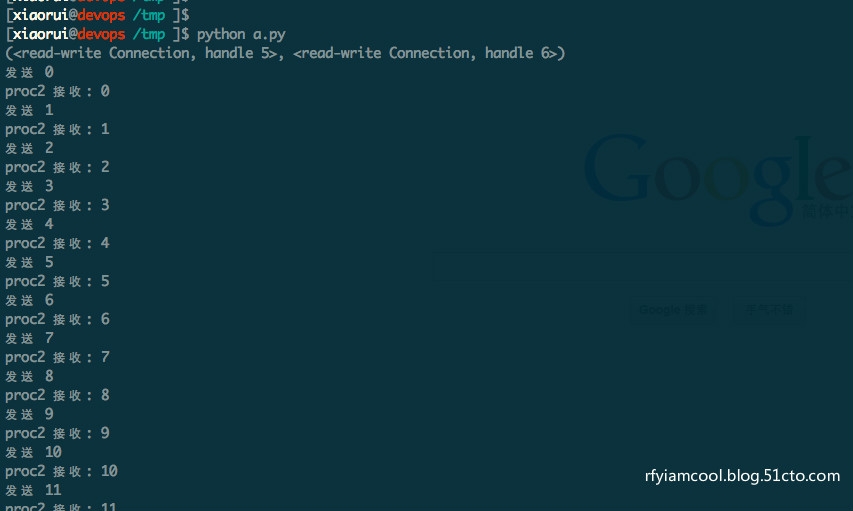
不只是multiprocessing的pipe,包括其他的pipe实现,都只是两个进程之间的游玩,我给你,你来接收 或者是你来,我接收。 当然也可以做成双工的状态。
queue的话,可以有更多的进程参与进来。用法和一些别的queue差不多。
看下官网的文档:
multiprocessing.Pipe([duplex])
Returns a pair (conn1, conn2) of Connection objects representing the ends of a pipe.
#两个pipe对象。用这两个对象,来互相的交流。
If duplex is True (the default) then the pipe is bidirectional. If duplex is False then the pipe is unidirectional: conn1 can only be used for receiving messages and conn2 can only be used for sending messages.
class multiprocessing.Queue([maxsize])
Returns a process shared queue implemented using a pipe and a few locks/semaphores. When a process first puts an item on the queue a feeder thread is started which transfers objects from a buffer into the pipe.
#队列的最大数
The usual Queue.Empty and Queue.Full exceptions from the standard library’s Queue module are raised to signal timeouts.
Queue implements all the methods of Queue.Queue except for task_done() and join().
qsize()
Return the approximate size of the queue. Because of multithreading/multiprocessing semantics, this number is not reliable.
#队列的大小
Note that this may raise NotImplementedError on Unix platforms like Mac OS X where sem_getvalue() is not implemented.
empty()
Return True if the queue is empty, False otherwise. Because of multithreading/multiprocessing semantics, this is not reliable.
#是否孔了。 如果是空的,他回返回一个True 的状态。
full()
Return True if the queue is full, False otherwise. Because of multithreading/multiprocessing semantics, this is not reliable.
#队列的状态是否满了。
put(obj[, block[, timeout]])
Put obj into the queue. If the optional argument block is True (the default) and timeout is None (the default), block if necessary until a free slot is available. If timeout is a positive number, it blocks at most timeout seconds and raises the Queue.Full exception if no free slot was available within that time. Otherwise (block is False), put an item on the queue if a free slot is immediately available, else raise the Queue.Full exception (timeout is ignored in that case).
#塞入队列,可以加超时的时间。
#文章原文: http://rfyiamcool.blog.51cto.com/1030776/1549857
put_nowait(obj)
Equivalent to put(obj, False).
#这里是不堵塞的
get([block[, timeout]])
Remove and return an item from the queue. If optional args block is True (the default) and timeout is None (the default), block if necessary until an item is available. If timeout is a positive number, it blocks at most timeout seconds and raises the Queue.Empty exception if no item was available within that time. Otherwise (block is False), return an item if one is immediately available, else raise the Queue.Empty exception (timeout is ignored in that case).
#获取状态
get_nowait()
Equivalent to get(False).
#不堵塞的get队列里面的数据
Queue has a few additional methods not found in Queue.Queue. These methods are usually unnecessary for most code:
close()
Indicate that no more data will be put on this queue by the current process. The background thread will quit once it has flushed all buffered data to the pipe. This is called automatically when the queue is garbage collected.
#关闭,省当前进程的资源。
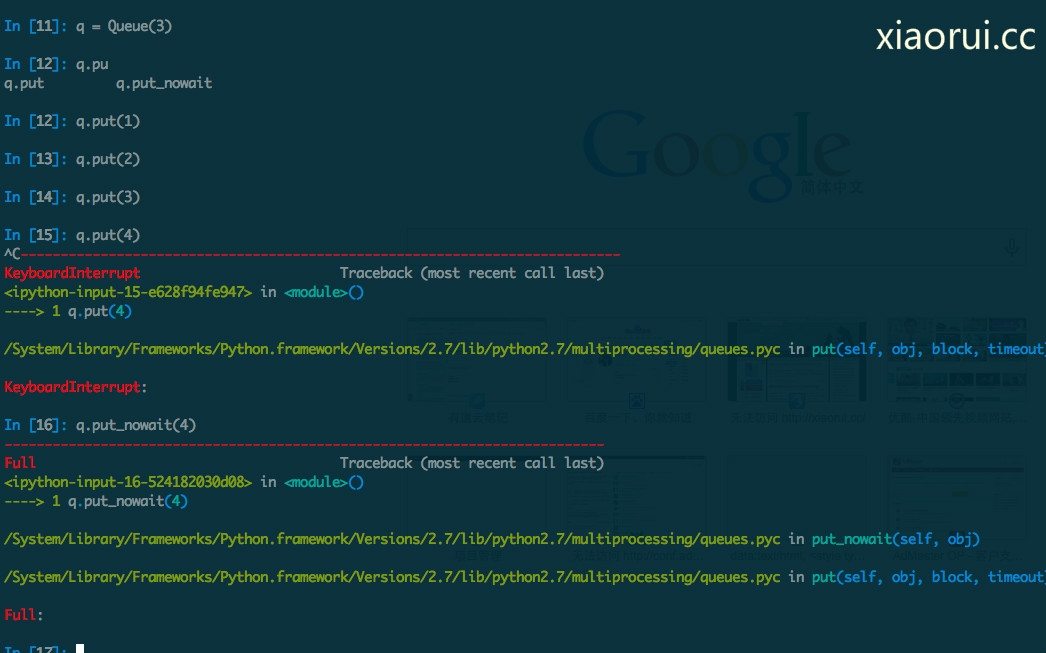
我配置了multiprocessing队里长度是3个,然后当我放入的是第四个的时候, 会发现一只的堵塞,他是在等待,有人把数据get掉一个,那个时候 他才能继续的塞入 。如果用put_nowait()的话,队列超出会立马会一个error的。
/System/Library/Frameworks/Python.framework/Versions/2.7/lib/python2.7/multiprocessing/queues.pyc in put_nowait(self, obj)
/System/Library/Frameworks/Python.framework/Versions/2.7/lib/python2.7/multiprocessing/queues.pyc in put(self, obj, block, timeout)
下面是一段测试的代码,同学们可以跑跑demo,感受下。
|
1
2
3
4
5
6
7
8
9
10
11
12
13
14
15
16
17
18
19
20
21
22
23
24
25
26
27
28
29
30
31
32
33
34
35
36
|
#coding:utf-8
import os
import multiprocessing
import time
# 写入 worker
def inputQ(queue):
while
True:
info =
"进程号 %s : 时间: %s"
%(os.getpid(),int(time.time()))
queue.put(info)
time.sleep(1)
# 获取 worker
def outputQ(queue,lock):
while
True:
info = queue.get()
# lock.acquire()
print (str(os.getpid()) +
'(get):'
+ info)
# lock.release()
time.sleep(1)
#===================
# Main
record1 = []
# store input processes
record2 = []
# store output processes
lock = multiprocessing.Lock()
# To prevent messy print
queue = multiprocessing.Queue(3)
# input processes
for
i
in
range(10):
process
= multiprocessing.
Process
(target=inputQ,args=(queue,))
process
.start()
record1.append(
process
)
# output processes
for
i
in
range(10):
process
= multiprocessing.
Process
(target=outputQ,args=(queue,lock))
process
.start()
record2.append(
process
)
|

好了,简单讲讲了 pipe和queue的用法。 其实我今个本来想扯扯python pipe的,结果google一搜,看到了multiprocessing的pipe。写完了pipe后,感觉文章的内容太少了,所以我才额外的增加了queue的。。。
还有: 大家中秋节快乐 ~
本文转自 rfyiamcool 51CTO博客,原文链接:http://blog.51cto.com/rfyiamcool/1549857,如需转载请自行联系原作者
