
LinearLayout:相当于Java GUI中的FlowLayout(流式布局),就是说一个组件后边跟一个,挨着靠,一个组件把一行占满了,就靠到下一行。
linearlayoutdemo.xml

<LinearLayout xmlns:android="http://schemas.android.com/apk/res/android"
    xmlns:tools="http://schemas.android.com/tools" android:id="@+id/L1" android:layout_width="fill_parent" android:layout_height="fill_parent" android:orientation="vertical" tools:context=".MainActivity"> <TextView android:id="@+id/tv" android:layout_width="fill_parent" android:layout_height="fill_parent" android:layout_weight="3" android:background="#ffffb859" android:gravity="center" android:text="@string/ll" android:textSize="20sp" /> <LinearLayout android:id="@+id/L21" android:layout_width="fill_parent" android:layout_height="fill_parent" android:layout_weight="1" android:orientation="horizontal"> <TextView android:id="@+id/tv2" android:layout_width="wrap_content" android:layout_height="fill_parent" android:layout_weight="1" android:background="#ff3fb200" /> <TextView android:id="@+id/tv3" android:layout_width="wrap_content" android:layout_height="fill_parent" android:layout_weight="2" android:background="#ff3436b2" /> <TextView android:id="@+id/tv5" android:layout_width="wrap_content" android:layout_height="fill_parent" android:layout_weight="3" android:background="#ff7a75b2" /> <LinearLayout android:id="@+id/L27" android:layout_width="wrap_content" android:layout_height="fill_parent" android:layout_weight="6" android:orientation="vertical"> <LinearLayout android:id="@+id/L37" android:layout_width="fill_parent" android:layout_height="fill_parent" android:layout_weight="2" android:background="#ff44ff16" android:orientation="horizontal"> </LinearLayout> <LinearLayout android:id="@+id/L32" android:layout_width="fill_parent" android:layout_height="fill_parent" android:layout_weight="1" android:background="#ff382aff" android:gravity="center" android:orientation="horizontal"> </LinearLayout> </LinearLayout> </LinearLayout> </LinearLayout>
效果:
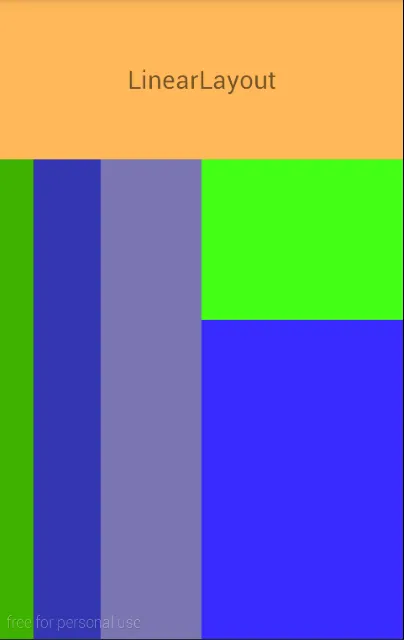
AbsolutelyLayout:绝对布局,相当于Java GUI中的空布局,就是啥也没有。组件的位置需要用坐标来显示。但是在android2.3之后已经弃用了,这种布局不能适应多种屏幕尺寸,局限性太大,但是对于独立开发者,单人单机来讲,用用也无妨。
absolutelayoutdemo.xml
<AbsoluteLayout xmlns:android="http://schemas.android.com/apk/res/android"
    android:layout_width="match_parent" android:layout_height="match_parent" android:background="#00ffff"> <Button android:id="@+id/er" android:layout_width="wrap_content" android:layout_height="wrap_content" android:layout_x="50dp" android:layout_y="50dp" android:background="#ff00ff" android:text="@string/al" /> </AbsoluteLayout>
效果:
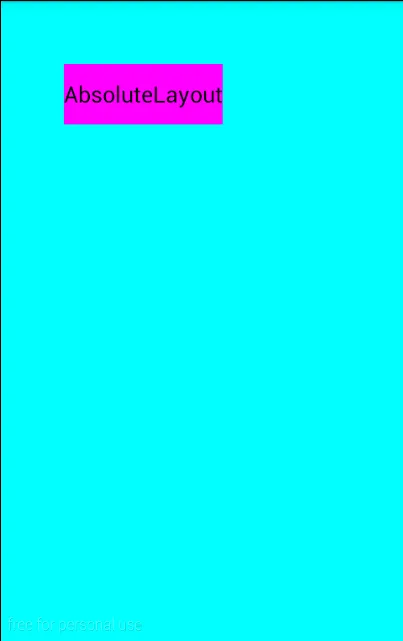
FrameLayout:这种布局是一层叠着一层,游戏类应用常会使用,涉及到NPC的构建视图等。
framelayoutdemo.xml
<FrameLayout xmlns:android="http://schemas.android.com/apk/res/android"
    android:layout_width="match_parent" android:layout_height="match_parent" android:background="#000000"> <TextView android:layout_width="wrap_content" android:layout_height="wrap_content" android:text="@string/fl" android:textColor="#ffff2f25" android:textSize="40sp" /> <TextView android:layout_width="wrap_content" android:layout_height="wrap_content" android:text="@string/fl" android:textColor="#ff7e66ff" android:textSize="70sp" /> <TextView android:layout_width="wrap_content" android:layout_height="wrap_content" android:text="@string/fl" android:textColor="#ff5eff4f" android:textSize="50sp" /> </FrameLayout>
效果:
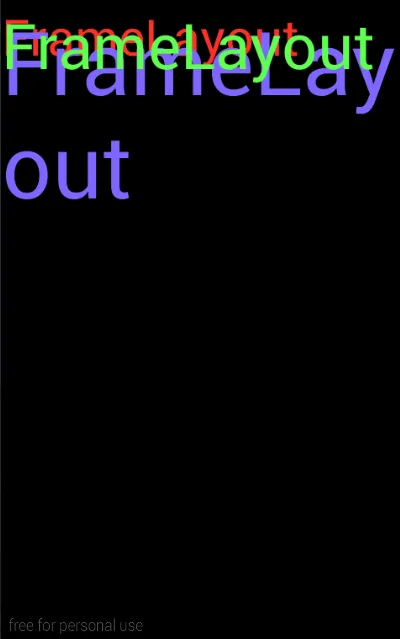
RelativeLayout:关系布局,顾名思义,就是靠关系,谁在谁的左边谁在谁的上边,谁前边和谁对其等等。属性这里就不赘述了,需要时查API即可。
relativelayoutdemo.xml
<RelativeLayout xmlns:android="http://schemas.android.com/apk/res/android"
    android:layout_width="match_parent" android:layout_height="match_parent"> <TextView android:id="@+id/t1" android:layout_width="wrap_content" android:layout_height="wrap_content" android:layout_centerInParent="true" android:background="#009922" android:text="@string/rl" android:textSize="40sp" /> <TextView android:id="@+id/t2" android:layout_width="wrap_content" android:layout_height="wrap_content" android:layout_below="@+id/t1" android:background="#ff8800" android:text="@string/rl" android:textSize="40sp" /> </RelativeLayout>
效果:
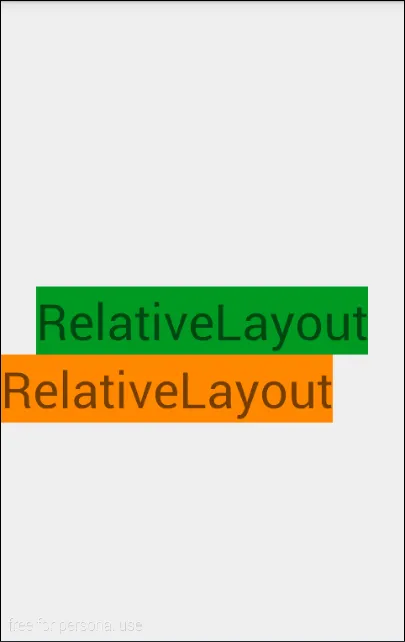
GridLayout:网格布局,自定义N x N,可拓展到屏幕外围,猜想:当某些游戏应用的地图大于手机屏幕时,可以使用此种布局,一张图片太大,可以用多张图片进行拼接,内嵌FrameLayout实现NPC在地图上。
gridlayoutdemo.xml
<?xml version="1.0" encoding="utf-8"?>
<GridLayout xmlns:android="http://schemas.android.com/apk/res/android" android:layout_width="wrap_content" android:layout_height="wrap_content" android:columnCount="6" android:orientation="horizontal" android:rowCount="10">    <Button android:background="#ffff5651" /> <Button android:background="#ff45ff61" /> <Button android:background="#ff5d59ff" /> <Button android:background="#fff9ff52" /> <Button android:background="#ff31fff0" /> <Button android:background="#ffff5651" /> <Button android:background="#ff45ff61" /> <Button android:background="#ff5d59ff" /> <Button android:background="#fff9ff52" /> <Button android:background="#ff31fff0" /> <Button android:background="#ffff5651" /> <Button android:background="#ff45ff61" /> <Button android:background="#ff5d59ff" /> <Button android:background="#fff9ff52" /> <Button android:background="#ff31fff0" /> <Button android:background="#ffff5651" /> <Button android:background="#ff45ff61" /> <Button android:background="#ff5d59ff" /> <Button android:background="#fff9ff52" /> <Button android:background="#ff31fff0" /> <Button android:background="#ffff5651" /> <Button android:background="#ff45ff61" /> <Button android:background="#ff5d59ff" /> <Button android:background="#fff9ff52" /> <Button android:background="#ff31fff0" /> <Button android:background="#ffff5651" /> <Button android:background="#ff45ff61" /> <Button android:background="#ff5d59ff" /> <Button android:background="#fff9ff52" /> <Button android:background="#ff31fff0" /> <Button android:background="#ffff5651" /> <Button android:background="#ff45ff61" /> <Button android:background="#ff5d59ff" /> <Button android:background="#fff9ff52" /> <Button android:background="#ff31fff0" /> <Button android:background="#ffff5651" /> <Button android:background="#ff45ff61" /> <Button android:background="#ff5d59ff" /> <Button android:background="#fff9ff52" /> <Button android:background="#ff31fff0" /> <Button android:background="#ffff5651" /> <Button android:background="#ff45ff61" /> <Button android:background="#ff5d59ff" /> <Button android:background="#fff9ff52" /> <Button android:background="#ff31fff0" /> <Button