原文:
weiapi2.2 HelpPage自动生成接口说明文档和接口测试功能
在开发Webapi项目时每写完一个方法时,是不是需要添加相应的功能说明和测试案例呢?为了更简单方便的写说明接口文档和接口测试HelpPage提供了一个方便的途径。
她的大致原理是:在编译时会生成.dll程序集和.xml程序集说明文件,通过xml文件获取Controller名称、action名称、参数信息和备注信息等。这样接口说明文档就可以放到备注信息了,个人觉得确实粗暴简单 。那接口测试在哪呢?这里用到nuget第三方程序包:webapitestclient
先上效果图吧!
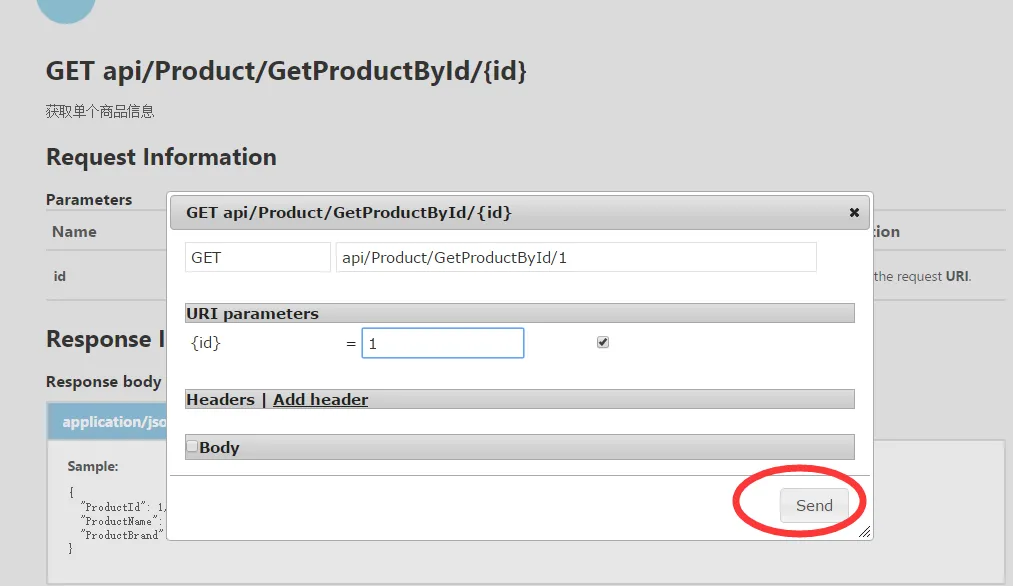
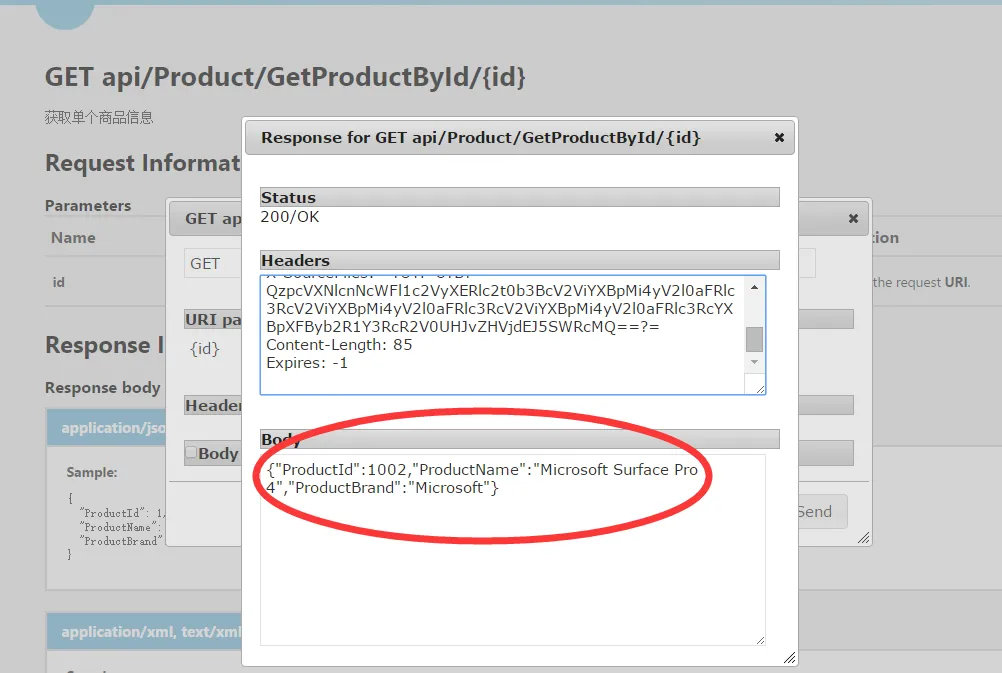
案例是用VS2013创建的,已创建好HelpPage,但wepapi版本是1.0 。wepapi2功能增强,为更上节奏进入nuget升级。

其他的互相依赖项也会升级!
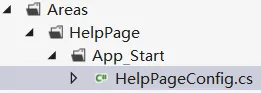
设置xml说明文档路径:

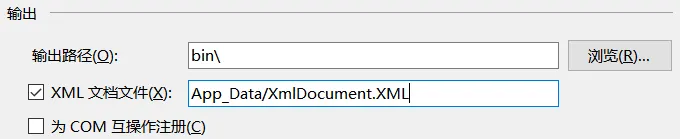
web项目属性设置生成的xml路径:
遗憾webapitestclient只支持最低版本的HelpPage,升级webapi还得修改部分代码!说明:webapi1可以获取action的备注说明但不能获取controller的备注说明 webapi2是可以。
升级后,XmlDocumentationProvider类需要会多出两个实现方法:Controller和action描述方法.
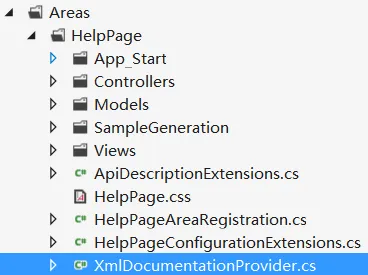
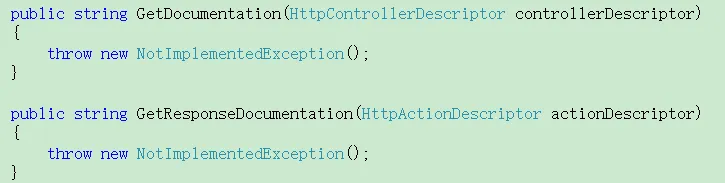
XmlDocumentationProvider.cs
public class XmlDocumentationProvider : IDocumentationProvider
    {
        private XPathNavigator _documentNavigator;
        private const string TypeExpression = "/doc/members/member[@name='T:{0}']";
        private const string MethodExpression = "/doc/members/member[@name='M:{0}']";
        private const string ParameterExpression = "param[@name='{0}']";

        /// <summary>
        /// Initializes a new instance of the <see cref="XmlDocumentationProvider"/> class.
        /// </summary>
        /// <param name="documentPath">The physical path to XML document.</param>
        public XmlDocumentationProvider(string documentPath="")
        {
            //if (documentPath.IsNullOrWhiteSpace())
            //    documentPath = HttpContext.Current.Server.MapPath(ConfigurationManager.AppSettings["webApiDescription"]);
            if (documentPath == null)
            {
                throw new ArgumentNullException("documentPath");
            }
            XPathDocument xpath = new XPathDocument(documentPath);
            _documentNavigator = xpath.CreateNavigator();
        }
        private XPathNavigator GetTypeNode(Type type)
        {
            string controllerTypeName = GetTypeName(type);
            string selectExpression = String.Format(CultureInfo.InvariantCulture, TypeExpression, controllerTypeName);
            return _documentNavigator.SelectSingleNode(selectExpression);
        }
        private static string GetTagValue(XPathNavigator parentNode, string tagName)
        {
            if (parentNode != null)
            {
                XPathNavigator node = parentNode.SelectSingleNode(tagName);
                if (node != null)
                {
                    return node.Value.Trim();
                }
            }

            return null;
        }
        public virtual string GetDocumentation(HttpControllerDescriptor controllerDescriptor)
        {
            XPathNavigator typeNode = GetTypeNode(controllerDescriptor.ControllerType);
            return GetTagValue(typeNode, "summary");
        }
        public virtual string GetDocumentation(HttpActionDescriptor actionDescriptor)
        {
            XPathNavigator methodNode = GetMethodNode(actionDescriptor);
            if (methodNode != null)
            {
                XPathNavigator summaryNode = methodNode.SelectSingleNode("summary");
                if (summaryNode != null)
                {
                    return summaryNode.Value.Trim();
                }
            }

            return null;
        }

        public virtual string GetDocumentation(HttpParameterDescriptor parameterDescriptor)
        {
            ReflectedHttpParameterDescriptor reflectedParameterDescriptor = parameterDescriptor as ReflectedHttpParameterDescriptor;
            if (reflectedParameterDescriptor != null)
            {
                XPathNavigator methodNode = GetMethodNode(reflectedParameterDescriptor.ActionDescriptor);
                if (methodNode != null)
                {
                    string parameterName = reflectedParameterDescriptor.ParameterInfo.Name;
                    XPathNavigator parameterNode = methodNode.SelectSingleNode(String.Format(CultureInfo.InvariantCulture, ParameterExpression, parameterName));
                    if (parameterNode != null)
                    {
                        return parameterNode.Value.Trim();
                    }
                }
            }

            return null;
        }

        public string GetResponseDocumentation(HttpActionDescriptor actionDescriptor)
        {
            XPathNavigator methodNode = GetMethodNode(actionDescriptor);
            return GetTagValue(methodNode, "returns");
        }

        private XPathNavigator GetMethodNode(HttpActionDescriptor actionDescriptor)
        {
            ReflectedHttpActionDescriptor reflectedActionDescriptor = actionDescriptor as ReflectedHttpActionDescriptor;
            if (reflectedActionDescriptor != null)
            {
                string selectExpression = String.Format(CultureInfo.InvariantCulture, MethodExpression, GetMemberName(reflectedActionDescriptor.MethodInfo));
                return _documentNavigator.SelectSingleNode(selectExpression);
            }

            return null;
        }

        private static string GetMemberName(MethodInfo method)
        {
            string name = String.Format(CultureInfo.InvariantCulture, "{0}.{1}", method.DeclaringType.FullName, method.Name);
            ParameterInfo[] parameters = method.GetParameters();
            if (parameters.Length != 0)
            {
                string[] parameterTypeNames = parameters.Select(param => GetTypeName(param.ParameterType)).ToArray();
                name += String.Format(CultureInfo.InvariantCulture, "({0})", String.Join(",", parameterTypeNames));
            }

            return name;
        }

        private static string GetTypeName(Type type)
        {
            if (type.IsGenericType)
            {
                // Format the generic type name to something like: Generic{System.Int32,System.String}
                Type genericType = type.GetGenericTypeDefinition();
                Type[] genericArguments = type.GetGenericArguments();
                string typeName = genericType.FullName;

                // Trim the generic parameter counts from the name
                typeName = typeName.Substring(0, typeName.IndexOf('`'));
                string[] argumentTypeNames = genericArguments.Select(t => GetTypeName(t)).ToArray();
                return String.Format(CultureInfo.InvariantCulture, "{0}{{{1}}}", typeName, String.Join(",", argumentTypeNames));
            }

            return type.FullName;
        }
    }
修改获取Controller信息:
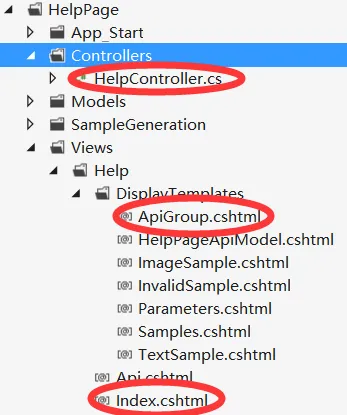
HelpController.cs
Index.cshtml
ApiGroup.cshtml
public ActionResult Index()
        {
            ViewBag.DocumentationProvider = Configuration.Services.GetDocumentationProvider();
            return View(Configuration.Services.GetApiExplorer().ApiDescriptions);
        }
@model Collection<ApiDescription>

@{
    ViewBag.Title = "ASP.NET Web API Help Page";

    // Group APIs by controller
    ILookup<System.Web.Http.Controllers.HttpControllerDescriptor, ApiDescription> apiGroups = Model.ToLookup(api => api.ActionDescriptor.ControllerDescriptor);
}

<header>
    <div class="content-wrapper">
        <div class="float-left">
            <h1>@ViewBag.Title</h1>
        </div>
    </div>
</header>
<div id="body">
    <section class="featured">
        <div class="content-wrapper">
            <h2>Introduction</h2>
            <p>
                Provide a general description of your APIs here.
            </p>
        </div>
    </section>
    <section class="content-wrapper main-content clear-fix">
        <!--遍历Controller -->
        @foreach (var group in apiGroups)
        {
            @Html.DisplayFor(m => group, "ApiGroup")
        }
    </section>
</div>
@model IGrouping<System.Web.Http.Controllers.HttpControllerDescriptor, ApiDescription>

@{
    var controllerDocumentation = ViewBag.DocumentationProvider != null ?
        ViewBag.DocumentationProvider.GetDocumentation(Model.Key) :
        null;
}
<!--Controller名称 -->
<h2 id="@Model.Key.ControllerName">@Model.Key.ControllerName</h2>
<!--Controller说明备注 -->
@if (!String.IsNullOrEmpty(controllerDocumentation))
{
    <p>@controllerDocumentation</p>
}
<table class="help-page-table">
    <thead>
        <tr><th>API</th><th>Description</th></tr>
    </thead>
    <tbody>
    <!--遍历Action -->
    @foreach (var api in Model)
    {
        <tr>
            <td class="api-name"><a href="@Url.Action("Api", "Help", new { apiId = api.GetFriendlyId() })">@api.HttpMethod.Method @api.RelativePath</a></td>
            <td class="api-documentation">
            @if (api.Documentation != null)
            {
                <p>@api.Documentation</p>
            }
            else
            {
                <p>No documentation available.</p>
            }
            </td>
        </tr>
    }
    </tbody>
</table>
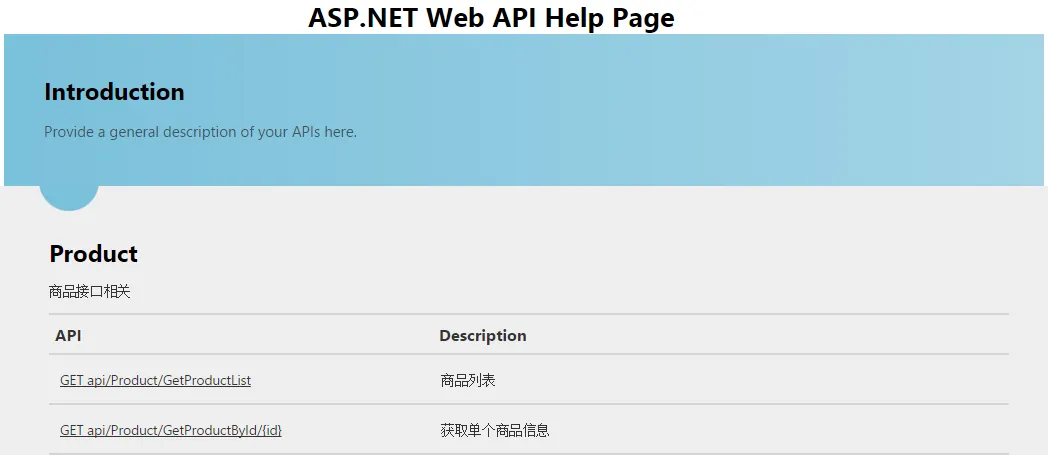
效果如下:
接下来添加接口测试功能.
nuget添加webapitestclient:
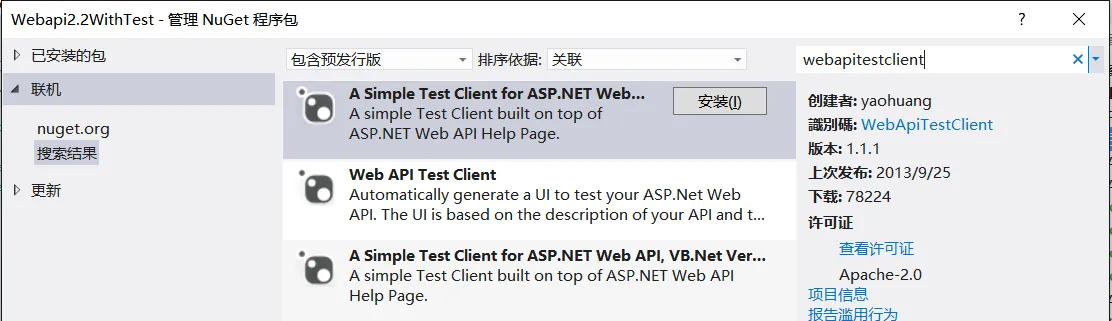
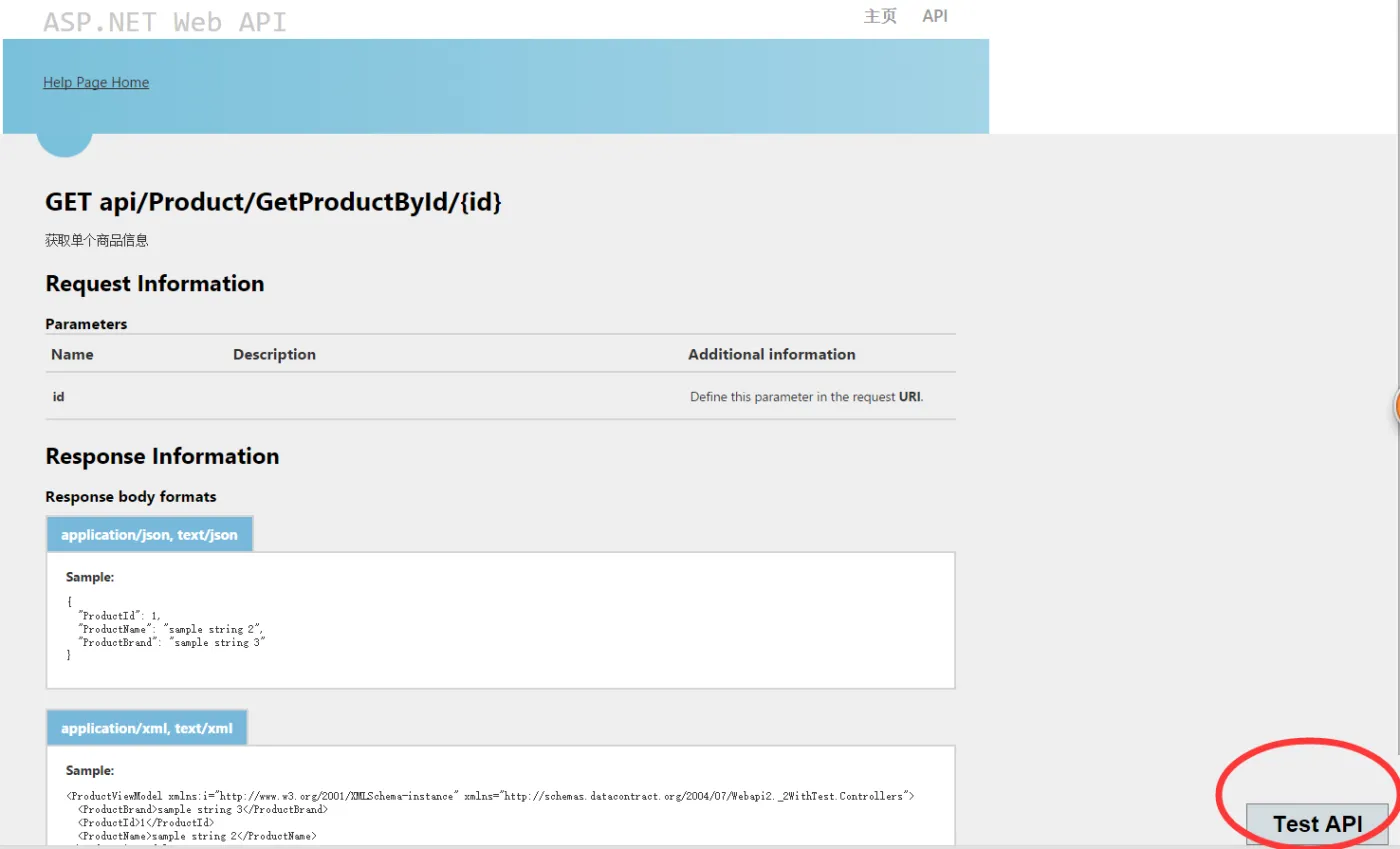
进入"获取单个商品信息"接口页面,会多出 "Test Api"按钮,也可以自己修改位置!
点击"Test Api"按钮 弹出调用窗口 :
输入参数调用,输出json数据:
共享Demo