百宝箱提供 Java SDK,开发者可以通过调用 SDK 将百宝箱提供的各项开放能力集成到自有的应用中。
前提条件
在调用本服务前,请先完成应用的发布,若无,请参见:发布应用,完成相关事项。
环境准备
百宝箱 Java SDK 适用于 Java 8 及以上版本,且要求 Maven 的版本在 3.x 或以上。开发者可以执行下述命令,查看已安装的 Java 版本。
java -version
安装 SDK
1. 添加 tboxsdk 依赖
开发者可以在 Maven 工程中使用百宝箱 JavaSDK,仅需在 pom.xml中添加相应依赖即可。下方提供在<dependency>中添加依赖的示例代码。
<dependency>
  <groupId>cn.tbox</groupId>
  <artifactId>tboxsdk</artifactId>
  <version>0.0.10</version>
</dependency>
2. 添加 OkHttp 及 SSE 扩展
版本要求:项目中 OkHttp 版本建议 ≥ 4.10.0。
<dependency>
  <groupId>com.squareup.okhttp3</groupId>
  <artifactId>okhttp</artifactId>
  <version>4.10.0</version>
</dependency>
<dependency>
  <groupId>com.squareup.okhttp3</groupId>
  <artifactId>okhttp-sse</artifactId>
  <version>4.10.0</version>
</dependency>
调用 SDK
1. 初始化客户端
开发者可以通过下述示例代码,完成初始化。
import cn.tbox.sdk.core.http.HttpClientConfig;
import cn.tbox.sdk.TboxClient;
public class TboxExample {
    private static final String YOUR_TOKEN = "{your_token}";
    TboxClient client = new TboxClient(new HttpClientConfig(YOUR_TOKEN));
    public static void main(String[] args) throws TboxClientConfigException {
        // 初始化客户端
        TboxClient client = new TboxClient(new HttpClientConfig(YOUR_TOKEN));
    }
}
其中,各参数说明如下。
参数名 |
必填 |
类型 |
说明 |
示例 |
YOUR_TOKEN |
是 |
String |
用于验证客户端身份的访问令牌,你可以在百宝箱中获取,获取方式可参见:授权管理。 |
pat_2j4e******THUIVRH1 |
2. 调用对话型智能体
通过下述代码示例,可以调用对话型智能体。
import java.util.Map;
import cn.tbox.sdk.TboxClient;
import cn.tbox.sdk.core.exception.TboxClientConfigException;
import cn.tbox.sdk.core.http.HttpClientConfig;
public class Demo {
    private static final String YOUR_TOKEN = "{your_token}";
    private static final String YOUR_APP_ID = "{your_app_id}";
    public static void main(String[] args) throws TboxClientConfigException {
        // 初始化客户端
        TboxClient client = new TboxClient(new HttpClientConfig(YOUR_TOKEN));
        String appId = YOUR_APP_ID;
        String query = "你好";
        String userId = "{user_id}";
        Iterable<Map<String, Object>> response = client.chat(appId, query, userId);
        for (Map<String, Object> chunk : response) {
            System.out.println(chunk); // 输出流式响应
        }
    }
}
其中,各参数说明如下。
参数名 |
必填 |
类型 |
说明 |
示例 |
conversationId |
否 |
String |
会话 ID,用于用户多轮对话时组装上下文信息。 |
首次对话时无需传入, 多轮对话时,按照SDK中之前返回的conversationId内容传入。 |
clientProperties |
否 |
Map<String,Object> |
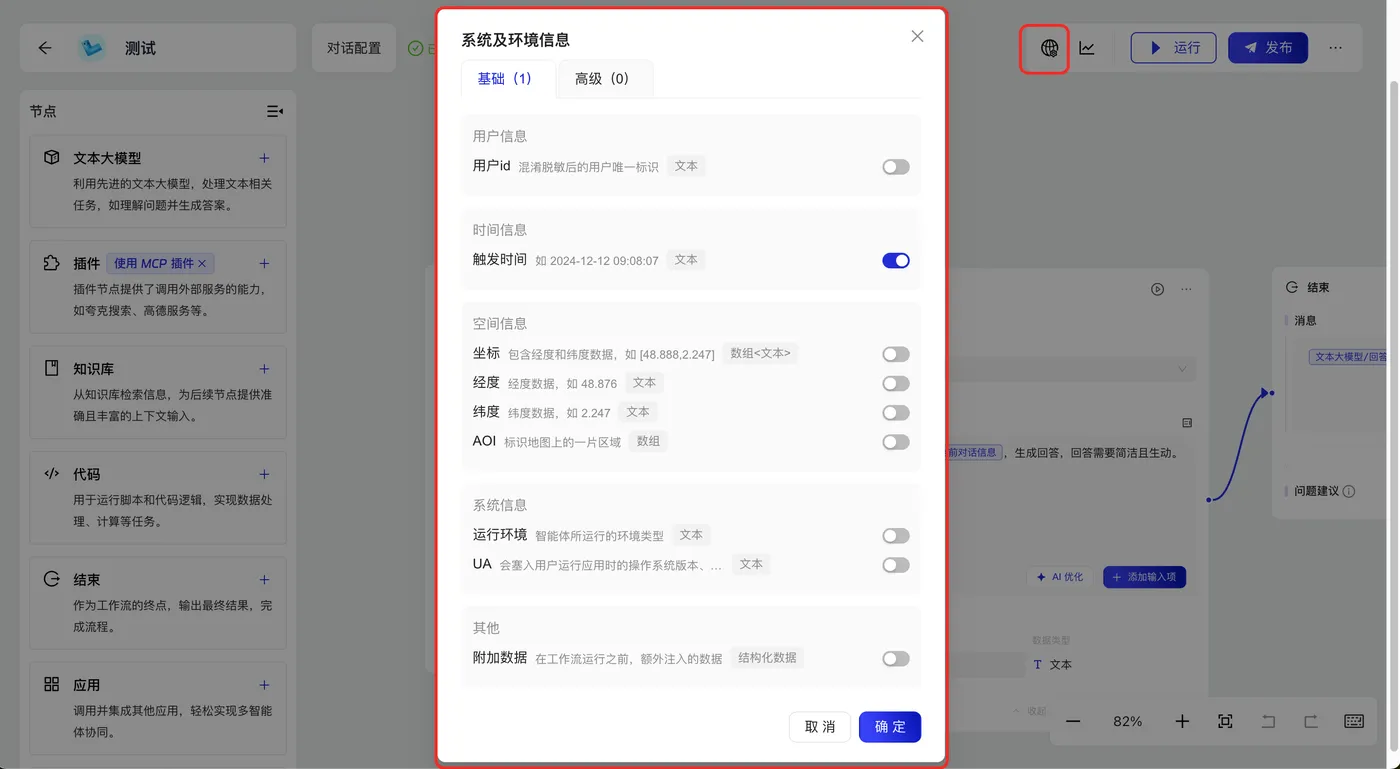
系统及环境变量参数。传入的key 值请参考示例。 |
如果你在对话型工作流应用中,开启了“系统及环境信息”中的变量开关(示例如下) 你可以将对应的参数传入到clientProperties中。每个变量对应的key值如下: 用户id - user_id 触发时间 - time 坐标 - pos 经度 - pos_lng 纬度 - pos_lat AOI - 待废弃参数,请不要使用 运行环境 - runtime_env UA - user_agent 附加数据 - _biz_params |
files |
否 |
List<File> |
文件列表,用于在对话中提供多模态(文档、图片、音频及视频)数据。 说明: 使用文件上传能力前,请先为智能体配置具有文件处理能力的大模型或插件。 |
- |
searchEngine |
否 |
Boolean |
本次对话是否使用联网搜索。 说明: 使用联网搜索前,需要先开启智能体对话配置中的联网搜索开关。
|
False |
stream |
否 |
Boolean |
是否流式响应,默认True |
True |
2.1. 创建会话
import java.util.Map;
import cn.tbox.sdk.TboxClient;
import cn.tbox.sdk.core.exception.TboxClientConfigException;
import cn.tbox.sdk.core.http.HttpClientConfig;
public class Demo {
    private static final String YOUR_TOKEN = "{your_token}";
    private static final String YOUR_APP_ID = "{your_app_id}";
    public static void main(String[] args) throws TboxClientConfigException {
        // 初始化客户端
        TboxClient client = new TboxClient(new HttpClientConfig(YOUR_TOKEN));
        TboxResponse<String> response = client.createConversation(YOUR_APP_ID);
        System.out.println(response);
        assertNotNull(response);
        String conversationId = response.getData();
        System.out.println(conversationId);
    }
}
其中,各参数说明如下。
参数名 |
必填 |
类型 |
说明 |
示例 |
appId |
是 |
String |
应用 ID,需要通过 API 进行集成的应用 ID。获取方式可参见:获取AppID。 |
202506e******00450562 |
2.2. 查询会话列表
import java.util.Map;
import cn.tbox.sdk.TboxClient;
import cn.tbox.sdk.core.exception.TboxClientConfigException;
import cn.tbox.sdk.core.http.HttpClientConfig;
public class Demo {
    private static final String YOUR_TOKEN = "{your_token}";
    private static final String YOUR_APP_ID = "{your_app_id}";
    public static void main(String[] args) throws TboxClientConfigException {
        // 初始化客户端
        TboxClient client = new TboxClient(new HttpClientConfig(YOUR_TOKEN));
        ConversationListRequest request = new ConversationListRequest();
        request.setAppId(YOUR_APP_ID);
        request.setUserId({userId});
        request.setSource(ConversationListRequest.Source.AGENT_SDK);
        request.setPageNum(1);
        request.setPageSize(10);
        TboxResponse<ConversationListResponse> response = client.getConversations(request);
        System.out.println(response);
        assertNotNull(response);
        List<Conversation> conversations = response.getData().getConversations();
        assertNotNull(conversations);
        for (Conversation conversation : conversations) {
            System.out.println(conversation.getConversationId());
        }
    }
}
其中,各参数说明如下。
参数名 |
必填 |
类型 |
说明 |
示例 |
appId |
是 |
String |
应用 ID,需要通过 API 进行集成的应用 ID。获取方式可参见:获取AppID。 |
202506e******00450562 |
userId |
否 |
String |
用户ID,发起对话时指定,需要在智能体内唯一。不传返回全部用户的会话列表。 |
- |
source |
否 |
String |
对话渠道,用于筛选指定渠道的对话,不传值将返回所有渠道发生的会话动作。
|
AGENT_SDK |
pageNum |
否 |
Integer |
分页页码,从 1 开始,默认为 1 |
1 |
pageSize |
否 |
Integer |
分页条数,默认为 10,最大 50 |
10 |
sortOrder |
否 |
String |
会话列表排序方式,默认 DESC
|
DESC |
2.3. 查询会话消息
import java.util.Map;
import cn.tbox.sdk.TboxClient;
import cn.tbox.sdk.core.exception.TboxClientConfigException;
import cn.tbox.sdk.core.http.HttpClientConfig;
public class Demo {
    private static final String YOUR_TOKEN = "{your_token}";
    private static final String YOUR_APP_ID = "{your_app_id}";
    public static void main(String[] args) throws TboxClientConfigException {
        // 初始化客户端
        TboxClient client = new TboxClient(new HttpClientConfig(YOUR_TOKEN));
        ConversationListRequest request = new ConversationListRequest();
        request.setAppId(SDK_CONVERSATION_APPID);
        request.setUserId({userId});
        request.setSource(ConversationListRequest.Source.AGENT_SDK);
        request.setPageNum(1);
        request.setPageSize(10);
        TboxResponse<ConversationListResponse> response = client.getConversations(request);
        List<Conversation> conversations = response.getData().getConversations();
        assertNotNull(conversations);
        for (Conversation conversation : conversations) {
            System.out.println(conversation.getConversationId());
        }

        String conversationId = conversations.get(0).getConversationId();
        MessageListRequest messageListRequest = new MessageListRequest();
        messageListRequest.setConversationId(conversationId);
        messageListRequest.setPageNum(1);
        messageListRequest.setPageSize(10);
        TboxResponse<MessageListResponse> messageListResponse = client.getMessages(messageListRequest);
        System.out.println(messageListResponse);
        assertNotNull(messageListResponse);
        List<Message> messages = messageListResponse.getData().getMessages();
        assertNotNull(messages);
        for (Message message : messages) {
            System.out.println(message.getMessageId());
        }
    }
}
其中,各参数说明如下。
参数名 |
必填 |
类型 |
说明 |
示例 |
conversationId |
是 |
String |
会话 ID |
- |
pageNum |
否 |
Integer |
分页页码,从 1 开始,默认为 1 |
1 |
pageSize |
否 |
Integer |
分页条数,默认为 10,最大 50 |
10 |
sortOrder |
否 |
String |
会话列表排序方式,默认 DESC
|
DESC |
3. 调用生成型智能体
开发者可以通过下述示例代码,调用生成型智能体。
import java.util.Map;
import cn.tbox.sdk.TboxClient;
import cn.tbox.sdk.core.exception.TboxClientConfigException;
import cn.tbox.sdk.core.http.HttpClientConfig;
public class Demo {
    private static final String YOUR_TOKEN = "{your_token}";
    private static final String YOUR_APP_ID = "{your_app_id}";
    public static void main(String[] args) throws TboxClientConfigException {
        // 初始化客户端
        TboxClient client = new TboxClient(new HttpClientConfig(YOUR_TOKEN));
        String appId = YOUR_APP_ID;
        String query = "你好";
        String userId = "{userId}";

        Map<String, Object> inputs = new HashMap<>();
        inputs.put("主题", query);
        Iterable<Map<String, Object>> response = client.completion(appId, inputs, userId);
        for (Map<String, Object> chunk : response) {
            System.out.println(chunk); // 输出流式响应
        }
    }
}
其中,各参数说明如下。
参数名 |
必填 |
类型 |
说明 |
示例 |
inputs |
否 |
Map<String,Object> |
如果您的应用中有自定义参数,需要填入对应的key-value值,参考示例。 |
如上图,key填写为title,value填写为您想要的主题内容。 |
clientProperties |
否 |
Map<String, Object> |
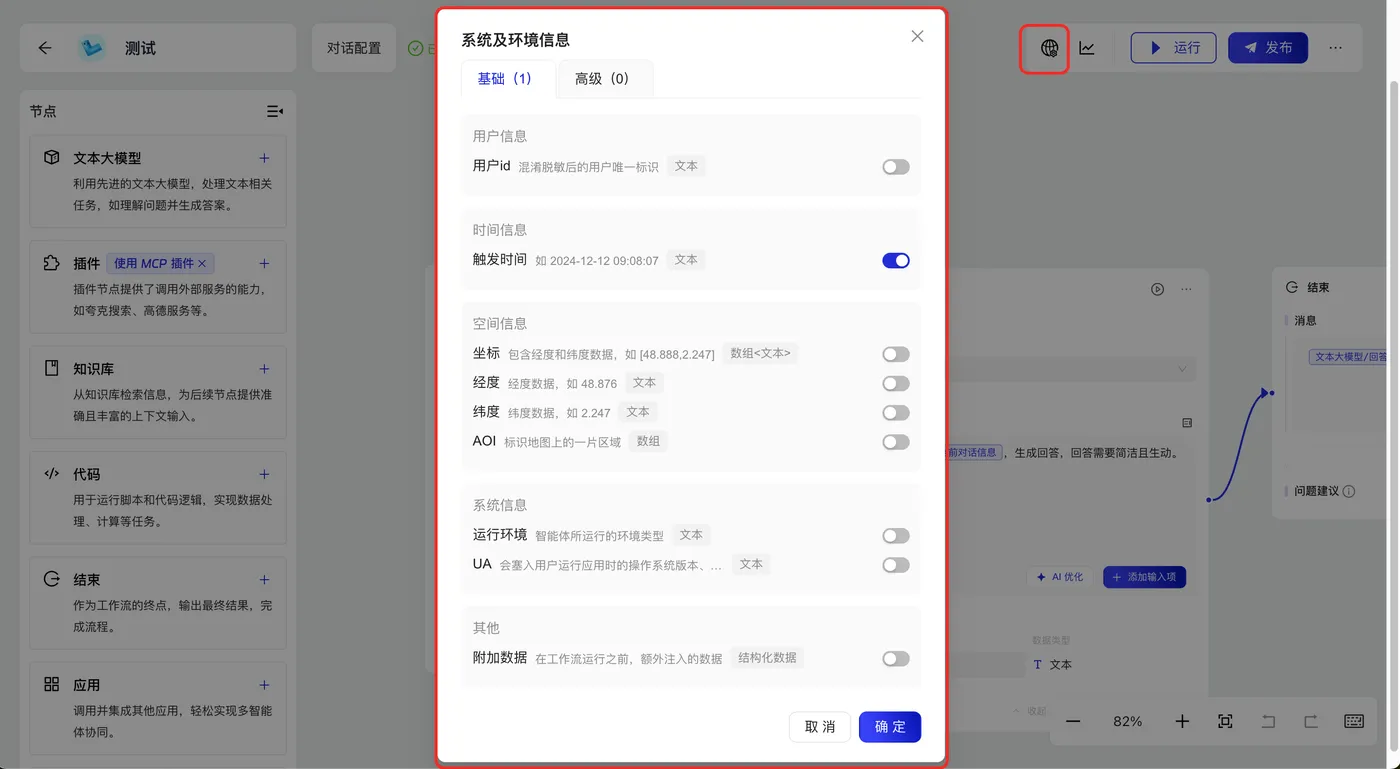
系统及环境变量参数。传入的key值请参考示例。 |
如果你在对话型工作流应用中,开启了“系统及环境信息”中的变量开关(示例如下) 你可以将对应的参数传入到clientProperties中。每个变量对应的key值如下: 用户id - user_id 触发时间 - time 坐标 - pos 经度 - pos_lng 纬度 - pos_lat AOI - 待废弃参数,请不要使用 运行环境 - runtime_env UA - user_agent 附加数据 - _biz_params |
files |
否 |
List<File> |
文件列表,用于在对话中提供多模态(文档、图片、音频及视频)数据。 说明: 使用文件上传能力前,请先为智能体配置具有文件处理能力的大模型或插件。 |
- |
stream |
否 |
Boolean |
是否流式响应,默认True |
True |

4. 上传文件
import java.util.Map;
import cn.tbox.sdk.TboxClient;
import cn.tbox.sdk.core.exception.TboxClientConfigException;
import cn.tbox.sdk.core.http.HttpClientConfig;
public class Demo {
    private static final String YOUR_TOKEN = "{your_token}";
    private static final String YOUR_APP_ID = "{your_app_id}";
    public static void main(String[] args) throws TboxClientConfigException {
        // 初始化客户端
        TboxClient client = new TboxClient(new HttpClientConfig(YOUR_TOKEN));
        TboxResponse<String> response = client.uploadFile("{filePath}");
            System.out.println(response.getData());
    }
}
其中,各参数说明如下。
参数名称 |
必填 |
类型 |
含义 |
示例 |
filePath |
是 |
String |
本地文件路径 |
本地文件路径 |