
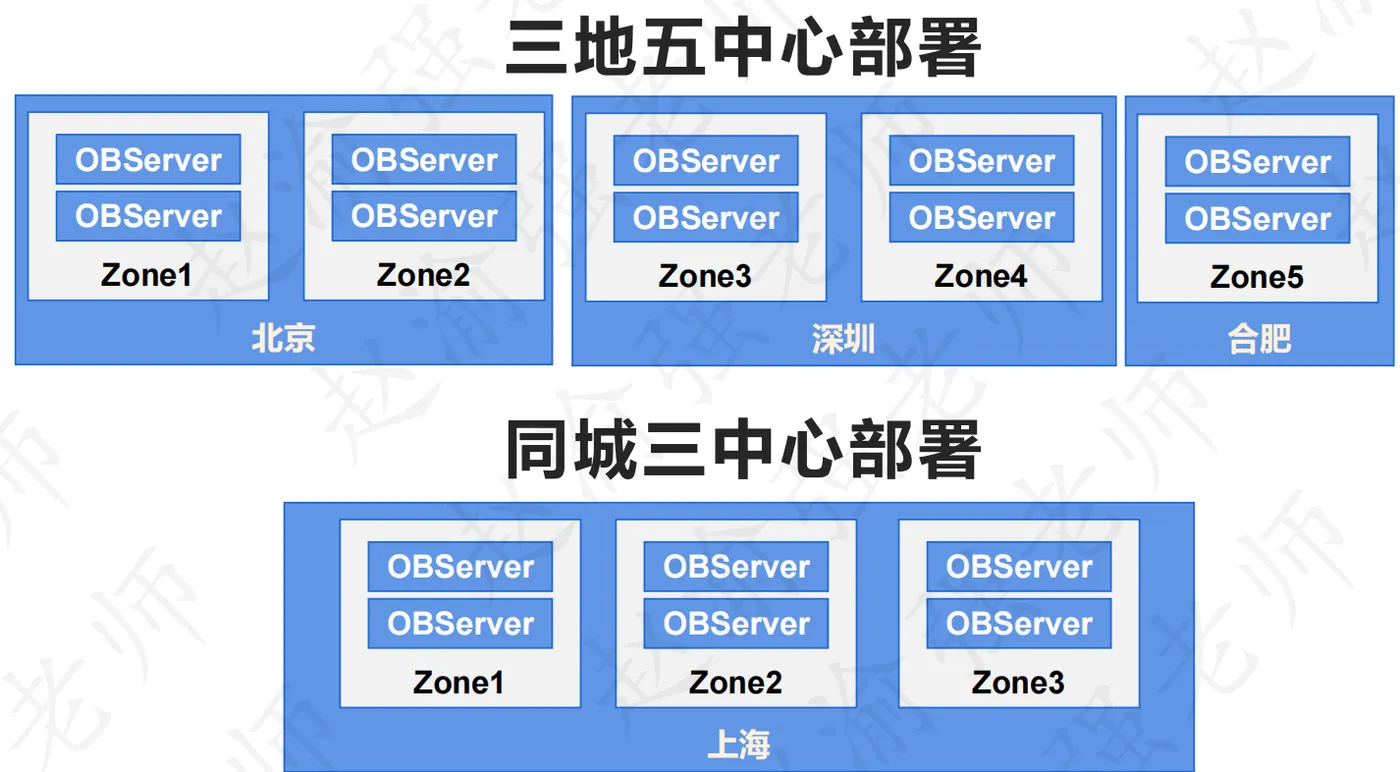
为保证单一机器故障时同一分区的多数派副本可用,OceanBase数据库会保证同一个分区的多个副本不调度在同一台机器上。由于同一个分区的副本分布在不同的Zone/Region下,在城市级灾难或者数据中心故障时既保证了数据的可靠性,又保证了数据库服务的可用性,达到可靠性与可用性的平衡。OceanBase数据库创新的容灾能力有三地五中心可以无损容忍城市级灾难,以及同城三中心可以无损容忍数据中心级故障。下面分别展示了这两种部署模式的形式。
视频讲解如下:
下面将以在多机上部署OceanBase集群社区版为例来演示如何部署OceanBase全分布式集群。下表展示了OceanBase全分布式集群中包含的实例信息。
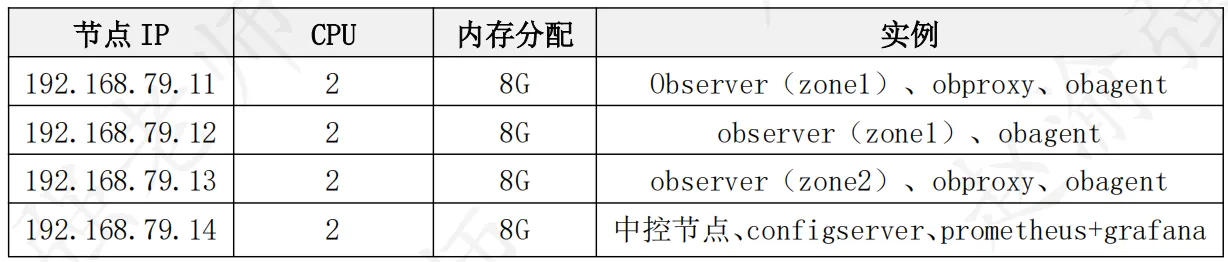
OceanBase全分布式集群是真正用于生产环境的集群模式,它是指在多机上部署生产环境的分布式集群。
(1)在中控机上在线安装obd
# 如果宿主机可以连接网络,可执行如下命令在线安装。
bash -c "$(curl -s https://obbusiness-private.oss-cn-shanghai.aliyuncs.com/download-center/opensource/oceanbase-all-in-one/installer.sh)"

# 如果/tmp目录空间不足,会导致下载文件无法写入。解决方案如下:
# 修改文件/etc/fstab,增加如下内容:
# tmpfs /tmp tmpfs nodev,nosuid,size=5G 0 0
(2)安装成功后将输出下面的信息
##########################################################################
 Install Finished
==========================================================================
Setup Environment:              source ~/.oceanbase-all-in-one/bin/env.sh
Quick Start:                    obd demo
Use Web Service to install:     obd web
Use Web Service to upgrade:     obd web upgrade
More Details:                   obd -h
==========================================================================
(3)执行下面的语句生效环境变量
source ~/.oceanbase-all-in-one/bin/env.sh

# 安装成功后,/tmp 目录下会新增tmp.xxx文件夹作为安装目录,如:tmp.66RxuoJG0f。
(4)在中控节点上配置到各节点的免密码登录
# 生成密钥对。
ssh-keygen -t rsa

# 复制公钥文件。
ssh-copy-id -i .ssh/id_rsa.pub root@192.168.79.11
ssh-copy-id -i .ssh/id_rsa.pub root@192.168.79.12
ssh-copy-id -i .ssh/id_rsa.pub root@192.168.79.13
ssh-copy-id -i .ssh/id_rsa.pub root@192.168.79.14

# 验证免密码登录。
ssh 192.168.79.11

# 此时不需要输入密码即可登录当前主机。
(5)编辑部署描述文件all-components.yaml,内容如下:
# 注意:由于OceanBase中每个observer最小需要6G内存,因此需要保证虚拟机能够提供足够内存。可以将每台运行observer的虚拟机内存设置为8G。

user:
  username: root
  password: Welcome_7788
  port: 22
oceanbase-ce:
  depends:
    - ob-configserver
  servers:
    - name: server1
      ip: 192.168.79.11
    - name: server2
      ip: 192.168.79.12
    - name: server3
      ip: 192.168.79.13
  global:
    cluster_id: 1
    memory_limit: 6G
    system_memory: 1G
    datafile_size: 10G
    log_disk_size: 5G
    cpu_count: 2
    production_mode: false
    enable_syslog_wf: false
    max_syslog_file_count: 4
    root_password: Welcome_1
  server1:
    mysql_port: 2881
    rpc_port: 2882
    obshell_port: 2886
    home_path: /root/observer
    data_dir: /root/obdata
    redo_dir: /root/redo
    zone: zone1
  server2:
    mysql_port: 2881
    rpc_port: 2882
    obshell_port: 2886
    home_path: /root/observer
    data_dir: /root/obdata
    redo_dir: /root/redo
    zone: zone1
  server3:
    mysql_port: 2881
    rpc_port: 2882
    obshell_port: 2886
    home_path: /root/observer
    data_dir: /root/obdata
    redo_dir: /root/redo
    zone: zone2
obproxy-ce:
  depends:
    - oceanbase-ce
    - ob-configserver
  servers:
    - 192.168.79.11
    - 192.168.79.13
  global:
    listen_port: 2883
    prometheus_listen_port: 2884
    home_path: /root/obproxy
    enable_cluster_checkout: false
    skip_proxy_sys_private_check: true
    enable_strict_kernel_release: false
    obproxy_sys_password: 'Welcome_1'
    observer_sys_password: 'Welcome_1'
obagent:
  depends:
    - oceanbase-ce
  servers:
    - name: server1
      ip: 192.168.79.11
    - name: server2
      ip: 192.168.79.12
    - name: server3
      ip: 192.168.79.13
  global:
    home_path: /root/obagent
prometheus:
  servers:
    - 192.168.79.14
  depends:
    - obagent
  global:
    home_path: /root/prometheus
grafana:
  servers:
    - 192.168.79.14
  depends:
    - prometheus
  global:
    home_path: /root/grafana
    login_password: 'Welcome_1'
ob-configserver:
  servers:
    - 192.168.79.14
  global:
    listen_port: 8080
    home_path: /root/ob-configserver
(6)执行命名部署集群
obd cluster deploy myob-cluster -c all-components.yaml

# myob-cluster为集群的名称。
(7)部署完成后,执行命令启动OceanBase
obd cluster start myob-cluster

# 启动成功后将输出下面的信息:
......
+------------------------------------------------------------------+
|                         ob-configserver                          |
+---------------+------+---------------+----------+--------+-------+
| server        | port | vip_address   | vip_port | status | pid   |
+---------------+------+---------------+----------+--------+-------+
| 192.168.79.14 | 8080 | 192.168.79.14 | 8080     | active | 51742 |
+---------------+------+---------------+----------+--------+-------+
curl -s 'http://192.168.79.14:8080/services?Action=GetObProxyConfig'
Connect to observer 192.168.79.11:2881 ok
Wait for observer init ok
+-------------------------------------------------+
|                   oceanbase-ce                  |
+---------------+---------+------+-------+--------+
| ip            | version | port | zone  | status |
+---------------+---------+------+-------+--------+
| 192.168.79.11 | 4.3.5.1 | 2881 | zone1 | ACTIVE |
| 192.168.79.12 | 4.3.5.1 | 2881 | zone1 | ACTIVE |
| 192.168.79.13 | 4.3.5.1 | 2881 | zone2 | ACTIVE |
+---------------+---------+------+-------+--------+
obclient -h192.168.79.11 -P2881 -uroot -p'Welcome_1' -Doceanbase -A
cluster unique id: ca2bc58a-5296-598f-8c3c-89efb5210f03-195d6f47d1f-01050304
Connect to obproxy ok
+-------------------------------------------------------------------+
|                             obproxy-ce                            |
+---------------+------+-----------------+-----------------+--------+
| ip            | port | prometheus_port | rpc_listen_port | status |
+---------------+------+-----------------+-----------------+--------+
| 192.168.79.11 | 2883 | 2884            | 2885            | active |
| 192.168.79.13 | 2883 | 2884            | 2885            | active |
+---------------+------+-----------------+-----------------+--------+
obclient -h192.168.79.11 -P2883 -uroot@proxysys -p'Welcome_1' -Doceanbase -A
Connect to Obagent ok
+------------------------------------------------------------------+
|                             obagent                              |
+---------------+--------------------+--------------------+--------+
| ip            | mgragent_http_port | monagent_http_port | status |
+---------------+--------------------+--------------------+--------+
| 192.168.79.11 | 8089               | 8088               | active |
| 192.168.79.12 | 8089               | 8088               | active |
| 192.168.79.13 | 8089               | 8088               | active |
+---------------+--------------------+--------------------+--------+
Connect to Prometheus ok
+---------------------------------------------------------+
|                        prometheus                       |
+---------------------------+-------+------------+--------+
| url                       | user  | password   | status |
+---------------------------+-------+------------+--------+
| http://192.168.79.14:9090 | admin | ucws4ExTcX | active |
+---------------------------+-------+------------+--------+
Connect to grafana ok
+-------------------------------------------------------------------+
|                              grafana                              |
+---------------------------------------+-------+----------+--------+
| url                                   | user  | password | status |
+---------------------------------------+-------+----------+--------+
| http://192.168.79.14:3000/d/oceanbase | admin | admin    | active |
+---------------------------------------+-------+----------+--------+
myob-cluster running
......