问题描述
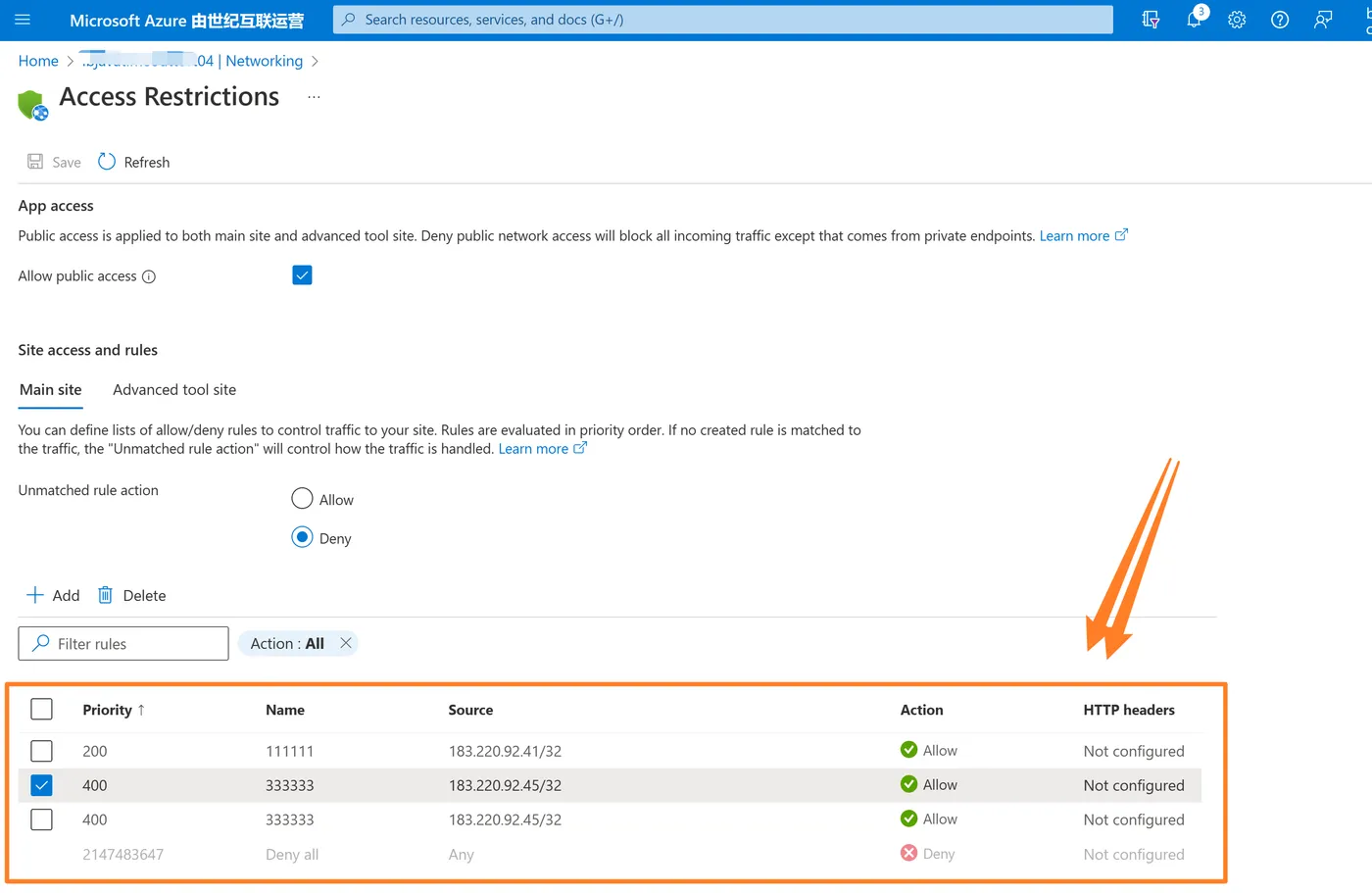
为Azure App Service添加访问限制,需要Python Azure SDK来实现的示例代码。
问题解答
查阅Azure App Service的官方资料,使用Python SDK有 azure-mgmt-web 包中的 WebSiteManagementClient 类可以对Azure App Service资源进行管理。
Access Restrictions属于App Service的配置项,所以可以通过 client类中的 web_apps.get_configuration 获取,及通过 web_apps.create_or_update_configuration 进行创建或修改。
get_configuration 方法的返回数据类型为 SiteConfig,其中包含了 ip_security_restrictions 属性值。而且它是一个List类型,其数据结构类型为 IpSecurityRestriction。
综上所述,通过Python SDK获取App Service的Access Restrictions的示例代码如下:
import os
from azure.identity import ClientSecretCredential, AzureAuthorityHosts
from msrestazure.azure_cloud import AZURE_CHINA_CLOUD
from azure.mgmt.web import WebSiteManagementClient
subscription_id = os.environ['AZURE_SUBSCRIPTION_ID']
myapp_base_url = "https://management.chinacloudapi.cn"
credentials = ClientSecretCredential(
    client_id=os.environ['AZURE_CLIENT_ID'],
    client_secret=os.environ['AZURE_CLIENT_SECRET'],
    tenant_id=os.environ['AZURE_TENANT_ID'],
    authority=AzureAuthorityHosts.AZURE_CHINA
)
def print_item(group):
    """Print some properties of an Azure model."""
    print("\tName: {}".format(group.name))
    print("\tId: {}".format(group.id))
    print("\tLocation: {}".format(group.location))
    print("\tTags: {}".format(group.tags))
    if hasattr(group, 'status'):
        print("\tStatus: {}".format(group.status))
    if hasattr(group, 'state'):  # Site
        print("\tStatus: {}".format(group.state))
    if hasattr(group, 'properties'):
        print_properties(group.properties)
    print("\n\n")
def print_properties(props):
    """Print some properties of a Site."""
    if props and props.provisioning_state:
        print("\tProperties:")
        print("\t\tProvisioning State: {}".format(props.provisioning_state))
def print_ipsecurityrestrictions(iprestrictions):
    """Print ip security restrictions of a Site."""
    for restrits in iprestrictions:
        print("\t for rule : {}".format(restrits.name))
        print("\t\t name : {}".format(restrits.name))
        print("\t\t ip_address : {}".format(restrits.ip_address))
        print("\t\t subnet_mask : {}".format(restrits.subnet_mask))
        print("\t\t action : {}".format(restrits.action))
        print("\t\t vnet_subnet_resource_id : {}".format(restrits.vnet_subnet_resource_id))
        print("\t\t vnet_traffic_tag : {}".format(restrits.vnet_traffic_tag))
        print("\t\t subnet_traffic_tag : {}".format(restrits.subnet_traffic_tag))
        print("\t\t tag : {}".format(restrits.tag))
        print("\t\t priority : {}".format(restrits.priority))
        print("\t\t description : {}".format(restrits.description))
        print("\n\n")
web_client = WebSiteManagementClient(credentials, subscription_id, base_url=myapp_base_url, credential_scopes=[
                                      AZURE_CHINA_CLOUD.endpoints.management + "/.default"])
resource_group_name = "app-rg"
for site in web_client.web_apps.list_by_resource_group(resource_group_name):
    print_item(site)
print("\n\n")
print("\nStart to get web app configs")
site_name = "testwebapp04"
configs = web_client.web_apps.get_configuration(resource_group_name, site_name)
print_ipsecurityrestrictions(configs.ip_security_restrictions)
#web_client.web_apps.create_or_update_configuration()
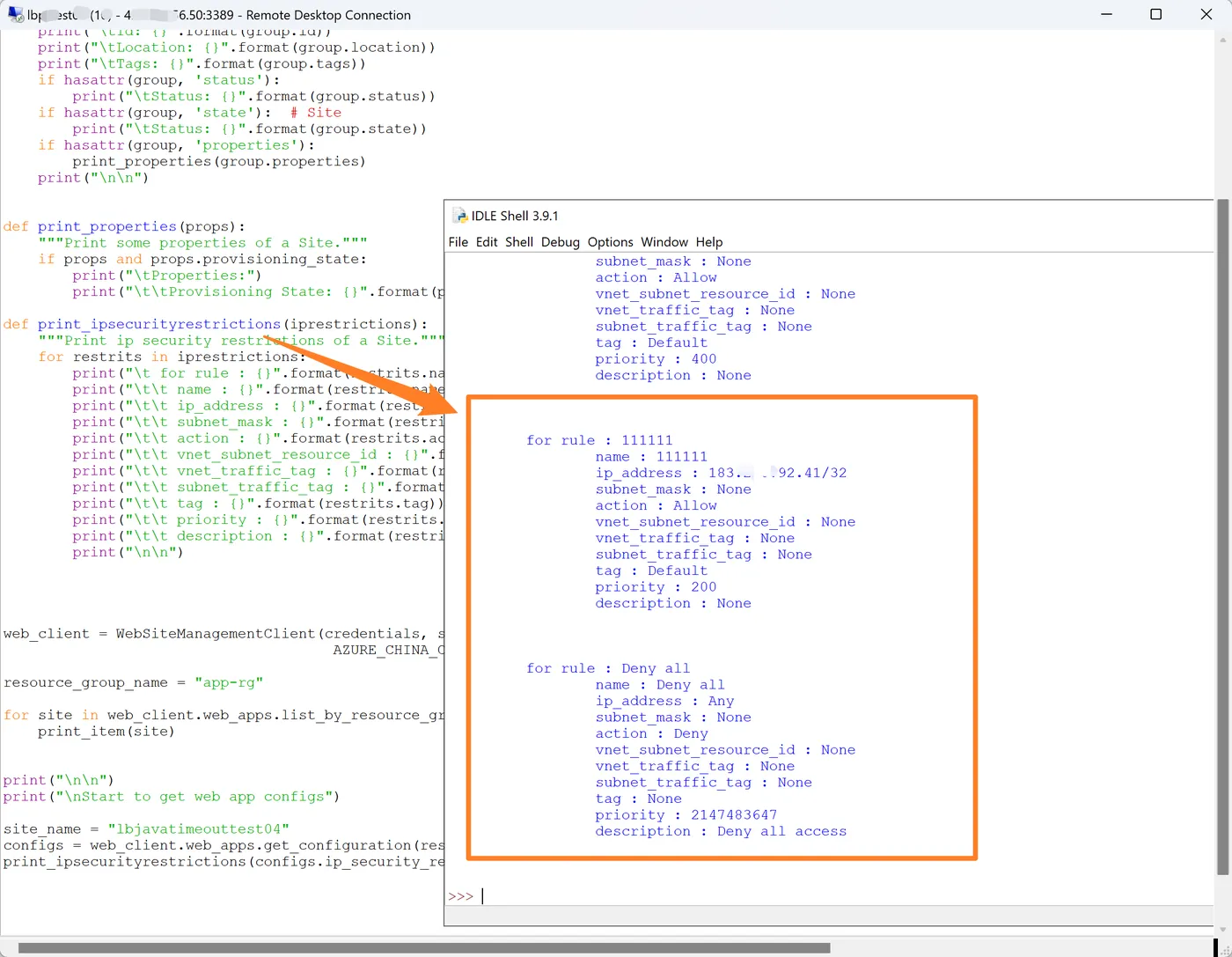
执行结果为:
附录一: 调试Ptyhon代码时,遇上了奇怪的AAD错误 azure.core.exceptions.ClientAuthenticationError: Authentication failed: AADSTS70011: The provided request must include a 'scope' input parameter. The provided value for the input parameter 'scope' is not valid. The scope . . . / / / : a a a a a c c c d d e e e f g h h i i l l m m n n n n o p p s t t t t u u is not valid.
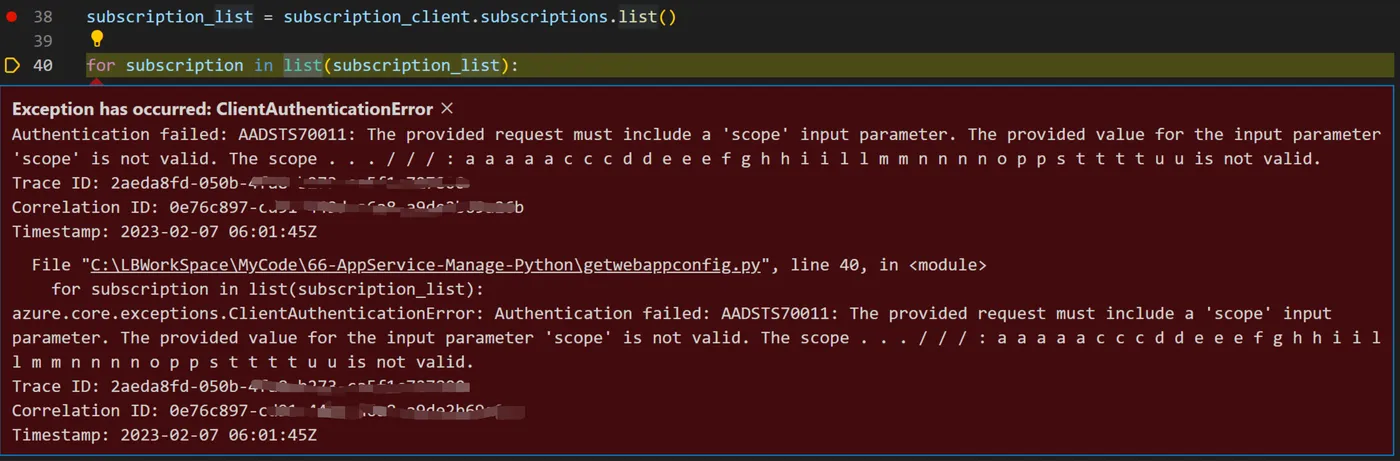
最后通过换一台执行代码的虚拟机后,同样的代码没有报错。所以最终定位到是本机环境中,给中azure identity 的包不一致导致。通过 pip -m list出两个环境不一样的module版本后,再本地重新安装azure identity 和 azure core 两个包后,问题消失!
azure-identity == 1.11.0
azure-core == 1.24.2 #1.25.1
参考资料
Manage Azure websites with Python : https://github.com/Azure-Samples/app-service-web-python-manage