本文首发于“生信补给站”公众号 ggplot2|ggpubr进行“paper”组图合并
多个图形进行组图展示,既可以展示一个“事情”的多个角度,也可以进行异同的比较,同时也是发表paper所必须的。
可以利用PS或者AI进行处理,但是图形的大小,位置,布局,字体等的调整也不是一个小工程。本文利用R包-ggpubr函数从0开始介绍组图的合并方式,也许。。。比AI或者PS更简单易学呢。
基础函数进行组图合并可参考R|绘图边距及布局
载入数据,R包
加载函数包及数据集
#install.packages("ggpubr")
library(ggpubr)
# ToothGrowth数据集
data("ToothGrowth")
head(ToothGrowth)
len supp dose
1 4.2 VC 0.5
2 11.5 VC 0.5
3 7.3 VC 0.5
4 5.8 VC 0.5
5 6.4 VC 0.5
6 10.0 VC 0.5
# mtcars 数据集
data("mtcars")
mtcars$name <- rownames(mtcars)
mtcars$cyl <- as.factor(mtcars$cyl)
head(mtcars[, c("name", "wt", "mpg", "cyl")])
name wt mpg cyl
Mazda RX4 Mazda RX4 2.620 21.0 6
Mazda RX4 Wag Mazda RX4 Wag 2.875 21.0 6
Datsun 710 Datsun 710 2.320 22.8 4
Hornet 4 Drive Hornet 4 Drive 3.215 21.4 6
Hornet Sportabout Hornet Sportabout 3.440 18.7 8
Valiant Valiant 3.460 18.1 6
创建单图
创建用于图形组合的图:
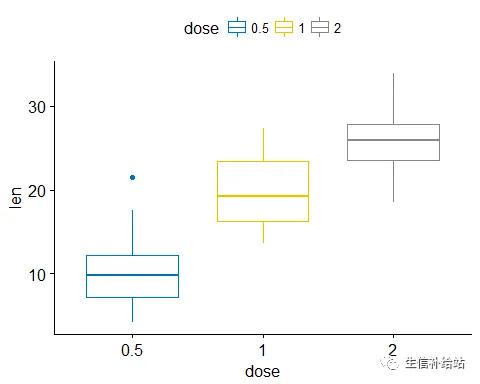
#箱线图
Box_plot <- ggboxplot(ToothGrowth, x = "dose", y = "len",color = "dose", palette = "jco")
Box_plot
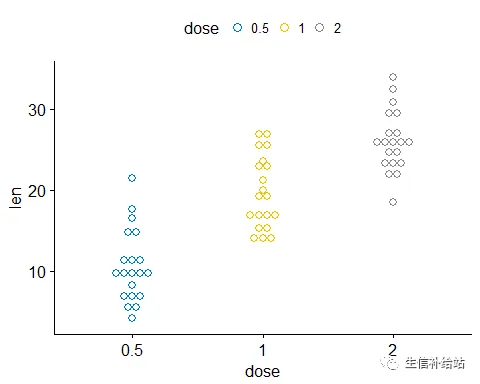
#点图
Dot_plot <- ggdotplot(ToothGrowth, x = "dose", y = "len",
                 color = "dose", palette = "jco", binwidth = 1)
Dot_plot
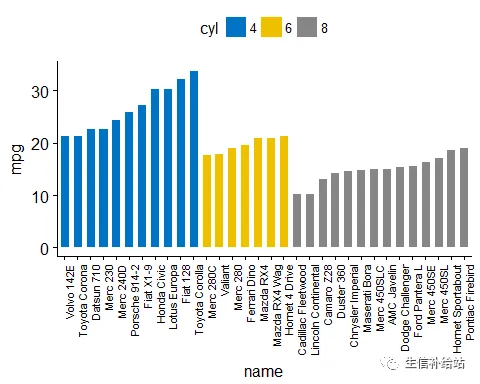
#有序条形图
Bar_plot <- ggbarplot(mtcars, x = "name", y = "mpg",
          fill = "cyl",               # change fill color by cyl
          color = "white",            # Set bar border colors to white
          palette = "jco",            # jco journal color palett. see ?ggpar
          sort.val = "asc",           # Sort the value in ascending order
          sort.by.groups = TRUE,      # Sort inside each group
          x.text.angle = 90           # Rotate vertically x axis texts
          ) + font("x.text", size = 8)
Bar_plot
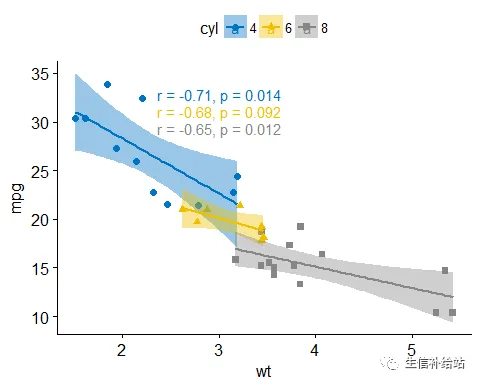
# 散点图
Scatter_plots <- ggscatter(mtcars, x = "wt", y = "mpg",
                add = "reg.line",               # Add regression line
                conf.int = TRUE,                # Add confidence interval
                color = "cyl", palette = "jco", # Color by groups "cyl"
                shape = "cyl"                   # Change point shape by groups "cyl"
                )+
  stat_cor(aes(color = cyl), label.x = 3)       # Add correlation coefficient
Scatter_plots
图形组合
使用ggpubr包的函数ggarrange()中在一页上进行组合展示
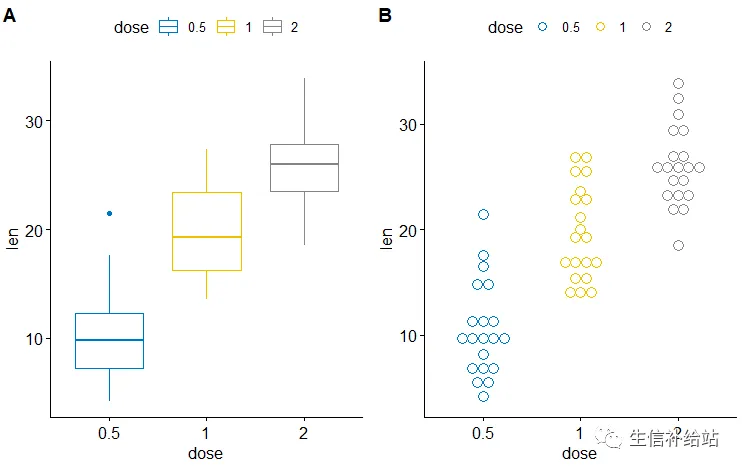
1)ToothGrowth数据集的箱线图,点图 组合展示
ggarrange(Box_plot, Dot_plot,labels = c("A", "B"),ncol = 2, nrow = 1)
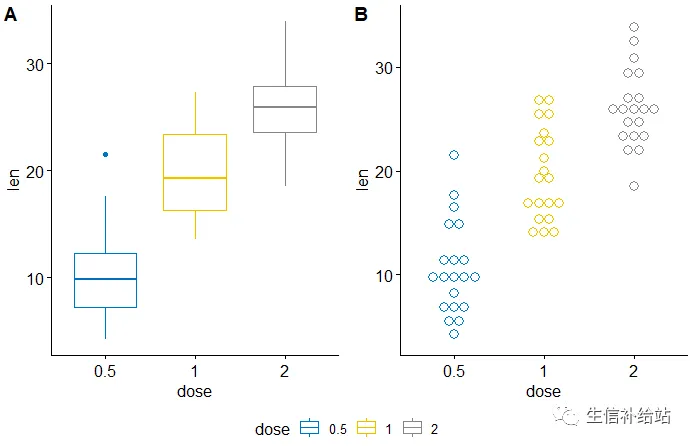
#图的边缘放置共同的唯一图例:common.legend = TRUE参数
ggarrange(bxp, dp, labels = c("A", "B"),
         common.legend = TRUE, legend = "bottom")
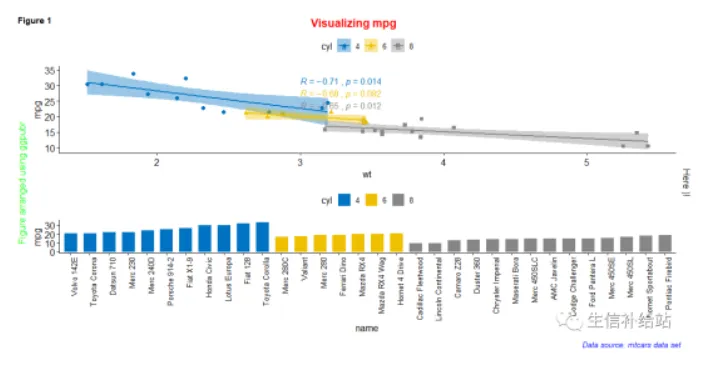
2)mtcars 数据集的条形图,散点图组合展示
figure <- ggarrange(Scatter_plots, Bar_plot + font("x.text", size = 10),ncol = 1, nrow = 2)
#添加图形的注释信息(标题,副标题,坐标轴,字体,颜色等)
annotate_figure(figure,
                top = text_grob("Visualizing mpg", color = "red", face = "bold", size = 14),
                bottom = text_grob("Data source:  mtcars data set", color = "blue",
                                   hjust = 1, x = 1, face = "italic", size = 10),
                left = text_grob("Figure arranged using ggpubr", color = "green", rot = 90),
                right = "Here )!",
                fig.lab = "Figure 1", fig.lab.face = "bold"
                )
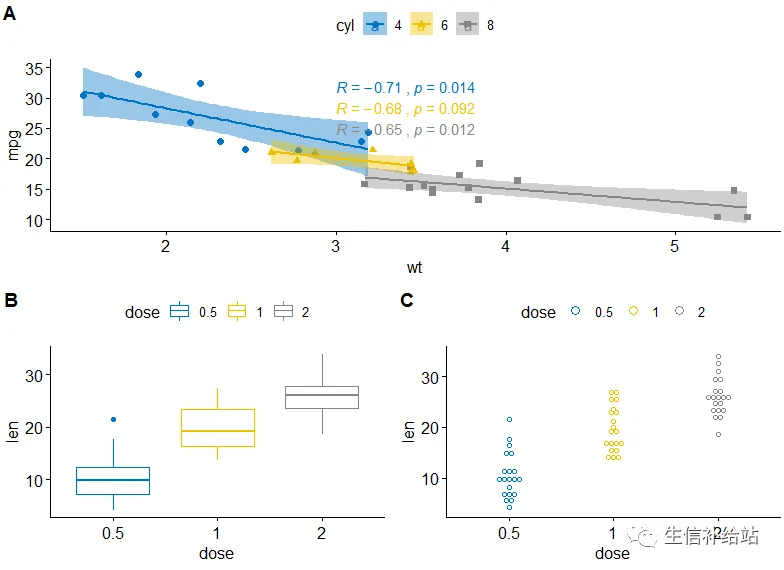
3)ggarrange()函数更改绘图的列/行跨度
#散点图在第一行跨两列,箱形图和点图并于第二行
ggarrange(Scatter_plots,                                                 # First row with scatter plot
         ggarrange(Box_plot, Dot_plot, ncol = 2, labels = c("B", "C")), # Second row with box and dot plots
         nrow = 2,
         labels = "A"                                        # Labels of the scatter plot
         )
4)利用NULL构建空白图
示例:绘制具有边际密度图的散点图
#绘制主要散点图
Scatter_plots <- ggscatter(iris, x = "Sepal.Length", y = "Sepal.Width",
               color = "Species", palette = "jco",
               size = 3, alpha = 0.6)+
 border()
#上侧,右侧添加密度图
xplot <- ggdensity(iris, "Sepal.Length", fill = "Species",
                  palette = "jco")
yplot <- ggdensity(iris, "Sepal.Width", fill = "Species",
                  palette = "jco")+
 rotate()
# 设置主题
yplot <- yplot + clean_theme()
xplot <- xplot + clean_theme()
# 通过width和height参数调整图的大小
# 利用NULL设置空白图
ggarrange(xplot, NULL, Scatter_plots, yplot,
         ncol = 2, nrow = 2,  align = "hv",
         widths = c(2, 1), heights = c(1, 2),
         common.legend = TRUE)

5)添加统计图表及文本信息
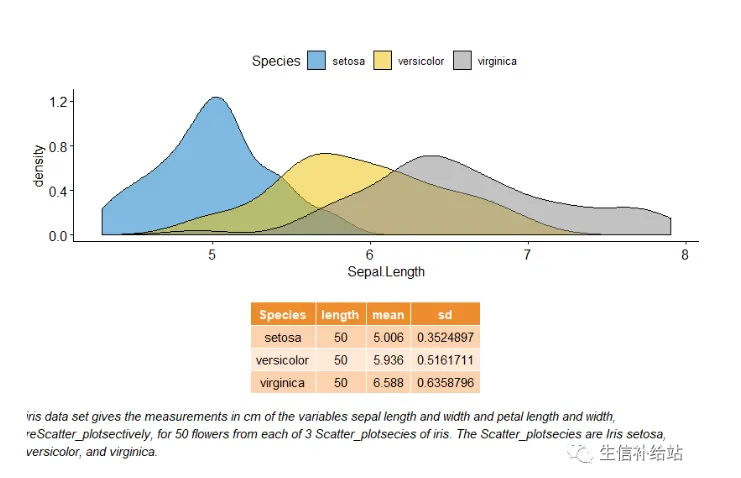
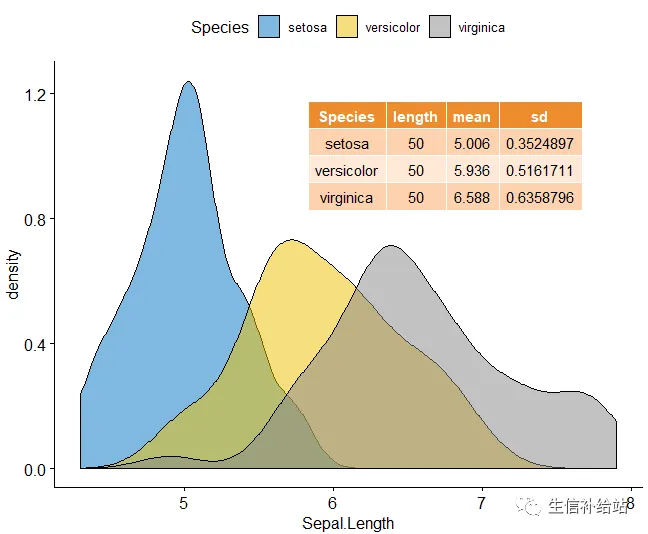
绘制变量“Sepal.Length” 的密度图以及描述性统计(mean,sd,...)的汇总表。
# Sepal.Length密度图
density.p <- ggdensity(iris, x = "Sepal.Length",
                      fill = "Species", palette = "jco")
# Sepal.Length描述性统计
stable <- desc_statby(iris, measure.var = "Sepal.Length",
                     grps = "Species")
stable <- stable[, c("Species", "length", "mean", "sd")]
# 设置table的主题
stable.p <- ggtexttable(stable, rows = NULL,
                       theme = ttheme("mOrange"))
# text 信息
text <- paste("iris data set gives the measurements in cm",
             "of the variables sepal length and width",
             "and petal length and width, reScatter_plotsectively,",
             "for 50 flowers from each of 3 Scatter_plotsecies of iris.",
            "The Scatter_plotsecies are Iris setosa, versicolor, and virginica.", sep = " ")
text.p <- ggparagraph(text = text, face = "italic", size = 11, color = "black")
# 组图展示,调整高度和宽度
ggarrange(density.p, stable.p, text.p,
         ncol = 1, nrow = 3,
         heights = c(1, 0.5, 0.3))
#子母图展示
density.p + annotation_custom(ggplotGrob(stable.p), xmin = 5.5, ymin = 0.7, xmax = 8)
6)嵌套布局展示
p1 <- ggarrange(Scatter_plots, Bar_plot + font("x.text", size = 9),
               ncol = 1, nrow = 2)
p2 <- ggarrange(density.p, stable.p, text.p,
               ncol = 1, nrow = 3,
               heights = c(1, 0.5, 0.3))
#先组合P1,P2,然后自定义行 列 ,嵌套组合展示
ggarrange(p1, p2, ncol = 2, nrow = 1)