ECMAScript2022(ES13)初体验
2022年6月22日,第123届ECMA大会批准了ECMAScript2022语言规范,这意味着它现在正式成为标准。下面就来看看ECMAScript2022有哪些新特性!
新特性总览

- •Top-levelAwait
- •Object.hasOwn()
- •at()
- •error.cause
- •正则表达式匹配索引
- •类
- •ES14:Array.prototype.findLast和Array.prototype.findLastIndex的提案。
Top-levelAwait(顶级await)
async和await在ES2017(ES8)中引入用来简化Promise操作,但是却有一个问题,就是await只能在async内部使用,当我们直接在最外层使用await的时候就会报错:UncaughtSyntaxError:awaitisonlyvalidinasyncfunctionsandthetoplevelbodiesofmodules
没有顶级await之前,当我们导入一个外部promise.js文件的时候,因为需要等待这个外部js执行完成再执行别的操作
// promise.js
let res = { name: "" },
  num;
const np = () => {
  return new Promise((resolve, reject) => {
    setTimeout(() => {
      resolve(456);
    }, 100);
  });
};
const p = async () => {
  const res1 = await np();
  res.name = res1;
  num = res1;
};
p();
export default res;
//validate.js
import res from "./p.js";
console.log("res", res, num);
// 这时 res 和 num 都是 undefined
因为res和num需要在异步执行完成之后才能访问它,所以我们可以加个定时器来解决
setTimeout(() => {
 console.log("res3000", res, num);
}, 1000);
// res 可以正确输出 {name: 456}
// num 还是 undefined
为什么res可以正常输出,而num不行?
这是因为res时对象,是一个引用类型,当过了100毫秒后,异步操作以及执行完成并且赋值了,而导出的res和p.js里面的res指向同一个地址,所以能监听到改变,但是num是基本数据类型,导出的和p.js里面的不是同一个,所以无法监听到,故而一直是undefined,而且在实际项目中,异步时间是不确定,所以这种方法存在一定缺陷,这时就可以使用顶级await来实现
// p.js
let res = { name: "" },
  num;
const np = () => {
  return new Promise((resolve, reject) => {
    setTimeout(() => {
      resolve(456);
    }, 100);
  });
};
// 这里进行改造
const res1 = await np();
res.name = res1;
num = res1;
export { res, num };
//validate.js
import { res, num } from "./p.js";
console.log("res adn num", res, num);
// 全部正常输出
代码自上而下执行,遇到await进入等待,np函数执行完成之后进行赋值,赋值完成后导出。
顶级await使用部分场景
- •资源初始化:例如,等待某个文件(图片、js(初始化变量的js)等)加载完成之后再渲染
- •依赖回退:
let depVersion;
try {
  depVersion = await import(xxx/depVersion-2.0.0.min.js)
}catch {
  depVersion = await import(xxx/depVersion-1.5.0.min.js)
}
- •模块动态加载:
let myModule = 'await-module'
const module = await import(`./${myModule}`)
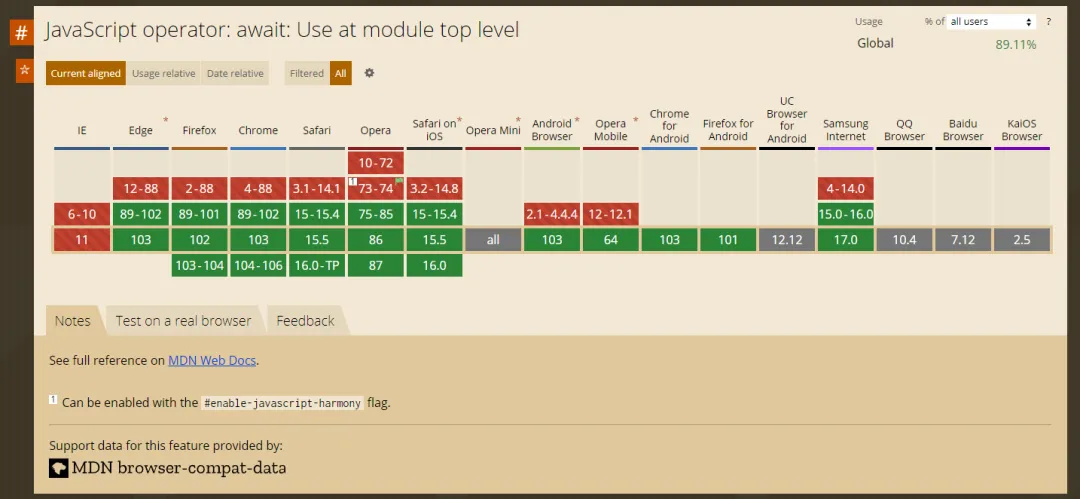
兼容性
Object.hasOwn()
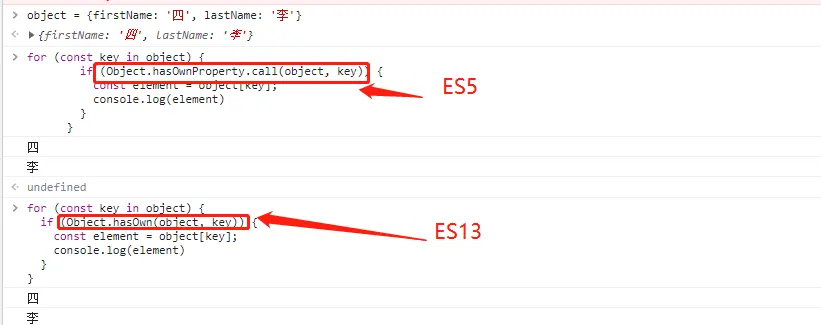
ES5:当我们检查一个属性时候属于对象的时候可以使用
常用例子:
object = {firstName: '四', lastName: '李'}
for (const key in object) {
  if (Object.hasOwnProperty.call(object, key)) {
    const element = object[key];
    console.log(element)
  }
}
ES6:Object.hasOwn特性是一种更简洁、更可靠的检查属性是否直接设置在对象上的方法
常用例子:
object = {firstName: '四', lastName: '李'}
for (const key in object) {
  if (Object.hasOwn(object, key)) {
    const element = object[key];
    console.log(element)
  }
}
at()
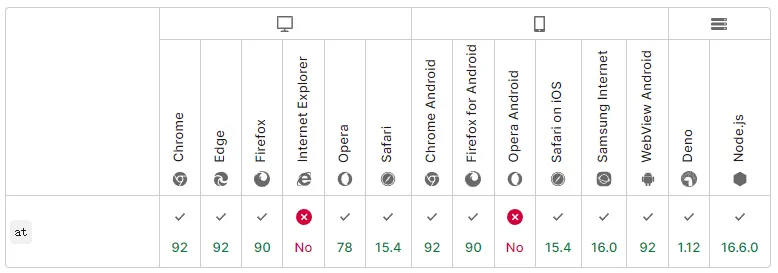
一个TC39提案,向所有基本可索引类(Array、String、TypedArray)添加.at()方法
ES13之前,要从可索引对象的末尾访问值,通常的做法是写入arr[arr.length-N]或者使用arr.slice(-N)[0]
ES13:可以使用at()方法
// 数组
const array = [0,1,2,3,4,5];
array.at(-1) // 5
array.at(-2) // 4
// 字符串
string= 'abcdefg'
string.at(-2) // f
兼容性
ErrorCause
有时,对于代码块的错误需要根据其原因进行不同的处理,但错误的原因又较为相似(例如:错误的类型和消息均相同)。
// ES13 之前通常用以下几种方式处理错误
async function errFunc() {
  const rawResource = await axios('/testError')
    .catch(err => {
      // 第一种
      throw new Error('我的错误信息:', err.message);
      // 第二种,需要连接错误信息
      const wrapErr = new Error('Download raw resource failed');
      // 自己创建 一个 cause 属性来接收错误上下文
      wrapErr.cause = '错误原因:' + err;
      throw wrapErr;
      // 第三种,需要连接错误信息
      class CustomError extends Error {
         constructor(msg, cause) {
           super(msg);
            // 自己创建 一个 cause 属性来接收错误上下文
           this.cause = cause;
         }
       }
       throw new CustomError('Download raw resource failed', err);
    });
}
try {
    const res = await errFunc()
}catch (err) {
    console.log(err)
    console.log(err.cause)
}
// 第一种输出:Uncaught Error: 我的错误信息:Failed to fetch
// 第一种输出:undefined
// 第二种输出:Uncaught Error: 我的错误信息
 // 第二种输出:错误原因: err
// 第三种:Uncaught Error: 我的错误信息
// 第三种输出:错误原因: err
正则表达式匹配索引
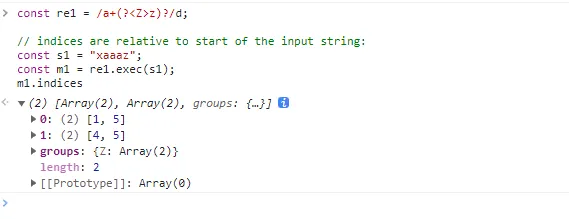
给正则表达式添加修饰符d,会生成匹配对象,记录每个组捕获的开始和结束索引,由于/d标识的存在,m1还有一个属性.indices,它用来记录捕获的每个编号组
// ?<m>n:命名分组,m 为组名称,n 为正则表达式
const re1 = /a+(?<Z>z)?/d;
// indices are relative to start of the input string:
const s1 = "xaaaz";
const m1 = re1.exec(s1);
console.log(m1.indices)
类class
公共实例字段
在ES13之前,在定义类的属性时,需要在构造函数中定义了实例字段和绑定方法
class myClass {
  constructor() {
    this.count = 1
    this.increment = this.increment.bind(this);
  }
  increment() {
    this.count += 1
  }
}
ES13可以使用公共实例字段,这样就简化了类的定义,使代码更加简洁、可读
class myClass {
  count = 1
  increment = () => {
    this.count += 1
  }
}
私有实例字段
默认情况下,class中所有属性都是公共的,可以在class之外进行修改,例如
class myClass {
  count = 1
  setCount = () => {
    this.count += 1
  }
}
const es13 = new myClass()
es13.count = 5
// myClass {count: 5, setCount: ƒ}count: 5setCount: () => {     this.count += 1   }[[Prototype]]: Object
通过上面的例子可以看到,当我们直接设置count属性的时候,是直接跳过setCount进行设置的,有时候我们并不想这样,所以可以使用私有实例字段,用法很简单,只需要在私有字段添加#就可以实现,当然了,在调用的时候我们也应该加上#进行调用,如下:
class myClass {
  #count = 1
  setCount = () => {
    this.#count += 1
  }
}
const es13 = new myClass()
es13.setCount() // 正常修改,每执行执行一次 setCount 方法后 #count的值每一次都加1
// 直接修改私有属性
es13.#count = 5
// 报错:Uncaught SyntaxError: Private field '#count' must be declared in an enclosing class
可以看到,当我们直接修改私有属性之后,浏览器直接抛出错误:UncaughtSyntaxError:Privatefield'#count'mustbedeclaredinanenclosingclass
私有方法
都有私有属性了,怎么能少了私有方法呢,方法和属性一下只有加上#即可:
class myClass {
  #count = 1
  #setCount = () => {
    this.#count += 1
  }
    newSetCount = () => {
    this.#setCount()
  }
}
const es13 = new myClass()
es13.#setCount()
// 直接调用私有方法报错:Uncaught SyntaxError: Private field '#setCount' must be declared in an enclosing class
//通过公共方法 newSetCount 调用
es13.newSetCount()
//成功,#count + 1
静态公共字段、静态私有字段、静态私有方法
与私有实例字段和方法一样,静态私有字段和方法也使用哈希#前缀来定义
class myClass {
 //静态公共字段
 static color = 'blue'
 // 静态私有字段
 static #count = 1
 // 静态私有方法
 static #setCount = () => {
    this.#count += 1
  }
  newSetCount = () => {
    this.#setCount()
  }
}
const es13 = new myClass()
实例 es13 上面只有 newSetCount() 方法
es13.newSetCount()
// 报错:Uncaught SyntaxError: Private field '#setCount' must be declared in an enclosing class
私有静态字段有一个限制:只有定义私有静态字段的类才能访问该字段。这可能在使用this时导致出乎意料的情况,所有我们需要改一下
class myClass {
// 静态私有字段
 static #count = 1
 // 静态私有方法
 static #setCount = () => {
   // 实例化之后,this 不再指向 myClass,所有需要改成 myClass 类调用
    myClass.#count += 1
  }
  newSetCount = () => {
    // 实例化之后,this 不再指向 myClass,所有需要改成 myClass 类调用
    myClass.#setCount()
  }
}
const es13 = new myClass()
es13.newSetCount()
// 成功
类静态块
在以前,如果我们希望在初始化期间像try…catch一样进行异常处理,就不得不在类之外编写此逻辑。该规范就提供了一种在类声明/定义期间评估静态初始化代码块的优雅方法,可以访问类的私有字段。
ES13之前
class Person {
    static EEEOR = "error"
    static SUCCESS_TYPE = "success_type";
    constructor() {
        // ...
    }
    try {
        // ...
    } catch {
        // ...
    }
}
上面代码直接报错:UncaughtSyntaxError:Unexpectedtoken'{'
ES13:直接将try...cathc使用static包裹起来即可
class Person {
    static EEEOR = "error"
    static SUCCESS_TYPE = "success_type";
    constructor() {
        // ...
    }
    static {
      try {
        // ...
      } catch {
        // ...
      }
    }
}
ES14新提案
- •Array.prototype.findLast
- •Array.prototype.findLastIndex
Tips:
- •Array.prototype.findLast和Array.prototype.find的行为相同,但会从最后一个迭代到第一个。
- •Array.prototype.findLastIndex和Array.prototype.findIndex的行为相同,但会从最后一个迭代到第一个。
Array.prototype.findLast和Array.prototype.findLastIndex的提案
与Array.prototype.find和Array.prototype.findIndex的行为相同,但会从最后一个迭代到第一个。
const array = [{ value: 1 }, { value: 2 }, { value: 3 }, { value: 4 }];
array.find(n => n.value % 2 === 1); // { value: 1 }
array.findIndex(n => n.value % 2 === 1); // 0
// ======== Before the proposal ===========
// find
[...array].reverse().find(n => n.value % 2 === 1); // { value: 3 }
// findIndex
array.length - 1 - [...array].reverse().findIndex(n => n.value % 2 === 1); // 2
array.length - 1 - [...array].reverse().findIndex(n => n.value === 42); // should be -1, but 4
// ======== In the proposal ===========
// find
array.findLast(n => n.value % 2 === 1); // { value: 3 }
// findIndex
array.findLastIndex(n => n.value % 2 === 1); // 2
array.findLastIndex(n => n.value === 42);