for in
针对json数组使用
for in 会便利属性上的每个属性名称,
实例
let array={fname:“Bill”,lname:“Gates”,age:56};
   for(let index in array) {
        console.log(index,array[index]);
    };
    //index是fname、Iname、age
    //array[index]为Bill、Gates、56
let iterable = [3, 5, 7];
iterable.foo = "hello";
for (let i in iterable) {
  console.log(i);  //  0, 1, 2, "foo",
}
forEach
数组时使用,json数组不行 ,没有返回值
参数唯一的时候,就是值本身。
array.forEach(v=>{
    console.log(v);
});
array.forEach(function(v){
    console.log(v);
});
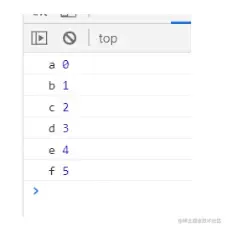
参数两个的时候,第一个为元素,第二个为下标
let array = [0222, 2221, 231312, 3, 4, 5]
 array.forEach((item, index) => {
 console.log(item, index);
 });
第三个参数为当前正操作的数组
let array = [1, 221, 4312, 34, 64, 58]
array.forEach((value, index, array) => {
  console.log(value)    //value为遍历的当前元素
  console.log(index)  //index为当前索引
  console.log(array)  //array为正在操作的数组
  console.log('------------------------------------')
})
array . forEach (( value , index , array )=>{
// value 为遍历的当前元素, index 为当前索引, array 为正在操作的数组// do something console . log ( value )
 console . log ( index ) console . log ( array )
 console .1og('----
// thisArg 为执行回调时的 this
(6)[1,221,4312,34,64,58]
221
for of
在ES6中增加的循环,使用方法简单
let array = ['a', 'b', 'c', 'd', 'e', 'f']
for (let v of array) {
  console.log(v);    //v在这里就是每个元素了,
};
>
 let array =[' a ',
 for ( let v of array ){
 console . log ( v );
' b '," c ", d ',' e "," f "
// v 在这里就是每个元素了,
};
 a
 b
 c
 d
 e
 f
 undefined
let myString = "helloabc";
for(let char of myString ) {
    console.log(char);
}