Junit4和Junit5区别非常大,高版本的springboot(如:2.6.5)只有junit5没有引入junit4,但是低版本springboot(如:2.1.8.RELEASE)的默认引入的是junit4。
初始化项目,访问spring init,创建完成后导入IDEA中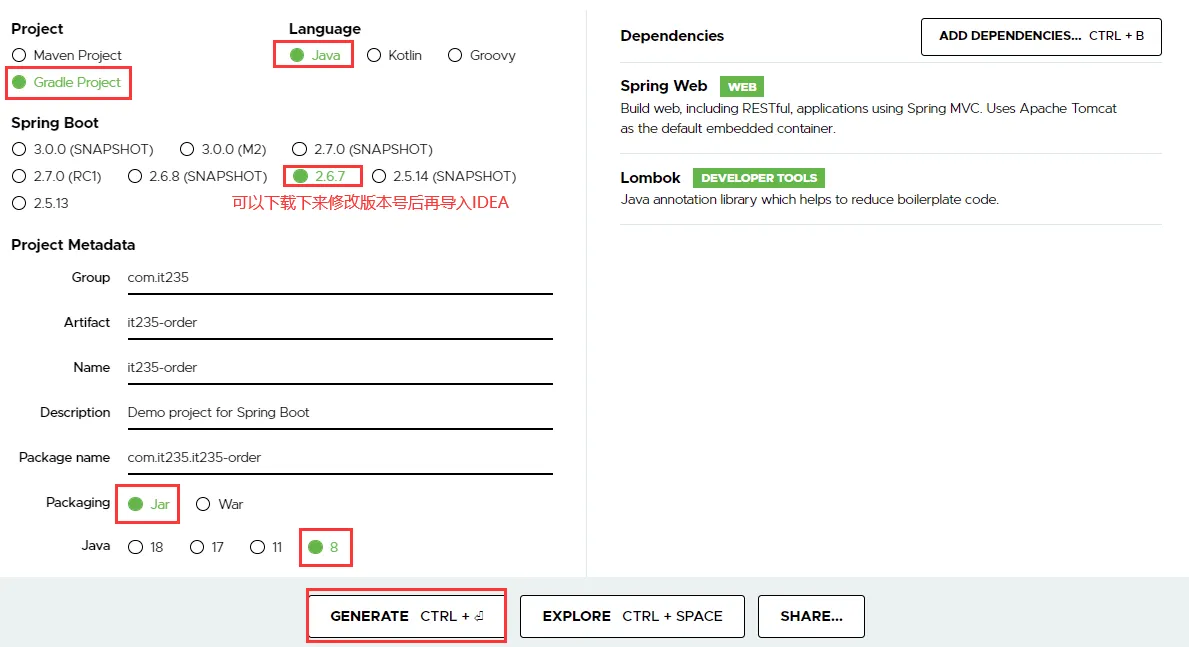
修改repositories为阿里云的镜像
repositories {
    maven { url 'https://maven.aliyun.com/repository/central' }
    mavenCentral()
}
Junit版本差异
Junit4和Junit5区别非常大,高版本的springboot(如:2.6.5)只有junit5没有引入junit4,但是低版本springboot(如:2.1.8.RELEASE)的默认引入的是junit4。

Junit Platform:Junit Platform是在JVM上启动测试框架的基础,不仅支持Junit自制的测试引擎,其他测试引擎也都可以接入。Junit Jupiter:Junit Jupiter提供了JUnit5的新的编程模型,是JUnit5新特性的核心。内部 包含了一个测试引擎,用于在Junit Platform上运行。Junit Vintage: 由于JUnit已经发展多年,为了照顾老的项目,JUnit Vintage提供了兼容JUnit4.x,Junit3.x的测试引擎。
junit4代码示例
import org.junit.After;
import org.junit.Before;
import org.junit.Test;
import org.junit.runner.RunWith;
import org.springframework.boot.test.context.SpringBootTest;
import org.springframework.test.context.junit4.SpringRunner;

@SpringBootTest(webEnvironment = SpringBootTest.WebEnvironment.RANDOM_PORT)
@RunWith(SpringRunner.class)
public class Junit4Test {

    @Autowired
    private TestRestTemplate testRestTemplate;

    @Before
    public void testBefore(){
        System.out.println("before.. 每个Test都会执行一次");
    }
    @Test
    public void test1(){
        String t = testRestTemplate.getForObject("/index", String.class);
        System.out.println("toIndex:" + t);
    }
    @After
    public void TestAfter(){
        System.out.println("after... 每个Test都会执行一次");
    }

    @BeforeClass
    public static void initClass(){
        System.out.println("******测试开始初始化,必须是static方法,仅执行一次");
    }

    @AfterClass
    public static void endClass(){
        System.out.println("******测试结束初始化,必须是static方法,仅执行一次");
    }
}
//执行顺序是:@BeforeClass→@Before→@Test→@After→@AfterClass
junit5代码示例
//包名有变化
import org.junit.jupiter.api.*;
import org.springframework.boot.test.context.SpringBootTest;
@SpringBootTest
public class Junit5Test {

    @BeforeAll
    public static void testBeforeAll() {
        System.out.println("表示在所有单元测试之前执行......");
    }

    @BeforeEach
    public void testBeforeEach() {
        System.out.println("类似于JUnit4的@Before 表示在每个单元测试之前执行......");
    }
    @AfterEach
    public void testAfterEach() {
        System.out.println("类似于JUnit4的@After 表示在每个单元测试之后执行......");
    }

    @DisplayName("测试类或测试方法声明一个自定义的显示名称")
    @Test
    public void testTwo() throws Exception {
        System.out.println("testTwo......");
    }

    /**
     * 规定方法超时时间。超出时间测试出异常
     * @throws InterruptedException
     */
    @Timeout(value = 500, unit = TimeUnit.MILLISECONDS)
    @Test
    void testTimeout() throws InterruptedException {
        Thread.sleep(600);
    }

    @AfterAll
    public static void testAfterAll() {
        System.out.println("表示在所有单元测试之后执行......");
    }
}
更多的变化请自行查阅相关文档
build.gradle配置
//方式1
tasks.named('test') {
   useJUnitPlatform()
}

//方式2
test {
   useJUnitPlatform()
}
单元测试代码
主程序代码
//application
package com.it235.it235order
@SpringBootApplication
public class It235OrderApplication {
    public static void main(String[] args) {
        SpringApplication.run(It235OrderApplication.class, args);
    }
}

//controller
package com.it235.it235order.rest;
@RestController
public class OrderController {

    @GetMapping("/index")
    public String index(){
        return "ok";
    }
}

//service
package com.it235.it235order.service;
public interface OrderService {
    String get(Long orderId);
}

@Service
public class OrderServiceImpl implements OrderService {
    @Override
    public String get(Long orderId) {
        return "订单ID:" + orderId;
    }
}
测试程序代码
package com.it235.it235order;

@SpringBootTest
public class It235OrderApplicationTests {
}

package com.it235.it235order.order;
import com.it235.it235order.It235OrderApplicationTests;
import com.it235.it235order.service.OrderService;
import org.junit.jupiter.api.*;
import org.springframework.beans.factory.annotation.Autowired;
//集成Tests类
public class OrderTests extends It235OrderApplicationTests {
    @Autowired
    private OrderService orderService;

    @DisplayName("测试方法1")
    @Test
    void getOrderTest() {
        Long orderId = 1001L;
        String s = orderService.get(orderId);
        Assertions.assertEquals("订单ID:" + orderId , s );
    }

    @DisplayName("测试方法2")
    @Test
    void getOrderTest2() {
        Long orderId = 1002L;
        String s = orderService.get(orderId);
        Assertions.assertEquals("订单ID2:" + orderId , s );
    }
}
单元测试执行命令
使用gradlew test命令执行
.\gradlew.bat testbuild时跳过test
.\gradlew build -x test
test闭包扩展参数
执行单元测试前jvm相关参数
test {
    // Discover and execute JUnit4-based tests
    useJUnit()

    // Discover and execute TestNG-based tests
    useTestNG()

    // set a system property for the test JVM(s)
    systemProperty 'some.prop', 'value'

    // set heap size for the test JVM(s)
    minHeapSize = "128m"
    maxHeapSize = "512m"

    //实际执行:java -Xmx20m -Dspring.profiles.active=unit -XX:+UseG1GC -jar app.jar
    jvmArgs "-Xmx20m" ,"-Dspring.profiles.active=unit" , "-XX:+UseG1GC"

    //Junit5
    useJUnitPlatform()
}
执行单元测试前拷贝资源文件
//定义一个拷贝任务,将src/main/db目录文件拷贝至build中
task copyDbResources(type: Copy) {
    from 'src/main/db'
    into 'build/resources/main/db'
}

test {
    useJUnitPlatform()
}

//将测试资源复制到测试资源目录
processTestResources {
    dependsOn copyDbResources
}
排除不被单元测试扫描的包
test {
    // explicitly include or exclude tests
    include 'org/foo/**'
    exclude 'com/it235/it235order/order'

    useJUnitPlatform()
}
总结
SpringBoot将Junit无缝整合后让单元测试变得更加简单,Gradle也只需要简单的配置即可完成Junit的集成。