一、Pod简介
1.1 Pod结构
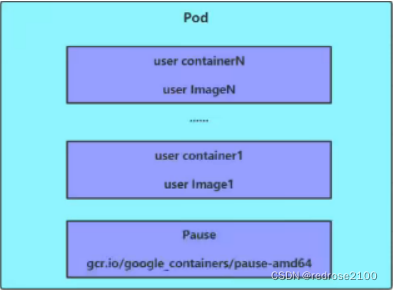
每个Pod中都可以包含一个或者多个容器,这些容器可以分为两类:
- 用户程序所在的容器,数量可多可少
Pause容器,这个是每个Pod都会有的根容器,它的作用有两个:
- 可以以它为依据,评估整个Pod的健康状态
- 可以在根容器上设置ip地址,其他容器都可以通过此ip(Pod IP),以实现Pod内部的网络通信,这里是Pod内部的通信,Pod之间的通信采用虚拟二层网络技术实现,比如Flanel技术
1.2 Pod定义
如下查看pod的yaml文件的一级属性,即一级属性只有apiVersion,kind,metadata,spec,status五个属性
[root@master ~]# kubectl explain pod
KIND:     Pod
VERSION:  v1

DESCRIPTION:
     Pod is a collection of containers that can run on a host. This resource is
     created by clients and scheduled onto hosts.

FIELDS:
   apiVersion   <string>
     APIVersion defines the versioned schema of this representation of an
     object. Servers should convert recognized schemas to the latest internal
     value, and may reject unrecognized values. More info:
     https://git.k8s.io/community/contributors/devel/sig-architecture/api-conventions.md#resources

   kind <string>
     Kind is a string value representing the REST resource this object
     represents. Servers may infer this from the endpoint the client submits
     requests to. Cannot be updated. In CamelCase. More info:
     https://git.k8s.io/community/contributors/devel/sig-architecture/api-conventions.md#types-kinds

   metadata     <Object>
     Standard object's metadata. More info:
     https://git.k8s.io/community/contributors/devel/sig-architecture/api-conventions.md#metadata

   spec <Object>
     Specification of the desired behavior of the pod. More info:
     https://git.k8s.io/community/contributors/devel/sig-architecture/api-conventions.md#spec-and-status

   status       <Object>
     Most recently observed status of the pod. This data may not be up to date.
     Populated by the system. Read-only. More info:
     https://git.k8s.io/community/contributors/devel/sig-architecture/api-conventions.md#spec-and-status

[root@master ~]#
五个一级属性的含义:
- apiVersion ,版本,由kubernetes内部定义,版本号可以用kubectl api-versions查询
- kind , 类型,由kubernetes内部定义,类型可以用kubectl api-resources查询
如下,为继续查找metadata的属性如何填
- metadata
- spec
- status
如下为二级属性的查询命令
[root@master ~]# kubectl explain Pod.spec
KIND:     Pod
VERSION:  v1

RESOURCE: spec <Object>

DESCRIPTION:
     Specification of the desired behavior of the pod. More info:
     https://git.k8s.io/community/contributors/devel/sig-architecture/api-conventions.md#spec-and-status

     PodSpec is a description of a pod.

FIELDS:
   activeDeadlineSeconds        <integer>
     Optional duration in seconds the pod may be active on the node relative to
     StartTime before the system will actively try to mark it failed and kill
     associated containers. Value must be a positive integer.

   affinity     <Object>
     If specified, the pod's scheduling constraints

   automountServiceAccountToken <boolean>
     AutomountServiceAccountToken indicates whether a service account token
     should be automatically mounted.

   containers   <[]Object> -required-
     List of containers belonging to the pod. Containers cannot currently be
     added or removed. There must be at least one container in a Pod. Cannot be
     updated.

   dnsConfig    <Object>
     Specifies the DNS parameters of a pod. Parameters specified here will be
     merged to the generated DNS configuration based on DNSPolicy.

   dnsPolicy    <string>
     Set DNS policy for the pod. Defaults to "ClusterFirst". Valid values are
     'ClusterFirstWithHostNet', 'ClusterFirst', 'Default' or 'None'. DNS
     parameters given in DNSConfig will be merged with the policy selected with
     DNSPolicy. To have DNS options set along with hostNetwork, you have to
     specify DNS policy explicitly to 'ClusterFirstWithHostNet'.

   enableServiceLinks   <boolean>
     EnableServiceLinks indicates whether information about services should be
     injected into pod's environment variables, matching the syntax of Docker
     links. Optional: Defaults to true.

   ephemeralContainers  <[]Object>
     List of ephemeral containers run in this pod. Ephemeral containers may be
     run in an existing pod to perform user-initiated actions such as debugging.
     This list cannot be specified when creating a pod, and it cannot be
     modified by updating the pod spec. In order to add an ephemeral container
     to an existing pod, use the pod's ephemeralcontainers subresource. This
     field is alpha-level and is only honored by servers that enable the
     EphemeralContainers feature.

   hostAliases  <[]Object>
     HostAliases is an optional list of hosts and IPs that will be injected into
     the pod's hosts file if specified. This is only valid for non-hostNetwork
     pods.

   hostIPC      <boolean>
     Use the host's ipc namespace. Optional: Default to false.

   hostNetwork  <boolean>
     Host networking requested for this pod. Use the host's network namespace.
     If this option is set, the ports that will be used must be specified.
     Default to false.

   hostPID      <boolean>
     Use the host's pid namespace. Optional: Default to false.

   hostname     <string>
     Specifies the hostname of the Pod If not specified, the pod's hostname will
     be set to a system-defined value.

   imagePullSecrets     <[]Object>
     ImagePullSecrets is an optional list of references to secrets in the same
     namespace to use for pulling any of the images used by this PodSpec. If
     specified, these secrets will be passed to individual puller
     implementations for them to use. For example, in the case of docker, only
     DockerConfig type secrets are honored. More info:
     https://kubernetes.io/docs/concepts/containers/images#specifying-imagepullsecrets-on-a-pod

   initContainers       <[]Object>
     List of initialization containers belonging to the pod. Init containers are
     executed in order prior to containers being started. If any init container
     fails, the pod is considered to have failed and is handled according to its
     restartPolicy. The name for an init container or normal container must be
     unique among all containers. Init containers may not have Lifecycle
     actions, Readiness probes, Liveness probes, or Startup probes. The
     resourceRequirements of an init container are taken into account during
     scheduling by finding the highest request/limit for each resource type, and
     then using the max of of that value or the sum of the normal containers.
     Limits are applied to init containers in a similar fashion. Init containers
     cannot currently be added or removed. Cannot be updated. More info:
     https://kubernetes.io/docs/concepts/workloads/pods/init-containers/

   nodeName     <string>
     NodeName is a request to schedule this pod onto a specific node. If it is
     non-empty, the scheduler simply schedules this pod onto that node, assuming
     that it fits resource requirements.

   nodeSelector <map[string]string>
     NodeSelector is a selector which must be true for the pod to fit on a node.
     Selector which must match a node's labels for the pod to be scheduled on
     that node. More info:
     https://kubernetes.io/docs/concepts/configuration/assign-pod-node/

   overhead     <map[string]string>
     Overhead represents the resource overhead associated with running a pod for
     a given RuntimeClass. This field will be autopopulated at admission time by
     the RuntimeClass admission controller. If the RuntimeClass admission
     controller is enabled, overhead must not be set in Pod create requests. The
     RuntimeClass admission controller will reject Pod create requests which
     have the overhead already set. If RuntimeClass is configured and selected
     in the PodSpec, Overhead will be set to the value defined in the
     corresponding RuntimeClass, otherwise it will remain unset and treated as
     zero. More info:
     https://git.k8s.io/enhancements/keps/sig-node/20190226-pod-overhead.md This
     field is alpha-level as of Kubernetes v1.16, and is only honored by servers
     that enable the PodOverhead feature.

   preemptionPolicy     <string>
     PreemptionPolicy is the Policy for preempting pods with lower priority. One
     of Never, PreemptLowerPriority. Defaults to PreemptLowerPriority if unset.
     This field is beta-level, gated by the NonPreemptingPriority feature-gate.

   priority     <integer>
     The priority value. Various system components use this field to find the
     priority of the pod. When Priority Admission Controller is enabled, it
     prevents users from setting this field. The admission controller populates
     this field from PriorityClassName. The higher the value, the higher the
     priority.

   priorityClassName    <string>
     If specified, indicates the pod's priority. "system-node-critical" and
     "system-cluster-critical" are two special keywords which indicate the
     highest priorities with the former being the highest priority. Any other
     name must be defined by creating a PriorityClass object with that name. If
     not specified, the pod priority will be default or zero if there is no
     default.

   readinessGates       <[]Object>
     If specified, all readiness gates will be evaluated for pod readiness. A
     pod is ready when all its containers are ready AND all conditions specified
     in the readiness gates have status equal to "True" More info:
     https://git.k8s.io/enhancements/keps/sig-network/0007-pod-ready%2B%2B.md

   restartPolicy        <string>
     Restart policy for all containers within the pod. One of Always, OnFailure,
     Never. Default to Always. More info:
     https://kubernetes.io/docs/concepts/workloads/pods/pod-lifecycle/#restart-policy

   runtimeClassName     <string>
     RuntimeClassName refers to a RuntimeClass object in the node.k8s.io group,
     which should be used to run this pod. If no RuntimeClass resource matches
     the named class, the pod will not be run. If unset or empty, the "legacy"
     RuntimeClass will be used, which is an implicit class with an empty
     definition that uses the default runtime handler. More info:
     https://git.k8s.io/enhancements/keps/sig-node/runtime-class.md This is a
     beta feature as of Kubernetes v1.14.

   schedulerName        <string>
     If specified, the pod will be dispatched by specified scheduler. If not
     specified, the pod will be dispatched by default scheduler.

   securityContext      <Object>
     SecurityContext holds pod-level security attributes and common container
     settings. Optional: Defaults to empty. See type description for default
     values of each field.

   serviceAccount       <string>
     DeprecatedServiceAccount is a depreciated alias for ServiceAccountName.
     Deprecated: Use serviceAccountName instead.

   serviceAccountName   <string>
     ServiceAccountName is the name of the ServiceAccount to use to run this
     pod. More info:
     https://kubernetes.io/docs/tasks/configure-pod-container/configure-service-account/

   setHostnameAsFQDN    <boolean>
     If true the pod's hostname will be configured as the pod's FQDN, rather
     than the leaf name (the default). In Linux containers, this means setting
     the FQDN in the hostname field of the kernel (the nodename field of struct
     utsname). In Windows containers, this means setting the registry value of
     hostname for the registry key
     HKEY_LOCAL_MACHINE\SYSTEM\CurrentControlSet\Services\Tcpip\Parameters to
     FQDN. If a pod does not have FQDN, this has no effect. Default to false.

   shareProcessNamespace        <boolean>
     Share a single process namespace between all of the containers in a pod.
     When this is set containers will be able to view and signal processes from
     other containers in the same pod, and the first process in each container
     will not be assigned PID 1. HostPID and ShareProcessNamespace cannot both
     be set. Optional: Default to false.

   subdomain    <string>
     If specified, the fully qualified Pod hostname will be
     "<hostname>.<subdomain>.<pod namespace>.svc.<cluster domain>". If not
     specified, the pod will not have a domainname at all.

   terminationGracePeriodSeconds        <integer>
     Optional duration in seconds the pod needs to terminate gracefully. May be
     decreased in delete request. Value must be non-negative integer. The value
     zero indicates stop immediately via the kill signal (no opportunity to shut
     down). If this value is nil, the default grace period will be used instead.
     The grace period is the duration in seconds after the processes running in
     the pod are sent a termination signal and the time when the processes are
     forcibly halted with a kill signal. Set this value longer than the expected
     cleanup time for your process. Defaults to 30 seconds.

   tolerations  <[]Object>
     If specified, the pod's tolerations.

   topologySpreadConstraints    <[]Object>
     TopologySpreadConstraints describes how a group of pods ought to spread
     across topology domains. Scheduler will schedule pods in a way which abides
     by the constraints. All topologySpreadConstraints are ANDed.

   volumes      <[]Object>
     List of volumes that can be mounted by containers belonging to the pod.
     More info: https://kubernetes.io/docs/concepts/storage/volumes

[root@master ~]#
二级属性Pod.spec中最常用的为如下属性
- containers <[]Object>,容器列表,用于定义容器的详细信息
- nodeName ,根据nodeName的值将pod调度到指定的node节点上
- nodeSelector <map[]>, 根据nodeSelector中定义的信息选择将该Pod调度到包含这些label的Node上
- hostNetwork , 是否使用主机网络模式,默认为false,如果设置为TRUE,表示使用宿主机网络
- volumes
- restartPolicy , 重启策略,表示Pod在遇到故障的时候的处理策略