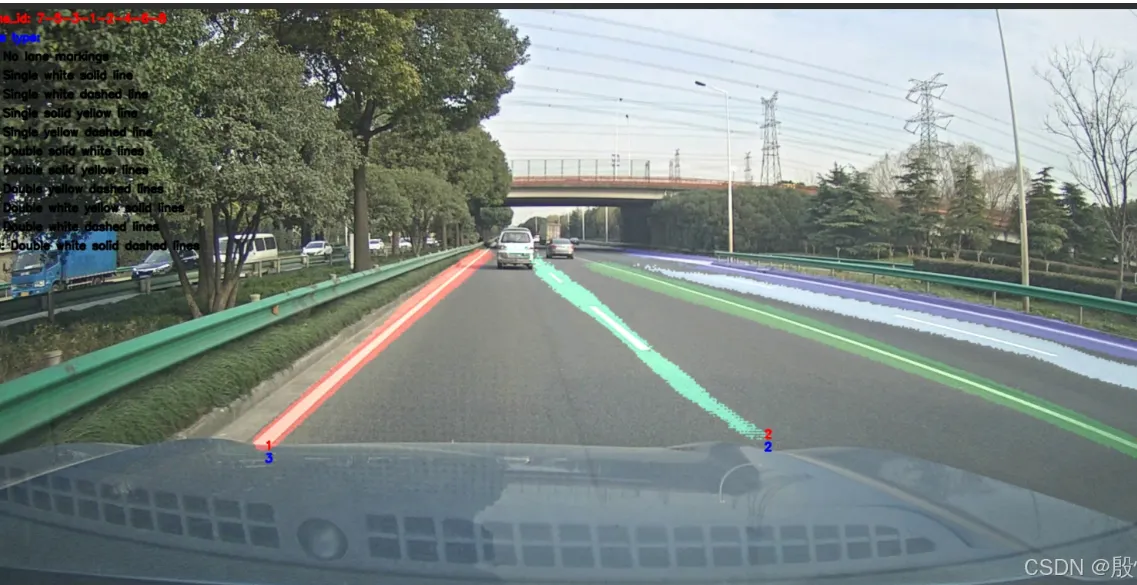
UNetMultiLane 多车道线、车道线类型识别。
数据是基于开源数据集 VIL100。其中数据标注了所在的六个车道的车道线和车道线的类型。
8条车道线(六个车道),对应的顺序是:7,5,3,1,2,4,6,8。其中1,2对应的自车所在的车道,从左往右标记。
车道线的类别(10个类别):单条白色实线、单条白色虚线、单条黄色实线、单条黄色虚线、双条白色实线、双条黄色实线、双条黄色虚线、双条白色实虚线、双条白色黄色实线、双条白色虚实线。
从环境开发到部署记录全过程。
由于没有使用CUDA,所以训练和转换ONNX在CPU上进行,山水无移大佬的是使用CUDA处理,这里修改了一点他的代码。
一、环境创建
1、创建虚拟环境
conda create -n UNet_env python=3.9
2、激活
conda activate UNet_env
3、安装轮子
pip install torch -i https://pypi.tuna.tsinghua.edu.cn/simple

pip install numpy -i https://pypi.tuna.tsinghua.edu.cn/simple

pip install Pillow  -i https://pypi.tuna.tsinghua.edu.cn/simple

pip install torchvision -i https://pypi.tuna.tsinghua.edu.cn/simple

pip install tqdm -i https://pypi.tuna.tsinghua.edu.cn/simple

pip install opencv-python -i https://pypi.tuna.tsinghua.edu.cn/simple

pip install onnx -i https://pypi.tuna.tsinghua.edu.cn/simple

pip install onnxruntime -i https://pypi.tuna.tsinghua.edu.cn/simple
二、训练
cqu20160901/UNetMultiLane: UNetMultiLane 多车道线、车道线类型识别,自我学习使用,没有经过大量测试,不免有问题,不喜不扰。 (github.com)
代码比较简单,不多,由于使用的是CPU所以修改了train.py,直接附上。
train.py
from getdata import GetLaneDataset
from torch.utils.data import DataLoader as DataLoader
from unet import UNetMultiLane as Net
import torch
from torch.autograd import Variable
from loss import softmax_focal_loss
from tqdm import tqdm
import sys


train_image_txt = './data/VIL100/train.txt'
test_image_txt = './data/VIL100/test.txt'

data_main_path = './data/VIL100'
weights_save_path = './weights'

input_height = 480
input_width = 640
lane_num = 9   # 8 条车道线 + 1
type_num = 11  # 10 种线的类型 + 1

epoch_num = 50
batch_size = 2
learn_rate = 0.001
num_workers = 1

width_mult = 0.25


def test_eval(model, epoch):
    log_txt = open(weights_save_path + './log.txt', 'a')
    dataset = GetLaneDataset(image_txt=test_image_txt, data_main_path=data_main_path, input_height=input_height, input_width=input_width, train_mode=False)
    images_num = len(dataset)
    print('eval images num is:', images_num)
    model.eval()
    criterion = softmax_focal_loss

    dataloader = DataLoader(dataset, batch_size=batch_size, shuffle=True, num_workers=num_workers, drop_last=True)
    seg_loss_total = 0
    cls_loss_total = 0

    for image, label_mask, label_type in tqdm(dataloader):

        image, label_mask, label_type = Variable(image), Variable(label_mask), Variable(label_type)
        if torch.cuda.is_available():
            image, label_mask, label_type = image.cuda(), label_mask.cuda(), label_type.cuda()
            print("Model is running on GPU")
        else:
            print("Model is running on CPU")

        pred_out = model(image)
        seg_loss, cls_loss = criterion(pred_out, label_mask, label_type.squeeze())

        seg_loss_total += seg_loss.item()
        cls_loss_total += cls_loss.item()

    print(f"{'eval_seg_loss':>13} {'eval_cls_loss':>13} {'eval_total_loss':>15}")
    print(f"{seg_loss_total:>13} {cls_loss_total:>13} {(seg_loss_total + seg_loss_total):>15}")

    save_line = 'epoch:' + str(epoch) + ',seg_loss_total:' + str(seg_loss_total) + ', cls_loss_total:' + str(cls_loss_total) + ', total_loss:' + str(seg_loss_total + seg_loss_total) + '\n'
    log_txt.write(save_line)
    log_txt.close()

    return seg_loss_total + seg_loss_total


def train():
    dataset = GetLaneDataset(image_txt=train_image_txt, data_main_path=data_main_path, input_height=input_height, input_width=input_width, train_mode=True)
    images_num = len(dataset)
    print('train images num is:', images_num)

    model = Net(in_channels=3, lane_num=lane_num, type_num=type_num, width_mult=width_mult, is_deconv=True, is_batchnorm=True, is_ds=True)
    if torch.cuda.is_available():
        model = model.cuda()
        print("Model is running on GPU")
    else:
        print("Model is running on CPU")

    model.train()

    criterion = softmax_focal_loss

    optimizer = torch.optim.Adam(model.parameters(), lr=learn_rate)
    print(f"{'epoch'}/{'epoch_num'} | {'seg_loss':>8} | {'cls_loss':>8} | {'total_loss':>10}")

    eval_loss_total = 1e7
    best_epoch = 0
    for epoch in range(epoch_num):
        dataloader = DataLoader(dataset, batch_size=batch_size, shuffle=True, num_workers=num_workers, drop_last=True)

        seg_loss_total = 0
        cls_loss_total = 0

        for image, label_mask, label_type in tqdm(dataloader):

            image, label_mask, label_type = Variable(image), Variable(label_mask), Variable(label_type)
            if torch.cuda.is_available():
                image, label_mask, label_type = image.cuda(), label_mask.cuda(), label_type.cuda()
                print("Model is running on GPU")
            else:
                print("Model is running on CPU")

            pred_out = model(image)
            seg_loss, cls_loss = criterion(pred_out, label_mask, label_type.squeeze())

            total_loss = seg_loss + cls_loss
            total_loss.backward()
            optimizer.step()
            optimizer.zero_grad()

            seg_loss1 = "%.4f" % seg_loss.item()
            cls_loss1 = "%.4f" % cls_loss.item()
            total_loss1 = "%.4f" % total_loss.item()

            text = f"{epoch}/{epoch_num} {seg_loss1:>8} {cls_loss1:>8} {total_loss1:>8}"
            sys.stdout.write(text)
            sys.stdout.flush()

            seg_loss_total += seg_loss.item()
            cls_loss_total += cls_loss.item()

        seg_loss_total1 = "%.4f" % seg_loss_total
        cls_loss_total1 = "%.4f" % cls_loss_total
        total_loss_total1 = "%.4f" % (seg_loss_total + cls_loss_total)

        print()
        print(f"{'epoch':<5} {'epoch_num':<9} {'seg_loss_total':>14} {'cls_loss_total':>14} {'total_loss_total':>16}")
        print(f"{epoch:<5} {epoch_num:<9} {seg_loss_total1:>14} {cls_loss_total1:>14} {total_loss_total1:>16}")

        torch.save(model.state_dict(), weights_save_path + '/epoch_{0}.pth'.format(epoch + 1))

        eval_loss = test_eval(model, epoch)
        model.train()
        if eval_loss < eval_loss_total:
            eval_loss_total = eval_loss
            torch.save(model.state_dict(), weights_save_path + '/best.pth')
            best_epoch = epoch
    log_txt = open(weights_save_path + './log.txt', 'a')
    save_line = 'eval best epoch is:' + str(best_epoch) + '\n'
    log_txt.write(save_line)
    log_txt.close()


if __name__ == '__main__':
    print('start train ...')
    train()
执行python train.py开始训练,由于是cpu,50轮大概4小时。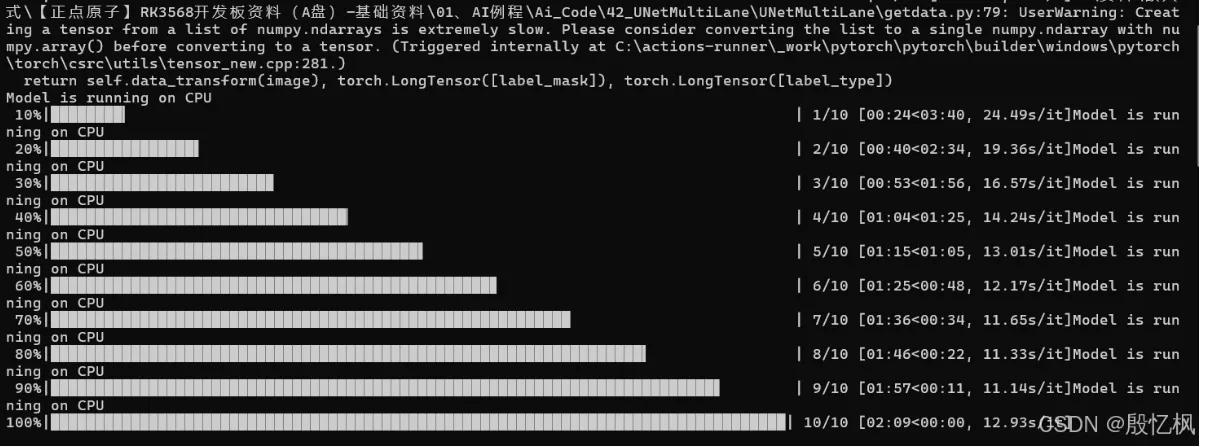
三、测试
原代码测试使用的是GPU,这里也修改成cpu,并增加了视频检测功能。
from unet import UNetMultiLane as Net
import torch
import numpy as np
import cv2
from torch.autograd import Variable


width_mult = 0.25

input_height = 480
input_width = 640
lane_num = 9   # 8 条车道线 + 1
type_num = 11  # 10 种线的类型 + 1


color_list = [(100, 149, 237), (0, 0, 255), (173, 255, 47), (240, 255, 255), (0, 100, 0),
              (47, 79, 79), (255, 228, 196), (138, 43, 226), (165, 42, 42), (222, 184, 135)]

lane_Id_type = [7, 5, 3, 1, 2, 4, 6, 8]


line_type = ['No lane markings',
             'Single white solid line',
             'Single white dashed line',
             'Single solid yellow line',
             'Single yellow dashed line',
             'Double solid white lines',
             'Double solid yellow lines',
             'Double yellow dashed lines',
             'Double white yellow solid lines',
             'Double white dashed lines',
             'Double white solid dashed lines']


def precess_image(img_src, resize_w, resize_h):
    image = cv2.resize(img_src, (resize_w, resize_h), interpolation=cv2.INTER_LINEAR)
    image = cv2.cvtColor(image, cv2.COLOR_BGR2RGB)
    image = image.astype(np.float32)
    image /= 255
    image = image.transpose((2, 0, 1))
    return image


def softmax(x, axis):
    x -= np.max(x, axis=axis, keepdims=True)
    value = np.exp(x) / np.sum(np.exp(x), axis=1, keepdims=True)
    return value


def test_image():
    weights_path = './weights/best.pth'
    image_path = './images/00078.jpg'

    model = Net(in_channels=3, lane_num=lane_num, type_num=type_num, width_mult=width_mult, is_deconv=True, is_batchnorm=True, is_ds=True)

    if torch.cuda.is_available():
        model = model.cuda()
        print("Model moved to GPU.")
    else:
        print("No CUDA device available, model will run on CPU.")

    model.load_state_dict(torch.load(weights_path))
    model.eval()

    origin_image = cv2.imread(image_path)
    image_height, image_width = origin_image.shape[:2]

    input_image = precess_image(origin_image, input_width, input_height)

    input_image = torch.from_numpy(input_image)
    input_image = Variable(input_image.unsqueeze(0))
    # 判断 input_image 是否在 CUDA 设备上
    if torch.cuda.is_available():
        input_image = input_image.cuda()
        print("输入图像在CUDA设备上")
    else:
        print("输入图像在CPU上")

    output = model(input_image)

    seg_output = softmax(output[0].cpu().detach().numpy(), axis=1)[0]
    cls_output = softmax(output[1].cpu().detach().numpy(), axis=2)[0]

    cls_output = np.argmax(cls_output, axis=1)

    mask = np.zeros(shape=(input_height, input_width, 3))

    lane_id = []
    write_pos = []

    for i in range(mask.shape[0] - 1, 0, -1):
        for j in range(mask.shape[1] - 1, 0, -1):
            max_index = np.argmax(seg_output[:, i, j])
            if max_index not in lane_id:
                lane_id.append(max_index)
                if i > input_height - 20 or j > input_width - 20:
                    write_pos.append([j - 20, i - 20])
                else:
                    write_pos.append([j, i])
            if max_index != 0 and seg_output[max_index, i, j] > 0.5:
                mask[i, j, :] = color_list[max_index]

    mask = cv2.resize(mask, (image_width, image_height))

    for i in range(len(lane_id)):
        if lane_id[i] == 0:
            continue

        lane_type = cls_output[lane_Id_type.index(lane_id[i])]

        px = int(write_pos[i][0] / input_width * image_width)
        py = int(write_pos[i][1] / input_height * image_height)

        cv2.putText(origin_image, str(lane_id[i]), (px, py), cv2.FONT_HERSHEY_SIMPLEX, 0.6, (0, 0, 255), 2, cv2.LINE_AA)
        cv2.putText(origin_image, str(lane_type), (px, py + 20), cv2.FONT_HERSHEY_SIMPLEX, 0.6, (255, 0, 0), 2, cv2.LINE_AA)

    cv2.putText(origin_image, 'lane_id: 7-5-3-1-2-4-6-8', (10, 20), cv2.FONT_HERSHEY_SIMPLEX, 0.6, (0, 0, 255), 2, cv2.LINE_AA)

    cv2.putText(origin_image, 'line type:', (10, 50), cv2.FONT_HERSHEY_SIMPLEX, 0.6, (255, 0, 0), 2, cv2.LINE_AA)
    for i in range(len(line_type)):
        cv2.putText(origin_image, str(i) + ': ' + str(line_type[i]), (10, 80 + i * 30), cv2.FONT_HERSHEY_SIMPLEX, 0.6,(0, 0, 0), 2, cv2.LINE_AA)

    opencv_image = np.clip(np.array(origin_image) + np.array(mask) * 0.4, a_min=0, a_max=255)
    opencv_image = opencv_image.astype("uint8")
    cv2.imwrite('./images/result.jpg', opencv_image)


def test_video():
    weights_path = './weights/best.pth'
    video_path = './images/test.mp4'

    model = Net(in_channels=3, lane_num=lane_num, type_num=type_num, width_mult=width_mult, is_deconv=True, is_batchnorm=True, is_ds=True)

    if torch.cuda.is_available():
        model = model.cuda()
        print("Model moved to GPU.")
    else:
        print("No CUDA device available, model will run on CPU.")

    model.load_state_dict(torch.load(weights_path))
    model.eval()

    cap = cv2.VideoCapture(video_path)

    # 获取视频的宽度和高度
    width = int(cap.get(cv2.CAP_PROP_FRAME_WIDTH))
    height = int(cap.get(cv2.CAP_PROP_FRAME_HEIGHT))

    # 设置新的宽度和高度
    new_width = int(width * 0.7)
    new_height = int(height * 0.7)

    # 创建一个新的VideoWriter对象,用于保存缩放后的视频
    fourcc = cv2.VideoWriter_fourcc(*'mp4v')
    out = cv2.VideoWriter('./images/output.mp4', fourcc, cap.get(cv2.CAP_PROP_FPS), (new_width, new_height))
    k = 0
    while True:
        ret, origin_image = cap.read()
        if not ret:
            break
        k = k+1
        print("k = ", k)
        image_height, image_width = origin_image.shape[:2]

        input_image = precess_image(origin_image, input_width, input_height)

        input_image = torch.from_numpy(input_image)
        input_image = Variable(input_image.unsqueeze(0))
        # 判断 input_image 是否在 CUDA 设备上
        if torch.cuda.is_available():
            input_image = input_image.cuda()
            print("输入图像在CUDA设备上")
        else:
            print("输入图像在CPU上")

        output = model(input_image)

        seg_output = softmax(output[0].cpu().detach().numpy(), axis=1)[0]
        cls_output = softmax(output[1].cpu().detach().numpy(), axis=2)[0]

        cls_output = np.argmax(cls_output, axis=1)

        mask = np.zeros(shape=(input_height, input_width, 3))

        lane_id = []
        write_pos = []

        for i in range(mask.shape[0] - 1, 0, -1):
            for j in range(mask.shape[1] - 1, 0, -1):
                max_index = np.argmax(seg_output[:, i, j])
                if max_index not in lane_id:
                    lane_id.append(max_index)
                    if i > input_height - 20 or j > input_width - 20:
                        write_pos.append([j - 20, i - 20])
                    else:
                        write_pos.append([j, i])
                if max_index != 0 and seg_output[max_index, i, j] > 0.5:
                    mask[i, j, :] = color_list[max_index]

        mask = cv2.resize(mask, (image_width, image_height))

        for i in range(len(lane_id)):
            if lane_id[i] == 0:
                continue

            lane_type = cls_output[lane_Id_type.index(lane_id[i])]

            px = int(write_pos[i][0] / input_width * image_width)
            py = int(write_pos[i][1] / input_height * image_height)

            cv2.putText(origin_image, str(lane_id[i]), (px, py), cv2.FONT_HERSHEY_SIMPLEX, 0.6, (0, 0, 255), 2, cv2.LINE_AA)
            cv2.putText(origin_image, str(lane_type), (px, py + 20), cv2.FONT_HERSHEY_SIMPLEX, 0.6, (255, 0, 0), 2, cv2.LINE_AA)

        cv2.putText(origin_image, 'lane_id: 7-5-3-1-2-4-6-8', (10, 20), cv2.FONT_HERSHEY_SIMPLEX, 0.6, (0, 0, 255), 2, cv2.LINE_AA)

        cv2.putText(origin_image, 'line type:', (10, 50), cv2.FONT_HERSHEY_SIMPLEX, 0.6, (255, 0, 0), 2, cv2.LINE_AA)
        for i in range(len(line_type)):
            cv2.putText(origin_image, str(i) + ': ' + str(line_type[i]), (10, 80 + i * 30), cv2.FONT_HERSHEY_SIMPLEX, 0.6,(0, 0, 0), 2, cv2.LINE_AA)

        opencv_image = np.clip(np.array(origin_image) + np.array(mask) * 0.4, a_min=0, a_max=255)
        opencv_image = opencv_image.astype("uint8")

        # 缩放帧
        resized_frame = cv2.resize(opencv_image, (new_width, new_height))

        # 写入新的VideoWriter对象
        out.write(resized_frame)

        #cv2.imshow("Image",resized_frame)

        #if cv2.waitKey(1) & 0xFF == ord("q"):
        #    break


if __name__ == '__main__':
    print('test image ...')
    # test_image()
    test_video()
测试结果