1 简介
这是我的系列教程「Python+Dash快速web应用开发」的第十六期,在过往所有的教程及案例中,我们所搭建的Dash应用的访问地址都是单一的,是个「单页面」应用,即我们所有的功能都排布在同一个url之下。
而随着我们所编写的Dash应用功能的日趋健全和复杂,单一url的内容组织方式无法再很好的满足需求,也不利于构建逻辑清晰的web应用。
因此我们需要在Dash应用中引入「路由」的相关功能,即在当前应用主域名下,根据不同的url来渲染出具有不同内容的页面,就像我们日常使用的绝大多数网站那样。
而今天的教程,我们就将一起学习在Dash中编写多url应用并进行路由控制的常用方法。
 图1
图1
2 编写多页面Dash应用
2.1 Location()的基础使用
要想在Dash中实现url路由功能,首先我们需要捕获到浏览器中地址栏对应的url是什么,这在Dash中可以通过在app.layout中构建一个可以持续监听当前Dash应用url信息的部件来实现。
我们使用官方依赖库dash_core_components中的Location()部件来实现上述功能,它的核心参数或属性有href、pathname、search和hash,让我们通过下面的例子来直观的了解它们各自记录了地址栏url中的哪些信息:
❝app1.py
❞
import dash
import dash_core_components as dcc
import dash_html_components as html
import dash_bootstrap_components as dbc
from dash.dependencies import Input, Output
app = dash.Dash(__name__)
app.layout = dbc.Container(
    [
        dcc.Location(id='url'),
        html.Ul(id='output-url')
    ],
    style={
        'paddingTop': '100px'
    }
)
@app.callback(
    Output('output-url', 'children'),
    [Input('url', 'href'),
     Input('url', 'pathname'),
     Input('url', 'search'),
     Input('url', 'hash')]
)
def show_location(href, pathname, search, hash):
    return (
        html.Li(f'当前href为:{href}'),
        html.Li(f'当前pathname为:{pathname}'),
        html.Li(f'当前search为:{search}'),
        html.Li(f'当前hash为:{hash}'),
    )
if __name__ == '__main__':
    app.run_server(debug=True)
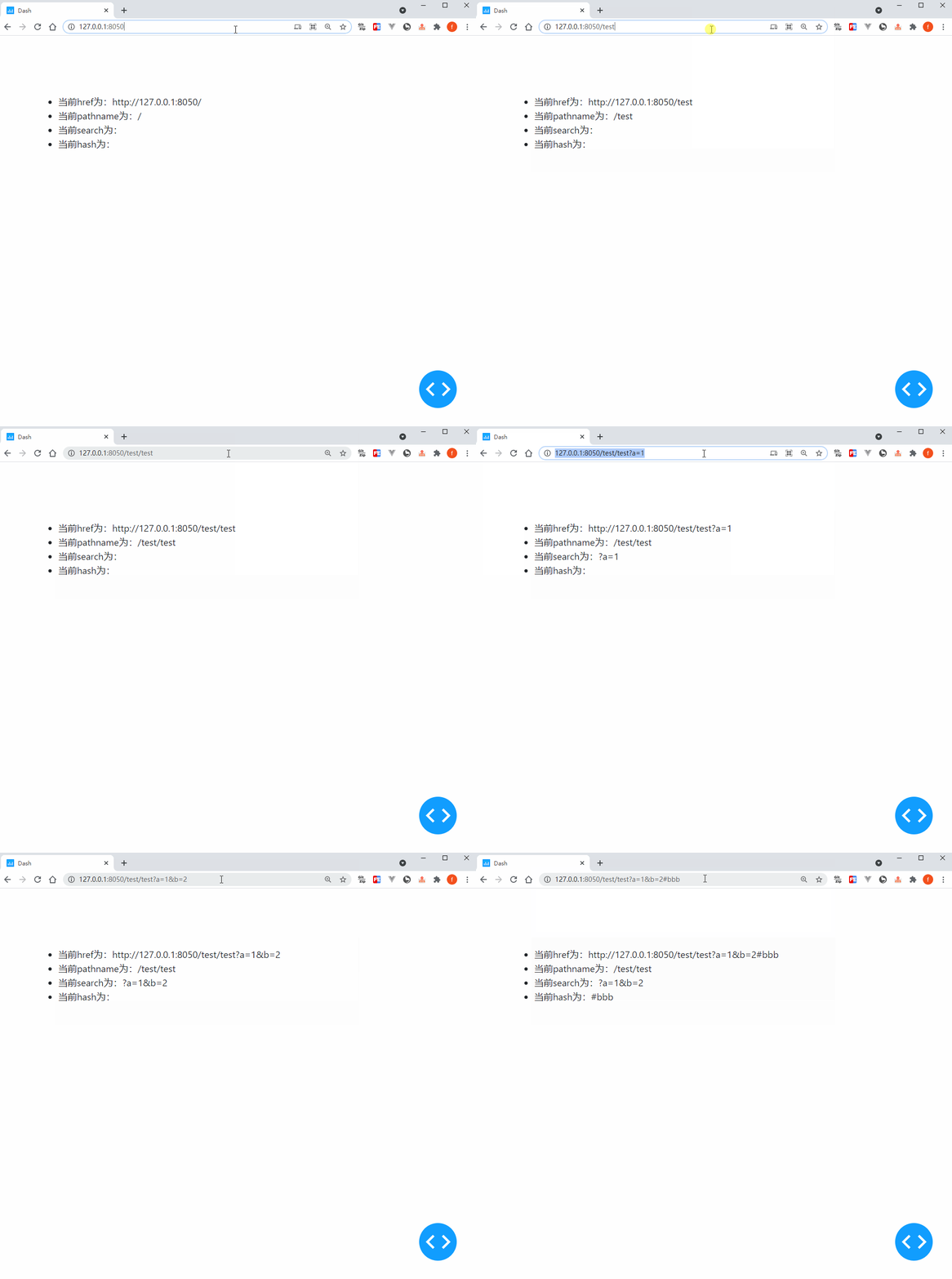 图2
图2
因此在Dash中编写多url应用的核心策略是利用埋点Location()捕获到地址栏对应信息的变化,并以这些信息作为回调函数的输入,来输出相应的页面内容变化,让我们从下面这个简单的例子中get上述这一套流程的运作方式:
❝app2.py
❞
import dash
import dash_core_components as dcc
import dash_html_components as html
import dash_bootstrap_components as dbc
from dash.dependencies import Input, Output
app = dash.Dash(__name__)
app.layout = dbc.Container(
    [
        dcc.Location(id='url', refresh=False),
        dbc.Row(
            [
                dbc.Col(
                    [
                        html.A('页面A', href='/pageA'),
                        html.Br(),
                        html.A('页面B', href='/pageB'),
                        html.Br(),
                        html.A('页面C', href='/pageC'),
                    ],
                    width=2,
                    style={
                        'backgroundColor': '#eeeeee'
                    }
                ),
                dbc.Col(
                    html.H3(id='render-page-content'),
                    width=10
                )
            ]
        )
    ],
    style={
        'paddingTop': '20px',
        'height': '100vh',
        'weight': '100vw'
    }
)
@app.callback(
    Output('render-page-content', 'children'),
    Input('url', 'pathname')
)
def render_page_content(pathname):
    if pathname == '/':
        return '欢迎来到首页'
    elif pathname == '/pageA':
        return '欢迎来到页面A'
    elif pathname == '/pageB':
        return '欢迎来到页面B'
    elif pathname == '/pageC':
        return '欢迎来到页面C'
    else:
        return '当前页面不存在!'
if __name__ == '__main__':
    app.run_server(debug=True)
 图3
图3
2.2 利用Location()实现页面重定向
在上一小节我们对dcc.Location()的基础用法进行了介绍,而它的功能可不止监听url变化这么简单,我们还可以利用它在Dash中实现「重定向」,使用方式简单一句话描述就是将Location()作为对应回调的输出(记住一定要定义id属性),这样地址栏url会在回调完成后对应跳转。
让我们通过下面这个简单的例子来get这个技巧:
❝app3.py
❞
import dash
import dash_core_components as dcc
import dash_html_components as html
import dash_bootstrap_components as dbc
from dash.dependencies import Input, Output
app = dash.Dash(__name__)
app.layout = dbc.Container(
    [
        html.Div(id='redirect-url-container'),
        dbc.Button('跳转到页面A', id='jump-to-pageA', style={'marginRight': '10px'}),
        dbc.Button('跳转到页面B', id='jump-to-pageB'),
    ],
    style={
        'paddingTop': '100px'
    }
)
@app.callback(
    Output('redirect-url-container', 'children'),
    [Input('jump-to-pageA', 'n_clicks'),
     Input('jump-to-pageB', 'n_clicks')],
)
def jump_to_target(a_n_clicks, b_n_clicks):
    ctx = dash.callback_context
    if ctx.triggered[0]['prop_id'] == 'jump-to-pageA.n_clicks':
        return dcc.Location(id='redirect-url', href='/pageA')
    elif ctx.triggered[0]['prop_id'] == 'jump-to-pageB.n_clicks':
        return dcc.Location(id='redirect-url', href='/pageB')
    return dash.no_update
if __name__ == '__main__':
    app.run_server(debug=True)
 图4
图4
2.3 用Link()实现“无缝”页面切换
你应该注意到了,在Dash中利用Location()和普通的A()部件实现跳转时,页面在跳转后会整体刷新,这会一定程度上破坏整个web应用的整体体验。
而dash_core_components中的Link()部件则是很好的替代,它的基础属性与A()无异,但额外的refresh参数默认为False,会在点击后进行Dash应用内跳转时无缝切换,页面不会整体刷新:
❝app4.py
❞
import dash
import dash_core_components as dcc
import dash_html_components as html
import dash_bootstrap_components as dbc
from dash.dependencies import Input, Output
app = dash.Dash(__name__)
app.layout = dbc.Container(
    [
        dcc.Location(id='url'),
        dcc.Link('页面A', href='/pageA', refresh=True),
        html.Br(),
        dcc.Link('页面B', href='/pageB'),
        html.Hr(),
        html.H1(id='render-page-content')
    ],
    style={
        'paddingTop': '100px'
    }
)
@app.callback(
    Output('render-page-content', 'children'),
    Input('url', 'pathname')
)
def render_page_content(pathname):
    if pathname == '/':
        return '欢迎来到首页'
    elif pathname == '/pageA':
        return '欢迎来到页面A'
    elif pathname == '/pageB':
        return '欢迎来到页面B'
    elif pathname == '/pageC':
        return '欢迎来到页面C'
    else:
        return '当前页面不存在!'
if __name__ == '__main__':
    app.run_server(debug=True)
 图5
图5
类似的功能还有dash_bootstrap_components中的NavLink(),用法与Link()相似,这里就不再赘述。
3 动手开发个人博客网站
掌握了今天的知识之后,我们来用Dash开发一个简单的个人博客网站,思路是在Location()监听url变化的前提下,后台利用网络爬虫从我的博客园Dash主题下爬取相应的网页内容,并根据用户访问来渲染出对应的文章:
❝app5.py
❞
import dash
import dash_core_components as dcc
import dash_html_components as html
import dash_bootstrap_components as dbc
import dash_dangerously_set_inner_html  # 用于直接渲染html源码字符串
from dash.dependencies import Input, Output
import re
from html import unescape
import requests
from lxml import etree
app = dash.Dash(__name__, suppress_callback_exceptions=True)
app.layout = html.Div(
    dbc.Spinner(
        dbc.Container(
            [
                dcc.Location(id='url'),
                html.Div(
                    id='page-content'
                )
            ],
            style={
                'paddingTop': '30px',
                'paddingBottom': '50px',
                'borderRadius': '10px',
                'boxShadow': 'rgb(0 0 0 / 20%) 0px 13px 30px, rgb(255 255 255 / 80%) 0px -13px 30px'
            }
        ),
        fullscreen=True
    )
)
@app.callback(
    Output('article-links', 'children'),
    Input('url', 'pathname')
)
def render_article_links(pathname):
    response = requests.get('https://www.cnblogs.com/feffery/tag/Dash/',
                            headers={
                                'User-Agent': 'Mozilla/5.0 (Windows NT 10.0; Win64; x64) AppleWebKit/537.36 (KHTML, like Gecko) Chrome/89.0.4389.114 Safari/537.36'
                            })
    tree = etree.HTML(response.text)
    posts = [
        (href, title.strip())
        for href, title in zip(
            tree.xpath("//div[@class='postTitl2']/a/@href"),
            tree.xpath("//div[@class='postTitl2']/a/span/text()")
        )
    ]
    return [
        html.Li(
            dcc.Link(title, href=f'/article-{href.split("/")[-1]}', target='_blank')
        )
        for href, title in posts
    ]
@app.callback(
    Output('page-content', 'children'),
    Input('url', 'pathname')
)
def render_article_content(pathname):
    if pathname == '/':
        return [
            html.H2('博客列表:'),
            html.Div(
                id='article-links',
                style={
                    'width': '100%'
                }
            )
        ]
    elif pathname.startswith('/article-'):
        response = requests.get('https://www.cnblogs.com/feffery/p/%s.html' % re.findall('\d+', pathname)[0])
        tree = etree.HTML(response.text)
        return (
            html.H3(tree.xpath("//title/text()")[0].split(' - ')[0]),
            html.Em('作者:费弗里'),
            dash_dangerously_set_inner_html.DangerouslySetInnerHTML(
                unescape(etree.tostring(tree.xpath('//div[@id="cnblogs_post_body"]')[0]).decode())
            )
        )
    return dash.no_update
if __name__ == '__main__':
    app.run_server(debug=True)
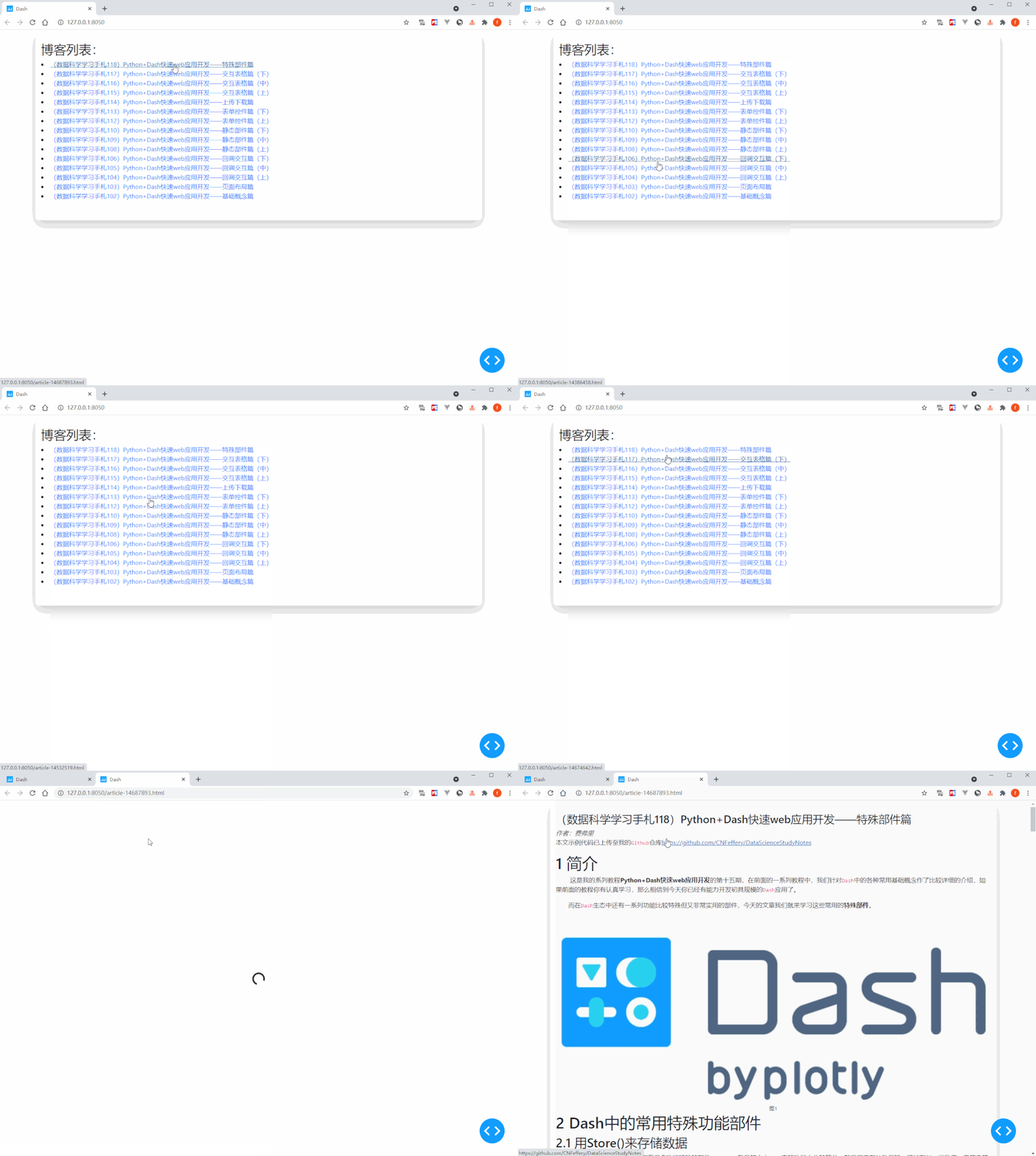 图6
图6