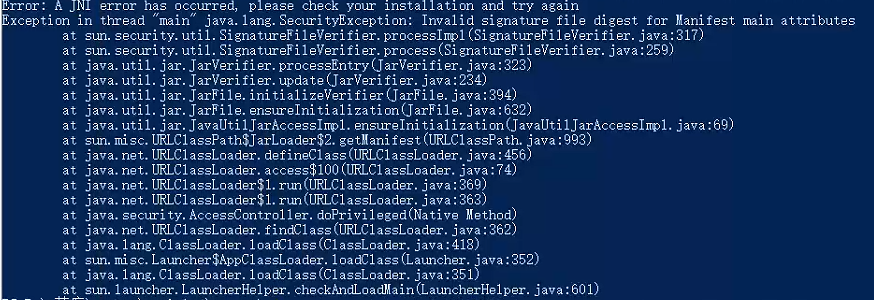
 你好,请问我使用视觉智能平台java的maven引入imageseg20191230的1.0.5,然后运行测试的时候报错。不引入就不会保存。sdk有什么问题吗?
版权声明:本文内容由阿里云实名注册用户自发贡献,版权归原作者所有,阿里云开发者社区不拥有其著作权,亦不承担相应法律责任。具体规则请查看《阿里云开发者社区用户服务协议》和《阿里云开发者社区知识产权保护指引》。如果您发现本社区中有涉嫌抄袭的内容,填写侵权投诉表单进行举报,一经查实,本社区将立刻删除涉嫌侵权内容。
要在Java项目中使用阿里云视觉智能平台的图像分割服务,您需要引入以下Maven依赖:
<dependency>
    <groupId>com.aliyun</groupId>
    <artifactId>aliyun-java-sdk-core</artifactId>
    <version>4.5.3</version>
</dependency>
<dependency>
    <groupId>com.aliyun</groupId>
    <artifactId>aliyun-java-sdk-imageseg20191230</artifactId>
    <version>1.0.5</version>
</dependency>
其中,aliyun-java-sdk-core是阿里云Java SDK的核心依赖,aliyun-java-sdk-imageseg20191230是阿里云视觉智能平台的图像分割服务依赖,1.0.5是该服务的版本号。
您可以在pom.xml文件中添加以上依赖,然后使用Maven构建项目。在代码中,您可以按照以下方式创建ImageSeg20191230Client实例,并调用图像分割服务:
import com.aliyuncs.DefaultAcsClient;
import com.aliyuncs.exceptions.ClientException;
import com.aliyuncs.exceptions.ServerException;
import com.aliyuncs.imageseg20191230.model.SegmentBodyRequest;
import com.aliyuncs.imageseg20191230.model.SegmentBodyResponse;
import com.aliyuncs.imageseg20191230.model.SegmentCommonImageRequest;
import com.aliyuncs.imageseg20191230.model.SegmentCommonImageResponse;
import com.aliyuncs.imageseg20191230.model.SegmentSkyRequest;
import com.aliyuncs.imageseg20191230.model.SegmentSkyResponse;
import com.aliyuncs.profile.DefaultProfile;
import com.aliyuncs.profile.IClientProfile;
import com.aliyuncs.visionai_common.model.Result;

public class ImageSegDemo {
    public static void main(String[] args) {
        String accessKeyId = "your_access_key_id";
        String accessKeySecret = "your_access_key_secret";
        String regionId = "cn-shanghai";

        // 创建AcsClient实例
        IClientProfile profile = DefaultProfile.getProfile(regionId, accessKeyId, accessKeySecret);
        DefaultAcsClient client = new DefaultAcsClient(profile);

        // 创建分割人像请求
        SegmentBodyRequest bodyRequest = new SegmentBodyRequest();
        bodyRequest.setImageURL("https://your-image-url");
        try {
            SegmentBodyResponse bodyResponse = client.getAcsResponse(bodyRequest);
            Result result = bodyResponse.getData();
            System.out.println(result.getUrl());
        } catch (ServerException e) {
            e.printStackTrace();
        } catch (ClientException e) {
            e.printStackTrace();
        }

        // 创建分割通用图像请求
        SegmentCommonImageRequest commonImageRequest = new SegmentCommonImageRequest();
        commonImageRequest.setImageURL("https://your-image-url");
        try {
            SegmentCommonImageResponse commonImageResponse = client.getAcsResponse(commonImageRequest);
            Result result = commonImageResponse.getData();
            System.out.println(result.getUrl());
        } catch (ServerException e) {
            e.printStackTrace();
        } catch (ClientException e) {
            e.printStackTrace();
        }

        // 创建分割天空请求
        SegmentSkyRequest skyRequest = new SegmentSkyRequest();
        skyRequest.setImageURL("https://your-image-url");
        try {
            SegmentSkyResponse skyResponse = client.getAcsResponse(skyRequest);
            Result result = skyResponse.getData();
            System.out.println(result.getUrl());
        } catch (ServerException e) {
            e.printStackTrace();
        } catch (ClientException e) {
            e.printStackTrace();
        }
    }
}
以上代码演示了如何使用Java SDK调用阿里云视觉智能平台的图像分割服务,并获取分割结果的URL。在实际使用中,您需要将accessKeyId和accessKeySecret替换为您的阿里云账号的AccessKey ID和AccessKey Secret,将regionId替换为您选择的地域ID,将imageURL替换为您要分割的图像的URL。
SDK没问题的,你这样安装的嘛? com.aliyun imageseg20191230 1.0.5 ,此回答整理自钉群“阿里云视觉智能开放平台咨询1群”