ActionMappingManager读取配置文件
在ActionMappingManager中,应该读取配置文件,然后把信息全部封装到里边去…
/**
 * Created by ozc on 2017/4/26.
 *
 * 该类管理着全部的Action
 *
 * 要管理全部的Action,就需要用一个容器来装载这些Action
 *
 * 选择Map集合是最合适的,可以通过key来得到Action,key就是<action name=><action/>中的name属性
 *
 */
public class ActionMappingManager {
    private Map<String, ActionMapping> allAction ;
    public ActionMappingManager() {
        this.allAction = new HashMap<>();
        //读取配置文件信息
        init();
    }
    public void init() {
        /********通过DOM4J读取配置文件信息*********/
        try {
            //得到解析器
            SAXReader saxReader = new SAXReader();
            //读取在类目录下的mystruts.xml文件
            InputStream stream = ActionMappingManager.class.getClassLoader().getResourceAsStream("mystruts.xml");
            //得到代表XML文件的Document对象
            Document document = saxReader.read(stream);
            //通过XPATH直接得到所有的Action节点
            List list = document.selectNodes("//action");
            //得到每个Action节点
            for (int i = 0; i < list.size(); i++) {
                Element action = (Element) list.get(i);
                //把得到每个Action的节点信息封装到ActionMapping中
                ActionMapping actionMapping = new ActionMapping();
                String name = action.attributeValue("name");
                String method = action.attributeValue("method");
                String className = action.attributeValue("className");
                actionMapping.setName(name);
                actionMapping.setMethod(method);
                actionMapping.setClassName(className);
                //得到action节点下的所有result节点
                List results = action.elements("result");
                //得到每一个result节点
                for (int j = 0; j < results.size(); j++) {
                    Element result = (Element) results.get(j);
                    //把得到每个result节点的信息封装到Results中
                    Results results1 = new Results();
                    //得到节点的信息
                    String name1 = result.attributeValue("name");
                    String type = result.attributeValue("type");
                    String page = result.getText();
                    results1.setName(name1);
                    results1.setType(type);
                    results1.setPage(page);
                    //把result节点添加到ActionMapping的集合中
                    actionMapping.getResults().put(name1, results1);
                }
                //最后把得到每个ActionMapping的信息添加到ActionMappingManager中
                allAction.put(name, actionMapping);
            }
        } catch (DocumentException e) {
            new RuntimeException("初始化的时候出错了!“" + e);
        }
    }
    //注意:外界都是通过name来得到对应的Action的,并不会获取得到整个Manager
    public ActionMapping getActionMapping(String name) {
        return allAction.get(name);
    }
}
ActionServlet
使用init()方法只加载创建一个ActionManagerMapping对象,并设置在Web容器启动了该Servlet就启动
/**
 * Created by ozc on 2017/4/26.
 *
 *
 * Web容器一启动的时候,该类就应该加载了,在web.xml文件中配置onloadStart
 */
public class ActionServlet extends HttpServlet {
    //该对象封装了所有的XML信息
    ActionMappingManager actionMappingManager ;
    @Override
    public void init() throws ServletException {
        //让ActionMappingManager对象只有一个!
        actionMappingManager = new ActionMappingManager();
    }
    protected void doPost(HttpServletRequest request, HttpServletResponse response) throws ServletException, IOException {
        try {
            //得到用户的uri
            String uri = request.getRequestURI();
            //截取uri的关键部分-----截完应该是login
            uri = uri.substring(uri.lastIndexOf("/") + 1, uri.lastIndexOf("."));
            //通过uri得到配置文件中的action信息
            ActionMapping actionMapping = actionMappingManager.getActionMapping(uri);
            //得到action的类名,方法名
            String className = actionMapping.getClassName();
            String method = actionMapping.getMethod();
            //通过反射创建出Action的对象,调用对应的方法
            Class t = Class.forName(className);
            Object o = t.newInstance();
            //注意:这里的参数是接口的class,不是单纯的request的class,单纯的class是实现类
            Method m = t.getMethod(method, HttpServletRequest.class, HttpServletResponse.class);
            //调用方法,得到标记
            String returnFlag = (String) m.invoke(o, request, response);
            //通过标记得到result的具体信息
            Results result = actionMapping.getResults().get(returnFlag);
            String type = result.getType();
            String page = result.getPage();
            //判断是重定向还是转发,为空就是转发,反则是重定向
            if (type == null) {
                response.sendRedirect(page);
            } else {
                request.getRequestDispatcher(request.getContextPath() + page).forward(request, response);
            }
        } catch (Exception e) {
            e.printStackTrace();
        }
    }
    protected void doGet(HttpServletRequest request, HttpServletResponse response) throws ServletException, IOException {
        this.doPost(request, response);
    }
}
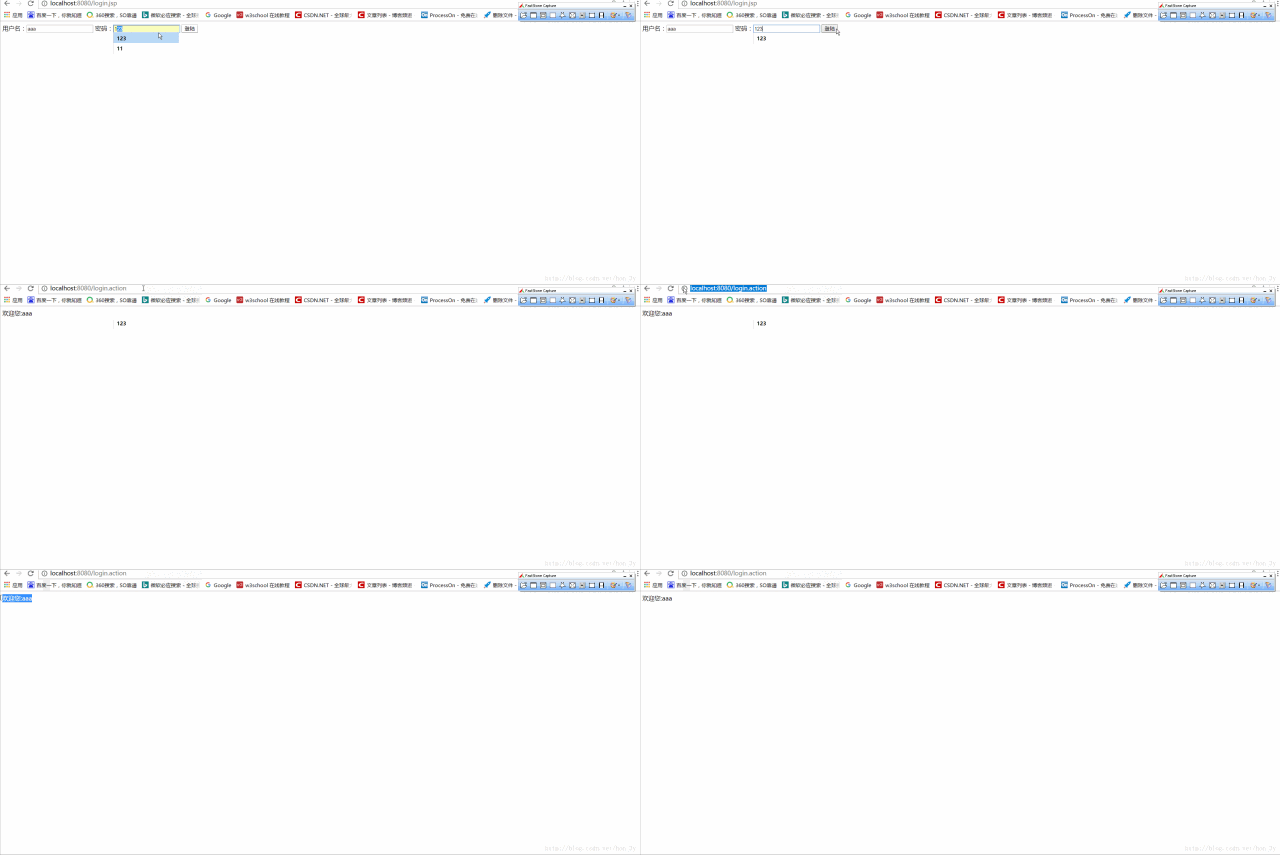
具体的Action的方法只要返回一个标识量即可,我们通过标识量来得到具体的跳转页面url和跳转的方法的。。。
效果:
自定义MyStruts总结:
由于传统web的Controller模块存在弊端:
- 一些功能重复使用,代码过于重复了。
- 跳转的页面写死了。改变需求的时候需要更改源代码
本博文主要模拟Struts的开发流程
- 使用一个ActionServlet核心控制器来管理全部的Web请求,写XML配置文件,读取配置文件。
- ActionMapping封装了Action的基本信息,在XML配置文件中就是读取Action的基本信息,封装到JavaBean上,最后使用ActionMapping类的集合统一管理起来。
- 当用户访问的时候,我们根据url也就是Action的名称反射出对应的类,来对其进行操作。
- 再根据XML文件的配置信息来确定跳转方法、跳转的url
我们现在学习的是Struts2,其实Struts1和Struts2在技术上是没有很大的关联的。 Struts2其实基于Web Work框架的,只不过它的推广没有Struts1好,因此就拿着Struts这个名气推出了Struts2框架。
因此,学习Struts2的时候,不了解Struts1是没有任何关系的。
在前面,已经说明了为什么要引入Struts框架,其实就是为了提高开发效率…
Struts2框架预先实现了一些功能:
- 请求数据自动封装
- 文件上传的功能
- 对国际化功能的简化
- 数据效验功能…….等等
Struts2开发步骤
我们就直接来讲解Struts2的开发步骤是什么吧….在了解它的细节之前,先要把配置环境搭好!
引入jar文件
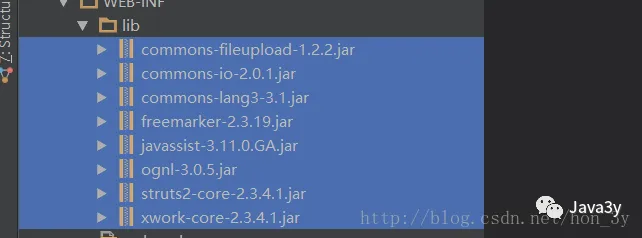
完整的struts中的jar包有80多个,我们日常开发是不需要那么多个的。一般我们导入的jar包有8个:
- commons-fileupload-1.2.2.jar 【文件上传相关包】
- commons-io-2.0.1.jar【文件上传相关包】
- struts2-core-2.3.4.1.jar 【struts2核心功能包】
- xwork-core-2.3.4.1.jar 【Xwork核心包】
- ognl-3.0.5.jar 【Ognl表达式功能支持表】
- commons-lang3-3.1.jar 【struts对java.lang包的扩展】
- freemarker-2.3.19.jar 【struts的标签模板库jar文件】
- javassist-3.11.0.GA.jar 【struts对字节码的处理相关jar】
配置web.xml
在web.xml中配置的过滤器,其实就是在为struts进行初始化工作
值得注意的是:如果该web.xml配置了多个fileter,那么struts的filter需要在最后面!
<!-- 引入struts核心过滤器 -->
    <filter>
        <filter-name>struts2</filter-name>
        <filter-class>org.apache.struts2.dispatcher.ng.filter.StrutsPrepareAndExecuteFilter</filter-class>
    </filter>
    <filter-mapping>
        <filter-name>struts2</filter-name>
        <url-pattern>/*</url-pattern>
    </filter-mapping>
开发Action
开山篇我们已经说了,Servlet的业务代码,我们都使用Action来代替…Action类一般继承着ActionSupport
Action类也叫动作类,处理请求的类。
public class HelloAction extends ActionSupport {
    @Override
    public String execute() throws Exception {
        System.out.println("helloworld");
        return "success";
    }
}
至于execute()方法是什么,我们先不要去管它,为啥要返回一个String,我们也不要去管它….只要记住开发步骤,并且,我们的Action类是要继承ActionSupport类的
配置struts.xml
至于配置struts.xml,我们可以在文件中找到相对应的模版代码的…最终修改成下面这个样子就行了:
<?xml version="1.0" encoding="UTF-8" ?>
        <!DOCTYPE struts PUBLIC
                "-//Apache Software Foundation//DTD Struts Configuration 2.0//EN"
                "http://struts.apache.org/dtds/struts-2.0.dtd">
<struts>
<package name="hello" extends="struts-default">
    <action name="hello" class="action.HelloAction" method="execute">
        <result name="success">/index.jsp</result>
    </action>
</package>
</struts>
看完上面的配置文件,是非常像我们开山篇写的struts框架的配置文件的….
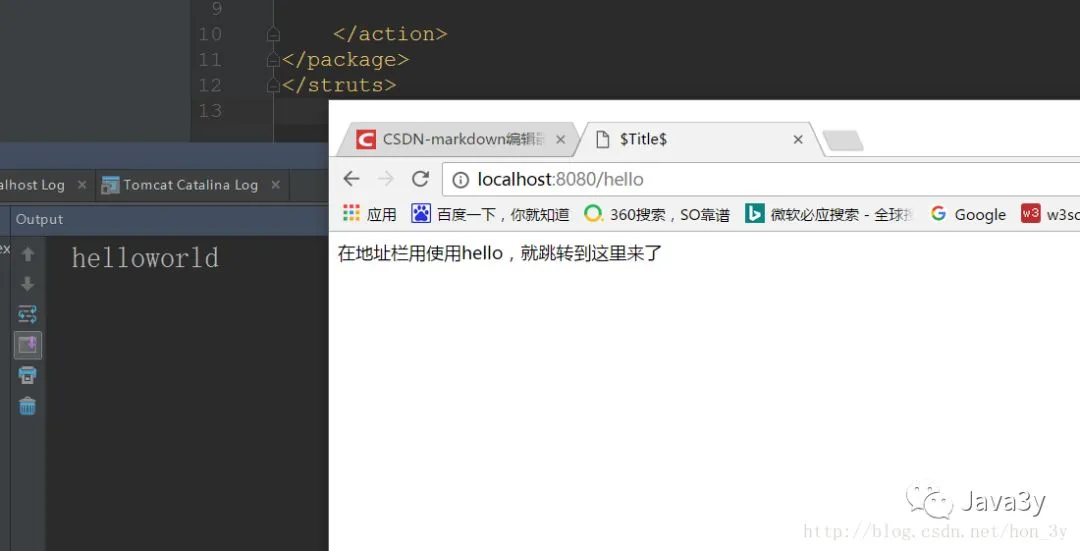
效果:
在地址栏中直接输入hello,就跳转到index.jsp页面了。并且,execute()中的语句被执行了…