2、Decoration介绍
Flutter的Decoration可以设置:背景色 背景图 边框 圆角 阴影 渐变色 的等属性,有点像android里面的shape,Decoration 是基类,它的子类有下面这些
BoxDecoration:
实现边框、圆角、阴影、形状、渐变、背景图像
ShapeDecoration:
实现四边分别指定颜色和宽度、底部线、矩形边色、圆形边色、体育场(竖向椭圆)、 角形(八边角)边色
FlutterLogoDecoration:
Flutter图片
UnderlineTabindicator:
下划线
这里先介绍常用的 BoxDecoration,构造方法
const BoxDecoration({
  this.color,//背景色
  this.image,//图片
  this.border,//描边
  this.borderRadius,//圆角大小
  this.boxShadow,//阴影
  this.gradient,//渐变色
  this.backgroundBlendMode,//图像混合模式
  this.shape = BoxShape.rectangle,//形状,BoxShape.circle和borderRadius不能同时使用
})
boxShadow 阴影
color - 阴影颜色
offset - 阴影相偏移量
blurRadius - 高斯模糊数值
spreadRadius - 阴影膨胀量,这个值我是真不知有啥用,没场景啊,一般不写这个值
gradient渐变
支持2种渐变:LinearGradient线性渐变 和 RadialGradient扫描渐变
LinearGradient :
begin - 渐变开始的位置
end - 渐变结束的位置
colors - 渐变颜色,是数组
stops - 值列表,装有0.0到1.0的数值
tileMode - 平铺模式
shape形状
rectangle是矩形,BoxShape.circle是圆形,BoxShape.circle和borderRadius不能一起使用
3、代码测试
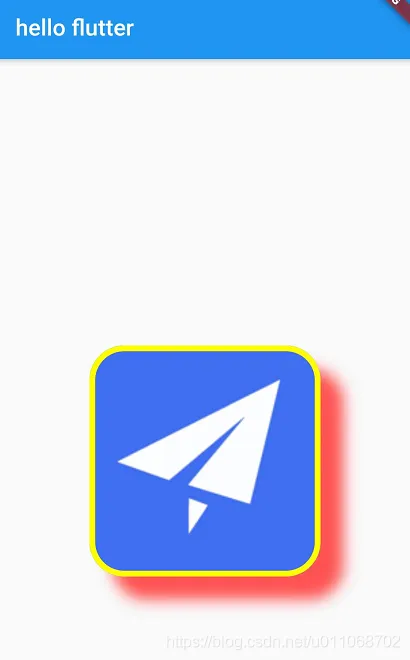
效果1测试代码
  @override
  Widget build(BuildContext context) {
      return MaterialApp(
          title: 'open url',
          home: Scaffold(
            appBar: AppBar(
              // Here we take the value from the MyHomePage object that was created by
              // the App.build method, and use it to set our appbar title.
              title: Text('hello flutter'),
            ),
            body: Center(
              child: DecoratedBox(
//              padding: EdgeInsets.all(16),
//            padding: EdgeInsets.fromLTRB(10, 20, 30, 40),
//            padding: EdgeInsets.only(left: 10, right: 30),
                decoration: BoxDecoration(
                  // 背景色
                    color: Colors.lightBlueAccent,
                    // 边框,
                    border: Border.all(color: Colors.yellowAccent, style: BorderStyle.solid, width: 5),
                    // 背景图
                    image: new DecorationImage(
                        image: new NetworkImage(
                            'https://ss0.bdstatic.com/70cFvHSh_Q1YnxGkpoWK1HF6hhy/it/u=1484037605,2864708693&fm=11&gp=0.jpg'),
                        fit: BoxFit.cover
                    ),
                    borderRadius: BorderRadius.all(Radius.circular(30)),
                    boxShadow:[
                      BoxShadow(
                        color: Colors.redAccent,
                        offset: Offset(20, 20),
                        blurRadius: 10,
                      ),
                    ]
                ),
                child: Container(
                  height: 200,
                  width: 200,
                ),
              ),
            ),
          ),
      );
  }
}
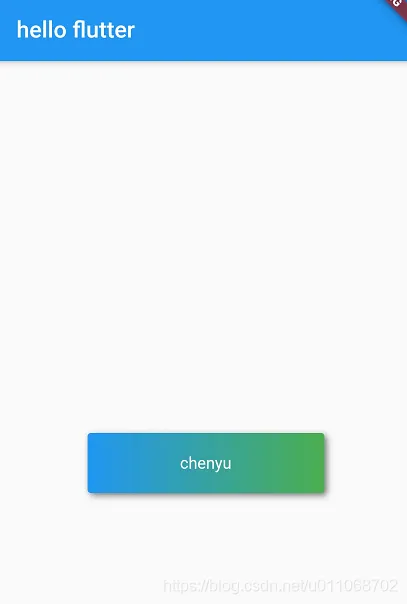
效果2测试代码
  @override
  Widget build(BuildContext context) {
      return MaterialApp(
          title: 'open url',
          home: Scaffold(
            appBar: AppBar(
              // Here we take the value from the MyHomePage object that was created by
              // the App.build method, and use it to set our appbar title.
              title: Text('hello flutter'),
            ),
            body: Center(
              child: DecoratedBox(
//              padding: EdgeInsets.all(16),
//            padding: EdgeInsets.fromLTRB(10, 20, 30, 40),
//            padding: EdgeInsets.only(left: 10, right: 30),
                decoration: BoxDecoration(
                  // 背景色
                    gradient: LinearGradient(colors:[Colors.blue, Colors.green]), //背景渐变
                    color: Colors.lightBlueAccent,
                    // 背景图
                    borderRadius: BorderRadius.all(Radius.circular(3)),
                    boxShadow: [ //阴影
                      BoxShadow(
                          color:Colors.black54,
                          offset: Offset(2.0,2.0),
                          blurRadius: 4.0
                      )
                    ]
                ),
                child: Padding(
                    padding: EdgeInsets.symmetric(horizontal: 80.0, vertical: 18.0),
                    child: Text("chenyu", style: TextStyle(color: Colors.white),
                  ),
                )
              ),
            ),
          ),
      );
  }
}
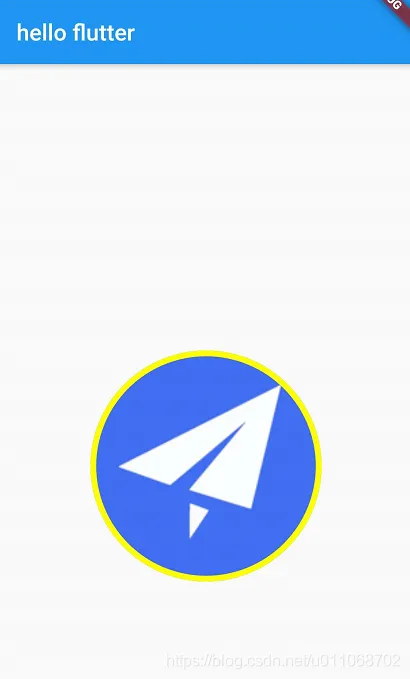
效果3测试代码
  @override
  Widget build(BuildContext context) {
      return MaterialApp(
          title: 'open url',
          home: Scaffold(
            appBar: AppBar(
              // Here we take the value from the MyHomePage object that was created by
              // the App.build method, and use it to set our appbar title.
              title: Text('hello flutter'),
            ),
            body: Center(
              child: DecoratedBox(
//              padding: EdgeInsets.all(16),
//            padding: EdgeInsets.fromLTRB(10, 20, 30, 40),
//            padding: EdgeInsets.only(left: 10, right: 30),
                decoration: BoxDecoration(
                  // 背景色
                    border: Border.all(
                        color: Colors.yellowAccent, style: BorderStyle.solid, width: 5),
                    // 背景图
                    image: new DecorationImage(
                        image: new NetworkImage(
                            'https://ss0.bdstatic.com/70cFvHSh_Q1YnxGkpoWK1HF6hhy/it/u=1484037605,2864708693&fm=11&gp=0.jpg'),
                        fit: BoxFit.cover
                    ),
                    shape: BoxShape.circle,
                ),
                child: Container(
                  width: 200,
                  height: 200,
                ),
              ),
            ),
          ),
      );
  }
}