Original article: https://yq.aliyun.com/articles/137060
For task state management in a task scheduling system, the database usually stores the process and state of task scheduling, and controls the lock of a task. Advisory Lock is very easy to implement for a small number of tasks. But how can we design a task state management database for processing hundreds of millions or even several billion tasks every hour?
In a task scheduling platform for multiple users (such as, cloud task scheduling platform for all tenants), a major challenge is to write the task data. Updating the task state (massive, each task is updated at least once) is another challenge.
Massive Task Scheduling Database Design
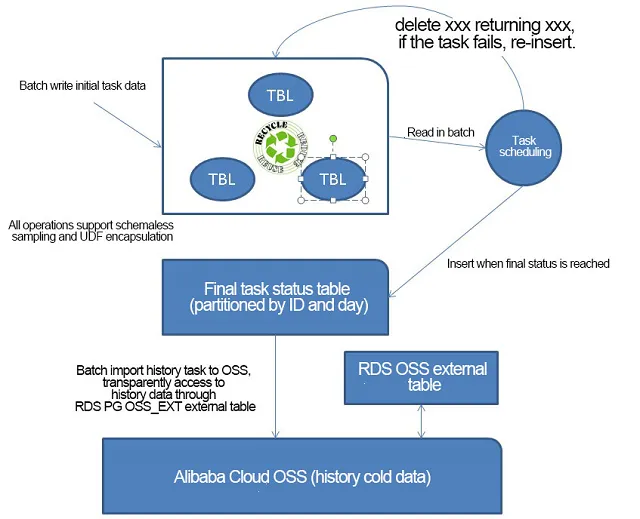
Cloud task scheduling has the following features:
- There is no relation between users' tasks. During scheduling, there may be a dependency on a single user's task.
- It has massive data.
- Tasks are in a final stable state. After the tasks are stable, their records stay unchanged.
Sample PostgreSQL design has following features:
- After generating the task data, we write it into a task processing table.
- We can design the task processing table via rotate (for example, a rotate table once every hour). As the data completed processing is directly cleaned, we don’t have to vacuum it.
- Regarding partitioning, the task processing table samples a user-level partition, which is more refining (reducing redundant scanning) when we get a task for processing.
- When the task reaches the final state, delete it from the task running table and write it into the history table.
- Early history tables are deleted from RDS PG, and written into Alibaba Cloud OSS. We can access this historical data via the RDS PG OSS external table interface.
Demo Design
1.Initial task table for storing tasks generated by a user.
create table task_init (    -- Initial task table
  uid  int,        -- User ID
  ptid serial8,    -- Parent task ID
  tid serial,      -- Subtask ID
  state int default 1,    -- Task state: 1 indicates the initial state; -1 indicates being processed; 0 indicates processing completed
  retry int default -1,   -- Number of retries
  info text,              -- Other information
  ts timestamp            -- Time
);
2.Task history table used for storing the final state of a task.
create table task_hist (    -- Task history table
  uid  int,   -- User ID
  ptid int8,  -- Parent task ID
  tid int,    -- Subtask ID
  state int default 1,    -- Task state: 1 indicates the initial state; -1 indicates being processed; 0 indicates processing completed
  retry int default -1,   -- Number of retries
  info text,              -- Other information
  ts timestamp      -- Time
);
3.To simplify the test, we will make the partitions by the user ID.
(For the rotate design and multi-level partition design mentioned above, refer to the articles mentioned at the end of this document.)
do language plpgsql
$$

declare
begin
  for i in 1..1000 loop
    execute 'create table task_init_'||i||' ( like task_init including all)';
    execute 'create table task_hist_'||i||' ( like task_hist including all)';
  end loop;
end;

$$
;
4.To facilitate the test, use the schemaless design, generate a user task's initial data, and write and put it in the plpgsql logic.
create or replace function ins_task_init(
  uid int,
  info text,
  ts timestamp
)  returns void as
$$

declare
  target name;
begin
  target := format('%I', 'task_init_'||uid);
  execute format('insert into %I (uid,info,ts) values (%L,%L,%L)', target, uid,info,ts);
end;

$$
 language plpgsql strict;
5.Run a task by the following steps.
- Read a task from a task table.
- The user executes the task.
- Feedback the execution result, update the table task_init for unsuccessfully executed tasks, and migrate the data from task_init to task_hist for successfully executed (and ended) tasks.
In order to test the database's performance, we need to write the logic for the three steps into plpgsql. At the same time, we have to use the delete limit feature in batch to take out several tasks at once.
We have used the CTID line number to a position here to achieve optimal performance. In this way, we do not have to use an index and can get better performance.
We have used Advisory Lock so that a single user has no parallel tasks (parallel is allowed in the actual business).
We have not tested the update state here. A part of task_init is updated (compared with insert and delete, its proportion is small and can be ignored) when the task fails.
autovacuum of the table task_init is disabled, and processing is made via rotate.
create or replace function run_task(
  uid int,
  batch int
) returns void as
$$

declare
  target1 name;
  target2 name;
begin
  target1 := format('%I', 'task_init_'||uid);
  target2 := format('%I', 'task_hist_'||uid);
  execute format('with t1 as (select ctid from %I where pg_try_advisory_xact_lock(%L) limit %s) , t2 as (delete from %I where ctid = any (array(select ctid from t1)) returning *)  insert into %I select * from t2;', target1, uid, batch, target1, target2);
end;

$$
 language plpgsql strict;
Test the Decomposed Operations.
1.Write the initial task
postgres=# select ins_task_init(1,'test',now()::timestamp);
 ins_task_init
---------------

(1 row)

postgres=# select ins_task_init(1,'test',now()::timestamp);
 ins_task_init
---------------

(1 row)
2.Run the task
postgres=# select run_task(1,100);
 run_task
----------

(1 row)
3.View whether the task ends and migrate it to the history table
postgres=# select * from task_init_1;
 uid | ptid | tid | state | retry | info | ts
-----+------+-----+-------+-------+------+----
(0 rows)

postgres=# select * from task_hist_1;
 uid | ptid | tid | state | retry | info |             ts
-----+------+-----+-------+-------+------+----------------------------
   1 |    1 |   1 |     1 |    -1 | test | 2017-07-20 15:26:32.739766
   1 |    2 |   2 |     1 |    -1 | test | 2017-07-20 15:26:33.233469
(2 rows)
Performance Pressure Test
1.Generate the performance of a task
vi ins.sql
\set uid random(1,1000)
select ins_task_init(:uid,'test',now()::timestamp);

pgbench -M prepared -n -r -P 1 -f ./ins.sql -c 32 -j 32 -T 120
query mode: prepared
number of clients: 64
number of threads: 64
duration: 360 s
number of transactions actually processed: 86074880
latency average = 0.268 ms
latency stddev = 0.295 ms
tps = 239079.558174 (including connections establishing)
tps = 239088.708200 (excluding connections establishing)
script statistics:
 - statement latencies in milliseconds:
         0.001  \set uid random(1,1000)
         0.267  select ins_task_init(:uid,'test',now()::timestamp);

postgres=# select count(*) from task_init_1;
 count
-------
 88861
(1 row)

postgres=# select count(*) from task_init_2;
 count
-------
 88196
(1 row)

....

postgres=# select count(*) from task_init_1000;
 count
-------
 88468
(1 row)
2. Run the performance of the task
(obtain 10,000 tasks at once in a batch)
vi run.sql
\set uid random(1,1000)
select run_task(:uid,10000);

pgbench -M prepared -n -r -P 1 -f ./run.sql -c 32 -j 32 -T 120

query mode: prepared
number of clients: 32
number of threads: 32
duration: 120 s
number of transactions actually processed: 3294
latency average = 1171.228 ms
latency stddev = 361.056 ms
tps = 27.245606 (including connections establishing)
tps = 27.247560 (excluding connections establishing)
script statistics:
 - statement latencies in milliseconds:
         0.003  \set uid random(1,1000)
      1171.225  select run_task(:uid,10000);

postgres=# select count(*) from task_init_1000;
 count
-------
 18468
(1 row)

postgres=# select count(*) from task_hist_1000;
 count
--------
 224207
(1 row)
Individual Data Test
1.Generate 239,000 tasks per second
2.Consume 272,000 tasks per second
Test Data Running During Task Generation and Consumption
- Generate 168,000 tasks per second
- Consume more than 168,000 tasks per second
No tasks are accumulated.
Conclusion
PostgreSQL plays an important role in the cloud massive task scheduling system.
A single PostgreSQL instance is sufficient to process task generation and consumption every hour.
The task scheduling system is more complex than MQ. Similar to the MQ superset, if you need MQ, you can use RDS PostgreSQL. Its performance indicator is better than that in the test above.