最近公司要求将IDC的APP日志备份到公司办公网内部,思前想后,结合以前学过的知识,决定用rsync直接推送,即从APP服务器上直接将日志推送到公司内网。这样避免了在生产服务器上额外安装更多软件而且只需要进行简单的配置,从运维的角度看简化了排错步骤,同时降低了安全风险,简要网络拓扑图如下:
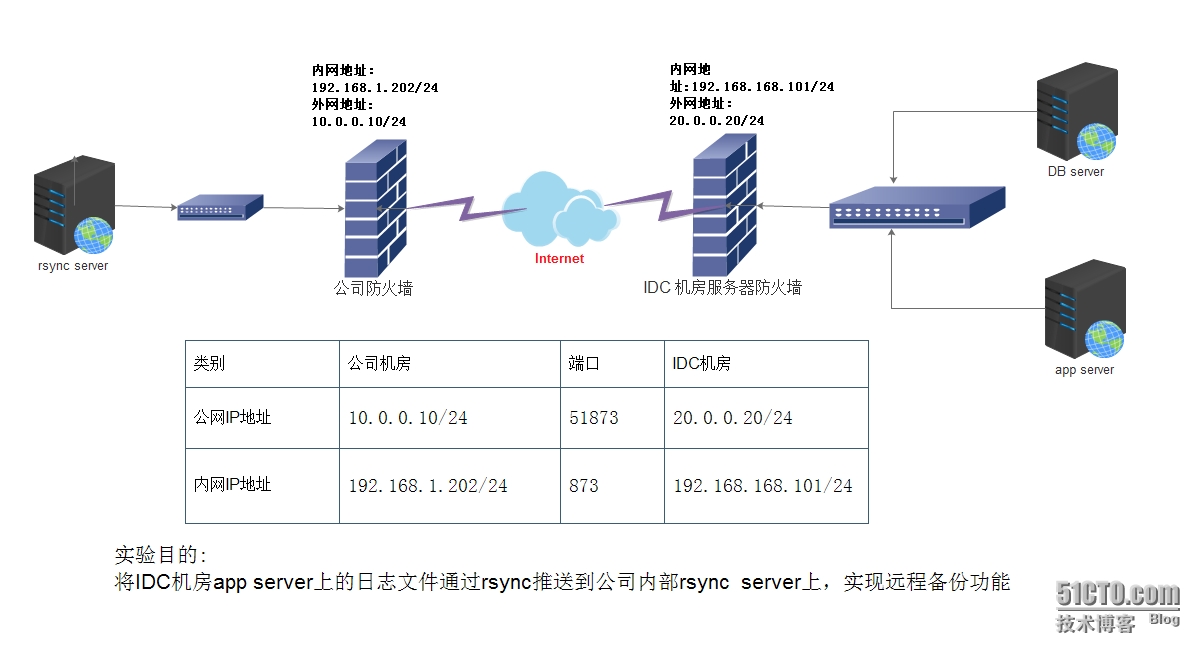
提示:办公区服务器192.168.1.202上的rsync服务端口为873,映射到公网10.0.0.10上的端口为51873
实验环境
IDC机房内网服务器:
|
1
2
3
4
5
6
7
8
9
10
11
|
[root@server101 ~]
# cat /etc/redhat-release
CentOS release 6.4 (Final)
[root@server101~]
# uname -m
x86_64
[root@Fabric-64 ~]
[root@server101 ~]
# uname -r
2.6.32-358.el6.x86_64
[root@server101 ~]
#
[root@server101 ~]
#ifconfig eth0
eth0 Link encap:Ethernet HWaddr 00:50:56:90:A1:DA
inet addr:192.168.168.101 Bcast:192.168.168.255 Mask:255.255.255.0
|
公司办公区机房内部服务器:
|
1
2
3
4
5
6
7
8
9
10
11
|
[root@server202 ~]
# cat /etc/redhat-release
CentOS release 6.4 (Final)
[root@server202~]
# uname -m
x86_64
[root@Fabric-64 ~]
[root@server202 ~]
# uname -r
2.6.32-358.el6.x86_64
[root@server202 ~]
#
[root@server202 ~]
#ifconfig eth0
eth0 Link encap:Ethernet HWaddr 00:50:56:90:A1:DA
inet addr:192.168.1.202 Bcast:192.168.168.255 Mask:255.255.255.0
|
说明:这里规定公司办公区服务器作为rsync的服务端,所以rsync的主服务程序运行在192.268.1.202上,数据流向是从IDC机房内部服务器到办公网内部服务器
rsync服务端进行配置
①rsync服务配置文件如下:
|
1
2
3
4
5
6
7
8
9
10
11
12
13
14
15
16
17
18
19
20
|
[root@server1-202 ~]
# vim /etc/rsyncd.conf
#rsync_config
uid = www
gid = www
use chroot = no
max connections = 200
timeout = 300
pid
file
=
/var/run/rsyncd
.pid
lock
file
=
/var/run/rsync
.lock
log
file
=
/var/log/rsyncd
.log
[datacenter]
path =
/data/datacenter/apps/approval
ignore errors
read
only =
false
list =
false
#hosts allow = 0.0.0.0/24
#hosts deny = 0.0.0.0/32
auth
users
= rsync_backup
secrets
file
=
/etc/rsync
.password
[root@server1-202 ~]
#
|
②密码文件内容如下:
|
1
2
3
|
[root@server1-202 ~]
# cat /etc/rsync.password
rsync_backup:123456
[root@server1-202 ~]
#
|
③密码文件权限设置为600:
|
1
2
3
4
|
[root@server1-202 ~]
# chmod 600 /etc/rsync.password
[root@server1-202 ~]
# ll /etc/rsync.password
-rw------- 1 root root 23 Nov 6 10:57
/etc/rsync
.password
[root@server1-202 ~]
#
|
④以守护进程的模式启动rsync(daemon模式)
|
1
2
3
4
5
6
7
|
[root@server1-202 ~]
# rsync --daemon --config=/etc/rsyncd.conf
[root@server1-202 ~]
#
[root@server1-202 ~]
#ps -ef|grep rsync
root 18170 1 0 12:27 ? 00:00:00
rsync
--daemon --config=
/etc/rsyncd
.conf
root 19989 19916 0 16:51 pts
/0
00:00:00
grep
rsync
[root@server1-202 ~]
#
|
客户端安装配置
配置之前查看是否安装rsync
|
1
2
3
|
[root@server101 ~]
# rpm -q rsync
rsync
-3.0.6-9.el6.x86_64
[root@server101 ~]
#
|
创建密码文件,因为客户端只需要指定登录密码即可,该密码与服务端的密码配置文件中的密码要一致
|
1
2
|
[root@server101 ~]
# echo '123456' >/etc/rsync.password
[root@server101 ~]
#
|
同时给密码文件授权600
|
1
2
3
4
|
[root@server101 ~]
# chmod 600 /etc/rsync.password
[root@server101 ~]
# ll /etc/rsync.password
-rw------- 1 root root 10 11月 6 10:58
/etc/rsync
.password
[root@server101 ~]
#
|
测试同步结果:
|
1
2
3
4
5
6
|
[root@server101 ~]
#rsync -avz /etc/hosts --port=51873 rsync_backup@20.0.0.20
::datacenter --password-
file
=
/etc/rsync
.password sending incremental
file
list
hosts
sent 734 bytes received 27 bytes 1522.00 bytes
/sec
total size is 3117 speedup is 4.10
[root@server101 ~]
#
|
服务端202上查看同步结果:
|
1
2
3
4
5
6
|
[root@server1-202 approval]
# pwd
/data/datacenter/apps/approval
[root@server1-202 approval]
#
[root@server1-202 approval]
# ll
-rw-r--r-- 1 www www 3117 Oct 29 14:13 hosts
[root@server1-202 approval]
#
|
发现文件hosts已经同步到rsync服务器的目录/data/datacenter/apps/approval,至此数据同步完成解析来做定时任务
设置定时任务,让该任务在每天晚上凌晨1点开始执行同步前一天的数据:
|
1
2
3
4
5
6
7
|
[root@server101 ~]
#mkdir /server/scripts
[root@server101 ~]
#cd /server/scripts
[root@server101 ~]
#vim rsync-log.sh
#!/bin/bash
rsync
-avz
/usr/local/nginx/logs/app_
$(
date
-d
"1 day ago"
+%Y-%m-%d).log --port=
51873 rsync_backup@20.0.0.20::datacenter --password-
file
=
/etc/rsync
.password
[root@server101 ~]
#
|
注意:这里不要忘记了给rsync-log.sh赋予可执行权限
|
1
2
3
4
5
6
|
[root@server101 ~]
#chmod +x rsync-log.sh
[root@server101 ~]
#
[root@server101 ~]
#crontab -e
#rsync app logs to datacenter every 01:00:00
* 01 * * *
/bin/sh
/server/scripts/rsync-log
.sh >
/dev/null
2>&1
[root@server101 ~]
#
|
保存,重启crontab服务
|
1
2
3
4
5
|
[root@server101 ~]
#
[root@server101 ~]
# /etc/init.d/crond restart
停止 crond: [确定]
正在启动 crond: [确定]
[root@server101 ~]
#
|
cp 与 rsync 同名目录同步覆盖关系
同名目录同步覆盖方法:
1、cp -rp dir1/* dir2/
同名不覆盖不提示:yes no| cp -rp dir1/* dir2/
同名覆盖不提示:\cp -rp dir1/* dir2/
2、rsync -avz dir1/ dir2/
or rsync -avz dir1/* dir2/
同名同步后不删除:rsync -avz dir1/* dir2/
同名同步后删除dir1同步过去的原文件 :rsync -avz dir1/* dir2/ --remove-sent-files
至此rsync实现远程日志文件同步实验配置完成,如有不妥请各位多多指点!
本文转自027ryan 51CTO博客,原文链接:http://blog.51cto.com/ucode/1710413,如需转载请自行联系原作者